If I only knew then what I knew now

I’m going to warn you right now, this post has nothing to do with RepRap or MakerBot.

Three years ago I was  unemployed with a big fat mortgage payment.  The year that followed my newfound unemployment was a roller coaster.  I took contract work for others, I had a few small clients of my own, taught myself how to program in PHP/MySQL, built my first website, tried to turn that website into a business, did some freelance programming, and generally did whatever I could do in order to make ends meet.  It was an exciting and scary time.  About a year after becoming unemployed I accepted an unsolicited job offer and have been there ever since.

I wish that I had read Tim Ferriss’ Four Hour Work Week and Guy Kawasaki’s Art of the Start back then.1  I just finished reading the FHWW for the first time and I’m glad I bought it.  Like Reality Check and The Art of the Start before it, these are books I’m positive I will be using as reference manuals.  It would have been sooo helpful to have Guy’s book around when I started my first website business.  I needn’t have learn so many lessons the hard way.

The same goes for the FHWW.  Tim’s book includes a lot of advice that would have been invaluable to me as an unemployed entrepreneur-by-circumstance2 .  Basically, when I had a surplus of time and deficit of money.  With a steady job I no longer have a deficit of money3 , but I do have a deficit of time.  Some days I will daydream about what I could accomplish if only I had a little more time in the day.  I won’t know until I try, but the Four Hour Work Week may just be my chance to find out.

Suffice it to say, I’ve read both books and will probably re-read both again soon.  If you’re unemployed or want to start a business4 , you should definitely pick up both of these books.

Okay, back to your regularly scheduled nonsense.  :)

  1. Guy’s new book Reality Check is an updated and expanded version of “The Art of the Start.” []
  2. As opposed to an entrepreneur-by-choice []
  3. And, by no means a surplus!  Haha! []
  4. Perhaps a MakerBot or RepRap based business? []

Printable Sonic Screwdriver progress

STL sheet for printable sonic screwdriver
Sketch of Screwdriver

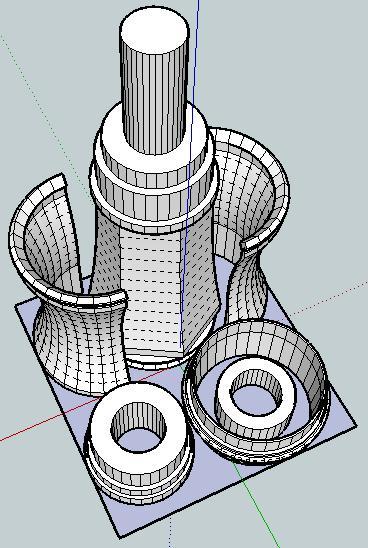
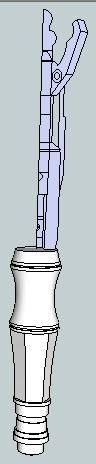
Off to the left is a picture of what the finished sonic screwdriver should look like.  Here’s a picture of the parts I’ve designed so far.  Assembled properly, these parts should be able to be assembled into the lower half of the sonic screwdriver.

I’ve arranged the parts so that they have a less than 60mm x 60mm footprint on the build platform.  I would really like it if the final product could be printed all on one build plate and assembled without tools or additional non-printed pieces.

After my recent design-print fail, I’m going back to the drawing board (slightly)1 wiser.  If nothing else, I like to think what I have so far is pretty neat. 2

  1. Make that very slightly. []
  2. Even if it doesn’t work at all. []

MakerBot Calibration

After my design-print failure I thought it was about time I recalibrated my ‘bot:

  1. Starting from scratch, I’m using the 0.5mm test pieces from Spacexula’s calibration set.  Before starting I set Skeinforge->Carve->Layer Thickness (mm) to 0.4.  Thus, I came to test piece 815.1.  The piece came out well, but I noticed that where the Z axis raises there is some slight blobbing and just before the blobbing, some sparse areas I can see through.  Otherwise, great interlayer adhesion.  The height of the piece is 10.25, 10.31, 10.30, 10.55.  Throwing out the high and low, there’s an average of 10.305mm.  It is 22.29mm x 22.29mm.
  2. Skeinforge->Carve->Layer Thickness (mm) to 0.38.  Test piece 815.2.  Again, slight blobbing, very small sparse areas and great interlayer adhesion.  Piece height is 10.39, 10.40, 10.18, 10.19, we’ll call this 10.29mm.  It is 22.41mm x 22.13mm.
  3. Skeinforge->Carve->Layer Thickness (mm) to 0.36.  Test piece 815.3.  Slight blobbing, very small sparse areas and great interlayer adhesion.  Piece height is 10.25, 10.31, 10.14, 10.30, we’ll call this 10.275mm.  This one was 22.33mm x 22.29mm.

Design-print fail

I’ve been slowly working on the design of a printable (and fully MakerBottable) sonic screwdriver.  This model of the sonic screwdriver is built up of a number of concentric cylinders, has several significant overhangs well in excess of 45 degrees, and is larger than the MakerBot’s built capacity.  In order to deal with these design problems, I modeled it in sections.

In order to make the overall result something I could just pop/snap/slide together I designed it making some sections which were split vertically and other sections which slide around those sections to keep them together.  In order to make the parts quickly printable I designed all the parts at around 0.5mm thickness.

About 40% of the way through the print one of the vertical sections wasn’t coming out properly – probably because it was too thin.  The parts were too thin and flexible and ended up tearing between layers and just being too flimsy.

I also noticed something odd – the extrusion was too thin on that side of the model.   I can’t be sure why this is happening – but I suspect it’s due to the extruder not getting a good enough grip.  Perhaps I need to floss the extruder pulley or install a new extruder idler wheel.  However, it doesn’t explain why the extrusion was too thin on just that one side and no other spots.

Suggestions?

3x2x1 Rubik’s Cube Production File

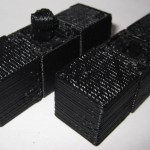
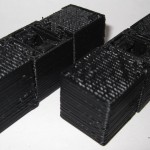
My prior copy of this 3x2x1 Rubik’s Cube was printed a few parts at a time – I’d print one part, test it, print up another, etc.  Last night I was able to use my production file to generate all seven pieces in one go.  It took 1 hour and 45 minutes to complete the print job, but well under three minutes to clear most of the pieces of the raft off the parts and assemble the puzzle.  In order to help people modify and improve upon my design, I’ve upload the original Sketchup files, the STL I used, as well as my own GCode.

Owenscenic on Thingiverse asked,

I am interested in trying your gcode, how did you generate it? How well does it minimize strings between the printed parts? I’ll look at is to see how it starts and the temp…

In case you’re wondering too, the answers are as follows:

  1. I generated the Gcode using my slightly tweaked RepG v18 built-in Skeinforge settings for ABS with a raft, with a build temperature of 220C.
  2. The Gcode does pretty well with minimizing stringing.  However, some of the credit has to go with the part placement in the STL production file as well as the nature of the object.  As soon as you assemble it and start to rotate the parts, most of the remaining strings and little blobbies will pop right off.

Owenscenic, please let me know how your print of this turned out!  Please post a picture!

What’s the cost of printing with a MakerBot?

I’ve wondered for a while about the cost of operating a MakerBot.  Let’s break it down and see what happens:

  • Plastic. According to some calculations on the MakerBot Operators group, the cost of MakerBot ABS is around $0.03 – $0.04 per cubic centimeter based upon a price of $70 for 5 pounds (or 2268 grams) of ABS, a density of 1.2 grams per cubic centimeter. 1  Using the current prices of $81.36 for a 5 pound coil after shipping, I calculate the price of ABS at $0.035 per cubic centimeter.  Since we’re talking about such large numbers, let’s just round on up to $0.04/cc.
  • Time. Skeinforge has been estimating about 85 minutes to print 19 cc of plastic.  This comes to about 4.5 minutes/cc.
  • Electricity. At at $0.20/kWh, a MakerBot probably draws around $0.03 per hour.

Thus,we may estimate the cost of operating a MakerBot in terms of consumption of goods and resources (excluding computer, human, and MakerBot time and wear and tear) as follows, where V is the volume of the extruded object in cubic centimeters or “cc”:

Supposing I wanted to recoup the entire cost of my MakerBot to date and spread it across the entire life of a single 5 pound roll of ABS. 2  Let’s round the cost of the MakerBot, all repairs, and all extra MakerBot related materials up to $1,500.00.  One 5 pound coil would have 1890 cc’s of plastic.  This would come to $0.794 per cc of plastic.  So, I would suggest the cost of buying a MakerBot and printing off an entire coil of plastic would probably end up costing you about $0.85 per cubic centimeter of plastic.

Resource cost of printing a 19cc totally MakerBottable 3x2x1 Rubik’s Cube is $0.80.

Actual pro rated cost of printing a 19cc totally MakerBottable 3x2x1 Rubik’s Cube is $16.15.

Absolute cheapest MakerBot usage I’ve seen anywhere at Metrix:Create for members printing from Thingiverse is $0.30/minute, which would print the totally MakerBottable 3x2x1 Rubik’s Cube for $25.65.

  1. No one has yet quoted me a price on a pint of tears. []
  2. Printing an entire coil would take about 142 hours. []

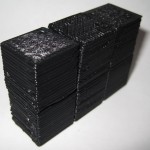
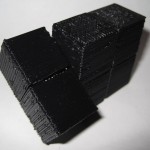
3x2x1 Rubik’s Cube assembly pictures

The design should be pretty intuitive.  However, I went ahead and took some pictures of the assembly anyhow.

As I mentioned in an earlier post, I think this one came out really really well.  :)

Tyvek Sled Kite… from office supplies

Tyvek Office Supply Kite

The picture to the right is of a kite that I built several weeks ago and only got around to actually flying this weekend.  It’s basically made out of office supplies.  :)

Originally I just wanted to make the Tyvek sled kite from the Howtoons shown in Craft Magazine, Volume 81  But then I wanted to see how much of the kite I could assemble just using things from the office.  The answer is, basically all of it.

The Howtoons calls for:

  1. A large sheet of Tyvek
  2. Tyvek tape
  3. A washer
  4. Ruler
  5. Scissors

Instead I used:

  1. Tyvek from Tyvek office envelopes, rather than a large sheet or roll of Tyvek house wrap.  My office is sent dozens of these things a day.  It didn’t take long to collect 30 plus.
  2. Clear packing tape.  I used this instead of Tyvek tape.  Tyvek tape would have worked a LOT better, but I have no complaints.
  3. Rather than use a washer, I used a spare keyring.  I had other various office supply bits hanging around in case this didn’t work out.  Paperclips, binder clips, etc.
  4. Yardstick.
  5. Scissors.

Since the envelopes are significantly smaller than the sheet of Tyvek rolls, I had to either make my kite smaller or stitch them together into a larger sheet.  I did both.  I scaled the plans down to about 2/3rds the size from the diagrams and then used packing tape to put them all together.  To get the most surface area out of each envelope, I burst all of the envelopes at the seams and then taped them up.  Once I had a 36″ tall sheet, I started cutting it into the pieces I needed, re-taped it back together as indicated by the diagram, and then set it aside for weeks while I didn’t fly it.  :)

On the day of the launch I made the tail out of strips of leftover envelopes taped together with the gluey bits from some of the envelope flap sealants and more packing tape.  I punched a hole in the three ribs using a pen, ran the line through each of the three ribs, reinforced it with more packing tape…  and launched.

The only non-office supply things used in the construction were:

  • Crayons for coloring the kite (hard to see)
  • The ruler – I don’t have a yardstick at work
  • The kite line, purchased from Amazon

It flew pretty well.

  1. I found a copy of all three pages after googling around a little.  Howtoons: Sled on a Thread pages 1 2, 3 []

3x2x1 Rubik’s Cube – done!

I’m so happy with the way this has turned out.

I’ve made a bunch of changes since the last revision of this printable 3x2x1 Rubik’s Cube puzzle:

  • I’ve totally redesigned the center barbell connector.  I simplified the design, removed the five support struts for each end and replaced it with a single support strut and a flat hexagon in the center of the piece.  The purpose of the hexagon is to give the barbell more contact area with the raft.  One of the earlier drafts didn’t have as many supports or this flat hexagon, and it tore off the build platform partway through the build.
  • I increased the diameter of the tube between the barbells.  This enabled it to print easier, made it a little more sturdy, and decreased the wobbliness of the barbell when everything is assembled.
  • I also shortened the entire barbell by 1mm, so that the entire puzzle is held together more closely.
  • I made the flat semi-circular tabs slightly thinner so they rotate a little more freely.
  • I significantly redesigned, thickened and simplified the two brackets that the barbell snaps into.  It’s been able to easily withstand numerous couplings/decouplings as well as numerous rotations.  With a few rotations, all parts now rotate easily.
  • All of the parts fit together SO much better than my first draft held together with a nut and bolt.
  • There is a slight bit of sideways flex that can occur with the use of the barbell.  It is really minor and it actually seems to help the puzzle be more forgiving as you manipulate it.  I see this more as a benefit than a design flaw.

The was one design choice on which I waffled.  I considered making the center cubes non-identical, with one having half a barbell stick out and with the other having the internal connector you see now.  This would have removed much of the sideways flex – since the barbell would be stationary.  I did not go with this design choice because whether the puzzle used one barbell and two connectors or male/female center cubes, there would always be some flex caused by the use of a connector rather than a static pin.  And, to be honest, I much preferred the symmetry of having everything assembled out of just three unique parts.

I know I’ve mentioned this before, but I really like the idea of a MakerBot printable toy that can be printed in one go and then assembled without tools or any additional hardware.  I also think this would make a great MakerBot print demonstration.

I’ll post some pictures of the parts a little bit later.