Open Source Makes You Smarter [08/27/2010]

[I mean, the chutzpah of a man who starts a blog post… for the purpose of linking back to his own blog post from two months prior?  Oh, young MakerBlock…  You rascal!]

One of the nifty things about examining the designs of others is that looking at those designs can give one ideas for ways to improve those designs or come up with my own.  In short, open source tech makes you smarter.

Drafts Zero - The Lost Blog Posts
  1. Misnamer [11/28/2010]
  2. The Lost Blog Posts
  3. Plastruder! [Draft 12/25/2009]
  4. UNTITLED [Draft 12/25/2009]
  5. Preparing to print [Draft 12/27/2009]
  6. More prints [Draft 01/04/2010]
  7. Prototype Pricing [Draft 01/19/2010]
  8. MakerBot tuning [Draft 01/20/2010]
  9. Plastic Screw Anchor [Draft 02/02/2010]
  10. Magic [Draft 02/03/2010]
  11. How are you printing with PLA? [Draft 02/16/2010]
  12. Rebuilding my extruder [Draft 02/16/2010]
  13. MY robot [Draft 02/18/2010]
  14. more things i learned [Draft 02/20/2010]
  15. First commissioned piece! [Draft 02/22/2010]
  16. MakerBot: Toy or Tool? [02/25/2010]
  17. Idea for Skeinforge settings… [Draft 03/27/2010]
  18. RepRap and MakerBot alternatives [Draft 04/05/2010]
  19. RepRap Parts for Sale [Draft 04/07/2010]
  20. Where is the Othercutter? [Draft 06/08/2015]
  21. Mendel Parts – Printed, Cast, CNC’d, Lasercut or Injection Molded? [Draft 04/12/2010]
  22. MakerBot Operator’s Manual [06/04/20210]
  23. MakerBot on CBS! [07/07/2010]
  24. New Print: Soft-Pawed Albino Stoat of South Wales Cookie Cutter [07/07/2010]
  25. House calls [07/11/2010]
  26. Digital assistant? [08/05/2010]
  27. MakerBot + Junk = Stuff! [08/06/2010]
  28. Design choices in RepRap, Goals of RepRap [08/14/2010]
  29. Upgrades and obsolescence [08/25/2010]
  30. Dear Anonymous [08/25/2010]
  31. The ultimate in customer service [08/26/2010]
  32. Open Source Makes You Smarter [08/27/2010]
  33. Getting my Plastruder MK5 running [09/06/2010]
  34. Weird new kind of spam [09/19/2010]
  35. An open letter to Ms. Word [10/18/2010]
  36. Printing with PLA again! [10/18/2010]
  37. Halloween costume too [10/27/2010]
  38. Dream jobs [10/29/2010]
  39. The nuances of time travel [10/31/2010]
  40. Printed Pink Panther Person [11/22/2010]
  41. Skein them all and let ‘Bot sort them all out [11/24/2010]
  42. The Patents for disc shooters [12/10/2010]
  43. Princess Bride with Lightsabers [12/13/2010]
  44. Dilbert comic [12/13/2010]
  45. Ultimachine PLA review [12/15/2010]
  46. Mendel to the power of 101 [12/21/2010]
  47. Potential improvements for Leonardo Voltron [12/27/20210]
  48. You can keep your filthy money [12/28/2010]
  49. I watched Primer the other night [12/30/2010]

The ultimate in customer service [08/26/2010]

[How wild was it that I could write a blog post namechecking pretty much all the people in and around an open source project in a short blog post?  All of the people mentioned below were super happy to help troubleshoot and get printers working.  Gotta love open source – and the people committed to keeping these projects going.  Plus, this was still the “wild west” of 3D printers.  People were building printers, innovating, shipping, fixing, and trying new things constantly.]

There’s been some interesting discussion following We Alone On Earth’s post (Plus the updates)) in the comments.  I think WAOE and the various commentors would probably agree that although anyone could build a working MakerBot Cupcake CNC from a kit with enough persistence and help, DIY kits1 just aren’t for everyone.

It’s the “help” part that is the most amazing and enabling aspect.  There are not a lot of products out there where the best customer service actually comes from the customers themselves.  We’ve collectively built up wiki, posted problems and solutions, taken pictures and videos.  It probably took me about three months before I progressed from total newbie posting basic annoying questions to being able to help others with their problems. 2  With each shipment of MakerBots, the product gets better with customer innovations and input, customers improve the instructions and wiki, and there are even more people out there to help you.

  • Bre, Zach, Adam, and Marisol
  • Andrew Plumb aka Clothbot
  • Rick Pollack aka MakerGear for holding my hand in diagnosing a blown thermistor
  • Rick Pollack aka MakerGear and Neil Underwood aka Spacexula for talking me down from the ledge when I clogged my extruder
  • Scott Small aka Tox for PLA printing advice
  • Eberhard Rensch aka Zaggo and J. E. ‘jet’ Townsend for helping me create a mini-mug
  • Conrad Farnsworth for helping me figure out how to install my XY opto-endstops
Drafts Zero - The Lost Blog Posts
  1. Misnamer [11/28/2010]
  2. The Lost Blog Posts
  3. Plastruder! [Draft 12/25/2009]
  4. UNTITLED [Draft 12/25/2009]
  5. Preparing to print [Draft 12/27/2009]
  6. More prints [Draft 01/04/2010]
  7. Prototype Pricing [Draft 01/19/2010]
  8. MakerBot tuning [Draft 01/20/2010]
  9. Plastic Screw Anchor [Draft 02/02/2010]
  10. Magic [Draft 02/03/2010]
  11. How are you printing with PLA? [Draft 02/16/2010]
  12. Rebuilding my extruder [Draft 02/16/2010]
  13. MY robot [Draft 02/18/2010]
  14. more things i learned [Draft 02/20/2010]
  15. First commissioned piece! [Draft 02/22/2010]
  16. MakerBot: Toy or Tool? [02/25/2010]
  17. Idea for Skeinforge settings… [Draft 03/27/2010]
  18. RepRap and MakerBot alternatives [Draft 04/05/2010]
  19. RepRap Parts for Sale [Draft 04/07/2010]
  20. Where is the Othercutter? [Draft 06/08/2015]
  21. Mendel Parts – Printed, Cast, CNC’d, Lasercut or Injection Molded? [Draft 04/12/2010]
  22. MakerBot Operator’s Manual [06/04/20210]
  23. MakerBot on CBS! [07/07/2010]
  24. New Print: Soft-Pawed Albino Stoat of South Wales Cookie Cutter [07/07/2010]
  25. House calls [07/11/2010]
  26. Digital assistant? [08/05/2010]
  27. MakerBot + Junk = Stuff! [08/06/2010]
  28. Design choices in RepRap, Goals of RepRap [08/14/2010]
  29. Upgrades and obsolescence [08/25/2010]
  30. Dear Anonymous [08/25/2010]
  31. The ultimate in customer service [08/26/2010]
  32. Open Source Makes You Smarter [08/27/2010]
  33. Getting my Plastruder MK5 running [09/06/2010]
  34. Weird new kind of spam [09/19/2010]
  35. An open letter to Ms. Word [10/18/2010]
  36. Printing with PLA again! [10/18/2010]
  37. Halloween costume too [10/27/2010]
  38. Dream jobs [10/29/2010]
  39. The nuances of time travel [10/31/2010]
  40. Printed Pink Panther Person [11/22/2010]
  41. Skein them all and let ‘Bot sort them all out [11/24/2010]
  42. The Patents for disc shooters [12/10/2010]
  43. Princess Bride with Lightsabers [12/13/2010]
  44. Dilbert comic [12/13/2010]
  45. Ultimachine PLA review [12/15/2010]
  46. Mendel to the power of 101 [12/21/2010]
  47. Potential improvements for Leonardo Voltron [12/27/20210]
  48. You can keep your filthy money [12/28/2010]
  49. I watched Primer the other night [12/30/2010]
  1. And all that they entail []
  2. It only took me about another month or so before I started posting regularly here.  I find it’s a wider platform for annoying more people than just those that read the MakerBot Operators‘ group. []

MakerBot: Toy or Tool? [02/25/2010]

or this post could be titled …  “Open source intern tells all!”1

A review of the MakerBot Industries Cupcake CNC today from a former MakerBot intern discusses the MakerBot’s use as a tool.  Some of the comments bring to suggest its usage as an expensive toy.  I’ve used my MakerBot as a tool to print tools and as a tool to print toys.  I suppose at the point I’m using it to print up toys I’m really using as a toy.

I’m fairly confident my MakerBot will pay for itself.  That’s not a claim most people can make about their toys.  I have printed replacement parts for toys, broken parts around the house, and broken tools – thereby saving me those replacement costs.  This probably doesn’t amount to more than $20 or so.  That’s not a great return on an investment, but it is returning

Drafts Zero - The Lost Blog Posts
  1. Misnamer [11/28/2010]
  2. The Lost Blog Posts
  3. Plastruder! [Draft 12/25/2009]
  4. UNTITLED [Draft 12/25/2009]
  5. Preparing to print [Draft 12/27/2009]
  6. More prints [Draft 01/04/2010]
  7. Prototype Pricing [Draft 01/19/2010]
  8. MakerBot tuning [Draft 01/20/2010]
  9. Plastic Screw Anchor [Draft 02/02/2010]
  10. Magic [Draft 02/03/2010]
  11. How are you printing with PLA? [Draft 02/16/2010]
  12. Rebuilding my extruder [Draft 02/16/2010]
  13. MY robot [Draft 02/18/2010]
  14. more things i learned [Draft 02/20/2010]
  15. First commissioned piece! [Draft 02/22/2010]
  16. MakerBot: Toy or Tool? [02/25/2010]
  17. Idea for Skeinforge settings… [Draft 03/27/2010]
  18. RepRap and MakerBot alternatives [Draft 04/05/2010]
  19. RepRap Parts for Sale [Draft 04/07/2010]
  20. Where is the Othercutter? [Draft 06/08/2015]
  21. Mendel Parts – Printed, Cast, CNC’d, Lasercut or Injection Molded? [Draft 04/12/2010]
  22. MakerBot Operator’s Manual [06/04/20210]
  23. MakerBot on CBS! [07/07/2010]
  24. New Print: Soft-Pawed Albino Stoat of South Wales Cookie Cutter [07/07/2010]
  25. House calls [07/11/2010]
  26. Digital assistant? [08/05/2010]
  27. MakerBot + Junk = Stuff! [08/06/2010]
  28. Design choices in RepRap, Goals of RepRap [08/14/2010]
  29. Upgrades and obsolescence [08/25/2010]
  30. Dear Anonymous [08/25/2010]
  31. The ultimate in customer service [08/26/2010]
  32. Open Source Makes You Smarter [08/27/2010]
  33. Getting my Plastruder MK5 running [09/06/2010]
  34. Weird new kind of spam [09/19/2010]
  35. An open letter to Ms. Word [10/18/2010]
  36. Printing with PLA again! [10/18/2010]
  37. Halloween costume too [10/27/2010]
  38. Dream jobs [10/29/2010]
  39. The nuances of time travel [10/31/2010]
  40. Printed Pink Panther Person [11/22/2010]
  41. Skein them all and let ‘Bot sort them all out [11/24/2010]
  42. The Patents for disc shooters [12/10/2010]
  43. Princess Bride with Lightsabers [12/13/2010]
  44. Dilbert comic [12/13/2010]
  45. Ultimachine PLA review [12/15/2010]
  46. Mendel to the power of 101 [12/21/2010]
  47. Potential improvements for Leonardo Voltron [12/27/20210]
  48. You can keep your filthy money [12/28/2010]
  49. I watched Primer the other night [12/30/2010]
  1. …  ’cause, you know, it was all… open source. []

BristleBots – Easy DIY STEM/STEAM Robots

This slideshow requires JavaScript.

If you don’t know who EMSL are, you’re missing out.  Evil Mad Scientist Laboratories is a small family owned DIY electronics business in the California Bay Area with a deep enduring commitment and support for open source software, open source hardware, educators, and Makers.

And they are genuinely good people.  Their blog is an incredible resource for anyone from beginners in crafts and electronics to grizzled veteran engineers.  There are free tutorials, resources, and tons of kits for every level.  I’ve purchased several of their kits and cannot recommend their products highly enough for the material quality, comprehensive (and occasionally playful) instructional materials, and support – including a robust community and forum.1

Since our family is home an awful lot these days, we’re always looking ways to keep our kids curious, engaged, and occupied.  Our next project is the EMSL “BristleBot.”2

Their write up and video tutorial will provide you with all the information you need to help build a very tiny zippy robot from things you probably have around the house. 3  There’s a lot to talk about with your kids here – from basic electrical connections, off-center motors, springiness of the bristles, to how the directions of bristles affect the robot’s travel.

A box of parts to make enough for a whole classroom might be about $50 (or less) if you could buy parts in bulk.  But, if you only need a handful of BristleBots for your household, you could taking things apart for motors, old toothbrushes for bristles, common coin cell batteries for free/nearly free, maybe adding some matchbox car or marble run tracks for BristleBot trails or a cardboard box for a battle arena.

  1. Most notably their Egg-Bot []
  2. Time capsule:  This post was published in July of 2020 []
  3. You can get these from old cell phones, cheap dollar store electric toothbrushes, or lots of places online []

Arduino Adventure Series – The Adventure Begins!

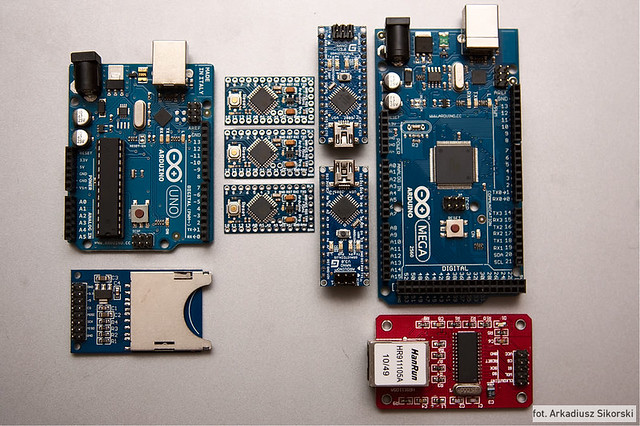
Arduinos, Arduinos, Arduinos... where to start?!
Arduinos, Arduinos, Arduinos… where to start?!

A few weeks ago I started fiddling with an Arduino in earnest.1 I’ve built things using Arduinos before, but each time all I did was slavishly follow a tutorial as it took me step by step through a process.

Just as a child memorizes the Pledge of Allegiance, committing to memory the right sounds in the right order, I had a grasp of the assembly – but not the underlying meaning.  Sure, I built a MakerBot Cupcake CNC (“Bender”), a MakerBot Thing-O-Matic (“Flexo”), an Egg-Bot, a Polargraph/PlotterBot, and an IoT Printer.  ((FYI, my MakerBot Replicator 1 is named “HedonismBot“))  However, I have only the dimmest understanding of how the things I did actually created the things I ended up building.

However, I want more – there are several ideas I would like to create using electronics.  One is a sonic screwdriver flashlight.  Another is device for … shall we say…2  interfering with television infrared codes.3

My goal for this series of posts4 is to document my triumphs and failures playing with an Arduino.  I think it’s time to get started on that next post now…

Default Series Title
  1. Photo courtesy of Arkadiusz Sikorski []
  2. Mu-ah-ha-ha!!! []
  3. Nope, not a TV-B-Gone []
  4. I know it’s ambitious to call a post the “first” post – but dammit, a man’s got to dream []

Simple Series WordPress Plugin

I’ve written a new WordPress plugin specifically designed to let you simply and easily create a series of related posts.  You can download Simple Series here.

What does “Simple Series” do?

Simple Series uses a WordPress shortcode to associate your posts together.  All you have to do is use the same shortcode in all of the posts you want to associate together and the plugin does the rest.  It will automatically find all of the posts with the same shortcode, organize them by publication date, and put them together in a professional and easy to read format.  If you wish to change the format, you can just add your own custom CSS to your theme.

How does “Simple Series” work?

Easy!  Just add the shortcode to each of the posts you want to put in the series.  Inside the shortcode you will need to specify the title for the series.  Like so:

Default Series Title

What if I add more posts later?

No problem!  The “Simple Series” plugin will always update the series lists in each of your posts whenever you publish a new post.  The newest post will always be added to the series in chronological order, by publication date.  You can see an example of what it looks like here in my own DrawBot series.

I have more questions!

Cool!  Please leave a comment to this post or send me an e-mail!

Default Series Title

A nifty little WordPress plugin…

The idea for this little plugin has been rattling around in my head for a little while now.  It clocks in at less than 60 lines of code, including comments, and makes it easy to create a “series” for posts.

As I’ve been blogging about my (mis)adventures in building a DrawBot, I’ve been updating each post to contain a link back to all of the prior posts in the series.  However, if someone were to find one of the first posts – they wouldn’t see a link to a later post.  That is, unless I update all the posts.  That’s not really much of an option, since I’ve racked up 23 posts in less than 19 days. 12

This plugin is actually super simple.  Here’s what it does:

  1. Add a “post meta” tag for the current post with the same key as whatever you want to name the post series
  2. Query the database for all posts with the same post meta key as the one for the current post
  3. Output an ordered chronological list of all posts in with the same post meta key as the one for the current post

The simplicity of this plugin are actually some of it’s strongest features.  Unlike a lot of other series plugins out there, it doesn’t create any unnecessary tables in your WordPress database.  There are no settings to mess with, no CSS to fiddle with, no ugly standard formatting to overcome.

The only downside I can perceive is that if you delete the shortcode from a plugin, it will still leave the post-meta attached to the post and the post will still appear in the series.  If you leave the shortcode in and don’t specify a series title, it will delete the post-meta.  I suppose I could include a little button in the interface to delete the post from the series, but really, it’s just not going to be used that often.

Anyhow, this is something that I’ve wanted to have for a long time – I just hadn’t gotten around to building it yet.

Default Series Title
  1. I’ve got a lot to say. []
  2. And, actually, that’s just 23 posts on this one topic.  I’ve probably blogged an equal amount over on the MakerBot blog, with a few totally random additional posts here. []

PayPal payments and micropayments

So, PayPal has a micropayment system as well as a regular payment system.  The micropayment fee is 5% + $0.05 while the normal fee is 2.9% + $0.30.  For payments below $12.00, it makes sense to use the micropayments system and the normal system above that level.

Here’s the rub – you can only set up your PayPal account for one or the other.  I’m working on a WordPress PayPal plugin, but I’d like to have that plugin work with micropayments without forcing all of my other PayPal transactions to go through that fee structure.  Oh well.

WordPress Plugin Writing Resources

WordPress is easily my favorite open source software project.  I love it for it’s functionality, flexibility, and extensibility.  When it comes to writing a plugin, these are my favorite resources.  Don’t write a plugin without them!

  1. WordPress.org Codex for Writing a Plugin
    1. If you’re just getting started, this is the place to begin
  2. WordPress.org Codex Plugin API
    1. a great overview of the WordPress plugin API
  3. WordPress Action Reference
    • When WordPress displays a post, page, or the administrative pages it has to run through a number of functions and actions.  Your plugin will need to be activated at one of these points, and it is very helpful to know the order in which things happen.
  4. WordPress Filter Reference
    • The WordPress filter reference is a list of WordPress filters.  Each one will be able to deliver a little piece of the website for your to manipulate in your plugins.
  5. WordPress PHP Cross-Reference
    • The WordPress codex is pretty good – but it is not comprehensive.  If you want to know how some of the more obscure functions, variables, or constants work, you’ll just need to dive into the source code itself.  PHPXRef is, hands down, the best way to do this.  It let’s you search and read the the source code from their website.
  6. Top 10 Most Common Coding Mistakes in WordPress Plugins
    • This is quite possibly the best blog post about writing WordPress plugins.  Applying these guidelines will make you a better WordPress developer and your plugins faster, more efficient, and more awesome. :)
  7. How to Design and Style Your WordPress Plugin Admin Panel
    • In a lot of ways, a program is only as good as its user interface.  Build a good friendly and powerful interface and people will use your program.  Build a bad one and no one will use it, no matter how awesome it is.  This one blog post gives numerous little ways to make your WordPress plugin administrative interface look better.

Microcontrollers?

Recently more than one person has suggested I try my hand at an Arduino.  I’ve got a spare Extruder Controller which happens to include an Arduino.

I rarely bother learning something new if I can help it. 1  And, I’ll actively avoid trying to learn something new if there’s not a need to learn it.

I have no doubt that once I figure out how to use an Arduino I’d enjoy it.  However, I just don’t have any ideas of what I’d want to use a microcontroller for at this time.  And, really, none of the projects I’ve seen is particularly compelling.  And, without an end goal I’m shooting for, this would just be learning something for learning’s sake.

So, here’s the question I pose to you, gentle reader:

What would you design/build if you had access to an Arduino, a Thing-O-Matic, a Cupcake, an Egg-Bot, and lots of plastic?

  1. I remember in high school that it was so much easier for me to derive Tan, Sin, Cos, rather than to actually remember the values around the unit circle.  And really, if you can derive that information quickly, why bother committing it to memory? []
Test