As time grew close to Maker Faire, we had to sharpen / tighten our goals. We always try to improve some part of our projects and change things up. This year, we worked on the more “cosplay” elements and left the more electronic and technical aspects largely alone.
ED-E Companion Robot
Dexter built an entirely new body for ED-E from a milk jug, 3D printed parts, foam mats, and model magic. In retrospect, an HDPE milk jug is so smooth and adhesive resistant that it may not have been the best choice. The paint flaked off in some small places and the 3D printed internal structures didn’t stay in place as desired, but everything held together quite well over the course of the entire weekend.
ED-E used to be built into a small 3D printed enclosure, about the size of a baseball, which was limiting for power supply and other mechanical abilities. This year we mounted him on a PVC pipe, but quickly learned the end needed to be padded otherwise the constant shock of hitting the ground would slowly scramble his brains.
I think an entirely 3D printed case is very doable for next year, would take pain much better, permit easier access to his brain, better placement for LED’s and a speaker. He would probably benefit from using separate ESP32’s for the brain and the PIP-Boy to communicate wirelessly, so that the robot could be easily untethered from the arm.
Another issue with the robot was simply carrying the thing over the day. The robot and PVC aren’t that heavy, but over time lugging it around, even using it as a walking stick takes its toll. The temporary fix at Maker Faire was to tape a bunch of foam to the bottom of the PVC pipe. One possible fix would be to design a TPU cap to go over the bottom of the pipe, to cushion the impact of the pipe on the ground – and help reduce the impact on the robot components. One idea is to add a wheel or caster to the base and another idea would be to put the whole robot on an IV pole. Putting the pole on a single caster/wheel could be problematic if we needed to set the robot down – unless the wheel had a retractable kickstand or retractable wheel. An IV pole might work well, but sourcing one might be an issue. 1
Vault Dweller
I pivoted my project from being solely about a shoulder mounted robot to being more of a “vault dweller with companion robot.” I designed our PIP-Boys from the ground up, making several changes from other designs out there for aesthetic and practical reasons, while keeping the essential look. Although I didn’t get around to adding yellow accents to my blue jumpsuit, I was recognized throughout Maker Faire and called out as a “vault dweller” probably due to the icon combination of the jumpsuit and PIP-Boy.
My PIP-Boy included the e-ink display I had originally purchased for use in a kind of digital to-do list, but disconnected from a microcontroller. I’m looking forward to building in additional features to the device, adding a power supply, microcontroller, buttons, and lights to bring it to life.
I normally take a sling backpack with me when I’m out for a day trip or running some errands. However, after the first two days I skipped it entirely since my jumpsuit had ample pockets and storage. The various vault suits out there don’t seem to include pockets, but that’s just silly. Ideally, for aesthetics the vault suit would feature some leather / faux leather (possibly weathered craft foam) pads at the elbows and knees as well as a brown / dark brown leather belt with pockets / pouches for stuff.
I’d really like to get a working set of buttons and microcontroller working in my PIP-Boy to be able to change the display. There’s probably room in the PIP-Boy for a battery pack, some wires going to various LED’s2 , possibly a small servo, potentially a little laser3 , and maybe a little spring loaded projectile launcher.
I couldn’t be happier with how the PIP-Boys turned out. My 3D designs really came together. The cuff parts were just craft foam / floor mats and fit reasonably well. They had a tendency to slip or rotate on the arms a little, but not to a problematic extent. The 3D printed parts stayed affixed to the painted foam cuffs well enough. Both were instantly recognizable as PIP-Boys by lots of people. I think with some sanding, wet sanding, and a blast from a heat gun, they’d look even better. I’m really looking forward to sprucing these up.
I don’t mind paying ~$10 for a used one, but not interested in picking up a brand new one for $40-400. I did find one on Craigslist, but the seller hasn’t replied after several hours. After this afternoon, I’ll be a lot less immediately interested since we probably won’t be suiting up again for another year. [↩]
I have a great spot for the 5mm NeoPixels I bought years ago [↩]
I’ve broken this year’s Maker Faire roundup into two sections – those things that were totally new to me – and those projects and friends I was fortunate enough to see again.
Fred Zyda’s Harmonograph
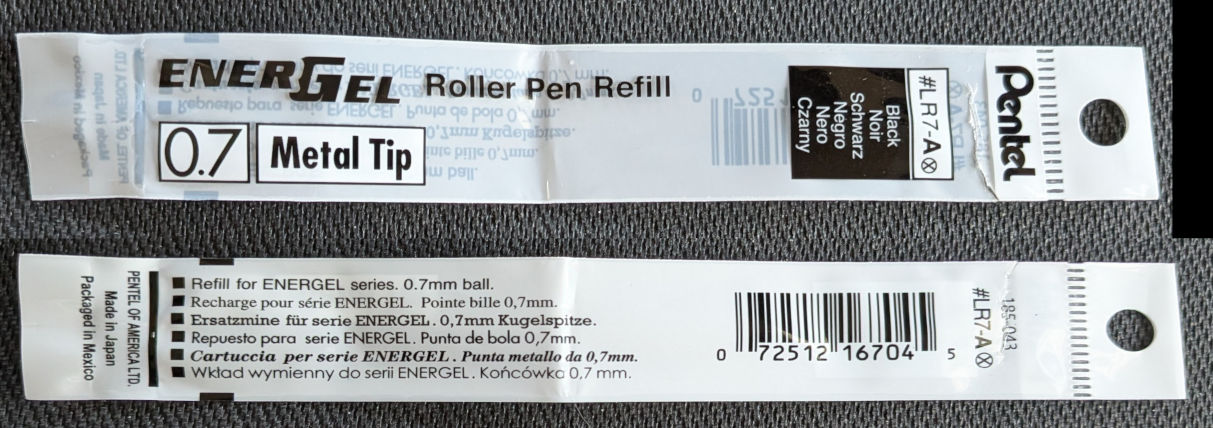
Fred and Eleanor made a harmonograph to draw Lissajous figures based on designs by Karl Sims. Karl also published a tutorial on Make Magazine a few years back. This is one of those projects which doesn’t look like much on paper – but when it’s in front of you is downright mesmerizing. One of the things I love about Maker Faire is meeting people who have exhaustively searched for the perfect parts for their project. Here, Fred bought up pretty much every kind of pen possible before settling on the Pentel Energel Pro Permanent Gel Pen 0.7 mm – the key being not just a smooth motion, but a pen that could draw swiftly enough to keep up with the machine.
Pentel EnerGel Pen Refill 0.7 Metal Tip (#LR7-A)
Maclean’s super accurate Apollo space suit
Maclean‘s Apollo spacesuit was a marvel of hyper accurate multi-mode making using machined parts, FDM and resin 3D printing, vacuum forming, sewing, and electronics. he also brought his Ghostbusters proton pack!
El Pulpo Magnifico
The photographs and videos of this metal monstrosity simply do not do it justice. Their DJ spun some crazy tunes on Saturday night and their FJ1 were blowing the lid off the evening with huge bursts of flames while Makers ate, partied, and danced all around under a moonlit night.
The booth for Generate Labs is what making and helping people is all about. Makers and medical professionals work together to come up with ways to quickly and cost effectively solve real world problems and help out individual patients in ways that might otherwise be completely impossible. I was touched by their stories of helping a child with cerebral palsy play his favorite Taylor Swift songs, someone else play their favorite video games by building a prosthetic that would otherwise have been $70k, building life size physical representations of the human circulatory system so medical professionals could visualize how implantations are placed, special prosthetics so that a baby born with differences could learn to crawl. Even though their facility gives these devices away for free, I have no doubt they’re actually saving the facility tens of thousands of dollars by being able to print color coded test tube trays and repair their microscope equipment.2
These two video games were both clearly passion projects. Future gaming consoles may never have teat or foot interfaces, but these were both incredibly fun games and super enthusiastic teams.
This group had a laptop connected to an LLM, which pulled an image, which was turned into a simple vector drawing, then printed out using a 1980’s plotter. While LLM use tastes like the opposite of making, it was less a critical component of their project and more about enabling a kind of pictionary telephone-game between booth visitors.
This university’s pitch was quite compelling – a four year university that is less expensive for out-of-state residents than it is for a local California community college, with no less than four separate makerspaces.
One of my favorite things to do at Maker Faire is basically sprint from booth to booth, learning everything I can about what people are doing and how they overcame challenges. Adrian took great care with his Lumotron to orient the 3D pieces to minimize any tell-tale appearance of 3D printing artifacts – and used some interesting mathematic applications4 to run a single sided LED strip through the entire sculpture in such a path that it created essentially a double-sided strip throughout. Plus, he built his own javascript tools for planning it all. Sometimes I like having a thing… but so much more often, I just feels so much more satisfying to understand how a thing came to be.
I reached out to Ravi before Maker Faire because I was so interested in his project. If you’re not using a laptop to watch videos, there’s no real reason for a big power-hungry screen when a simple low power e-ink display could help a device last for days or weeks. He also hooked us up with a some foam for ED-E’s PVC pipe! Thanks bud!
Chris spoke passionately about building a life-size 50 foot tall Iron Giant out of steel. It took some serious love and determination just to do the head – and I have no doubt he’ll be able to build the entire rest of the robot.
These were really nice looking metal EDC utility knives; thin, a smooth bistable movement, and it made use of easily disposable and replaceable utility blades. If I was a knife carrying kinda guy, I’d probably want one.
I like to peruse the Maker Faire website before the event starts, scoping out all the things I’d be interested in seeing. Dipstick caught my eye because it was a fun solution to a very niche issue (wanting to see clearly into shallow water) with some fun pictures. It’s basically a flexible digital underwater periscope and was an interesting combination of electronics, 3D printing, and plumbing. The father and daughter duo were enthusiastic and engaging as they explained how they made it. They purchased pretty much every kind of digital endoscope before finding – and then having built – the exact kind of waterproof one they needed for the project!
Warren creates block prints using 3D printed versions of his digital designs – but also drawings / paintings over trading cards and pages from old books. Most years I don’t buy anything at Maker Faire besides food and drink – but this year I bought one of Warren’s pieces because every time I looked at it I just laughed.
The booth was so mobbed that I only got a chance to watch it in action. The project was a cross between a carnival game and Simon. You and three competitors slap one of the four colored buttons matching the colored lights as they flash beneath your balloon.
When I first saw this page on the Maker Faire website, I thought “So what? A single servo in a ball wiggling?” When I saw it in real life… I realized Fangwei was able to actually control the approximate direction of the sphere just through wiggling that one motor! In a delicate balance of the placement of the electronics and felt feet mixed with shaking the servo in a particular way to one side or the other and some careful calibration – he was able to actually move the robot in a desired location.
I didn’t get a chance to actually build one of these, but I watched the videos on their Maker Faire page – and got to see several in action. They’re so simple, so fun to watch, and open themselves to lots of design and exploration by adjusting the paper fins.
This is another exhibit that almost doesn’t make sense until you see it. Kids make drawings on transparencies, these are folded and joined into a ring of four panels, then placed on a rotating mechanism with a light source and then behind a diffuser. The result is a dreamy kind of pantomime repeating visual story.
Brain at SnackNotes had a LOT of different little projects to show off in their small booth. He had zoetropes, a DIY whiteboard etch-a-sketch, squishy blob puppets, and lots more – and was happy to share everything about their projects.
We also got to see some friends and favorite familiar projects from prior years:
I don’t think I’ve seen Paul Nosa at Maker Faire for some time – but it was great to see his sewing artistry on display.
Melty Cube. Daniel’s “melty cube” has to be seen in person to be believed. As the staff spins and changes colors, you realize each face is slightly different, causing them to become animated before your very eyes.
Clever Clocks. I saw these clocks for the first time in 2025 and was mesmerized by their seeming simplicity and abstract beauty. Every single one of their clocks is clearly a work of art. What I love about these timepieces is that when you don’t need to know the time, every one of them is lovely kinetic sculpture.
The balloon and buoy projects are not at all affiliated with one another – but I love how they’re both ways that regular people could accessibly explore the entire planet.
We’ve bought several pieces from the Dickinsons over the years and love checking in with them each time we come to Maker Faire. His work is beautiful and it’s mesmerizing to watch him craft something out of a blob of glass and flame.
As with so many makers, everyone at the entire booth is absolutely overjoyed about sharing what they made, how they made it, how they overcame challenges – plus they have some hilarious Hollywood stories as well.
I first saw Stephen‘s word games at last year’s Maker Faire. This description won’t do it justice, but it’s kind of like a combination of Banangrams/Scrabble and Tetris, where you build words using big physical blocks and LED displays, while new letters drop down a screen.
I’d seen Sync Tank in years prior, but didn’t get a chance to stop by their booth again. However, since I haven’t typed up my notes from prior years, it seemed appropriate to add it in now. Chase built a way to watch and monitor his fish underwater. If you love fish and fishtanks, but are bummed you can’t have them with you all the time, this is the project for you.
I last checked out the laser maze about two years prior and didn’t get a chance to go back this year. If you ever get a chance, it’s incredibly fun to try and make your way past these lasers in time to beat the clock.
There were more than one booth from other makers that were largely indistinguishable from AI image / AI 3D model + printing / AI vision / AI API calls [↩]
Hermes Agent and LangGraph probably aren’t going to work for me either. On a highly resource constrained system like my no-GPU/no-VRAM Ubuntu box, Hermes quickly has a problem with long contexts. The benefits of Hermes is that it tries to iterate quickly using lots of calls, but with each call including a huge amount of context overhead about the user, the tools, and the current task, the context bloat means each of these calls takes forever. I like the UI and as long as I’m using an API based LLM through OpenRouter1 , it’s fine. While a small local model can move relatively “fast”, it gets bogged down with context and larger models which can handle the context are even slower. Again, there’s a lot of great things about Hermes with an API. It can be conversational, it’s fairly coherent across long conversations, it can review files, make changes, and does indeed to try to improve itself as advertised. It’s also got a lot of ways to quickly flip between models and sessions/conversations on different topics. Even with all these abilities, it’s still only a partial solution to what I want. I’d like to have something that can run custom scripts on a regular basis, interact via voice, and these features don’t seem well implemented quite yet. 2 If left alone to do a task, it will litter it’s home directory with a pile of different folders and files, despite explicit instructions otherwise. It’s very capable – but can get confused and messy. Perhaps this wouldn’t be a problem if it were powered by a frontier model, but I’m not going to do that.
I tried out LangGraph as a possible replacement, but it has it’s own problems. It’s far more “bare bones”, with all commands needing to be typed into the command line. Adding skills via specific scripts works very well, powering it via local LLM works very well, it’s able to accurately interpret language and make tool calls, properly set up CRUD lists and reminders, and even manages separate conversations in it’s own clunky way. However, it seems to really lack the iterative ability of Hermes to actually get things done. If it had a better UI, a more clear path to having it semi-autonomously work on a task, I think I could make a go of it.
Even though these two systems aren’t for me, I’ve learned a lot about what I like and what I could put to use in the future.
I keep circling back to … maybe I should just build my own thing. I’ve built the various parts several times before getting distracted by something shiny, so it’s really a matter of collecting those pieces, cleaning them up, and wiring most of them together with what I’ve learned from using other systems.
While I’m rambling, I just read this article on Hackaday about the LLM moats for frontier labs starting to shrink. 3 It kind of makes sense these damn frontier AI companies had to buy up all the RAM. If people could easily pick up 128GB of RAM for $2504 and given the performance of medium sized models in the 30-70B / 30-70GB range, no one would pay $20 per month for access to an AI. At the rate models are improving and being released, it certainly seems like the only thing keeping big AI companies afloat is high RAM prices. While I would not spend $3k-$5k to get a 128GB RAM beast today, since it would never pay for itself, if that price dropped to $500, the cost / benefit analysis starts to make sense.
It does make me wonder, though… what happens if RAM supply suddenly increases, home inference machines are suddenly feasible and every domain name / hosting provider has a $5 upsell for their own Qwen 3.8+ instance. What happens to these billion dollar companies? I would think there’s only so much “intelligence” people are going to be willing to pay for. If all people really want are digital receptionists, developers, lead generation, content generation, investment predictions, and the occasional therapist/pseudo-relationship, why would they pay for an astrophysics PhD level hyper intelligent machine?
In a move that might surprise no one – these last two points suggest a much darker path for frontier AI companies. Perhaps the game was always about about increasing surveillance and diminishing critical reasoning of the masses.
I’d been looking at several LLM powered “agent” frameworks recently. OpenClaw got a lot of buzz several months ago, spiked the cost of Mac Mini’s, and it seems reality doesn’t quite live up to the hype. Peter Steinberger’s description of his OpenClaw1 creation in multiple videos, podcasts, and posts was he would wake up each day to discovery the agent had been working tirelessly throughout the night on projects, building things, discover things, bring him new opportunities, and learning and growing as it went. Reddit and Youtube exploded with people snatching up Mac Mini’s for their high unified RAM / small form factor / modest cost, implementing their own OpenClaw’s, and telling everyone about their successes breathlessly.
I think my favorite “review” was this:
The next ClawdBot rebrand?
In the span of a few weeks ClawdBot went through several name changes, Anthropic blocked it from consumer level plans, Steinberger got a job with OpenAI, while people started to post their runaway token costs and concerns the agent was escaping containment, grabbing personal information, publishing personal information, and just generally running amok.
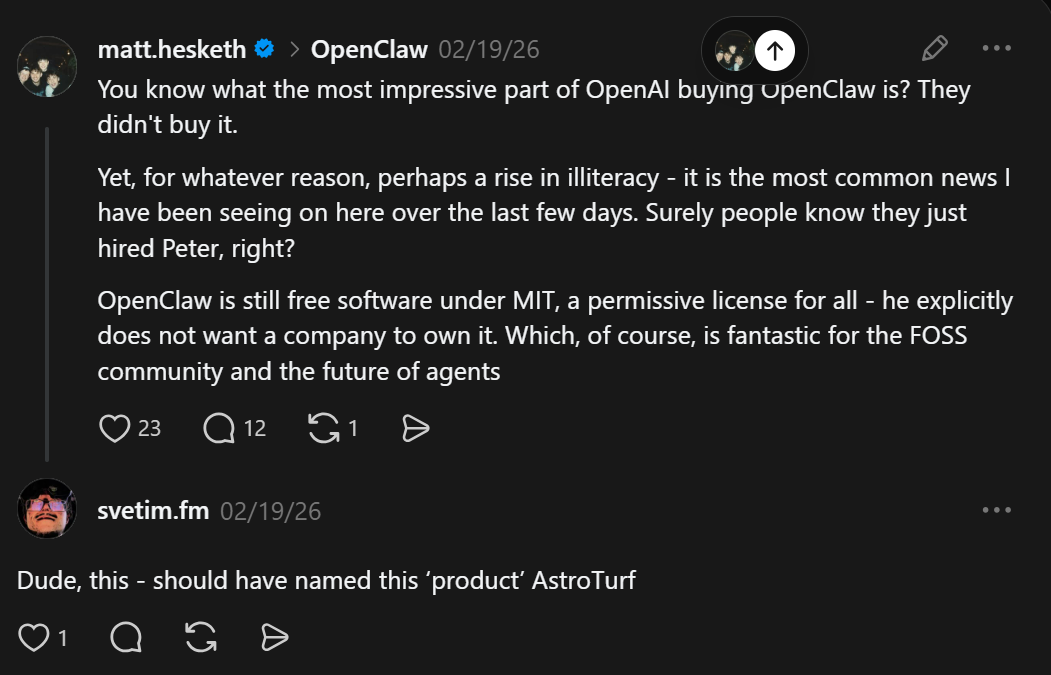
I have never tried OpenClaw because it seemed like an AI vibe coded slop privacy / security nightmare with a thick frosting of marketing slathered all over. I understand the appeal of OpenClaw. It would be so nice to have a little digital butler, looking at my cluttered desktop, helping tidy up, organize me, make some connections and surprising me in the morning with some new developments. After all, where would Tony Stark be without Pepper Potts and Jarvis to keep him on the rails?2 I also understand how some semi-technical people would be dazzled by the promise of something that would work around the clock to make them money, all for the cost of a Mac Mini.
A short interlude about Chik-Fil-A. I don’t like their politics and will not support them. I’ve never once given them a single penny. But, I have eaten food from Chik-Fil-A… When a new located opened not far from my former workplace, they came by and left a HUGE platter of delicious chicken nuggets and sauces. They have historically donated to our local Maker Faire, providing lunch for the makers. Hide their branding and of course their food is going to be delicious – that’s the entire point of fast food. The first year they provided lunch, I didn’t eat it – because I don’t like Chik-Fil-A. The second year… I was weaker – but also more practical? I was hungry, the kids were hungry, and although I had no problem paying for food at one of the many vendors, we’d been there a while, it was hot, the lines were long, and well, the food was right there. I suppose the most subversive thing to do would be to take their food and toss it in the trash – or maybe shuttle their food to the kinds of people they despise. But, I’m not in the habit of wasting or delivering food. My own subversive little act was to eat the food – and resolve to never, ever, advertise for them or give them any money.
Back to LLM’s. I have tried Hermes Agent, running in a docker container in a machine with very little personal information about me. I’ve only been using it for a few days – and I think it has some real promise with some real caveats.
The first caveat is that I won’t use any frontier LLM services because I can’t justify giving OpenAI/Anthropic/Google/Meta money for such things. Whatever Google once was, whatever their motto might have been, they’re so far removed from that as to be a different animal entirely. 3 The obvious downside is that without access to a very fast, very big, and very powerful LLM, my Hermes Agent will absolutely be less useful than someone else’s instance.
It will run in a Docker container on an isolated, budget machine, or not at all.
In practical terms, this means I’ve limited myself to either smaller and less capable local LLM’s that my machine can run or free tier API’s for various LLM providers. I’m still fumbling my way around Linux / Ubuntu and already using LLM’s to get my bearings, so these resources for providing the LLM reasoning power for Hermes feels within bounds too.
As always, I simply don’t trust any LLM’s outputs. I don’t trust their purported facts, claims, summaries, etc. Even so, there’s no arguing they are capable of building systems. Some family recently “fact checked” me using ChatGPT and I pointed out its merely a machine designed to provide them with the very next token of what they want to hear – not a system for giving them facts. I feel like it’s probably impossible to build an AI / AGI without training it on facts, but relying on a token generator for facts seems foolhardy. That said, I don’t have a problem relying on a system / set of processes / code base that I can inspect and verify works to arrive at a solution.
These “agent” systems are usually better called “agent harnesses,” since their best feature is offloading the work of monitoring, guiding, and nudging an LLM to perform a task. The Hermes agent adds a lot of extra features – keeping things organized, keeping certain chats available to revisit later on, switching LLM’s between local / API based, but at it’s core it is saving me the time of just babysitting an LLM.
As understand these agents, the first thing they do is take a query, ask the LLM to break it into pieces, and then get to work on discrete elements. It used to be that on long tasks ChatGPT would keep popping up a “Continue” button. About two years ago I wrote a simple Chrome extension that was active on ChatGPT and would simply auto-click the “Continue” button whenever it appeared. I think this is less a thing these days and ChatGPT will either truncate a reply or simply stop. But, keeping the LLM on track for each small sub-task and spurring it to complete appears to be part of what the agent is doing under the hood.
I’ve tried several LLM’s to assist with writing code, with varying degrees of success. The best OpenRouter free model I’ve used recently has been Poolside’s Laguna S2.1 with 118B parameters, a “mixture of experts” model with only 8B active at any given time. I’ve been very impressed with it’s coherence on long tasks and overall quality of work – and it has been extremely helpful in setting up Hermes. I haven’t tried a recent Qwen or Deepseek model on my very much underpowered system, but I plan on doing so soon.
My first goal with this system is to get it to just run a bunch of python scrips on a cron job. I may need to build up a separate system entirely that only runs cron jobs, but which can have it’s roster of tasks manipulated by Hermes. Too often the LLM gets involved and wants to interpret a query rather than run a static script, which just leads to more hassles. Perhaps a frontier LLM wouldn’t have this problem – but I don’t plan on using them.
NGL, I really hated Gwenth Paltrow’s Pepper Potts and would have liked nearly anyone else in that role. Maybe it was the direction – or maybe just my dislike for Paltrow – but I found her bumbling, flustered character exhausting. The comic book Potts was a capable, intelligent person in their own right. Maybe there’s hope for a better person in a future reboot? Hell, if they can recast Roddy, they can recast Potts. [↩]
I won’t even bore you with the full story of how Google promised a remediation for a Pixel 6 battery problem, bait and switched, then slowplayed it until everything expired. [↩]
Trigger warning: This post (and potential series) is going to discuss some AI/LLM stuff. That’s only a part of what’s going on, but if you hate all things LLM, then maybe this post isn’t for you.
Reasons for Building a PC
I haven’t built a PC in probably 25 years now. Even then, I had the kind assistance of two friends who knew a lot more about PC building than I ever did. More recently I’ve been interested in building a PC for a variety of reasons:
The intellectual exercise of building something, mostly out of parts, all by myself
Having a PC running Ubuntu / Linux, something I’ve toyed with now and then, but never really tried in earnest. I already eschew most closed source software in favor of open source alternatives1 , so moving to an open source operating system seems almost natural.
Some of my personal information currently resides on a computer I use for work – and I’d like to create a clean separation of these things for a variety of practical reasons.
Having an inexpensive and dedicated box would let me sandbox certain programs, try out different new ideas, and still let me access all this information and processing power remotely, if set up properly.
Yeah, I wouldn’t mind an Iron Man style Jarvis virtual assistant / butler, but the technology is still a fair bit aways as are my own skills and budget for such things.
Building in Parallel
I’ve taken to “building in parallel” for several recent projects. With the recent remote temperature sensor system, I tried taking measurements with an infrared heat gun, then an ESP32C3 module with lots of wires, then several Wemos D1 Mini modules each separately sending data back to my PC. While the ESP32C3 systems were still (mostly) working, I recognized some of the weaknesses and failure points and began working on the Wemos systems and didn’t take the ESP32C3 sensors offline until the Wemos sensors were up and running. There was certainly overlap for a little while, but this also let me calibrate both systems. I enjoyed working on these things, so building an entire second set of sensors in exchange for doubling the price and quadrupling the soldering wasn’t a horrible experience. I’m reminded of a quote from Contact, “First rule in government spending: why build one when you can have two at twice the price?”
As with those sensors, I’ve had some automated projects running constantly lately. Something that downloads a huge work calendar daily, a few simple reminders, something that sends me reminders over a messaging platform, and a few other assorted digital doodads. I’m keeping all of these online, on my work PC, until I can get the Linux box going – then I’ll look forward to closing these down.
Pricing Things Out
As with nearly any learning experience, you end up paying for it one way or another – money, tuition, wasted attempts and materials, time. Partially because I’m just starting out and partially because I’m fairly frugal, I set a budget of ~$2502 If I’m going to spend any money at all, I wanted something that would work – but I’m not ready to drop $5k on RAM/GPU/newest processors. My needs are still modest – and largely covered by my equally modest work computer. It’s an Intel i7 with 32GB RAM in a very small mini PC case, handles email, big spreadsheets, graphic programs, python projects, and even 3D modeling and rendering with OpenSCAD if you give it enough time. It cost $550 before tax, new from Amazon, nearly 4 years ago, and is still going strong.
For this project I contemplated going with a fanless headless system, but these seemed to require special aluminum cases and appeared to be little harder to come by. I thought about tracking down some e-waste resources, Facebook Marketplace, and Craiglist – but all of these require a fair bit of legwork and I feel like they’d also have more than a modest possibility of wasted time. Any new PC would set me back at least $500 through either Amazon or Costco, so I turned to eBay since the rating system provides at least a modicum of quality assurance – if not in the product, at least the seller.
There are a ton of options for older PC’s that can be given a new lease on life with Ubuntu and some extra memory. I’m still pretty biased against Dell, HP, and Gateway for producing sub-par consumer grade computers for myself, family, and friends. Some noodling about and half-hearted research suggested that these brands may produce significantly better enterprise machines than their consumer grade lines. This only irritates me even more, if true. This pretty much left me with Lenovo.
I ended up going with a “Lenovo ThinkCentre M70q Tiny i5-10500T 2.30 GHz” and paid a little extra to have the eBay seller customize it with 32 GB DDR4 RAM total, a 512 GB M.2 NVMe SSD, and throw in the antenna. Besides being fairly accommodating and helpfully communicative, I went with this listing because it fell squarely in my price range / project budget, it already came with the power adapter, they were California, and it could ship very quickly. While I could have easily spent another week or three trying to find a better deal on better and newer equipment, this was always going to be a project running on low end / older equipment and I valued the immediacy of getting to work over the incremental value of a better system. Frankly, just not having to hunt for a compatible power adapter was a huge plus for me.
In the end I purchased the main system from the eBay seller, paid an extra $36 to make sure the system had 32GB of RAM, ordered a used 512GB SSD (they threw in the antenna) from them in a second purchase for $55, a SATA SSD enclosure to re-use an old 500GB SSD, and $7 to grab some HDMI dummy plugs off Amazon. I knew the system would come with 16GB of RAM, but the benefit of “buying up” to 32GB also meant that I knew the machine wouldn’t have two 8GB sticks instead of a single 16GB stick. I could later upgrade from 16GB to 32GB if I had a single 16GB stick to start – but having two 8GB sticks would mean I would later have to get two 16GB sticks.
Anyhow, for those of you playing along at home, here are all the parts for my $284.30 computer system.
Part
Cost
Shipping
Tax
Total
M70q Gen 1(i5-10500T, 16GB, Adapter Incl., No SSD), upgraded to 32GB
$185.99
$5.93
$14.41
$206.33
M.2 SATA SSD to 2.5” SATA adapter enclosure
$10.79
$0.84
$11.63
512 GB NVMe M.2 SSD, antenna
$55.00
$4.13
$59.13
Dummy HDMI Plug
$6.69
$0.52
$7.21
$284.30
I didn’t have to buy the SSD enclosure – but it seemed like a very inexpensive way to double the storage and repurpose my old drive. I didn’t realize I’d need to get an HDMI dummy plug, or even what they were, until I tried to “remote” into the headless box and got a fairly ugly looking desktop instead of the slick Ubuntu desktop. This was probably the least necessary of these purchases. If I kept the system to the PC with the 32GB upgrade, ran the OS off my old SSD in the SATA enclosure, and picked up a $7 antenna off Amazon, the system would have only cost about $213. The extra $59.13 doubled the hard disk space and enabled a more graphically pleasing interface. It’s not much of a splurge and this was never a “build a PC for as little as possible” kind of a challenge anyhow.
The final system is probably on par with my existing 4 year old PC at roughly half the cost. I think it was a “decent” deal and I have a system that I can use to offload a lot of projects. If any of these projects end up requiring more processing power, I’m not even really “out” $285 since I can still keep using this system for other tasks (home automation, running daily scripts, etc).
And, yes, I’m trying to use this PC as a basis for a bundle of scripts I can deterministically interact with via voice input / output as well as certain LLM powered tasks. First, a helpful comic.
And, that kids, is how AI killed human interaction
We’re probably hurtling towards dead internet theory. I can’t search through Google or even DuckDuckGo anymore without having to wade through their AI summaries and then scroll past search results from AI slop. Using ad blockers or setting up a PiHole to block ads and stop tracking from ever touching my PC may impoverish some otherwise worthy websites. However, I simply don’t have to read every advertisement sent in the mail, on the inside of my grocery shopping cart, or every billboard. Yeah, I hate the idea of AI companies boiling oceans of drinking water for their inscrutable purposes…
Reminds me of another quote…
There’s a quote I love by H.L. Mencken; “Every normal man must be tempted, at times, to spit on his hands, hoist the black flag, and begin slitting throats.” What if the best way to filter out AI garbage is to use an LLM to do some of that filtering for me? 34
Searching through any search provider is kinda garbage these days, but there’s no reason I should have to wade through that AI garbage myself. Gone are the days you can drill down to the kind of search results you want by simply adding “-negative_search_terms”, because there’s probably no financial reason for them to permit this.
But what if I created my own search function? I recently tasked an AI with searching up 10 options for a certain product for me on Amazon and it did a mediocre job, finding 7 dead or unavailable listings. But it also saved me a lot of time looking through dozens of pages of crap when I only needed to look through 10 crap listings. With some tinkering, I think I could make a script that would identify negative search terms, perform the search as requested, then remove those that should have been removed with the negative search terms. I could see this being incredibly useful for Ebay and Amazon purchases.
A preview for next time: After some dithering, much watching of youtube videos, I’m going to give Hermes Agent a shot over OpenClaw.
And, yes, I have considered the possibility that an AI company’s aim might be to make everyone distrust the entirety of the internet, then sequester everyone into their own little siloed version of digital reality, everyone watching slightly more targeted ads and Marvel movies than everyone else, and any attempt to use another LLM to filter shit out only results in more precise targeting… [↩]
I went to the hardware store yesterday and was told by someone who worked there in an orange apron that the entire store, inside and out, was covered in Flock cameras. I think this bullshit surveillance is really starting to get to me. [↩]
I just had OpenSCAD die on me. It’s probably my fault for running a version from 2024 – but it’s been super stable and … why mess with a thing that works? Fortunately, OpenSCAD replied to my toot saying “@makerblock Check the “Backup Path” folder, e.g. on Linux that is at $HOME/.local/share/OpenSCAD/backups/”
However, having a program crash isn’t always that bad. Yes, it’s a hassle. But, I often find that the new version ends up being built / recreated in a fraction of the time and and more streamlined. In this case, I was working on a revision of my stamp eraser carving grips. The code for new version ended up cleaner and the final model was better looking as well.
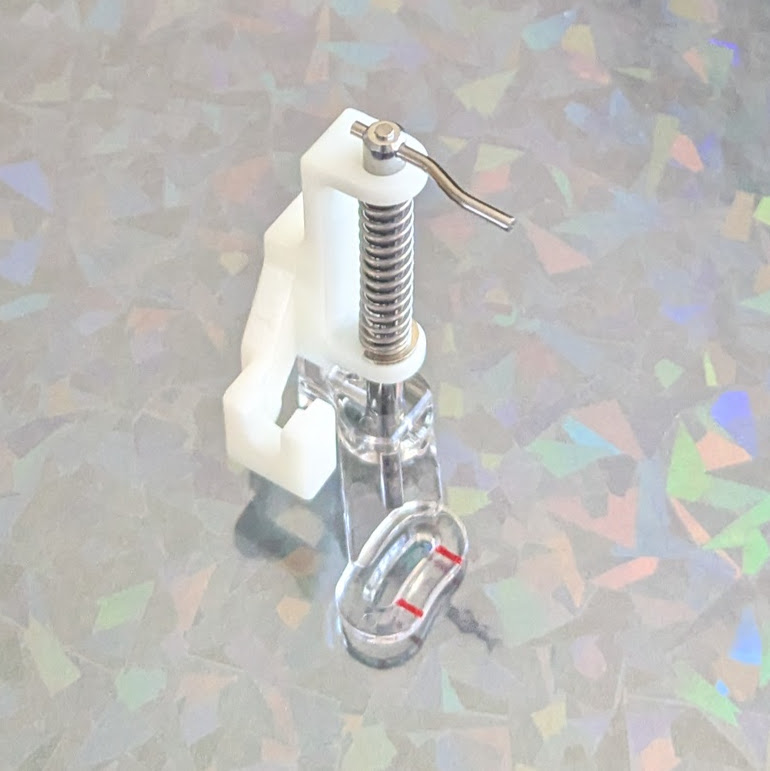
Brother Free Motion Presser / Quilting Foot SA129Apparently I already have one! This is technically the third Brother sewing machine I’ve owned. My first was my Mom’s hand-me-down, which worked for years, then stopped working and was too expensive to fix. :( The second one was also a Brother, that one was fairly inexpensive, but strangely enough some of the rubber wheels inside literally melted into goo. I 3D printed a new one of these wheels, but ended up making everything worse and… once again it was too expensive to repair. I donated both to Goodwill a long time ago in the hopes someone more capable will find and fix them.
In any case, one or more of these sewing machines came with the above free motion foot! On the Brother website it’s listed as the SA129 for $60 and doesn’t indicate it’s compatible with my Brother XM3700. The Brother part elsewhere for only $40 and does indicate it’s compatible with my machine. 1 You can find this exact part available for sale on ebay for under $15, which seems like a pretty great deal. Edit: Ugh, it looks like Amazon has Temu knockoffs for as little as $6, shipped overnight?!2
This little device reminds me of Paul Nosa‘s work with a drawings using a solar powered sewing machine. We’ve seen him at Maker Faire several times – and it’s always a treat to watch him in action. I’m not positive he’s using a free motion / quilting foot for his machine – but it makes sense that’s what he was doing.
The good news is that I don’t have to find this part or wait for it to be shipped. The “bad” news is that I no longer have any excuse for not making something with it!
And, I mean, why wouldn’t it be, really? I can’t imagine Brother would make this one sewing machine not compatible for some reason. That’d be just mean. [↩]
It’s such a simple part, that one of these would work. I’m just torn by my severe dislike for Bezos/Amazon [↩]
I’ve seen a few small vacuum formers, most notably the peanut butter jarvacuum former and some small ones over on Kickstarter, but this one by odemir_atelier seems particularly small, cute, and well put together. It’s basically an attachment for a vacuum hose/handled vacuum and a frame for a sheet of plastic. Apply heat with a heat gun, then lower the plastic on the vacuum box. They’re using a sheet of 3mm plywood with holes cut into it for heat resistance. Since heat is applied while the plastic is placed on the box, it makes sense that this sheet is not made of a material that softens under heat.1
This slideshow requires JavaScript.
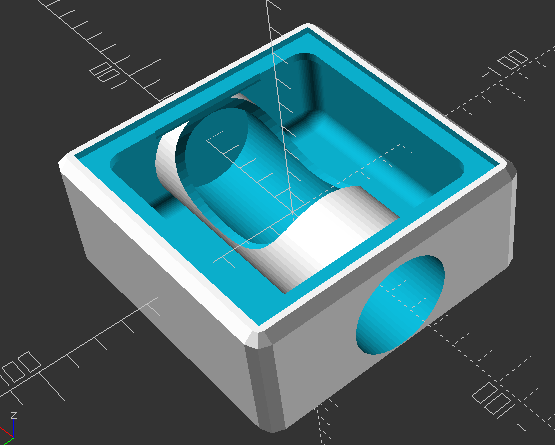
The maker has an interesting “drop down” style small vacuum former on Printables, which is likely to reduce errors, but one of these vacuum attachment ones. It seems reasonably easy to produce. It’s basically a box, a tube out the side, and a platform where you can place a holey 3mm board. If I wasn’t trying to be fancy, I imagine I could knock out this design in a few minutes of OpenSCAD work.
Well. I just can’t help myself.
Vacuum former box adapter
The box puts the adapter inside the box, so it’s not sticking out, has some supports underneath the lip supporting the cutout for the plywood plate. Sure, this would still need a way to hold the plastic sheet, but that’s less interesting so I didn’t make it. :)
You might wonder why I’m including screenshots rather than embedding the video… I basically don’t count on users not deleting their content and don’t trust any online platform that they will still be here in the future. [↩]
While I haven’t done extensive testing on these, I have some experience with 3D printing pens. Overall, I’d recommend against them for use in a makerspace with a limited budget. They’re generally inexpensive, but have such limited utility and reliability, I don’t think they’re worth the shelf or budget space.
I’ve used a 3Doodler 3D printing pen at a makerspace and I bought a cheapie one off Amazon. I though the 3Doodler was okay, but found it too slow and manual to make anything very interesting to me. 1
Given the speed, lack of precision, need for a steady hand, market packed with cheap knockoffs, there aren’t a lot of these tools I’d ever use. The highest personal use for one of these low speed, low volume 3D printer pens I could think of would be repairs of 3D prints. For a school or makerspace, these would be interesting, but even the best ones would probably be more novelty than any kind of real tool.
The one exception would be Tim Keller’sStruder which I’ve seen and used. It essentially uses a full sized extruder and hot end and has the kind of flowrate you’d expect from a 3D printer, except that it is hand held. The artists who’ve used his Struder have made some pretty cool things.
Whether you make an entire systems as complicated as Adam Savage’s huge setup or as simple as something made from a peanut butter jar, the theory and operation is essentially the same:
Build an enclosure that can pull a vacuum
Put a bunch of holes in a side of that enclosure
Warm a sheet of plastic until it begins to soften
Turn on the vacuum and lower the warmed plastic over an object for the vacuum to pull the plastic around the object
In recent years there have been several Kickstarters for vacuum formers. At a few Maker Faires in the past I’ve gotten to see several of them up close. Don’t get me wrong – those professionally built models are great, but I probably won’t ever buy one. They’re probably great for consistent temperatures, going quickly and precisely from heat to vacuum, much bigger than my own DIY setup, and probably has some kind of safety testing.
That said, this is one of those “Pareto Principle” type tools. I can get way more than 80% of what I need way less than 20% of the cost. The bucket vacuum former costs probably $50 worth of materials plus a cheap heat source versus $500 – $5,000 for a more professional setup.