Building a Cardboard Cutter Table With Cardboard

I hadn’t heard of a cardboard table saw before seeing the Chomp Saw at Maker Faire and Kickstarter several years ago. 1  During their run on Shark Tank they disclosed it took $73.81 to make each one.2

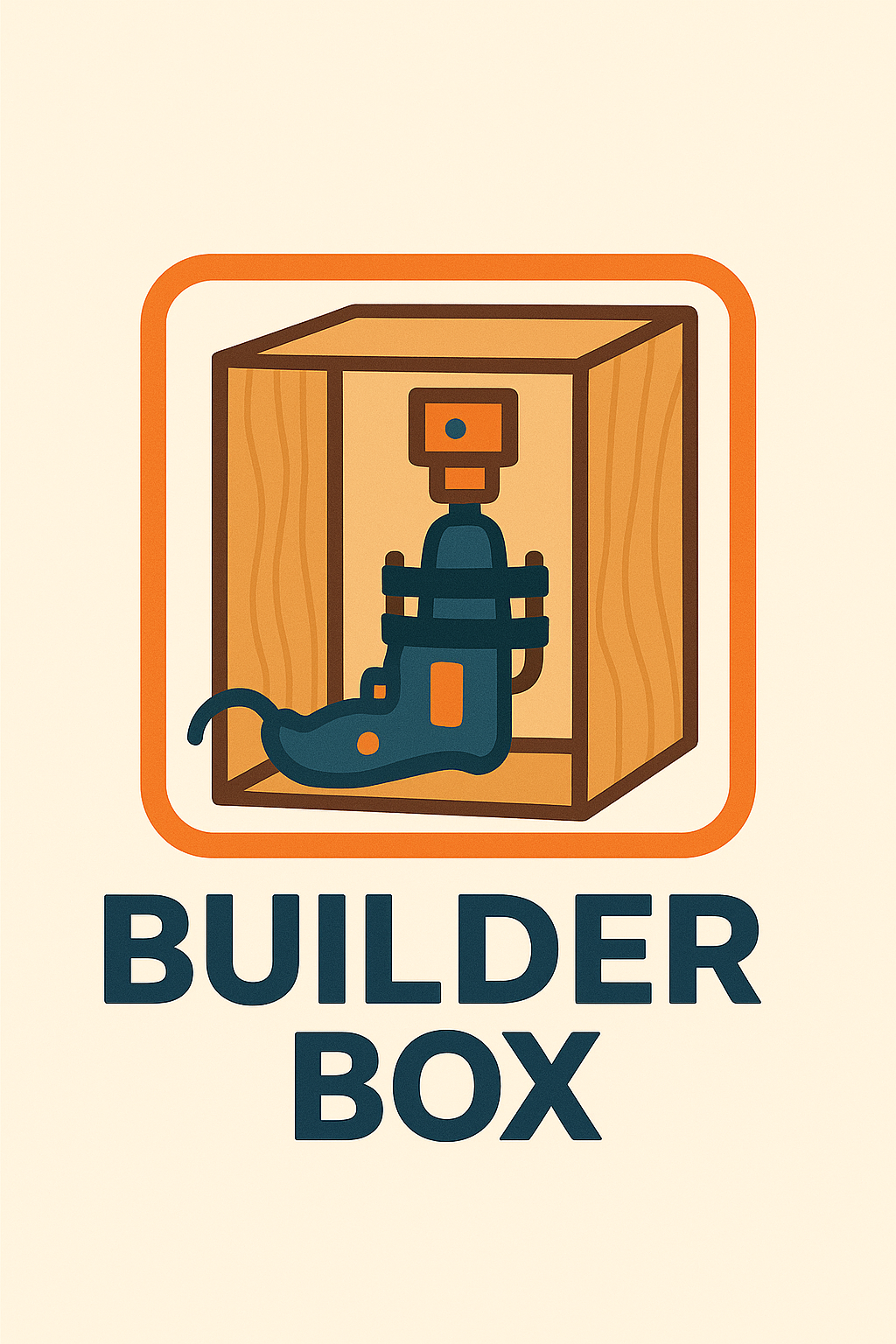
When I originally saw the ChompSaw, I had no idea how the thing worked and assumed it was some kind of custom made invention.  It wasn’t until much later I learned it was basically a drill + a sheet metal nibbler + plastic box.  A maker named Alejandro Leguizamo entered something called the “Builder Box” for the Rocklin Maker Faire in 2025.  The description was “Experience the Builder Box! The Builder Box is a power drill accessory which cuts various materials, like cardboard, fabric, and plastic, in a safe manner, perfect for young makers. Test prototypes, share your thoughts, and be part of its evolution.” but I wasn’t sure what it was or how it worked since the only picture was a kind of a logo.  I reached out to the maker and it turned out that he couldn’t make it to the event that year, but he explained the project was, as suggested above, a drill + sheet metal nibbler + a box.  Suddenly, the logo made sense!

Builder Box Logo

Once I knew what I was looking at, it instantly became easier to find more resources.  I found piles of nibblers / sheet metal nibblers for sale online for ~$30-40, several pictures and an unlisted video from ChompShop, and two Instructables,3  One of the instructables indicated you could use a foot peddle to act as a variable speed controller for the drill.  While an interesting idea, I’m not certain the additional incremental benefit is worth the complexity.  The ChopmSaw is able to operate at a single speed, so why not this?  While an on/off toggle switch is obviously helpful, I’m not going to go out of my way to add this for my own simple prototype/home use.  The unlisted maintenance video shows the ChompSaw’s disassembly showing a motor, a nibbler end, bits of wire and such, in a plastic housing, with a fan and tray for catching the cardboard bits – exactly as one would expect.

This slideshow requires JavaScript.

Before I go on, a word about their work station.  I got to see one of these at Woodland’s Square One makerspace and thought it was fantastic.  It’s cheap, lightweight, sturdy, and attractive.  I’m not sure where someone would get the cardboard for these tables, but ChompShop has a guide on building the workstation and an accompanying video.  While I would love to have the plans to be able to make one, it’s child sized, would need to be scaled for adult use, and at that point, I really might as well design my own.

I’m reminded of a a guy who invented a simple and attractive business card that turned into a cell phone stand.  He went on to create a cardboard furniture / homegoods design studio called “Out of the Box.”4  Like many other people, we accumulate a lot of cardboard.  It sure would be great to have plans to draw out designs on cardboard, chop them up with a drill + nibbler, and then fold into furniture.

My understanding of the Gingery lathe is that as you build the device, the portions you’ve built help you build the next pieces.  How cool would it be to pick up a nibbler and cheap drill, slap them together, start slicing up parts to make simple mount, then use that to keep building up into a workstation, then desk, then cardboard workshop?

In any case, given the entire project could be basically put together with:

  • Cheap drill (Harbor Freight has some for less than $20)
  • Nibbler attachment ($30-$40 at the hardware store or online)
  • 3D printed part to clamp drill in place
  • Box of some kind
  • Zip ties to hold drill and clamp in place and hold the drill trigger down or at a certain speed
  • Extension cord or power strip to turn the drill on and off

Now, I could put my regular corded drill into this, but for an extra $20 I could also have a small dedicated cardboard cutting worktable which seems like a fair investment to me.

Making a Makerspace
  1. Tool Recommendations for Making a Makerspace
  2. Makerspace: Just a few more things for the shopping list
  3. Building a Cardboard Cutter Table With Cardboard
  1. Unfortunately, the Maker Faire website regularly wipes out maker entry pages, so I can’t easily link back to the 2023 entry as I would much prefer. []
  2. It’s unclear whether this is the per unit cost from their Chinese factories, to just build a unit, or actual landed cost.  I’m guessing landed from their manufacturer. []
  3. Those instructables posted about 9 years ago and 3 years ago, respectively. []
  4. Though, possibly renamed to Creative Cardboard Company now? []

Makerspace: Just a few more things for the shopping list

Is there a word for the feeling when you place an online order and the moment you hit “Purchase” you realize there was something else you wanted and now it’s too late?  No?  Um…  me neither.

Since publishing a large blog post about my wishlist / shopping list for building a makerspace two days ago I’ve got two new things to add to the list.  I wonder how best to maintain this list.  While a wiki would be the best for maintaining evolving content, the tone of my posts tend to be a mix of useful things and nonsense and I’d have to heavily edit / format the content.  Maybe one day I’ll get organized and create a page on this site that’s something of a shopping list with links back to the rambling posts.

  1. Low Rider CNC.

    1. My buddy Andrew suggested the Low Rider CNC belongs on this list.  I haven’t done a deep dive on this yet, but just checking out the main documentation pages, it looks amazing.  While a full table sized CNC can run $7-10k, this Low Rider CNC appears to be community supported, open source, and designed for people to build themselves for ~$100 in hardware and electronic parts, plus  3 kilos of 3D printed parts, zip ties, conduit/rails, router, table, and wood.  An affiliate appears to sell partially assembled and fully built options from $900 – $1,500, which appears to include shipping.
  2. Hot Foam Cutter.

    1. I was reminded these existed after seeing this Mastodon post from Concretedog about his 4D CNC hot foam cutter.  However, it’s possible to build a hot foam cutter with little more than some nichrome wire, a battery, and some random stuff.
    2. While I don’t have a ton of uses for a hot foam cutter…  but I did purchase some nichrome wire two years ago specifically to make one of these for … reasons I no longer recall.  I made the purchase some time in October 2024, so it couldn’t have have been for Maker Faire and likely not for Halloween…
    3. A little extra research brought me back down a rabbit hole to rediscover why I started thinking about hot wire foam cutting.
    4. At Maker Faire 2023 I was excited to see Robert van de Walle’s “composite structures with low VOC materials” 2023 Maker Faire project.  The project showed off how he would avoid the use of fiberglass and resins in favor of laminated paper using glue over an insulation foam structure.

      This slideshow requires JavaScript.

    5. Robert also has an interesting tutorial about using Harbor Freight floor mats for making inexpensive, lightweight, and flexible structures using contact cement instead of expensive pink insulation boards.  Robert’s video was in turn inspired by Evil Ted Smith‘s video demonstrating how to copy forms into inexpensive foam mats by covering the object in aluminum foil, that in duck tape, taking the coverings off, cutting them into flat shapes with “darts” for alignment and to allow the formation of curves, cutting these out of foam, heat forming, applying contact cement, then reassembling.  Both of these videos had previously sent me down a rabbit hole of looking into making “poor man’s fiberglass” to make a foamie using cloth and wood glue over a lightweight structure.  And, more recently Nighthawkinlight’s videos about making strong lightweight structures with what amounted to lumber made from cardboard, covered in a water proofing coating.  I remember watching a video about biomimicry and how the how the toucan’s beak can be both strong and lightweight because it is essentially a lightweight, nearly hollow, sparse structure wrapped in a tight hard shell of keratin.
    6. Anyhow, I think I was researching these things after Maker Faire because of how miserable it was to cut sheets of foam with a craft knife which then lead to soooo much sanding.  I figured in the future I could design something that would let me create almost a small hot wire cutter to consistently and easily cut shapes and beveled edges into foam.

Sometimes I want to add an update only to discover that I never published a blog post about a thing I wanted to link back to.  I guess it’s time to dust off my pictures from 2024 leading up to Maker Faire to share information about how we made my kiddo’s Fallout inspired combat armor from Harbor Freight floor mats.

With the magic of time travel, I’ve now created that post and can now link to it.  :)  Share and enjoy.

Making a Makerspace
  1. Tool Recommendations for Making a Makerspace
  2. Makerspace: Just a few more things for the shopping list
  3. Building a Cardboard Cutter Table With Cardboard

Making Cosplay Armor from Foam Mats

This post has been a long time coming.  My kiddo and I made Fallout inspired combat armor out of Harbor Freight floor mats.  We’ve now brought these to Maker Faire 2024 and 2025.  They’re only $13 for about 16 square feet of 1/2 inch thick sheets of material which was enough for a front and back panel plus enough to do it all again.

I’ll update the photos below with pictures of the finished1 armor.  However, below is what it looked like part way through the construction process.  We added some 3D printed parts to allow the front and back “plates” to be kept together with some seat belt looking nylon webbing.

This slideshow requires JavaScript.

The very short version of the build guide, for our first simple builds with these mats, would be:

  1. Make patterns on paper or cardboard
  2. Trace and/or cut out of foam using a utility / craft knife you don’t care about because the foam will dull the knife quickly
  3. Bevel/shape/sand as needed
  4. Using gloves, apply a thin layer of contact cement to one piece of foam and the other piece where it’s supposed to go.  Let it dry.  Then, carefully place one piece upon the other – because the moment the two pieces are joined the contact cement will bond instantly making adjustments2 impossible.
  5. Bevel/shape/sand/paint as needed
  6. If making weathered armor / metallic features, consider using a silver pen or paint to dry brush on the silver color

I tend to take pictures as I build things out of an ambition to turn them into a blog post at some point.  So, hopefully these pictures give a sense of how the build went:

This slideshow requires JavaScript.

These were easy enough to create as the entire design was basically just bit flat planks of material.  Making more complicated / curved features would probably best be done by using a heat gun to soften and shape or cutting the curved features into flat panels with “darts” / wedges cut out so that when they’re glued together and the form built up, it will take on a curved shape.

The tutorial videos from Robert van de Walle and Evil Ted Smith are absolutely worth watching.  The short version would be that when copying another form, you could cover it with aluminum foil, that in duck tape, draw in lines for what could be fairly flat sections, including registration marks, cut the duck tape into flattened sections with “darts” as necessary, trace onto and cut out from foam, heat-shape as necessary, apply and allow contact cement to dry, assemble.  Some stills from ETS’s videos might be helpful:

This slideshow requires JavaScript.

These stills won’t do the full videos justice, so you should go watch those.  Robert’s point with his short 3 minute video was basically that these materials are incredibly inexpensive, able to build up huge shapes quickly, and look great.  I’d agree on all counts.

  1. Nothing is ever finished. []
  2. Nearly []

Tool Recommendations for Making a Makerspace

I’m extremely fortunate that my city’s utilities are not only provided through the city as an alternative to the incredibly poorly run PG&E system, but they have a STEAM oriented “exploration center” to entertain and educate about science, conservation, and environmentalism.  The people who work there put on workshops about all kinds of things and are incredibly helpful, friendly, and enthusiastic.  Right now they’re in the process of converting a section of their building into a makerspace and I couldn’t be more stoked.

If you are one of those “Just show me the recipe, I don’t need your life story” types, you can skim the table of contents to see what I’d recommend for various home/makerspaces at different levels/price points.  If you don’t mind a short walk, I’ve got a few related things you might not hate reading.

I’m fortunate that we have been able to put together some of the basic tools for something of a “home makerspace.”  Even so, I’m super psyched about there being a makerspace within biking distance of my house.  It’s got me thinking – how would I build out a makerspace?  I think my design philosophy would be “tools before tech.”  I do have a vinyl cutter, but before that I cut things by hand with an exacto knife.1 I have a laser cutter, but before that I cut things with a hacksaw.  I have a 3D printer, but before that I would just cludge stuff together.

If going to Maker Faire has taught me anything, it’s that you don’t need high tech gadgets to make incredible things – you’ve just got to be resourceful and scrappy.  Then again, if you’ve got a budget… well, sometimes it’s nice to be able learn new skills, try out new machines, explore new possibilities, and make things easier/faster/with less waste.

I like the process of making things with my hands.  It was a point of pride that my ukulele was almost 100% made with hand tools.2  But, as much as I like making things with my hands, many times I am less invested in the journey than I am in acquiring the thing I’m making or just making it as polished / easy to make as possible.  I like making my own heat transfer vinyl t-shirts, but cutting out a very simple SVG design by hand would be 30-45 minutes of concentrated painstaking effort versus 2 minutes of craft cutter time.

One of the reasons for putting together this list is because too often I see slick marketing convince schools/classrooms/makerspaces/libraries to buy expensive, less useful, or hyper-niche products.

I thought to search up some other maker space tool lists after I was mostly done with this list.  I found these two links to be fairly reasonable.  The others ones I found seemed to be more about trying to sell stuff to libraries and schools, going for flashy things, rather than things that are actually likely to be useful.

  1. Maker Tool Philosophy

    1. I tend to avoid Unitaskers, large, expensive Tools

      1. These have just the one use

        I tend to follow the 80/20 Pareto Principle3 and avoid unitaskers, especially when they’re bulky or expensive.  The formulation of this rule I prefer is that you can typically get 80% of the results you want for 20% of the cost and effort.4 I don’t want something I use once a year taking up space in my life.  If the tool is expensive, it has be able to save me sufficient time / energy / resources versus making by other means.  If the tool is bulky or expensive, I’m probably better off just renting access to the tool or outsourcing when needed.5

    2. Support Local Makerspaces

      1. Woodland Public Library – and their SquareOne makerspace

        Your local library may have a makerspace.  They might only have a sewing machine, 3D printer, and vinyl cutter, but using their services will help them keep or get new funding.  If you’re in California and have a valid state issued ID, you can get a library card at any state library.  One of the best, most organized, and most well equipped makerspaces I’ve ever visited is hidden up in Woodland, CA.

      2. If you don’t have a local library with a makerspace, your local community college probably has a kick-ass fablab/makerspace with every tool imaginable for the cost of a single unit class.  I haven’t checked, but I suspect it could be  even a remote-only semester long class, you could take it in anything, and they probably don’t have any kind of academic requirement that you do well to use the makerspace.  While getting a student spot at a local college may not be feasible, many of these makerspaces will sell passes or conduct workshops.  It is absolutely worth your time to visit and find out.
      3. Inventopia in Davis, CA

        Did you know your local college almost certainly has some kind of maker-incubator within a stone’s throw?  They’re generally people who just love making stuff and helping others, will train you to use their machines, have wide access times, and reasonable monthly fees for makers and co-working.  If it’s local, check out my friends over at Inventopia in Davis, CA.

    3. Before Buying:  Borrow, Experiment, Make Do, Build

      1. I highly recommend experimenting or testing out a tool before making a big investment.  Before getting a vinyl cutter, I cut heat transfer vinyl using a craft knife.  If I hated the hobby or result, I would have been out some time and a few ruined t-shirts.  Since I enjoyed it, it was worth investing in an inexpensive machine.
      2. If I can do without a much more expensive option by making the tool / equipment or making do without, I will.  I can’t justify buying a Chomp Saw for cardboard crafts for $300 when I could build one for about $30.  Similarly, I can’t just justify $1-2k for a vacuum former when I can build a small one for $40 or a big one for not a lot more.  Thus, I’ll probably never get an embroidery machine, if I can make do with the attachment below.
  2. Basic Home Repair Tools and Equipment.

    1. While you could go with Harbor Freight for some these things, but if you plan on keeping them for any length of time, just get something good.  If interested in a short anecdote, check this footnote.6 I’m not knocking Harbor Freight either.  They have super inexpensive and serviceable rubber gloves, foam knee pads, and foam floor mats that have lots of uses.  I just wouldn’t go with Harbor Freight for tools that would get frequent use.  Honestly, buying lunch for a neighbor who would loan you a specific tool is a better investment in friendship, community, money, without taking up any storage space.7
    2. Hand saw, hacksaw, hacksaw blades, coping saw, coping saw blades.
    3. Utility knife, razor blades.
    4. Hammer, wrenches, screwdrivers, hex wrenches.
    5. Wire cutters, wire strippers, pliers.
    6. Measuring tape, yard / meter sticks.
    7. Vise, duck tape, electrical tape, wood glue, zip ties, Machine oil, WD-40.
    8. Needles, threads, old clothing, scraps of fabric.
  3. Basic School / Craft Art Supplies.

    1. Regular batteries (9V, AAA, AA) and coin cell batteries.
    2. Crayons, color pencils.  I’d probably not keep markers on hand – they just go dry too quickly.
    3. Pipe cleaners, googly eyes, craft foam, construction paper, paints (probably tempera then acrylic), paint brushes.
    4. So much cardboard.
    5. Scissors.
    6. Masking tape, blue painter’s tape, scotch tape, white glue, glue sticks.
  4. Basic STEM / STEAM Stuff

    1. Once you’ve got some basic tools and willing to get your hands dirty, you’re pretty much set.  Research, experimenting, hardware stores, thrifting, and even dumpster diving can get you a lot of what you need to build many things.  However, if you’re going to lean into more “STEAM” kinds of activities…  a drawer full of microcontrollers, components, chips, wires, components, motors, magnets, and even broken things goes a long way.
    2. For basic STEAM educational kits, I highly recommend my friends over at BrownDogGadgets.  My local library / utility system uses their kits all the time , the kits are always well put together, well documented, and they’re always a hit.  Their various solar powered, wearables, maker tape, and MicroBit kits are great.
    3. After some intro-level electronics, it makes sense to spend a few dozen dollars to pick up piles of LED’s8 , coin cell battery holders, and conductive thread and you’re basically into making wearables. 9
    4. A few words about conductive metallic tape.  You can find copper tape anywhere online, but it might not have conductive adhesive unless you buy it from a retailer you trust.10 While, aluminum tape is incredibly inexpensive and works reasonably well, only comes in huge wide strips since it’s designed for HVAC and home repair situations, is not available with conductive adhesives, and you can’t solder to it.  It’s big enough that I think you could probably design an entire circuit board into a wide strip of this tape.  If you’re working with kids and want to make things easy on them, the BrownDogGadgets “Maker Tape” is reasonably priced, easy to tear by hand, has conductive adhesive, and since it is made with nylon can take tons of flexing abuse which could fatigue a metallic tape.  Maker Tape is only slightly more expensive than copper tape, but worth keeping on hand, especially for wearables/crafting/teaching environments.  None of these will break the bank, all have good applications,  and there are some interesting ways to combine them, so its worth having all three on hand.
    5. For mid-level programming with drag-and-drop programs and then easy to use MicroPython/CircuitPython, I would highly recommend the Adafruit Circuit Playground ecosystem.  You basically cannot get a more beginner friendly, feature rich, easy to use system with this many sensors11 and output devices12 and communication possibilities13 for as little as a single Circuit Playground for $25.
    6. For those ready to graduate to things made with very small microcontroller chips, breadboards, and the ATTiny ecosystem, I really like my SparkFun Tiny AVR programmer.  I still build very small things with it (simple timers and buzzers, mostly), but I can see why it’s discontinued.  A small underpowered ATTiny85 will run about $2, can be a little bit of a hassle to program, only carries 8k of space, and will require fiddly wiring/soldering and additional components to be useful.  The original Raspberry Pi Pico starts at $4, has tons of input/output pins broken out, power regulator, built-in USB connector, and 2MB of space. You’ll still need to solder things to it in order to make it do stuff, but 250x the space, more RAM and processing power, for $2 extra is a great deal.  I’ve played with the WeMos D1 Mini ESP8266, but not gotten it to do a whole lot.  For roughly $2 in small lot orders, you can get something that requires a little more tinkering but has 4MB of space and built-in wifi.
    7. I guess what I’m saying is that as technology improves, wifi/bluetooth added into smaller spaces, with more features, for less money – lots of makers will naturally end up with a drawer full of microcontrollers they’d be happy to donate to a good cause.
  5. Basic Tech Tools

    1. These tools are things pretty much everyone could use, pretty much anyone could justify, and you could probably find at your local library or neighborhood.
    2. Laminator.  $35-$50

      1. I have an Amazon Basics laminator.  It’s fine.  It takes a little while to heat up, has only two settings, and will sometimes crumple small laminating items.  That said, it was incredibly inexpensive 9 years ago and is still working.  Laminating sheets and small card sized pouches are very inexpensive.
    3. Laser printer.  $180

      1. I will only buy Brother laser printers.  Inkjets are a scam and I will never go back.  A Brother laser printer is a workhorse that will print, scan, fax, and sip toner.
    4. Sewing machine.  $200+

      1. If I was starting out, I’d probably get whatever Singer or Brother sewing machine CostCo had at the time.  I’m not an avid sewist, but I can make or mend a few things.  If it can do a zigzag stitch, straight line, and handle a few folds of material, that’s all I’d need.
      2. Again, I’m not an avid sewist, but there are certain things that are so inexpensive and such a huge benefit, that their addition is a no-brainer.
      3. Extra bobbins, thread, and needles.  A pack of 20 bobbins will probably be less than $5, just make sure they fit your machine.  Get white, black, and perhaps a few other colors of thread.  I like Gutterman nylon upholstery thread for tougher applications like bags and cotton thread for clothing.  Bigger needles for tougher / thicker materials, thinner for more delicate materials, and replace them when they “feel” like they’re not sharp any more.
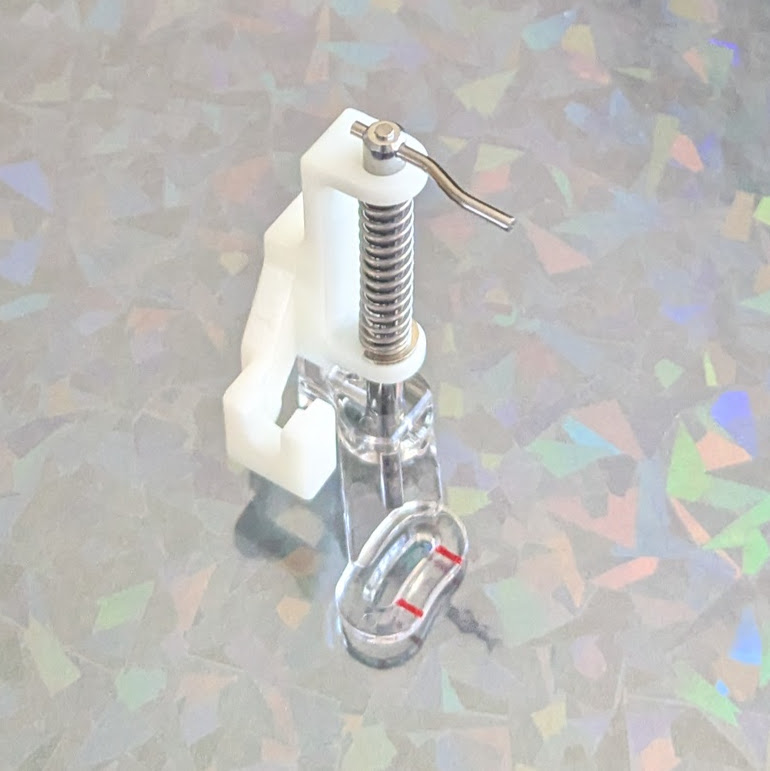
      4. A “free motion presser foot” or “free motion sewing foot” or “free motion quilting foot.”  I don’t have an embroidery machine, think they’re super neat, wouldn’t mind learning how to use one, and, if I’m being honest, might use one perhaps once a year.  However, I’m not going to spend $500-$7500 on one.  A “free motion presser foot” attachment for your sewing machine, this very short Instagram video by @Riskthrift, and different colored thread are all you need to get probably +95% of the utility of an embroidery machine for about $10.
    5. Vinyl cutter.  $85+

      1. This isn’t an endorsement, but I bought a Monoprice craft cutter.  I’ve been using it to make heat transfer vinyl t-shirts.  It’s slightly finnicky, I’m not crazy about the software, but it works.  This model is usually $250, but it goes on sale all the time, and I snapped it up when it hit $80.  I’ve used it to cut heat transfer and sticker vinyl as well as cardstock for game boxes and it’s handled everything quite well.
      2. I haven’t used a CriCut, but for a little bit more than what I spent you can get something everyone is familiar with.
    6. A wet/dry “buckethead” Shop Vacuum.  $40

      1. Specifically, this particular “Buckethead” shop vac that attaches to any standard 5 gallon bucket.  You can get buckets anywhere from free14 , to recycled15 , to free-ish16 , to inexpensive.  The attachment used to be $25, but is now $37.  Even so, you really can’t beat the price.
      2. And, as an added bonus, for the price of scrap wood or a few wooden dowels and some 3D printed parts, it can perform double-duty as a vacuum former!
  6. Home Maker Tools

    1. FDM / FFF 3D Printer.  $500-$2,000

      1. A word about 3D printers.

        1. It’s hard to go to a farmer’s market or craft fairs without seeing buckets of 3D printed knickknacks, dragons, keychains, etc.  Yes, they can be a great way to churn out trinkets, but printing nonsense you downloaded off the internet is just the beginning.
        2. Access to a 3D printer is a complete game changer.  The true strength of a 3D printer is in making it possible to build nearly anything you can design, irrespective of your tool set or skill level.  Come up with some designs, iterate, and invent a new tool or product that solves a real problem.  Build and give away prosthetic parts to help those in need or parts for PPE during a pandemicSave millions of dollars replacing broken or worn parts with functional replicas for pennies.  Use the parts to build other tools or robots to help solve other problems.  I don’t think I’m exaggerating when I say that a sufficiently motivated person could save lives, iterate and invent, build a business, conduct scientific and/or medical research.  Sure, people are selling Deadpool-dragon-keychains and Nerf gun parts.  But, those hobbyists/entrepreneurs are the ones helping bring down the barriers and prices on equipment and supplies for everyone.
      2. Type:  FDM > Resin.

        1. Resin printers are neat, tend to have small build volumes, incredibly high resolution, but use toxic chemicals with toxic fumes and require more toxic chemicals to clean.  I don’t want these in my home, let alone use them.
        2. I’ll stick to “FDM” or “FFF” (Fused deposition modeling or fused filament fabrication).  They do produce VOC’s, particulates, and fumes when in use, and caution should always be taken, but they’ll just be easier to deal with overall.  Filament is ubiquitous and inexpensive in a variety of colors.  I stay away from glow in the dark because the strontium used to make it glow is very abrasive and will chew up a print nozzle quickly.  White plastic filament made with titanium oxide has the same problem.  I tend to print in gray/silver/black/colors most of the time anyhow.
      3. Features.  Slicer agnostic, enclosure, toolheads.

        1. The slicer is the software used to “slice” a 3D model into thin layers the 3D printer can lay down with molten plastic, one at a time.  Some 3D printers will only accept models sliced by their software, their servers, their app, or their machine.  These machines sometimes come with built-in cameras, print failure detection, automatic time lapse photos, remote  job start-stop.  While this can make them easier to use, they’re all different ways in which it can be misused or crippled later.  I would stay away from any 3D printer that uses proprietary or cloud upload software.  It’s just too easy for a 3D printer company to decide to brick their machines.  A printer that accepts GCode and makes plastic things is all you need.  In fact, a printer that requires an app is a significant downside for me.
        2. If I were purchasing for a makerspace, I would probably go for a printer with an enclosed build area over multiple print heads/tool heads.  If I was getting one today for personal use, I’d opt for multiple material tool heads over an enclosure.
        3. I’m a fan of the Prusa printers, I own one, but when working on a tight budget, it’s really hard to argue with a Flashforge for ~1`/3 the price.  If times were tight, I’d go with a Flashforge, Snapmaker, or one of the various vowel heavy alternatives that require a little more tinkering and elbow grease.  If I had the budget for it or if I had to maintain a frequently used machine, I would (and have!) go with a Prusa.
    2. Plywood CNC Cutter.  $600

      1. I don’t have one yet – but I would personally start with a MaslowCNC for cutting full size sheets of plywood.   I’ve met Bar Smith a few times at Maker Faire, supported at least one of his MaslowCNC Kickstarters, followed their forums,
      2. These can be used to make huge displays, furniture, benches and desks, signage, and piles more things.  It takes a fair bit of space to set these up, even in the vertical orientation like the original MaslowCNC and even more floorspace to use it in the current horizontal setup system, but when not in use the entire system would fit into a small-ish moving box.
  7. Industrial Fabrication Tools.

    1. These last two items would be fantastic to have – but
    2. CNC Mill.  $5,000 – $7,500

      1. I don’t have a table router-based CNC cutter – or the space to really even keep one, but I’ve heard good things about the X-Carve.  A table CNC takes up a considerable amount of space, will need a vacuum attachment,  filtering, exhaust, etc.  I’m not ready for that kind of commitment.
    3. Laser Cutter.  $7500+

      1. I have a woefully underutilized Glowforge.  I pledged their pseudo-crowdfunding-preorder, so I got it an early model for a lot cheaper than their current $7k price tag.  (I’m not counting their cheaper laser diode line)  Unless I had a very strong intended business use case, I probably wouldn’t buy a laser cutter today.  They’re big, loud, require major venting / fume extraction, and I could probably cut whatever I needed for a few projects at a local makerspace.
  8. Things I wouldn’t buy

    1. While working on this blog post, I initially searched to see what kinds of tools other people recommended for budding makerspaces.  I was kind of horrified at the listicles like “5 makerspace must haves” and such, usually linking to their very own store.
    2. Sphero.  They’re cute and kids could program them.  I remember one of my kids’ teachers being extremely excited about getting a few Spheros for the kids to work with.  I just think there are better and more cost effective ways to get kids into programming than a $200 rolling robot.  If I had to teach coding to kids, I would absolutely start with the Adafruit CircuitPlayground mentioned above.
    3. Any Robot Kits.  This isn’t just about the Sphero – I’d be wary of any robot kits.  If the robot kit were something inexpensive you drop a microcontroller brain into, then maybe it would have a place in a classroom or makerspace.  Robot kits don’t really have to be very expensive.  If you have a 3D printer, two motors, and a drawer full of stuff, you could probably make a robot that does stuff for about $20/student.
    4. A single servo and basic microcontroller platform can do so much.  Back during the pandemic the Exploratorium held a “MicroBitVirtualConcert” and my youngest build this little monocle top hat cat robot with a Circuit Playground and a single servo.
    5. MakerBot or Ultimaker 3D printers.  I loved MakerBot for what it was back in the day – a scrappy start up that made open source 3D printers you could build and, above all, maintain yourself.  I like to think I’m still friends with the founders of these companies.  And, while I still love MakerBot for blazing the trail and clearing the way for other 3D printers, the current offerings are high on marketing and bear little resemblance to their open source roots.  Honestly, I haven’t kept up with Ultimaker once they were acquired by Stratasys.  Until that point they were still an open source darling and I still think their Cura slicing software is top notch.  While the MakerBot website was scrubbed of open source resources long ago, the Ultimaker website still has these various things still available.  I haven’t been able to confirm whether the Ultimaker is still open source, but given the purchase by Stratasys, I’m guessing it is not.  If I’m not buying an open source machine, I’d go with something way cheaper that doesn’t require a ton of bloatware, apps, server based slicing, or proprietary slicing software.
    6. ChompSaw.  I cant’ justify $300 for a machine that can be built from scrap plus a small $30 part and power drill that can be used as a drill whenever not used in the project.

What did I miss? What did I get wrong?

Making a Makerspace
  1. Tool Recommendations for Making a Makerspace
  2. Makerspace: Just a few more things for the shopping list
  3. Building a Cardboard Cutter Table With Cardboard
  1. By candle light. []
  2. I drilled the holes for the tuning pegs with an electric drill, but then designed/3D printed a hand drill to help finish it. []
  3. I didn’t realize until recently the original Pareto principle was about how 80% of the land in Italy was owned by 20% of the citizens. []
  4. Actually, I aim for 85% results for 15% effort. []
  5. I’ll never buy an RV for $50-200k and then pay to insure/store/maintain, when I could for a few thousand dollars whenever I wanted.  Which will also be never. []
  6. Many years ago my dad gave me his trusty utility knife.  It was already old by the time he gave me this Stanley brand knife.  Around the time we moved I had visited an Ace Hardware and saw they had a $1 bargain bin utility knife that looked very much like my own, so I picked it up to have an extra one on hand in a different area of the house.  Like my trust knife, this one had an internal area where it could store extra blades – so that’s where I put some blades.  You’re probably wondering – how bad could this utility knife be?  The handle had a slight gap in it where one of the extra blades stuck out very slightly – by probably half a millimeter.  It was never enough that it ever broke the skin but always enough to poke me and I hated it.  If you’re going to use something more than a few times, get something good that will last you.  Don’t cheap out and get a piece of crap that will scratch you. []
  7. A word about hardware store bargain bins.  I don’t know this to be true, but I strongly suspect the various Home Depot and Ace Hardware bargain bins are essentially sourced from the same cheap and/or low quality sources pitched to the store buyers at the most recent convention or the same Temu/AliExpress sources we can buy from.  My additional suspicion is that this is basically the entirety of Harbor Freight’s stock comes almost exclusively from these kinds of sources. []
  8. Different colors, sizes, shapes, and types – from single color, flashing colors, and “smart” / NeoPixel LED’s []
  9. A note about conductive thread: I like the BrownDogGadgets.com brand.  It wasn’t brittle, was easy to thread, and has seemed to hold up in my projects.  I’ve heard other threads are less easy to work with or tend to break. []
  10. For me, that would be BrownDogGadgets or Adafruit []
  11. Touch, temperature, light, accelerometer []
  12. LED’s, buzzers []
  13. Some versions have IR emitter/detectors and some have Bluetooth capabilities []
  14. Talk to your local bakeries and ask for their buckets.  You’ll have to wash it out, but they’ll be free []
  15. Laundry detergent or pool chemicals []
  16. Harbor Freight frequently has coupons for free/cheap buckets []

OpenSCAD Shadow Boxes, Shadow Casting

This slideshow requires JavaScript.

A friend recently requested some less LLM-centric content.  I’ve often said this blog is largely a lab notebook for various ideas or build log.  It’s also merely a subset of the stuff swirling around in my brain than a dedication to any one topic.  In any case, this post is dedicated to Pete.

I saw the above 3D printed box on Instagram.  It looks like a wanted poster from the show “One Piece” of a character named Roronoa Zoro who carries three swords.  The box contains a small post in the very center which seems very out of place – until the lights are dimmed and the light under the tip of the post is activated, revealing the light is blocked by the irregular edges of the box and casts a shadow of the silhouette of a figure holding three swords.

I’ve seen other implementations of this stereographic projection technique, but this was easily the coolest.  The disparity between the size and shape of the box and shadow was almost startling.

My mind went wild with ideas upon seeing this box.  One of the first ideas I had related to some fan-made movie posters by Kevin Collert many years ago.1 Imagine a small projector / box of arbitrary shape that could project that kind of silhouette behind you?

Yeah, a Tony Stark cosplay is neat… but what if you had an inconspicuous stereographic projector on your back that threw up a huge Iron Man shadow behind you!?

This could be extended in any number of ways.  A Luke Skywalker cosplay that casts a Darth Vader shadow, Bruce Banner with a Hulk, etc, etc.  But, also, what about a shadow of a familiar?  A little dragon perched behind you.  Or two thugs standing to your side like evil shadow henchmen?  Or a crowd of zombies?  The neat part about the box / lamp shown on Instagram was that the box didn’t look like it would display that kind shadow of a shadow.  It just looked like a box with weird edges to it.

But, how did they do it?

He makes a good point (iykyk)

I’m terrible at Blender.  I’ve watched tutorials, tried to use it, but I just can’t wrap my feeble mind around it.  My one string is the ability to make things in OpenSCAD.  There are plenty of others who can make incredible things in it, but I’m no slouch.  The code may not be pretty, but, well, as they say…

And, really, that’s all that counts

I started with a few assumptions.

  • The light source has to be a single point.  If there were multiple LED’s or filaments, it would create fuzzy / duplicate shadow edges.  This should be possible with a single bright LED.
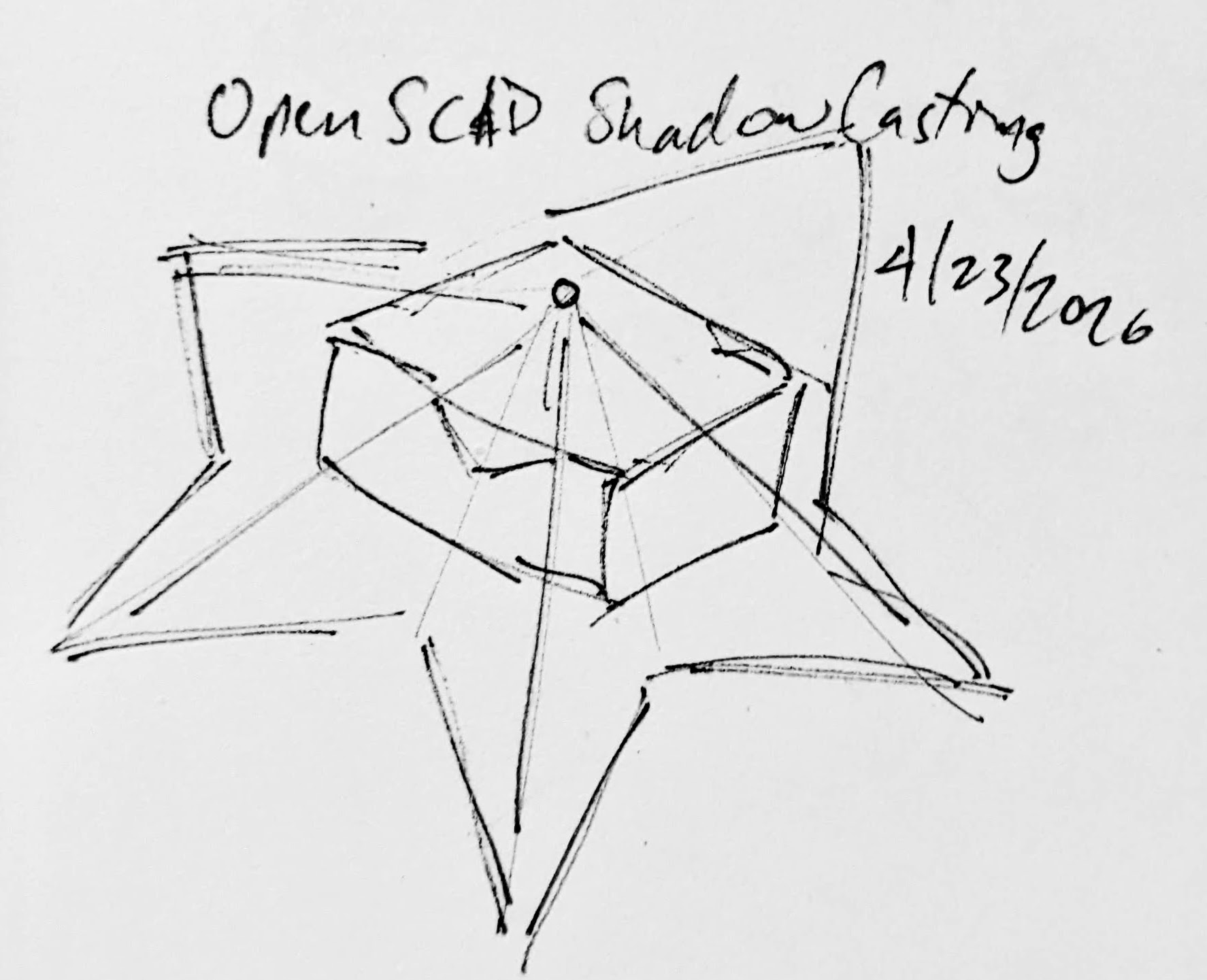
  • The shadow is basically a cone.  The edge of the shadow everywhere must be essentially some sort of a distorted cone, with the center point being the single point of light and the edges of the silhouette being the edge of the cone.
  • The top edge of the box must be where the cone intersects with the box.  If we decide how far off the wall the point of light is and we know where we want the shadow to be and where the shadow edges are, we should be able to intersect the shadow-cone with a thin walled box.
A rough sketch of the idea

Creating the box itself shouldn’t be that big a deal.  It’s an easy few lines of OpenSCAD.  Creating the arbitrary “cone” was initially a much harder problem.  Now, if the design I was trying to create was very simple or entirely convex, I could just use the OpenSCAD hull function around an SVG of the desired shadow and a very small sphere for the point of light.  Since a simple shape would be uninteresting, I knew that hull wasn’t going to work.  For a while I tried really hard to build a python program that would work by creating a polyhedron built out of the large SVG in the desired location and a very small SVG at the light point – and stitching the sides together programmatically.  If you’ve ever worked with the OpenSCAD polyhedron functions, you know what a pain it is.  If you don’t define the faces in a certain order or order the faces properly, you’ll end up with flipped faces and a pile of useless triangles.  Even when the faces were properly built, the result ended up being difficult for OpenSCAD to render since it involved so many points converging on so few points and weird little overlaps.  It was a mess.

I’m listening…

You mean, all I have to do is RFTM?  Apparently the linear_extrude function has a parameter called “scale” where you can define how small something should get as it is extruded.  This is literally exactly what I needed.

I needed the shadow on the wall to be extruded off the wall as high as the point of light, but scaled down to that same point of light.  But, would this work???  I haven’t printed it yet, but I believe it should.

This slideshow requires JavaScript.

From there, the next question is… does this OpenSCAD back-of-the-napkin sketch really work?  Again, I’m not sure – I haven’t printed this for a few different reasons.  If this design were printed “as is”, there would be a ton of overhangs and support material.  I believe when you look at some of the pictures of the lamp lit up from the side, you can see the infill patterns on the sides.  I can’t tell from these videos – but I suspect the easiest way to 3D print this box would be to do so in big flat panels.  At the point you’re just trying to turn filament into 2D panels, why even bother printing it when you could lasercut it in a fraction of the time?

Let’s look at a few stills of the lamp.

This slideshow requires JavaScript.

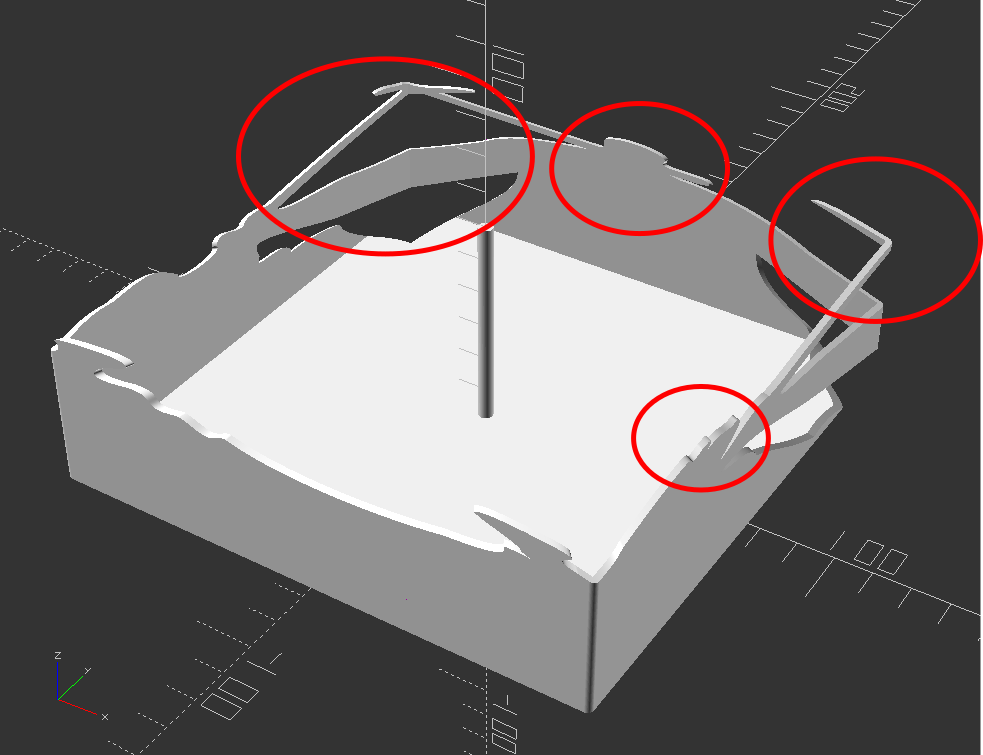
Now, for my quick mockup I just used a simple square shape – but you can definitely see the same features as in the lamp in the video stills.  The head, the crossed sword tips at the left, the jagged edges on the bottom right, the floating sword on the right.

Common structural features circled

Given that the theory feels intuitive and sound and that my quick mockup proof of concept seems to have the same structural features as the lamp in the video… this seems like it would work.

If this quick mockup works, then why restrict ourselves to simple boxes?  For a mass produced thing you just want to stamp out, a simple box just makes sense.  You could lasercut the panels, slap them together, and churn them out all day long.  But, the thing that you use to block the light and form the shadow could be any arbitrary shape.  It could be a triangle, star, or something far more complex.  Here’s another quick sketch:

This slideshow requires JavaScript.

Obviously, this would be a support structure nightmare.  But, for a one-off project and a cool enough idea, I think it could definitely work!

  1. His work has been stolen and slapped on so many dropshipped things that it was very difficult to find the original artist! []

Prepping for Maker Faire Bay Area 2024

It’s always a whirlwind heading into Maker Faire.  This year is no exception.  This past weekend we got things mostly ready for the Rocklin Maker Faire.  All of our robots were functional, which was really great.  A quick update to document progress and also act like a to-do list of sorts:

  • MakerKnit’s companion robot
    • My wife has knit her octopus
    • I’ve installed the Adafruit QtPy, NeoPixels, and touch sensors connected via BrownDogGadgets conductive thread through the legs
    • It’s been programmed to “blink” the two LED eyes randomly plus a small number of light shows for the body
    • Designed/3D printed several eyes, settling on a nice design that should make the eye animations look good
  • Kim’dael LightningSlayer’s Pendant
    • The youngest’s project has morphed from an LED arm to a CircuitPlayground in a pendant that just plays some notes when she presses buttons.
    • A long extension for the battery pack, using thicker gauge wire wound through the back of stock CircuitPlayground enclosure, is now the “necklace” portion for this project.
  • Dexter Starfighter’s ED-E
  • MakerBlock
    • My robot wasn’t quite ready for Maker Faire last year, but “ready enough” to share.  Last year the little bot was just sitting in a jar I carried around and not really visible to anyone.
    • This year I’ve added feet (entirely cosmetic), changed the battery pack around so it is removeable, swapped out dome diffusers, and am working on new animations/behaviors.
    • I realized that my old LED goggles were… janky.  This was because I had soldered some buttons to one side and then wired them into the Trinket directly, without any resistors.  While it /worked/, it caused some problems whenever I pressed a button.  I pulled the Trinket out and swapped in my new favorite board, the QtPy.
      • I really prefer programming / updating via CircuitPython over Arduino since there’s no pre-compile time and fussy Arduino connections.
      • Besides the programming/uploading, I love the built in RGB, up to 6 capacitive touch sensor, and easy serial communication
      • As an added plus, I soldered on the 2MB flash chip so the project as a ton of space. 1
      • And at almost the same price as a Triket ($0.50 more than the original, $0.50 less than the M0 Trinkets), it’s just easier to swap them into any project I would have previously put a Trinket into
  •  Soldering
    • I’ve really upgraded my soldering experience and it’s made a world of difference.  We moved about a year ago and there’s a space in the house where I can keep a soldering station out and ready to use.  Just having it available is such an upgrade.  I’ve had several handheld / pen style soldering irons over the years and they’re usually pretty terrible.  In fairness, this is also because I’m kinda terrible at soldering.  I had a basic garbage soldering iron from the local hardware store, upgrade one that had a little temperature control from Adafruit, and then upon the recommendation of a friend upgraded a few weeks ago to an X-TRONIC soldering station.
    • I gave my old soldering iron to my neighbor so he could work on a project for his wife.  As I got to finishing up work on the above projects I realized I couldn’t find my pen soldering iron from Adafruit – and that I didn’t want to find it anyhow.  It was fine.  It worked.  But, my soldering iron holder was cheap and flimsy and easy to tip over and the helping hands I had from Adafruit were “okay” for very small projects, but the joints came loose easily and the helping hands kept falling off.  Rather than spend $20 on another soldering iron I would hate, I dropped $70 on the X-TRONIC station which has built in helping hands and soldering iron holder.  Setting aside that it heats up very quickly, has good temperature control, melts solder quickly, and has great helping hands… it has a way to hold the soldering iron in a way that isn’t constantly anxiety inducing. 2
    • Having the soldering station handy has meant I don’t really mind whipping out a quick battery pack extension cable for our projects.  I just need to strip some wires, fire it up, drop some solder, and turn it off again.
    • I may have ruined the first soldering iron tip kinda quickly.  Again, I have no idea what I’m doing.  I would add solder, dip the tip in flux, wipe on sponge, and then do it all again.  This is a terrible process since all it does it add extra contaminants and gunk to the tip, reducing the ability of it to transfer heat effectively.  Instead, after watching a video, I learned I should run it at the lowest temperature appropriate for the solder/joint, just dab the tip in the brass wool to clean it up a little, then maybe wipe on the slightly damp sponge, and absolutely coat the tip in solder before putting it down.

Things left to do!

  • Things to finish
    • I’d really like to finish up the Fallout themed shirt/vest to go with my project
    • A way to attach my wife’s octopus to a purse strap
    • A better way to wear my robot on my shoulder – may use a similar foam paldron
    • A big chunky seat belt looking thing for the strap wearing my robot
    • I’ve got designs for a new bag to wear/carry around Maker Faire, but haven’t sewn them up yet – maybe this week!?!!?
  • Make sure we have
    • Enough batteries, battery packs, etc for our projects
    • USB chargers for our LiPo batteries in goggles
    • Finish my goggles (install battery, update code, possibly change out diffusers
    • Bring a few Maker Coins to give out (I bought 100 of the 5,000 minted, probably never to be minted again…)
    • Ways to show people links to learn more about our projects – probably via QR codes – though I might also use an RFID tag :)

Okay, back to work on… work… so I can get back to making!

  1. Note to self:  It requires a different version of CircuitPython, Haxpress, to make use of the chip storage []
  2. I used to tape the cord of my soldering iron to the table and then place it on the flimsy stand []

Heat Transfer Vinyl T-Shirts Without a Craft Cutter (2023)

Saturday, October 21
Zone 2 – Make: Demo Stage
2:30 pm – 3:00 pm
Let’s goooooooooooooooooooo!

Heat Transfer Vinyl T-Shirts (Without a Craft Cutter)
  1. Heat Transfer Vinyl T-Shirts – Without A Vinyl Cutter
  2. Heat Transfer Vinyl T-Shirts – Without A Vinyl Cutter, Part II
  3. Heat Transfer Vinyl T-Shirts Without a Craft Cutter (2023)

Companion Robots and Maker Faire Season!

I’m super excited for Maker Faire Bay Area / Mare Island and Mini Maker Faire Rocklin.1  I’m not just excited to see everything, but to show all the things I’ve been working on for a while now.  It’s also time to pick up all the little dev boards I’ve somehow accumulated and see if I can make anything with them to show off.

  1. Project Boards
    1. Wemos D1 Mini.  A small insanely cheap (~$3?!) WiFi enabled dev board2 , which has 4MB onboard and can run Arduino.  I think it can also run MicroPython, but I haven’t tested this yet.
    2. Wemos 600 Pico.  An even smaller, even cheaper (~$2 when ordered from China) WiFi enabled dev board that runs… MicroPython?  I think??  I’m saying “I think” because I haven’t been able to get it to do anything yet.
      1. Since starting this blog post, I found a guide on installing MicroPython on Wemos boards that seems promising.
        1. Flashing MicroPython on an ESP8266
        2. https://github.com/espressif/esptool/tree/master
        3. Arguing with Python to let me use “esptool.py”
          1. esptool -p COM13 -c esp8266 flash_id
      2. As promising as that series of blog posts looked, I eventually scrapped the Wemos because it was just too much of a pain to get going with MicroPython.  I think I could have made it work, but for $7 I could also just use the Adafruit QtPy I already have.  The advantages of simply uploading code over a USB cable into a virtual drive just can’t be overstated.
    3. Other Boards
      1. I have a bad habit of picking up dev boards.  I’ve got several Adafruit QtPy’s, several Adafruit Trinkets, an Adafruit FX Sound Board, Raspberry Pi Pico (non-WiFi), various Digispark boards, a small handful of ATTiny85’s, and an even weirder assortment of VERY small programmable circuit boards (ISD1806B-COB) designed to go in greeting cards (just 6 seconds), etc.
  2. Companion Robot
    1. Background.
      1. I started this post at least a month ago when I only had a vague idea of what I wanted to make and even fewer skills.  After seeing my kid’s companion robot take shape, I wanted to get in on the action and make my own.  I decided to make a really small companion robot with just some LED’s, piezo, and small microcontroller unit.  I’d taken a stab at making a companion robot a few years ago, but set it aside for a variety of reasons and never went back.
      2. The idea for this new robot would be something a little less ambitious, make more use of NeoPixels than in prior projects3, with a little more interactivity, trying out some CircuitPython, and… let’s be real… more pizzazz!
    2. Idea:  Friendly Cloud/Vapor/Flame
      1. I still really like the copper-toned PLA I’ve been using since it has something of a steampunk flair to it.  I settled on repurposing a small plastic enclosure with a clear dome as the “body” for the robot.  I wanted it to look something like a small entrapped / captive / domesticated4 sentient cloud of vapor or perhaps flame held within a steampunk enclosure.
      2. As a very small, inexpensive board that could run either Arduino or CircuitPython, I decided on the Adafruit QtPy M0.  It could run NeoPixels, there were lots of cool guides on it, plenty of pinouts, and could definitely fit within the confines of my enclosure.
    3. Enclosure:
      1. I started the enclosure by trying to design and 3D print a part to mate with the clear plastic dome.  It took a few tries.

        This slideshow requires JavaScript.

      2. Once I had that, I extended the base so it could hold more electronics.  I could definitely have shoehorned everything into the dome, especially if I took up some of the space inside the dome, but even with an “elevated base” it was still plenty small and could use a battery pack rather than a rechargeable lipo.
      3. Once I had a good design for the enclosure, I tried to make it work with an existing 3xAAA battery pack.  In the process I yanked off the connector and ended up soldering the battery pack leads directly into the circuits.
    4. Internal Electronics
      1. I’m just not a great electrical engineer and am still copy/pasting from various guides, tinkering, changing bits of code, swapping out parts, and using “close enough” resistors.  Wiring up some LEDs or a piezo to a project isn’t very difficult – it’s some of the more fiddly bits.
      2. Piezo Element Speaker
        1. I wanted to use a piezo buzzer/speaker because they’re large and incredibly thin.  They’re not without their downsides.  The crystal wafer is also thin and a little fragile.  The piezo buzzer without additional electronics has the potential to act as a knock sensor and can generate a high voltage spike which can fry a board.  And, without additional electronics, the piezo just isn’t very loud.  There are some libraries for the Arduino that basically double the volume of a piezo by connecting it to two pins and then running each opposite of the other, doubling the voltage difference, but they only work for Arduino chips.5
        2. After searching for various ways to increase the sound of the piezo elements, I settled on trying to use the Adafruit piezo amp.  I bought two – and tried desoldering the terminal blocks.  This completely ruined one.  The other one worked great, but for the modest volume gain it was just too big in an already cramped enclosure.
        3. After searching around, I found some amplifier circuits using a small number of common parts.6
        4. Then I tried building an amplifier circuit using an NPN transistor.  After reviewing the datasheets for my NPN transistors (and PNP transistors), and breadboarding the circuit with resistors, I sketched it a few times, laid it down with copper tape, soldered it in place with SMD resistors, then pulled it off and placed it onto a piece of Kapton tape and put another piece on top – “laminating” it in place.
      3. Capacitive Touch
        1. Buttons are great and all, but with a capacitive touch pad, I could add metallic elements to my robot rather than a much bulkier button.  I bought a few brass upholstery tacks because they looked great – but they just would not accept molten solder.  I ended up cutting the prongs short with wire cutters, wrapping the stub with copper tape, then soldering the wires to the tape.  I’d also added a little piece of heat shrink tubing over the connection to help keep it together.  It’s been working well so far.
      4. LED Animations
        1. As we know from Phillip Burgess‘ incredible “power sipping NeoPixel” guide, we can conserve power and increase the impact of the LED’s by reducing the number of LED’s, keeping max brightness ~20% for a disproportionately large impact, running fewer LED’s at a time, and even running fewer colors at a time.  Between Phillip’s work, Todbot’s guide, and the specialized QtPy NeoPixel guide by Kattni Rembor, I was able to put together a few neat animations.
      5. Piezo Sounds
        1. I had a heck of time getting the piezo buzzer to do anything interesting.  Fortunately, with my kid helped convert the piano music for “Paint It Black” into tones for me.  I haven’t gotten all the note timings right, but I’m working on it!
  3. Future Modifications
    1. More Accessible Enclosure.  Right now the “lid” with a hole for the LED ring just sits on the enclosure with a light friction fit.  One idea is a hinged lid, either with a conventional hinge or perhaps a hidden swivel hinge.  The problem with that, of course, is it requires even more internal space.  Other ideas include a ring on top that screws down, holding the top down and in place.  I’m crap at designing screw threads, so I’ve avoided this.

      Hinged lid for enclosure
      Hinged lid for enclosure
    2. Piezo Knocks.  Perhaps the next version will include some kind of tap / double tap / knock sensors using one or more piezo elements.
    3. Knobs.  There’s not a ton of room inside the enclosure, but by including a gear within a gear, I might be able to rotate part of the case and have it manipulate a potentiometer.

      Offset gear within gear, manipulating an off-center internal potentiometer
      Offset gear within gear, manipulating an off-center internal potentiometer
    4. Motors.  A robot that just flashes lights and makes a few beeps can still be pretty interesting.  However, I have some neat potential features that could be added with just one or two motors.  There are some interesting limitations with the current incarnation of this robot and using a QtPy.  I’ve only got 10 pinouts7 , 1 for NeoPixels, 1 for the piezo, 6 in use for the capacitive touch sensors, leaving 2 for other potential tasks.8  However, space is already tight so one or two micro servos would be a big space commitment.  I’ve seen some really tiny micro servos that might work, but I have no idea where to source them.  One silly idea is a “weapons system” using a spring loaded projectile activated by a very small servo.

      A small spring loaded projectile launcher, actuated by a small servo
      A small spring loaded projectile launcher, actuated by a small servo
    5. Creating Tone Library.  The basic piezo tones are easy enough to play, but including the entire list of tones and the frequencies associated with them seems eat up the poor little QtPy’s memory.  I think compressing them into a library might be the way around this issue.
    6. Playing WAV files.  WAV files are bulky, but that’s the only sound file format a QtPy M0 can play.  However, with the extra 2MB from the SPI chip installed, this shouldn’t be a huge problem.  I used Audacity to mix the sound clip down to mono then to 22 KHz sample rate.  My preliminary tests worked – but it was incredibly quiet.  I haven’t run it through the audio amplifier yet, but I’m planning to.
    7. Sleep / Deep Sleep.  Ever since I swapped out the tiny LiPo for a 3xAAA battery pack, I’ve had a lot more battery life, so adding sleep / deep sleep functions haven’t been a priority.  However, this inclusion just couldn’t hurt.
  4. Other QtPy and CircuitPython Resources
    1. Adafruit’s QtPy CircuitPython PWM resource
    2. TodBot’s CircuitPython tricks
Companion Robots: Building Robot Friends
  1. Cephalopod Robot Friend, the story so far
  2. Cephalopod Robot Friend Progress
  3. CuttleBot Body and OpenSCAD Design Tips
  4. An Assembled CuttleBot Body
  5. Building the Monocle Top Hat Cat for #MicrobitVirtualConcert
  6. Companion Robots and Maker Faire Season!
  1. I just got a notice they’re no longer a “Mini”! []
  2. pinouts for my future reference []
  3. LED goggles and a Marvel Universe inspired set of “Infinity Knuckles” []
  4. OMG dome-sticated?! []
  5. This is just my very basic understanding of how it works.  I’m entirely positive this is far too simplified. []
  6. And one very long article about using a lot of parts []
  7. 12 if you want to count the onboard NeoPixel []
  8. Or 4… []

Beep Boop: Emotions for ED-E

So I’m trying to program emotions for ED-E.

Better ed-e dialogue at Fallout New Vegas - mods and community

In Fallout New Vegas, ED-E doesn’t use regular dialogue, but communicates through beeps. Basically, he gets <(Emotion) + beeping> as his dialogue. Obviously the only way to research his beeping for this project is to replay Fallout New Vegas and talk to everyone’s favorite eyebot. I came up with a list of some of the emotional beeps he has in the game (and some that I just want) to start programming into him. I have ideas for what I want him to sound like, but I just need to find the right pitches and durations.

By this I mean I am sitting in my room and saying “beep beep” to myself at different pitches in sync with a program I wrote.

Yesterday my dad was checking in on me and how my programming was going and asked how I was doing. I replied, approximately, “bleurrrrghhhhh.”
I was having trouble programming the emotional beeps because I have very specific ideas for what ED-E should sound like and no way to get that into a computer. I’m a huge music nerd, but I unfortunately don’t have perfect pitch or some superhuman ability like that to use to get ED-E to sound exactly like I want him to.1 Dad suggested using a loop with an array going up every time, which made everything so. Much. Easier.
This plays frequencies starting at 100hz and going up by 10hz every time. I started with 100hz but going up by 50hz every time, but I liked the specificity of 10hz. Once I get in the ballpark of where I want to be, I can then just run the program and correct the pitches if need be.
If you read my last post, specifically the spoiler section, you will know why I started with a shy beep. If you didn’t read my last post, go do that! If you didn’t read the spoiler section, that’s fine. What you really need to know is that I want ED-E to make noises.
I’ll admit, this took a while to get right. Not playing the tones or even figuring out what pitches they were or how long they should play for. No, getting the tones to play was easy. Getting them to stop… was much harder.
ED-E was shyly screaming at me on repeat for at least 10 minutes while I was slowly losing my mind and trying to make him shut up.
I turned to ChatGPT to help me fix this, but it was utterly unhelpful and I ended up fixing the problem myself by deleting a bunch of the garbage it generated. Now the problem was that I had to continually upload the code to make the ShyBeep function run again. I was happy that it wasn’t looping anymore, but I wanted to fine tune the beeps and making it upload again and again was a pain. That’s why I decided to make it run when a button is pressed.2
It took a little while to make it run when a button was pressed, but then it would only run once and never again, even if the button was pressed. I finally realized that this was happening because runOnce was set to false, and fixed that.
Now that I have this framework, it has been much easier to program more beeps. Now I have a sad beep, and I’m going to start working on a happy beep because I have had just about enough of ED-E’s negativity.3
  1. I almost decided to use the definitions of pitch from my Rickroll code so I could just ask the computer to start at middle C and go down or say I want the pitch to be a half note in 3/4 time. I then realized I was making this WAY more complicated than it needed to be and just used seconds and hz like a normal-ish person []
  2. I seriously love Circuit Playgrounds. They have everything. []
  3. Just kidding ED-E, I love you []

ED-E Project: Origins

Hi, I’m DexterStarfighter, offspring of MakerBlock.1 I am a maker and artist with possibly too many interests that include drawing, writing, cats, theatre, video games, horror podcasts, folklore, coding, Jenga, history, triangles, succulents, and reading literally anything. I have been going to MakerFaire for basically my entire life and it has always been something I look forward to for the whole year. As soon as Dad told me MakerFaire was coming back, I knew I had to make something super cool for the occasion. This brings me to my latest project, a companion robot.

First, some background. My favorite game is part of the Fallout series (New Vegas, if you were wondering). I started the Fallout series because my dad played them when the first Fallout came out and I wanted to be able to share a cool game with him. I started Fallout 1 and loved it, then played Fallout 2 and 3. Over the summer, Epic Games released Fallout New Vegas with all DLCs for free and of course, I played the crap out of that.23

In Fallout New Vegas, there are various companions you can take with you on your journey through the Wasteland. There are human companions of course (and ghoul and nightkin), but you can also take with you one nonhuman companion. At first I was super disappointed that I couldn’t find Dogmeat. I don’t actually like being around dogs in real life, but I got Dogmeat in Fallout 1 and somehow I have become very attached. (I do not even want to think about how many times I have reloaded a save to keep that little jerk alive.) I quickly got over my disappointment though, because there is a statue of a dinosaur and now I’m disappointed that you can’t have a dinosaur robot companion. Anyway, in my travels through the Mojave, I found two interesting nonhuman companions. The first one I found was this little eye bot named ED-E. I play as a charismatic nerd (high INT and CHA with good repair, speech, barter and science) so I was able to fix him up. ED-E was still only able to beep in ways I couldn’t understand and when I brought him to where I was supposed to for his quest, there was some sort of glitch and I couldn’t interact with the lady for the quest. ED-E seemed kind of lame to me then, so I took him back to the place I found him and left. I later ran into a dog named Rex who I had to take care of for an Elvis impersonator (no, really) and found he was a pretty good companion.

Flash forward to the endgame. I had met a cowboy robot, climbed a dinosaur statue, resurrected a B-29, fought a soldier for a dog’s brain, charmed a scientist, accidentally sided with the mafia, cleaned out an entire casino, assassinated a 261-year-old man, had my vital organs removed, stolen 27 bars of gold, befriended a man wrapped in toilet paper, and was well on my way to conquering New Vegas for myself. I had only one more thing to check off my list: walking the Courier’s Mile. Don’t worry, I won’t spoil the Lonesome Road quest for you- I’ll just tell you that I met ED-E again. Somehow, within the first few minutes of interacting with him, I had become so completely charmed by this little robot that I would do literally anything to protect him. I’m not sure what about ED-E made him so endearing to me, but he became my best friend. 

GameBanshee

In 2019, I met Odd_Jayy at MakerFaire. I remember seeing his spider bot and thinking how cool it was. I’ve always liked the idea of a companion bot, but I’ve never actually had a specific idea of what I want out of one. When dad told me that we would be going to MakerFaire again, I immediately thought of an ED-E companion bot.4 Dad loved the idea too and gave me lots of good tips on how to get started. I have a tendency to get lost in the details, so he helped me focus on the big picture and the first steps I could take to achieving my goals.

I have a lot of ideas about what I want ED-E to do eventually, but I’m a complete beginner at Arduino programming. Knowing this, Dad suggested starting small. First, turn on one light. Then multiple lights. Then make them flash. Then make them change colors. Then add beeps. Stuff like that. I was like “cool, cool” and immediately programmed ED-E to beep the entirety of Never Gonna Give You Up instead of doing literally anything sensible.

I regret nothing. It was frustrating at first because I was super out of my depth. I used Chlorondria’s arrangement of Never Gonna Give You Up and used ChatGPT to help me learn how the code works. ChatGPT was super helpful because I could get feedback on why my code wasn’t working. The sense of accomplishment when I finally recognized the tune made all the frustration so incredibly worth it.

After my self-indulgent first project for ED-E, I moved on to taking Dad’s suggestions. Sort of. I’m a teenager, and therefore I am legally obliged not to listen to any authority figures, real or perceived. I made ED-E flash some rainbow lights. I started with just red lights and it took a while to make the code work, but once I made it work, I just changed the color brightnesses. Fun fact: my ED-E bot now actually glows two shades of blue in his rainbow light show pattern. For some reason I decided RGB stood for Red Yellow Blue and messed up with the color values when I was trying to make green and accidentally made a light blue. The light blue actually looked pretty cool, so I decided to keep it.

Today, I worked more on5 ED-E’s… musical function. I’m going to warn you right now: there will be spoilers for MakerFaire below! I intend to take ED-E to MakerFaire with me, and if you meet him, there will be some fun surprises in store for you. Not if you read the spoilers, though. MakerFaire is a big place and I don’t expect everyone who visits this page to run into me at the Faire, so I’ll include some stuff about the surprises below. 

***SPOILERS START***


If you’re still here, I assume you want to read this. One of my favorite things about ED-E in Fallout are the little conversations you can have with him. I want to be able to have a few little “conversations” with my companion bot, kind of like in the game. I’m going to have a Pip-Boy with various buttons to run functions for ED-E, but one of the first conversations I thought of had to do with his musical function. This was my idea:


Me: Hey, ED-E. Do you wanna sing them your favorite song?

ED-E: [Shy beeping]

Me: Aw, are you shy?

ED-E: [Shy beeping]

Me: Come on, ED-E. We’d all really like to hear you sing!

ED-E: [Questioning beeping]

Me: Yes, of course! Listen, I’ll ask them. Do you want to hear ED-E sing his favorite song?

Other person: Yes!

Me: See, ED-E? 

ED-E: [Pleased beeps, wait, then Rickroll beeps]


Obviously, I’m not going to make ED-E understand my words and respond to them. ED-E will be a shoulder mounted bot, so I want to be able to have conversations that trigger based on movement. I’m using a Circuit Playground, so I intend to take full advantage of all the different sensors it has. I programmed ED-E to run his Rickroll function if he senses a significant change in acceleration. I’ll pop my shoulder like I’m giving him a nudge, triggering the function. He waits for 8 seconds to give me time to talk, then plays the Rickroll beeps.

I have to admit, this took a WHILE to get right. It was still incredibly satisfying to see it all come together and go right. I was so excited when it started working! I did a lot of testing to get the sensitivity right because I don’t want it to trigger if I’m just walking around. I’m still fine tuning that part because I bumped the cord earlier and he started Rickrolling me. Then again, maybe ED-E just has a funny sense of humor.


***SPOILERS END***

So, what’s next for ED-E? I think the next thing I want to work on is getting his beeps right. I can make him beep music, and that’s great, but I also want to have him beep every so often and have “conversations” with him. I’m going to program some little beep clips for different emotions or situations that I can then mix and match into various conversations. I might also actually listen to Dad for once and work on a light show.

Thanks for reading about my ED-E project! I’ve enjoyed working on him and I’m so excited to share him with other makers. I’ll try to post updates regularly (they shouldn’t be as long as this one since you won’t need all the background next time). Thank you to Odd_Jayy for the inspiration, Chlorondria for the musical arrangement, ChatGPT for the troubleshooting help, Adafruit for making awesome boards, whoever made Fallout New Vegas, MakerBlock for being a great dad and helpful sounding board, and to you for reading this post.

ED-E Companion Bot Project

  1. ED-E Project: Origins
  2. Beep Boop: Emotions for ED-E

  1. I considered saying progeny and descendant of the House of MakerBlock, but offspring sounded the best. Progeny sounded weird and the descendant thing reminded me of Game of Thrones, which I have not read or watched, but I might someday and I don’t want to invite spoilers. []
  2. I love Epic Games. Free games every week? Yes please! Disclaimer: I am not being sponsored by Epic Games, but if I was, that would be awesome. []
  3. New Vegas is best Fallout, you can fight me on this. []
  4. I also considered a Muggy companion bot. I love Muggy and if ED-E turns out well, Muggy might be my next project. []
  5. Lol, moron []
Test