I’ve seen a few small vacuum formers, most notably the peanut butter jarvacuum former and some small ones over on Kickstarter, but this one by odemir_atelier seems particularly small, cute, and well put together. It’s basically an attachment for a vacuum hose/handled vacuum and a frame for a sheet of plastic. Apply heat with a heat gun, then lower the plastic on the vacuum box. They’re using a sheet of 3mm plywood with holes cut into it for heat resistance. Since heat is applied while the plastic is placed on the box, it makes sense that this sheet is not made of a material that softens under heat.1
This slideshow requires JavaScript.
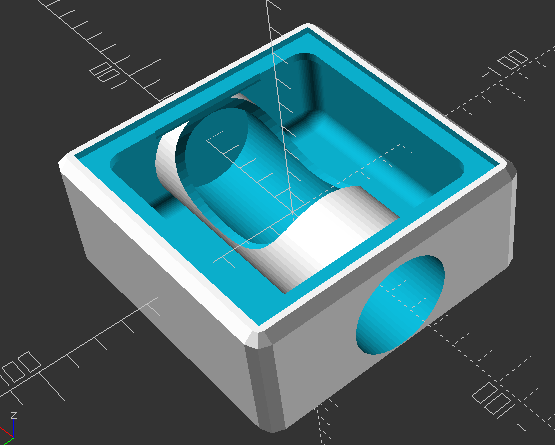
The maker has an interesting “drop down” style small vacuum former on Printables, which is likely to reduce errors, but one of these vacuum attachment ones. It seems reasonably easy to produce. It’s basically a box, a tube out the side, and a platform where you can place a holey 3mm board. If I wasn’t trying to be fancy, I imagine I could knock out this design in a few minutes of OpenSCAD work.
Well. I just can’t help myself.
Vacuum former box adapter
The box puts the adapter inside the box, so it’s not sticking out, has some supports underneath the lip supporting the cutout for the plywood plate. Sure, this would still need a way to hold the plastic sheet, but that’s less interesting so I didn’t make it. :)
You might wonder why I’m including screenshots rather than embedding the video… I basically don’t count on users not deleting their content and don’t trust any online platform that they will still be here in the future. [↩]
Whether you make an entire systems as complicated as Adam Savage’s huge setup or as simple as something made from a peanut butter jar, the theory and operation is essentially the same:
Build an enclosure that can pull a vacuum
Put a bunch of holes in a side of that enclosure
Warm a sheet of plastic until it begins to soften
Turn on the vacuum and lower the warmed plastic over an object for the vacuum to pull the plastic around the object
In recent years there have been several Kickstarters for vacuum formers. At a few Maker Faires in the past I’ve gotten to see several of them up close. Don’t get me wrong – those professionally built models are great, but I probably won’t ever buy one. They’re probably great for consistent temperatures, going quickly and precisely from heat to vacuum, much bigger than my own DIY setup, and probably has some kind of safety testing.
That said, this is one of those “Pareto Principle” type tools. I can get way more than 80% of what I need way less than 20% of the cost. The bucket vacuum former costs probably $50 worth of materials plus a cheap heat source versus $500 – $5,000 for a more professional setup.
I’m extremely fortunate that my city’s utilities are not only provided through the city as an alternative to the incredibly poorly run PG&E system, but they have a STEAM oriented “exploration center” to entertain and educate about science, conservation, and environmentalism. The people who work there put on workshops about all kinds of things and are incredibly helpful, friendly, and enthusiastic. Right now they’re in the process of converting a section of their building into a makerspace and I couldn’t be more stoked.
If you are one of those “Just show me the recipe, I don’t need your life story” types, you can skim the table of contents to see what I’d recommend for various home/makerspaces at different levels/price points. If you don’t mind a short walk, I’ve got a few related things you might not hate reading.
I’m fortunate that we have been able to put together some of the basic tools for something of a “home makerspace.” Even so, I’m super psyched about there being a makerspace within biking distance of my house. It’s got me thinking – how would I build out a makerspace? I think my design philosophy would be “tools before tech.” I do have a vinyl cutter, but before that I cut things by hand with an exacto knife.1 I have a laser cutter, but before that I cut things with a hacksaw. I have a 3D printer, but before that I would just cludge stuff together.
If going to Maker Faire has taught me anything, it’s that you don’t need high tech gadgets to make incredible things – you’ve just got to be resourceful and scrappy. Then again, if you’ve got a budget… well, sometimes it’s nice to be able learn new skills, try out new machines, explore new possibilities, and make things easier/faster/with less waste.
I like the process of making things with my hands. It was a point of pride that my ukulele was almost 100% made with hand tools.2 But, as much as I like making things with my hands, many times I am less invested in the journey than I am in acquiring the thing I’m making or just making it as polished / easy to make as possible. I like making my own heat transfer vinyl t-shirts, but cutting out a very simple SVG design by hand would be 30-45 minutes of concentrated painstaking effort versus 2 minutes of craft cutter time.
One of the reasons for putting together this list is because too often I see slick marketing convince schools/classrooms/makerspaces/libraries to buy expensive, less useful, or hyper-niche products.
I thought to search up some other maker space tool lists after I was mostly done with this list. I found these twolinks to be fairly reasonable. The others ones I found seemed to be more about trying to sell stuff to libraries and schools, going for flashy things, rather than things that are actually likely to be useful.
Maker Tool Philosophy
I tend to avoid Unitaskers, large, expensive Tools
These have just the one use
I tend to follow the 80/20 Pareto Principle3 and avoid unitaskers, especially when they’re bulky or expensive. The formulation of this rule I prefer is that you can typically get 80% of the results you want for 20% of the cost and effort.4 I don’t want something I use once a year taking up space in my life. If the tool is expensive, it has be able to save me sufficient time / energy / resources versus making by other means. If the tool is bulky or expensive, I’m probably better off just renting access to the tool or outsourcing when needed.5 It’s not just about the cost of the tool – it’s also the opportunity cost in terms of space and other equipment. An embroidery machine is 2-10x the cost of a sewing machine and requires 2-4x the space.
Support Local Makerspaces
Woodland Public Library – and their SquareOne makerspace
Your local library may have a makerspace. They might only have a sewing machine, 3D printer, and vinyl cutter, but using their services will help them keep or get new funding. If you’re in California and have a valid state issued ID, you can get a library card at any state library. One of the best, most organized, and most well equipped makerspaces I’ve ever visited is hidden up in Woodland, CA.
If you don’t have a local library with a makerspace, your local community college probably has a kick-ass fablab/makerspace with every tool imaginable for the cost of a single unit class. I haven’t checked, but I suspect it could be even a remote-only semester long class, you could take it in anything, and they probably don’t have any kind of academic requirement that you do well to use the makerspace. While getting a student spot at a local college may not be feasible, many of these makerspaces will sell passes or conduct workshops. It is absolutely worth your time to visit and find out.
Inventopia in Davis, CA
Did you know your local college almost certainly has some kind of maker-incubator within a stone’s throw? They’re generally people who just love making stuff and helping others, will train you to use their machines, have wide access times, and reasonable monthly fees for makers and co-working. If it’s local, check out my friends over at Inventopia in Davis, CA.
Before Buying: Borrow, Experiment, Make Do, Build
I highly recommend experimenting or testing out a tool before making a big investment. Before getting a vinyl cutter, I cut heat transfer vinyl using a craft knife. If I hated the hobby or result, I would have been out some time and a few ruined t-shirts. Since I enjoyed it, it was worth investing in an inexpensive machine.
If I can do without a much more expensive option by making the tool / equipment or making do without, I will. I can’t justify buying a Chomp Saw for cardboard crafts for $300 when I could buildonefor about $30. Similarly, I can’t just justify $1-2k for a vacuum former when I can build a small one for $40 or a big one for not a lot more. Thus, I’ll probably never get an embroidery machine, if I can make do with the attachment below.
Basic Home Repair Tools and Equipment.
While you could go with Harbor Freight for some these things, but if you plan on keeping them for any length of time, just get something good. If interested in a short anecdote, check this footnote.6 I’m not knocking Harbor Freight either. They have super inexpensive and serviceable rubber gloves, foam knee pads, and foam floor mats that have lots of uses. I just wouldn’t go with Harbor Freight for tools that would get frequent use. Honestly, buying lunch for a neighbor who would loan you a specific tool is a better investment in friendship, community, money, without taking up any storage space.7
Hand saw, hacksaw, hacksaw blades, coping saw, coping saw blades.
Regular batteries (9V, AAA, AA) and coin cell batteries.
Crayons, color pencils. I’d probably not keep markers on hand – they just go dry too quickly.
Pipe cleaners, googly eyes, craft foam, construction paper, paints (probably tempera then acrylic), paint brushes.
So much cardboard.
Scissors.
Masking tape, blue painter’s tape, scotch tape, white glue, glue sticks.
Basic STEM / STEAM Stuff
Once you’ve got some basic tools and willing to get your hands dirty, you’re pretty much set. Research, experimenting, hardware stores, thrifting, and even dumpster diving can get you a lot of what you need to build many things. However, if you’re going to lean into more “STEAM” kinds of activities… a drawer full of microcontrollers, components, chips, wires, components, motors, magnets, and even broken things goes a long way.
For basic STEAM educational kits, I highly recommend my friends over at BrownDogGadgets. My local library / utility system uses their kits all the time , the kits are always well put together, well documented, and they’re always a hit. Their various solar powered, wearables, maker tape, and MicroBit kits are great.
After some intro-level electronics, it makes sense to spend a few dozen dollars to pick up piles of LED’s8 , coin cell battery holders, and conductive thread and you’re basically into making wearables. 9
A few words about conductive metallic tape. You can find copper tape anywhere online, but it might not have conductive adhesive unless you buy it from a retailer you trust.10 While, aluminum tape is incredibly inexpensive and works reasonably well, only comes in huge wide strips since it’s designed for HVAC and home repair situations, is not available with conductive adhesives, and you can’t solder to it. It’s big enough that I think you could probably design an entire circuit board into a wide strip of this tape. If you’re working with kids and want to make things easy on them, the BrownDogGadgets “Maker Tape” is reasonably priced, easy to tear by hand, has conductive adhesive, and since it is made with nylon can take tons of flexing abuse which could fatigue a metallic tape. Maker Tape is only slightly more expensive than copper tape, but worth keeping on hand, especially for wearables/crafting/teaching environments. None of these will break the bank, all have good applications, and there are some interesting ways to combine them, so its worth having all three on hand.
For mid-level programming with drag-and-drop programs and then easy to use MicroPython/CircuitPython, I would highly recommend the Adafruit Circuit Playground ecosystem. You basically cannot get a more beginner friendly, feature rich, easy to use system with this many sensors11 and output devices12 and communication possibilities13 for as little as a single Circuit Playground for $25.
For those ready to graduate to things made with very small microcontroller chips, breadboards, and the ATTiny ecosystem, I really like my SparkFun Tiny AVR programmer. I still build very small things with it (simple timers and buzzers, mostly), but I can see why it’s discontinued. A small underpowered ATTiny85 will run about $2, can be a little bit of a hassle to program, only carries 8k of space, and will require fiddly wiring/soldering and additional components to be useful. The original Raspberry Pi Pico starts at $4, has tons of input/output pins broken out, power regulator, built-in USB connector, and 2MB of space. You’ll still need to solder things to it in order to make it do stuff, but 250x the space, more RAM and processing power, for $2 extra is a great deal. I’ve played with the WeMos D1 Mini ESP8266, but not gotten it to do a whole lot. For roughly $2 in small lot orders, you can get something that requires a little more tinkering but has 4MB of space and built-in wifi.
I guess what I’m saying is that as technology improves, wifi/bluetooth added into smaller spaces, with more features, for less money – lots of makers will naturally end up with a drawer full of microcontrollers they’d be happy to donate to a good cause.
Basic Tech Tools
These tools are things pretty much everyone could use, pretty much anyone could justify, and you could probably find at your local library or neighborhood.
Laminator. $35-$50
I have an Amazon Basics laminator. It’s fine. It takes a little while to heat up, has only two settings, and will sometimes crumple small laminating items. That said, it was incredibly inexpensive 9 years ago and is still working. Laminating sheets and small card sized pouches are very inexpensive.
Laser printer. $180
I will only buy Brother laser printers. Inkjets are a scam and I will never go back. A Brother laser printer is a workhorse that will print, scan, fax, and sip toner.
Sewing machine. $200+
If I was starting out, I’d probably get whatever Singer or Brother sewing machine CostCo had at the time. I’m not an avid sewist, but I can make or mend a few things. If it can do a zigzag stitch, straight line, and handle a few folds of material, that’s all I’d need.
Again, I’m not an avid sewist, but there are certain things that are so inexpensive and such a huge benefit, that their addition is a no-brainer.
Extra bobbins, thread, and needles. A pack of 20 bobbins will probably be less than $5, just make sure they fit your machine. Get white, black, and perhaps a few other colors of thread. I like Gutterman nylon upholstery thread for tougher applications like bags and cotton thread for clothing. Bigger needles for tougher / thicker materials, thinner for more delicate materials, and replace them when they “feel” like they’re not sharp any more.
“Free motion presser foot”
A “free motion presser foot” or “free motion sewing foot” or “free motion quilting foot.” I don’t have an embroidery machine, think they’re super neat, wouldn’t mind learning how to use one, and, if I’m being honest, might use one perhaps once a year. However, I’m not going to spend $500-$7500 on one. A “free motion presser foot” attachment for your sewing machine, this very short Instagram video by @Riskthrift, and different colored thread are all you need to get probably +95% of the utility of an embroidery machine for about $10.
Vinyl cutter. $85+
This isn’t an endorsement, but I bought a Monoprice craft cutter. I’ve been using it to make heat transfer vinyl t-shirts. It’s slightly finnicky, I’m not crazy about the software, but it works. This model is usually $250, but it goes on sale all the time, and I snapped it up when it hit $80. I’ve used it to cut heat transfer and sticker vinyl as well as cardstock for game boxes and it’s handled everything quite well.
I haven’t used a CriCut, but for a little bit more than what I spent you can get something everyone is familiar with.
A wet/dry “buckethead” Shop Vacuum. $40
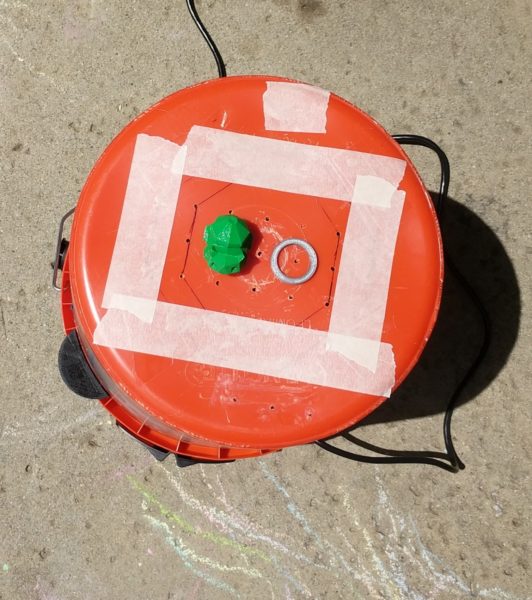
Specifically, this particular “Buckethead” shop vac that attaches to any standard 5 gallon bucket. You can get buckets anywhere from free14 , to recycled15 , to free-ish16 , to inexpensive. The attachment used to be $25, but is now $37. Even so, you really can’t beat the price.
It’s hard to go to a farmer’s market or craft fairs without seeing buckets of 3D printed knickknacks, dragons, keychains, etc. Yes, they can be a great way to churn out trinkets, but printing nonsense you downloaded off the internet is just the beginning.
Access to a 3D printer is a complete game changer. The true strength of a 3D printer is in making it possible to build nearly anything you can design, irrespective of your tool set or skill level. Come up with some designs, iterate, and invent a new tool or product that solves a real problem. Build and give away prostheticparts to help those in need or parts for PPE during a pandemic. Save millions of dollars replacing broken or worn parts with functional replicas for pennies. Use the parts to build other tools or robots to help solve other problems. I don’t think I’m exaggerating when I say that a sufficiently motivated person could save lives, iterate and invent, build a business, conduct scientific and/or medical research. Sure, people are selling Deadpool-dragon-keychains and Nerf gun parts. But, those hobbyists/entrepreneurs are the ones helping bring down the barriers and prices on equipment and supplies for everyone.
Type: FDM > Resin.
Resin printers are neat, tend to have small build volumes, incredibly high resolution, but use toxic chemicals with toxic fumes and require more toxic chemicals to clean. I don’t want these in my home, let alone use them.
I’ll stick to “FDM” or “FFF” (Fused deposition modeling or fused filament fabrication). They do produce VOC’s, particulates, and fumes when in use, and caution should always be taken, but they’ll just be easier to deal with overall. Filament is ubiquitous and inexpensive in a variety of colors. I stay away from glow in the dark because the strontium used to make it glow is very abrasive and will chew up a print nozzle quickly. White plastic filament made with titanium oxide has the same problem. I tend to print in gray/silver/black/colors most of the time anyhow.
Features. Slicer agnostic, enclosure, toolheads.
The slicer is the software used to “slice” a 3D model into thin layers the 3D printer can lay down with molten plastic, one at a time. Some 3D printers will only accept models sliced by their software, their servers, their app, or their machine. These machines sometimes come with built-in cameras, print failure detection, automatic time lapse photos, remote job start-stop. While this can make them easier to use, they’re all different ways in which it can be misused or crippled later. I would stay away from any 3D printer that uses proprietary or cloud upload software. It’s just too easy for a 3D printer company to decide to brick their machines. A printer that accepts GCode and makes plastic things is all you need. In fact, a printer that requires an app is a significant downside for me.
If I were purchasing for a makerspace, I would probably go for a printer with an enclosed build area over multiple print heads/tool heads. If I was getting one today for personal use, I’d opt for multiple material tool heads over an enclosure.
I’m a fan of the Prusa printers, I own one, but when working on a tight budget, it’s really hard to argue with a Flashforge for ~1`/3 the price. If times were tight, I’d go with a Flashforge, Snapmaker, or one of the various vowel heavy alternatives that require a little more tinkering and elbow grease. If I had the budget for it or if I had to maintain a frequently used machine, I would (and have!) go with a Prusa.
Plywood CNC Cutter. $600
I don’t have one yet – but I would personally start with a MaslowCNC for cutting full size sheets of plywood. I’ve met Bar Smith a few times at Maker Faire, supported at least one of his MaslowCNC Kickstarters, followed their forums,
These can be used to make huge displays, furniture, benches and desks, signage, and piles more things. It takes a fair bit of space to set these up, even in the vertical orientation like the original MaslowCNC and even more floorspace to use it in the current horizontal setup system, but when not in use the entire system would fit into a small-ish moving box.
Industrial Fabrication Tools.
These last two items would be fantastic to have – but
CNC Mill. $5,000 – $7,500
I don’t have a table router-based CNC cutter – or the space to really even keep one, but I’ve heard good things about the X-Carve. A table CNC takes up a considerable amount of space, will need a vacuum attachment, filtering, exhaust, etc. I’m not ready for that kind of commitment.
Laser Cutter. $7500+
I have a woefully underutilized Glowforge. I pledged their pseudo-crowdfunding-preorder, so I got it an early model for a lot cheaper than their current $7k price tag. (I’m not counting their cheaper laser diode line) Unless I had a very strong intended business use case, I probably wouldn’t buy a laser cutter today. They’re big, loud, require major venting / fume extraction, and I could probably cut whatever I needed for a few projects at a local makerspace.
Things I wouldn’t buy
While working on this blog post, I initially searched to see what kinds of tools other people recommended for budding makerspaces. I was kind of horrified at the listicles like “5 makerspace must haves” and such, usually linking to their very own store.
Sphero. They’re cute and kids could program them. I remember one of my kids’ teachers being extremely excited about getting a few Spheros for the kids to work with. I just think there are better and more cost effective ways to get kids into programming than a $200 rolling robot. If I had to teach coding to kids, I would absolutely start with the Adafruit CircuitPlayground mentioned above.
Any Robot Kits. This isn’t just about the Sphero – I’d be wary of any robot kits. If the robot kit were something inexpensive you drop a microcontroller brain into, then maybe it would have a place in a classroom or makerspace. Robot kits don’t really have to be very expensive. If you have a 3D printer, two motors, and a drawer full of stuff, you could probably make a robot that does stuff for about $20/student.
MakerBot or Ultimaker 3D printers. I loved MakerBot for what it was back in the day – a scrappy start up that made open source 3D printers you could build and, above all, maintain yourself. I like to think I’m still friends with the founders of these companies. And, while I still love MakerBot for blazing the trail and clearing the way for other 3D printers, the current offerings are high on marketing and bear little resemblance to their open source roots. Honestly, I haven’t kept up with Ultimaker once they were acquired by Stratasys. Until that point they were still an open source darling and I still think their Cura slicing software is top notch. While the MakerBot website was scrubbed of open source resources long ago, the Ultimaker website still has these various things still available. I haven’t been able to confirm whether the Ultimaker is still open source, but given the purchase by Stratasys, I’m guessing it is not. If I’m not buying an open source machine, I’d go with something way cheaper that doesn’t require a ton of bloatware, apps, server based slicing, or proprietary slicing software.
ChompSaw. Now, I can’t justify $300 for a machine that can be built from scrap plus a small $30 part and $20 power drill that can be used as a drill whenever not used in the project. That said, if I were trying to furnish a makerspace and just wanted an off-the-shelf solution, the ChompSaw has a dust collection pan and has safety testing certifications
I drilled the holes for the tuning pegs with an electric drill, but then designed/3D printed a hand drill to help finish it. [↩]
I didn’t realize until recently the original Pareto principle was about how 80% of the land in Italy was owned by 20% of the citizens. [↩]
Actually, I aim for 85% results for 15% effort. [↩]
I’ll never buy an RV for $50-200k and then pay to insure/store/maintain, when I could for a few thousand dollars whenever I wanted. Which will also be never. [↩]
Many years ago my dad gave me his trusty utility knife. It was already old by the time he gave me this Stanley brand knife. Around the time we moved I had visited an Ace Hardware and saw they had a $1 bargain bin utility knife that looked very much like my own, so I picked it up to have an extra one on hand in a different area of the house. Like my trust knife, this one had an internal area where it could store extra blades – so that’s where I put some blades. You’re probably wondering – how bad could this utility knife be? The handle had a slight gap in it where one of the extra blades stuck out very slightly – by probably half a millimeter. It was never enough that it ever broke the skin but always enough to poke me and I hated it. If you’re going to use something more than a few times, get something good that will last you. Don’t cheap out and get a piece of crap that will scratch you. [↩]
A word about hardware store bargain bins. I don’t know this to be true, but I strongly suspect the various Home Depot and Ace Hardware bargain bins are essentially sourced from the same cheap and/or low quality sources pitched to the store buyers at the most recent convention or the same Temu/AliExpress sources we can buy from. My additional suspicion is that this is basically the entirety of Harbor Freight’s stock comes almost exclusively from these kinds of sources. [↩]
Different colors, sizes, shapes, and types – from single color, flashing colors, and “smart” / NeoPixel LED’s [↩]
A note about conductive thread: I like the BrownDogGadgets.com brand. It wasn’t brittle, was easy to thread, and has seemed to hold up in my projects. I’ve heard other threads are less easy to work with or tend to break. [↩]
For me, that would be BrownDogGadgets or Adafruit [↩]
I’ve been making some notes as I work on my vacuum former and the proposed workshop for this year’s Bay Area Maker Faire. Here’s some ideas and thoughts, in no particular order.12
Workshop Proposal
I’ve demonstrated my bucket vacuum former at my daughter’s school a few times – and it is always a huge hit. The vacuum formed result looks like so much more than the product of very cheap and accessible materials. Two years ago I put on a presentation at Maker Faire about how to build a vacuum former – and this year I want to try something even more ambitious. Here’s the slideshow from 2017.
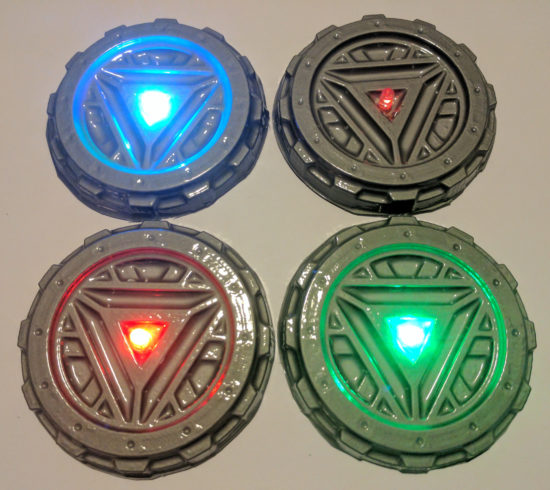
I want to do an entire workshop on how to build and operate a vacuum former – and then let people try to vacuum form their own objects. One of my favorite things to vacuum form is an “Arc Reactor” and then augment it with an RGB flashing LED and a coin cell battery. However, I think people would also enjoy making goggles and phone cases. It takes about 30 seconds to heat up the plastic and just seconds to actually vacuum form a shape and let it cool down.
Several months ago, just before Thanksgiving, our stovetop stopped working. Yeah. I know. Talk about timing, right? While we scrambled to get a new cooktop ordered, delivered, and installed, we also purchased an inexpensive hot plate from Amazon. I had originally used an old hand-me-down large toaster oven to heat up the plastic, but wondered … is there a better way? That toaster oven is huge and takes a long time to heat up. This weekend I was delighted to learn the hot plate heats up very quickly, gets hot enough to soften the plastic, and works as a fantastic and compact replacement for the toaster oven.
There are a few caveats to using the hot plate.
The heat was more localized, causing the center of the plastic to become thinner and saggier. When the plastic plates were heated in the toaster oven, they tended to heat more evenly. Perhaps if I tried a lower heat setting or held the plastic plate higher, this might be mitigated.
It’s hard to get a sense of the plastic without actually watching it get soft and wobbly. This is especially true when the plate is inside the toaster oven – there’s only room enough for one or two people to see what’s going on. However, with the hot plate, there’s no enclosure3 to obscure an audience view.
I was somewhat paranoid about letting the plastic droop down onto the heating element. I’m pretty sure it would smelled horrible, made a huge mess, been nearly impossible to clean, and made the hot plate unsuitable for any other purposes. I may try to locate a cheap hot plate from a second hand / thrift store / goodwill to take to Maker Faire. Though, now I’m also wondering if it might be possible to repurpose an old coffee maker, grill, griddle, or panini press, into the heater for this project. Maybe if I covered the heating element in aluminum foil first, that would protect the surface?
The power switch of the vacuum head / bucket head is conveniently placed right on top for normal operation. For unusual operations such as this, where the vacuum is upside down, it is decidedly inconvenient. I used a power strip with a switch which made it much easier to operate the vacuum. I think I may invest in a dedicated foot switch extension cord for this project. It’s a very cheap upgrade that would make it a lot easier to do.
Accessories / Things to Bring to Maker Faire. There are SO many little parts to a project – forget any one little thing and you’re going to be making a last minute trip to the hardware store.4 Here’s a few lists of things I will need:
Parts
Bucket
Vacuum head
Hot plate
Power strip or foot switch extension cord
One or two wire coat hangers
6x Small to medium binder clips
Wooden dowel (1x 6″ riser, 3x 8″ legs)
3D printed parts (1x plug, 2x riser caps, 3x leg holders, 3x feet)
Hot glue
Building Tools
Drill (for drilling holes)
Ruler and / or paper grid
Chisels
Hacksaw (cutting the wooden dowels)
Hot glue gun
Sharpie
Presentation Tools
Heat gun
Scissors (cutting plastic plates)
Old socks (DIY oven mitts)
Materials
Examples of plastic plates in various stages of the process
Examples of items made, also in various stages of production
In case you missed me at Maker Faire Bay Area 2017 this year, here are my slides! Don’t forget to check out all the blog posts with even more detail and pictures. You can find all the links, including to the 3D printable files, below.
This is less a post and more about just brainstorming some ideas about how to improve my vacuum formed objects:
Main holes, plus smaller holes
Perhaps additional, smaller, holes in the center of the vacuum former would allow for additional suction and more detail.
Taping unused holes
My thinking is the most useful holes in the vacuum former are those that are just under and immediately around the objects being formed. Other holes beyond those immediately around the object are probably something of a waste of suction power. Perhaps by placing tape over the extra holes, it would apply a greater vacuum force on the plastic immediately over the object, leading to a more detailed form.
Rigid top
When the vacuum is turned on, it causes the bottom of the bucket (or, rather, the top surface of the vacuum former) to bow in slightly, going concave. This hasn’t been a big problem for anything I’ve formed thus far, so I’m not that worried about it.
Build a dedicated vacuum box
There are tons of plans out there for flat boxes with holes on top and a round hole for a vacuum attachment. There’s no doubt in my mind, that a dedicated flat vacuum box for a vacuum former would work better than the bucket top I’m using. That said, the bucket setup is working just find for now. :)
Plastic frame holder and/or a dedicated oven mitt
I’m still using mini binder clips and a bent coat hanger. This works just find for my purposes right now. However, my fingers get pretty toasty as I’m holding the coat hanger. Right now I’m just using a large sheet of vinyl shower liner to insulate the coat hanger handle and protect my hands (a little) from the heat. I’m going to pick up an old oven mitt I can dedicate to this project. It would be nice if I had a better way of holding the plastic than a coat hanger, but it’s the best I have right now and probably better than most ways for holding a circular piece of plastic.
Also, as a public service announcement, if you get a chance, pick up a foot wide sheet of the vinyl shower liner. It’s cheap and you’ll find all kinds of uses for it.
Virgin plastic
Plastic plates are great because they’re free/cheap depending on how you use or source them. But, they’ve already been heated, molded and formed. That means that when you re-heat and re-mold and re-form them, they’ll be more brittle than they used to be. I haven’t priced out plastic sheets for vacuum forming, but they can’t be that expensive.
Better designed forms
I managed to design a 3D printable arc reactor with “draft,” so that the molded parts would release easier from the molded plastic. I used a draft angle of 10 degrees, which seemed to work pretty well but still required a little effort to remove the part from the molded plastic. However, I think I’ll design my next part with even more draft; perhaps as much as 15 or 20 degrees.
This is the second post in a short series about vacuum formers. You can start with the first post about how to make your own inexpensive and easy to use vacuum former or skip to the bottom of this post with a list of all of the posts in this series.
Theory
This slideshow requires JavaScript.
I discussed the theory behind a vacuum former in the prior post. This post is really about how to actually use a vacuum former in conjunction with a heat source.
Parts
This slideshow requires JavaScript.
“Buck”
The things you’re going to create molds of with your vacuum former are called the “bucks.”
Wire coat hanger
The coat hanger will be bent out of shape and won’t be usable for hanging clothes after this. A coat hanger from your local dry cleaner would do just fine.
The good news is that this is the only thing, besides the consumable plastic plates, that you can’t put back into its ordinary service as soon as you’re done vacuum forming.
4 or more binder clips
Pretty much any size binder clips would work, as long as they can get around the thick gauge wire of the coat hanger. I only had four on hand, (which is probably the minimum necessary) but the more the better. As you heat the plastic, it will contract and deform. The more clips you have, the more circular you can keep the plastic as you lay it on top of the object.
Oven mitt
I used a cotton oven mitt that has a silicone rubber grip. This is probably overkill, but better safe than sorry.
Everything you’ll be touching with the oven mitt will be cool to the touch within about a minute of taking it out of the toaster oven. I’m pretty sure a thin towel which has been folded over several times would work just fine.
Toaster oven
Preferably one that can do small round pizzas. If you’re out shopping for one, try and find one that will fit the 10″ diameter plastic plates. You can find a cheap toaster oven for about $30 on Amazon and about $15-20 on Craigslist. If you’re short of funds, I’m pretty sure garage sales or Goodwill would have a bargain.
Out of an abundance of caution, I was using my toaster oven outside on the off-chance that heating the plastic was giving off some undesirable fumes. I’m also utilizing a used toaster oven donated by my brother. I’m pretty sure the process of heating a few pieces of plastic in the toaster oven don’t make it unsafe for cooking food, but again, I’m erring on the side of caution here.
There’s nothing special about the toaster oven; it’s nothing more than a convenient and cheap heat source. If you were a more daring sort you could probably use your standard kitchen oven. I suppose in a pinch you could also use a cheap heat gun, but I haven’t tried this yet.
Pliers (Optional)
I got these out to help shape the coat hanger. In the end, I didn’t use it very much and it probably wasn’t necessary.
ConsumablesRound plastic plates, 10 – 1/4″
Round plastic plates (~10″ diameter, without dividers?)
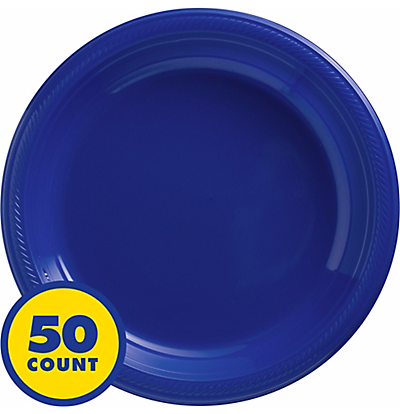
These are just the bulk plastic plates we had left over from Party City. Next time I’m there, I’ll check and see just what kind of plastic they’re made of. Their website suggests they carry plastic plates with diameters from 9″ to 10.25″ to 10.5″. The plates I had were 10.25″ and they worked out really well. You can probably find a pack of 50 plates for less than $10. You might be able to do even better by hitting up a dollar store.
Make the Plate Holder
This slideshow requires JavaScript.
Using your hands or a pair of pliers, bend the coat hanger as pictured. The goal is to get it to fit around the underside of the rim of the plate.
Clip the Plate to the Plate Holder
This slideshow requires JavaScript.
Using four or more small binder clips, clip the coat hanger to the paper plate. Put two clips on either side of where the coat hanger handle meets the plate. Put the other two clips approximately 180 degrees from the first two clips. If you have more than four binder clips, they would be helpful since the plastic will pull away from the frame as it heats up. (I only had four on hand)
Turn on the Toaster Oven
Remove all the racks, except for the bottom drip tray, from the inside of the toaster oven.
Set up your vacuum former as close to your heat source as is practicable. You want to be able to transfer the molten plastic plate to the vacuum former as quickly as possible so that it doesn’t cool down in transit.
Prepare Buck and Turn on Vacuum FormerVacuum former at the ready
Organize the bucks (the things you want to mold) on top of the vacuum former, then turn on the vacuum.
You may notice the vacuum pushes or pulls some of the objects out of the way. Just rearrange them as necessary. I try to place things so that they’re surrounded by the holes in the top of the vacuum former.
Basically, you want the vacuum pulling on the hot plastic plate, but not sucking air freely from around it. If the holes in the top of the vacuum former are spaced out way outside the perimeter of the plate, you’ll want to cover those holes up with some tape. Regular masking tape worked just fine for me.
Heat and Vacuum!
This slideshow requires JavaScript.
Put on your oven mitt, open the toaster oven, and hold the plate in the oven near the top heating element.
The plates I used went through several physical changes before they were ready. First they softened a little, then they actually flattened all the way out, then then pulled away from the wire frame, then, finally, the plastic got very droopy. This whole process took less than a minute with the oven at full power.
Once the plastic is nice and droopy, pull the frame out and place it on top of the vacuum former.
The vacuum should pull the hot plastic around your objects. After a few seconds the plastic should no longer be flexible and warm. Once it’s cool, turn off the vacuum.