Rambling again

Hermes Agent and LangGraph probably aren’t going to work for me either.  On a highly resource constrained system like my no-GPU/no-VRAM Ubuntu box, Hermes quickly has a problem with long contexts.  The benefits of Hermes is that it tries to iterate quickly using lots of calls, but with each call including a huge amount of context overhead about the user, the tools, and the current task, the context bloat means each of these calls takes forever.  I like the UI and as long as I’m using an API based LLM through OpenRouter1 , it’s fine.  While a small local model can move relatively “fast”, it gets bogged down with context and larger models which can handle the context are even slower.  Again, there’s a lot of great things about Hermes with an API.  It can be conversational, it’s fairly coherent across long conversations, it can review files, make changes, and does indeed to try to improve itself as advertised.  It’s also got a lot of ways to quickly flip between models and sessions/conversations on different topics.  Even with all these abilities, it’s still only a partial solution to what I want.  I’d like to have something that can run custom scripts on a regular basis, interact via voice, and these features don’t seem well implemented quite yet. 2 If left alone to do a task, it will litter it’s home directory with a pile of different folders and files, despite explicit instructions otherwise.  It’s very capable – but can get confused and messy.  Perhaps this wouldn’t be a problem if it were powered by a frontier model, but I’m not going to do that.

I tried out LangGraph as a possible replacement, but it has it’s own problems.  It’s far more “bare bones”, with all commands needing to be typed into the command line.  Adding skills via specific scripts works very well, powering it via local LLM works very well, it’s able to accurately interpret language and make tool calls, properly set up CRUD lists and reminders, and even manages separate conversations in it’s own clunky way.  However, it seems to really lack the iterative ability of Hermes to actually get things done.  If it had a better UI, a more clear path to having it semi-autonomously work on a task, I think I could make a go of it.

Even though these two systems aren’t for me, I’ve learned a lot about what I like and what I could put to use in the future.

I keep circling back to … maybe I should just build my own thing.  I’ve built the various parts several times before getting distracted by something shiny, so it’s really a matter of collecting those pieces, cleaning them up, and wiring most of them together with what I’ve learned from using other systems.

While I’m rambling, I just read this article on Hackaday about the LLM moats for frontier labs starting to shrink3  It kind of makes sense these damn frontier AI companies had to buy up all the RAM.  If people could easily pick up 128GB of RAM for $2504 and given the performance of medium sized models in the 30-70B / 30-70GB range, no one would pay $20 per month for access to an AI.  At the rate models are improving and being released, it certainly seems like the only thing keeping big AI companies afloat is high RAM prices.  While I would not spend $3k-$5k to get a 128GB RAM beast today, since it would never pay for itself, if that price dropped to $500, the cost / benefit analysis starts to make sense.

It does make me wonder, though…  what happens if RAM supply suddenly increases, home inference machines are suddenly feasible and every domain name / hosting provider has a $5 upsell for their own Qwen 3.8+ instance.  What happens to these billion dollar companies?  I would think there’s only so much “intelligence” people are going to be willing to pay for.  If all people really want are digital receptionists, developers, lead generation, content generation, investment predictions, and the occasional therapist/pseudo-relationship, why would they pay for an astrophysics PhD level hyper intelligent machine?

On an unrelated note, while I’m busy pontificating…  I feel like I’d recently seen something about how continued AI usage “quiets” a brain’s activity – and how taxi cab drivers in NY had very low incidence of brain deterioration as they grew older.  All of which to suggest5 that more brain use means more brain and less brain use means less brain.6

In a move that might surprise no one – these last two points suggest a much darker path for frontier AI companies.  Perhaps the game was always about about increasing surveillance and diminishing critical reasoning of the masses.

Project Jarvis
  1. Building a Jarvis-inspired voice activated LLM powered virtual assistant
  2. Building a Home PC Lab
  3. Secret Agent Man
  4. Rambling again
  1. Poolside’s Laguna S 2.1 has been incredibly useful []
  2. It can do cron jobs, but for some reason loses track of the correct date / time and time offset based on time zone really quickly []
  3. The Hackaday article is largely summarizing this article by TerminalBytes, which is an excellent read in it’s own right []
  4. Assuming pre-AI boom RAM prices and the gentle application of Moore’s law… []
  5. Assuming my recollection and interpretation of these findings is accurate and the findings themselves were valid… []
  6. Seems like a fairly reasonable assumption??? []

Secret Agent Man

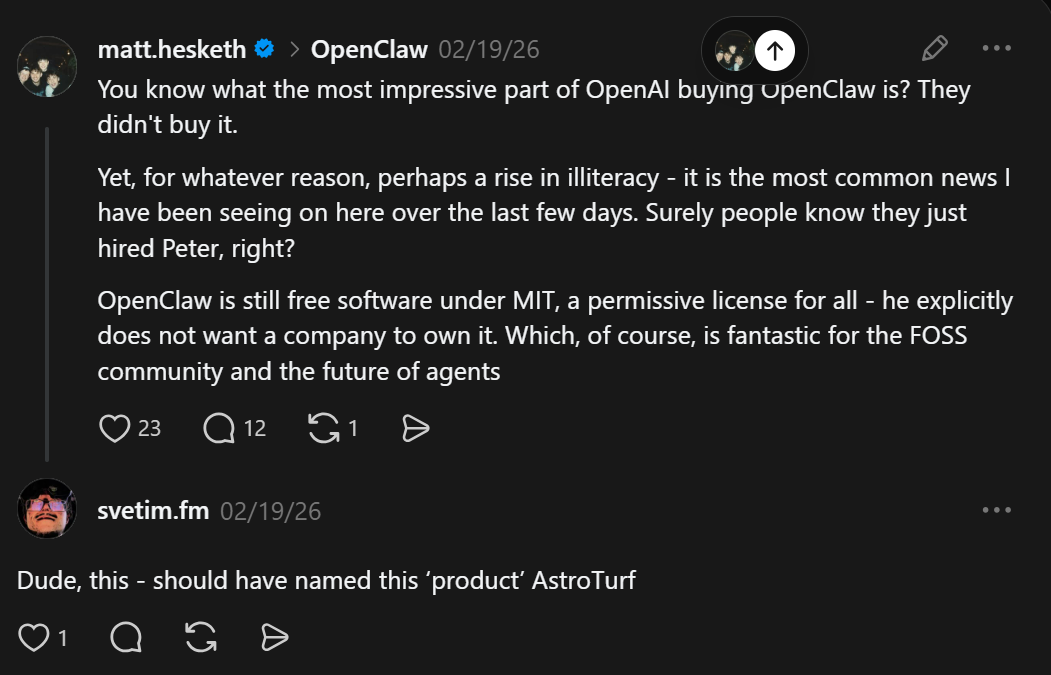
I’d been looking at several LLM powered “agent” frameworks recently.  OpenClaw got a lot of buzz several months ago, spiked the cost of Mac Mini’s, and it seems reality doesn’t quite live up to the hype.  Peter Steinberger’s description of his OpenClaw1 creation in multiple videos, podcasts, and posts was he would wake up each day to discovery the agent had been working tirelessly throughout the night on projects, building things, discover things, bring him new opportunities, and learning and growing as it went.  Reddit and Youtube exploded with people snatching up Mac Mini’s for their high unified RAM / small form factor / modest cost, implementing their own OpenClaw’s, and telling everyone about their successes breathlessly.

I think my favorite “review” was this:

The next ClawdBot rebrand?

In the span of a few weeks ClawdBot went through several name changes, Anthropic blocked it from consumer level plans, Steinberger got a job with OpenAI, while people started to post their runaway token costs and concerns the agent was escaping containment, grabbing personal information, publishing personal information, and just generally running amok.

I have never tried OpenClaw because it seemed like an AI vibe coded slop privacy / security nightmare with a thick frosting of marketing slathered all over.  I understand the appeal of OpenClaw.  It would be so nice to have a little digital butler, looking at my cluttered desktop, helping tidy up, organize me, make some connections and surprising me in the morning with some new developments.  After all, where would Tony Stark be without Pepper Potts and Jarvis to keep him on the rails?2  I also understand how some semi-technical people would be dazzled by the promise of something that would work around the clock to make them money, all for the cost of a Mac Mini.

A short interlude about Chik-Fil-A.  I don’t like their politics and will not support them.  I’ve never once given them a single penny.  But, I have eaten food from Chik-Fil-A…  When a new located opened not far from my former workplace, they came by and left a HUGE platter of delicious chicken nuggets and sauces.  They have historically donated to our local Maker Faire, providing lunch for the makers.  Hide their branding and of course their food is going to be delicious – that’s the entire point of fast food.   The first year they provided lunch, I didn’t eat it – because I don’t like Chik-Fil-A.  The second year… I was weaker – but also more practical?  I was hungry, the kids were hungry, and although I had no problem paying for food at one of the many vendors, we’d been there a while, it was hot, the lines were long, and well, the food was right there.  I suppose the most subversive thing to do would be to take their food and toss it in the trash – or maybe shuttle their food to the kinds of people they despise.  But, I’m not in the habit of wasting or delivering food.  My own subversive little act was to eat the food – and resolve to never, ever, advertise for them or give them any money.

Back to LLM’s.  I have tried Hermes Agent, running in a docker container in a machine with very little personal information about me.  I’ve only been using it for a few days – and I think it has some real promise with some real caveats.

  1. The first caveat is that I won’t use any frontier LLM services because I can’t justify giving OpenAI/Anthropic/Google/Meta money for such things.  Whatever Google once was, whatever their motto might have been, they’re so far removed from that as to be a different animal entirely. 3 The obvious downside is that without access to a very fast, very big, and very powerful LLM, my Hermes Agent will absolutely be less useful than someone else’s instance.
  2. It will run in a Docker container on an isolated, budget machine, or not at all.

In practical terms, this means I’ve limited myself to either smaller and less capable local LLM’s that my machine can run or free tier API’s for various LLM providers.  I’m still fumbling my way around Linux / Ubuntu and already using LLM’s to get my bearings, so these resources for providing the LLM reasoning power for Hermes feels within bounds too.

As always, I simply don’t trust any LLM’s outputs.  I don’t trust their purported facts, claims, summaries, etc.  Even so, there’s no arguing they are capable of building systems.  Some family recently “fact checked” me using ChatGPT and I pointed out its merely a machine designed to provide them with the very next token of what they want to hear – not a system for giving them facts.  I feel like it’s probably impossible to build an AI / AGI without training it on facts, but relying on a token generator for facts seems foolhardy.  That said, I don’t have a problem relying on a system / set of processes / code base that I can inspect and verify works to arrive at a solution.

These “agent” systems are usually better called “agent harnesses,” since their best feature is offloading the work of monitoring, guiding, and nudging an LLM to perform a task.  The Hermes agent adds a lot of extra features – keeping things organized, keeping certain chats available to revisit later on, switching LLM’s between local / API based, but at it’s core it is saving me the time of just babysitting an LLM.

As understand these agents, the first thing they do is take a query, ask the LLM to break it into pieces, and then get to work on discrete elements.  It used to be that on long tasks ChatGPT would keep popping up a “Continue” button.  About two years ago I wrote a simple Chrome extension that was active on ChatGPT and would simply auto-click the “Continue” button whenever it appeared.  I think this is less a thing these days and ChatGPT will either truncate a reply or simply stop.  But, keeping the LLM on track for each small sub-task and spurring it to complete appears to be part of what the agent is doing under the hood.

I’ve tried several LLM’s to assist with writing code, with varying degrees of success.  The best OpenRouter free model I’ve used recently has been Poolside’s Laguna S2.1 with 118B parameters, a “mixture of experts” model with only 8B active at any given time.  I’ve been very impressed with it’s coherence on long tasks and overall quality of work – and it has been extremely helpful in setting up Hermes.  I haven’t tried a recent Qwen or Deepseek model on my very much underpowered system, but I plan on doing so soon.

My first goal with this system is to get it to just run a bunch of python scrips on a cron job.  I may need to build up a separate system entirely that only runs cron jobs, but which can have it’s roster of tasks manipulated by Hermes.  Too often the LLM gets involved and wants to interpret a query rather than run a static script, which just leads to more hassles.  Perhaps a frontier LLM wouldn’t have this problem – but I don’t plan on using them.

Project Jarvis
  1. Building a Jarvis-inspired voice activated LLM powered virtual assistant
  2. Building a Home PC Lab
  3. Secret Agent Man
  4. Rambling again
  1. Well, Clawdbot -> Moltbot -> OpenClaw []
  2. NGL, I really hated Gwenth Paltrow’s Pepper Potts and would have liked nearly anyone else in that role.  Maybe it was the direction – or maybe just my dislike for Paltrow – but I found her bumbling, flustered character exhausting.  The comic book Potts was a capable, intelligent person in their own right.  Maybe there’s hope for a better person in a future reboot?  Hell, if they can recast Roddy, they can recast Potts. []
  3. I won’t even bore you with the full story of how Google promised a remediation for a Pixel 6 battery problem, bait and switched, then slowplayed it until everything expired. []

Building a Home PC Lab

Trigger warning:  This post (and potential series) is going to discuss some AI/LLM stuff.  That’s only a part of what’s going on, but if you hate all things LLM, then maybe this post isn’t for you.

Reasons for Building a PC

I haven’t built a PC in probably 25 years now.  Even then, I had the kind assistance of two friends who knew a lot more about PC building than I ever did. More recently I’ve been interested in building a PC for a variety of reasons:

  • The intellectual exercise of building something, mostly out of parts, all by myself
  • Having a PC running Ubuntu / Linux, something I’ve toyed with now and then, but never really tried in earnest.  I already eschew most closed source software in favor of open source alternatives1 , so moving to an open source operating system seems almost natural.
  • Some of my personal information currently resides on a computer I use for work – and I’d like to create a clean separation of these things for a variety of practical reasons.
  • Having an inexpensive and dedicated box would let me sandbox certain programs, try out different new ideas, and still let me access all this information and processing power remotely, if set up properly.
  • Yeah, I wouldn’t mind an Iron Man style Jarvis virtual assistant / butler, but the technology is still a fair bit aways as are my own skills and budget for such things.

Building in Parallel

I’ve taken to “building in parallel” for several recent projects.  With the recent remote temperature sensor system, I tried taking measurements with an infrared heat gun, then an ESP32C3 module with lots of wires, then several Wemos D1 Mini modules each separately sending data back to my PC.  While the ESP32C3 systems were still (mostly) working, I recognized some of the weaknesses and failure points and began working on the Wemos systems and didn’t take the ESP32C3 sensors offline until the Wemos sensors were up and running.  There was certainly overlap for a little while, but this also let me calibrate both systems.  I enjoyed working on these things, so building an entire second set of sensors in exchange for doubling the price and quadrupling the soldering wasn’t a horrible experience.  I’m reminded of a quote from Contact, “First rule in government spending: why build one when you can have two at twice the price?”

As with those sensors, I’ve had some automated projects running constantly lately.  Something that downloads a huge work calendar daily, a few simple reminders, something that sends me reminders over a messaging platform, and a few other assorted digital doodads.  I’m keeping all of these online, on my work PC, until I can get the Linux box going – then I’ll look forward to closing these down.

Pricing Things Out

As with nearly any learning experience, you end up paying for it one way or another – money, tuition, wasted attempts and materials, time.  Partially because I’m just starting out and partially because I’m fairly frugal,  I set a budget of ~$2502  If I’m going to spend any money at all, I wanted something that would work – but I’m not ready to drop $5k on RAM/GPU/newest processors.  My needs are still modest – and largely covered by my equally modest work computer.  It’s an Intel i7 with 32GB RAM in a very small mini PC case, handles email, big spreadsheets,  graphic programs, python projects, and even 3D modeling and rendering with OpenSCAD if you give it enough time.  It cost $550 before tax, new from Amazon, nearly 4 years ago, and is still going strong.

For this project I contemplated going with a fanless headless system, but these seemed to require special aluminum cases and appeared to be little harder to come by.  I thought about tracking down some e-waste resources, Facebook Marketplace, and Craiglist – but all of these require a fair bit of legwork and I feel like they’d also have more than a modest possibility of wasted time.  Any new PC would set me back at least $500 through either Amazon or Costco, so I turned to eBay since the rating system provides at least a modicum of quality assurance – if not in the product, at least the seller.

There are a ton of options for older PC’s that can be given a new lease on life with Ubuntu and some extra memory.  I’m still pretty biased against Dell, HP,  and Gateway for producing sub-par consumer grade computers for myself, family, and friends.  Some noodling about and half-hearted research suggested that these brands may produce significantly better enterprise machines than their consumer grade lines.  This only irritates me even more, if true.  This pretty much left me with Lenovo.

I ended up going with a “Lenovo ThinkCentre M70q Tiny i5-10500T 2.30 GHz” and paid a little extra to have the eBay seller customize it with 32 GB DDR4 RAM total, a 512 GB M.2 NVMe SSD, and throw in the antenna.  Besides being fairly accommodating and helpfully communicative, I went with this listing because it fell squarely in my price range / project budget, it already came with the power adapter, they were California, and it could ship very quickly.  While I could have easily spent another week or three trying to find a better deal on better and newer equipment, this was always going to be a project running on low end / older equipment and I valued the immediacy of getting to work over the incremental value of a better system.  Frankly, just not having to hunt for a compatible power adapter was a huge plus for me.

In the end I purchased the main system from the eBay seller, paid an extra $36 to make sure the system had 32GB of RAM, ordered a used 512GB SSD (they threw in the antenna) from them in a second purchase for $55, a SATA SSD enclosure to re-use an old 500GB SSD, and $7 to grab some HDMI dummy plugs off Amazon.  I knew the system would come with 16GB of RAM, but the benefit of “buying up” to 32GB also meant that I knew the machine wouldn’t have two 8GB sticks instead of a single 16GB stick.  I could later upgrade from 16GB to 32GB if I had a single 16GB stick to start – but having two 8GB sticks would mean I would later have to get two 16GB sticks.

Specs and Prices

Anyhow, for those of you playing along at home, here are all the parts for my $284.30 computer system.

PartCostShippingTaxTotal
M70q Gen 1(i5-10500T, 16GB, Adapter Incl., No SSD), upgraded to 32GB$185.99$5.93$14.41$206.33
M.2 SATA SSD to 2.5” SATA adapter enclosure$10.79$0.84$11.63
512 GB NVMe M.2 SSD, antenna$55.00$4.13$59.13
Dummy HDMI Plug$6.69$0.52$7.21
$284.30

I didn’t have to buy the SSD enclosure – but it seemed like a very inexpensive way to double the storage and repurpose my old drive.  I didn’t realize I’d need to get an HDMI dummy plug, or even what they were, until I tried to “remote” into the headless box and got a fairly ugly looking desktop instead of the slick Ubuntu desktop.  This was probably the least necessary of these purchases.  If I kept the system to the PC with the 32GB upgrade, ran the OS off my old SSD in the SATA enclosure, and picked up a $7 antenna off Amazon, the system would have only cost about $213.  The extra $59.13 doubled the hard disk space and enabled a more graphically pleasing interface.  It’s not much of a splurge and this was never a “build a PC for as little as possible” kind of a challenge anyhow.

The final system is probably on par with my existing 4 year old PC at roughly half the cost.  I think it was a “decent” deal and I have a system that I can use to offload a lot of projects.  If any of these projects end up requiring more processing power, I’m not even really “out” $285 since I can still keep using this system for other tasks (home automation, running daily scripts, etc).

And, yes, I’m trying to use this PC as a basis for a bundle of scripts I can deterministically interact with via voice input / output as well as certain LLM powered tasks.  First, a helpful comic.

And, that kids, is how AI killed human interaction

We’re probably hurtling towards dead internet theory.  I can’t search through Google or even DuckDuckGo anymore without having to wade through their AI summaries and then scroll past search results from AI slop.  Using ad blockers or setting up a PiHole to block ads and stop tracking from ever touching my PC may impoverish some otherwise worthy websites.  However, I simply don’t have to read every advertisement sent in the mail, on the inside of my grocery shopping cart, or every billboard.  Yeah, I hate the idea of AI companies boiling oceans of drinking water for their inscrutable purposes…

Reminds me of another quote…

There’s a quote I love by H.L. Mencken; “Every normal man must be tempted, at times, to spit on his hands, hoist the black flag, and begin slitting throats.”  What if the best way to filter out AI garbage is to use an LLM to do some of that filtering for me? 34

Searching through any search provider is kinda garbage these days, but there’s no reason I should have to wade through that AI garbage myself.  Gone are the days you can drill down to the kind of search results you want by simply adding “-negative_search_terms”, because there’s probably no financial reason for them to permit this.

But what if I created my own search function?  I recently tasked an AI with searching up 10 options for a certain product for me on Amazon and it did a mediocre job, finding 7 dead or unavailable listings.  But it also saved me a lot of time looking through dozens of pages of crap when I only needed to look through 10 crap listings.  With some tinkering, I think I could make a script that would identify negative search terms, perform the search as requested, then remove those that should have been removed with the negative search terms.  I could see this being incredibly useful for Ebay and Amazon purchases.

A preview for next time:  After some dithering, much watching of youtube videos, I’m going to give Hermes Agent a shot over OpenClaw.

Project Jarvis
  1. Building a Jarvis-inspired voice activated LLM powered virtual assistant
  2. Building a Home PC Lab
  3. Secret Agent Man
  4. Rambling again
  1. LibreOffice, Thunderbird, OpenSCAD, etc []
  2. Is it really a budget if there’s a range?

    Words to live by

    []

  3. And, yes, I have considered the possibility that an AI company’s aim might be to make everyone distrust the entirety of the internet, then sequester everyone into their own little siloed version of digital reality, everyone watching slightly more targeted ads and Marvel movies than everyone else, and any attempt to use another LLM to filter shit out only results in more precise targeting… []
  4. I went to the hardware store yesterday and was told by someone who worked there in an orange apron that the entire store, inside and out, was covered in Flock cameras.  I think this bullshit surveillance is really starting to get to me. []
Test