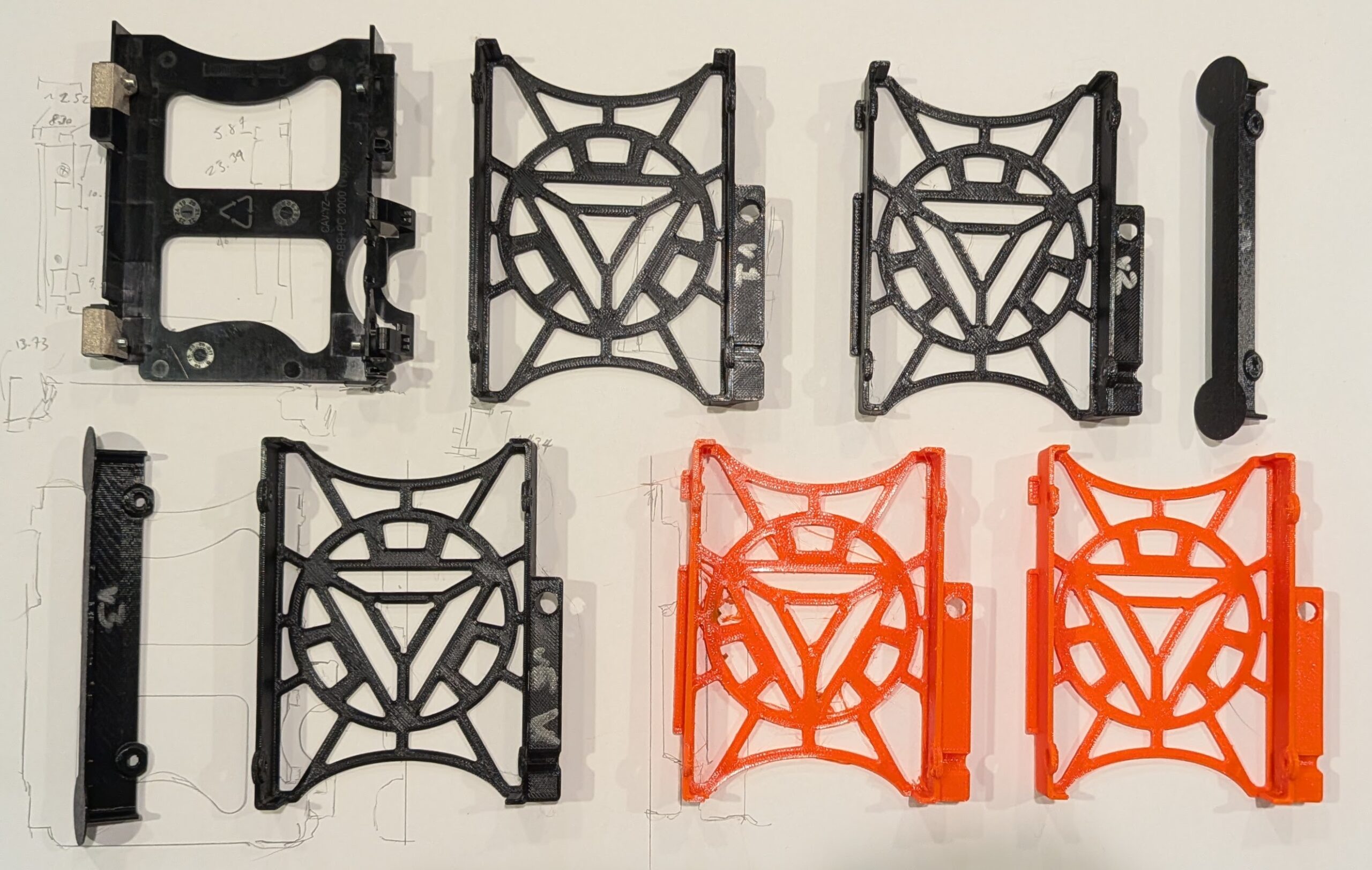
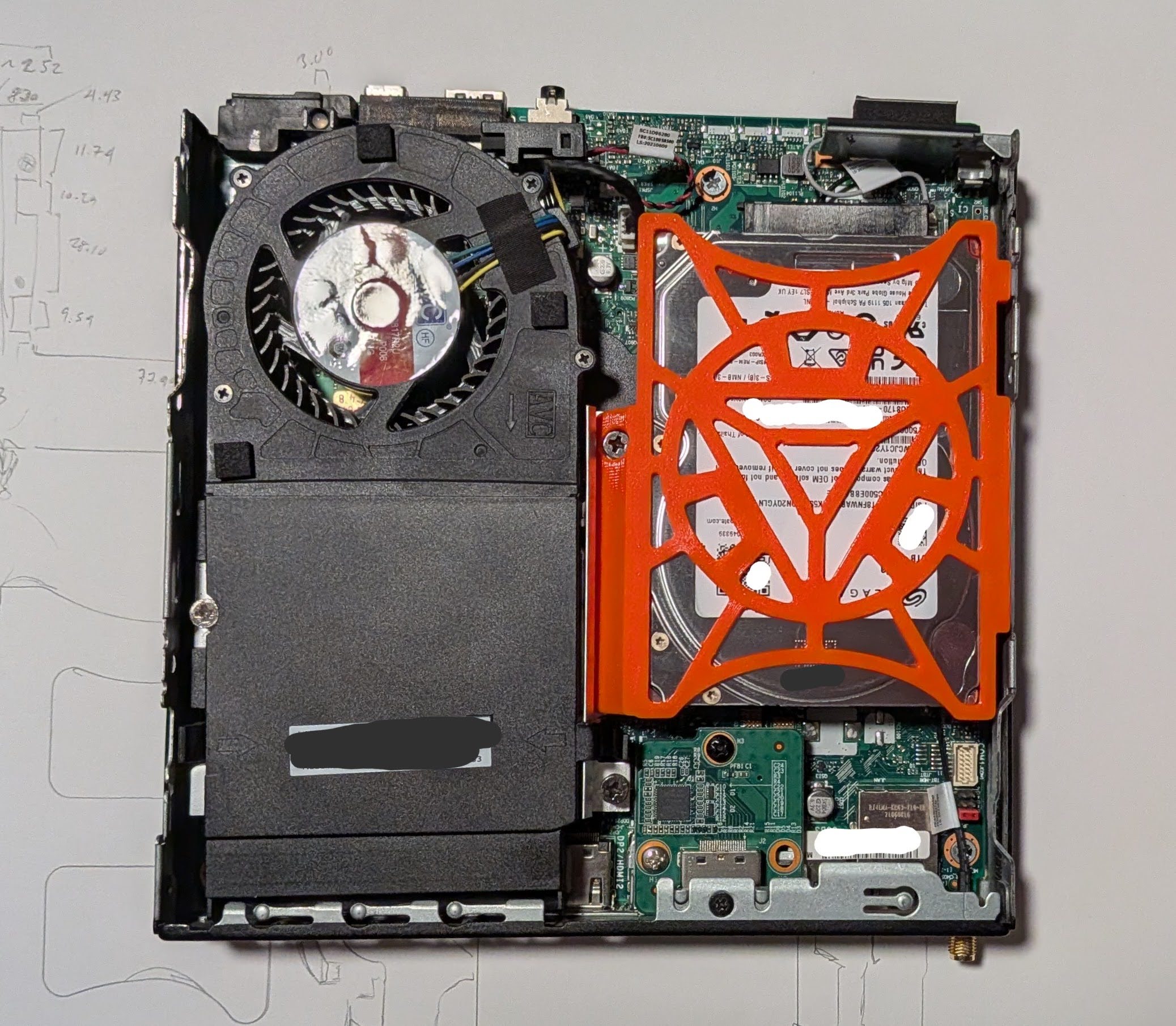
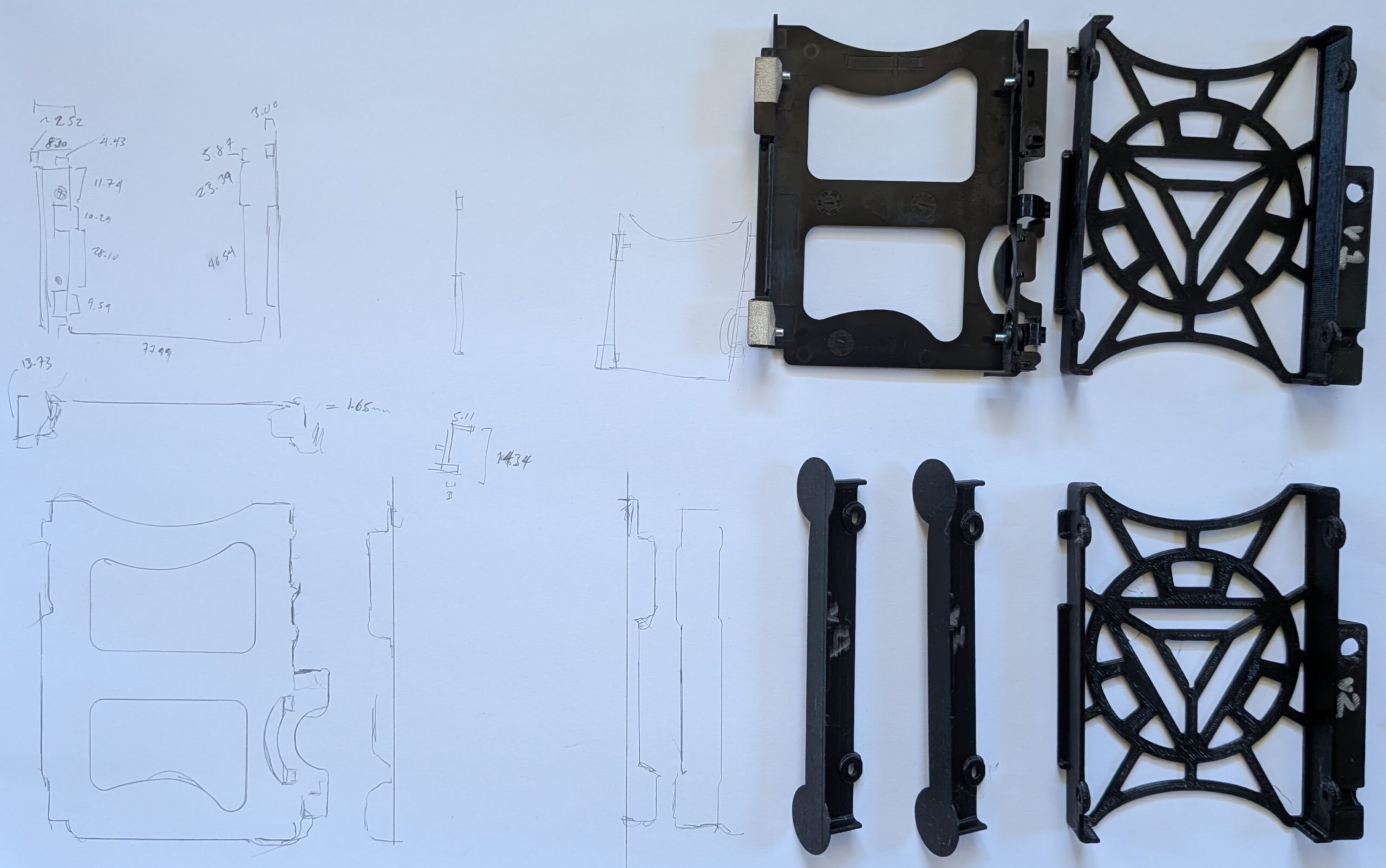
Five versions printed for testing and fitting, a failed orange PETG print, and a final orange PETG print
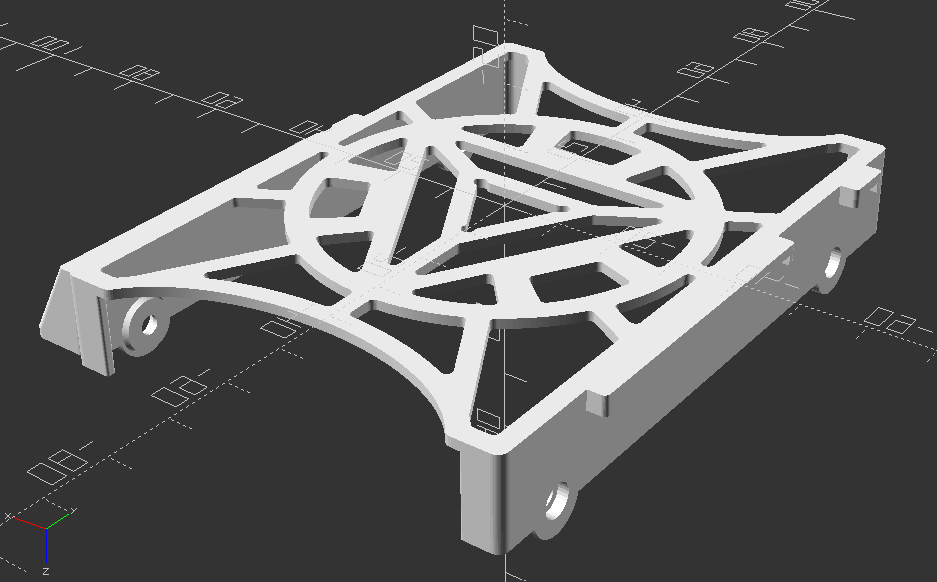
Final OpenSCAD render, top down view
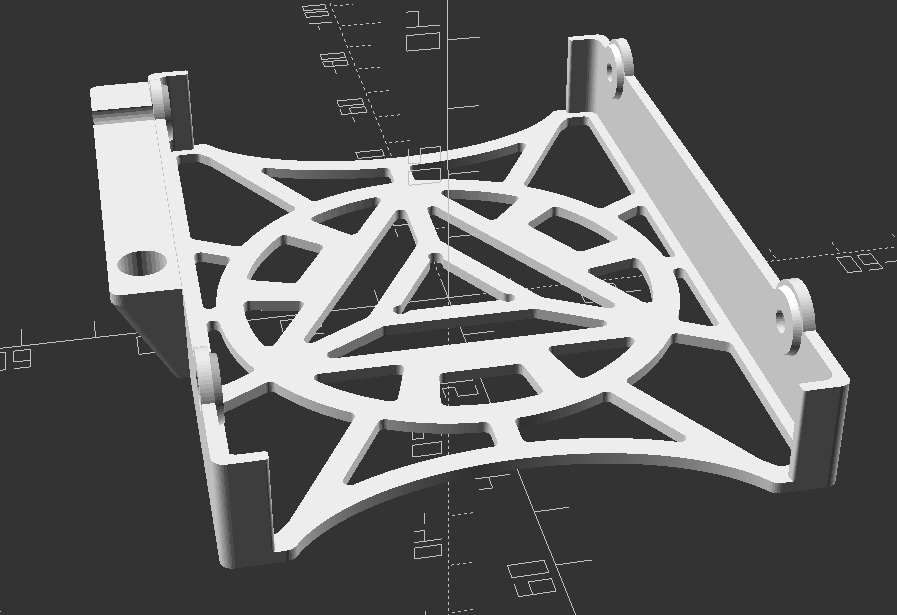
Final OpenSCAD render, oriented for printing
I couldn’t be happier with how this model and print turned out.
Fifth variation on the 2.5″ SATA hard drive caddy for the Lenovo ThinkCentre Tiny M70q case
The part pops into place snugly, even though it doesn’t include any snap-fit parts. The two tabs on the right fit over and around two bent metal tabs coming off of the frame, the beveled section on the left sits on a metal bar, with a hole for a bolt head which holds that metal frame in place. The design doesn’t include all the fancy fiddly bits that go in and around that metal bar, but it doesn’t wiggle with medium pressure. It’s easy enough to drop into place and remove without too much trouble.
In a perfect world, I would have printed it in a more appropriate color befitting an arc reactor, like glow in the dark, white, light blue, or some combination. However, while I have a medium sized collection of PLA in various colors, I’m fine with just using this one roll of PETG in it’s bright orange for those use cases requiring something that requires more flexibility or heat resistance than PLA.
I’m super happy to have this PC housing a drive that will likely last me a very long time. Our old external backup drive holds 2TB, is quite slow, requires a USB mini to USB A cable, and a huge wall wart power adapter. Now I can keep our files easily accessible inside this PC without no fussing with cables/adapters, taking up a USB port, and not requiring the additional space that’s literally larger than this entire PC.
In other news on this “Project Jarvis”… I haven’t been making much progress lately. I’m not able to run any reasonably capable local LLM’s at any exciting speeds, but it’s still at least possible at a 1-2 token per second rate. I think once it’s set up I’ll probably want to switch it to a “dumber” smart assistant kind of system where it helps me answer basic verbal queries about the weather, date, schedules/cron jobs, and any sensors I might create.
TLDR: I designed and 3D printed a caddy for my Lenovo ThinkCentre Tiny M70q to accommodate a 15mm HDD instead of the stock 7-10mm caddy.
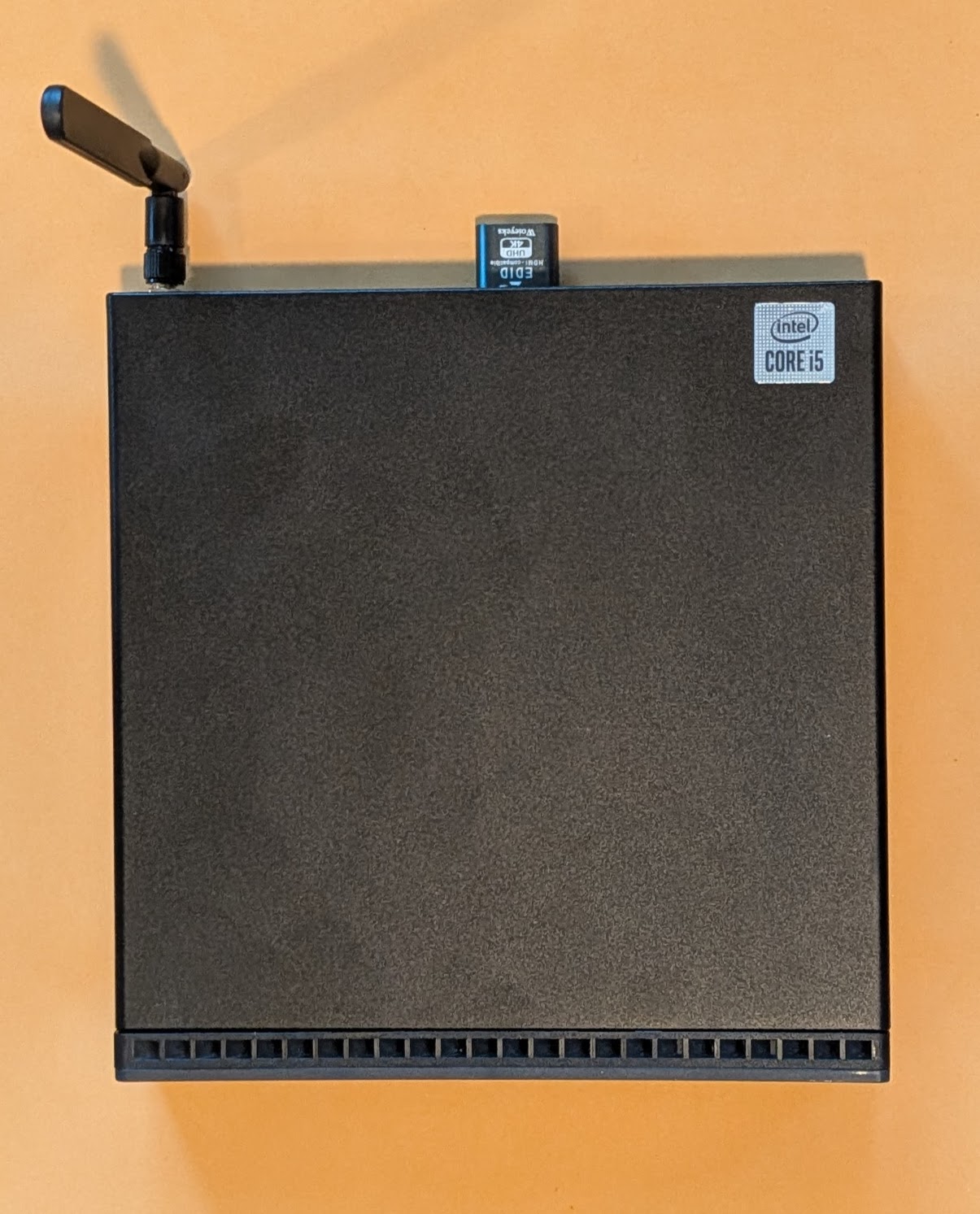
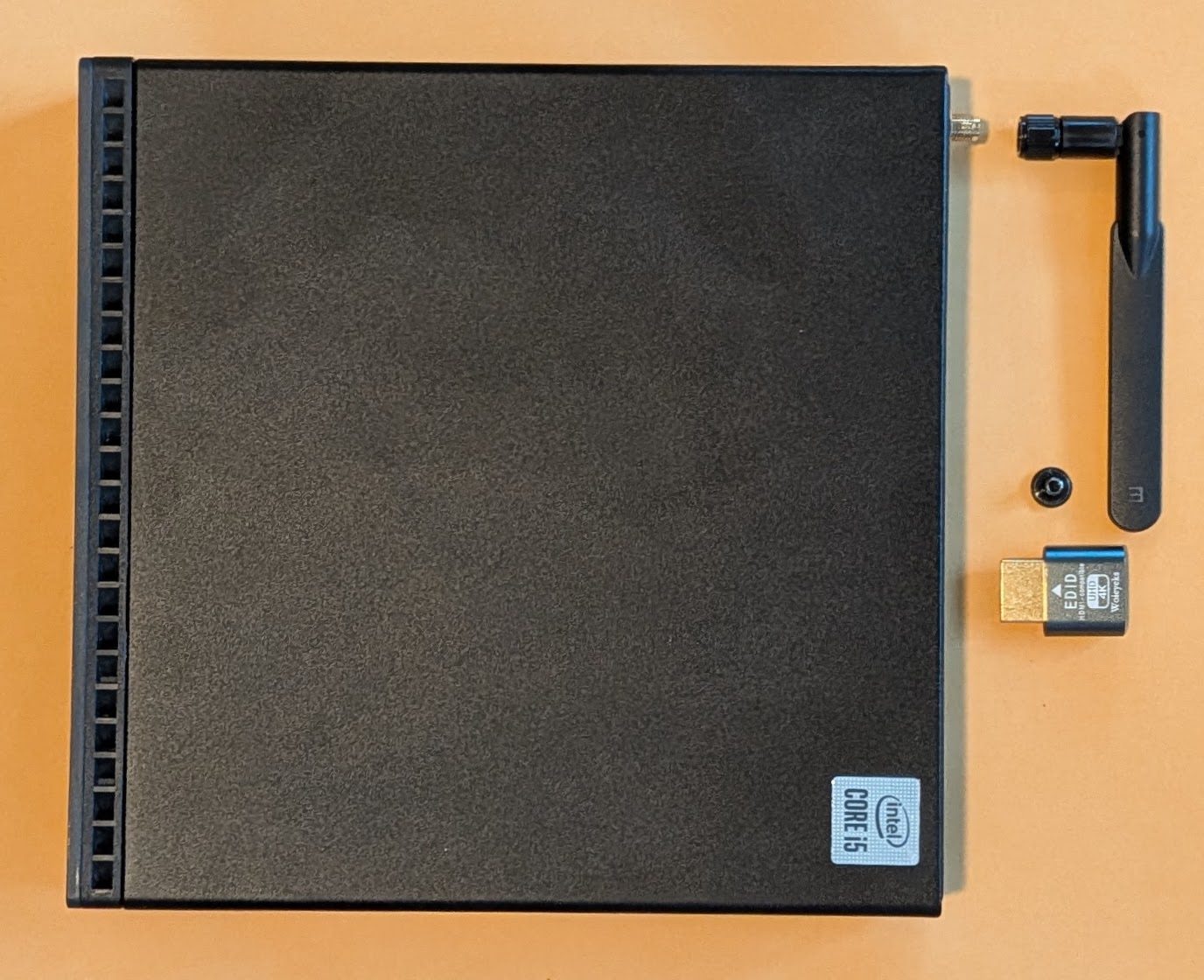
Lenovo ThinkCentre M70q, with antenna and HDMI dummy plug
Backside
Close up of the two expansion ports
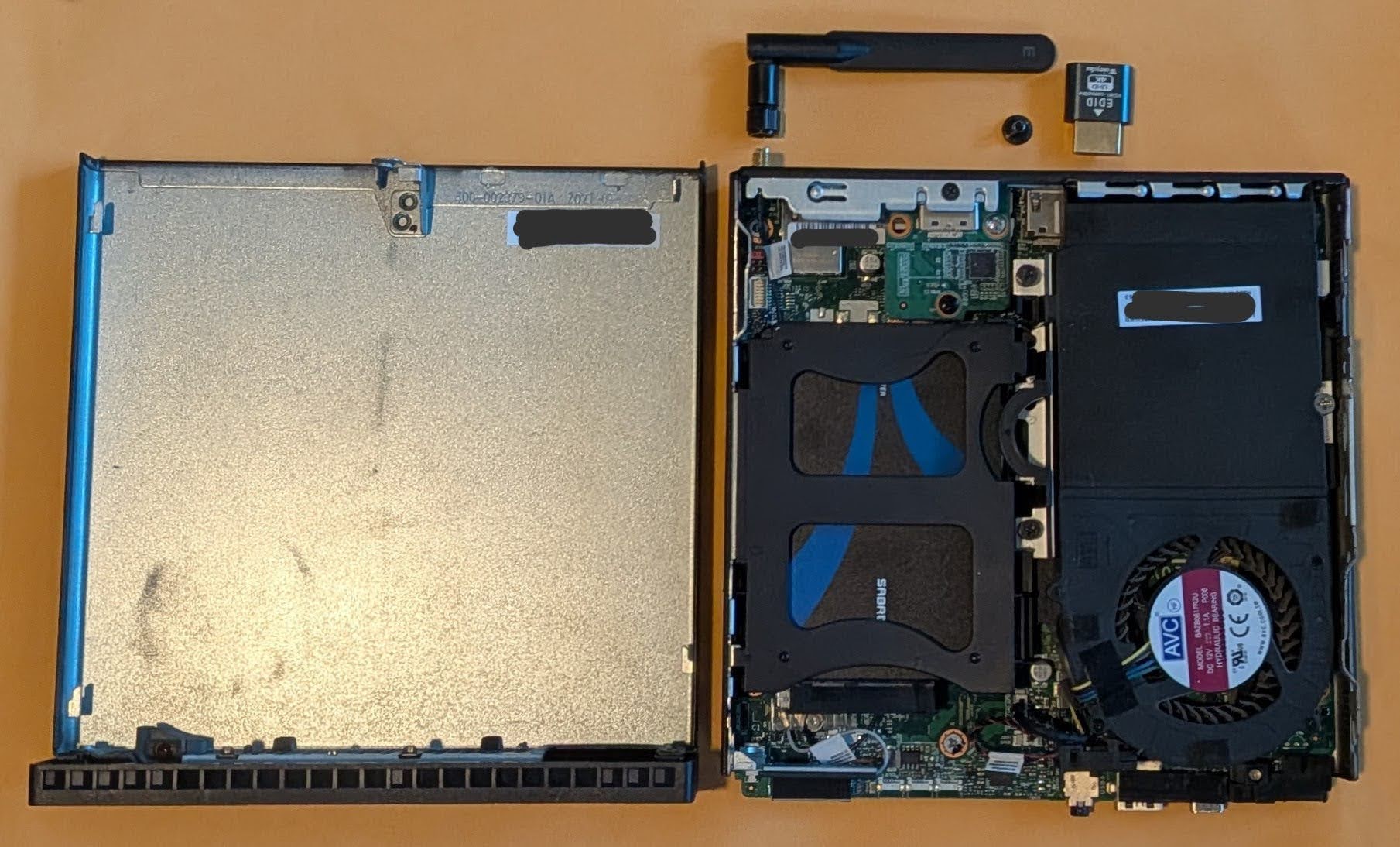
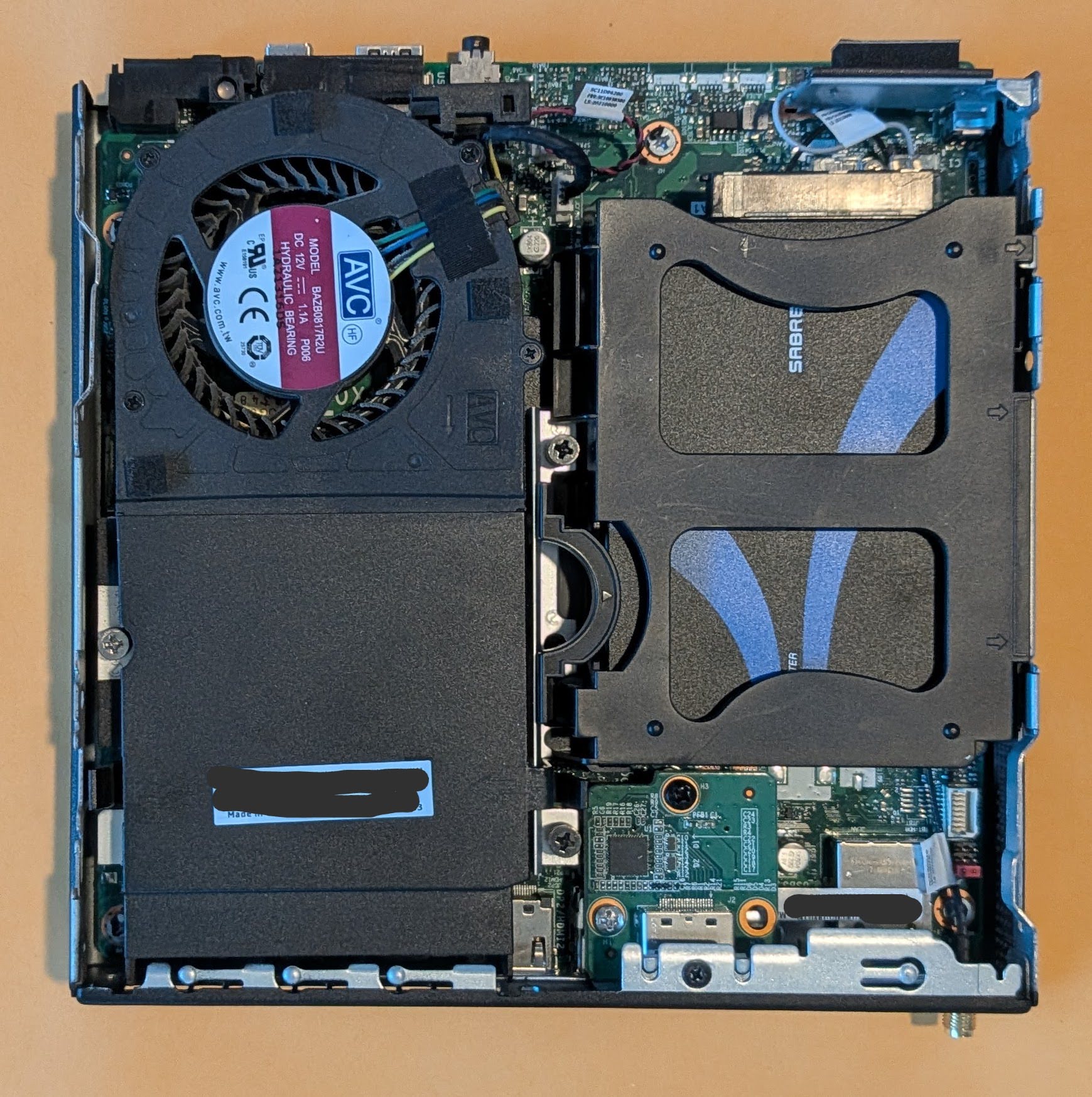
Inside the PC, showing off the hard drive caddy (with SSD inside an adapter)
Just the inside of the PC
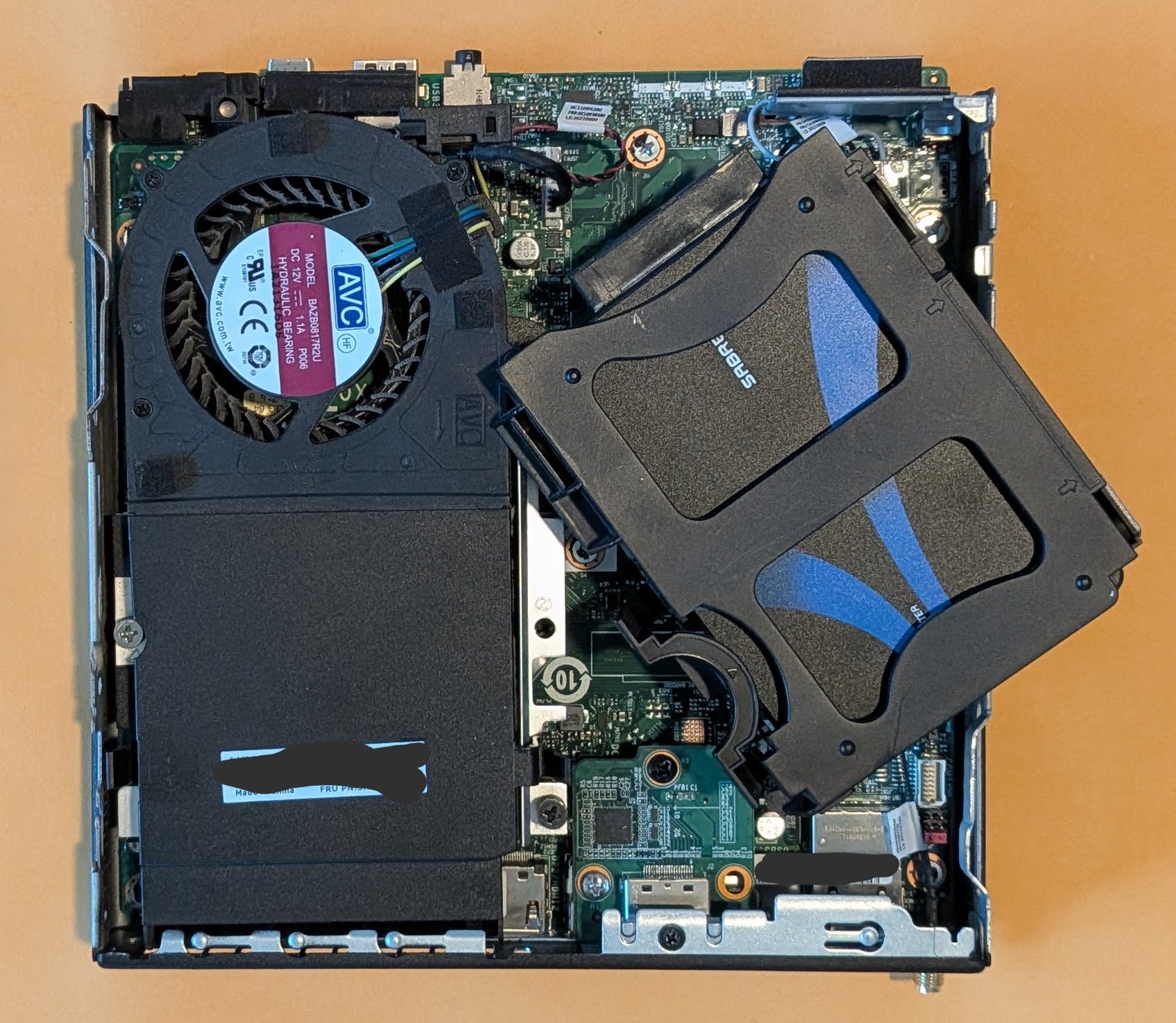
Unclipping the hard drive caddy
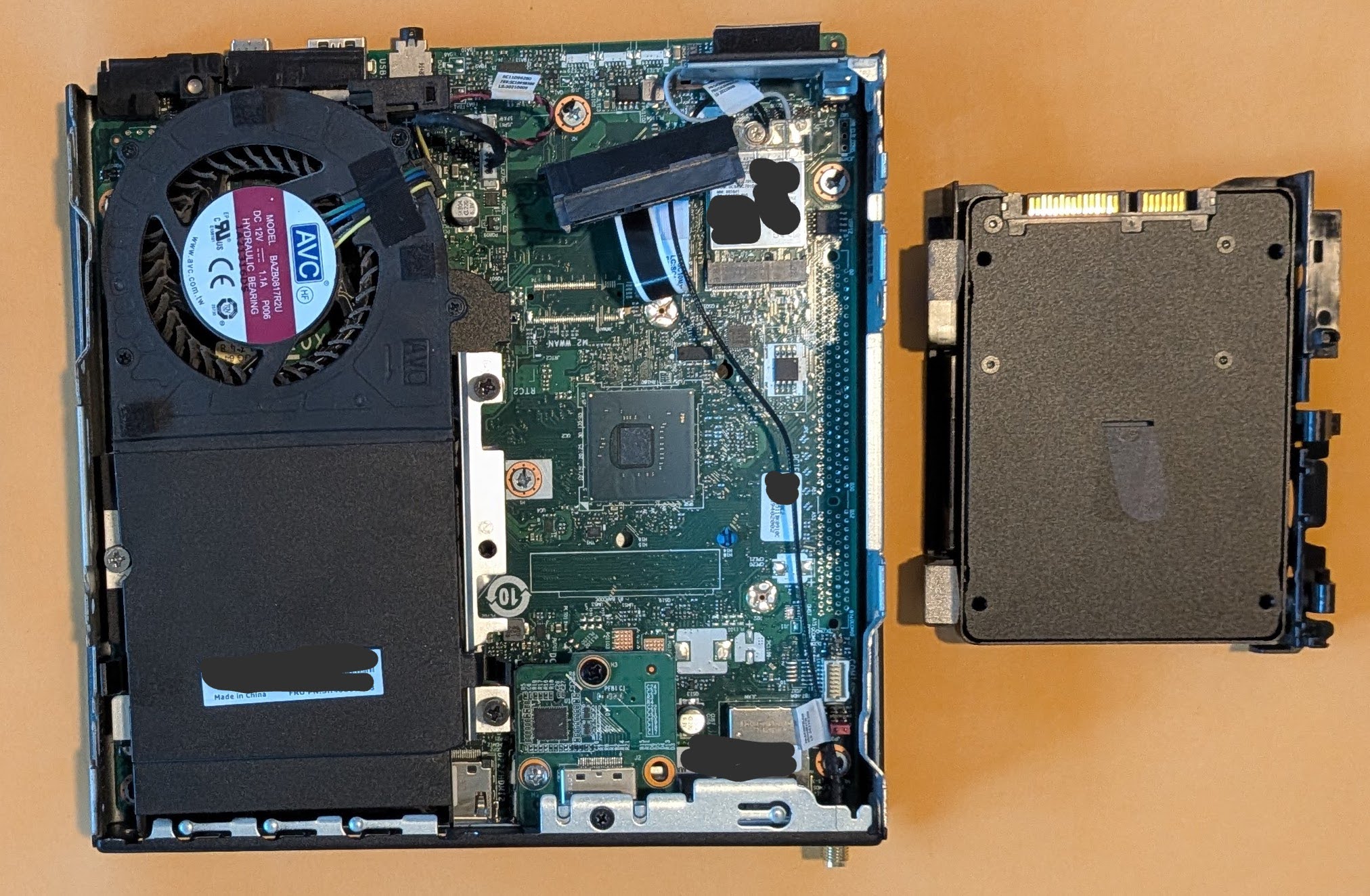
Hard drive caddy, removed
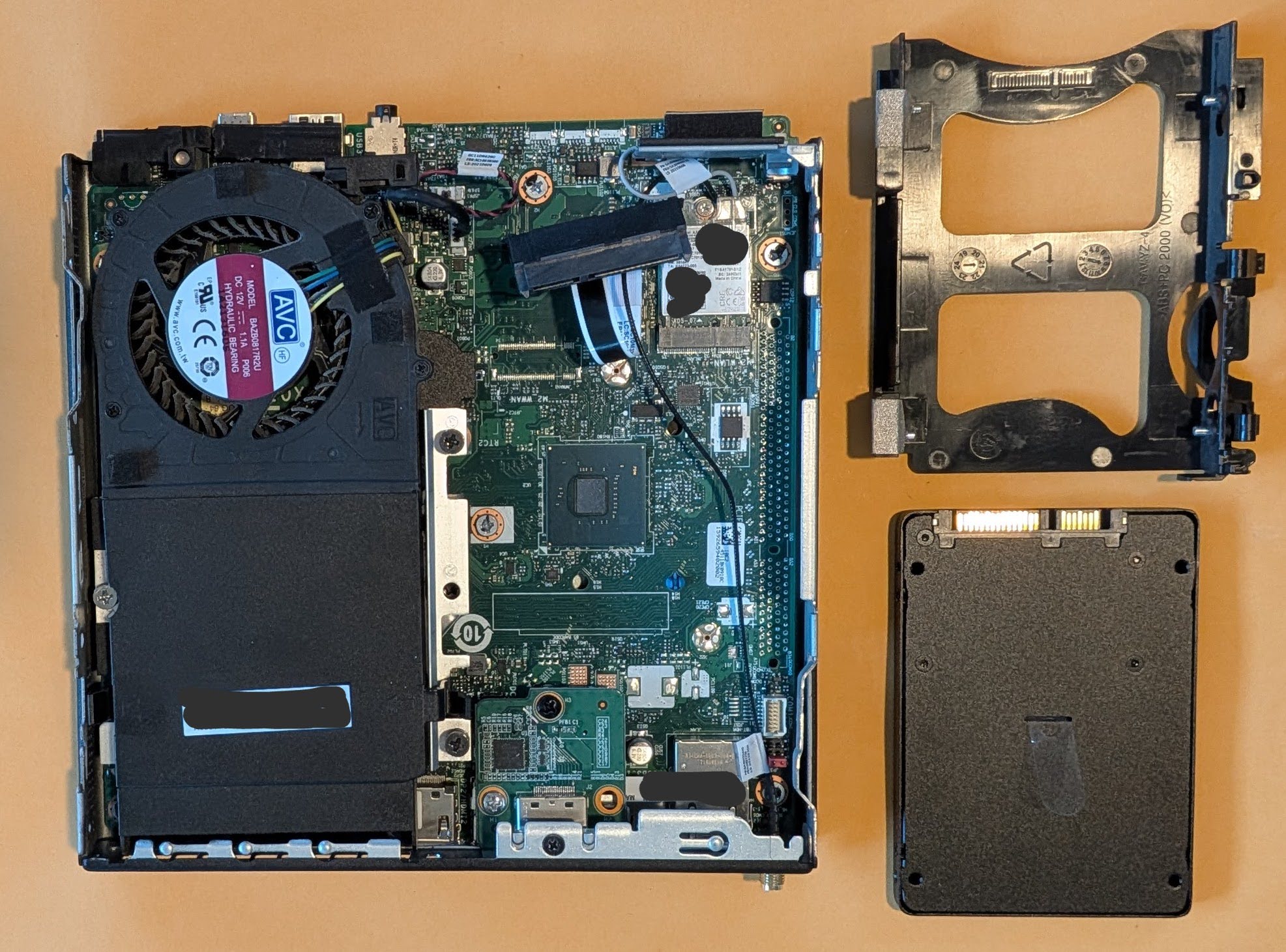
Hard drive removed from caddy
Lenovo ThinkCentre without a SATA hard drive
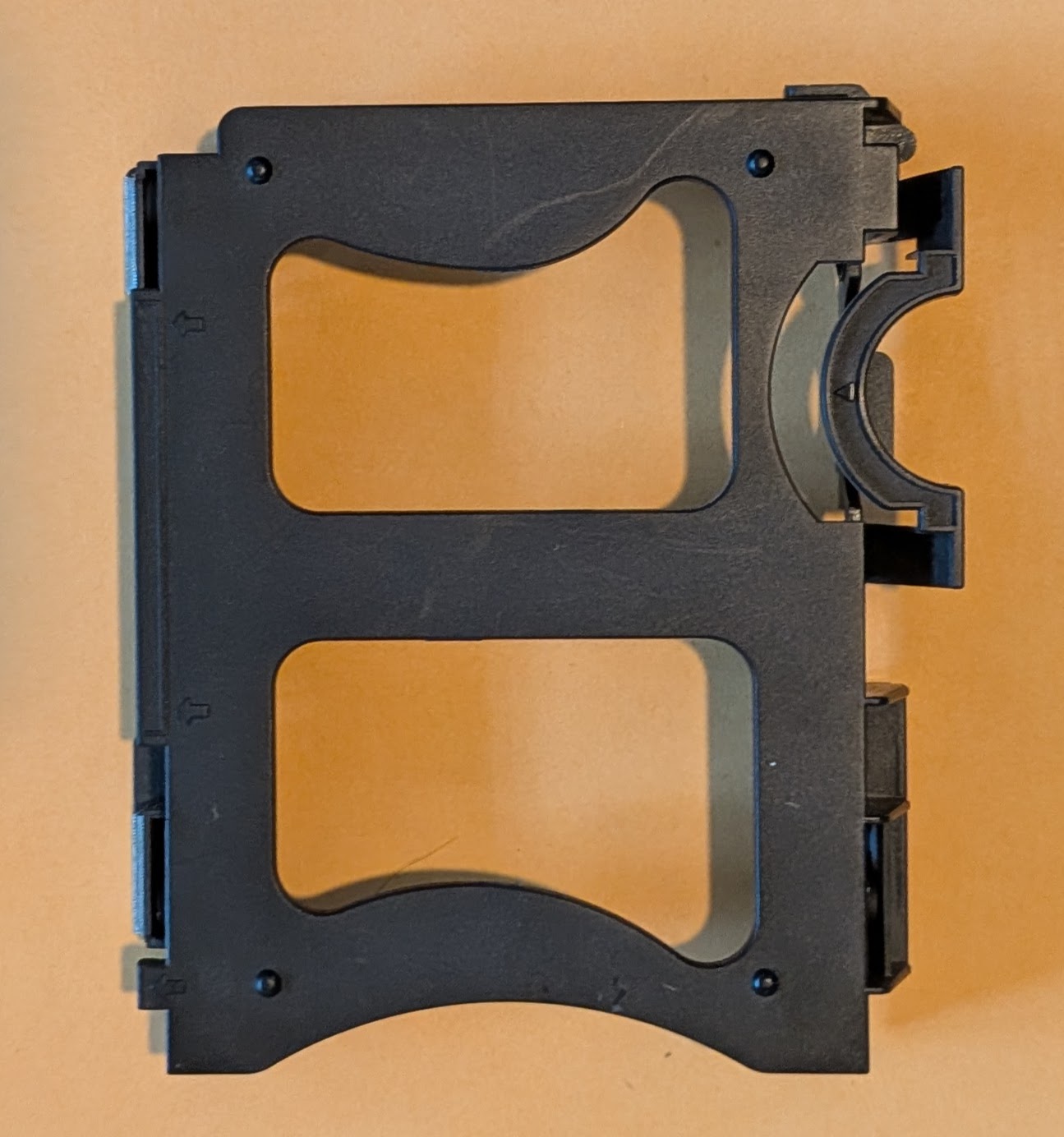
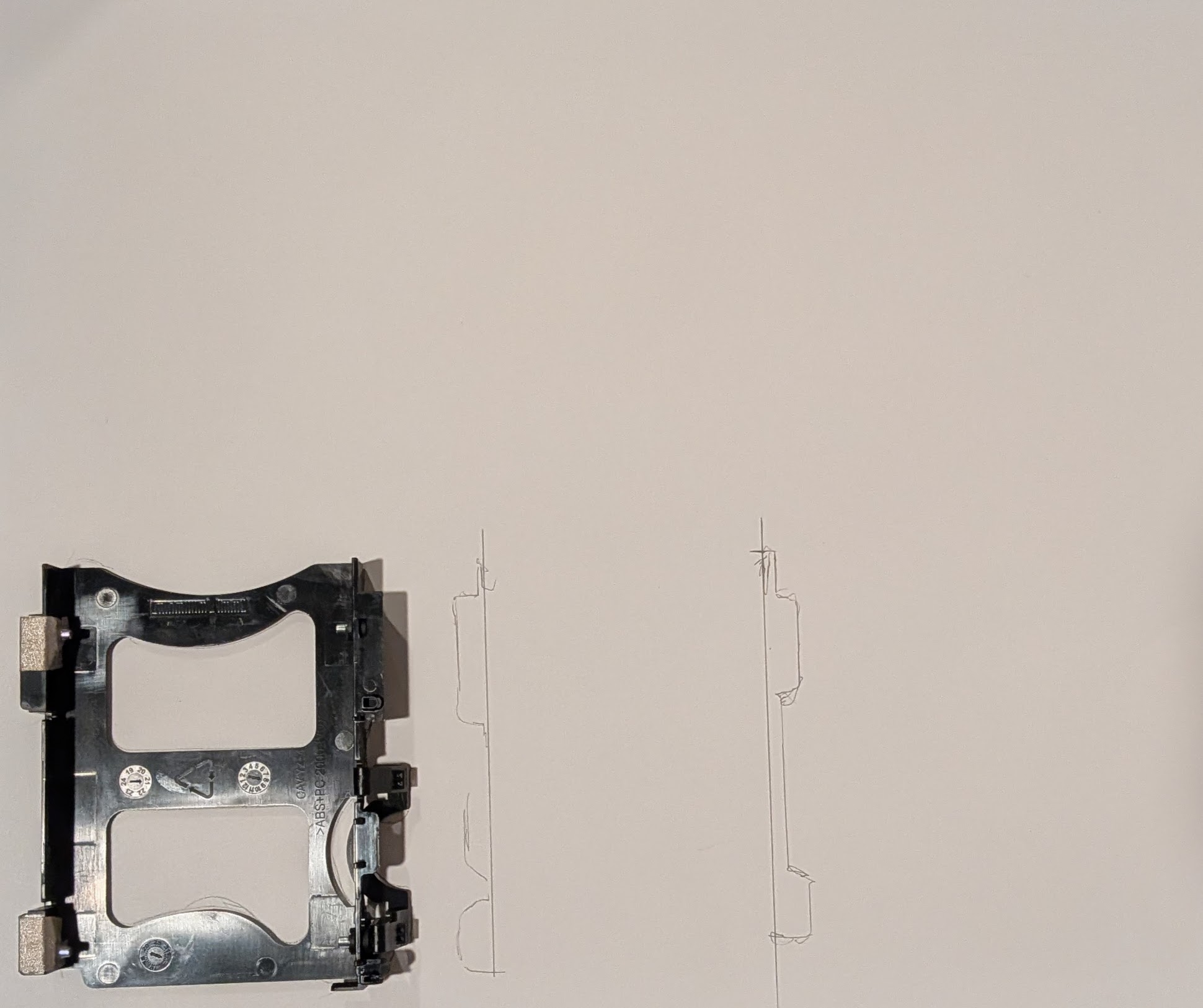
Stock hard drive caddy
I spent way too long designing and redesigning this part before I ever even printed a single version. I consulted the spec sheets for 2.5″ drives, took measurements, approached the design from different angles, and then started over again several times. Sometimes figuring out a design means I have to attack it from different angles. I tried designing it by modeling the entire enclosure, by designing a model of the SATA drive itself first, and by designing a duplicate of the caddy. The caddy that came with my PC has a lot of little fiddly bits and parts that clip onto, over, or into different parts of the case.
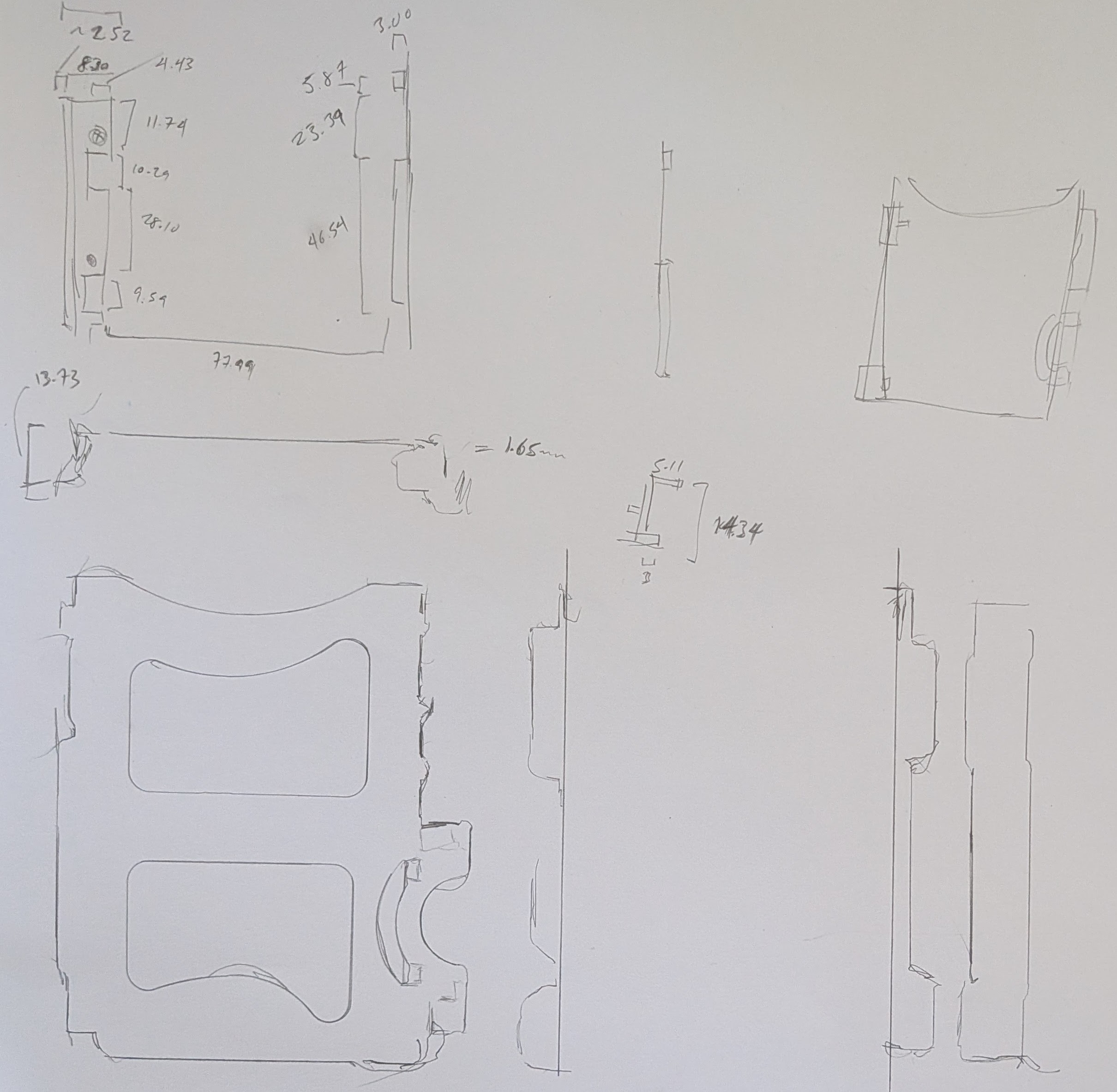
Rather than sketching the entire existing or planned part out, I traced different parts of it onto a large sheet of paper and then annotated it with measurements. I don’t think these ended up helping that much in the final designs, but they did help me have a better sense of how things fit together.
Tracing the hard drive caddy
Hard drive aspects traced out
After many iterations, I decided to design the part based on the rough external dimensions of the existing caddy and scrapping all of the fiddly and clip-on parts. The design includes a void where a bolt screws into a metal bracket to help constrain things in place. I’ve printed the entire caddy three times and parts of it twice more in PLA. While I pride myself on being able to take measurements, design a part, and obtain a successful print in one go … some projects require a bit more trial and error. Some of my measurements were off and I’d made a few incorrect assumptions in my initial design approaches, but I’m really happy with the result.
Sketches and prototypes 1-4
Final OpenSCAD render, top down view
Final OpenSCAD render, oriented for printing
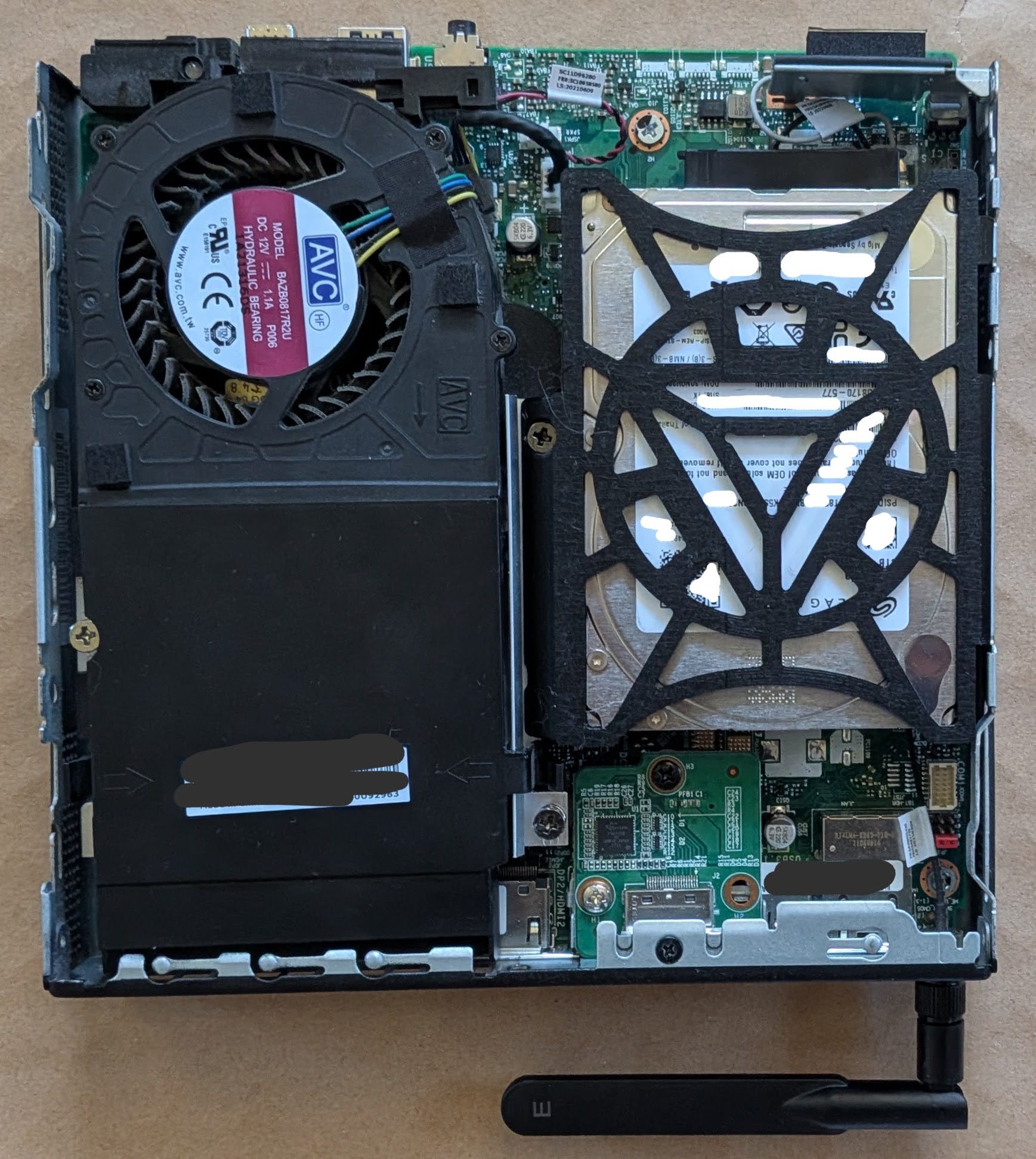
New hard drive caddy, holding a 15mm hard drive, installed
I am very happy with the fit of the final part. With screws holding the drive in place, everything stays very snug, and the part wedges precisely into place. All of the prototypes and the version I fit into the PC are all printed in black PLA, but I’m printing another version in orange PETG since it’s glass point temperature is so much higher than standard PLA and I don’t want the hard drive caddy softening up inside the case. I don’t anticipate anyone other than me will ever open this case up, but if they ever do they’ll get to enjoy the Iron Man arc reactor inspired motif to the hard drive frame.
Despite owning this printer and spool of PETG for nearly 5 years, this is my first time printing with this material. Although it’s been in it’s vacuum sealed pouch all this time, the initial printing looks slightly stringy. I’m hoping it ends up as clean and dimensionally accurate as the PLA prototypes.
Now that this is out of the way, I think the next project is getting the little voice robot to work.
Yes, I’m still struggling with the implications and ethics of LLM use.
Small LLM’s you can run at home or offline, on your machine, in your browser, or on your phone feel intuitively less evil. But, they’re just small distillation spawn from a much larger LLM – built from hoovering an internet of data, all social media sites, literally destroying old books for even more data, building hundreds of data centers, consuming power and water, churning out waste and noise. If I can’t justify using a big AI company services, shouldn’t I also refrain from using their derivatives as well?
I am still using frontier AI, just not paying for it in the normal sense of sending them money. But, I’m under no illusions that any time I’m using their services, I’m helping shovel content into their machines and train SkyNet. Since small models can be run entirely offline, they don’t have the same “you’re the content” problems.
One of my goals is to bootstrap my way out of using these things. I’m still very much a Linux newb and still working on my Python skills and what little programming abilities I have are all self-taught. StackOverflow used to be a reasonably reliable source for finding discussions on how to overcome a given technical problem, but now it’s a ghost town. If I can’t turn to something like StackOverflow… the options these days are asking on Mastodon and hoping a mutual replies, asking / searching on Reddit and hoping the answer isn’t a ‘bot, or just asking a ‘bot directly.
It’s still the same problem – and I honestly can’t tell if I’m trying to rationalize my LLM use or if there are any legitimate uses. Certainly OCR and interpreting MRI and other radiological reports to help save lives are reasonable and beneficial uses. I guess part of my struggle is that I literally cannot avoid interacting with stupid AI when they’re everywhere, in everything, ads in media and billboards, spam emails/texts, website chatbots, preliminary phone / chat bot screenings, and even shoved into the products I’ve owned for a while.1 If I’m already forced to interact with an LLM to (perhaps) benefit other people / companies, why shouldn’t I feel comfortable using them to (a) filter out their AI garbage (b) assist me with minor tasks?
Possibly unrelated, both of my kiddos are facing AI nonsense in school. The eldest receives constant warnings at university about what uses are permitted / not permitted – and then the university has students submit their work through an AI port to determine whether the students are using AI. 2 The younger one has teachers saying their work will be graded by AI – in junior high?!
I refuse to believe these students’ work aren’t being used to train the next generation of AI education software.
I know I’m rambling. I recently sent a picture of a basket of baby otters to some family members – who thought it was probably AI. I had seen it on Mastodon and based on the context, I felt it was likely real – but I had to question it. Performing an exact match image search didn’t work – since the same image has been spammed across the internet in the AI era of post-2023. I narrowed the search to only those results prior to 2020 and was able to locate a copy of the image from roughly 11 years ago.34 This made me think – since current Google searches have become complete AI slop / summary garbage, why not narrow all internet searches to only those results prior to 2023?
I think where I’m leaning on this entire ethical morass is … this stupid AI nonsense is everywhere around me, my own work and thoughts are going to be fed into the giant provider AI machines willingly5 , begrudgingly6 , or unwillingly,7 and I don’t have a big problem using similar technology to build systems to filter out AI garbage and teach me further skills.
Technically, anyone can record in public and by going out in public I’m consenting to the possibility my actions and likeness will be fed into the giant data machine. Even so, still Flock + Palantir + Meta/Google/etc is about as offensive as big brother / big data gets [↩]
Assuming all human knowledge and the entire of the internet is fed into LLM’s, they’ve digested the thousands of blog and social media posts I’ve created. robots.txt. What a joke. [↩]
This little banjo ditty from Sesame Street circa 1979 permanently lives in my brain. I’ve played the video for my kids and it’s even become something of a “meme” in our household when someone needs more room.
Anyhow… I want to add more storage space to my Lenovo ThinkCentre Tiny M70q computer. The problem, as one might infer from the name of this particular form factor PC, is that it is pretty tiny and there’s limited space inside. Even so, I have to say it is a very well designed PC case. The PC cover comes off after loosening a single screw in the back1 , hard drive caddy clips into place, the cover for where the RAM sticks are located can also be removed by hand without any tools. It’s just so incredibly modular that swapping out either RAM or a drive would easily take less than a minute. These particular kinds of PC’s appear to be marketed towards office and corporate systems, where there’s an IT department with a box of parts, that can just quickly disconnect a PC, drop in a replacement, or apply a quick fix. With their quiet operation, sturdy metal frame, stock features2, modularity, and price point make them a perfect choice for any office environment. I’m guessing the reason these haven’t taken over the consumer market is because they’re not sexy and don’t have any flashy LED’s.
It also has two small features which I love. The PC comes with a small integrated speaker – so you can play a small sound or sound file without any peripherals. 3 Also, you can buy these very inexpensive little expansion boards to give your PC an extra HDMI, DP, or COM port. I know this might sound like I’m shilling for Lenovo, but I picked this thing up on the secondary market for a hair over $200.
The problem I’m running into is that the stock PC hard drive caddy can only accommodate drives up to about 7-10mm thick and the most storage space you can get in a 7mm drive is 2TB and anything above that pretty much necessitates a 15mm thick drive.
From just a visual inspection456 I believe I can physically insert a 15mm thick drive into the SATA drive area. A quick search of Reddit suggests the only way to do this is to be a complete maniac. One Redditor said he sanded out the tabs which would normally hold a 7mm drive in place, flipped the drive upside down to pop into the metal pins, then had to twist the SATA cable around to connect to the upside down drive. The drive caddy I have doesn’t have those tabs, so it should be possible to mount a thicker drive upside down and put a half twist7 into the ribbon cable, but… I’m not excited about twisting that thin delicate ribbon cable. They’re not super expensive, but they are proprietary and the hassle of putting the device out of commission for a few days while a replacement arrives is not something I feel like risking.
I started searching ebay to see if there were any off the shelf parts to drop a 15mm drive into a ThinkCentre Tiny without success. I did, however, discover this absolute gem for sale on ebay for $20 plus $10 shipping:
Lenovo ThinkCentre Tiny 2.5″ SSD Tray/Caddy by Ropsu11 on MakerWorld
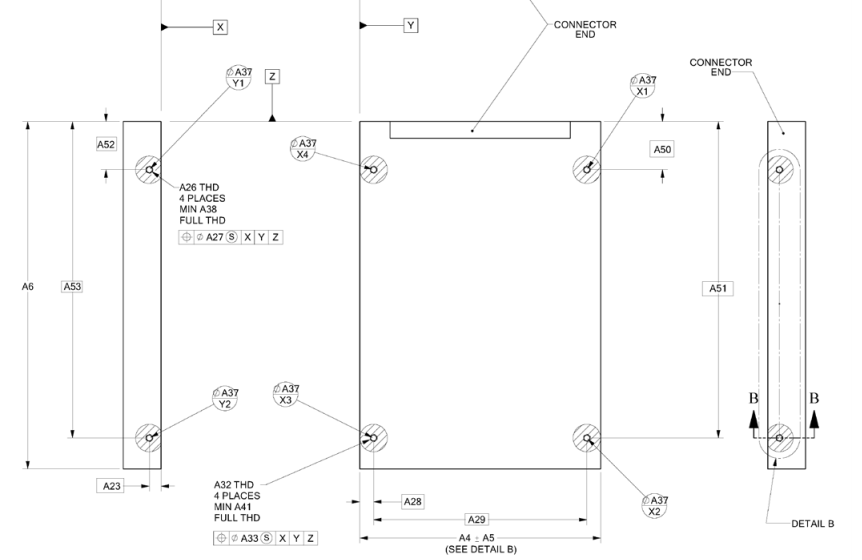
I express no opinion on whether $30 is a good deal for this product, but I couldn’t help notice it certainly has the look of a 3D printed part, which lead me to what I believe is the original file by Ropsu11 on MakerWorld. This looks perfect for my purposes, except that the design would still need to be altered slightly so that I could make it work with a 15mm drive without having to flip it on it’s back.8 I tracked down the specifications for 2.5″ SATA drives so I could figure out just how to adjust the 3D model file. Apparently the screws for SATA drives, irrespective of whether it’s a 5mm or 15mm tall drive, are located 3mm from the bottom of the drive.
2.5″ Form Factor Drive Dimensions (SFF-8201, established 01/19/2018)
The 3D model file was available on MakerWorld as an 3MF file, which I rotated slightly and then converted into an STL using PrusaSlicer. By using a little bit of OpenSCAD magic, I can take the model to center it on the origin. In doing so I discovered the various holes/tabs don’t really seem to line up properly. In an ideal world, I’d be able to adjust the original design files and failing that email or message the creator. Since the creator doesn’t enable messages from users with less than a level 7 on MakerWorld, it looks like I’ll need to try and either adjust or redesign the file myself. The specific locations of the mounting holes should be determined by the SATA drive specifications above – rather than slightly offset by various small amount. By taking the model and mirroring it over the X and Y axes and using the “%” background modifier, I can make sure it’s perfectly centered – but ended up discovering the various holes don’t seem to really line up with one another.
After some fiddling with the STL for that file, I find myself where I usually do after inspecting someone else’s model. I think I’ll just design it myself. Yes, there will be some measurements, possible repeat printing, but I’ll be certain it will fit my machine and new drive – and I can customize it as well.
The only things I have plugged into this device are the stubby wifi antenna, the dummy HDMI plug, the power cable, and sometimes a USB flash drive or device I’m working on. I just want this PC to exist invisibly and silently in the back of my home office doing it’s thing. [↩]
I had one incredibly pompous “doctor” use the word “oculometrics” to describe how he was able to perform a medical examination and make particular measurements. In looking up the word now, it appears it refers to the measurements of eye movements – not one’s ability to measure with just their eyeball perception aided by their brains. [↩]
That, of course, would be considered “cerebral aided oculometrics” 🤮 [↩]
I say “doctor” not because this person was a time traveler with dubious credentials, but because they held themselves out as a doctor of chiropractic. I’m sure people find relief through chiropractic manipulations, but as an orthopedic surgeon once told me … “90% of all back pain goes away on it’s own. So, just because you rub bleu cheese on your back and pain goes away, doesn’t mean it worked.” [↩]
One of my favorite things to do leading up to Maker Faire is to reach out to interesting people / projects / exhibits ahead of time to learn more about what they’re doing, how they make things, and be sociable, really. There’s so much to see that even if your Maker Faire enjoyment strategy is to sprint from booth to booth all day long talking to as many people as possible, it’s very easy to miss someone who was only there for just one day or part of the weekend or even someone who’s tucked away in some small corner or behind a booth that gets swamped.1 I reached out to RiseLink about their incredibly cute looking board and workshop and they graciously offered to send me one of these boards for experimentation – with their only request being that I share a short video of whatever I build.
RiseLink.AI’s AI Talking Toy
RiseLink doesn’t seem to be a “maker-facing” business per se, but rather a big chip maker creating some of these development boards to showcase their chips. From what I can tell, this board packs a huge punch for the $50 price tag – a built in camera, microphone, speaker, LCD display, and wifi capabilities, fully pre-assembled into a very cute little package.
Suffice it to say, I’m having a lot of problems getting this project off the ground. Here’s how I approached this project:
Locate Documentation
The documentation is somewhat sprinkled throughout the RiseLink website and their Github. For the moment, I’m just going to dump all the links and sort them out later.
cd /tmp
wget https://developer.arm.com/-/media/Files/downloads/gnu-rm/10.3-2021.10/gcc-arm-none-eabi-10.3-2021.10-x86_64-linux.tar.bz2
sudo tar -jxvf gcc-arm-none-eabi-10.3-2021.10-x86_64-linux.tar.bz2 -C /opt/
Clone Core SDK Repo
mkdir -p ~/armino && cd ~/armino
git clone https://github.com/bekencorp/bk_avdk_smp.git
Compile Base Audio/Voice Firmware
cd ~/armino/bk_avdk_smp
make bk7258 PROJECT=doorbell_asr
Verify Output
ls -lh build/bk7258/doorbell_asr/package/all-app.bin
Flashing the Board
Find the USB port (likely “/dev/ttyUSB0”)
ls -l /dev/ttyUSB* /dev/ttyACM* 2>/dev/null
Ensure user permissions for serial access
sudo usermod -aG dialout $USER
Flash firmware
cd ~/armino/bk_avdk_smp
tools/build_tools/armino -p /dev/ttyUSB0 burn -f build/bk7258/doorbell_asr/package/all-app.bin
By the end of all this2 , I can receive “success” messages when I flash the firmware, but I can’t get the device to do anything useful yet. I’d really like to get this working and will keep at it. Wish me luck.
… Uh, as I was getting ready to publish, I figured I’d add some visual interest to this post and looked at the RiseLink.AI’s website and blog. I found they linked to a Google Doc with a tutorial for getting it working. When I approach this again with fresh eyes, I guess I’ll start there!
Hermes Agent and LangGraph probably aren’t going to work for me either. On a highly resource constrained system like my no-GPU/no-VRAM Ubuntu box, Hermes quickly has a problem with long contexts. The benefits of Hermes is that it tries to iterate quickly using lots of calls, but with each call including a huge amount of context overhead about the user, the tools, and the current task, the context bloat means each of these calls takes forever. I like the UI and as long as I’m using an API based LLM through OpenRouter1 , it’s fine. While a small local model can move relatively “fast”, it gets bogged down with context and larger models which can handle the context are even slower. Again, there’s a lot of great things about Hermes with an API. It can be conversational, it’s fairly coherent across long conversations, it can review files, make changes, and does indeed to try to improve itself as advertised. It’s also got a lot of ways to quickly flip between models and sessions/conversations on different topics. Even with all these abilities, it’s still only a partial solution to what I want. I’d like to have something that can run custom scripts on a regular basis, interact via voice, and these features don’t seem well implemented quite yet. 2 If left alone to do a task, it will litter it’s home directory with a pile of different folders and files, despite explicit instructions otherwise. It’s very capable – but can get confused and messy. Perhaps this wouldn’t be a problem if it were powered by a frontier model, but I’m not going to do that.
I tried out LangGraph as a possible replacement, but it has it’s own problems. It’s far more “bare bones”, with all commands needing to be typed into the command line. Adding skills via specific scripts works very well, powering it via local LLM works very well, it’s able to accurately interpret language and make tool calls, properly set up CRUD lists and reminders, and even manages separate conversations in it’s own clunky way. However, it seems to really lack the iterative ability of Hermes to actually get things done. If it had a better UI, a more clear path to having it semi-autonomously work on a task, I think I could make a go of it.
Even though these two systems aren’t for me, I’ve learned a lot about what I like and what I could put to use in the future.
I keep circling back to … maybe I should just build my own thing. I’ve built the various parts several times before getting distracted by something shiny, so it’s really a matter of collecting those pieces, cleaning them up, and wiring most of them together with what I’ve learned from using other systems.
While I’m rambling, I just read this article on Hackaday about the LLM moats for frontier labs starting to shrink. 3 It kind of makes sense these damn frontier AI companies had to buy up all the RAM. If people could easily pick up 128GB of RAM for $2504 and given the performance of medium sized models in the 30-70B / 30-70GB range, no one would pay $20 per month for access to an AI. At the rate models are improving and being released, it certainly seems like the only thing keeping big AI companies afloat is high RAM prices. While I would not spend $3k-$5k to get a 128GB RAM beast today, since it would never pay for itself, if that price dropped to $500, the cost / benefit analysis starts to make sense.
It does make me wonder, though… what happens if RAM supply suddenly increases, home inference machines are suddenly feasible and every domain name / hosting provider has a $5 upsell for their own Qwen 3.8+ instance. What happens to these billion dollar companies? I would think there’s only so much “intelligence” people are going to be willing to pay for. If all people really want are digital receptionists, developers, lead generation, content generation, investment predictions, and the occasional therapist/pseudo-relationship, why would they pay for an astrophysics PhD level hyper intelligent machine?
In a move that might surprise no one – these last two points suggest a much darker path for frontier AI companies. Perhaps the game was always about about increasing surveillance and diminishing critical reasoning of the masses.
I’d been looking at several LLM powered “agent” frameworks recently. OpenClaw got a lot of buzz several months ago, spiked the cost of Mac Mini’s, and it seems reality doesn’t quite live up to the hype. Peter Steinberger’s description of his OpenClaw1 creation in multiple videos, podcasts, and posts was he would wake up each day to discovery the agent had been working tirelessly throughout the night on projects, building things, discover things, bring him new opportunities, and learning and growing as it went. Reddit and Youtube exploded with people snatching up Mac Mini’s for their high unified RAM / small form factor / modest cost, implementing their own OpenClaw’s, and telling everyone about their successes breathlessly.
I think my favorite “review” was this:
The next ClawdBot rebrand?
In the span of a few weeks ClawdBot went through several name changes, Anthropic blocked it from consumer level plans, Steinberger got a job with OpenAI, while people started to post their runaway token costs and concerns the agent was escaping containment, grabbing personal information, publishing personal information, and just generally running amok.
I have never tried OpenClaw because it seemed like an AI vibe coded slop privacy / security nightmare with a thick frosting of marketing slathered all over. I understand the appeal of OpenClaw. It would be so nice to have a little digital butler, looking at my cluttered desktop, helping tidy up, organize me, make some connections and surprising me in the morning with some new developments. After all, where would Tony Stark be without Pepper Potts and Jarvis to keep him on the rails?2 I also understand how some semi-technical people would be dazzled by the promise of something that would work around the clock to make them money, all for the cost of a Mac Mini.
A short interlude about Chik-Fil-A. I don’t like their politics and will not support them. I’ve never once given them a single penny. But, I have eaten food from Chik-Fil-A… When a new located opened not far from my former workplace, they came by and left a HUGE platter of delicious chicken nuggets and sauces. They have historically donated to our local Maker Faire, providing lunch for the makers. Hide their branding and of course their food is going to be delicious – that’s the entire point of fast food. The first year they provided lunch, I didn’t eat it – because I don’t like Chik-Fil-A. The second year… I was weaker – but also more practical? I was hungry, the kids were hungry, and although I had no problem paying for food at one of the many vendors, we’d been there a while, it was hot, the lines were long, and well, the food was right there. I suppose the most subversive thing to do would be to take their food and toss it in the trash – or maybe shuttle their food to the kinds of people they despise. But, I’m not in the habit of wasting or delivering food. My own subversive little act was to eat the food – and resolve to never, ever, advertise for them or give them any money.
Back to LLM’s. I have tried Hermes Agent, running in a docker container in a machine with very little personal information about me. I’ve only been using it for a few days – and I think it has some real promise with some real caveats.
The first caveat is that I won’t use any frontier LLM services because I can’t justify giving OpenAI/Anthropic/Google/Meta money for such things. Whatever Google once was, whatever their motto might have been, they’re so far removed from that as to be a different animal entirely. 3 The obvious downside is that without access to a very fast, very big, and very powerful LLM, my Hermes Agent will absolutely be less useful than someone else’s instance.
It will run in a Docker container on an isolated, budget machine, or not at all.
In practical terms, this means I’ve limited myself to either smaller and less capable local LLM’s that my machine can run or free tier API’s for various LLM providers. I’m still fumbling my way around Linux / Ubuntu and already using LLM’s to get my bearings, so these resources for providing the LLM reasoning power for Hermes feels within bounds too.
As always, I simply don’t trust any LLM’s outputs. I don’t trust their purported facts, claims, summaries, etc. Even so, there’s no arguing they are capable of building systems. Some family recently “fact checked” me using ChatGPT and I pointed out its merely a machine designed to provide them with the very next token of what they want to hear – not a system for giving them facts. I feel like it’s probably impossible to build an AI / AGI without training it on facts, but relying on a token generator for facts seems foolhardy. That said, I don’t have a problem relying on a system / set of processes / code base that I can inspect and verify works to arrive at a solution.
These “agent” systems are usually better called “agent harnesses,” since their best feature is offloading the work of monitoring, guiding, and nudging an LLM to perform a task. The Hermes agent adds a lot of extra features – keeping things organized, keeping certain chats available to revisit later on, switching LLM’s between local / API based, but at it’s core it is saving me the time of just babysitting an LLM.
As understand these agents, the first thing they do is take a query, ask the LLM to break it into pieces, and then get to work on discrete elements. It used to be that on long tasks ChatGPT would keep popping up a “Continue” button. About two years ago I wrote a simple Chrome extension that was active on ChatGPT and would simply auto-click the “Continue” button whenever it appeared. I think this is less a thing these days and ChatGPT will either truncate a reply or simply stop. But, keeping the LLM on track for each small sub-task and spurring it to complete appears to be part of what the agent is doing under the hood.
I’ve tried several LLM’s to assist with writing code, with varying degrees of success. The best OpenRouter free model I’ve used recently has been Poolside’s Laguna S2.1 with 118B parameters, a “mixture of experts” model with only 8B active at any given time. I’ve been very impressed with it’s coherence on long tasks and overall quality of work – and it has been extremely helpful in setting up Hermes. I haven’t tried a recent Qwen or Deepseek model on my very much underpowered system, but I plan on doing so soon.
My first goal with this system is to get it to just run a bunch of python scrips on a cron job. I may need to build up a separate system entirely that only runs cron jobs, but which can have it’s roster of tasks manipulated by Hermes. Too often the LLM gets involved and wants to interpret a query rather than run a static script, which just leads to more hassles. Perhaps a frontier LLM wouldn’t have this problem – but I don’t plan on using them.
NGL, I really hated Gwenth Paltrow’s Pepper Potts and would have liked nearly anyone else in that role. Maybe it was the direction – or maybe just my dislike for Paltrow – but I found her bumbling, flustered character exhausting. The comic book Potts was a capable, intelligent person in their own right. Maybe there’s hope for a better person in a future reboot? Hell, if they can recast Roddy, they can recast Potts. [↩]
I won’t even bore you with the full story of how Google promised a remediation for a Pixel 6 battery problem, bait and switched, then slowplayed it until everything expired. [↩]
Trigger warning: This post (and potential series) is going to discuss some AI/LLM stuff. That’s only a part of what’s going on, but if you hate all things LLM, then maybe this post isn’t for you.
Reasons for Building a PC
I haven’t built a PC in probably 25 years now. Even then, I had the kind assistance of two friends who knew a lot more about PC building than I ever did. More recently I’ve been interested in building a PC for a variety of reasons:
The intellectual exercise of building something, mostly out of parts, all by myself
Having a PC running Ubuntu / Linux, something I’ve toyed with now and then, but never really tried in earnest. I already eschew most closed source software in favor of open source alternatives1 , so moving to an open source operating system seems almost natural.
Some of my personal information currently resides on a computer I use for work – and I’d like to create a clean separation of these things for a variety of practical reasons.
Having an inexpensive and dedicated box would let me sandbox certain programs, try out different new ideas, and still let me access all this information and processing power remotely, if set up properly.
Yeah, I wouldn’t mind an Iron Man style Jarvis virtual assistant / butler, but the technology is still a fair bit aways as are my own skills and budget for such things.
Building in Parallel
I’ve taken to “building in parallel” for several recent projects. With the recent remote temperature sensor system, I tried taking measurements with an infrared heat gun, then an ESP32C3 module with lots of wires, then several Wemos D1 Mini modules each separately sending data back to my PC. While the ESP32C3 systems were still (mostly) working, I recognized some of the weaknesses and failure points and began working on the Wemos systems and didn’t take the ESP32C3 sensors offline until the Wemos sensors were up and running. There was certainly overlap for a little while, but this also let me calibrate both systems. I enjoyed working on these things, so building an entire second set of sensors in exchange for doubling the price and quadrupling the soldering wasn’t a horrible experience. I’m reminded of a quote from Contact, “First rule in government spending: why build one when you can have two at twice the price?”
As with those sensors, I’ve had some automated projects running constantly lately. Something that downloads a huge work calendar daily, a few simple reminders, something that sends me reminders over a messaging platform, and a few other assorted digital doodads. I’m keeping all of these online, on my work PC, until I can get the Linux box going – then I’ll look forward to closing these down.
Pricing Things Out
As with nearly any learning experience, you end up paying for it one way or another – money, tuition, wasted attempts and materials, time. Partially because I’m just starting out and partially because I’m fairly frugal, I set a budget of ~$2502 If I’m going to spend any money at all, I wanted something that would work – but I’m not ready to drop $5k on RAM/GPU/newest processors. My needs are still modest – and largely covered by my equally modest work computer. It’s an Intel i7 with 32GB RAM in a very small mini PC case, handles email, big spreadsheets, graphic programs, python projects, and even 3D modeling and rendering with OpenSCAD if you give it enough time. It cost $550 before tax, new from Amazon, nearly 4 years ago, and is still going strong.
For this project I contemplated going with a fanless headless system, but these seemed to require special aluminum cases and appeared to be little harder to come by. I thought about tracking down some e-waste resources, Facebook Marketplace, and Craiglist – but all of these require a fair bit of legwork and I feel like they’d also have more than a modest possibility of wasted time. Any new PC would set me back at least $500 through either Amazon or Costco, so I turned to eBay since the rating system provides at least a modicum of quality assurance – if not in the product, at least the seller.
There are a ton of options for older PC’s that can be given a new lease on life with Ubuntu and some extra memory. I’m still pretty biased against Dell, HP, and Gateway for producing sub-par consumer grade computers for myself, family, and friends. Some noodling about and half-hearted research suggested that these brands may produce significantly better enterprise machines than their consumer grade lines. This only irritates me even more, if true. This pretty much left me with Lenovo.
I ended up going with a “Lenovo ThinkCentre M70q Tiny i5-10500T 2.30 GHz” and paid a little extra to have the eBay seller customize it with 32 GB DDR4 RAM total, a 512 GB M.2 NVMe SSD, and throw in the antenna. Besides being fairly accommodating and helpfully communicative, I went with this listing because it fell squarely in my price range / project budget, it already came with the power adapter, they were California, and it could ship very quickly. While I could have easily spent another week or three trying to find a better deal on better and newer equipment, this was always going to be a project running on low end / older equipment and I valued the immediacy of getting to work over the incremental value of a better system. Frankly, just not having to hunt for a compatible power adapter was a huge plus for me.
In the end I purchased the main system from the eBay seller, paid an extra $36 to make sure the system had 32GB of RAM, ordered a used 512GB SSD (they threw in the antenna) from them in a second purchase for $55, a SATA SSD enclosure to re-use an old 500GB SSD, and $7 to grab some HDMI dummy plugs off Amazon. I knew the system would come with 16GB of RAM, but the benefit of “buying up” to 32GB also meant that I knew the machine wouldn’t have two 8GB sticks instead of a single 16GB stick. I could later upgrade from 16GB to 32GB if I had a single 16GB stick to start – but having two 8GB sticks would mean I would later have to get two 16GB sticks.
Anyhow, for those of you playing along at home, here are all the parts for my $284.30 computer system.
Part
Cost
Shipping
Tax
Total
M70q Gen 1(i5-10500T, 16GB, Adapter Incl., No SSD), upgraded to 32GB
$185.99
$5.93
$14.41
$206.33
M.2 SATA SSD to 2.5” SATA adapter enclosure
$10.79
$0.84
$11.63
512 GB NVMe M.2 SSD, antenna
$55.00
$4.13
$59.13
Dummy HDMI Plug
$6.69
$0.52
$7.21
$284.30
I didn’t have to buy the SSD enclosure – but it seemed like a very inexpensive way to double the storage and repurpose my old drive. I didn’t realize I’d need to get an HDMI dummy plug, or even what they were, until I tried to “remote” into the headless box and got a fairly ugly looking desktop instead of the slick Ubuntu desktop. This was probably the least necessary of these purchases. If I kept the system to the PC with the 32GB upgrade, ran the OS off my old SSD in the SATA enclosure, and picked up a $7 antenna off Amazon, the system would have only cost about $213. The extra $59.13 doubled the hard disk space and enabled a more graphically pleasing interface. It’s not much of a splurge and this was never a “build a PC for as little as possible” kind of a challenge anyhow.
The final system is probably on par with my existing 4 year old PC at roughly half the cost. I think it was a “decent” deal and I have a system that I can use to offload a lot of projects. If any of these projects end up requiring more processing power, I’m not even really “out” $285 since I can still keep using this system for other tasks (home automation, running daily scripts, etc).
And, yes, I’m trying to use this PC as a basis for a bundle of scripts I can deterministically interact with via voice input / output as well as certain LLM powered tasks. First, a helpful comic.
And, that kids, is how AI killed human interaction
We’re probably hurtling towards dead internet theory. I can’t search through Google or even DuckDuckGo anymore without having to wade through their AI summaries and then scroll past search results from AI slop. Using ad blockers or setting up a PiHole to block ads and stop tracking from ever touching my PC may impoverish some otherwise worthy websites. However, I simply don’t have to read every advertisement sent in the mail, on the inside of my grocery shopping cart, or every billboard. Yeah, I hate the idea of AI companies boiling oceans of drinking water for their inscrutable purposes…
Reminds me of another quote…
There’s a quote I love by H.L. Mencken; “Every normal man must be tempted, at times, to spit on his hands, hoist the black flag, and begin slitting throats.” What if the best way to filter out AI garbage is to use an LLM to do some of that filtering for me? 34
Searching through any search provider is kinda garbage these days, but there’s no reason I should have to wade through that AI garbage myself. Gone are the days you can drill down to the kind of search results you want by simply adding “-negative_search_terms”, because there’s probably no financial reason for them to permit this.
But what if I created my own search function? I recently tasked an AI with searching up 10 options for a certain product for me on Amazon and it did a mediocre job, finding 7 dead or unavailable listings. But it also saved me a lot of time looking through dozens of pages of crap when I only needed to look through 10 crap listings. With some tinkering, I think I could make a script that would identify negative search terms, perform the search as requested, then remove those that should have been removed with the negative search terms. I could see this being incredibly useful for Ebay and Amazon purchases.
A preview for next time: After some dithering, much watching of youtube videos, I’m going to give Hermes Agent a shot over OpenClaw.
And, yes, I have considered the possibility that an AI company’s aim might be to make everyone distrust the entirety of the internet, then sequester everyone into their own little siloed version of digital reality, everyone watching slightly more targeted ads and Marvel movies than everyone else, and any attempt to use another LLM to filter shit out only results in more precise targeting… [↩]
I went to the hardware store yesterday and was told by someone who worked there in an orange apron that the entire store, inside and out, was covered in Flock cameras. I think this bullshit surveillance is really starting to get to me. [↩]
I’d like my computer to be smarter and more interactive and handle boring stuff for me and I’d also like to play around with some LLM / AI stuff… which brings me to this project. I’ve got a ton of basic things I’d love for it to do – manage lists, reminders, some Outlook functions, some media functions, and then also be able to interact with me – all via voice commands. Yes, you can do this with ChatGPT and probably others – but I am loathe to provide any outside resource with more of “me” (DNA, biometrics, voice, ambient noises, etc) than absolutely necessary. Plus, I’ve been tinkering with these little LLM’s for a while now and see just what I can build out of them and with their assistance.
I’m not great at Python1 , so I admittedly enlisted the help of some very large LLM’s. I started the main project in conjunction with ChatGPT, used Gemini to answer some basic questions about programming in Python syntax, etc, and Claude for random things. The reason for keeping my general questions in Gemini versus ChatGPT was so that I could not “pollute” the ChatGPT flow of discussions with irrelevant sidetracks. This was the same reason for separating out the Claude discussions too. I find Claude reasonably helpful for coding tasks, but the use limits are too restrictive.
My kiddo asked me how much of the code was written by these models versus my own code. I’d say the raw code was mostly written by LLM’s – but I’m able to tinker, debug, and… above all learn. I’d rather be the one writing the code from scratch, but I’m treating these LLM’s like water wings. I know I’m not keeping myself fully afloat – but I’m actually the one treading water, putting it all together, and learning how to do it myself. Also… said kiddo was interested in building one too – so I’m helping teach someone else manually, and learning more that way.2
Ingredients
As with many of projects, I started by testing the individual pieces to see if I could get things working. In order I started with validating individual pieces of the process:
Could I get Python to use an API to run queries in LM Studio?
Yep! Using the openai API, I could use python to send queries to LM Studio after an LLM had been loaded into memory
Could I get Python to get my computer to respond to a “wakeword”?
Yep! There’s another Python module for using “wakewords” using PocketSphinx. This was an interesting romp. I found that I had to really tinker with the data being sent to the Wakeword to be properly recognized and then fiddle with the timing to make sure what came after the wakeword was properly captured before being sent to the LLM. Otherwise, I ended up with “Jarvis, set a timer for 15 minutes” would become… “Jarvis, for 15 minutes” since the “Jarvis” would get picked up by the wakeword but the rest not caught in time to be processed by whisper.
Can I get Python to verbally recite statements out loud?
Yep! I used text to speech using Piper. However, this process took a while. One thing I learned was that you needed not just the voice model’s *.ONNX file, but the *.JSON file associated with it.
Until this point, I had wanted to try running LLM’s with the training wheels from LM Studio’s API. I really like the LM Studio program, but I don’t want to be dependent upon their service when I’m trying to roll my own LLM interface. Python can run LLM’s directly using “llama-cpp-python” – except that it will throw errors on the version of Python I was running (3.14) and was known to work with a prior version (3.11).
This lead me to learning about running “virtual environments” within Python so that I can keep both versions of Python on my computer, but basically run my code within a specific container tied to the version I need. Typing this command created the virtual environment within my project folder. The second command will “activate” that virtual environment.
py -3.11 -m venv venv
This created the virtual environment, locked to Python 3.11
.venv\Scripts\activate
This activates the virtual environment, so I can start working inside it
Back to work!
The man’s got a job to do
Building a Pipeline
This is where things really seemed to take off. I was able to disconnect my script from LM Studio and use Python to directly call the LLM’s I’ve downloaded. These were reasonably straightforward – and I was suddenly able to go from: Wakeword -> whisper transcribed LLM query -> LLM response -> Piper recited reply. Then, it was reasonably easy to have the script listen for certain words, and perform certain actions (setting timers was the first such instance).
Optimizations, Problems, Solutions
Complicating factors
Building something that kind worked brought me to a new and interesting ideas, challenges, and problems:
The original cobbled together process was something like: record audio, transcribe through Whisper, delete the recording, pass the transcribed statement to the LLM, give that statement to Piper, generate a new recording, play that recording. However, this process has some obvious “slop” where I’m making and deleting two temporary audio files. The solution was to find ways to feed the recording process directly into Whisper and feed Piper’s response directly to the speakers, cutting out the two audio files.
I realized that I wanted the script to do more than just shove everything I have to say / ask into an LLM – to be really useful, the script would have to do more than just be a verbal interface for a basic LLM. This is where I started bolting on a few other things – like trying to call a very small LLM to try and parse the initial request to either:
Something that can be easily accomplished by a Python script (such as setting a timer)
Something that needed to be handled by a larger LLM (summarize, translate, explain)
Something that maybe a small model could address easily (provide simple answer to a simple question)
I ran into some problems at this point. I spent a lot of time trying to constrain a small LLM3 to figure out what the user wanted and assign labels/tasks accordingly. After a lot of fiddling, it turns out that an LLM is generally a “generative” model and it wants to “make” something. My trying to force it to make a choice among only a dozen “words”4 was really bumping into problems where it would have trouble choosing between two options, choose inconsistently, and sometimes just make up new keywords. Now, I could come up with a simple Python script which just did basic word-matching to sort the incoming phrases – but it seemed entirely counterproductive to build a Python word-matching process to help a tiny AI. I then tried building a small “decision tree” of multiple small LLM calls to properly sort between “easy Python script call” and “better call a bigger LLM to help understand what this guy is talking about” and quickly stopped. Again, my building a gigantic decision tree out of little LLM calls was proving to be a bigger task, adding latency and error with each call. I was hoping to use a small LLM to make the voice interaction with the computer simple and seamless and then pass bigger tasks to a larger LLM for handling, sprinkling in little verbal acknowledgements and pauses to help everything feel more natural. Instead I was spending too much time building ways to make a small LLM stupider, doing this repeatedly, and then still ending up with too much slop.
And, frankly, it felt weird to try and lobotomize a small LLM into doing something as simple as “does the user’s request best fall into one of 12 categories?” Yes, small LLM’s can easily start to hallucinate, they can lose track of a conversation, make mistakes, etc. But, to constrain one so tightly that I’m telling it that it may only reply with one of 12 words feels… odd?
Tell me what I want to hear and this can all stop
Over the last few days I’ve been tinkering with building an “intent classifier” or “intent encoder” to do the kind of automatic sorting I was trying to force an LLM to do. As I understand this process, you feed the classifier a bunch of example statements that have been pre-sorted into different “intent slugs.” The benefit of a classifier is that it can only reply with one of these “intent slugs” and will never produce anything else. It’s also way faster. Calling a small5 LLM with a sorting question could produce a sometimes reliable6 answer in about 0.2 ms, which is almost unnoticeable. Calling a classifier to sort should enable a 97% reliable result within 0.05 ms. This is so fast it is imperceptible.
I haven’t tried this yet. I’ve built up a pile of “examples” from largely synthetic data to feed into a classifier, produce an ONNX file7 , and try out. However, I wanted to pause at this juncture to write up what I’ve been working on. I say synthetic data because I didn’t hand write more than 3,000 examples on some 50 different intent slugs. I wrote a list of slugs, described what each one should be associated with, created a small set of examples, and then asked Gemini to produce reasonable sounding examples based on this information. 8 This list appeared pretty good – but needed to be manually edited and also tidied up. I wanted to remove most of the punctuation and adjust the ways numbers and statements showed up, because I’m simply not confident that Whisper will be able to accurately match “Add bananas to shopping list” to “Add bananas to ‘shopping list'” to something that the classifier will correctly interpret.
As I tinker with this project… I’m also looking at how I might be able to extend it into further projects. Not only might it be a great way to help me be more productive, but I might be able to create a really small version that could be put into a companion bot. A little companion bot with limited space, power, inputs, and abilities to emote could be far more lifelike, independent, and non-deterministic in it’s responses and actions.