
This little banjo ditty from Sesame Street circa 1979 permanently lives in my brain. I’ve played the video for my kids and it’s even become something of a “meme” in our household when someone needs more room.
Anyhow… I want to add more storage space to my Lenovo ThinkCentre Tiny M70q computer. The problem, as one might infer from the name of this particular form factor PC, is that it is pretty tiny and there’s limited space inside. Even so, I have to say it is a very well designed PC case. The PC cover comes off after loosening a single screw in the back1 , hard drive caddy clips into place, the cover for where the RAM sticks are located can also be removed by hand without any tools. It’s just so incredibly modular that swapping out either RAM or a drive would easily take less than a minute. These particular kinds of PC’s appear to be marketed towards office and corporate systems, where there’s an IT department with a box of parts, that can just quickly disconnect a PC, drop in a replacement, or apply a quick fix. With their quiet operation, sturdy metal frame, stock features2, modularity, and price point make them a perfect choice for any office environment. I’m guessing the reason these haven’t taken over the consumer market is because they’re not sexy and don’t have any flashy LED’s.
It also has two small features which I love. The PC comes with a small integrated speaker – so you can play a small sound or sound file without any peripherals. 3 Also, you can buy these very inexpensive little expansion boards to give your PC an extra HDMI, DP, or COM port. I know this might sound like I’m shilling for Lenovo, but I picked this thing up on the secondary market for a hair over $200.
The problem I’m running into is that the stock PC hard drive caddy can only accommodate drives up to about 7-10mm thick and the most storage space you can get in a 7mm drive is 2TB and anything above that pretty much necessitates a 15mm thick drive.
From just a visual inspection456 I believe I can physically insert a 15mm thick drive into the SATA drive area. A quick search of Reddit suggests the only way to do this is to be a complete maniac. One Redditor said he sanded out the tabs which would normally hold a 7mm drive in place, flipped the drive upside down to pop into the metal pins, then had to twist the SATA cable around to connect to the upside down drive. The drive caddy I have doesn’t have those tabs, so it should be possible to mount a thicker drive upside down and put a half twist7 into the ribbon cable, but… I’m not excited about twisting that thin delicate ribbon cable. They’re not super expensive, but they are proprietary and the hassle of putting the device out of commission for a few days while a replacement arrives is not something I feel like risking.
I started searching ebay to see if there were any off the shelf parts to drop a 15mm drive into a ThinkCentre Tiny without success. I did, however, discover this absolute gem for sale on ebay for $20 plus $10 shipping:
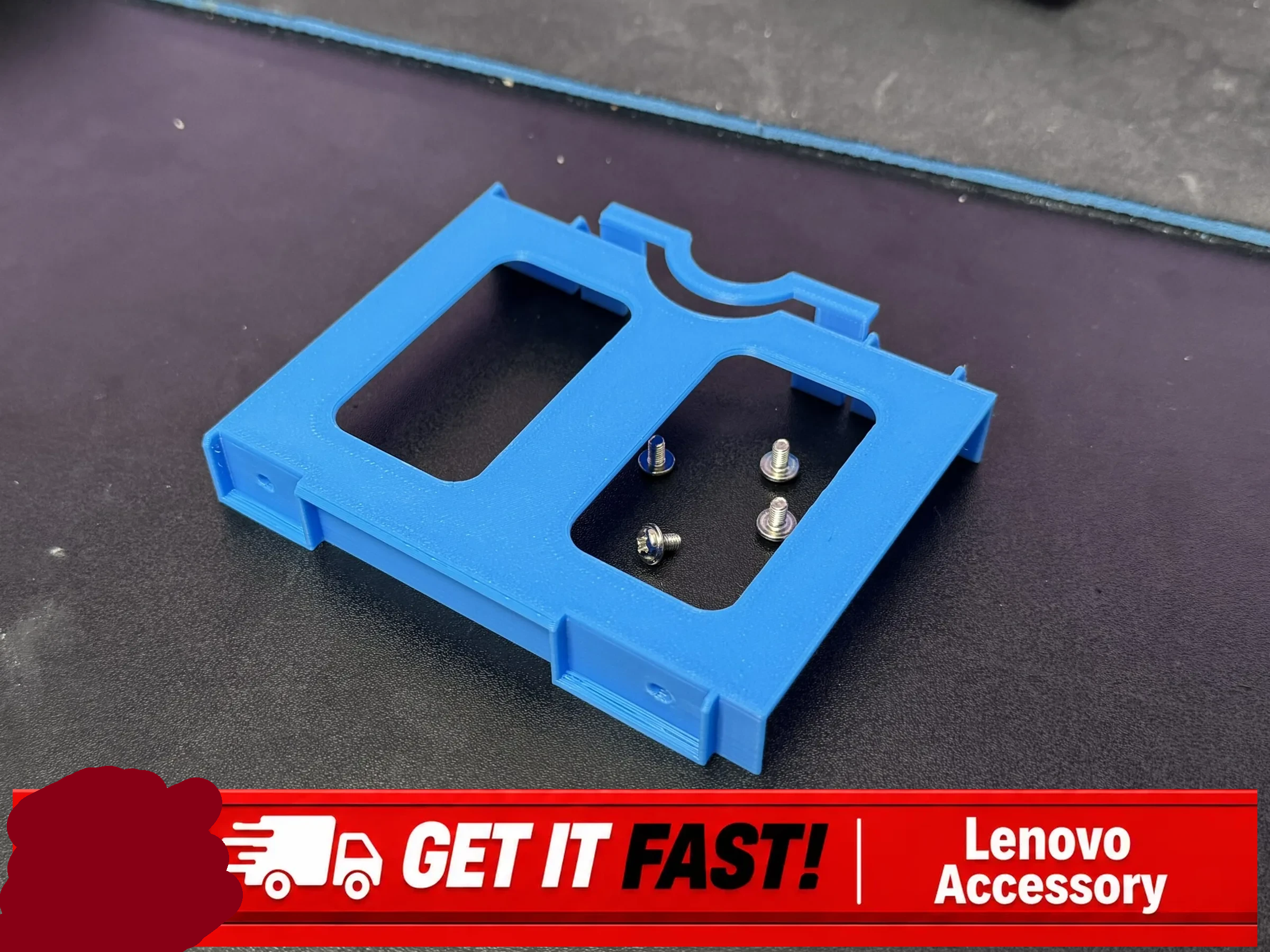
I express no opinion on whether $30 is a good deal for this product, but I couldn’t help notice it certainly has the look of a 3D printed part, which lead me to what I believe is the original file by Ropsu11 on MakerWorld. This looks perfect for my purposes, except that the design would still need to be altered slightly so that I could make it work with a 15mm drive without having to flip it on it’s back.8 I tracked down the specifications for 2.5″ SATA drives so I could figure out just how to adjust the 3D model file. Apparently the screws for SATA drives, irrespective of whether it’s a 5mm or 15mm tall drive, are located 3mm from the bottom of the drive.
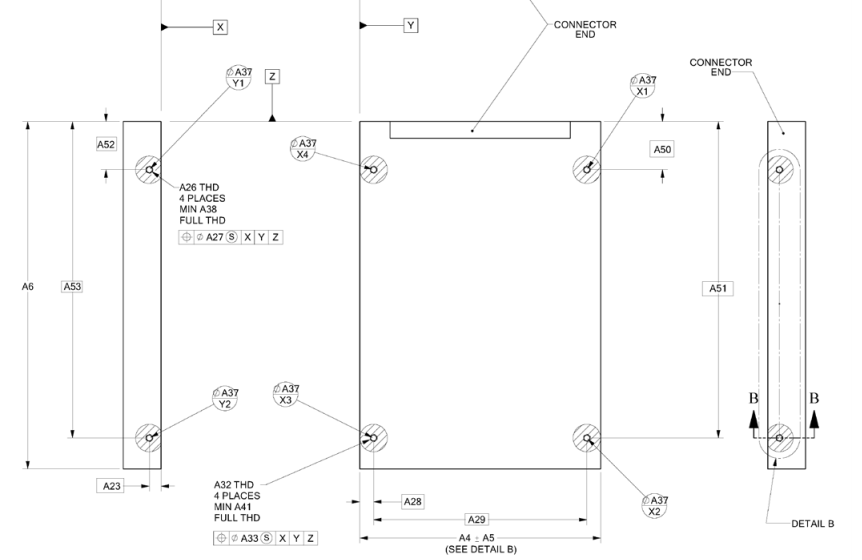
The 3D model file was available on MakerWorld as an 3MF file, which I rotated slightly and then converted into an STL using PrusaSlicer. By using a little bit of OpenSCAD magic, I can take the model to center it on the origin. In doing so I discovered the various holes/tabs don’t really seem to line up properly. In an ideal world, I’d be able to adjust the original design files and failing that email or message the creator. Since the creator doesn’t enable messages from users with less than a level 7 on MakerWorld, it looks like I’ll need to try and either adjust or redesign the file myself. The specific locations of the mounting holes should be determined by the SATA drive specifications above – rather than slightly offset by various small amount. By taking the model and mirroring it over the X and Y axes and using the “%” background modifier, I can make sure it’s perfectly centered – but ended up discovering the various holes don’t seem to really line up with one another.
After some fiddling with the STL for that file, I find myself where I usually do after inspecting someone else’s model. I think I’ll just design it myself. Yes, there will be some measurements, possible repeat printing, but I’ll be certain it will fit my machine and new drive – and I can customize it as well.
Project Jarvis- Building a Jarvis-inspired voice activated LLM powered virtual assistant
- Building a Home PC Lab
- Secret Agent Man
- Rambling again
- Little Desk Voice Assistant
- I’m crowded, roll over…
- Navel Gazing
- Lenovo ThinkCentre M70q 15mm HDD Caddy Adapter
- Achievement Complete: New Custom 2.5″ SATA Drive Caddy
- Without the need to unplug any connections in the back! [↩]
- Wifi, bluetooth, plenty of USB and HDMI ports [↩]
- The only things I have plugged into this device are the stubby wifi antenna, the dummy HDMI plug, the power cable, and sometimes a USB flash drive or device I’m working on. I just want this PC to exist invisibly and silently in the back of my home office doing it’s thing. [↩]
- I had one incredibly pompous “doctor” use the word “oculometrics” to describe how he was able to perform a medical examination and make particular measurements. In looking up the word now, it appears it refers to the measurements of eye movements – not one’s ability to measure with just their eyeball perception aided by their brains. [↩]
- That, of course, would be considered “cerebral aided oculometrics” 🤮 [↩]
- I say “doctor” not because this person was a time traveler with dubious credentials, but because they held themselves out as a doctor of chiropractic. I’m sure people find relief through chiropractic manipulations, but as an orthopedic surgeon once told me … “90% of all back pain goes away on it’s own. So, just because you rub bleu cheese on your back and pain goes away, doesn’t mean it worked.” [↩]
- Möbius style [↩]
- It’s a SFW link, don’t worry [↩]