Lots of progress photos for Dexter Starfighter’s ED-E build. The body/head is essentially a HDPE milk jug, 3D printed parts and foam mat pieces glued with contact cement, portions covered with craft foam and seams covered with air drying foam clay, primed, and painted. There are also some 3D printed connectors that go inside the “head” and at the “neck” to keep everything mounted and steady. We used the milk jug because it was the right size, approximately the right shape, the bottom of the jug already had a “grill” like look similar to the ED-E robot face, and it was free – since it would have been recycling/garbage otherwise. In order to assist with reinforcing the body1 , we cut a second jug and inserted most of it into the outside body. One downside to the jug is that HDPE is slick and doesn’t really take paint, glue, or even contact cement particularly well. Over Maker Faire weekend the paint started to fleck off in places. I think the size and shape is great – but that perhaps we would be better off covering it in paper mache and then painting and gluing onto that.
The old ED-E body was roughly the size of a tennis ball2 and the new one significantly roomier for the electronics. The PVC pipe had some holes drilled into it and was held at the right height using a zip tie. It held up really well all weekend and was apparently more comfortable than a shoulder-mounted robot, but it was a fair bit more to carry around. We’re working on some wheel based designs – and I even bought an IV stand off Craigslist for $10 to potentially use as a base for next year. 3
This slideshow requires JavaScript.
This year we opted to really focus on the “cosplay” elements of our project, making ED-E much larger and designing custom PIP-Boys. The PIP-Boy isn’t screen accurate, has an olive-green body which is more reminiscent of the early video games, and is still missing several of the greebles… but I really couldn’t be happier with how it came together and turned out. We were easily recognizable as Fallout vault dwellers everywhere we went.
While I did design this model entirely from scratch, I did take inspiration from various photographs from the show, game, and other 3D models out there. In particular, I liked the models from YTec3D, the official Bethesda props, and some of the features I noticed from various Etsy sellers.
I’d designed the PIP-Boy case to have a lot of interior space and specific cutouts that should work well for adding LED’s and real buttons and knobs later. I learned a lot from the Raptor FX guys about building with craft foam and foaming TPU, so I think the next iteration will include 3D printed cuffs and/or a buckle-based attachment system.
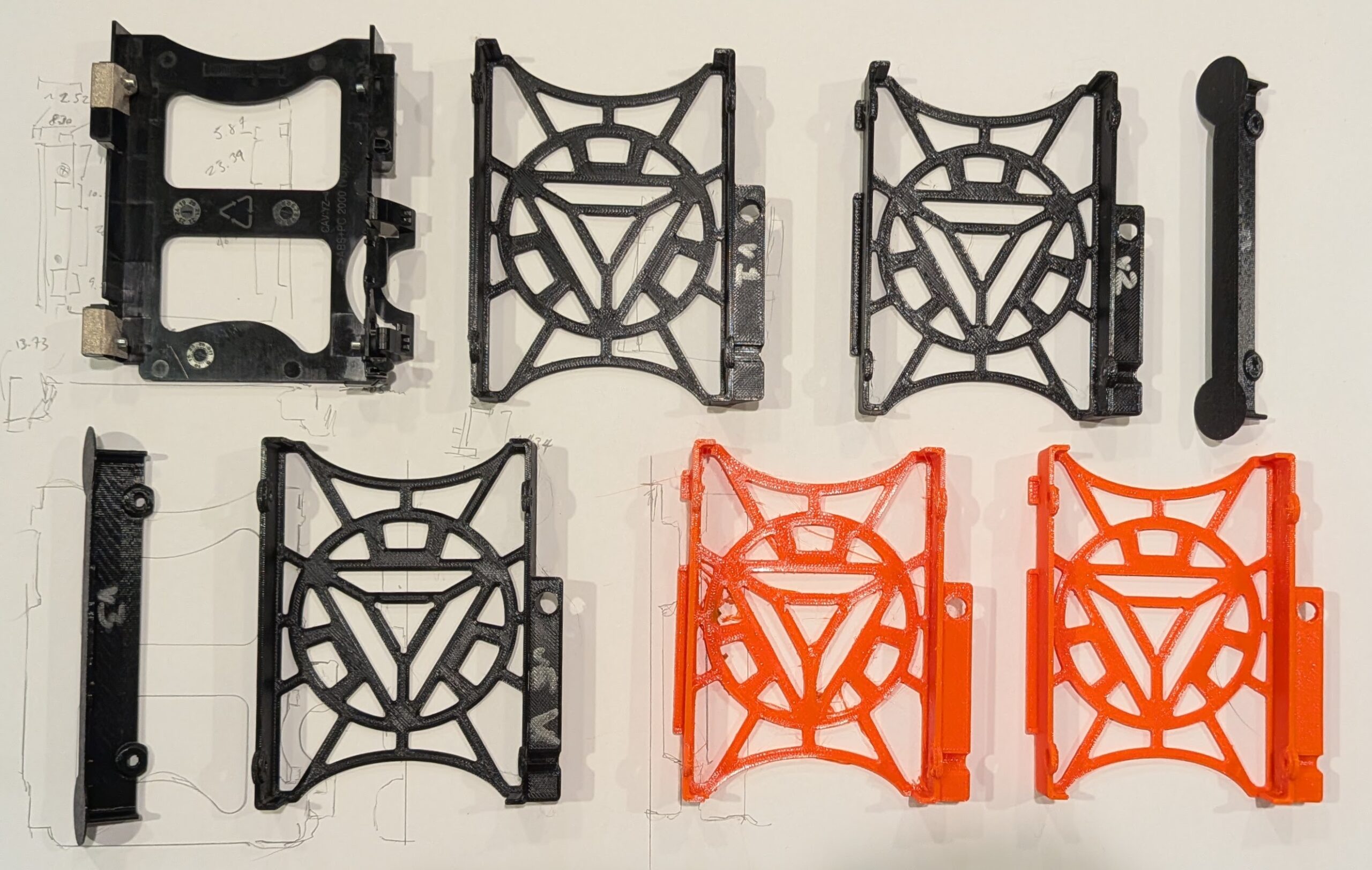
Five versions printed for testing and fitting, a failed orange PETG print, and a final orange PETG print
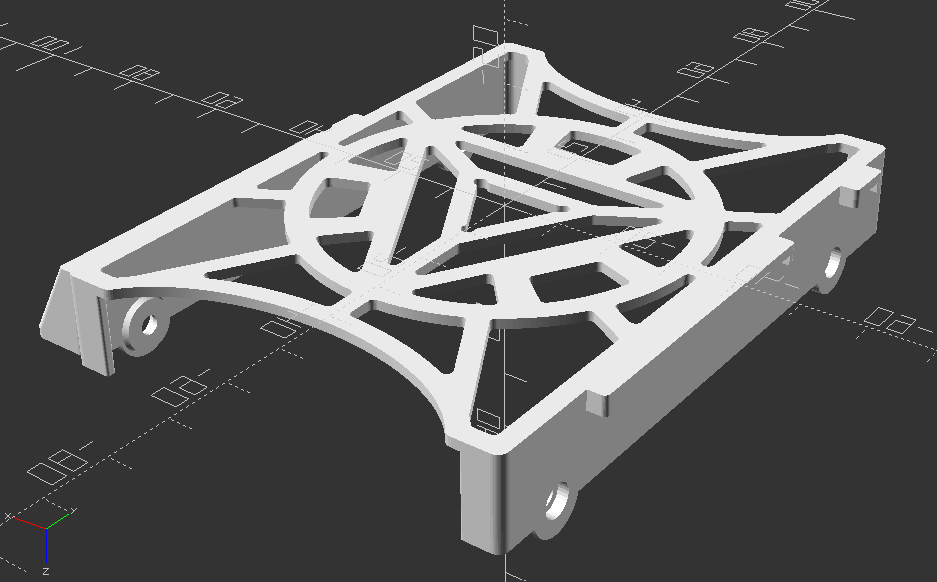
Final OpenSCAD render, top down view
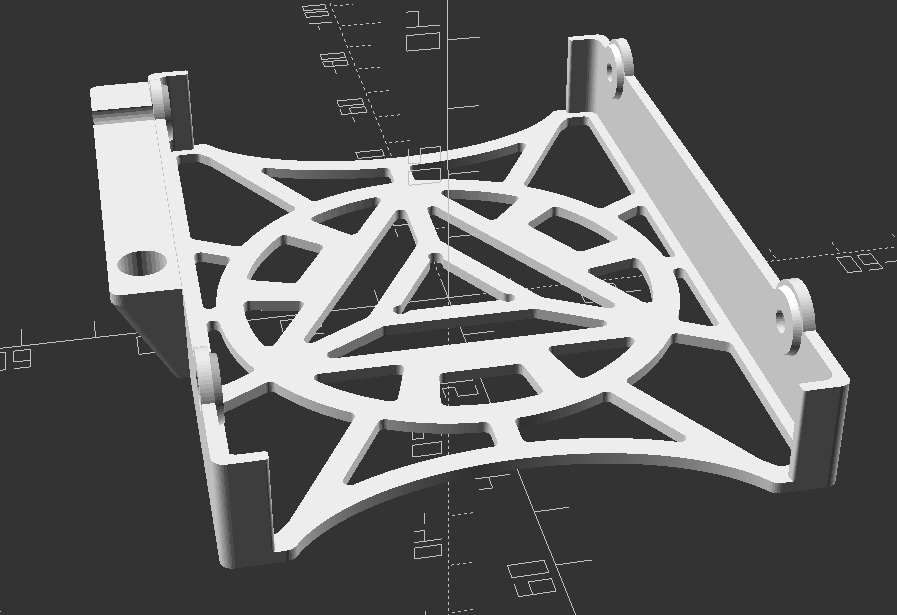
Final OpenSCAD render, oriented for printing
I couldn’t be happier with how this model and print turned out.
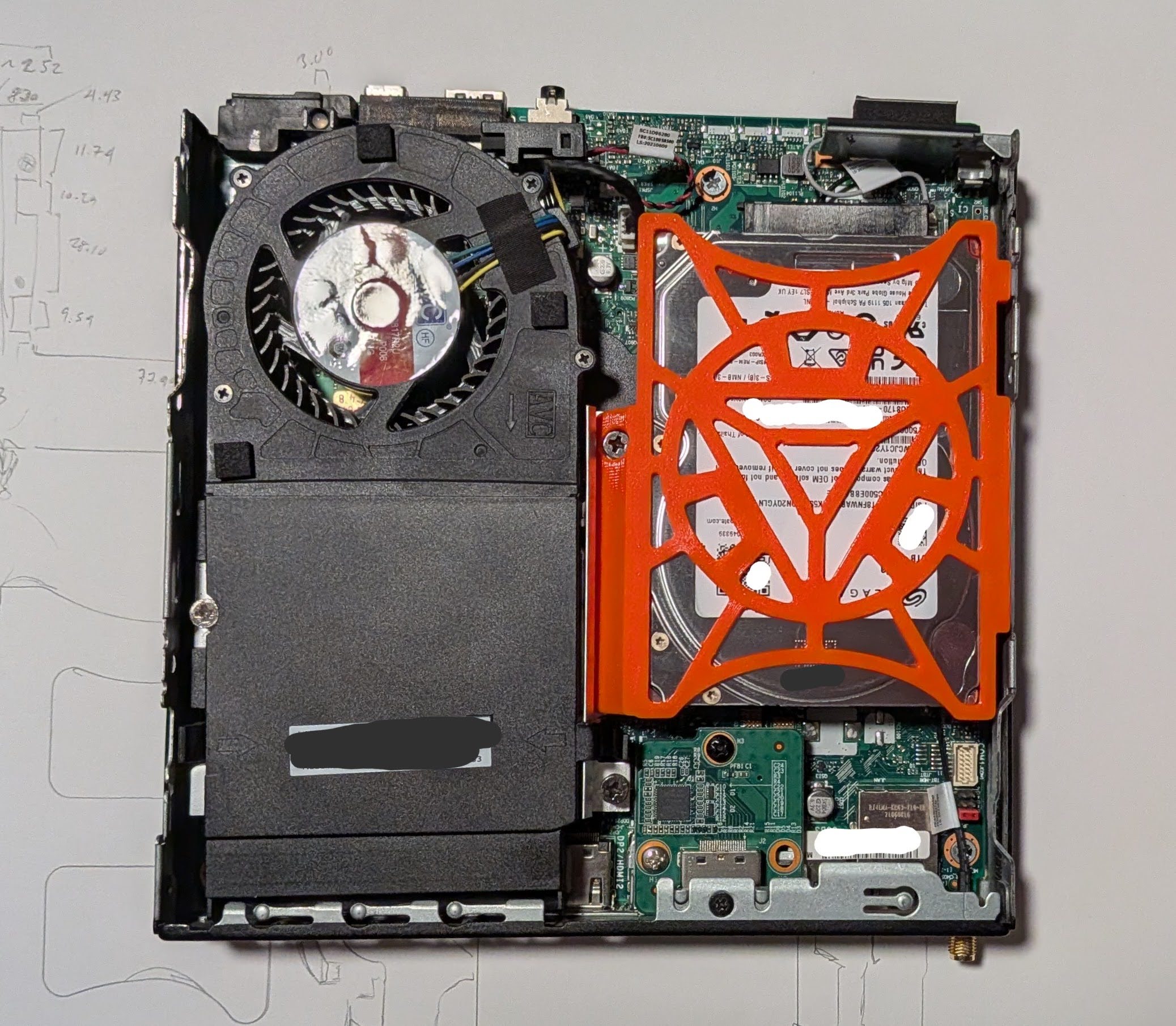
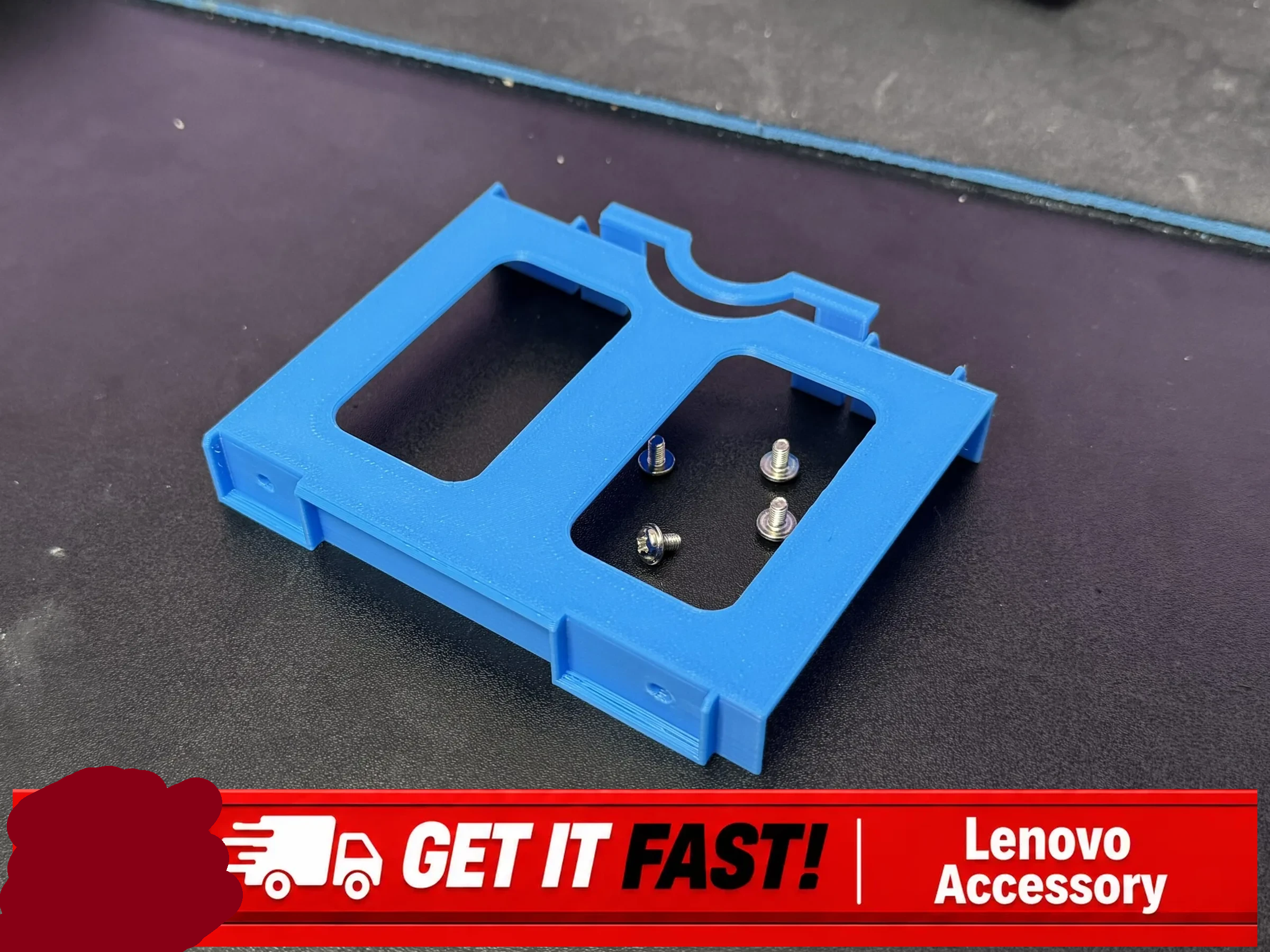
Fifth variation on the 2.5″ SATA hard drive caddy for the Lenovo ThinkCentre Tiny M70q case
The part pops into place snugly, even though it doesn’t include any snap-fit parts. The two tabs on the right fit over and around two bent metal tabs coming off of the frame, the beveled section on the left sits on a metal bar, with a hole for a bolt head which holds that metal frame in place. The design doesn’t include all the fancy fiddly bits that go in and around that metal bar, but it doesn’t wiggle with medium pressure. It’s easy enough to drop into place and remove without too much trouble.
In a perfect world, I would have printed it in a more appropriate color befitting an arc reactor, like glow in the dark, white, light blue, or some combination. However, while I have a medium sized collection of PLA in various colors, I’m fine with just using this one roll of PETG in it’s bright orange for those use cases requiring something that requires more flexibility or heat resistance than PLA.
I’m super happy to have this PC housing a drive that will likely last me a very long time. Our old external backup drive holds 2TB, is quite slow, requires a USB mini to USB A cable, and a huge wall wart power adapter. Now I can keep our files easily accessible inside this PC without no fussing with cables/adapters, taking up a USB port, and not requiring the additional space that’s literally larger than this entire PC.
In other news on this “Project Jarvis”… I haven’t been making much progress lately. I’m not able to run any reasonably capable local LLM’s at any exciting speeds, but it’s still at least possible at a 1-2 token per second rate. I think once it’s set up I’ll probably want to switch it to a “dumber” smart assistant kind of system where it helps me answer basic verbal queries about the weather, date, schedules/cron jobs, and any sensors I might create.
TLDR: I designed and 3D printed a caddy for my Lenovo ThinkCentre Tiny M70q to accommodate a 15mm HDD instead of the stock 7-10mm caddy.
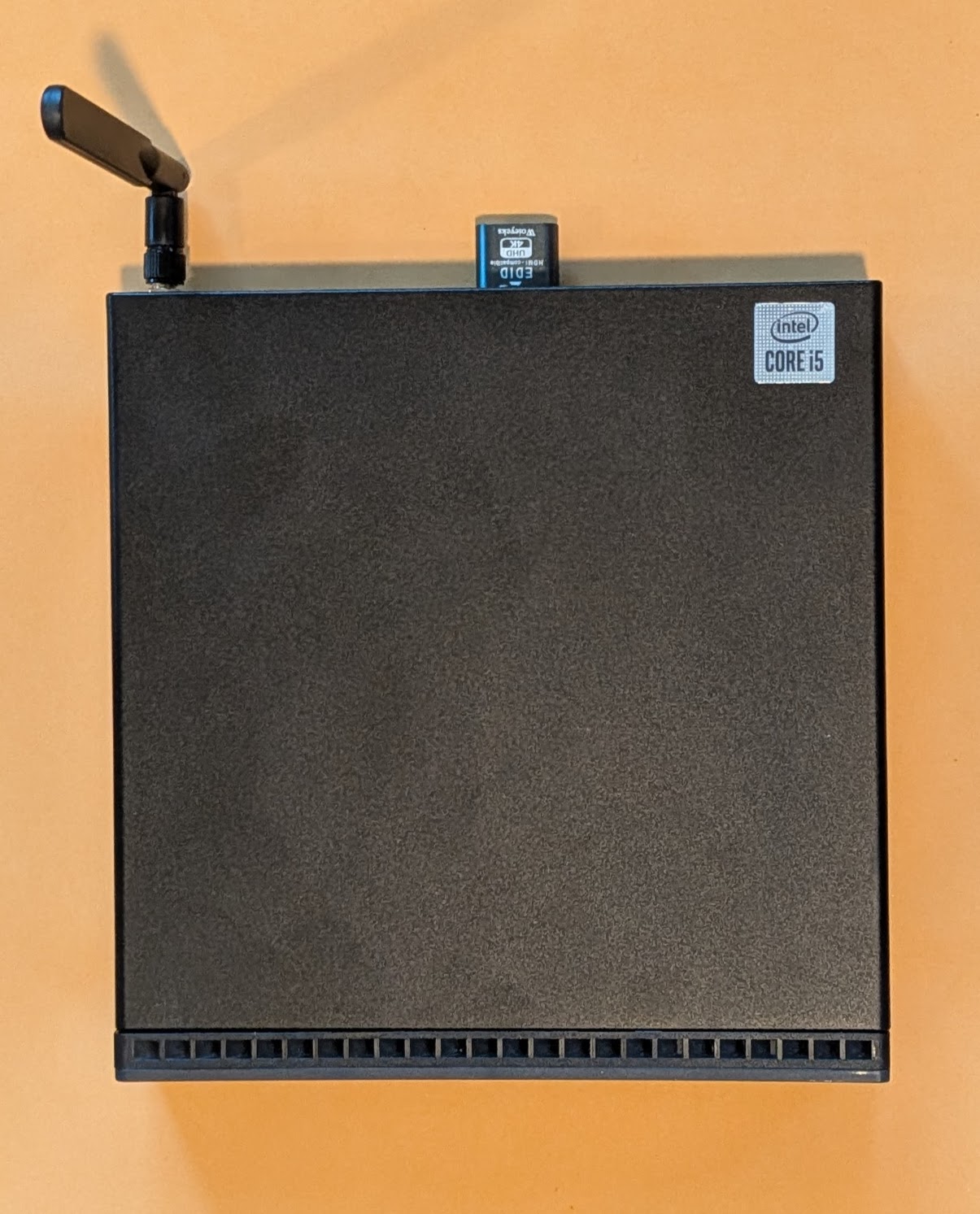
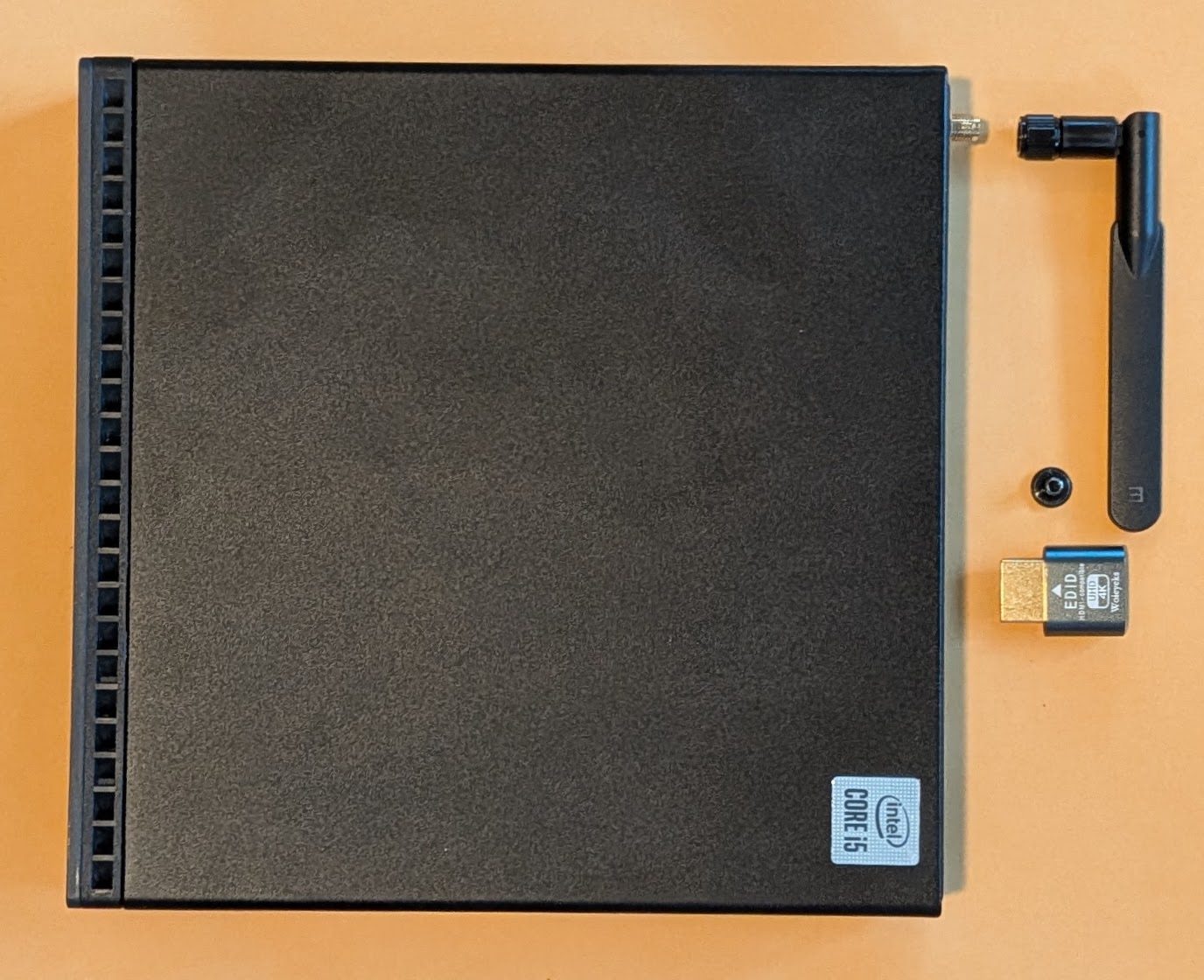
Lenovo ThinkCentre M70q, with antenna and HDMI dummy plug
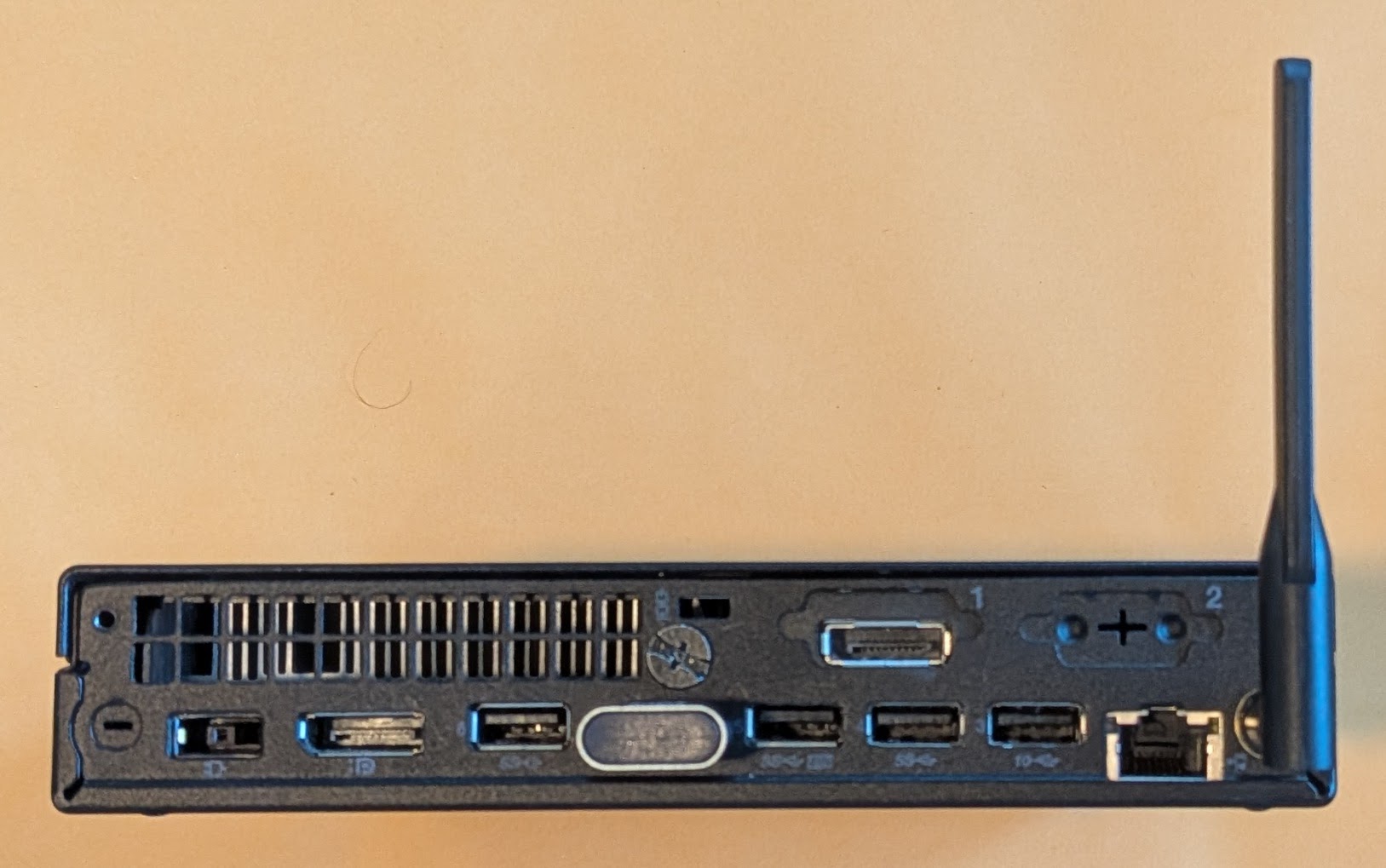
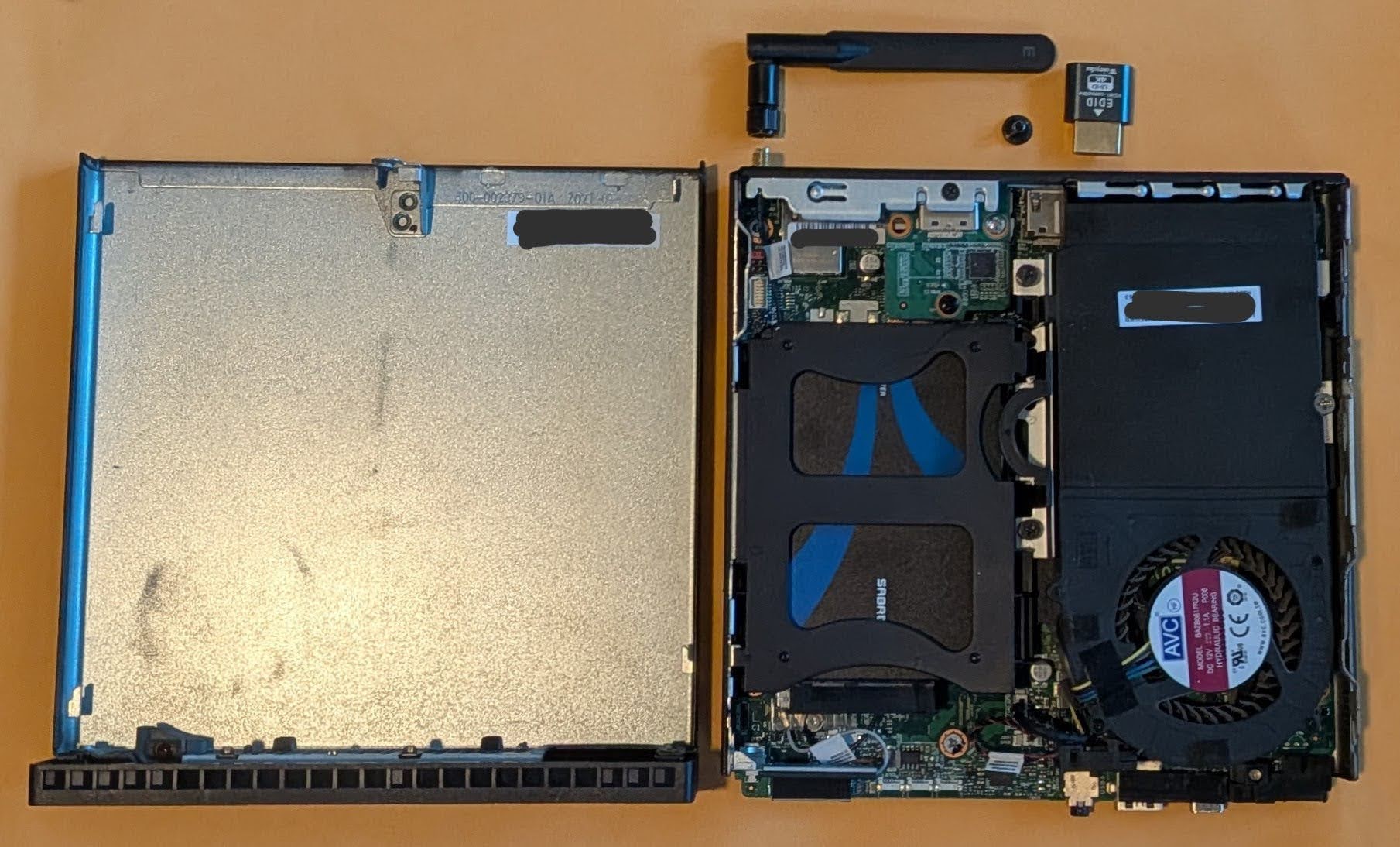
Backside
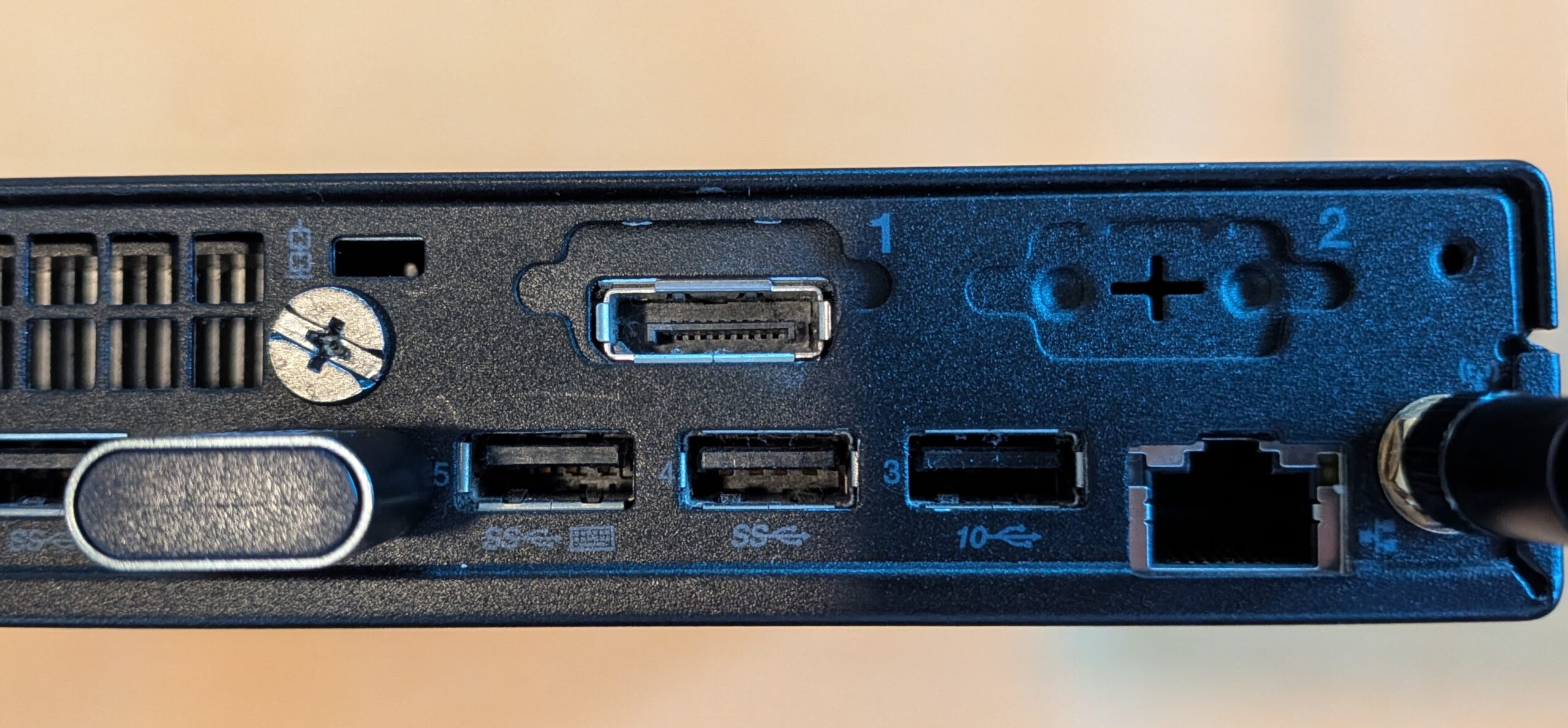
Close up of the two expansion ports
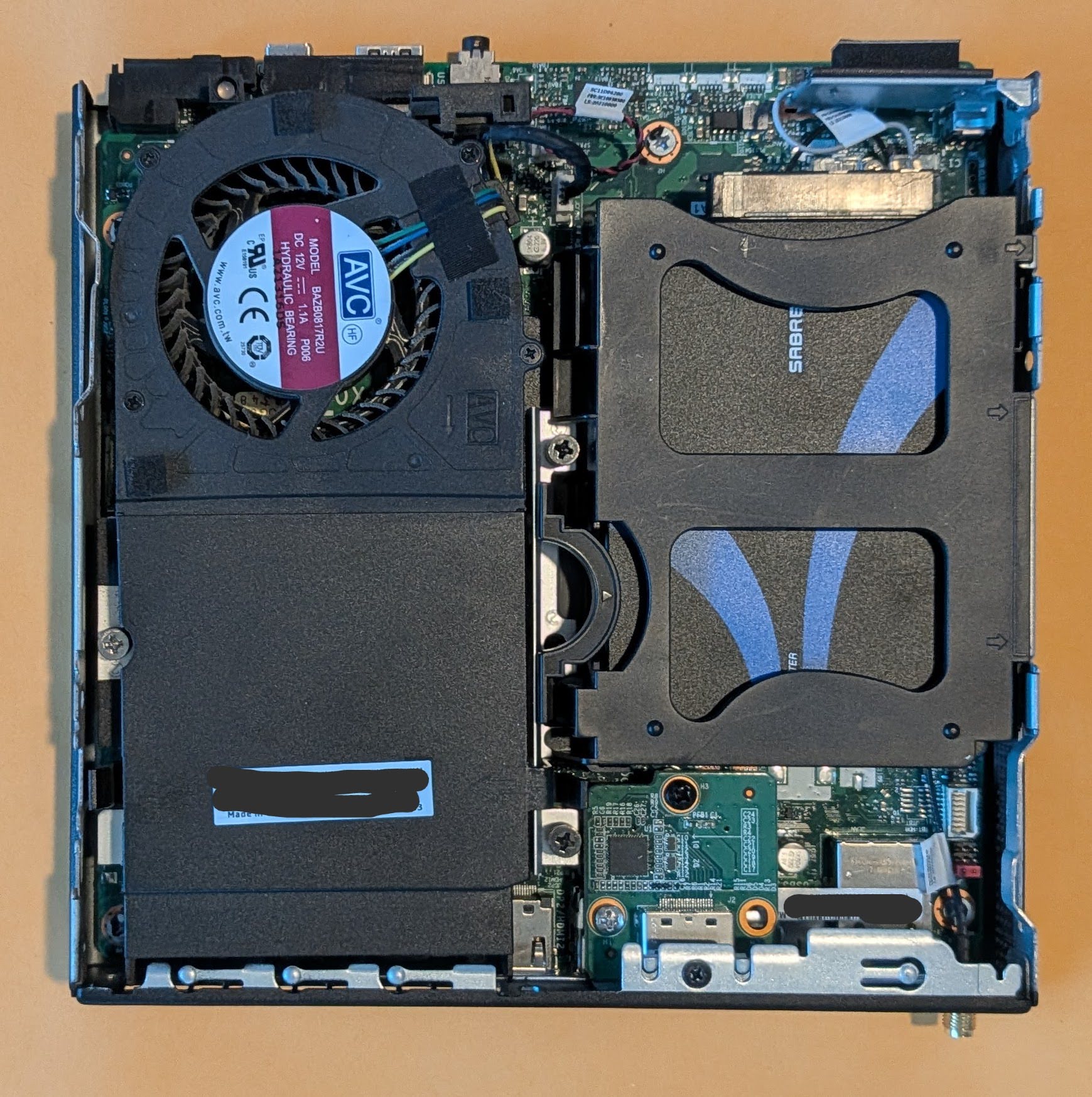
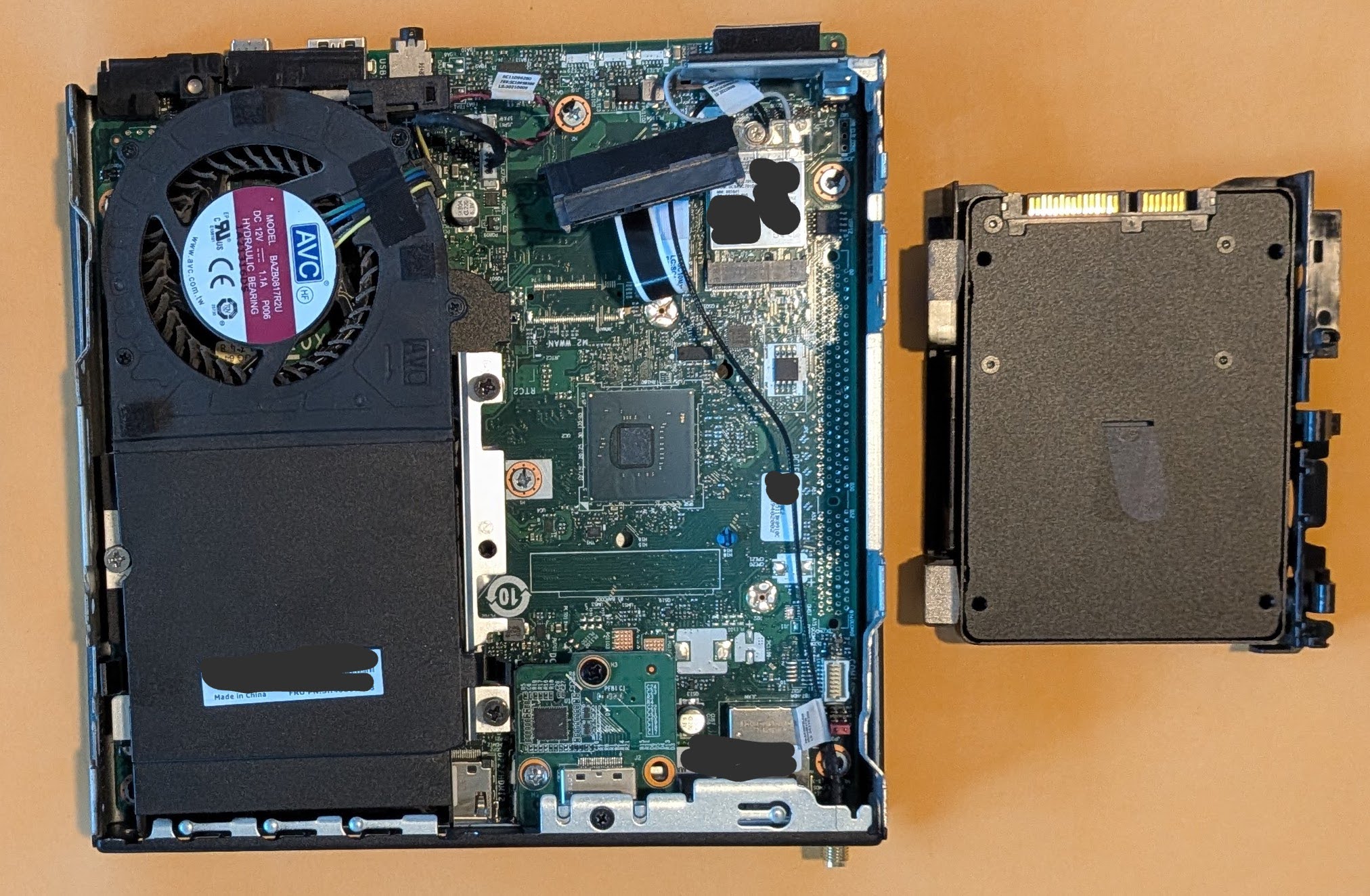
Inside the PC, showing off the hard drive caddy (with SSD inside an adapter)
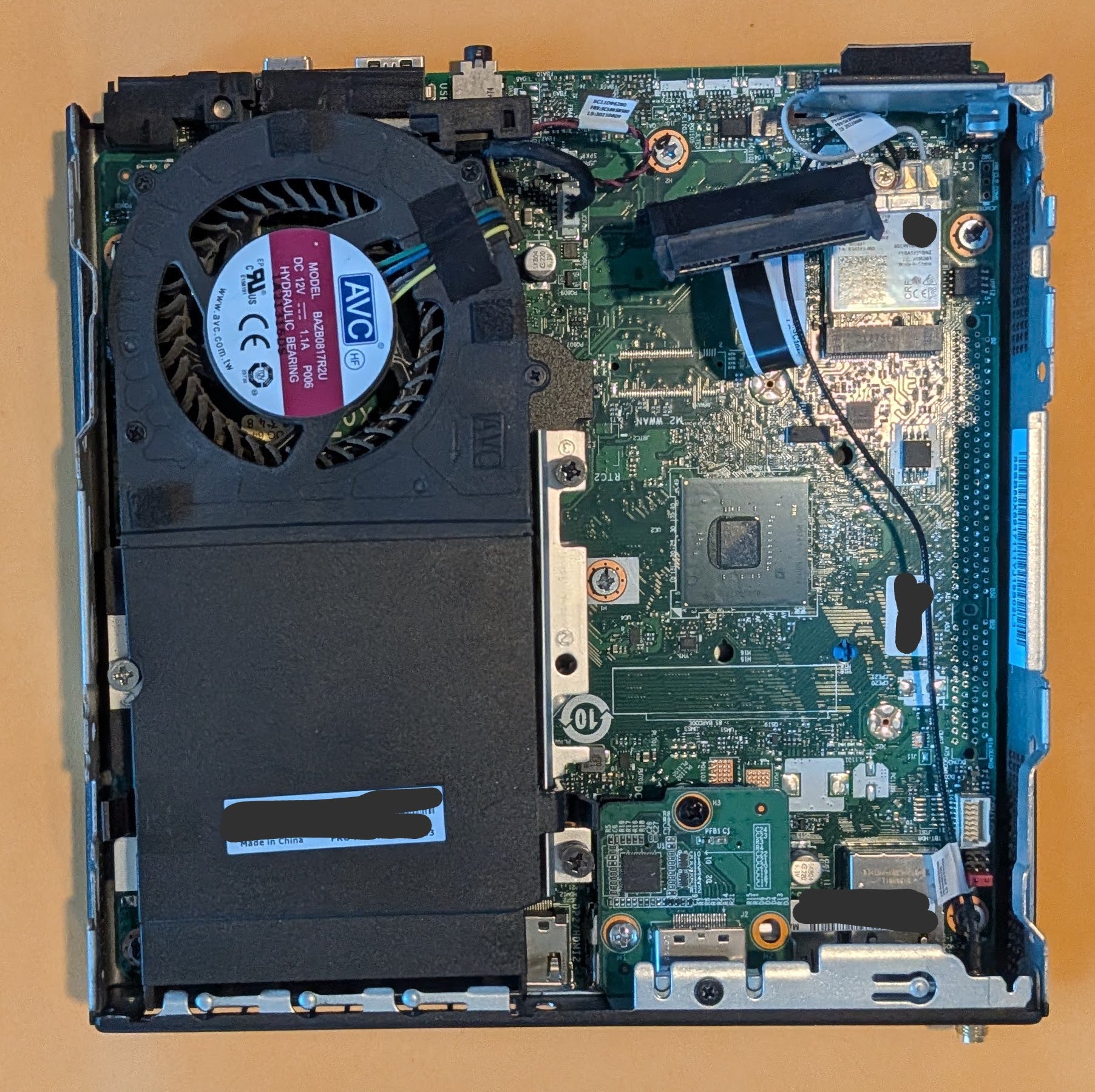
Just the inside of the PC
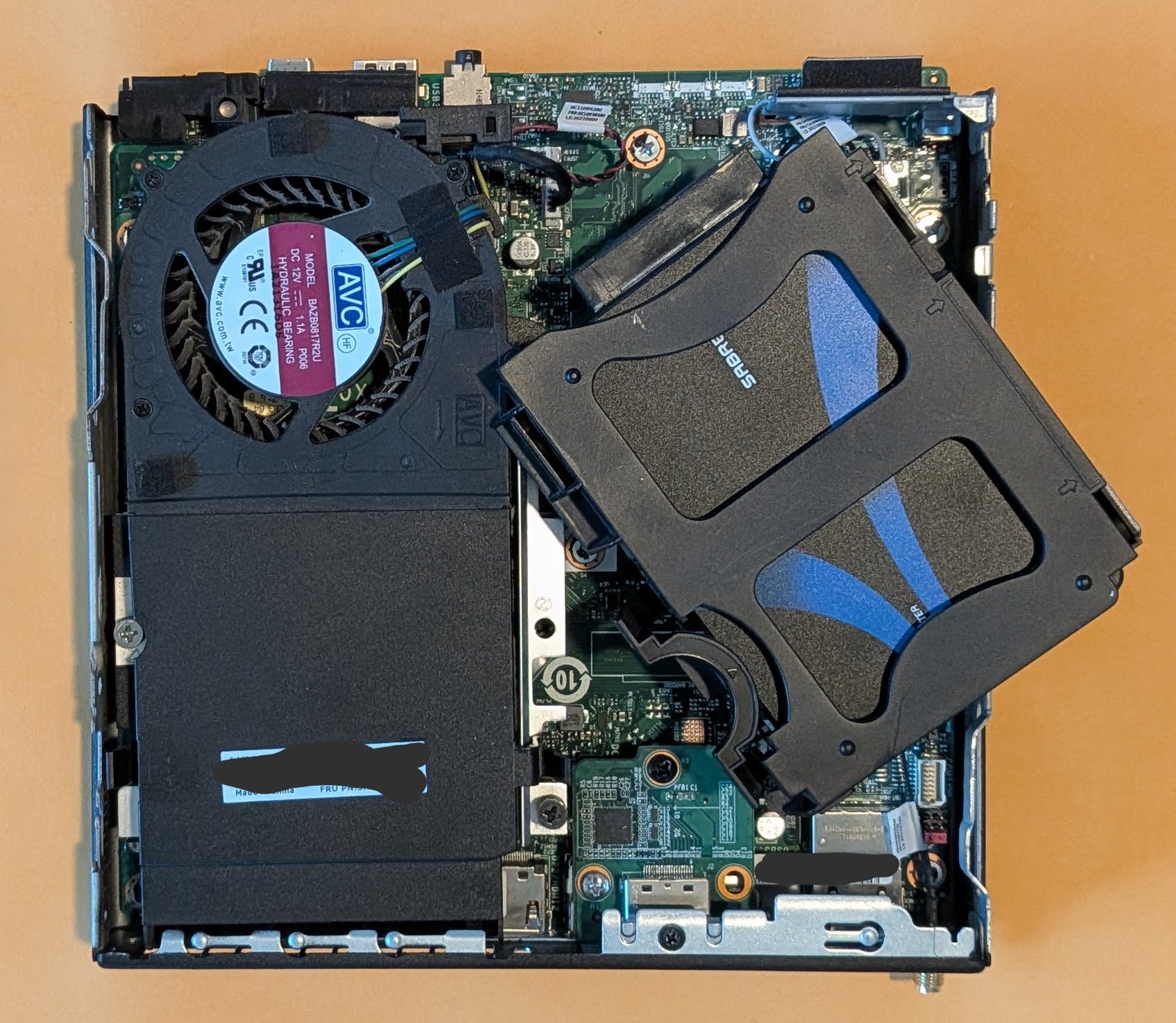
Unclipping the hard drive caddy
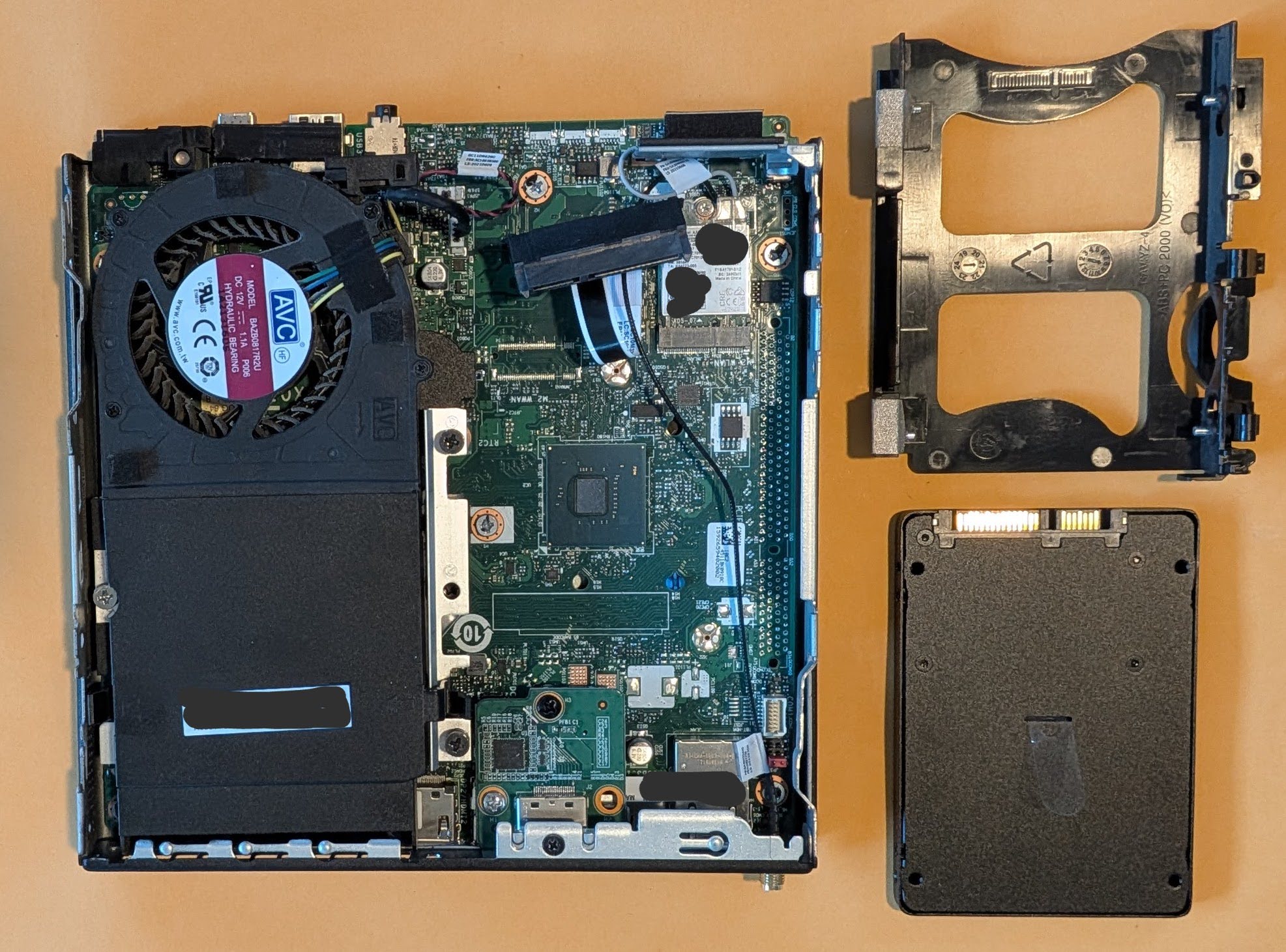
Hard drive caddy, removed
Hard drive removed from caddy
Lenovo ThinkCentre without a SATA hard drive
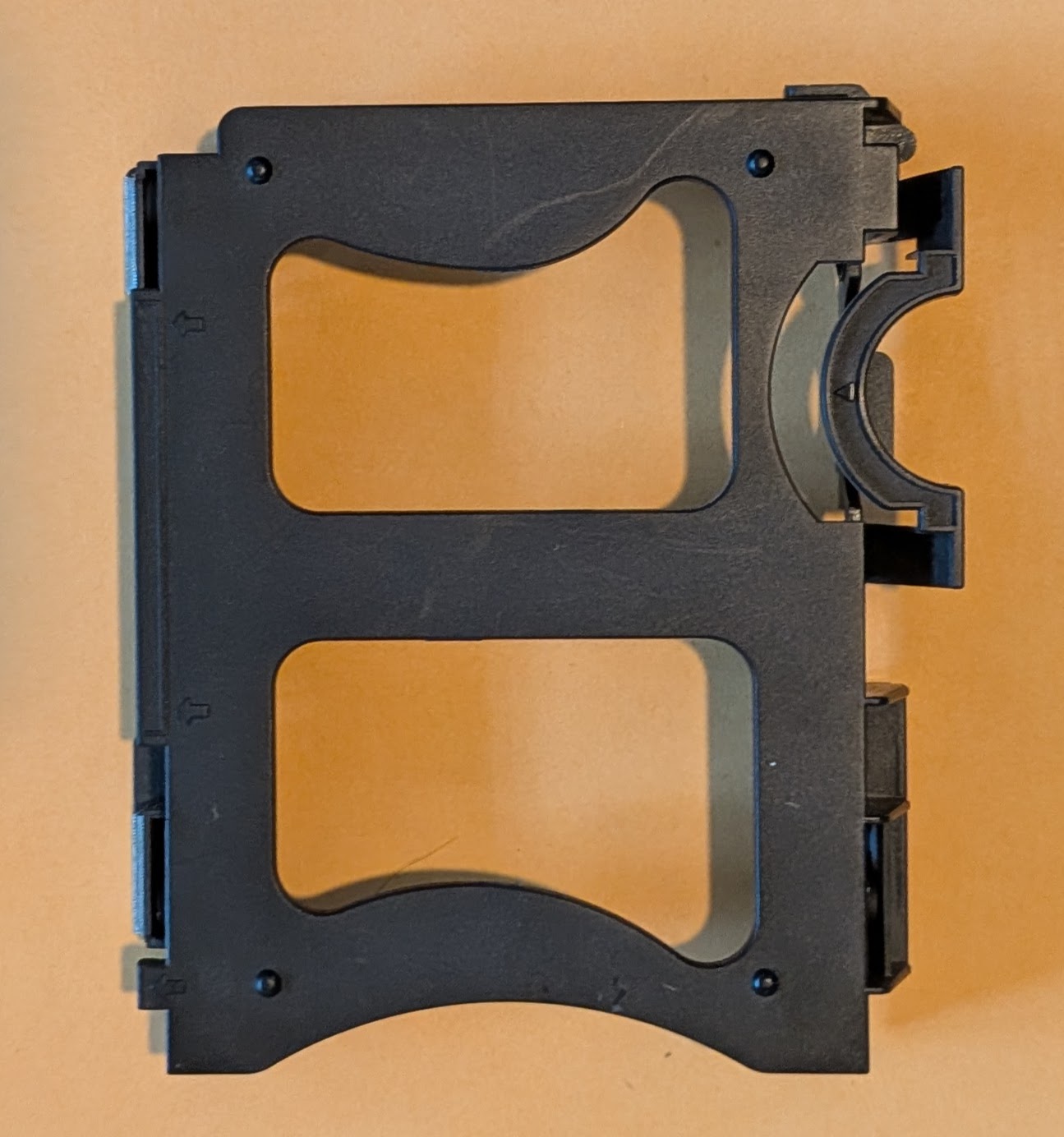
Stock hard drive caddy
I spent way too long designing and redesigning this part before I ever even printed a single version. I consulted the spec sheets for 2.5″ drives, took measurements, approached the design from different angles, and then started over again several times. Sometimes figuring out a design means I have to attack it from different angles. I tried designing it by modeling the entire enclosure, by designing a model of the SATA drive itself first, and by designing a duplicate of the caddy. The caddy that came with my PC has a lot of little fiddly bits and parts that clip onto, over, or into different parts of the case.
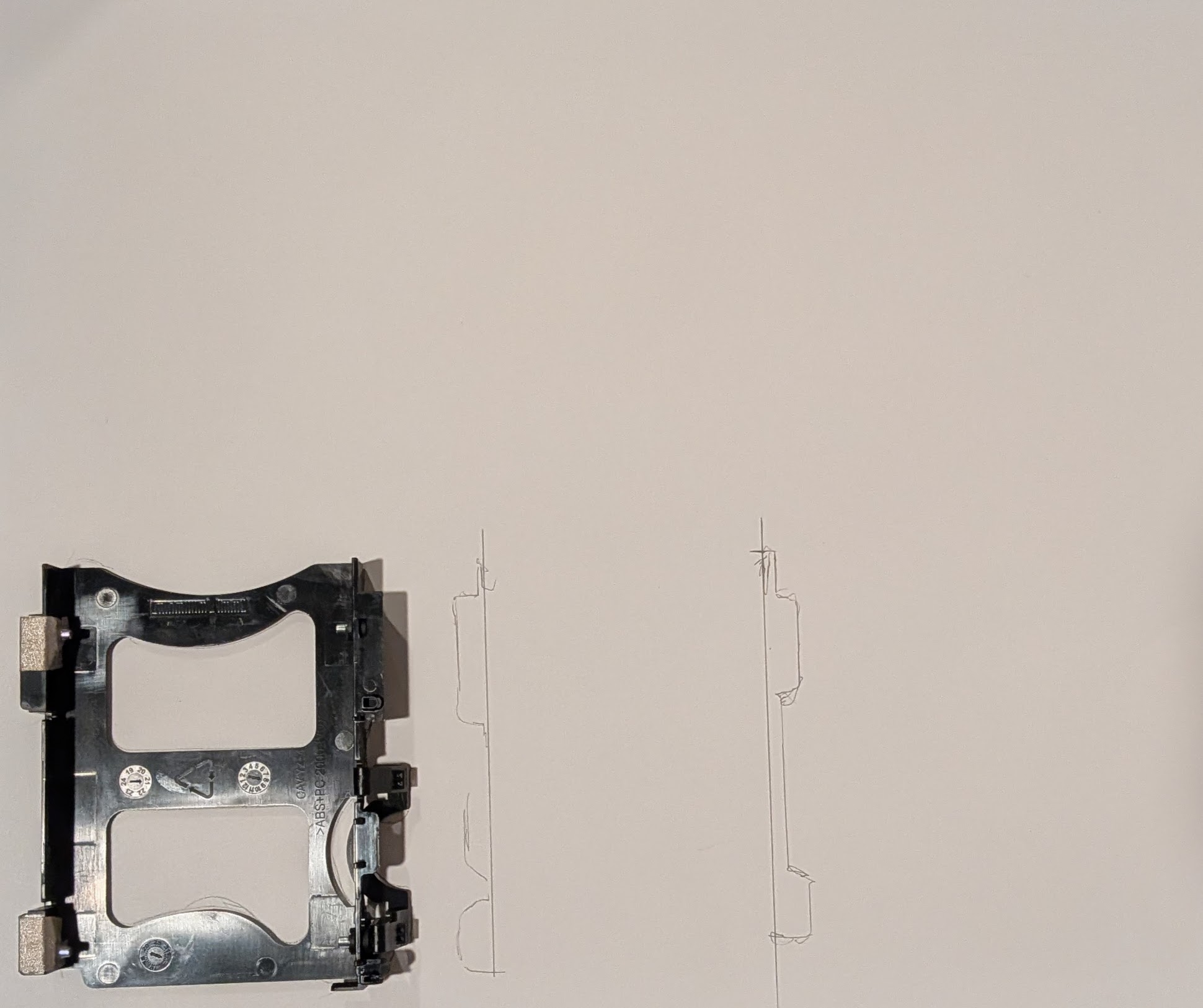
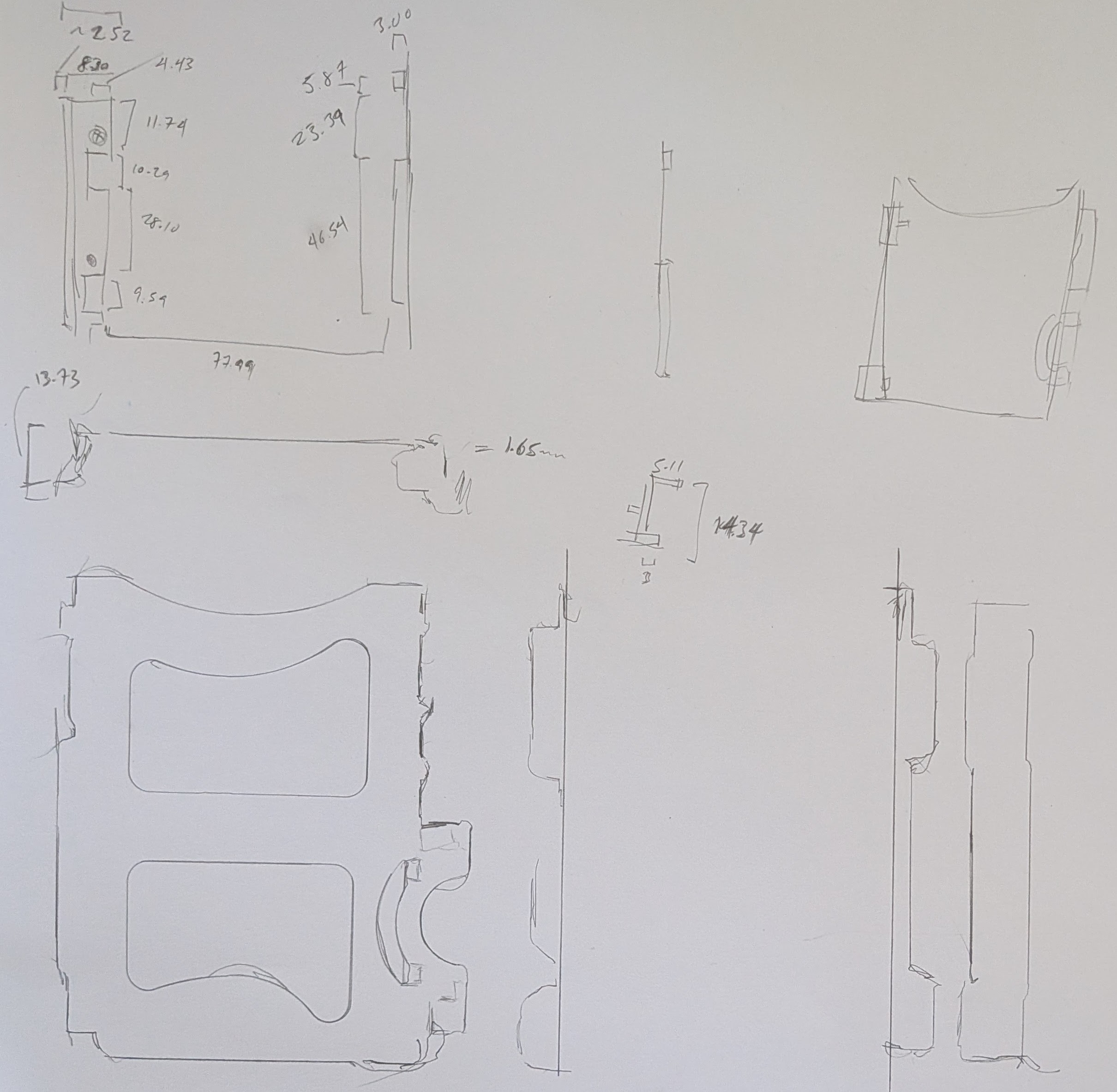
Rather than sketching the entire existing or planned part out, I traced different parts of it onto a large sheet of paper and then annotated it with measurements. I don’t think these ended up helping that much in the final designs, but they did help me have a better sense of how things fit together.
Tracing the hard drive caddy
Hard drive aspects traced out
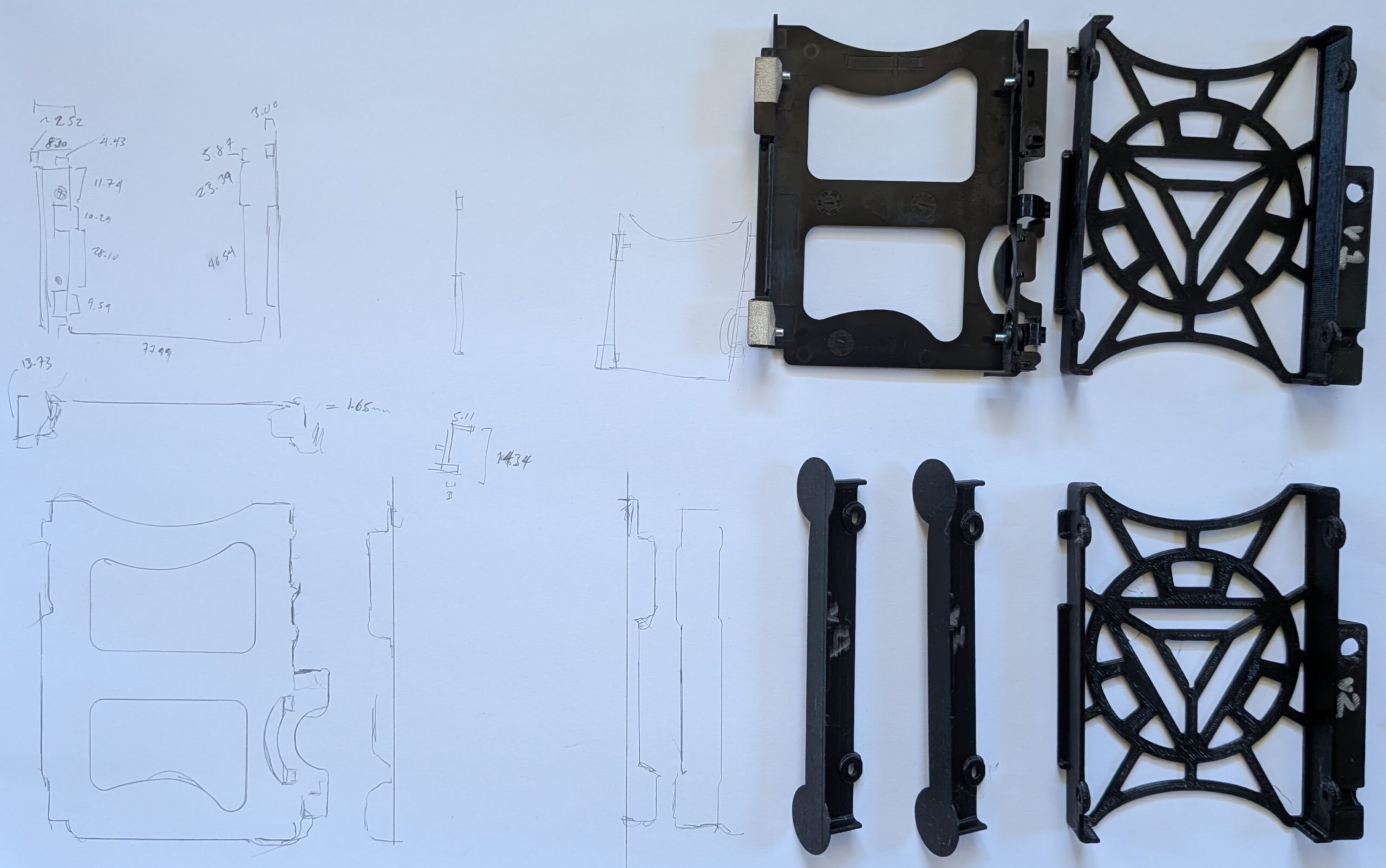
After many iterations, I decided to design the part based on the rough external dimensions of the existing caddy and scrapping all of the fiddly and clip-on parts. The design includes a void where a bolt screws into a metal bracket to help constrain things in place. I’ve printed the entire caddy three times and parts of it twice more in PLA. While I pride myself on being able to take measurements, design a part, and obtain a successful print in one go … some projects require a bit more trial and error. Some of my measurements were off and I’d made a few incorrect assumptions in my initial design approaches, but I’m really happy with the result.
Sketches and prototypes 1-4
Final OpenSCAD render, top down view
Final OpenSCAD render, oriented for printing
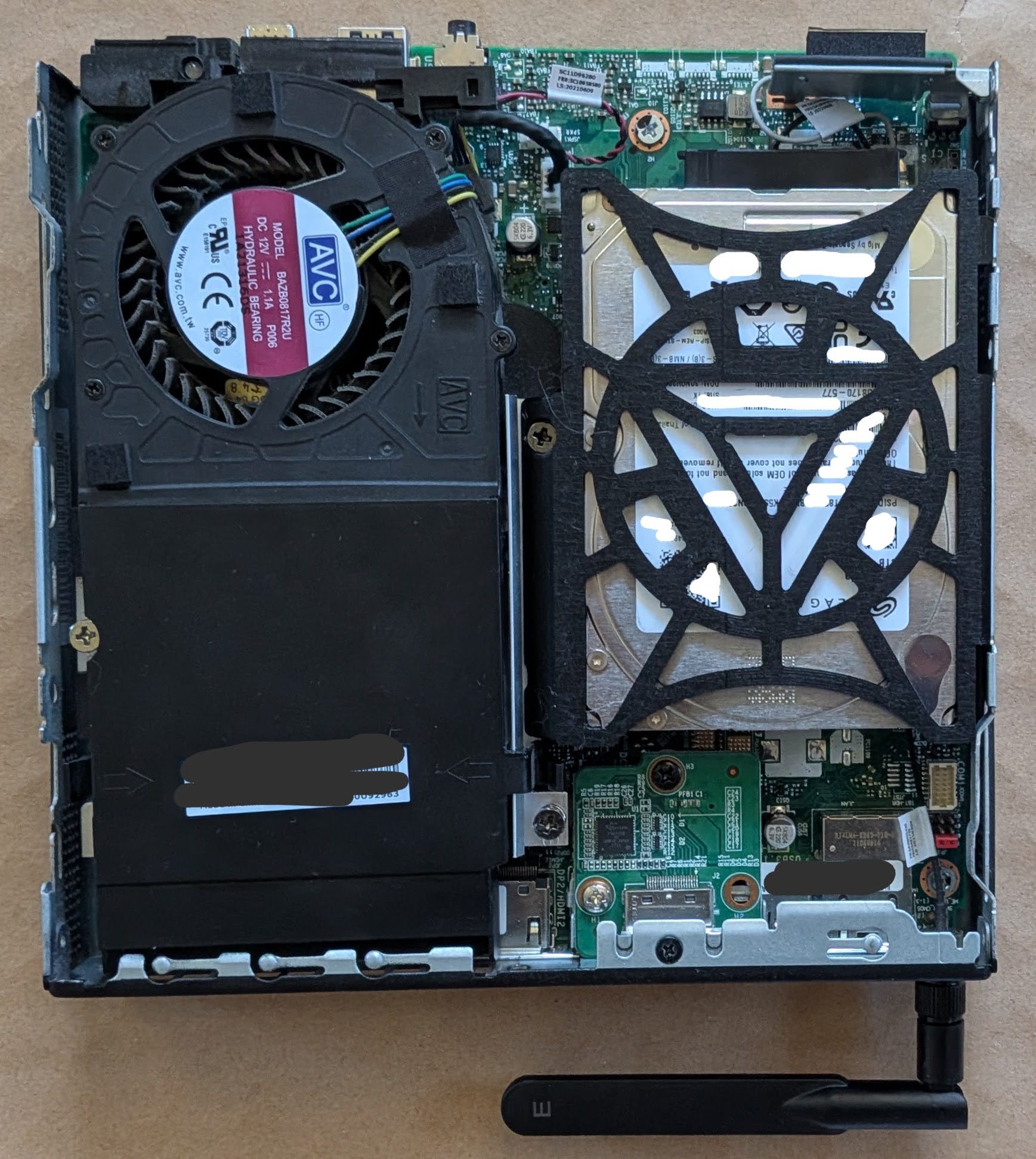
New hard drive caddy, holding a 15mm hard drive, installed
I am very happy with the fit of the final part. With screws holding the drive in place, everything stays very snug, and the part wedges precisely into place. All of the prototypes and the version I fit into the PC are all printed in black PLA, but I’m printing another version in orange PETG since it’s glass point temperature is so much higher than standard PLA and I don’t want the hard drive caddy softening up inside the case. I don’t anticipate anyone other than me will ever open this case up, but if they ever do they’ll get to enjoy the Iron Man arc reactor inspired motif to the hard drive frame.
Despite owning this printer and spool of PETG for nearly 5 years, this is my first time printing with this material. Although it’s been in it’s vacuum sealed pouch all this time, the initial printing looks slightly stringy. I’m hoping it ends up as clean and dimensionally accurate as the PLA prototypes.
Now that this is out of the way, I think the next project is getting the little voice robot to work.
I started to write this blog post a few months ago, and just published a post pontificating / complaining about AI search result slop.
Google has become nearly useless lately. Searching for anything turns up it’s AI slop nonsense or advertisements rather than actual links to something useful. Google’s initial promise – high quality uncluttered search results is dead. Any results are now hidden below their AI slop, advertisements, and other results from other slop sources. I might as well publish it now, rather than have it relegated to a draft for years to come.
If it were possible for Google AI summaries of search results to be infallible, I guess that would be fine – but it’s just so far from the truth. I’ve yet to see an LLM that doesn’t just try to generate something to please – rather than try to generate something that is accurate. Google AI offering false but pleasing slop reminds me of the Azimov story Liar!. Without a “three laws of robotics” style filter, there’s no systemic guardrail preventing automated misinformation.
While I think there’s room for legitimate practical LLM uses, shoving it into search results seems like a complete waste for everyone concerned. When people say “ChatGPT/Claude told me X”, that’s really no different than saying “ChatGPT/Claude thought I would be pleased if it said X.” But using an LLM1 for synthesis and summarization of information and data seems only able to generate either results its hopes are pleasing to the requestor or results hopelessly biased by it’s training. When too many people have the wrong idea about what an LLM is, how it works, or how to interpret it’s responses, putting an AI result before actually informative links is really damaging.
Yes, I’m still struggling with the implications and ethics of LLM use.
Small LLM’s you can run at home or offline, on your machine, in your browser, or on your phone feel intuitively less evil. But, they’re just small distillation spawn from a much larger LLM – built from hoovering an internet of data, all social media sites, literally destroying old books for even more data, building hundreds of data centers, consuming power and water, churning out waste and noise. If I can’t justify using a big AI company services, shouldn’t I also refrain from using their derivatives as well?
I am still using frontier AI, just not paying for it in the normal sense of sending them money. But, I’m under no illusions that any time I’m using their services, I’m helping shovel content into their machines and train SkyNet. Since small models can be run entirely offline, they don’t have the same “you’re the content” problems.
One of my goals is to bootstrap my way out of using these things. I’m still very much a Linux newb and still working on my Python skills and what little programming abilities I have are all self-taught. StackOverflow used to be a reasonably reliable source for finding discussions on how to overcome a given technical problem, but now it’s a ghost town. If I can’t turn to something like StackOverflow… the options these days are asking on Mastodon and hoping a mutual replies, asking / searching on Reddit and hoping the answer isn’t a ‘bot, or just asking a ‘bot directly.
It’s still the same problem – and I honestly can’t tell if I’m trying to rationalize my LLM use or if there are any legitimate uses. Certainly OCR and interpreting MRI and other radiological reports to help save lives are reasonable and beneficial uses. I guess part of my struggle is that I literally cannot avoid interacting with stupid AI when they’re everywhere, in everything, ads in media and billboards, spam emails/texts, website chatbots, preliminary phone / chat bot screenings, and even shoved into the products I’ve owned for a while.1 If I’m already forced to interact with an LLM to (perhaps) benefit other people / companies, why shouldn’t I feel comfortable using them to (a) filter out their AI garbage (b) assist me with minor tasks?
Possibly unrelated, both of my kiddos are facing AI nonsense in school. The eldest receives constant warnings at university about what uses are permitted / not permitted – and then the university has students submit their work through an AI port to determine whether the students are using AI. 2 The younger one has teachers saying their work will be graded by AI – in junior high?!
I refuse to believe these students’ work aren’t being used to train the next generation of AI education software.
I know I’m rambling. I recently sent a picture of a basket of baby otters to some family members – who thought it was probably AI. I had seen it on Mastodon and based on the context, I felt it was likely real – but I had to question it. Performing an exact match image search didn’t work – since the same image has been spammed across the internet in the AI era of post-2023. I narrowed the search to only those results prior to 2020 and was able to locate a copy of the image from roughly 11 years ago.34 This made me think – since current Google searches have become complete AI slop / summary garbage, why not narrow all internet searches to only those results prior to 2023?
I think where I’m leaning on this entire ethical morass is … this stupid AI nonsense is everywhere around me, my own work and thoughts are going to be fed into the giant provider AI machines willingly5 , begrudgingly6 , or unwillingly,7 and I don’t have a big problem using similar technology to build systems to filter out AI garbage and teach me further skills.
Technically, anyone can record in public and by going out in public I’m consenting to the possibility my actions and likeness will be fed into the giant data machine. Even so, still Flock + Palantir + Meta/Google/etc is about as offensive as big brother / big data gets [↩]
Assuming all human knowledge and the entire of the internet is fed into LLM’s, they’ve digested the thousands of blog and social media posts I’ve created. robots.txt. What a joke. [↩]
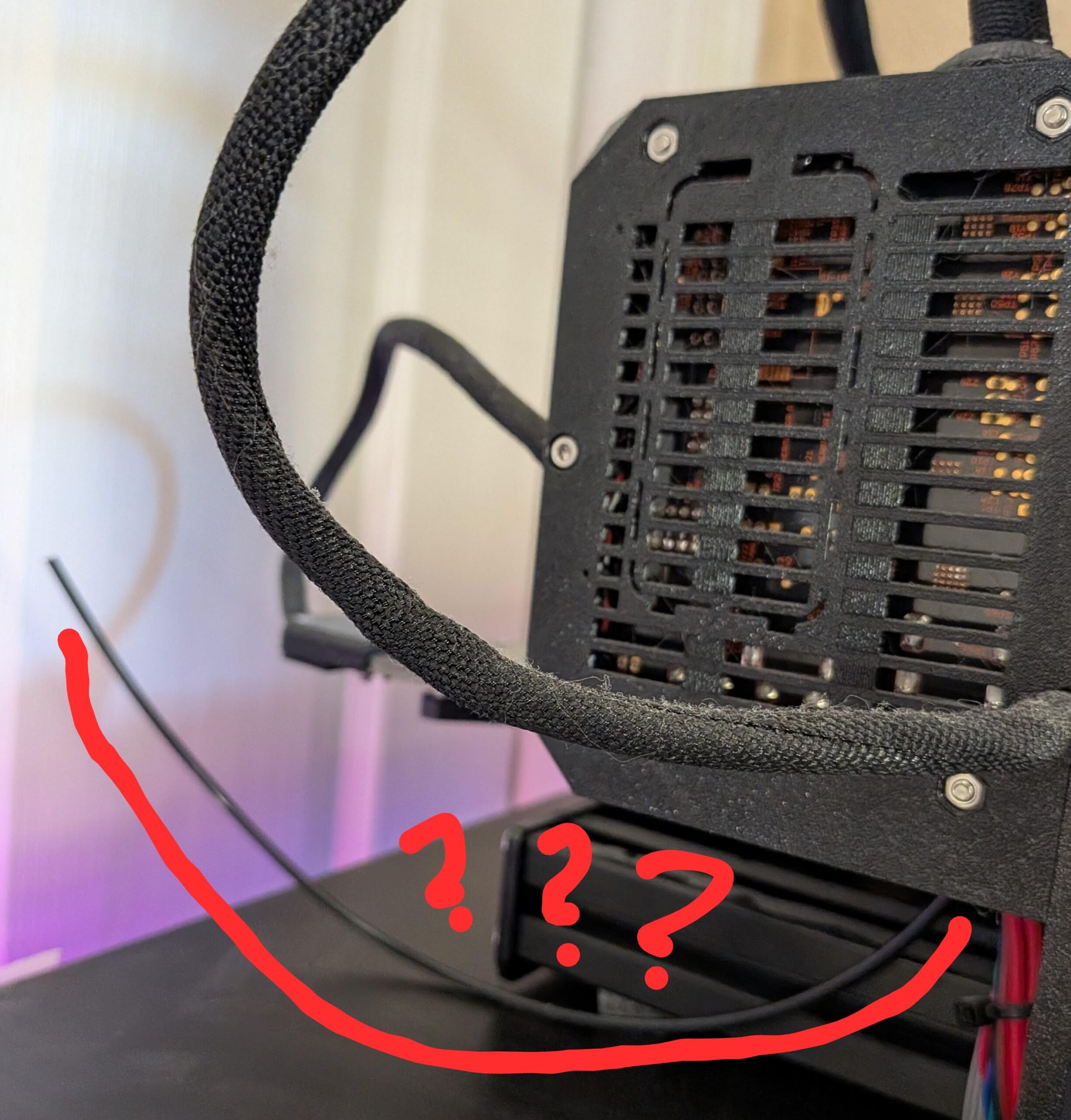
While fiddling around with my 3D printer1 I noticed there was this… filament sticking out of the electronics box. I bought this i3 MK3S printer pre-assembled, so I never got elbows deep in the build process. I had an inkling this plastic rod was likely a part of the electronics bundle going to the extruder, but I wasn’t sure until I looked at the official build guide and searched around the Prusa3D forums a bit. My understanding is that this 3mm nylon rod is designed to prevent too much flexing and fatigue on the wires running from the electronics box to the extruder.
Just what the hell is going on?
I’m not sure what the best way to re-insert this rod into the fabric wire bundle. From a cursory inspection, I suspect it would be to cut a bunch of little zip ties, possibly loosen the electronics case and/or where the wire bundle meets the extruder, unwrap everything, insert the nylon rod, then secure everything back.
I opted to just wedge the nylon rod through the small zip ties near the extruder and lash the nylon rod to the wire bundle with velcro straps every few inches. Yeah, it’s not as clean and professional as when the machine arrived but (a) that system apparently came loose and (2) this is was way less work and (c) doesn’t involve me potentially borking the printer.
Hopefully the nylon filament won’t migrate, so it won’t be a problem. I do plan, one day, to dig into the robot and install the Raspberry Pi Zero 2W so I can print wirelessly. If I were printing daily or had a print farm or a product I was manufacturing, this would be way more urgent. In any case, I’ll probably take the time to rewrap the nylon filament into the electronics wire bundle when I get around to that.
This little banjo ditty from Sesame Street circa 1979 permanently lives in my brain. I’ve played the video for my kids and it’s even become something of a “meme” in our household when someone needs more room.
Anyhow… I want to add more storage space to my Lenovo ThinkCentre Tiny M70q computer. The problem, as one might infer from the name of this particular form factor PC, is that it is pretty tiny and there’s limited space inside. Even so, I have to say it is a very well designed PC case. The PC cover comes off after loosening a single screw in the back1 , hard drive caddy clips into place, the cover for where the RAM sticks are located can also be removed by hand without any tools. It’s just so incredibly modular that swapping out either RAM or a drive would easily take less than a minute. These particular kinds of PC’s appear to be marketed towards office and corporate systems, where there’s an IT department with a box of parts, that can just quickly disconnect a PC, drop in a replacement, or apply a quick fix. With their quiet operation, sturdy metal frame, stock features2, modularity, and price point make them a perfect choice for any office environment. I’m guessing the reason these haven’t taken over the consumer market is because they’re not sexy and don’t have any flashy LED’s.
It also has two small features which I love. The PC comes with a small integrated speaker – so you can play a small sound or sound file without any peripherals. 3 Also, you can buy these very inexpensive little expansion boards to give your PC an extra HDMI, DP, or COM port. I know this might sound like I’m shilling for Lenovo, but I picked this thing up on the secondary market for a hair over $200.
The problem I’m running into is that the stock PC hard drive caddy can only accommodate drives up to about 7-10mm thick and the most storage space you can get in a 7mm drive is 2TB and anything above that pretty much necessitates a 15mm thick drive.
From just a visual inspection456 I believe I can physically insert a 15mm thick drive into the SATA drive area. A quick search of Reddit suggests the only way to do this is to be a complete maniac. One Redditor said he sanded out the tabs which would normally hold a 7mm drive in place, flipped the drive upside down to pop into the metal pins, then had to twist the SATA cable around to connect to the upside down drive. The drive caddy I have doesn’t have those tabs, so it should be possible to mount a thicker drive upside down and put a half twist7 into the ribbon cable, but… I’m not excited about twisting that thin delicate ribbon cable. They’re not super expensive, but they are proprietary and the hassle of putting the device out of commission for a few days while a replacement arrives is not something I feel like risking.
I started searching ebay to see if there were any off the shelf parts to drop a 15mm drive into a ThinkCentre Tiny without success. I did, however, discover this absolute gem for sale on ebay for $20 plus $10 shipping:
Lenovo ThinkCentre Tiny 2.5″ SSD Tray/Caddy by Ropsu11 on MakerWorld
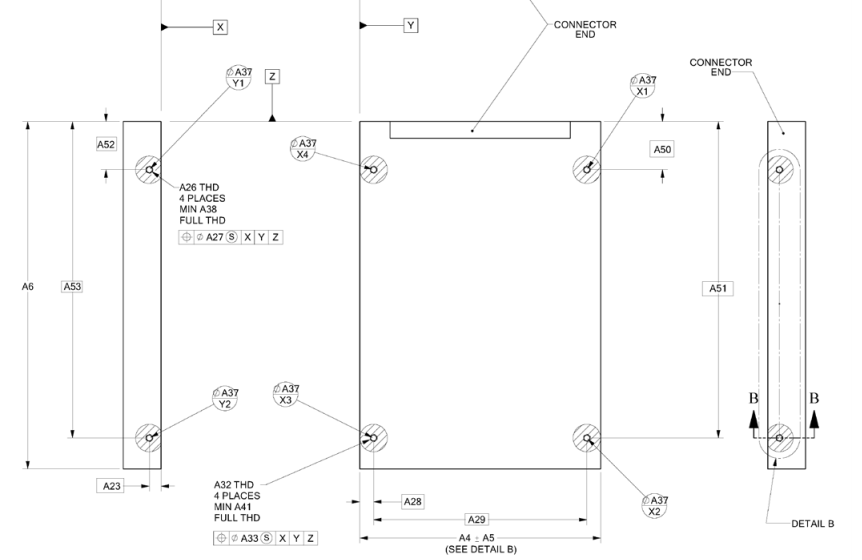
I express no opinion on whether $30 is a good deal for this product, but I couldn’t help notice it certainly has the look of a 3D printed part, which lead me to what I believe is the original file by Ropsu11 on MakerWorld. This looks perfect for my purposes, except that the design would still need to be altered slightly so that I could make it work with a 15mm drive without having to flip it on it’s back.8 I tracked down the specifications for 2.5″ SATA drives so I could figure out just how to adjust the 3D model file. Apparently the screws for SATA drives, irrespective of whether it’s a 5mm or 15mm tall drive, are located 3mm from the bottom of the drive.
2.5″ Form Factor Drive Dimensions (SFF-8201, established 01/19/2018)
The 3D model file was available on MakerWorld as an 3MF file, which I rotated slightly and then converted into an STL using PrusaSlicer. By using a little bit of OpenSCAD magic, I can take the model to center it on the origin. In doing so I discovered the various holes/tabs don’t really seem to line up properly. In an ideal world, I’d be able to adjust the original design files and failing that email or message the creator. Since the creator doesn’t enable messages from users with less than a level 7 on MakerWorld, it looks like I’ll need to try and either adjust or redesign the file myself. The specific locations of the mounting holes should be determined by the SATA drive specifications above – rather than slightly offset by various small amount. By taking the model and mirroring it over the X and Y axes and using the “%” background modifier, I can make sure it’s perfectly centered – but ended up discovering the various holes don’t seem to really line up with one another.
After some fiddling with the STL for that file, I find myself where I usually do after inspecting someone else’s model. I think I’ll just design it myself. Yes, there will be some measurements, possible repeat printing, but I’ll be certain it will fit my machine and new drive – and I can customize it as well.
The only things I have plugged into this device are the stubby wifi antenna, the dummy HDMI plug, the power cable, and sometimes a USB flash drive or device I’m working on. I just want this PC to exist invisibly and silently in the back of my home office doing it’s thing. [↩]
I had one incredibly pompous “doctor” use the word “oculometrics” to describe how he was able to perform a medical examination and make particular measurements. In looking up the word now, it appears it refers to the measurements of eye movements – not one’s ability to measure with just their eyeball perception aided by their brains. [↩]
That, of course, would be considered “cerebral aided oculometrics” 🤮 [↩]
I say “doctor” not because this person was a time traveler with dubious credentials, but because they held themselves out as a doctor of chiropractic. I’m sure people find relief through chiropractic manipulations, but as an orthopedic surgeon once told me … “90% of all back pain goes away on it’s own. So, just because you rub bleu cheese on your back and pain goes away, doesn’t mean it worked.” [↩]
One of my favorite things to do leading up to Maker Faire is to reach out to interesting people / projects / exhibits ahead of time to learn more about what they’re doing, how they make things, and be sociable, really. There’s so much to see that even if your Maker Faire enjoyment strategy is to sprint from booth to booth all day long talking to as many people as possible, it’s very easy to miss someone who was only there for just one day or part of the weekend or even someone who’s tucked away in some small corner or behind a booth that gets swamped.1 I reached out to RiseLink about their incredibly cute looking board and workshop and they graciously offered to send me one of these boards for experimentation – with their only request being that I share a short video of whatever I build.
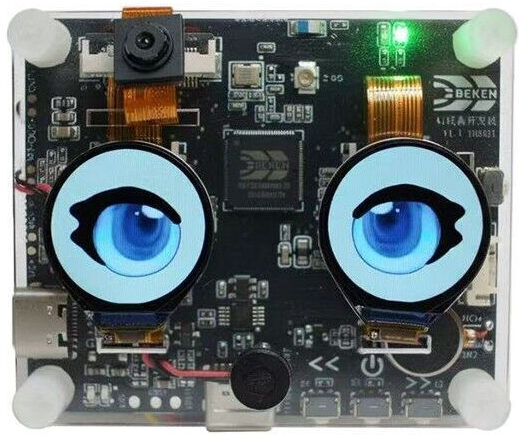
RiseLink.AI’s AI Talking Toy
RiseLink doesn’t seem to be a “maker-facing” business per se, but rather a big chip maker creating some of these development boards to showcase their chips. From what I can tell, this board packs a huge punch for the $50 price tag – a built in camera, microphone, speaker, LCD display, and wifi capabilities, fully pre-assembled into a very cute little package.
Suffice it to say, I’m having a lot of problems getting this project off the ground. Here’s how I approached this project:
Locate Documentation
The documentation is somewhat sprinkled throughout the RiseLink website and their Github. For the moment, I’m just going to dump all the links and sort them out later.
cd /tmp
wget https://developer.arm.com/-/media/Files/downloads/gnu-rm/10.3-2021.10/gcc-arm-none-eabi-10.3-2021.10-x86_64-linux.tar.bz2
sudo tar -jxvf gcc-arm-none-eabi-10.3-2021.10-x86_64-linux.tar.bz2 -C /opt/
Clone Core SDK Repo
mkdir -p ~/armino && cd ~/armino
git clone https://github.com/bekencorp/bk_avdk_smp.git
Compile Base Audio/Voice Firmware
cd ~/armino/bk_avdk_smp
make bk7258 PROJECT=doorbell_asr
Verify Output
ls -lh build/bk7258/doorbell_asr/package/all-app.bin
Flashing the Board
Find the USB port (likely “/dev/ttyUSB0”)
ls -l /dev/ttyUSB* /dev/ttyACM* 2>/dev/null
Ensure user permissions for serial access
sudo usermod -aG dialout $USER
Flash firmware
cd ~/armino/bk_avdk_smp
tools/build_tools/armino -p /dev/ttyUSB0 burn -f build/bk7258/doorbell_asr/package/all-app.bin
By the end of all this2 , I can receive “success” messages when I flash the firmware, but I can’t get the device to do anything useful yet. I’d really like to get this working and will keep at it. Wish me luck.
… Uh, as I was getting ready to publish, I figured I’d add some visual interest to this post and looked at the RiseLink.AI’s website and blog. I found they linked to a Google Doc with a tutorial for getting it working. When I approach this again with fresh eyes, I guess I’ll start there!
As time grew close to Maker Faire, we had to sharpen / tighten our goals. We always try to improve some part of our projects and change things up. This year, we worked on the more “cosplay” elements and left the more electronic and technical aspects largely alone.
ED-E Companion Robot
Dexter built an entirely new body for ED-E from a milk jug, 3D printed parts, foam mats, and model magic. In retrospect, an HDPE milk jug is so smooth and adhesive resistant that it may not have been the best choice. The paint flaked off in some small places and the 3D printed internal structures didn’t stay in place as desired, but everything held together quite well over the course of the entire weekend.
ED-E used to be built into a small 3D printed enclosure, about the size of a baseball, which was limiting for power supply and other mechanical abilities. This year we mounted him on a PVC pipe, but quickly learned the end needed to be padded otherwise the constant shock of hitting the ground would slowly scramble his brains.
I think an entirely 3D printed case is very doable for next year, would take pain much better, permit easier access to his brain, better placement for LED’s and a speaker. He would probably benefit from using separate ESP32’s for the brain and the PIP-Boy to communicate wirelessly, so that the robot could be easily untethered from the arm.
Another issue with the robot was simply carrying the thing over the day. The robot and PVC aren’t that heavy, but over time lugging it around, even using it as a walking stick takes its toll. The temporary fix at Maker Faire was to tape a bunch of foam to the bottom of the PVC pipe. One possible fix would be to design a TPU cap to go over the bottom of the pipe, to cushion the impact of the pipe on the ground – and help reduce the impact on the robot components. One idea is to add a wheel or caster to the base and another idea would be to put the whole robot on an IV pole. Putting the pole on a single caster/wheel could be problematic if we needed to set the robot down – unless the wheel had a retractable kickstand or retractable wheel. An IV pole might work well, but sourcing one might be an issue. 1
Vault Dweller
I pivoted my project from being solely about a shoulder mounted robot to being more of a “vault dweller with companion robot.” I designed our PIP-Boys from the ground up, making several changes from other designs out there for aesthetic and practical reasons, while keeping the essential look. Although I didn’t get around to adding yellow accents to my blue jumpsuit, I was recognized throughout Maker Faire and called out as a “vault dweller” probably due to the icon combination of the jumpsuit and PIP-Boy.
My PIP-Boy included the e-ink display I had originally purchased for use in a kind of digital to-do list, but disconnected from a microcontroller. I’m looking forward to building in additional features to the device, adding a power supply, microcontroller, buttons, and lights to bring it to life.
I normally take a sling backpack with me when I’m out for a day trip or running some errands. However, after the first two days I skipped it entirely since my jumpsuit had ample pockets and storage. The various vault suits out there don’t seem to include pockets, but that’s just silly. Ideally, for aesthetics the vault suit would feature some leather / faux leather (possibly weathered craft foam) pads at the elbows and knees as well as a brown / dark brown leather belt with pockets / pouches for stuff.
I’d really like to get a working set of buttons and microcontroller working in my PIP-Boy to be able to change the display. There’s probably room in the PIP-Boy for a battery pack, some wires going to various LED’s2 , possibly a small servo, potentially a little laser3 , and maybe a little spring loaded projectile launcher.
I couldn’t be happier with how the PIP-Boys turned out. My 3D designs really came together. The cuff parts were just craft foam / floor mats and fit reasonably well. They had a tendency to slip or rotate on the arms a little, but not to a problematic extent. The 3D printed parts stayed affixed to the painted foam cuffs well enough. Both were instantly recognizable as PIP-Boys by lots of people. I think with some sanding, wet sanding, and a blast from a heat gun, they’d look even better. I’m really looking forward to sprucing these up.
I don’t mind paying ~$10 for a used one, but not interested in picking up a brand new one for $40-400. I did find one on Craigslist, but the seller hasn’t replied after several hours. After this afternoon, I’ll be a lot less immediately interested since we probably won’t be suiting up again for another year. [↩]
I have a great spot for the 5mm NeoPixels I bought years ago [↩]