
One of my favorite things to do leading up to Maker Faire is to reach out to interesting people / projects / exhibits ahead of time to learn more about what they’re doing, how they make things, and be sociable, really. There’s so much to see that even if your Maker Faire enjoyment strategy is to sprint from booth to booth all day long talking to as many people as possible, it’s very easy to miss someone who was only there for just one day or part of the weekend or even someone who’s tucked away in some small corner or behind a booth that gets swamped.1 I reached out to RiseLink about their incredibly cute looking board and workshop and they graciously offered to send me one of these boards for experimentation – with their only request being that I share a short video of whatever I build.
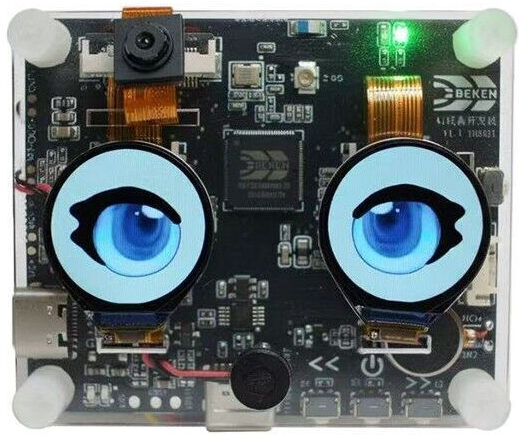
RiseLink doesn’t seem to be a “maker-facing” business per se, but rather a big chip maker creating some of these development boards to showcase their chips. From what I can tell, this board packs a huge punch for the $50 price tag – a built in camera, microphone, speaker, LCD display, and wifi capabilities, fully pre-assembled into a very cute little package.
Suffice it to say, I’m having a lot of problems getting this project off the ground. Here’s how I approached this project:
- Locate Documentation
- The documentation is somewhat sprinkled throughout the RiseLink website and their Github. For the moment, I’m just going to dump all the links and sort them out later.
- https://docs.bekencorp.com/
- https://docs.riselink.ai/arminodoc/bk_app/lvgl_ui_designer/en/index.html
- https://docs.riselink.ai/arminodoc/bk_avdk_smp/smp_doc/bk7258/en/v3.1.1/get-started/index.html
- The documentation is somewhat sprinkled throughout the RiseLink website and their Github. For the moment, I’m just going to dump all the links and sort them out later.
- Set Up Environment
- Install the ARM GNU toolchain
- cd /tmp
wget https://developer.arm.com/-/media/Files/downloads/gnu-rm/10.3-2021.10/gcc-arm-none-eabi-10.3-2021.10-x86_64-linux.tar.bz2
sudo tar -jxvf gcc-arm-none-eabi-10.3-2021.10-x86_64-linux.tar.bz2 -C /opt/
- cd /tmp
- Clone Core SDK Repo
- mkdir -p ~/armino && cd ~/armino
git clone https://github.com/bekencorp/bk_avdk_smp.git
- mkdir -p ~/armino && cd ~/armino
- Compile Base Audio/Voice Firmware
- cd ~/armino/bk_avdk_smp
make bk7258 PROJECT=doorbell_asr
- cd ~/armino/bk_avdk_smp
- Verify Output
- ls -lh build/bk7258/doorbell_asr/package/all-app.bin
- Install the ARM GNU toolchain
- Flashing the Board
- Find the USB port (likely “/dev/ttyUSB0”)
- ls -l /dev/ttyUSB* /dev/ttyACM* 2>/dev/null
- Ensure user permissions for serial access
- sudo usermod -aG dialout $USER
- Flash firmware
- cd ~/armino/bk_avdk_smp
tools/build_tools/armino -p /dev/ttyUSB0 burn -f build/bk7258/doorbell_asr/package/all-app.bin - sudo apt update && sudo apt install -y pipx
pipx install bk7231tools - sudo ~/.local/bin/bk7231tools write_flash -d /dev/ttyUSB0 -B build/bk7258/doorbell_asr/package/all-app.bin
- PLUS hitting the reset button…
- cd ~/armino/bk_avdk_smp
- Find the USB port (likely “/dev/ttyUSB0”)
By the end of all this2 , I can receive “success” messages when I flash the firmware, but I can’t get the device to do anything useful yet. I’d really like to get this working and will keep at it. Wish me luck.
… Uh, as I was getting ready to publish, I figured I’d add some visual interest to this post and looked at the RiseLink.AI’s website and blog. I found they linked to a Google Doc with a tutorial for getting it working. When I approach this again with fresh eyes, I guess I’ll start there!
Project Jarvis