I started to write this blog post a few months ago, and just published a post pontificating / complaining about AI search result slop.
Google has become nearly useless lately. Searching for anything turns up it’s AI slop nonsense or advertisements rather than actual links to something useful. Google’s initial promise – high quality uncluttered search results is dead. Any results are now hidden below their AI slop, advertisements, and other results from other slop sources. I might as well publish it now, rather than have it relegated to a draft for years to come.
If it were possible for Google AI summaries of search results to be infallible, I guess that would be fine – but it’s just so far from the truth. I’ve yet to see an LLM that doesn’t just try to generate something to please – rather than try to generate something that is accurate. Google AI offering false but pleasing slop reminds me of the Azimov story Liar!. Without a “three laws of robotics” style filter, there’s no systemic guardrail preventing automated misinformation.
While I think there’s room for legitimate practical LLM uses, shoving it into search results seems like a complete waste for everyone concerned. When people say “ChatGPT/Claude told me X”, that’s really no different than saying “ChatGPT/Claude thought I would be pleased if it said X.” But using an LLM1 for synthesis and summarization of information and data seems only able to generate either results its hopes are pleasing to the requestor or results hopelessly biased by it’s training. When too many people have the wrong idea about what an LLM is, how it works, or how to interpret it’s responses, putting an AI result before actually informative links is really damaging.
Yes, I’m still struggling with the implications and ethics of LLM use.
Small LLM’s you can run at home or offline, on your machine, in your browser, or on your phone feel intuitively less evil. But, they’re just small distillation spawn from a much larger LLM – built from hoovering an internet of data, all social media sites, literally destroying old books for even more data, building hundreds of data centers, consuming power and water, churning out waste and noise. If I can’t justify using a big AI company services, shouldn’t I also refrain from using their derivatives as well?
I am still using frontier AI, just not paying for it in the normal sense of sending them money. But, I’m under no illusions that any time I’m using their services, I’m helping shovel content into their machines and train SkyNet. Since small models can be run entirely offline, they don’t have the same “you’re the content” problems.
One of my goals is to bootstrap my way out of using these things. I’m still very much a Linux newb and still working on my Python skills and what little programming abilities I have are all self-taught. StackOverflow used to be a reasonably reliable source for finding discussions on how to overcome a given technical problem, but now it’s a ghost town. If I can’t turn to something like StackOverflow… the options these days are asking on Mastodon and hoping a mutual replies, asking / searching on Reddit and hoping the answer isn’t a ‘bot, or just asking a ‘bot directly.
It’s still the same problem – and I honestly can’t tell if I’m trying to rationalize my LLM use or if there are any legitimate uses. Certainly OCR and interpreting MRI and other radiological reports to help save lives are reasonable and beneficial uses. I guess part of my struggle is that I literally cannot avoid interacting with stupid AI when they’re everywhere, in everything, ads in media and billboards, spam emails/texts, website chatbots, preliminary phone / chat bot screenings, and even shoved into the products I’ve owned for a while.1 If I’m already forced to interact with an LLM to (perhaps) benefit other people / companies, why shouldn’t I feel comfortable using them to (a) filter out their AI garbage (b) assist me with minor tasks?
Possibly unrelated, both of my kiddos are facing AI nonsense in school. The eldest receives constant warnings at university about what uses are permitted / not permitted – and then the university has students submit their work through an AI port to determine whether the students are using AI. 2 The younger one has teachers saying their work will be graded by AI – in junior high?!
I refuse to believe these students’ work aren’t being used to train the next generation of AI education software.
I know I’m rambling. I recently sent a picture of a basket of baby otters to some family members – who thought it was probably AI. I had seen it on Mastodon and based on the context, I felt it was likely real – but I had to question it. Performing an exact match image search didn’t work – since the same image has been spammed across the internet in the AI era of post-2023. I narrowed the search to only those results prior to 2020 and was able to locate a copy of the image from roughly 11 years ago.34 This made me think – since current Google searches have become complete AI slop / summary garbage, why not narrow all internet searches to only those results prior to 2023?
I think where I’m leaning on this entire ethical morass is … this stupid AI nonsense is everywhere around me, my own work and thoughts are going to be fed into the giant provider AI machines willingly5 , begrudgingly6 , or unwillingly,7 and I don’t have a big problem using similar technology to build systems to filter out AI garbage and teach me further skills.
Technically, anyone can record in public and by going out in public I’m consenting to the possibility my actions and likeness will be fed into the giant data machine. Even so, still Flock + Palantir + Meta/Google/etc is about as offensive as big brother / big data gets [↩]
Assuming all human knowledge and the entire of the internet is fed into LLM’s, they’ve digested the thousands of blog and social media posts I’ve created. robots.txt. What a joke. [↩]
Trigger warning: This post (and potential series) is going to discuss some AI/LLM stuff. That’s only a part of what’s going on, but if you hate all things LLM, then maybe this post isn’t for you.
Reasons for Building a PC
I haven’t built a PC in probably 25 years now. Even then, I had the kind assistance of two friends who knew a lot more about PC building than I ever did. More recently I’ve been interested in building a PC for a variety of reasons:
The intellectual exercise of building something, mostly out of parts, all by myself
Having a PC running Ubuntu / Linux, something I’ve toyed with now and then, but never really tried in earnest. I already eschew most closed source software in favor of open source alternatives1 , so moving to an open source operating system seems almost natural.
Some of my personal information currently resides on a computer I use for work – and I’d like to create a clean separation of these things for a variety of practical reasons.
Having an inexpensive and dedicated box would let me sandbox certain programs, try out different new ideas, and still let me access all this information and processing power remotely, if set up properly.
Yeah, I wouldn’t mind an Iron Man style Jarvis virtual assistant / butler, but the technology is still a fair bit aways as are my own skills and budget for such things.
Building in Parallel
I’ve taken to “building in parallel” for several recent projects. With the recent remote temperature sensor system, I tried taking measurements with an infrared heat gun, then an ESP32C3 module with lots of wires, then several Wemos D1 Mini modules each separately sending data back to my PC. While the ESP32C3 systems were still (mostly) working, I recognized some of the weaknesses and failure points and began working on the Wemos systems and didn’t take the ESP32C3 sensors offline until the Wemos sensors were up and running. There was certainly overlap for a little while, but this also let me calibrate both systems. I enjoyed working on these things, so building an entire second set of sensors in exchange for doubling the price and quadrupling the soldering wasn’t a horrible experience. I’m reminded of a quote from Contact, “First rule in government spending: why build one when you can have two at twice the price?”
As with those sensors, I’ve had some automated projects running constantly lately. Something that downloads a huge work calendar daily, a few simple reminders, something that sends me reminders over a messaging platform, and a few other assorted digital doodads. I’m keeping all of these online, on my work PC, until I can get the Linux box going – then I’ll look forward to closing these down.
Pricing Things Out
As with nearly any learning experience, you end up paying for it one way or another – money, tuition, wasted attempts and materials, time. Partially because I’m just starting out and partially because I’m fairly frugal, I set a budget of ~$2502 If I’m going to spend any money at all, I wanted something that would work – but I’m not ready to drop $5k on RAM/GPU/newest processors. My needs are still modest – and largely covered by my equally modest work computer. It’s an Intel i7 with 32GB RAM in a very small mini PC case, handles email, big spreadsheets, graphic programs, python projects, and even 3D modeling and rendering with OpenSCAD if you give it enough time. It cost $550 before tax, new from Amazon, nearly 4 years ago, and is still going strong.
For this project I contemplated going with a fanless headless system, but these seemed to require special aluminum cases and appeared to be little harder to come by. I thought about tracking down some e-waste resources, Facebook Marketplace, and Craiglist – but all of these require a fair bit of legwork and I feel like they’d also have more than a modest possibility of wasted time. Any new PC would set me back at least $500 through either Amazon or Costco, so I turned to eBay since the rating system provides at least a modicum of quality assurance – if not in the product, at least the seller.
There are a ton of options for older PC’s that can be given a new lease on life with Ubuntu and some extra memory. I’m still pretty biased against Dell, HP, and Gateway for producing sub-par consumer grade computers for myself, family, and friends. Some noodling about and half-hearted research suggested that these brands may produce significantly better enterprise machines than their consumer grade lines. This only irritates me even more, if true. This pretty much left me with Lenovo.
I ended up going with a “Lenovo ThinkCentre M70q Tiny i5-10500T 2.30 GHz” and paid a little extra to have the eBay seller customize it with 32 GB DDR4 RAM total, a 512 GB M.2 NVMe SSD, and throw in the antenna. Besides being fairly accommodating and helpfully communicative, I went with this listing because it fell squarely in my price range / project budget, it already came with the power adapter, they were California, and it could ship very quickly. While I could have easily spent another week or three trying to find a better deal on better and newer equipment, this was always going to be a project running on low end / older equipment and I valued the immediacy of getting to work over the incremental value of a better system. Frankly, just not having to hunt for a compatible power adapter was a huge plus for me.
In the end I purchased the main system from the eBay seller, paid an extra $36 to make sure the system had 32GB of RAM, ordered a used 512GB SSD (they threw in the antenna) from them in a second purchase for $55, a SATA SSD enclosure to re-use an old 500GB SSD, and $7 to grab some HDMI dummy plugs off Amazon. I knew the system would come with 16GB of RAM, but the benefit of “buying up” to 32GB also meant that I knew the machine wouldn’t have two 8GB sticks instead of a single 16GB stick. I could later upgrade from 16GB to 32GB if I had a single 16GB stick to start – but having two 8GB sticks would mean I would later have to get two 16GB sticks.
Anyhow, for those of you playing along at home, here are all the parts for my $284.30 computer system.
Part
Cost
Shipping
Tax
Total
M70q Gen 1(i5-10500T, 16GB, Adapter Incl., No SSD), upgraded to 32GB
$185.99
$5.93
$14.41
$206.33
M.2 SATA SSD to 2.5” SATA adapter enclosure
$10.79
$0.84
$11.63
512 GB NVMe M.2 SSD, antenna
$55.00
$4.13
$59.13
Dummy HDMI Plug
$6.69
$0.52
$7.21
$284.30
I didn’t have to buy the SSD enclosure – but it seemed like a very inexpensive way to double the storage and repurpose my old drive. I didn’t realize I’d need to get an HDMI dummy plug, or even what they were, until I tried to “remote” into the headless box and got a fairly ugly looking desktop instead of the slick Ubuntu desktop. This was probably the least necessary of these purchases. If I kept the system to the PC with the 32GB upgrade, ran the OS off my old SSD in the SATA enclosure, and picked up a $7 antenna off Amazon, the system would have only cost about $213. The extra $59.13 doubled the hard disk space and enabled a more graphically pleasing interface. It’s not much of a splurge and this was never a “build a PC for as little as possible” kind of a challenge anyhow.
The final system is probably on par with my existing 4 year old PC at roughly half the cost. I think it was a “decent” deal and I have a system that I can use to offload a lot of projects. If any of these projects end up requiring more processing power, I’m not even really “out” $285 since I can still keep using this system for other tasks (home automation, running daily scripts, etc).
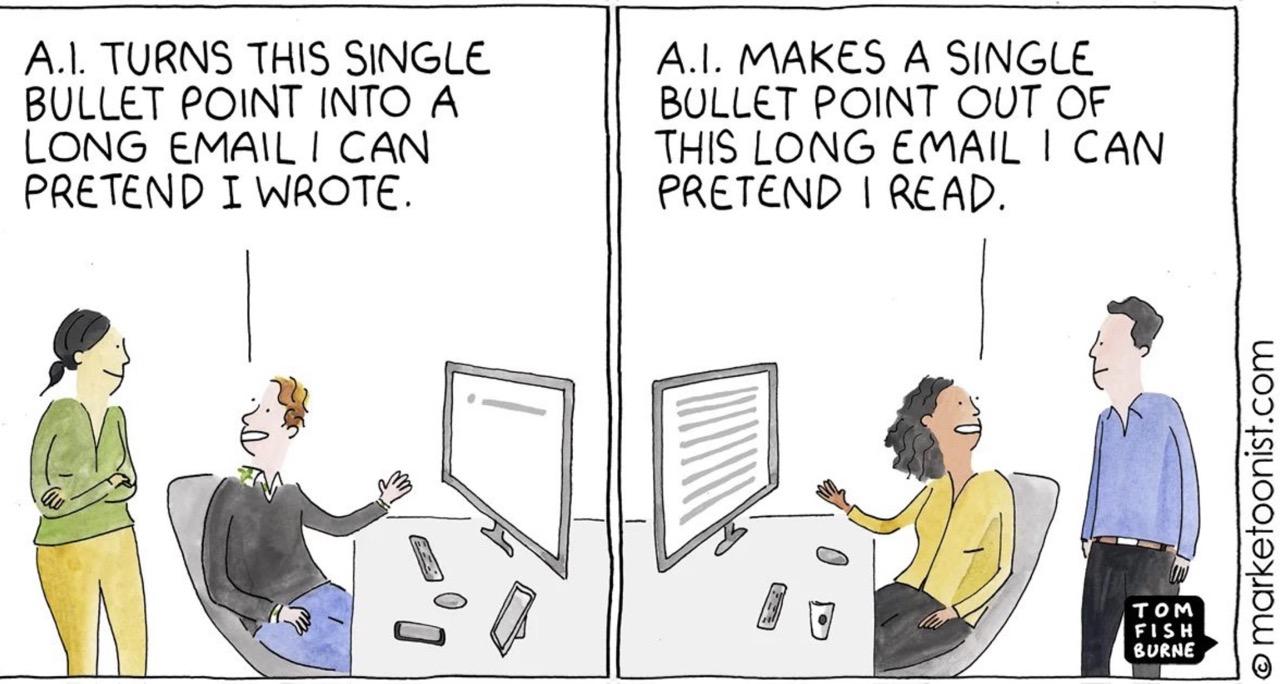
And, yes, I’m trying to use this PC as a basis for a bundle of scripts I can deterministically interact with via voice input / output as well as certain LLM powered tasks. First, a helpful comic.
And, that kids, is how AI killed human interaction
We’re probably hurtling towards dead internet theory. I can’t search through Google or even DuckDuckGo anymore without having to wade through their AI summaries and then scroll past search results from AI slop. Using ad blockers or setting up a PiHole to block ads and stop tracking from ever touching my PC may impoverish some otherwise worthy websites. However, I simply don’t have to read every advertisement sent in the mail, on the inside of my grocery shopping cart, or every billboard. Yeah, I hate the idea of AI companies boiling oceans of drinking water for their inscrutable purposes…
Reminds me of another quote…
There’s a quote I love by H.L. Mencken; “Every normal man must be tempted, at times, to spit on his hands, hoist the black flag, and begin slitting throats.” What if the best way to filter out AI garbage is to use an LLM to do some of that filtering for me? 34
Searching through any search provider is kinda garbage these days, but there’s no reason I should have to wade through that AI garbage myself. Gone are the days you can drill down to the kind of search results you want by simply adding “-negative_search_terms”, because there’s probably no financial reason for them to permit this.
But what if I created my own search function? I recently tasked an AI with searching up 10 options for a certain product for me on Amazon and it did a mediocre job, finding 7 dead or unavailable listings. But it also saved me a lot of time looking through dozens of pages of crap when I only needed to look through 10 crap listings. With some tinkering, I think I could make a script that would identify negative search terms, perform the search as requested, then remove those that should have been removed with the negative search terms. I could see this being incredibly useful for Ebay and Amazon purchases.
A preview for next time: After some dithering, much watching of youtube videos, I’m going to give Hermes Agent a shot over OpenClaw.
And, yes, I have considered the possibility that an AI company’s aim might be to make everyone distrust the entirety of the internet, then sequester everyone into their own little siloed version of digital reality, everyone watching slightly more targeted ads and Marvel movies than everyone else, and any attempt to use another LLM to filter shit out only results in more precise targeting… [↩]
I went to the hardware store yesterday and was told by someone who worked there in an orange apron that the entire store, inside and out, was covered in Flock cameras. I think this bullshit surveillance is really starting to get to me. [↩]
This is likely to be a rambly kind of a post. I typed the blog title first, but, as Hector Barbosa might say, they’re more of what you’d call guidelines than actual titles. Fair warning – as at least one reader will point out, this may be some more AI bellybutton gazing.1
I basically stopped using Creative Commons pictures in my blog posts and websites a few years ago when I learned of some CopyLeft troll nonsense litigation. I did my best when using these pictures to provide proper attribution and even wrote a WordPress plugin to help others do the same.2 Learning that a picture from Flickr or posted for free use under Creative Commons could lead to abusive litigation and extortion was so disheartening that I pulled a lot of pictures from my various blogs and either left them with no images, broken images, or if they were very important to the post/page making something to go there. From that point, I generally trended towards using/making memes to add visual interest to the blog posts.
I was reminded of this after reading a well written post on Mastodon about various alternatives to using AI generated images in blog posts.3 While I don’t think these are all necessarily practical when it comes to finding an appropriate and aesthetically pleasing image to go along with a blog post, I thought this was a worthwhile and thought provoking suggestion.
I do like adding pictures because it adds a little bit of visual interest to what would otherwise be a wall of text. Many times, I will add a screenshot from OpenSCAD or a photo of a sketch / sketchbook page. And now, a short digression…
Someone far more pithy than I comment recently that twenty years ago regular people were sued for posting song lyrics, sharing MP3’s of music, and low quality movies, while these days people are becoming AI millionaires by shoveling the entire internet and the collected written works of the human race into machines.
…What should people opposed to AI slop do, then? Do we stop driving because of license plate scanners and stop going out in public because some asshole will be wearing Google Glass Goggles or Facebook Meta Glasses and feeding our information into facial recognition software? 45 I don’t share photos of myself or family on social media, but should we not store our photos in the cloud and avoid fun community events at the local library? Even writing this post, I’m unwillingly contributing the corpus that will be fed into the next version of an LLM.
I feel damned either way. If I don’t use any LLM, they will consume my writings and original pictures, use my original pictures to track me across the internet, sell me things or sell me to other things. If I do use an LLM it will do all of that plus train on my interactions.
What is the most defiant thing to do when this blog post is almost certainly going to be read by more web crawlers, spam robots, and LLM’s than humans? Should I only post new pictures to add visual interest to my posts at the expense of embedding even more meta data into each post? Is it more subversive to use an AI to generate a fitting copyright-free but soulless image that adds little new information to the algorithm’s endless hunger?
I don’t have answers to any of this.
As I was working yesterday another thought occurred to me. Where is the line between “software” and “LLM/AI”? I had just run optical character recognition on a large document to help figure out what was in it. All OCR is just pattern recognition, making trained “black box” guesses at what’s a given letter/word/pattern. I’ve never liked the auto-suggest “feature” of my phone’s texting app or gmail, but I like the auto-complete feature of LibreOffice when I start to type a date. I don’t mind when my text editor suggests the name of previously used variables and functions – it’s actually quite helpful.
Why am I comfortable with an heuristic’s OCR/autocompleting dates/autocompleting variable/function names, but I hate auto-suggesting messages? Perhaps because it’s no something I can turn off. I just know I find these kinds of “helpful suggestions” to be far more intrusive. Maybe I don’t mind these helpers in documents – but I don’t want them stepping the communications between myself and another human?
I don’t mind using an AI image generators for a stupid joke, but I hate seeing them in advertisements. I would never use an AI, local or otherwise, to write something to someone I loved, client, colleague, coworker – but I don’t mind it when I’m trying to wrap my mind around a new API, updating an old program when certain parts I’d written are now deprecated, or even writing something in a brand new language. It’s hard to tell if I’m justifying my uses or if there really is a decent use case for these things.
I guess I’m trying to come to terms with what kinds of AI/heuristic usages I like, am ambivalent towards, and those I hate – to better understand why I feel/think these ways.
TLDR: Take a picture, use Wikimedia Commons, screenshot from video game, lego diorama, use art supplies/image program to make a picture, stickers, pictures of a shelf. [↩]
This is why I generally rescale/blur/distort images before posting them online. But, I mean, how much time am I going to devote to this if I just want to share a quick picture of something? [↩]
Look, I hate AI slop as much as the next person. My kiddo has been taking a college class where they’ve been delving to the ideas swirling around AI/LLM’s and from what I gather, the class is nearly incomprehensible. Just like my toaster, oven, toaster oven, fridge, and dryer don’t need wifi – neither does every damn thing need a thick coating of AI slop all over it.
Another Marvel reference?
I’ve been thinking about AI as a variation on the “super soldier serum” administered to Steve Rogers. Given to a good man, he can be better. Given to the Red Skull, well, he gets worse. Instead of only making things better, it seems to simply magnify the attributes of a thing.
I guess I’m struggling with the idea of whether it’s hypocritical of me to use AI for things when so often it just makes things worse. 1 And, I admit it is fairly self-serving to liken my uses to that of Steve Rogers and assign derogatory attributes to other uses.
Maybe it’s that I’m using AI/LLM’s to add micro improvements to my own life, rather than pushing it on others? After trying to work with free AI’s on some projects, I decided to pay $20 for a month of premium Claude Pro access. While using the free ones, I discovered:
Claude’s free chat would lock a conversation after a certain context length if you uploaded any documents
Gemini would time-gate a conversation by not letting you use it after a certain amount in a given period
ChatGPT would time-gate a conversation if you uploaded anything, but would merely drop to a lower power model if you didn’t upload content and instead just worked through the chat interface
Overall, ChatGPT was more useful as long as I didn’t upload anything, and I could “make do” with the lower tier models. I’d paid for the premium tier of ChatGPT for a few months about two years ago and quickly became disillusioned with it. I found that it would start to chase it’s own tail, forgetting the thread of a conversation and project, randomly refactoring stable code, hallucinating functions, variables, and the names of functions and variables. It was more work to keep it on the rails than it was to simply just work on my project. I ended up largely shelving several projects as a result. I’d tried unsuccessfully to hire someone, I didn’t have the time to work on them by myself, and sure as hell didn’t have the bandwidth to baby sit2 an LLM.
However, working with various LLMs recently gave me a glimmer of hope. Perhaps they could be useful after all? Pouring over documentation, searching for answers, and consulting Reddit and StackOverflow were options, but they all had their special problems. In any case, these days all of these options (except documentation)3 were getting more difficult to use as people started abandoningpublic forums in favor of just asking an AI.
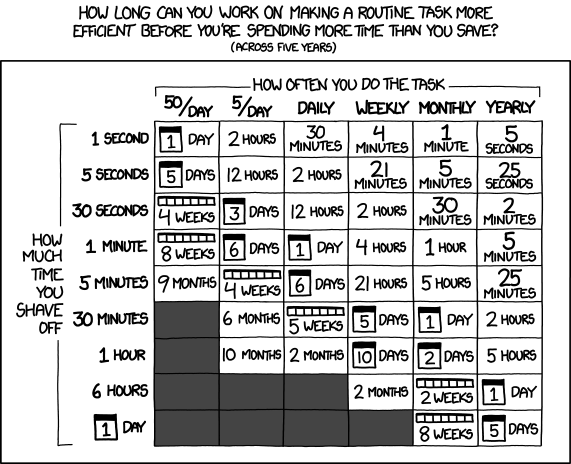
One of my favorite XKCD comics :)
So, what have I been working on? Well, I signed up for Claude Pro on 02/09/2026 and in the just over three weeks since then:
WordPress Plugin.
An overhaul of a website’s registration system. I had been using a now-defunct WordPress plugin on a different website which was basically crumbling to pieces as WordPress and the world moved on. My needs were simple – so a few days of tinkering with Claude Pro got me something that … just worked for my purposes. It eliminated all spam robot signups in a way that nothing I’d tried before had been able to manage. There were a lot of moving pieces to this plugin, and there was certainly some growing pains, but it worked very well, very quickly. I have built plugins for WordPress before and could well do so again even without an AI, but the speed of the model to build all the trivial or tedious stuff is by definition super-human. Since the site’s ability to turn visitors into users into (hopefully) a few dollars is dependent upon the ease of registering, this one single change easily justified the $20 cost of using Pro. That $20 accelerated this from a project I’ve been putting off for literal years because I knew how long it would take me alone, to … solved in a few days.
Python Assistant Script.
As a friend was quick to remind me, I’m very late to the voice activated computer assistant / smart home party. I’d been working on a version of this with three free frontier LLM models, but it was too much, spread across too many platforms to be really cohesive or stay undamaged by converting parts among through these resources. Progress on this project has been slower than building a single WordPress plugin, but it has definitely been boosted. I regularly have to join online meetings where the information to join is sprinkled like breadcrumbs across multiple disparate pages on a given website, sometimes requiring a pseudo-registration process to reach. Doing all these things manually is a real headache when I haven’t had my morning coffee. And, let’s be honest, it’s way more fun to throw hours at a problem figuring out how to solve a problem than it is to actually face one’s problems. I would estimate that this feature will save me about 15 minutes once a week. Using the above XKCD logic, I’m time/energy/effort-positive if I could built this feature in less than 5 days. I probably got it working in a few hours. At the same time, I’ve been “bolting on” new features – a scheduler, time queries, weather queries, media control over my computer, with more features on the way.4
A YouTube Management Chrome Plugin.
I have this unfortunate habit of keeping too many tabs open. While this is bad enough, keeping a lot of YouTube tabs open will have a huge impact on system memory very quickly. I didn’t have the time at the moment to watch the videos, didn’t want to lose these videos, and didn’t want to go through the hassle of adding them to playlists. Instead, apparently I had enough time to build a Chrome plugin that would go through all of my tabs, bookmark each one to a special bookmark sub-folder, sort them into sub-folders, and then close those tabs. I don’t know that this will ever “save” me time, but it certainly is helping my system work better and keep my tab monster from getting too far out of control. However, I think I’m going to extend this plugin to be a little more practical. I think it could work for more than just YouTube videos to mass-close tabs, bookmarking them so they’re not lost, then sorting them into sub-folders.
Email Entries for Work.
My day job requires entry of data into a web portal. It’s a good content management system, but not great for data entry. It’s designed for humans to insert data, slowly, one entry at a time. The UI requires a couple of duplicate keystrokes and/or mouse clicks. While I deeply dislike having to do something stupid even once. I absolutely loathe having to do something stupid twice. It’s basically my kryptonite. Rather than enter emails into this system, which I fucking hate, I wrote a Python script to pull data from Outlook into a CSV, export the email data into an HTML file which reviews each email and suggests an entry code for each one, and once that data’s been cleaned/formatted, which I upload into a script that I wrote to work with my employer’s website, then begin the process of uploading each one. Since the data entry website has all kinds of dynamic elements and animated features, I can’t simply populate fields – I have to give each one time to load. Instead of just uploading an Excel/CSV sheet, I have to wait for each entry to play it’s little animations, time the data to populate, and then click each one manually to enter because the animations sometimes don’t work well. However, it’s a million times less painful than having to type all this bullshit in myself.
Don’t worry, I don’t upload any of my email or data into any LLM. All the logic which pulls data out of my Outlook and builds things out of it runs on my local machine.
I never could have built so much, so fast, without the help of a frontier AI. None of the local LLM’s I’ve tried got even close and none of the free-level AI’s could maintain coherence long enough to help.
Claude Pro isn’t without it’s problems – I still had to monitor the code closely, keep it from forgetting certain key features, and deciding to completely refactor the code. At the $20 level, I can choose among several different models that are supposedly different levels of quality and consume higher amounts of tokens, and I’m limited to a certain amount of compute within a 4 hour window and limited to a certain amount each week. Even so, I’ve had more than enough compute for the tasks I’ve been doing. While these things have been super helpful to me… none of them are cutting edge research or huge trade secrets. In the chat interface you can switch language models, but doing so requires your conversation restart in a new conversation entirely. In Claude Code you can switch the models, but I feel like the LLM lost the thread a little when I did this.
I am a frugal man and tried to do this with free LLM access, but the benefit of more capable, more coherent models, with increased ability to share an entire code base (with the help of Claude Code + Github) for $20 has been an unbeatable deal. I’ve got a few ideas for some additional projects that could benefit from keeping the subscription going and will probably give it another month. I don’t know that I’d need year-round access though.