Not Team AI

Look, I hate AI slop as much as the next person.  My kiddo has been taking a college class where they’ve been delving to the ideas swirling around AI/LLM’s and from what I gather, the class is nearly incomprehensible.  Just like my toaster, oven, toaster oven, fridge, and dryer don’t need wifi – neither does every damn thing need a thick coating of AI slop all over it.

Another Marvel reference?

I’ve been thinking about AI as a variation on the “super soldier serum” administered to Steve Rogers.  Given to a good man, he can be better.  Given to the Red Skull, well, he gets worse.  Instead of only making things better, it seems to simply magnify the attributes of a thing.

I guess I’m struggling with the idea of whether it’s hypocritical of me to use AI for things when so often it just makes things worse. 1  And, I admit it is fairly self-serving to liken my uses to that of Steve Rogers and assign derogatory attributes to other uses.

Maybe it’s that I’m using AI/LLM’s to add micro improvements to my own life, rather than pushing it on others?  After trying to work with free AI’s on some projects, I decided to pay $20 for a month of premium Claude Pro access.  While using the free ones, I discovered:

  • Claude’s free chat would lock a conversation after a certain context length if you uploaded any documents
  • Gemini would time-gate a conversation by not letting you use it after a certain amount in a given period
  • ChatGPT would time-gate a conversation if you uploaded anything, but would merely drop to a lower power model if you didn’t upload content and instead just worked through the chat interface

Overall, ChatGPT was more useful as long as I didn’t upload anything, and I could “make do” with the lower tier models.  I’d paid for the premium tier of ChatGPT for a few months about two years ago and quickly became disillusioned with it.  I found that it would start to chase it’s own tail, forgetting the thread of a conversation and project, randomly refactoring stable code, hallucinating functions, variables, and the names of functions and variables.  It was more work to keep it on the rails than it was to simply just work on my project.  I ended up largely shelving several projects as a result.  I’d tried unsuccessfully to hire someone, I didn’t have the time to work on them by myself, and sure as hell didn’t have the bandwidth to baby sit2 an LLM.

However, working with various LLMs recently gave me a glimmer of hope.  Perhaps they could be useful after all?  Pouring over documentation, searching for answers, and consulting Reddit and StackOverflow were options, but they all had their special problems.  In any case, these days all of these options (except documentation)3 were getting more difficult to use as people started abandoning public forums in favor of just asking an AI.

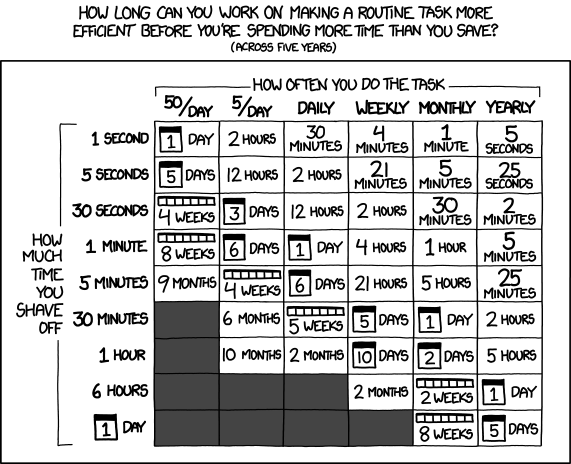
One of my favorite XKCD comics :)

So, what have I been working on?  Well, I signed up for Claude Pro on 02/09/2026 and in the just over three weeks since then:

  1. WordPress Plugin.
    1. An overhaul of a website’s registration system.  I had been using a now-defunct WordPress plugin on a different website which was basically crumbling to pieces as WordPress and the world moved on.  My needs were simple – so a few days of tinkering with Claude Pro got me something that … just worked for my purposes.  It eliminated all spam robot signups in a way that nothing I’d tried before had been able to manage.  There were a lot of moving pieces to this plugin, and there was certainly some growing pains, but it worked very well, very quickly.  I have built plugins for WordPress before and could well do so again even without an AI, but the speed of the model to build all the trivial or tedious stuff is by definition super-human.  Since the site’s ability to turn visitors into users into (hopefully) a few dollars is dependent upon the ease of registering, this one single change easily justified the $20 cost of using Pro.  That $20 accelerated this from a project I’ve been putting off for literal years because I knew how long it would take me alone, to … solved in a few days.
  2. Python Assistant Script.
    1. As a friend was quick to remind me, I’m very late to the voice activated computer assistant / smart home party.  I’d been working on a version of this with three free frontier LLM models, but it was too much, spread across too many platforms to be really cohesive or stay undamaged by converting parts among through these resources.  Progress on this project has been slower than building a single WordPress plugin, but it has definitely been boosted.  I regularly have to join online meetings where the information to join is sprinkled like breadcrumbs across multiple disparate pages on a given website, sometimes requiring a pseudo-registration process to reach.  Doing all these things manually is a real headache when I haven’t had my morning coffee.  And, let’s be honest, it’s way more fun to throw hours at a problem figuring out how to solve a problem than it is to actually face one’s problems.  I would estimate that this feature will save me about 15 minutes once a week.  Using the above XKCD logic, I’m time/energy/effort-positive if I could built this feature in less than 5 days.  I probably got it working in a few hours.  At the same time, I’ve been “bolting on” new features – a scheduler, time queries, weather queries, media control over my computer, with more features on the way.4
  3. A YouTube Management Chrome Plugin.
    1. I have this unfortunate habit of keeping too many tabs open.  While this is bad enough, keeping a lot of YouTube tabs open will have a huge impact on system memory very quickly.  I didn’t have the time at the moment to watch the videos, didn’t want to lose these videos, and didn’t want to go through the hassle of adding them to playlists.  Instead, apparently I had enough time to build a Chrome plugin that would go through all of my tabs, bookmark each one to a special bookmark sub-folder, sort them into sub-folders, and then close those tabs.  I don’t know that this will ever “save” me time, but it certainly is helping my system work better and keep my tab monster from getting too far out of control.  However, I think I’m going to extend this plugin to be a little more practical.  I think it could work for more than just YouTube videos to mass-close tabs, bookmarking them so they’re not lost, then sorting them into sub-folders.
  4. Email Entries for Work.
    1. My day job requires entry of data into a web portal.  It’s a good content management system, but not great for data entry.  It’s designed for humans to insert data, slowly, one entry at a time.  The UI requires a couple of duplicate keystrokes and/or mouse clicks.  While I deeply dislike having to do something stupid even once.  I absolutely loathe having to do something stupid twice.  It’s basically my kryptonite.  Rather than enter emails into this system, which I fucking hate, I wrote a Python script to pull data from Outlook into a CSV, export the email data into an HTML file which reviews each email and suggests an entry code for each one, and once that data’s been cleaned/formatted, which I upload into a script that I wrote to work with my employer’s website, then begin the process of uploading each one.  Since the data entry website has all kinds of dynamic elements and animated features, I can’t simply populate fields – I have to give each one time to load.  Instead of just uploading an Excel/CSV sheet, I have to wait for each entry to play it’s little animations, time the data to populate, and then click each one manually to enter because the animations sometimes don’t work well.  However, it’s a million times less painful than having to type all this bullshit in myself.
    2. Don’t worry, I don’t upload any of my email or data into any LLM.  All the logic which pulls data out of my Outlook and builds things out of it runs on my local machine.

I never could have built so much, so fast, without the help of a frontier AI.  None of the local LLM’s I’ve tried got even close and none of the free-level AI’s could maintain coherence long enough to help.

Claude Pro isn’t without it’s problems – I still had to monitor the code closely, keep it from forgetting certain key features, and deciding to completely refactor the code.  At the $20 level, I can choose among several different models that are supposedly different levels of quality and consume higher amounts of tokens, and I’m limited to a certain amount of compute within a 4 hour window and limited to a certain amount each week.  Even so, I’ve had more than enough compute for the tasks I’ve been doing.  While these things have been super helpful to me… none of them are cutting edge research or huge trade secrets.  In the chat interface you can switch language models, but doing so requires your conversation restart in a new conversation entirely.  In Claude Code you can switch the models, but I feel like the LLM lost the thread a little when I did this.

I am a frugal man and tried to do this with free LLM access, but the benefit of more capable, more coherent models, with increased ability to share an entire code base (with the help of Claude Code + Github) for $20 has been an unbeatable deal.  I’ve got a few ideas for some additional projects that could benefit from keeping the subscription going and will probably give it another month.  I don’t know that I’d need year-round access though.

Software Development with LLMs
  1. Series Plugin Test for Illustrative Purposes Only
  2. ChatGPT WordPress Plugins
  3. Coding with an LLM Sidekick
  4. Python Practice with an LLM
  5. Not Team AI
  1. “Do I contradict myself? Very well then I contradict myself, I am large, I contain multitudes.” – Walt Whitman []
  2. And, let’s be real – train []
  3. RTFM, I guess []
  4. Screenshots, giving me a daily briefing, etc []

Python Practice with an LLM

I’ve been tinkering with Python more recently.  When used on a MCU1 or a PC, it’s such a nice experience being able to write some code, run it without having to compile, see what happens, and adjust as necessary.  Now, since I’m a newb at this, I’m getting help from… *shudder* LLM’s.2 Now, in the past I’d turn to Googling, looking at reliable and friendly forums such as Adafruit and Arduino, but I’d invariably need to check out Stack Overflow as well.3

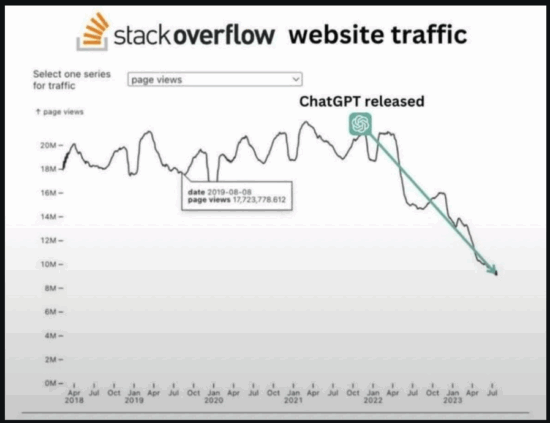
As you might imagine, Stack Overflow was something of a victim of it’s own success.  It’s content was good enough to train the LLM’s of the world – and those LLM’s can parrot / offer all the insights gleaned from Stack Overflow without the caustic haughty  condescending replies typical of the comment sections on Stack Overflow / SlashDot / HackADay.  Thus, it’s no small wonder the following graphic was circulating on Reddit:

Stack Overflow vs Time

Where was I?  Oh, yeah…  I was using some LLM’s to help with Python.  I don’t have any fancy GPU’s, BitCoin mining rigs, etc, so I’m just using my non-gaming PC’s modest 16 GB VRAM to run the smaller local LLM’s.  I can run things up to about 8B parameters, like the various Llama flavors, at 8 bit quantization with reasonable speed.  I’ve found for my system that Qwen3 4B to be fast, thoughtful, and helpful.

I’ve realized this blog post is woefully low on actual Python related content.  Here’s some things for future-me to remember:

  • pip list
    • Will give me all the names of all packages installed
  • pip install requests Pillow reportlab PyPDF2
    • Will install multiple packages, one after another
Python Programming Practice
  1. Python Practice with an LLM
Software Development with LLMs
  1. Series Plugin Test for Illustrative Purposes Only
  2. ChatGPT WordPress Plugins
  3. Coding with an LLM Sidekick
  4. Python Practice with an LLM
  5. Not Team AI
  1. Microcontroller unit []
  2. Large language models such as []
  3. I bought their April Fool’s joke keyboard turned real product and once I’d remapped the keys, got significant use out of it for a long time.  Between the construction, packaging, and accessories, at $30 this is still a total no-brainer if you need a small extra keyboard dedicated to some specific tasks. []

Coding with an LLM Sidekick

I fell down a rabbit hole recently which lead me to think about my experiences in the nascent field of “prompt engineering.”12

As a thought experiment, I was thinking about what I’ve managed to accomplish working with an LLM, the challenges along the way, and perhaps even where I can see the frayed edges of its current limitations.

After several starts and stops trying to hire someone to assist with a website I own, I turned to the idea of getting help from an LLM. 3 4  After all, some of them were touted as being able to actually draft code, right?  Besides, if the first step in even hiring a developer is just being able to describe what you need, and the first step of getting an LLM to generate some code is defining what I need, then…

There's no way this is going to work, right?
There’s no way this is going to work, right?
  1. Task 1:  Pie Chart WordPress Plugin

    1. I started off with a simple and easy to define task.  My original plugin was a quick and dirty bit of code, so if ChatGPT could create a WordPress plugin, there was a chance it could do something simple like this.
    2. My first attempt was a wildly spectacular, but highly educational, failure.  A brief description of the plugin’s function was enough to get a WordPress plugin template file with very little functionality.  Then came the arduous LLM wrangling, my asking it for refinements, it losing track of the conversation, and the endless sincere heartfelt apologies from ChatGPT about forgetting really basic pieces of information along the way.  Some changes were minor, but changing the names of variables, functions, the plugin, switching API’s, forgetting requirements, etc.  It was constant whack-a-mole that spanned nearly 90 pages of text.
    3. My next attempt was more focused.  I created a framework for discussions, provided more context, goals, descriptions of workflow, and resources for examples.  The result was a lot better, with portions of largely functional code.  However, the LLM kept forgetting things, renaming variables, files, directories, etc.
    4. Next I created the directory structure and blank placeholder files, zipped these, and uploaded them as an attachment for the LLM to review – along with a description of the contents and the above additional context.  This was even better than before, but after a certain depth of conversation no amount of reminding could bring the LLM around to the core of the conversation.
    5. My thinking was that after a certain level of conversation, the LLM was not going to be able to synthesize all of nuance of our conversations plus the content of the code drafted.  To get around this I would begin a conversation, make a little progress, then ask it to summarize the project, the current status, and a plan for completion – which was fed into an entirely new conversation.  This way, Conversation N was able to provide a succinct and complete description which Conversation N+1 could use as a jumping off point.  My thinking was that the LLM would be best positioned to create a summary that would be useful to another LLM.
    6. This process of minor “restarts” in the conversation was one of the most successful and powerful techniques I’ve employed to combat LLM hallucinations and forgetfulness.
  2. Task 2:  Blog Post Series Plugin

    1. After rewriting the above pie chart plugin using an LLM, I turned my attention to a slightly more complicated plugin.  The pie chart plugin is really just a single file which turns a shortcode with a little bit of data into a nice looking pie chart.  There’s no options page, no cross post interaction, database queries or anything.  It was really just a test to see if an LLM could really draft a basic piece of working code.
    2. The series plugin is still a reasonably simple piece of code, but it has several additional feature which require a settings page, saving settings, custom database queries, and organizing information across multiple pages.  It’s also one of the most used plugins on this website.
    3. I figured I would try feeding the LLM a description of my plugin, all the code in a directory structure, and then my initial “base” prompt which explains our roles, needs, resources, and scaffolding for a discussion.  I asked the LLM to summarize the function and features of the plugin, which it did quite nicely.  I added a few additional features I had previously worked on and asked it to incorporate this into the description.  Asking the LLM to simply “build this WordPress plugin” was met with a “you need to hire a developer” recommendation.  However, asking it to propose a workflow for building a plugin with these features was successful.  I was provided with a roadmap for building5 my plugin.
    4. This system worked reasonably well, allowing me to compartmentalize the steps, backtrack, retrace, revise code, working on a section, then another, sometimes going back to a prior sections at the LLM’s direction.  The LLM still tended to get lost, renamed variables/paths/directories/filenames, but it was less pronounced than before.  I did find it harder to use the “summarize and restart” strategy when dealing with a multi-step code development system.  However, it was still workable since I could upload all the code produced so far.
    5. The result was a new plugin, with better functionality than what I’d written myself 10 years before.  Here, the new strategy of having the LLM break the project into sections and providing a roadmap was particularly helpful.
  3. Strategy:  Conversational Scaffolding
    1. I mentioned “conversational scaffolding” and “frameworks” for discussing things with the LLM above.  This was an overarching and evolving strategy I use to help focus the LLM on the goals, keep it on track, and hopefully help it provide meaningful and useful replies.  The full text of my “prompt framework” file is too large to include here, but I’m happy to provide the highlights.
    2. Personas.  I assigned the LLM three distinct personas with differing backgrounds, strengths, and goals.  Their personas were defined in reference to one another, so the first would activate, the second would then review and interact with the first, after this process completed the third would be activated, perhaps interact with the first two, then it would move on.  I would say this process was rather successful.
    3. Myself.  I would describe myself, my goals, level of expertise, etc.  I found that I if I referred to myself as an expert, the LLM would not be as likely to offer me code proposals – but if I described myself as a newbie, it would recommend I hire a developer rather than tackle such a complex problem myself.
    4. Rules for Conversation.  These are a collection of 12 rules (at last count) which helped myself and the LLM interact.  The high points are:
      1. Answer Numbering, Answer Format, Eliminate Guesswork, Organize Assumptions, Conversational Review, Complex Answers, Context Refresher, Problem Solving Approach, File Structure, @Rules, and Personas.
      2. Each of these items were followed by a few sentences explaining something about how the LLM should be expecting to receive information and react.  My favorite of these was the rule “@Rules” which directed the LLM to begin it’s response by reviewing the Rules and following them.
    5. Knowledge.  There are a number of programming languages and technical topics I’m interested in and have used an LLM to address.  To this point, I solicited a list of useful resources from the LLM and started including a “Knowledge” section where I listed dozens of the most important resources for the languages and API’s I most commonly use.
    6. By beginning each prompt with the above “framework” (~10k of text) and following it up with a short description of my project or a file to consider, I found I was able to jump right into the project without having to provide additional significant background information.
  4. Task 3:  “Project Drift”
    1. This is a considerably more complicated task I will simply refer to as “Project Drift.”  This isn’t a real codename since the developer base is all of exactly one dude, but I don’t want to name the location/website for a variety of reasons.  In any case, Project Drift involves multiple user interfaces, numerous settings, database queries, data sanitation and validation procedures, administrator functions, and numerous other facets.  All of the above tasks and attempts were basically part of the run-up to this (ongoing) project.
    2. Using the LLM’s ability to open and read a ZIP file, as well as propose code, has been invaluable.  This in conjunction with my prompt framework allows me to get the LLM up to speed after a micro-restart – and it’s summarization procedures help me get back in the mindset after I’ve stepped away from the project for a few days.
    3. Since this project isn’t done yet, I can only give a progress report.  It’s going very well.  Much of the heavy lifting, scaffolding of the code, can be assembled for me, tedious database queries and chunks of code provided.  There are still large areas where the LLM is unable to be very helpful – and that relates to pinpointing a bug in the code (or between code sections).  This still requires a knowledgeable hand at the helm.
    4. As a solo-coder, having the assistance of another “persona” to keep me on track with a given section of code has been helpful.  I have only assigned three personas, but I could see adding a few more to fulfill different roles.

I would estimate Project Drift is roughly 30-50% complete, but this is still an incredible amount of progress in a very short time.  I would also estimate it has cut the amount of my development time by 90% (but on the easiest and most tedious stuff).

Software Development with LLMs
  1. Series Plugin Test for Illustrative Purposes Only
  2. ChatGPT WordPress Plugins
  3. Coding with an LLM Sidekick
  4. Python Practice with an LLM
  5. Not Team AI
  1. I know, it feels pretentious, doesn’t it? []
  2. I’ve got the same knee-jerk reaction to “visionary,” “thought leader,” “polymath,” and “futurist.” []
  3. Don’t get me wrong, some of the developers I’d hired simply disappeared while other relationships didn’t work out due to timing.  I don’t think anyone was malicious, just… busy, really. []
  4. Still, the job needs to be done. []
  5. Re-building? []