
After playing with this puzzle for a few days I’m really happy with how it turned out and I think the above improvements will make the next version a little bit better. This reminds me of Forrest Higgs’ recent commentary on engineering with a RepRap in the design cycle. It’s so easy to test out a new design that I don’t hesitate to whip something up, print it off, SEE and FEEL how it works and any unintended nuances of that design, and then redesign with these revelations in mind.
Category: MakerBlock
All things MakerBlock: RepRap, MakerBot, Cupcake CNC, open source, and plastic building toys!
MakerBot poll take away
Here’s what I take away from this small poll:
- People initially get interested in MakerBots because of a general interest in technology, the thought of making their ideas real on their own desktop, and because they just find MakerBots cool.
- While far and away the most common anticipated use of Thingiverse is for toys, games, and puzzles – this doesn’t really reflect the uses people intend for their MakerBots. If we were to put MakerBots into these people’s hands we’d see1 tools, replacement parts, and inventions as often as we saw designs for new toys.
- Lots of people design things in 3D, but not many of these designs are ever uploaded to Thingiverse.
- The three biggest obstacles to people getting a MakerBot are, in descending order, money, waiting for further improvements, and then doubting their own MakerBot building skills.
If you truly don’t have the money or a way to save up, there’s not much that can be done. However, if you are one of those who doesn’t have the money yet, but does have surplus time there may be hope. If you can lay your hands on the money for a MakerBot, you can crunch out parts for Mendels and Mini-Mendels. While the prices have fallen significantly, the selling point of these parts is still a lot higher than the cost of plastic plus electricity and wear-and-tear on your robot. Your robot can pay for itself. In fact, if you have a good enough idea you might even be able to open an Etsy store, your own storefront, eBay store or something similar selling prints of your ideas.
To those of you who are waiting for improvements – don’t. Yes, the MakerBot will be getting continually more awesome as people contribute to it in the future. But, no one is going to stop working on this open source project any time soon. They are going to be incredible improvements for years to come. Your MakerBot is essentially obsolescence-proof. Yeah, you might want to purchase an upgrade here or there in the future – but you don’t have to. You can be the person who figures out a simple solution to an existing problem you find with the MakerBot and you can fix it. I have zero expertise when it comes to electronics – but I’ve uploaded a few small improvements2 You just aren’t going to know how you can help yourself and others with this project unless you jump right in. Your MakerBot will never be obsolete. 3 Irrespective of improvements, I can tell you right now that building, designing for, operating, and even repairing a MakerBot is just plain fun. Don’t rob yourself of a fun weekend, just go purchase one right now. 4
Finally, to those of you who think you don’t have what it takes – I wasn’t sure I did either. Assembling it really is on par with putting together Ikea furniture. Go to the wiki, look at the build pictures, and read the instructions and troubleshooting guides. Once assembled it will take a little bit of work to get running – but there are lots and lots of people out there who will help you. Why not find someone nearby on the MakerBot map and e-mail them? Lots of us have websites and blogs – we’re happy to talk about our MakerBots. 5 There are also regional groups and hackerspaces. I don’t know for sure, but I strongly suspect if you get one and no one at your local hackerspace has one yet, they’ll be falling over themselves to help you get it operational.
Look, if I can do this, so can you.6
- Assuming they do as they intended… [↩]
- My X and Y axis tensioners. [↩]
- Look, if it happens somehow – well, just build a RepRap with it. The RepRap is specifically designed so that each generation can build the following generation – you’re guaranteed an upgrade path. [↩]
- Oh, and get the Deluxe kit. You won’t be sorry. [↩]
- Hell, I can’t stop talking about it. [↩]
- Oh, and, to those of who whose parents were killed by awesome robots… well… not to worry. As soon as I print up a few more upgrades, my MakerBot will be ready to finish the job. [↩]
Closing the MakerBot poll!
A great big thank you to everyone who took my MakerBot poll! I think I’ve got enough responses at this point to show some interesting results.
I’m going to close the poll tonight – so if you want to make your voice heard, toss in your two cents, or try to skew the results – this is your chance!
MakerBot Hi Rez Printing Secrets revealed!
Warning: All responses from Dave are real, in the correct order, and unchanged. I may have embellished my questions and responses.
- MakerBlock: Dave! How do you spell your last name?
- Dave: dduranT.. T!!!!

- Dave: dduranT.. T!!!!
- MakerBlock: How exotic! I’m having trouble pronouncing the last bit, so I hope you don’t mind me just calling you “Dave.” Well, how did you do it? Oh, and what’s your favorite vodka?
- Dave: Patience, practice, Grey Goose.
- MakerBlock: In two words or less, did you print slowly or fast?
- Dave: Really, REALLY fastly.
- MakerBlock: Um, I guess that counts. I mean, you did only use two words – but you used one of them twice. And I don’t think “fastly” is a real word. Did you run the extruder slow or fast? Please be sure and end your response with a preposition.
- Dave: Slow but not as slow as I expected I’d have to.
- MakerBlock: Did you use a custom nozzle or the standard MakerBot nozzle?
- Dave: I do have a 0.35mm hot end from makergear.com (props to makergear – much awesome to be found there) but haven’t installed it yet. I’m still using the 0.5mm nozzle from MBI.
- MakerBlock: Could you describe your setup for us? Please be sure and include at least one plug for your all-time favorite MakerBot / RepRap blog written by me.
- Dave:
- My cupcake (#915) is all stock except:
- – makergear.com heatercore & PEEK
- – z wobble arrester http://www.thingiverse.com/thing:2151
- – 1 z wobble float from http://www.thingiverse.com/thing:3057 (though I need to make another)
- – 3 z wobble floats from http://www.thingiverse.com/thing:3091
- – MakerBlock y tensioner from http://www.thingiverse.com/thing:1618

- – several small frogs (http://www.thingiverse.com/thing:3284) sitting on top
- Also using all the latest firmware, repg and skeinforge versions. No SD card, no HBP.
- I’ve been trying to get something more interesting than the 20mm cube to print before claiming the record.. Maybe this weekend.
- Dave:
- MakerBlock: Dave, it’s been great having you on the show. Thank you for coming to speak to us and we’d love to have you back any time.
Thing idea: Crayon mold
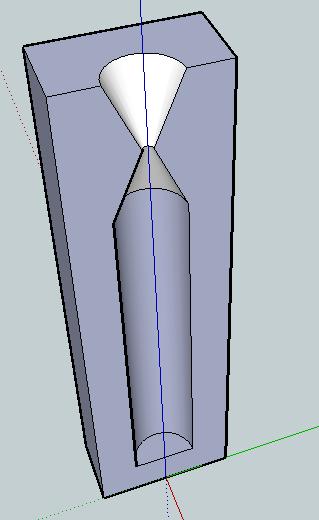
Problem: Broken crayons, useless crayon bits, or crayon shavings. Crayola has their own crayon making system – a cross between an easy-bake-oven and little molds. However, I don’t think it is quite versatile enough. Plus, why pay $20 for what could be accomplished easily for $0.20 worth of plastic parts?
Solution: A printed crayon mold!
Description: Crayons melt at about 128 – 147 degrees Fahrenheit, or up to about 66 degrees Celsius. ABS won’t melt until around 88-125 degrees Celsius, so there’s a wide margin for melting the paraffin wax crayons without distorting the mold.1
I would want at least three different molds – the normal crayon size, the fat crayon size, and then a triangular non-rolling crayon size. I’m picturing a two part mold for each, with the seam of the two parts running along the crayon lengthwise and a half funnel for pouring.
In addition to the half-mold, I’d also design a snug fitting square block for fitting the assembled mold into. That way you could stand it up and pour crayon wax into it.
Another potential use for this would be to place the pieces of crayon inside the mold, close it up, then heat. This would allow you to mend a broken crayon.
Usage: I can think of several different ways to use this mold. Frankly, I’m not sure which is easiest/most advisable/least advisable. There are easily several considerations:
- Assembly:
- The mold could be assembled with crayon inside to be melted and repaired.
- Crayon pieces could be melted and then poured into the assembled mold.
- Crayon pieces could be placed in the funnel at the top of the mold, the entire system heated and crayon allowed to melt down into the mold.
- Melting:
- Crayon could be melted in a test tube or similar container in the oven, microwave, hot water bath (such as on the stove) or perhaps even open flame and poured into the mold.
- Crayon could be melted while inside the mold by placing the mold in a heat source (oven, microwave, hot water bath).
- Crayon could be placed in the funnel and allowed to melt down into the mold with the application of a heat source (oven, microwave, hot water bath, open flame?, or sunlight plus magnifying lens!)
- Cooling:
- Allowing to naturally cool to ambient room temperature.
- Placing in fridge.
- Placing in freezer.
- Placing in cold water bath.
I’m not sure which method of heating and cooling are optimal. Though I’d suspect it is preferable to apply the least amount of heat over the shortest period possible.
Variations: It would be interesting to create these molds in different shapes besides cylinders. You could top each one with a geometric shape, the head (or tail!) of some kind of animal or character, or something else entirely. You could mold crayons into spheres, blocks, chips, or little figurines. While not particularly sturdy, you could even mold them into building blocks or components of some larger device. A clever person could use some left over nichrome wire to build a heated metallic funnel.
- That said, my extruder isn’t pumping out plastic until it hits 200 degrees Celsius at least. [↩]
How do upgrade your extruder firmware
Just as an FYI for anyone who’s having trouble upgrading your MakerBot Cupcake CNC plastruder firmware, the instructions built into ReplicatorG don’t tell you to unplug the TTL cable from the motherboard and plug it into the extruder board.
So, save yourself 5 minutes of frustration and googling for the answer… and just plug the TTL cable into the extruder board. :)
ReplicatorG won’t recognize the SD card after a firmware upgrade
Yeah, well, that’s what happened to me.
Thanks to Steven, this problem was fixed in all of 30 seconds as I reformatted the SD card as a FAT 16!
How to Raise Your MakerBot from the Dead
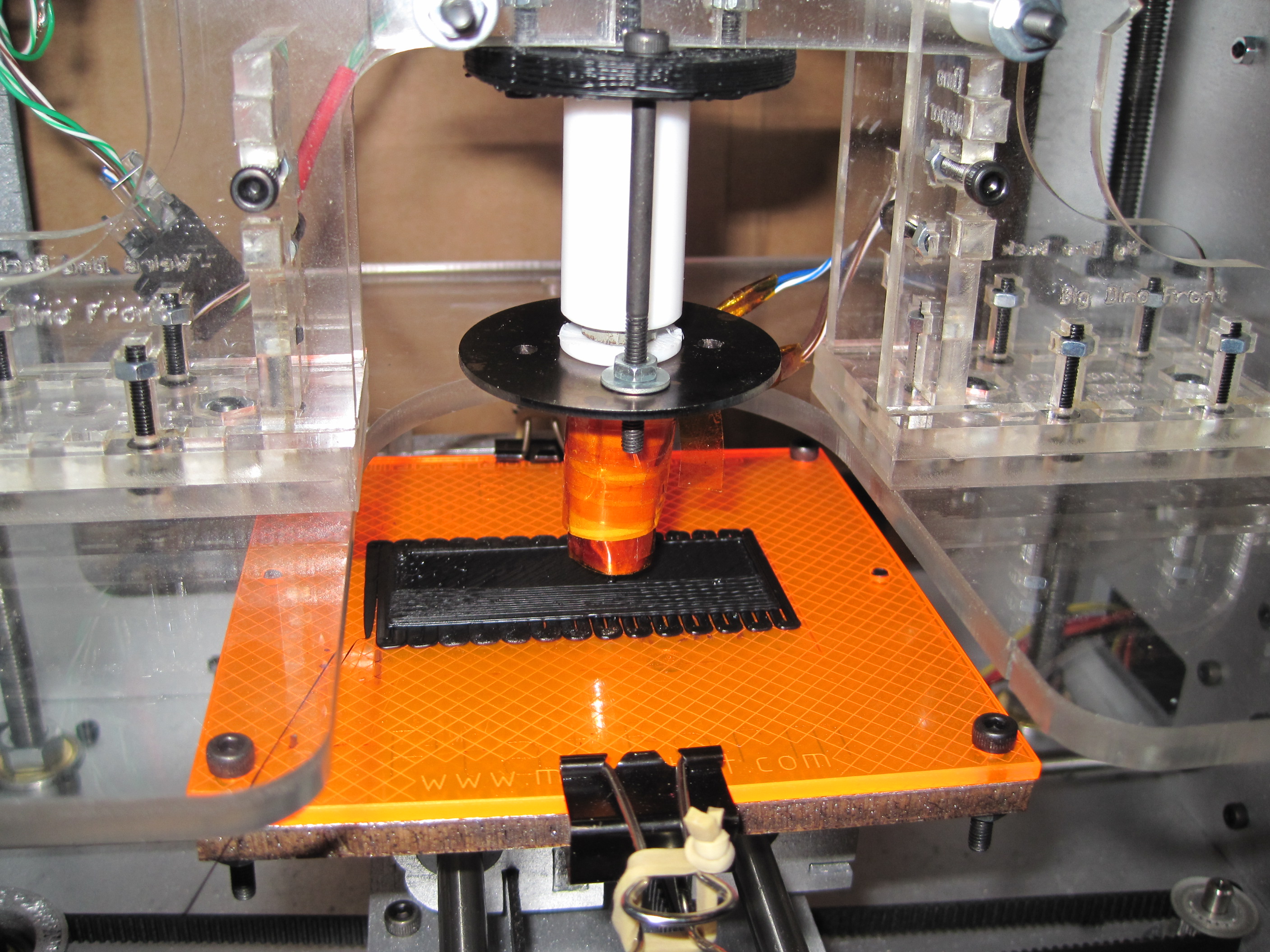
… or Happy Zombie Day!
My extruder is back online! Huzzah! Since I had it disassembled I made a few minor modifications.
- I’ve added binder clips to the front and back edges of the build platform. I found that my acrylic build base is slightly deformed and probably getting more so with each build. This is a temporary fix while I get around to picking up a new build base.
- You’ll notice I’ve also added pieces of rubber band. I cut a long rubber band into two pieces about an inch long, tied them off to make small loops, and put them around the handles to the binder clips. I don’t want to take the handles out of the binder clips because then they’ll be difficult to move/remove/replace. But, as I printed they tended to vibrate creating unnecessary noise.
- When ABS oozed down my PTFE threads and around the barrel, I sliced off about 1mm to use as a washer between the nut and large washer. The reason I’ve heard suggested for the PTFE washer is that it keeps the large metal washer from acting as a heat sink. The nut is right on the barrel and is able to heat right up along with the rest of the barrel. When the large washer is pressed on the nut (as it is supposed to) it is able to absorb heat through the nut as well as it’s contacts to the barrel. The thin surface area contact between interior hole in the large washer and the barrel probably doesn’t allow for much heat to be transferred to the large washer.
- I’ve read it mentioned that wrapping an extruder with nichrome is a two person or three handed job. I’ve found it to be fairly easy with just my two hands.
- I use a small piece of kapton to tape the nichrome to the extruder head/nozzle oriented so that it is lined up parallel to the barrel. 1
- From the point where I can see the nozzle touch the barrel I leave about 2-3cm of nichrome hanging off the edge, with the rest of the nichrome pointed up towards the barrel.
- Then I wrap the nichrome up the barrel in a single layer keeping a tight contact with the threads until there’s about 2cm or so left.
- Then I tape down all of the nichrome on the barrel, except the last 2cm.
- I untape the part of the nichrome on the nozzle.
- As I was out of those little metal connectors provided by MakerBot, I had to improvise a little.
- I stripped the leads on the nichrome so that about 3mm was exposed and used needle nose pliers to put it into a hook shape.
- Then I stripped the leads to the insulated wires so that about 15mm was exposed, used my fingers to twist the leads, doubled it back along itself, twisted it again so that there was a little loop.
- I hooked the nichrome into the loops of braided copper leads and crimped it down using the needle nosed pliers.
- Solder and done.
- I then liberally applied kapton to wrap the barrel and nichrome so that it would be unlikely the wire or leads would ever have to bear any of the stress should I move the extruder around.
- With my last two extruder assemblies I’ve taken a slightly different approach to attaching the thermistor. This method makes it easier to pull the thermistor out, but slightly more difficult to install it in the first place. Here’s what I do:
- I laminate the thermistor between two layers of kapton tape just past where it meets the insulated wires. Only the very tip of the thermistor is exposed.
- I wrap the barrel in nichrome as above, then ceramic tape, then wrap that in kapton – without the thermistor inside.
- Once the entire barrel is wrapped up just as I want it, I use a utility knife to make a vertical slice up the ceramic tape starting at the edge of the nozzle until I reach the point where the nozzle meets the barrel.
- I then peel back the ceramic tape and kapton, exposing a V shaped portion of the nozzle.
- I put the tip of the thermistor down into the V, replace the ceramic tape and kapton over it, and tape it down.
- I then re-wrap the barrel in kapton again.
- The first time I disassembled my extruder I screwed up my thermistor when unwrapping the barrel. While this makes it more difficult to get the thermistor into the assembly, it also makes it so much easier to pull it out and reuse it.
- At the top left of the above photo you can see a small black box with green and white wires coming out of it. That’s where I added an ethernet jack connector to the extruder assembly to make it easier to connect/disconnect the extruder.
- When I assembled my MakerBot I used insulated wire out of an ethernet cable. Since I only needed a few sets of insulated wire, I ended up with one piece of ethernet cable that still had the ethernet jack on it with four wires sticking out. I also had two ethernet ports left over from my opto-endstop kits.
- I plugged the ethernet jack into the ethernet port and tested the leads on the wires against the leads on the port. Once isolated I soldered wires to the four leads that lead to the four wires from the jack.
- I then soldered the four wires from the ethernet jack to the thermistor and nichrome.
- I took the wires I soldered to the ethernet port and ran them through the hole on the right side of the MakerBot in the back on the top. Then connected those leads to the appropriate ports on the extruder board.
- Once the wires were soldered up and extruder assembled I plugged the ethernet jack into the ethernet port and checked ReplicatorG to see if I could get a thermistor reading (yes) and heat the barrel (yes).
As I tinker and modify my MakerBot it seems I’m moving towards a system where I try to make the extruder assembly as modular as possible. I didn’t have this as a conscious thought when I started, but that’s where these modifications have been headed. While it is very convenient to have a totally modular extruder only connected to the robot by four bolts and an ethernet cable, that system is most useful if you are using drastically different print heads (such as a frostruder, Paxtruder, Bowden extruder, etc).
If you’re just swapping between PLA, ABS, or other plastic filament or color variations thereof, you can reuse the vast majority of the extruder assembly – the board, the motor, and the entire acrylic plastruder. If you had a different heater assembly you could just undo the two screws that attach the heater to the extruder, disconnect the thermistor, disconnect the nichrome, and swap in a new set. Although I don’t have a fully assembled second heater section yet, this set up makes a lot of sense to me just for ease of maintenance and repair.
- While I sing Christmas carols with my friends Meryl and Cheryl. [↩]
Printing a MakerBot
I’ve already pontificated on the idea that if you’ve purchased a MakerBot Cupcake CNC Deluxe kit, you basically get a second MakerBot for half off. (Spoiler: it’s because you can print a ton of the most expensive parts that go into building a new one). I don’t know why, but the idea of replacing wooden parts on my ‘bot with printed parts just fascinates me. 1
So, let’s have a list of potentially (and actually!) printable parts:
- Electronics spacers
- 3 large pulleys, 1 small pulley
- Y stage, the entire thing, as a single print
- X stage, in three large prints (there would be no need for the end caps if the three pieces were designed properly)
- Insulating retainer ring
- Printruder
- Dinos
- X stage end caps
- Z stage captive nut guides
- Z axis rod bearing brackets
Having more printed components for the MakerBot would reduce a lot of work in it’s assembly. There’s a lot of tiny fiddly bits in the X and Y stages that would become obsolete.
Heck, it might even be possible to replace some of the bolts with some kind of printable fastener system.
- Cue Johnny Cash singin’ One Piece At A Time [↩]
Peanut Butter Jar Mousetrap Insert
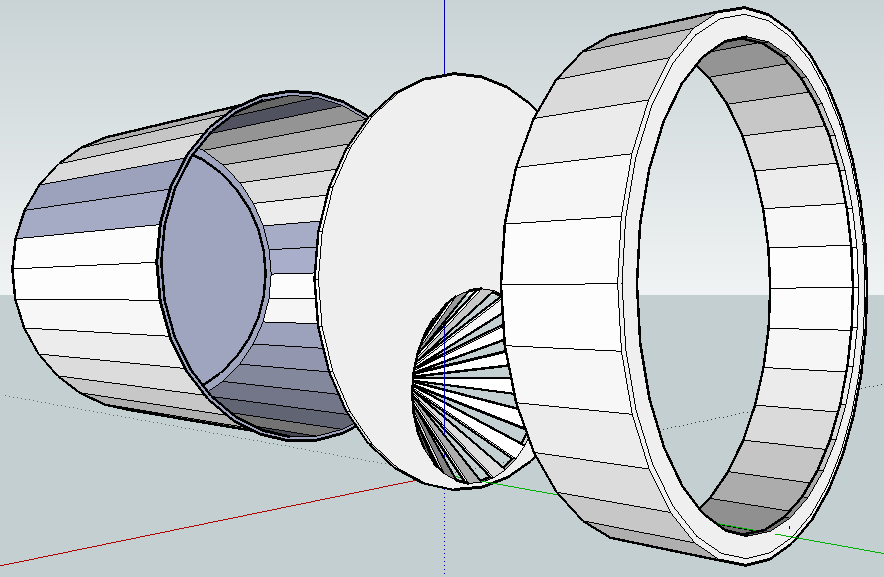
Here’s my entry in the Mouse Get! Challenge from Cathal Garvey. I call it the “Peanut Butter Jar Mousetrap Insert.”
The idea is pretty simple. Mice probably like peanut butter enough to squeeze into a small opening for a chance to eat it. If the opening is difficult to wedge back open they might not be able to get back out.
So, buy a jar of peanut butter, eat most of it, leave some peanut butter at the bottom, cut out most of the top from the lid, print the “Peanut Butter Jar Mousetrap Insert“, put the insert with the pointy bits going inside, close the lid, prop it up somewhere so it doesn’t roll away, and wait for your peanut butter covered mouse!