
Can you believe it?! Yeah, I was starting to get withdrawals too.
Hmm. I think a post about posting doesn’t really count.
Well, then again, my last post was about Spacexula’s post wherein he referenced my post.
Help! I’m stuck in a for loop!
Can you believe it?! Yeah, I was starting to get withdrawals too.
Hmm. I think a post about posting doesn’t really count.
Well, then again, my last post was about Spacexula’s post wherein he referenced my post.
Help! I’m stuck in a for loop!
See! Spacexula has discovered the hard way she’s a wicked temperamental woman!
Shattered acrylic plastruder… Yikes! I printed up one of Zaggo’s Prinstruders – but it appears to be optimized for an early MakerBot Batch 5 with large/small dinos. If I wanted to use my printstruder I would need to pick up some of the extra parts required and essentially print up a small dino.1 However, I think I’d like to start replacing parts out of my MakerBot with printed parts so that I can keep the originals as backups. However, I have a feeling a prinstruder out of ABS is going to be much more robust/resilient than the layered acrylic plastruder. What do I need?
In addition to these parts, I’ll also need to measure my ‘bot for a small dino equivalent. Since my extruder barrel is out of commission and the plastruder is just lying on the platform, this is as good a time as any to measure it up.
Is that I tend to think up better ideas about what I want to build with my ‘bot. Seriously, the downtime is quite useful that way.
You guys are going to have to let me know if this whole “Polly/PLA” and “Abby/ABS” thing starts to get creepy. Ferris Bueller famously once said… “You can never go too far.” As far as I know, anyone who’s ever taken Ferris’s advice ended up just fine.
I’m tempted to explain the references, but I don’t want to kill the joke…
My friends are telling me to give you another chance. They say you’re not so bad, that if I just put in the time things will work out. They say you’re capable of being faithful too…
Maybe there was just too much pressure on our relationship. Heaven knows we let things get too heated sometimes.
Was I expecting too much from you? I thought everything would be magic and come out smelling like roses. Things seemed to work fine at first, but they quickly turned into a big gooey mess.
Polly, I’m so confused. After all we’ve been through, I get all choked up… I just don’t know how I can take you back so soon. And, well, Abby has always been there for me… 1
Truly,
MakerBlock
Several people have suggested that the temperature at the entry of the barrel is very important to printing with PLA. This makes sense. If the temperature at the barrel entry is above the melting point for PLA, it can melt right there and ooze down around the threads.
Maybe I should assembly my extruder with just the thermistor on the barrel entry, and heat it until it is just below the melting point of PLA – then check the temperature at the nozzle.
Or, I could get a second thermistor and use it at the top of the barrel while keeping the original thermistor at the nozzle. I could only use one set at a time (since I don’t know how to hack the electronics/extruder board), but that shouldn’t be an issue.
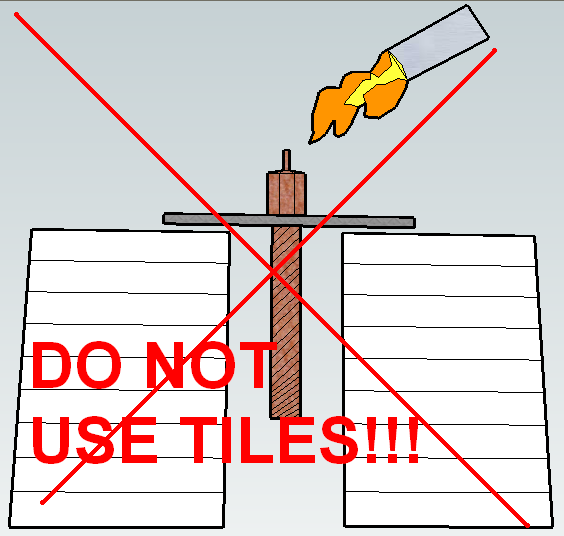
UPDATE: DO NOT USE TILES!!! THEY WILL SHATTER! READ LATEST POST!
The bad news is this is my first clogged extruder. The good news is I have all the spare parts to whip up a new extruder, no problem. That means I can experiment with wild abandon! My backup plan is to slice and dice the PTFE insulator into washers.
Having drilled out most of the plastic clog from the barrel, it’s mostly empty. The PTFE is in pretty good shape with the threads intact, if a little worse for wear. My plan to get the remaining plastic out of the nozzle is to put the nozzle/barrel assembly into the large washer upside down and prop it up on some ceramic tiles.
My hope is that by applying a heat source to the nozzle the plastic will just drip/fall out. The suggestion for using a blow torch to clear out the barrel and nozzle comes from Rick Pollack / MakerGear. Thanks again Rick!
By the way, wicked Google Sketchup skillz, no?

Freaking cool. This robot was designed by jrombosky by taking the measurements/proportions/ratios from Leonardo DaVinci’s Virtuvian Man. Even if these proportions were all messed up, this would still be super awesome. It’s a little printable robot!!!

It reminds me of a lego set from a few years ago:
I don’t know, but I’m about to find out.
I’ve managed to clear out the PTFE insulator pretty well. I pulled the entire heater out of the extruder, turned up the heat a little, held the barrel lightly in plyers, and unscrewed the PTFE without a problem, and then turned the heat off. I then used a precision flathead screwdriver to follow the threads, popping/chipping the plastic out as I followed I went. However, I don’t know to what extent the threads are still intact. Since the PLA oozed into the threads, I have to think they’re messed up to some extent.
As for the barrel, I used a drill bit with the unsharp end wrapped in a rubber band. I rotated the bit using the rubber band as a grip to drill out the plastic. It actually worked really well for clearing out the barrel right to where I can see the barrel entering the nozzle. The inside is reasonably clean, but I still can’t put a filament into it freely.
I also had to take a precision screwdriver and follow along the threads on the barrel to chip out plastic. This went reasonably quickly. Once I was done the nut was able to screw on and off freely.
Now I’m left with a slightly discolored PTFE and a mostly clean barrel. I’ve got a spare PTFE insulator, but I’m hoping this one is salvageable. It still has threads and the barrel will screw in nicely.
Rick and Spacexula have suggested I use a torch to heat up the nozzle and let the plastic burn/fall out. But, this is a trick for another day with proper safety equipment.
Oh, and before I forget, Spacexula suggested keeping a ruined PTFE barrier to slice into insulating washers. I’m hoping I might be able to re-use the PTFE insulator, but this is certainly my backup plan.
I’m so sorry – I don’t know what I was thinking. I must have lost my mind. Polly meant nothing to me.
The little things just always seemed to work out between us. Sure, we had our rough patches when it came to larger things, but we learned to live with that.
You were faithful and I let you go. Abby, please take me back. 1
Yours forever more,
MakerBlock