Printing a MakerBot

I’ve already pontificated on the idea that if you’ve purchased a MakerBot Cupcake CNC Deluxe kit, you basically get a second MakerBot for half off.  (Spoiler: it’s because you can print a ton of the most expensive parts that go into building a new one).  I don’t know why, but the idea of replacing wooden parts on my ‘bot with printed parts just fascinates me. 1

So, let’s have a list of potentially (and actually!) printable parts:

  • Electronics spacers
  • 3 large pulleys, 1 small pulley
  • Y stage, the entire thing, as a single print
  • X stage, in three large prints (there would be no need for the end caps if the three pieces were designed properly)
  • Insulating retainer ring
  • Printruder
  • Dinos
  • X stage end caps
  • Z stage captive nut guides
  • Z axis rod bearing brackets

Having more printed components for the MakerBot would reduce a lot of work in it’s assembly.  There’s a lot of tiny fiddly bits in the X and Y stages that would become obsolete.

Heck, it might even be possible to replace some of the bolts with some kind of printable fastener system.

  1. Cue Johnny Cash singin’ One Piece At A Time []

Mendel FAIL

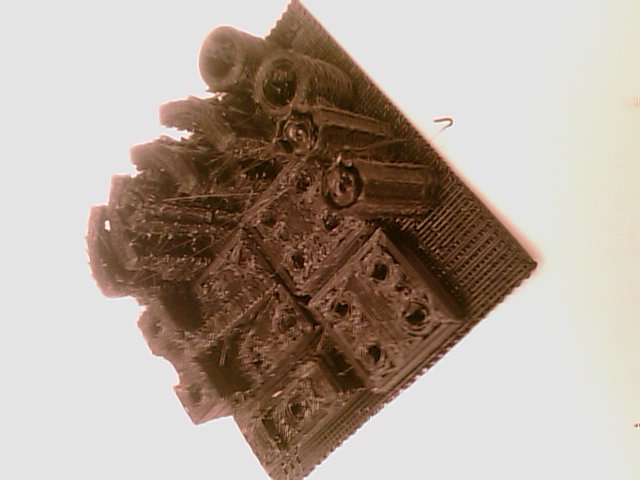
I can’t find my camera, so my camera phone will have to do. Here was my second attempt at printing Spacexula‘s Mendel production STL files.  Don’t even ask about the first attempt.

RepRap Mendel FAIL
RepRap Mendel FAIL

Spacexula offered some advice on how to fix this.  I have the Stretch feature turned on so that I can (hopefully) print better small circular features without the parts getting all globby.  He suggested turning Stretch off and just drilling out the holes if needs be.  Wise words from a man cranking out Mendel sets.

Unfortunately, I won’t have time to spent printing up parts until the weekend.  :/

These parts are not unusable.  Of the 13 parts on the sheet, I think five are probably perfectly serviceable.  The tall toothed gears are the most miserable parts – they are swayed and the teeth are basically intermittent bumps.  This has been one of my least successful completed prints in a long time.

Anyone want some Mendel parts?  Drop me a line.

My own plastic gnome

…or Minimum Wage Rights for Robots!

MakerBot posted a screenshot of a RepRap Printed Mendel Parts auction that sold for 420 pounds – roughly $630.84. 1  2  Others have been posting RepRap Mendel auctions as well.  One just sold for roughly $453, another for about $270, with two more auctions around $450 each with at least 3 more hours to go.

Using Spacexula’s Mendel production files, 24 STL sheets of parts, averaging 2-3 hours a print, we’re talking roughly 60 MakerBot print hours. 3  Assuming I only have the patience to print up one STL sheet a weekday and two sheets on the weekends, starting on a sunny Sunday like today, I could finish in 19 days.

Assuming very little human intervention, $600 for 60 hours of MakerBot operation is a pretty good deal.  It’s like having a fussy gnome who eats electricity and plastic living in your home and earning just above minimum wage for you. 4

  1. According to Google and at the time of this post. []
  2. I couldn’t find a link to the actual auction at first, but then figured it must be a private auction.  It turns out this was the RepRap eBay auction posted by Adrian Bowyer a little while ago.  You might need to be logged into eBay to visit that link. []
  3. This assumes no failed prints. []
  4. You know, like those shoe gnomes that made shoes for the cobbler in that children’s fairy tale. []

Help with a RepStrap alternative list

I’m trying to put together a list of all of the RepRap/RepStrap alternatives out there. 1  Later I’ll put up the list with links to their instructions and where to get parts.  Here’s what I have so far:

  1. RepRap – Mendel, Mini-Mendel, Darwin, McWire
  2. MakerBot
  3. RepMan
  4. ShaperCube
  5. Profound Devices
  6. Tommilese

Am I leaving any out?  If so, please leave a comment.

  1. Mind, this is just a list of those open source 3d plastic FDM printers, where the plans and instructions are available.  It’s not meant to include those machines people are building on their own or converting existing 3axis CNC’s into a RepStrap. []

Replicating without a RepRap

I’ve read others writing about creating molds for pulleys and molded RepRap parts.  Is this something you do?  Several of the Mendel sets on ebay appear to be parts cast from molds.  This would seem to be a very cost effective and relatively quick way to replicate parts.

At the same time, I’m not sure just how useful it is.  The best thing about a RepRap/RepStrap is you can tell the robot to build you something while you go out for a beer or take a nap.  Casting molds (from the reprap.org link above) seems to be a more involved and detailed process require a fair bit of human intervention.

Given that a set of printed or molded parts are selling for upwards of $400, I have to wonder why no one has stepped up to create a huge mold with all the parts and just start stamping them out.

I also wonder – if everyone had all the plastic/reprap’ed parts they needed – what would the next bottleneck be?  Electronics?

Beco Block limitations

Having printed up and played with a big pile of Beco Blocks, I have come to the conclusion they are only about half of what I was looking for.  Mind, they are probably the more difficult half.

The articulated joints you get with Beco Blocks are absolutely fantastic.  The connect well, disconnect well, are very moveable, and reasonably poseable.  Unfortunately, it is very difficult to build a rigid structure with them.  After you play with the parts a bit they become even more mobile and less poseable – but this is to be expected.

So, how would one go about building a system of rigidly connectable blocks?  There’s the Construx way – of side/slide/snapping parts together.  Then, there’s the snap/push the parts together Lego way.

Something to think about.

Skeinforge Multiply

In order to step up production of my Beco Block collection (up to 30 pieces now) I ‘ve been using the Skeinforge multiply feature.  Basically you feed it the number of columns and rows and it will make that many of your object in the final Gcode.  For my own reference, and hopefully to help others, I’m putting down this little tidbit about Skeinforge’s multiply feature.

The “Multiply->Columns” feature creates additional sets of your object running from the front to the back of your build platform.  So, if you have “Multiply->Columns” set to “3” and “Multiply->Rows” set to “1,” you will have three objects in a line running from the front of your Y platform to the back of your Y platform.

The “Multiply->Rows” feature predictably operates in a 90 degree rotation from the “Multiply->Columns” feature, with the additional parts running from side to side.  So, if you have “Multiply->Rows” set to “3” and “Multiply->Colums” set to “1,” you will have three objects in a line running from the left to right of your Y platform.

This is a pretty handy feature for production.  One caveat – more is not always better.  In producing the Beco Block FF pieces I’ve discovered their combined warping is enough to ruin the entire print job (on my unheated build platform).  I was printing 2 columns of 3 rows for 6 pieces at a shot.  Unfortunately, with the additional warping I don’t have a single usable FF piece.

Beco Block Connections

I really like the connection mechanism behind the Beco Blocks. 1  It appears to allow a wide range of movement and rotation in the joint.  There’s a lot of applications that come to mind:

  • Beco Block Voltron. ‘Cause, you know, I really really want a printable Voltron.
  • Beco Block Leonardo Robot. ‘Cause my robot’s hips keep breaking! 2
  • Beco connector Z axis crank. There’s a crank for everything, why not a Beco Block?
  • Beco connected printruder. Why not just snap the extruder together and hold it in place with fewer bolts?  Or, if that’s too fragile, why not a printruder that snaps into the printed dinos?
  • Beco connector dalek hinges. All that is stopping my dalek from ruling the universe (and time!) is some freedom of movement.

In furtherance of these possibilities, I’ve taken the smallest male/female Beco Block and sliced it between the male/female connector parts.  My idea is to start grafting these connector parts into other designs.  I need to fix up the files a little – but when I get them usable I’ll post them up to Thingiverse.

  1. Having only printed one block, I suppose I can’t really speak about it intelligently.  Then again, ignorance has never really been an impediment to me talking/typing before… []
  2. I’m not kidding.  It’s pretty sad.  First his left shoulder, then his right hand, then a hip, then both hips. []

New print: Beco Block!

I printed up my first Beco Block today – and I can’t wait to print up more.  Nate True was kind enough to download the STL files, center, align, save, and zip all of the various pieces1

I’d like to see a new STL file out there that has several different types of these Beco Blocks all on one sheet (similar to Spacexula‘s Mendel production STL files).  I could really see myself cranking out these by the dozens.  In fact…  once I had a sheet designed with a good mix of the various parts I could put it through the MakeNBreak script to churn them out.

  1. Nate, if you’re listening – thank you! []