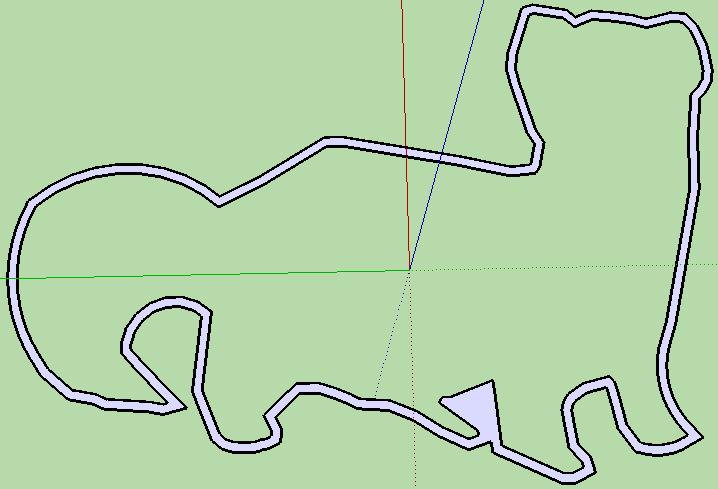
Show me your llamas!

This llama cookie cutter doesn’t take much plastic to print, especially if you’ve got a heated build platform or are printing in PLA.  The surface area of the part that touches the build platform is so small you might be able to get away with no raft at all.

A few days ago I was explaining to a friend of mine that you can print anything with a MakerBot.  All you need is sufficient time, determination, and plastic. 1  What I would really like to show my friend is how the llama cookie cutter we designed has made it around the world in just a few days.

How about printing a llama cookie cutter and posting a picture?

  1. The prime examples of this would be the cathedral playset and the MakerBot MakerBot []

New design: Rubik’s Cube (sorta)

Rubik's Cube for Dummies

I’ve already posted about how much I like TomZ’s simplified version of a Rubik’s cube.  Only problem is that I wasn’t able to encourage my MakerBot to print it.  Taking into account some of my ideas, I’ve designed a derivative.  It’s 4:45am at the moment – not a good time to have my MakerBot tooting and beeping.  ;)

Here’s what I’ve done with this version:

  1. Oriented the STL so it is immediately printable
  2. Run the STL through NetFabb to make sure it is manifold
  3. Reduced the number of unique printed parts from 5 to 2
  4. Put the STL together in such a way that you can print up two of the STL’s for a total of 6 parts, ready to be assembled
  5. Shrunk-ified the nubs for that fit into the center pieces
  6. Enlargened the grooves for the nubs
  7. Oriented the three parts so that they would use a minimal raft
  8. Changed the design so it will accommodate a nut/bolt attachment system rather than several additional plastic parts that must be glued together

In a future iteration, I hope to change the middle pieces so that all you need to do is snap the two middle pieces together.  Also, I’d like to incorporate any design suggestions from people who have tested this version.

Rubik’s Cube Fail

I just tried to print up the 1x2x3 Rubik’s cube puzzle from TomZ.  I really like the idea of it.

Unfortunately, it’s just not working for me.  I had to rotate all of the STL’s 90 degrees to make them printable.  Once most of the parts were printed I discovered it’s not going to fit together.  The swivelly bits on “Part 1” are too large to rotate freely inside the center cubes.  If the grooves in “Part 2” were much larger it wouldn’t fit inside the part.

At this point, it’s probably easier to start building the entire puzzle from scratch.  Here’s what I’m thinking:

  1. Make the swivelly bits on Part 1 smaller
  2. Make the grooves in Part 2 slightly larger
  3. Make a notch in Part 2 and Part 3 so that it can be put together with an M3x16 nut and bolt instead of a plastic pin

Botmill.com – NOT COOL

Okay, you had a robo-blog.  That’s fine.  Nothing wrong with that.  In fact, I’m appreciative for some of those posts and blogs you pointed out to me.  You apologized profusely, though I don’t there’s a need to apologize for a robo-blog per se.

However, since then your robo-blogs have gotten worse.  The one associated with 3D-Printer-Parts.com, which links back to your site, is collecting anything and everything with the words “made, make, printer, 3d, 3-d” et cetera.  Oh, but that’s not the worst part.

Botmill is stealing the entire content of other people’s works and not providing any attribution.  That link is to one of my own posts (and not a particularly interesting one) copied whole cloth and posted in your own blog.

Make up your mind – do you want to be a blog aggregator or sell robot parts? There are tons of aggregators out there.  Not many are very good.  The ones that are have a real person picking and choosing.  The robo-blogs are basically packed with irrelevant or useless content.  Turn off the robo-blog and drop the fake secondary sites.  Rather than stealing the content of potential customers, why not write some of your own content.  How about posting some information about your own products?  Or some innovations of your own?  Stolen content doesn’t help you with customers, hurts your Google PageRank, and actually causes ill will.

Why not take a page from MakerBot and MakerGear?  Have a contest, give some stuff away, write some interesting things, ask them for help, show them you care, involve your customers, and form a community.

Plastic wishlist

Glow in the dark plastic.

Don’t get me wrong, I like the idea of fluorescing red ABS.1  But, how sweet would glow in the dark plastic be?

It’s like making all of your printed plastic objects twice as useful, since they can be seen at night as well as day.

  1. Is it just me or was this a stealth launch?  I didn’t hear about it anywhere and just happened upon this new ABS plastic while checking on the availability of the new Heated Build Platform. []

You know, assuming everything goes according to plan…

Which never ever happens.

Right after posting about this fantastic large MySQL file upload script…  it stalled out around insert #2,650,000.  Thus, much fiddling with file offsets and start positions ensued.  So, fair warning – the script has zero upload recovery modes.

That said, it’s still significantly easier than using any of the methods I had tried earlier.

Anyhow, if your BigDump <shudder – what a name!> script fails on you, there is a way to force it to resume the upload.  I was performing the upload on a GZipped file – which makes the recovery process more difficult.  Nevertheless, here’s how you do it:

  1. Using FireFox and the FireBug plugin (you are using FireFox, right?) examine the last AJAX call
  2. Copy and paste the URL of the last AJAX call into a new browser tab
  3. Look for the GET variables in the URL named “start” and “foffset”
  4. This is the tedious part.  You’ll need to play with those two numbers until your script restarts.  When you get these numbers wrong, BigDump will be kind enough to show you the last bad MySQL line – it will almost certainly be a partial line.
  5. Looking at what has already been uploaded into your database, estimate whether the current MySQL error falls before or after the last entry.
  6. If after, crank the “foffset” number way down and re-try.  You want to start ratcheting the “foffset” number up – but from a point below the last good entry.  This will ensure you don’t accidentally resume the upload at a point after the last good entry.
  7. When you hit the correct “foffset” value, the browser window will take a while to pull up the page.  When it does, you will see the standard status screen with the file transfer data resumed.

I’ve used this process exactly once to resume a transfer of a GZipped file.  There’s no guarantee it will work for you, so use the above at your own risk.

Sweet PHP script, tragically terrible name

I’ve probably mentioned before how much of a PHP/MySQL/WordPress nerd I am.  If I haven’t so far, I’ve said so now.

One of the sites I operate requires numerous tables with about five million rows all together.  Automated backups are easy with any number of WordPress plugins.   But, what to do when you’ve got a HUGE SQL file and really small upload limits in phpMyAdmin and short server timeouts preventing a single script from reviving said huge file?

The brilliant scheme I came up with (I’m being sarcastic here) was to take those large files and split them up into smaller files of about 3MB each.  This approach was problematic for a number of reasons.  It required me to download a huge file and slice it up into small files between MySQL inserts.  Copying and pasting 25,000 rows at a time was giving my poor laptop fits.  It also meant I had to manipulate the full plaintext MySQL file, rather than a GZipped version.  On top of all of that, I was paranoid that I would accidentally omit a single row and have to start all over again.  In order to overcome the problem of server timeouts, I wrote a script that would load one small file, finish, then call itself again incrementing to the next file to be loaded, LRR.

There’s nothing good about this extremely time and labor intensive approach that was greatly error prone.

I wrote the above original serial-file-upload schema about a year and a half ago.  My PHP/MySQL kung fu is now much stronger.  Back then I never used scripts written by others – foolishly thinking that it would take me longer to understand how to integrate their scripts than it would be to build a serviceable script from scratch.  I went so far as to write my own AJAX library.  It was functional, but no where near the quality and reliability of jQuery.

Much humility and less hubris later, I’m more confident in my ability to read, understand, and interface with scripts written by others.  This now allows me to focus on only writing those things that are truly unique and critical to my projects, without having to re-invent the wheel.

What’s the name of this magnificent script I’m using for bulk uploads of really large MySQL databases?  Well, this is where the “tragically terrible name” bit from the subject line of this post.  The script is called <wince cringe>, “BigDump.”</wince cringe>  This script just automated a HUGE chunk of work for me.  Instead of struggling with more than 4 million lines of MySQL, I uploaded a SQL file, changed some variables in the BigDump script, and ran the script.

The total upload time is probably about the same as the script I was using.  The benefit is in not having to handle a ton of code before getting around to running the script

Uncle Ben had it right

With great power comes great responsibility

The guys at i.materialize turned down a request to print what appeared to be an ATM skimming device cover plate. 1 Like the power of a high quality full color photocopier and a stack of twenties, owning a MakerBot is a serious responsibility.

Edit:  Be sure and check out Erik’s post about the grave responsibilities associated with having access to a 3D printer

  1. Thanks to Clothbot []