MakerBots for Teachers

MakerBot Industries is giving away ten MakerBots to ten teachers at any educational level.  Let’s just consider this my entry:

  • Your name
    • Uh.  I’ll stick with “MakerBlock” for now.
  • Your school’s name
    • Sheesh.  These are getting harder.  Okay, how about “MakerBlock.com”?  No?  “MakerBlock U”?
  • The address you’d like the MakerBot sent to if you are chosen
    • Same place as my last order.  ;)
  • A paragraph describing how you would integrate the MakerBot into your curriculum. Include some description of the learning environment and what you teach
    • I would integrate a MakerBot into my curriculum by using it as a demonstration of iterative design, digital fabrication, digital design, invention, and innovation.  The learning environment is the whole freaking internet. 1  I teach digital plastic AWESOME.
  • A lesson plan that you will implement if you get a MakerBot
    1. Pssh.  Just one?  I’ll give you THREE.
    2. You’ve got a MakerBot, a laptop, unlimited plastic and electricity.  You are trapped in a mineshaft.  How do you get out?
    3. You’ve got a MakerBot, a laptop, unlimited plastic and electricity.  You are trapped in a mineshaft with a tiger.  How do you get out?
    4. You’ve got a MakerBot, a laptop, unlimited plastic and electricity.  You are trapped in a mineshaft with a tiger shark.  How do you get out?
  1. Actually, according to Feedburner and Google Analytics, the number is just a few hundred people a day []

It’s that time of year – to frustrate friends and family

So, I’ve got a birthday coming up.  Getting older doesn’t bother me much – it’s really just a number associated with the number of times I’ve traveled around the sun. 1  I will gleefully relate to anyone that I’m easily the luckiest man in the world.  I’ve got a wonderful family, good friends, everyone is healthy, interesting and challenging work, and a fair amount of free time to do with as I wish.  These are the sorts of things that are truly important to me, so by any measure of success I care about, I’ve got it all.

With my birthday approaching, my family starts to ask me about what they can get me for a present.  My usual answer is, “Nothing, let’s just hang out.”  This year, I actually have a list.

As it looks like both MakerGear and MakerBot are out of the magic pixie dust that will let me print in PLA without tears, the rest of my list is as follows:

I’m rather excited about some of these upgrades.  I’m looking forward to a heated build platform for smoother warp free ABS builds.  I’m looking forward to the rainbow pack for some crazy wacky fun. 2  And, I’m looking forward to needed the extra spare parts as infrequently as possible.  :)  Since my last major repair, I’ve been lucky enough to enjoy several months of carefree printing. 3

  1. It also seems to be related to the number of gray hairs that are appearing.  I rather like them, actually. []
  2. Freaking VOLTRON, remember? []
  3. I really hope I didn’t jinx myself []

3x2x1 Rubik’s Cube Production File

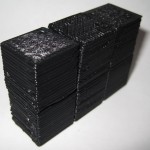
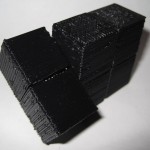
My prior copy of this 3x2x1 Rubik’s Cube was printed a few parts at a time – I’d print one part, test it, print up another, etc.  Last night I was able to use my production file to generate all seven pieces in one go.  It took 1 hour and 45 minutes to complete the print job, but well under three minutes to clear most of the pieces of the raft off the parts and assemble the puzzle.  In order to help people modify and improve upon my design, I’ve upload the original Sketchup files, the STL I used, as well as my own GCode.

Owenscenic on Thingiverse asked,

I am interested in trying your gcode, how did you generate it? How well does it minimize strings between the printed parts? I’ll look at is to see how it starts and the temp…

In case you’re wondering too, the answers are as follows:

  1. I generated the Gcode using my slightly tweaked RepG v18 built-in Skeinforge settings for ABS with a raft, with a build temperature of 220C.
  2. The Gcode does pretty well with minimizing stringing.  However, some of the credit has to go with the part placement in the STL production file as well as the nature of the object.  As soon as you assemble it and start to rotate the parts, most of the remaining strings and little blobbies will pop right off.

Owenscenic, please let me know how your print of this turned out!  Please post a picture!

What’s the cost of printing with a MakerBot?

I’ve wondered for a while about the cost of operating a MakerBot.  Let’s break it down and see what happens:

  • Plastic. According to some calculations on the MakerBot Operators group, the cost of MakerBot ABS is around $0.03 – $0.04 per cubic centimeter based upon a price of $70 for 5 pounds (or 2268 grams) of ABS, a density of 1.2 grams per cubic centimeter. 1  Using the current prices of $81.36 for a 5 pound coil after shipping, I calculate the price of ABS at $0.035 per cubic centimeter.  Since we’re talking about such large numbers, let’s just round on up to $0.04/cc.
  • Time. Skeinforge has been estimating about 85 minutes to print 19 cc of plastic.  This comes to about 4.5 minutes/cc.
  • Electricity. At at $0.20/kWh, a MakerBot probably draws around $0.03 per hour.

Thus,we may estimate the cost of operating a MakerBot in terms of consumption of goods and resources (excluding computer, human, and MakerBot time and wear and tear) as follows, where V is the volume of the extruded object in cubic centimeters or “cc”:

Supposing I wanted to recoup the entire cost of my MakerBot to date and spread it across the entire life of a single 5 pound roll of ABS. 2  Let’s round the cost of the MakerBot, all repairs, and all extra MakerBot related materials up to $1,500.00.  One 5 pound coil would have 1890 cc’s of plastic.  This would come to $0.794 per cc of plastic.  So, I would suggest the cost of buying a MakerBot and printing off an entire coil of plastic would probably end up costing you about $0.85 per cubic centimeter of plastic.

Resource cost of printing a 19cc totally MakerBottable 3x2x1 Rubik’s Cube is $0.80.

Actual pro rated cost of printing a 19cc totally MakerBottable 3x2x1 Rubik’s Cube is $16.15.

Absolute cheapest MakerBot usage I’ve seen anywhere at Metrix:Create for members printing from Thingiverse is $0.30/minute, which would print the totally MakerBottable 3x2x1 Rubik’s Cube for $25.65.

  1. No one has yet quoted me a price on a pint of tears. []
  2. Printing an entire coil would take about 142 hours. []

3x2x1 Rubik’s Cube assembly pictures

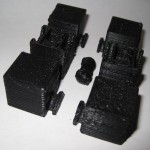
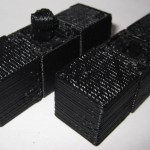
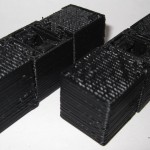
The design should be pretty intuitive.  However, I went ahead and took some pictures of the assembly anyhow.

As I mentioned in an earlier post, I think this one came out really really well.  :)

3x2x1 Rubik’s Cube – done!

I’m so happy with the way this has turned out.

I’ve made a bunch of changes since the last revision of this printable 3x2x1 Rubik’s Cube puzzle:

  • I’ve totally redesigned the center barbell connector.  I simplified the design, removed the five support struts for each end and replaced it with a single support strut and a flat hexagon in the center of the piece.  The purpose of the hexagon is to give the barbell more contact area with the raft.  One of the earlier drafts didn’t have as many supports or this flat hexagon, and it tore off the build platform partway through the build.
  • I increased the diameter of the tube between the barbells.  This enabled it to print easier, made it a little more sturdy, and decreased the wobbliness of the barbell when everything is assembled.
  • I also shortened the entire barbell by 1mm, so that the entire puzzle is held together more closely.
  • I made the flat semi-circular tabs slightly thinner so they rotate a little more freely.
  • I significantly redesigned, thickened and simplified the two brackets that the barbell snaps into.  It’s been able to easily withstand numerous couplings/decouplings as well as numerous rotations.  With a few rotations, all parts now rotate easily.
  • All of the parts fit together SO much better than my first draft held together with a nut and bolt.
  • There is a slight bit of sideways flex that can occur with the use of the barbell.  It is really minor and it actually seems to help the puzzle be more forgiving as you manipulate it.  I see this more as a benefit than a design flaw.

The was one design choice on which I waffled.  I considered making the center cubes non-identical, with one having half a barbell stick out and with the other having the internal connector you see now.  This would have removed much of the sideways flex – since the barbell would be stationary.  I did not go with this design choice because whether the puzzle used one barbell and two connectors or male/female center cubes, there would always be some flex caused by the use of a connector rather than a static pin.  And, to be honest, I much preferred the symmetry of having everything assembled out of just three unique parts.

I know I’ve mentioned this before, but I really like the idea of a MakerBot printable toy that can be printed in one go and then assembled without tools or any additional hardware.  I also think this would make a great MakerBot print demonstration.

I’ll post some pictures of the parts a little bit later.

New 3x2x1 Rubik’s cube design – totally printable!

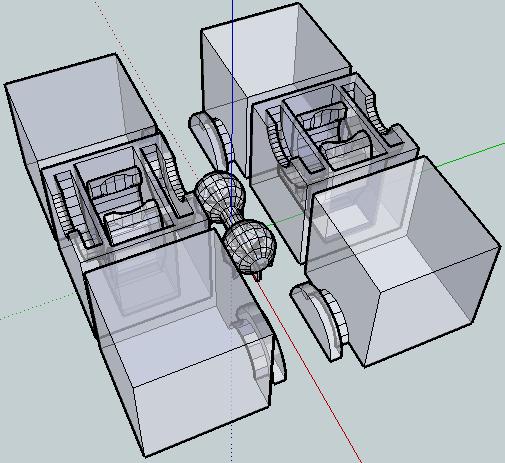
X-Ray view of the 3x2x1 puzzle cube

This is easily my most intricate digital design for the MakerBot yet.  It’s a 3x2x1 variation on the Rubik’s cube puzzle I had posted earlier.

This version incorporates the prior improvements as well as designing a connector system inspired by R3bbeca‘s beco block connectors.

This has enabled a totally printable toy.  This just makes me happy. 1  The idea that I can crank out a set of these parts, clean them up a little, and just snap the toy together is just amazing.

TomZ‘s original 1x2x3 “friendlier” Rubik’s cube designs were also totally printable – but required a printed pin that was later glued in place.  I like the ideal of all printed parts – but strongly prefer a design that can later be disassembled easily.  And, as I mentioned above – the ability to hand assemble the toy is important to me.

I wasn’t able to recreate R3bbeca’s female connector designs2 so I made a simplified version that should suffice.

The simplified connection mechanism is essentially two plastic fingers that will (hopefully) pinch the barbell into place.  This was made by designing the outline of the gripping “fingers,” creating a horizontal cylindrical hole slightly larger than the intended end of the barbell, then creating a vertical cylindrical hole in the center for the barbell to be inserted through, then a bit of cleanup.

The biggest potential problem is that this design will require a carefully tuned ‘bot.  The center cube pieces have a lot of stuff packed in there – semi-circular slots for the semi-circular tabs, connectors for the barbell, and thin walls separating things.  With those thin walls and interior overhangs, this may be a difficult design to print.

I think Bender is up to the task, but we’ll see in a few hours.  :)  I can’t wait to print this!

For me, having a MakerBot is like waking up to Christmas every morning.

Oh, and before I forget, if you want one of these – leave a comment or send me an e-mail through the Contact page.  Make me an offer.

  1. Perhaps a little prematurely, since I haven’t actually printed this yet… []
  2. I believe I’ve already sufficiently lamented my inability to understand women and their mysterious lady ways. []

Measurements of a pen

Pilot G2 Gel Pen
Pilot G2 Gel Pen

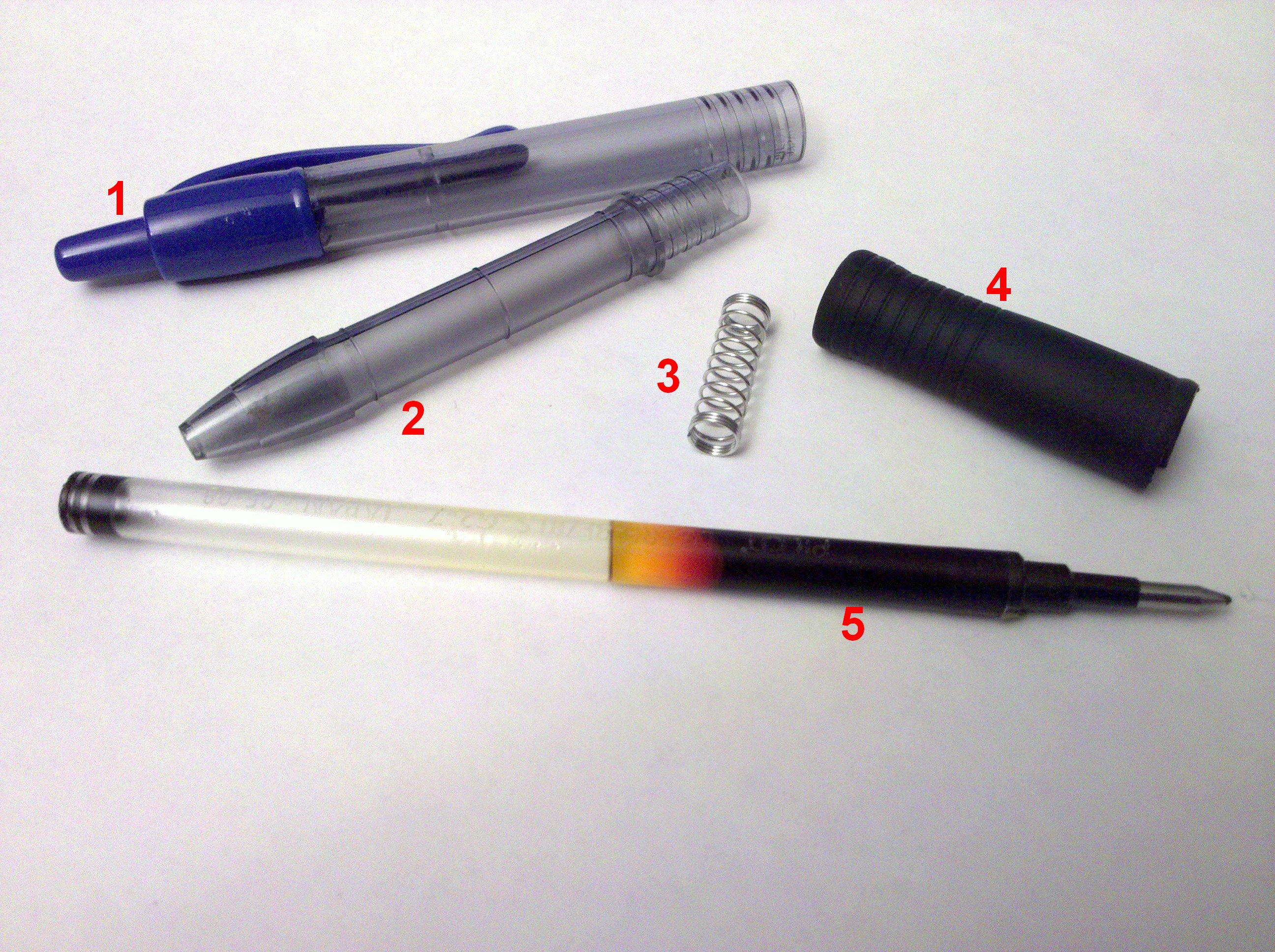
Pictured are:

  1. The pen end and handle. 9.89mm in outer diameter. 8.06mm in inner diameter. 76.92mm in length, when the button is totally recessed.
  2. The pen front. 68.00mm in length. 8.25 in outer diameter at the middle. 7.91 in outer diameter at the screw threads. 6.35mm in inner diameter.
  3. The spring. It is 19.67mm tall, uncompressed. 6.36mm, compressed. 5.53mm in outer diameter, 4.54mm in inner diameter. The wire is 0.47mm in diameter.
  4. The rubber grip. 1.3mm thick. 8.41mm inner diameter. 37.77mm in length.
  5. The ink cartridge. It is 6.03mm in diameter. 110.47mm in length.  Filled with ink.

Why am I telling you these things?  Stay tuned…

Designing with a MakerBot

After playing with this puzzle for a few days I’m really happy with how it turned out and I think the above improvements will make the next version a little bit better.  This reminds me of Forrest Higgs’ recent commentary on engineering with a RepRap in the design cycle.  It’s so easy to test out a new design that I don’t hesitate to whip something up, print it off, SEE and FEEL how it works and any unintended nuances of that design, and then redesign with these revelations in mind.

MakerBot poll take away

Here’s what I take away from this small poll:

  • People initially get interested in MakerBots because of a general interest in technology, the thought of making their ideas real on their own desktop, and because they just find MakerBots cool.
  • While far and away the most common anticipated use of Thingiverse is for toys, games, and puzzles – this doesn’t really reflect the uses people intend for their MakerBots.  If we were to put MakerBots into these people’s hands we’d see1 tools, replacement parts, and inventions as often as we saw designs for new toys.
  • Lots of people design things in 3D, but not many of these designs are ever uploaded to Thingiverse.
  • The three biggest obstacles to people getting a MakerBot are, in descending order, money, waiting for further improvements, and then doubting their own MakerBot building skills.

If you truly don’t have the money or a way to save up, there’s not much that can be done.  However, if you are one of those who doesn’t have the money yet, but does have surplus time there may be hope.  If you can lay your hands on the money for a MakerBot, you can crunch out parts for Mendels and Mini-Mendels.  While the prices have fallen significantly, the selling point of these parts is still a lot higher than the cost of plastic plus electricity and wear-and-tear on your robot.  Your robot can pay for itself.  In fact, if you have a good enough idea you might even be able to open an Etsy store, your own storefront, eBay store or something similar selling prints of your ideas.

To those of you who are waiting for improvements – don’t.  Yes, the MakerBot will be getting continually more awesome as people contribute to it in the future.  But, no one is going to stop working on this open source project any time soon.  They are going to be incredible improvements for years to come.  Your MakerBot is essentially obsolescence-proof.  Yeah, you might want to purchase an upgrade here or there in the future – but you don’t have to.  You can be the person who figures out a simple solution to an existing problem you find with the MakerBot and you can fix it.  I have zero expertise when it comes to electronics – but I’ve uploaded a few small improvements2  You just aren’t going to know how you can help yourself and others with this project unless you jump right in.  Your MakerBot will never be obsolete. 3  Irrespective of improvements, I can tell you right now that building, designing for, operating, and even repairing a MakerBot is just plain fun.  Don’t rob yourself of a fun weekend, just go purchase one right now4

Finally, to those of you who think you don’t have what it takes – I wasn’t sure I did either.  Assembling it really is on par with putting together Ikea furniture.  Go to the wiki, look at the build pictures, and read the instructions and troubleshooting guides.  Once assembled it will take a little bit of work to get running – but there are lots and lots of people out there who will help you.  Why not find someone nearby on the MakerBot map and e-mail them?  Lots of us have websites and blogs – we’re happy to talk about our MakerBots. 5  There are also regional groups and hackerspaces.  I don’t know for sure, but I strongly suspect if you get one and no one at your local hackerspace has one yet, they’ll be falling over themselves to help you get it operational.

Look, if I can do this, so can you.6

  1. Assuming they do as they intended… []
  2. My X and Y axis tensioners. []
  3. Look, if it happens somehow – well, just build a RepRap with it.  The RepRap is specifically designed so that each generation can build the following generation – you’re guaranteed an upgrade path. []
  4. Oh, and get the Deluxe kit.  You won’t be sorry. []
  5. Hell, I can’t stop talking about it. []
  6. Oh, and, to those of who whose parents were killed by awesome robots…  well…  not to worry.  As soon as I print up a few more upgrades, my MakerBot will be ready to finish the job. []