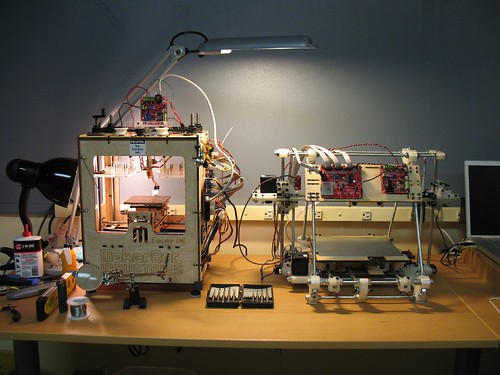
Adam, if you read this – the latest RepG is AMAZING. Getting to preview an STL, convert to GCode, and then to an S3G file all from the comfort of the friendly RepG UI is fantastic!
It’s not that I’m scared of the Skeinforge UI or anything.
It’s just that it stalks me while I sleep, steals my happy innocent dreams, and replaces them with a theater of shadow puppet parade of horrors.
Don’t get me wrong, I like the idea of fluorescing red ABS.1 But, how sweet would glow in the dark plastic be?
It’s like making all of your printed plastic objects twice as useful, since they can be seen at night as well as day.
Is it just me or was this a stealth launch? I didn’t hear about it anywhere and just happened upon this new ABS plastic while checking on the availability of the new Heated Build Platform. [↩]
The guys at i.materialize turned down a request to print what appeared to be an ATM skimming device cover plate. 1 Like the power of a high quality full color photocopier and a stack of twenties, owning a MakerBot is a serious responsibility.
I wish I had more patience for that. I tried for a while documenting each change… but quickly became enamored with the idea of spinning dials and flipping switches in Skeinforge in the (sadly badly) mistaken belief I could make it better.
BotHacker recently documented his adventures in cooling fans and Skeinforge options – to amazing effect. 1 You should read the entire post, because there’s a lot of good info in there. However, to summarize:
Numerous permutations of cooling fan sizes and speeds offered some improvement.
Using no cooling fans and putting the Skeinforge Cool setting at a minimum layer time of 10 seconds offered a dramatic improvement.
BotHacker’s post is what Skeinforge documentation should look like.
Update: Per BotHacker’s comment below, “Skeinforge must be told to ‘Slow Down’ for this to work. The other option is ‘Orbit’, and may lead to poorer results.”
BotHacker – your photo to the right on Flickr says “all rights reserved” but I thought you might not mind me discussing your post and photos favorably. If you don’t want me to link or post a copy of your photo, let me know and I’ll take it down. – MakerBlock [↩]
I just noticed that two parts I designed (an X-axis tensioner and Y-axis tensioner) are suggested prints on the MakerBot wiki. (Yes, I know it’s an open wiki – but I swear I didn’t add these things myself). It’s pretty cool that generations of MakerBots may be using upgrades I designed.
Webca clearly dreams (and designs) so so so much bigger than I. I am in awe of the awesomeness of that MakerBot made MakerBot.
150 plus printed parts, a month of solid printing, and more than 5 pounds of plastic. So, what’s the final cost of a second MakerBot made MakerBot? Setting aside issues of shipping and tax, it sounds like it would be about $50.00 worth of plastic plus all the bits from the $575.00 laserless MakerBot kit, plus some cables, cords, and power supply.
It’s a testament to MakerBot’s rock bottom pricing that a mostly-printed $625.00 MakerBot is not a tremendous discount off the $750.00 basic MakerBot Cupcake kit. But, cost-savings is almost certainly not why he designed and printed this. A month of printing and $50.00 of plastic is far more than it should take to print all the parts for a Mendel.
Yes, an unbelieveable amount of work, but now I want a PLA MakerBot…
I’ve been really looking forward to the MakerFaire (Bay Area) for – oooooh – probably about a year now.
Last year was the first time I had attended and I got to see a giant bronze snail car, a Victorian house car, the steampunk area, a giant set of rotating metal wings, pneumatic rockets, LCD guitars, numerous R2D2’s, a chunk of the Long Now clock (the very same which inspired Stephenson’s book Anathem), bicycle powered rock bands, a CandyFab, and, of course, a fully operational MakerBot complete with the MakerBot guys printing off amazing things.
I looked, I saw, I even hoola hooped. And I’m looking forward to seeing all new amazing stuff.
One of my interests outside MakerBot/RepRap is origami, the Japanese art of paper folding. At it’s inception it was really only a hobby for the rich – the only ones who had access to such a luxury as paper. Modern technical origami restricts one to only a single sheet of square paper transformed only through folding – no cuts, glue, tape, etc.
A lot of very interesting origami models have been developed over the years by some incredibly talented artists through a combination of experience and trial and error. These kinds of models have so much personality they almost appear to be real – rather than mere squares of paper. One of my favorite origami artists of this “genre” is Eric Joisel. I still find it hard to believe his models, such as the “Woman in Dress 2008,” can really be made of just a single square of paper.
There’s been a movement in the last two decades to bring a more methodical and mathematical approach to design, sometimes with the assistance of a computer. One of my favorite technical origami artists is Robert Lang). His models tend to the more realistic, rather than representational (as with Joisel). His insects, such as the stag beetle, are a prime example.
Lang has used his background in mathematics and origami to develop a giant collapsing/expandable lens – so that it could be transported to outer space and then deployed. This allows a normal space craft to deploy a much larger lens than would otherwise be possible.
Robert Lang's "Stag Beetle BP, opus 477"
Unlike Josiel’s models which are typically totally unique and irreproducible by anyone (including Josiel!) Lang’s mathematically assisted models are usually carefully documented by diagrams or, increasingly frequently, crease patterns. A crease pattern is what you would get if you totally unfolded a completed origami model. Typically only the “major” structural folds are depicted in a crease pattern.
Brian Chan's "Attack of the Kracken"
An interesting intersection between mathematics and origami is the problem of determining the most efficient manner of placing the most number of equally sized circle within the smallest possible area, called, “circle packing.” The reason this is important to origami is that the center of each circle can be turned into an appendage. Lang has developed a computer program that allows the creation of truly arbitrary proportions – any number of points with any kind of ratio of one appendage to another.
Brian Chan's crease pattern for "Attack of the Kraken"
Even to someone who doesn’t have any experience with origami or the mathematics involved, the appearance of circles in crease patterns can start to make intuitive sense. One of my all time favorite origami models is the “Attack of the Kraken” by Brian Chan. (Check out the larger pictures of that model. The entire thing is just one sheet of paper. If you look closely you’ll see some of the tentacles are grabbing sailors!) In addition to a picture of his final model he has also posted a picture of his crease pattern for that model, even labeling which parts of the model are derived from which regions of the sheet of paper.
If you’re the least bit interested in origami, I’d highly recommend (in this order) Peter Engel’s “Origami from Angelfish to Zen,” a documentary on origami called “Between the Folds,” and Lang’s book “Origami Design Secrets.” The Angelfish to Zen book is one of my favorite books for background on origami and a very accessible introduction to the hidden geometry underlying even the most simple models (and real life too!).