Actually, it’s pretty simple. I really enjoy blogging about my MakerBot, stuff I make, how I make it, what I see other people do with their Makerbots, and awesome robots in general. It helps me get ideas for things to write, things to design, and things to make – and hopefully things you like to read.
Heck, some of my favorite things only came about because someone e-mailed me or commented on one of these posts. (I mean, a soft-pawed albino stoat of Southern Wales??? WTF? That was so much fun!)
There’s a new Tall Print record holder in town. Brian J. Pierce aka Chooch printed a 154mm tall Chicago’s Willis Tower. Brian reveals the secret: “My bot is hacked, but using mostly original parts that came with the kit and printed parts to achieve the new record.”
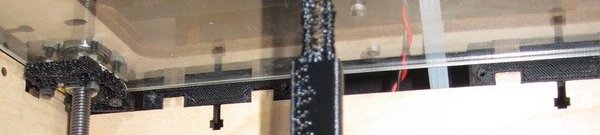
What’s the hack? Well, Brian says in the comments, “I’ll be releasing the Pfierce Z-axis extender kit in a couple of weeks. It comes with 6 spacers and a new and improved z axis crank.” Below is a crop of picture of Brian’s setup.
Chooch's Vertical Hack
I think there’s a lot of interesting stuff in this setup:
Check out the build quality on the Z axis wobble arrester – it’s terrible!!!
Now, check out the build quality on the print – it’s pretty good! Nice job! I guess that arrester is working.
If you look at the place where the top panel meets the sides, you can see printed bits. It looks like he’s used a series of “spacers” (perhaps 6?) to raise the top panel above the sides.
If the recent MakerBot competition and media coverage1 and showed us anything, it’s that there’s a lot of people who are interested in getting a MakerBot.
I’ve noticed that all the RepRap and MakerBot polls thus far are really geared towards people who already have such a machine. But, what if you don’t have an awesome robot that makes other robots? Well, I’m a curious guy, so I put together this poll. It’s fewer questions than the census and WAY less invasive! 2
In the comments of a recent post Tony and I were discussing how we were each thinking about how to design and print an 11th Doctor sonic screwdriver. 12 Let’s set aside the nature of the object in question for a moment and consider the constraints, problems, considerations, and potential design solutions.3
There are a number of challenges facing one wishing to print this particular object. Although the discussion4 pertains to the design challenges and decisions in this project, I’m hopeful it will be helpful to myself or another when it comes to some other design. Thus, let us think only of the design challenges, problems, and potential solutions.
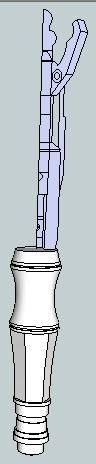
Sketch of Screwdriver
This newest one is too large to be printed as one single piece.
It has a number of overhangs.
It has a number of moving pieces.
It lights up.
It is a comprised of a number of different colors.
I don’t know the exact measurements.
Even if you want to print the non-extending, non-spring loaded, non-LED, non-swiveling bits there’s a fair number of considerations. Often my most successful way of solving a problem is to just get started and figure things out as I go.
In this case I got started by examining the pictures Tony and I had located. Quite separately we had both pulled the images out of the animated GIF. I created a new smaller image of the open and closed versions side by side, for comparison’s sake. Then, I reoriented both of them so they were vertical rather than on a slant. Then I resized the picture of the screwdriver in someone’s hand56 so that it was roughly the same scale as the other two images. This was placed next to the first two. I traced the images in Sketchup and spun the parts around and ended up with a reasonable facsimile of a portion of the screwdriver.
The problem with designing and printing in segments is figuring out how to assemble it.
Snap-fit?
Glue together?
Bolt together?
Friction fit?
Do we design it so that it can be disassembled easily?
And, what about other considerations? If we want to install any electronics, lights, etc we probably want it to be easy to disassemble. Ideally, the entire assembly7 would be hollow in order to incorporate electronic parts. Besides, “if you can’t open it, you don’t own it,” right? That means no easy glue or snap fit solution. Bolting together means non-printable parts. I generally have a preference for 100% printable designs when I can manage. Here are some of the ideas I considered and dismissed:
At first I was thinking of printing it in a series of tubes that fit over one another. This approach has several problems.
I considered a screw thread approach. Basically a series of tubes which were screwed together. I wasn’t crazy about the idea of generating a number of helices, but would do so if a good design required. Although, I did like the idea of being able to just unscrew the entire thing when I wanted to take it apart. There’s also the very visceral act of assembly by taking all the bits off the platform, cleaning them, and screwing them together in about 15 seconds without any additional tools.
A variation on the above. A system where the parts have a knob/groove connection similar to those very cool cylinder containers on Thingiverse. Twist, lock. It can be undone, and requires creating grooves instead of a helix, which is significantly easier.
I considered a system where I create a long tube with a knob at one end. Then, create all the other parts so they can slide on. Affix something to the other end when done, glue/bolt, done.
A variation on the above where all the parts are printed as tube, but press fit together. Designing them to the correct tolerances would be tough.
Then I thought about printing it in vertical halves. Again, problems. Again, none are insurmountable, just problematic.
Cosmetically, I’m not crazy about the nut/bolt holes which would be required to assemble two vertical halves.
Alternatively, a snap-fit would be great – but a good one would not be easily un-snap-able.
Press fit using circular tabs going into circular holes like every Happy Meal toy you’ve ever seen. There’s no real problem with this except that printing small nubs and circular holes is difficult. Then again, I could print larger holes/nubs. However, this means less room for a hollow interior.
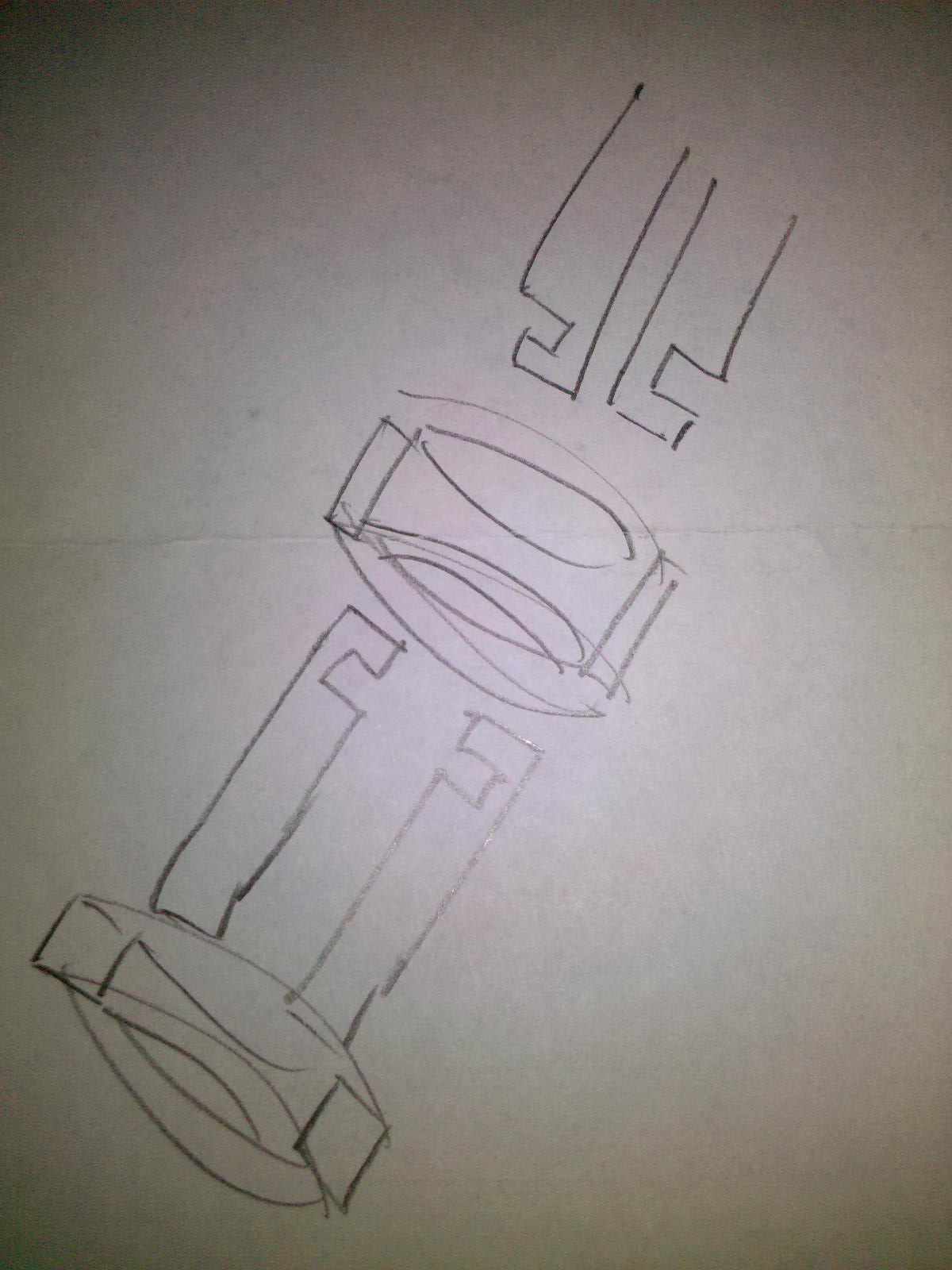
Napkin sketch
While sketching up the above in Sketchup8 I hit upon an idea. I could print the assembly in sections9 – but not necessarily similarly constructed sections. In this I was inspired by some of the design ideas I saw/recreated while creating a derivative 3x2x1 Rubik’s cube from TomZ’s 1x2x3 Rubik’s cube. If you look at the design of this style of Rubik’s cube (either of these will do) you’ll notice the two cubes at either end have little bits that stick out into half-cylinders which widen into half-disks. When you take two of these end cubes and set them together you end up with a full cylinder terminating in a full disk. These two are then captured in the two center cubes which have half-cylinder, half-disk grooves – which allow the two end pieces to rotate freely.
So, what if I printed large sections of the screwdriver as pieces that fit together vertically – but had a groove around the edge? You could leave the inside mostly hollow. Then, you could slide a ring or thin cylinder around it. If so, the ring would keep the two halves in place. The ring could be kept in place either by friction or a notch/groove system. The point is this design would:
Allow the interior to be hollow
Require only printed parts for assembly
Not be overly complicated to design
Be easily assembled and disassembled
Napkin sketch on right.
Amusingly, this only gets me 1/3 of the way. I still need to figure out how to design the bits that slide and the bits that swivel the claw like bits at the end. So, Tony, what you got?
In case anyone from the BBC cares – I’m not doing this for pecuniary gain. I’m just a nerdy American Doctor Who fan who enjoys making things. [↩]
FYI, this unbelievably long post has been brought to you by CryozapCyrozap, Schmarty, and Cameron. I wanted to serve up truncated RSS feeds, but nooooooooo… they just wanted you to have to endure more than a thousand words of my rambling nonsense. [↩]
Well, this is just me babbling, so it’s more rambling musings than discussion. Then again, if there’s a single comment it becomes a discussion. Single non-spam comment. [↩]
No doubt the hand of some snooty fancy hand model. [↩]
I’ve exhausted my cookie cutter ideas for the moment.
With 10cm x 10cm square being about the proper size for a cookie,I would point out that cookie cutters are a really fantastic implementation of a MakerBot print. So much so that I looked into purchasing “CustomCookieCutters.com.” Don’t bother – it’s taken. However, it certainly seems like a viable niche business.
One amusing and useful experiment was the serial production of the Z Axis Wobble Reducers by MakiYoshida. Using my current settings I printed one. Then I installed it and printed a second. The second was a visibly better product. I installed the second and printed a third. The third was no better than the second. I installed the third and printed a fourth. I then installed the fourth… and didn’t bother to print with it.
Right now I have two of these wobble reducers installed on the front right and back left Z axes. Installing one on the most warped rod (front right, for those of you playing at home) helped significantly. Installing the second on the back left helped a little more. Installing the third on the back right didn’t seem to make much of a difference, and may have been worse than the second print. I didn’t realize why until I tried to install the fourth Z axis wobble reducer.
Once all of the wobble reducers were in place I found that the entire Z stage was too mobile – and would easily shift from left to right and back and forth. When you have no wobble reducers one or more warped Z axis rods will force the entire stage out of whack. When you have four wobble reducers, there is nothing keeping the Z stage steady. Thus, the optimum number is between one and three. However, I noticed that having two diagonally across from one another gave me enough wobble reduction to improve the print, but not so much flexibility that it could get pushed around in the middle of a print.
Part of the problem is that this particular wobble reducer will allow nearly unimpeded side-to-side motion. However, these wobble reducers are also fantastic at compensating for a badly warped rod. I suspect that mixing different kinds of wobble reducers might be my best bet. I’m not really that interested in installing one of versions that requires precision rods, since it’s just one more thing I have to source for my MakerBot. Ideally I can mix and match these two types of wobble reducers to improve the overall print. The Z-axis floating arrester appears to keep the captive nut more … captive than the Z axis wobble reducers I have installed. This may provide the exact combination of rigidity and flexibility I need to optimize my print quality and minimize layer shift as I print.
The upshot of all of this, and the reason for the post title, is that I now have two Z Axis Wobble Reducers by MakiYoshida that I’m not using. Do you need one or two of these and feel like saving yourself the print time? If so, drop me a line.
Adam, if you read this – the latest RepG is AMAZING. Getting to preview an STL, convert to GCode, and then to an S3G file all from the comfort of the friendly RepG UI is fantastic!
It’s not that I’m scared of the Skeinforge UI or anything.
It’s just that it stalks me while I sleep, steals my happy innocent dreams, and replaces them with a theater of shadow puppet parade of horrors.
Don’t get me wrong, I like the idea of fluorescing red ABS.1 But, how sweet would glow in the dark plastic be?
It’s like making all of your printed plastic objects twice as useful, since they can be seen at night as well as day.
Is it just me or was this a stealth launch? I didn’t hear about it anywhere and just happened upon this new ABS plastic while checking on the availability of the new Heated Build Platform. [↩]
The guys at i.materialize turned down a request to print what appeared to be an ATM skimming device cover plate. 1 Like the power of a high quality full color photocopier and a stack of twenties, owning a MakerBot is a serious responsibility.