I’ve posted about other people’s MakerBot work space set ups,1 but not much about my own yet.
Right now there’s a bunch of junk2 in the way so no pictures of the setup for now. My MakerBot – “Bender,” a laptop3 , and a large long cardboard box with a wooden dowel running the length with badly cut cardboard spools holding what was once a 5 pound coil of black ABS4 , a very nearly 5 pound coil of clear PLA5 , and a full pound of white ABS I’ve never used. 678
All of this resides in our living room on an enormous former-library card catalog. For those of you youngsters out there, a library card catalog is the kind of thing you see in the background scenes of Warehouse 13. Imagine a huge chest about four feet tall that has lots of small, deep, drawers. It is what libraries used to use to store information about their collections – an analog database. Frankly, I didn’t realize the one I bought was quite so large. 9 It’s literally big enough for about six identical MakerBot/laptop/plastic coil setups to the one I have. 10 The drawers beneath the area where my Makerbot resides are devoted to tools and spare parts. Right now the surface is covered in a number of unfinished projects and some totally finished projects.
Library card catalogs are super handy and useful ways to incorporate storage and a raised level surface for working. The only problem is that these things are absolutely enormous and way way heavier than they look.
I remember waiting for the letter which would tell me whether I got into grad school. Once you send off your application, it’s out of your hands and just need to be patient. I was waiting to find out if I would get the small envelope1 or the large envelope.2
I hadn’t thought about the small/large envelope anticipation for a while now. I was only really reminded when I recently applied for a job. I saw the posting about 8pm or so and stayed up way later than I’d like to admit writing up my application.
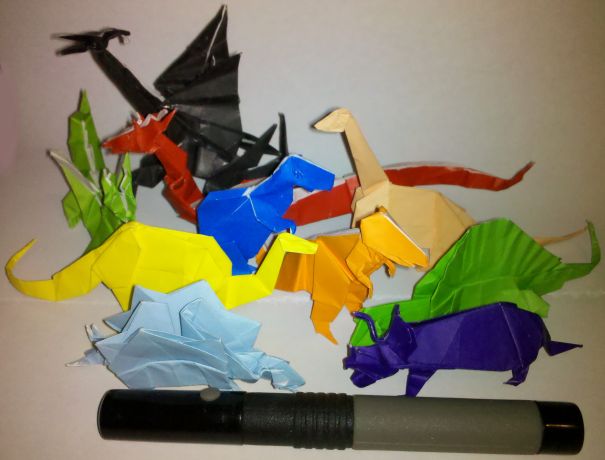
Of course, I had to follow up my application with a post about dinosaurs and lasers… Both of which I happen to just have lying around here at MakerBlock headquarters. 3
I’m guessing I’m not the only one who would be interested in such an add-on for my MakerBot. It’s not a terrible burden to have a computer constantly connected, but it would be nice to have the MakerBot slightly more independent of a computer. Just bring plenty of plastic, electricity, and an SD card with your favorite things.
There’s a new poll to the right. Basically, “Should Makerbot hire MakerBlock to blog for them?” So, take 5 seconds and cast your vote. Then, on to pictures of dinosaurs with lasers!!!
I never meant for this to happen. It just sort of happened. It all started so innocently – reading about the RepRap project, going to the MakerFaire, buying a MakerBot, starting this blog, extra plastic here and there… and then MakerBot advertised for a blogger.
Tell the kids I love them, don’t forget to feed the dog, and there’s a post-it on the dresser for my boss.1
The interesting thing about this model is that it combines some of the best parts of Darwin and MakerBot and what appears to be a Bowden extruder.
The very nature of FDM1 means that the robot will only move the Z axis a little bit every once in a while. One of the design drawbacks to the Darwin was that the heavy extruder head (motors, gears, heating elements) were so heavy that the entire robot would rock or vibrate with the lateral XY movements. MakerBot got around the heavy extruder head problem by moving the platform in the XY and moving the extruder head only up and down. This design decision isn’t without it’s tradeoffs, however. One downside is that their build area is much smaller than a Darwin. Another downside of the MakeBot design is that once the object being built reaches a sufficiently large volume or height, moving the object around quickly on the XY platform causes it to vibrate, shake, and become somewhat unstable.
One of the main improvements inherent in the Bowden extruder is that it allows you to take the heaviest parts of the extruder head, separate them from the rest of the extruder head, and move those heavy pieces to a different location. Using a Bowden extruder makes a Darwin style robot much more feasible – the small moveable print head won’t have the mass to cause the robot to become unstable.
It seems that combining either of the X or Y movements with the Z probably won’t matter all that much, since the Z axis will only move about 0.33mm or so per layer and the Z axis typically doesn’t operate at the same time as either the X or Y axis. Combining the as the new RepRap version II, Mendel, design shows us that combining the Z axis along with either the X or Y axis, but not both, can lead to a very stable configuration.
What I like about the Ultimaker design is that it would appear to incorporate some of the best parts of the MakerBot and Darwin designs. It appears to have a bolt/nut/T-slot MakerBot style assembly structure using thin lasercut wood pieces for the body. I found these parts to bolt together very quickly. Contrast this to the Darwin/Mendel structure using lots of nuts and threaded rod and printed plastic parts to hold it together. At the same time, by making use of a Bowden extruder and the Darwin body shape, it appears to be able to use most of the interior volume for printing.
I suspect it probably uses fewer parts than a typical Darwin, but I can’t be sure. I also have to wonder about the cost of lasercut wood versus the cost of nuts and threaded rod.
After playing with this puzzle for a few days I’m really happy with how it turned out and I think the above improvements will make the next version a little bit better. This reminds me of Forrest Higgs’ recent commentary on engineering with a RepRap in the design cycle. It’s so easy to test out a new design that I don’t hesitate to whip something up, print it off, SEE and FEEL how it works and any unintended nuances of that design, and then redesign with these revelations in mind.
People initially get interested in MakerBots because of a general interest in technology, the thought of making their ideas real on their own desktop, and because they just find MakerBots cool.
While far and away the most common anticipated use of Thingiverse is for toys, games, and puzzles – this doesn’t really reflect the uses people intend for their MakerBots. If we were to put MakerBots into these people’s hands we’d see1 tools, replacement parts, and inventions as often as we saw designs for new toys.
Lots of people design things in 3D, but not many of these designs are ever uploaded to Thingiverse.
The three biggest obstacles to people getting a MakerBot are, in descending order, money, waiting for further improvements, and then doubting their own MakerBot building skills.
If you truly don’t have the money or a way to save up, there’s not much that can be done. However, if you are one of those who doesn’t have the money yet, but does have surplus time there may be hope. If you can lay your hands on the money for a MakerBot, you can crunch out parts for Mendels and Mini-Mendels. While the prices have fallen significantly, the selling point of these parts is still a lot higher than the cost of plastic plus electricity and wear-and-tear on your robot. Your robot can pay for itself. In fact, if you have a good enough idea you might even be able to open an Etsy store, your own storefront, eBay store or something similar selling prints of your ideas.
To those of you who are waiting for improvements – don’t. Yes, the MakerBot will be getting continually more awesome as people contribute to it in the future. But, no one is going to stop working on this open source project any time soon. They are going to be incredible improvements for years to come. Your MakerBot is essentially obsolescence-proof. Yeah, you might want to purchase an upgrade here or there in the future – but you don’t have to. You can be the person who figures out a simple solution to an existing problem you find with the MakerBot and you can fix it. I have zero expertise when it comes to electronics – but I’ve uploaded a few small improvements2 You just aren’t going to know how you can help yourself and others with this project unless you jump right in. Your MakerBot will never be obsolete. 3 Irrespective of improvements, I can tell you right now that building, designing for, operating, and even repairing a MakerBot is just plain fun. Don’t rob yourself of a fun weekend, just go purchase one right now. 4
Finally, to those of you who think you don’t have what it takes – I wasn’t sure I did either. Assembling it really is on par with putting together Ikea furniture. Go to the wiki, look at the build pictures, and read the instructions and troubleshooting guides. Once assembled it will take a little bit of work to get running – but there are lots and lots of people out there who will help you. Why not find someone nearby on the MakerBot map and e-mail them? Lots of us have websites and blogs – we’re happy to talk about our MakerBots. 5 There are also regional groups and hackerspaces. I don’t know for sure, but I strongly suspect if you get one and no one at your local hackerspace has one yet, they’ll be falling over themselves to help you get it operational.
Look, if it happens somehow – well, just build a RepRap with it. The RepRap is specifically designed so that each generation can build the following generation – you’re guaranteed an upgrade path. [↩]
Oh, and get the Deluxe kit. You won’t be sorry. [↩]
Oh, and, to those of who whose parents were killed by awesome robots… well… not to worry. As soon as I print up a few more upgrades, my MakerBot will be ready to finish the job. [↩]