The RepRap Prize

A commentator suggested that the RepRap Challenge prize is set up to avoid paying out.  This seems like a silly and vacuous charge to me.  The $20,000 and $80,000 prize payouts have firm award dates of 12/31/2012 and 12/31/2015, respectively.  If someone hasn’t achieved the specific milestones by those dates, by the terms of their declarations (and assuming they are good to their word), they’ll have to award those sums to whoever is closest.

In any case, here’s a summary of the list of the requirements for those interested.

Interim Personal Manufacturing prize of $20,000.00 to be awarded on 12/31/2012:

  1. Print at least three different materials, including one that is usefully electrically conductive.
  2. The ability to print electronic circuit boards.
  3. Print beds1 must be of a material which may be reused with minimal refurbishment for at least 20 print cycles.
  4. Maintain a total materials and parts cost under $200 and that 90% of the volume of the printer parts be printed.2
  5. Demonstrate a build volume of the printer above 300x300x100mm in order to insure that items daily utility can be printed.
  6. The capacity to print a full set of parts for a complete replica of itself within 10 days unattended save for clearing no more than one printer head jam.
  7. The ability to print autonomously without a PC attached.
  8. Uses no more than 60 watts of electrical power.

Grand Personal Manufacturing Prize of $80,000.00 to be awarded on 12/31/2015:

  1. That the cost of the material used for printing does not exceed $4/kilogram.
  2. The capacity to print a full set of parts for a complete replica of itself within 7 days, including the time for reloading, and clearing of printer head jams.3
  3. Maintain a total materials and parts cost under $200 and that 90% of the volume of the printer parts be printed.4
  4. Participating teams are expected to regularly publish and make available their technology on an ongoing basis. All technology developed by participating teams becomes open source under a GPL or BSD license. Therefore, the winning team will have to have published at least some of their innovations more than 12 months before the deadline.
  1. Print beds are flat surfaces onto which parts are printed. []
  2. Print beds are not necessarily a permanent part of the printer and are not figured into either the cost or the volume requirements of a printer. []
  3. According to the article it currently takes approximately 21 days with 90% of the time requiring human involvement. []
  4. Plastics such as HDPE and Polypropylene, of which millions of tons exist as waste matter, may be suitable candidates, and recycling of such waste material would be viewed favorably by the judging panel. []

11 year old builds 3D printer

Um.  Wow.  Justin, you rock.  This 11 year old kid apparently designed and built his own 3D printer.

Forrest Higg’s vision has just come true!  He’s written several times about how he wants to design and build a system that a reasonably bright 12 year old could build.  I guess we should have known it would have taken a 12 year old to design such a system in the first place.

Thanks to Fabbaloo for the link!

Open Everything

The ideal is obviously using a totally open source environment to develop things with a RepRap/MakerBot.  For the most part I use open source software – FireFox, Thunderbird, OpenOffice, Pigin, PHP, MySQL, WordPress.

However, I’m still tied to certain closed source proprietary software.  I still use Windows and haven’t made the leap of faith to Linux/Ubuntu.  I really like the ease of use and intuitive nature of Google’s Sketchup.  But, I can’t help feel like a little bit of a sham – still clinging to Windows and Sketchup because they’re easy and familiar.  All the while cranking out wonderful plastic goodness with my open source hardware ‘bot.

I have a feeling I could get used to Linux/Ubuntu if I gave them a shot, but the alternatives to Sketchup I’ve seen and tried are nearly unintelligible.  Does this mean I try to run Wine or break down and spend the time to learn something else?

Things I learned while soldering opto-endstops

The opto-endstops marked the very first parts I had to solder for this MakerBot.  Not having soldering anything more complicated than two wires together, this was an adventure and learning experience.  Here’s what I learned today:

  • The 3-pin connectors used for two of the opto-endstops (on the Y-axis stage) are in the Generation 3 MakerBot Electronics Kit (Mostly Assembled) with some of the other connector bits.  I was a little confused about this for a while.
  • It helps to lay out all the little bits in an organized fashion beforehand.
  • Keep a long thin rigid stick handy for bending delicate leads into the circuit board holes.
  • Although I read the RepRap electronics fabrication guide and found it helpful, I still felt a little lost.  I found the most effective way to solder the parts in was to:
    • Get the soldering iron good and hot
    • Put the leads through the holes
    • Bend the leads a little so that they stayed in place
    • Flipped the board over so the leads were sticking up
    • Touched the solder to where I wanted the joint
    • Gently stroked the solder with the soldering iron tip towards the joint
    • This process seemed to create a pretty good joint
  • You’re going to burn a finger at some point, accept it.1
  • This almost goes without saying, but go slowly.
  • Check and double check the orientation and placements.
  • I found it helpful to take a large sheet of aluminum foil and shape it into a tray.  This helped contain the parts I was working on and was a good way to catch the flying leads that I clipped off.
  1. I burned two. []

Toasted WordPress

I’ve been tinkering with this website trying to move it to a different domain – MakerBlock.com rather than MakerBlocks.com.  (I like both names, but have a slight preference for MakerBlock).  In any case, since I’m rather used to working with WordPress I figured I’d just dive into the MySQL tables and start changing stuff.

This doesn’t work quite as well as you would think it would.  :)  For anyone who is looking to move a WordPress website from one domain (or subdomain) to another, I highly recommend using Domain Name Changer.

Lesson learned.  I’m just a little bit smarter today!  Woo hoo!

Mission critical decisions

Such as:  Should I paint?  What color(s)?

I’m thinking I should paint.  I figure it will help the robot body stand up to a little extra wear and tear while looking cool.

Not white or black.  That’s SOooo October 2009.  I’m liking gray/gunmetal/silver.  I’ve only seen pictures of one silver MakerBot and I rather liked it.  (Thank you to RDon Ebben/Robostang 548 for posting pics of his MakerBot 347.)  The picture is a little dark, so I don’t think I can see it to its full effect.

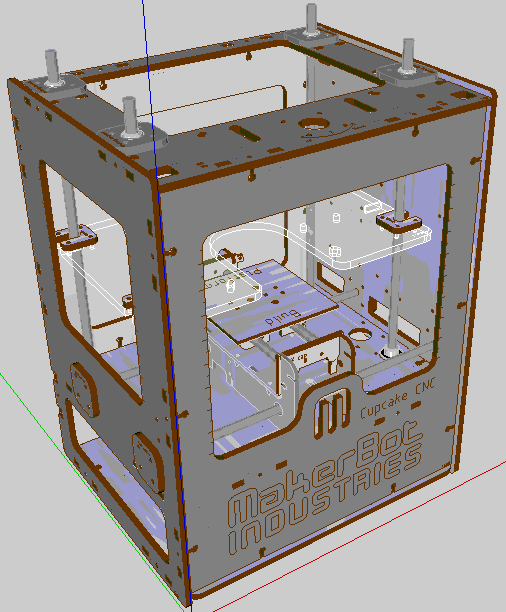
Just the other day a user named unrepentantgeek posted a Google Sketchup version of a MakerBot, to make it easy to test out paint/color schemes.  URG – you’re the best!  Thanks to you, I got to test out this color scheme:

Roughly a 50% gray on the outside, silver on the inside.  (I figure I can’t rightfully name the machine Bender unless it has a shiny metal assplate, right?)

Looking forward

This website for documenting my attempt to build a MakerBot Industries CupCake CNC 3D printer.  I’ve got just about no experience working with electronics and no experience building robots.  So, its going to be a wild ride.

It is named “Bender.”

Here’s what I’d like to see happen:

  • Documenting everything inside the CupCake Deluxe CNC kit
    • Right now I’ve only documented the unboxing
    • I’d like to document all the bits inside the various boxes/kits as well
  • Documenting each step (and misstep!) of taking a box of parts to a fully functional 3D printer
    • As I’m a total and complete novice, this should be educational for everyone involved
    • Since the guys at MakerBot suggest two people could assemble a CupCake CNC in leisurely weekend, I suspect it would probably take me about a week or two
  • Printing crazy plastic things for myself and others

Why did I name the website MakerBlock?  Well, if when I get this robot operational, I’d really like to design and print custom blocks that are compatible with various toy construction sets.

Frivolous?  Undoubtedly.  But, a man’s got to dream.

MakerBot Ordered!

MakerBot CupCake CNC

Ever since hearing about the RepRap project more than a year and a half ago I’ve been dying to make/build/buy one.  This last May I got to see an actual MakerBot CupCake CNC print a lego right in front of my eyes at the 2009 MakerFaire in San Mateo.  One of the best parts was getting to meet Zach Hoeken Smith, Bre Pettis, and Adam Mayer.

Well, this morning I finally pulled the trigger.

I just ordered a CupCake CNC Deluxe kit from MakerBot Industries.

Here’s the thing: I have no experience working with electronics beyond putting batteries in the T.V. remote.  It’s going to be an adventure!

I can’t wait!!!

Test