
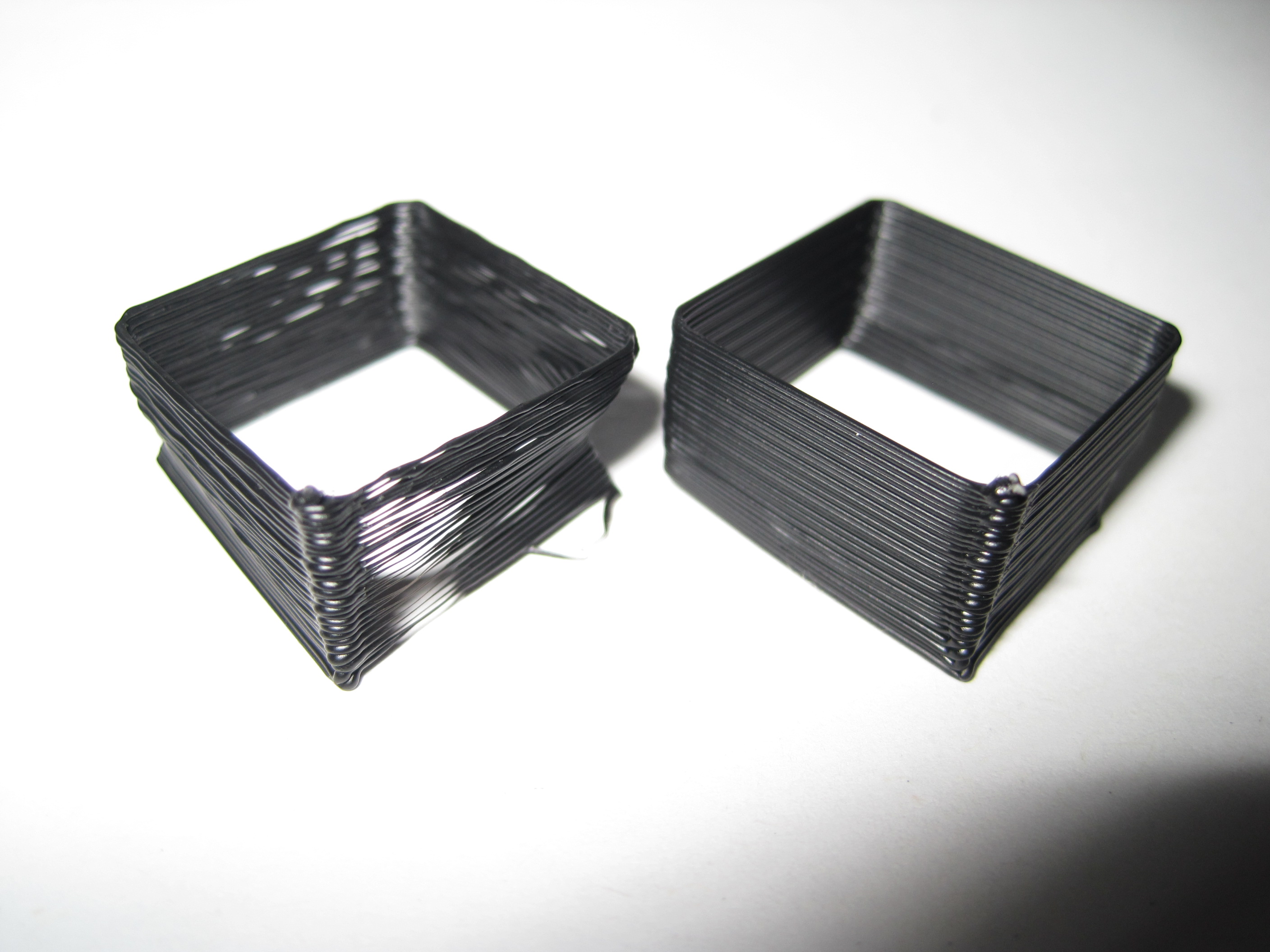
Skeinforge calibration test 1, 2

Test 1, Test 2
Test 1, Test 2

For these tests I used the “single walled test piece” from Da3v

  1. Test 1 on the left
    1. Temperature: 220
    2. Skeinforge -> Carve -> Layer Thickness (mm): 0.36
    3. Skeinforge -> Speed -> Flowrate PWM Setting (if PWM Setting is Chosen): 230
    4. Skeinforge -> Speed -> Feedrate (mm/s): 40
    5. Skeinforge -> Speed -> Travel Feedrate (mm/s): 40
    6. Extrusion diameter: 0.57
    7. Skeinforge -> Speed -> Extrusion Diameter Over Thickness (ratio): 1.583
    8. Wall thickness of the test piece: 0.40
  2. Test 2 on the right
    1. Skeinforge -> Speed -> Feedrate (mm/s): 30
    2. Skeinforge -> Speed -> Travel Feedrate (mm/s): 30
    3. Wall thickness of the test piece: 0.40
    4. Skeinforge -> Speed -> Extrusion Diameter Over Thickness (ratio): 1.583
    5. Skeinforge -> Carve -> Extrusion Width over Thickness (ratio): 1.583
    6. Skeinforge -> Inset -> Extrusion Perimeter Width over Thickness (ratio): 1.583

That’s a pretty big improvement.  I haven’t tried printing something small with lots of details, but now I’m curious how well these settings hold up.  My previous settings (which I zipped in case I totally messed this up) were reasonably good, but the layer adhesion was merely adequate.

Dragging my feet on PLA

I’ve been a total slacker about getting started printing in PLA.  Part of the reason is I’ve seen others have a lot of problems printing with it – ruining extruders, oozing out of barriers, too hot, too cold, too just right, the heat is uneven, the barrel jams, etc, etc.  However, since I’ve been printing larger and larger objects I’m finding that warpage is become more of an issue.  This means I need to either buy/make a heated platform for the ABS or I need to switch to PLA.

There’s a few things I’d like to build that are big and flat.  I’d like to print up a modular chess board (already have it designed in my head, I just need to export it to Sketchup) and crank out a few Mendel or Mini Mendel pieces.

Default Series Title

How to caliberate and tune Skeinforge for your MakerBot

Update 4/21/2011: This post is more than a year old.  Since then I’ve created ProfileMaker which should eliminate the need for almost all of these steps.  Share and enjoy!


A MakerBot Operators group member, Cliff Biffle, has posted a very comprehensive list his Skeinforge tuning and calibration procedure.  Cliff owns MakerBot #69 from Batch#4, named Kallisti.  Although Cliff has a MakerBot Skeinforge tuning page, it looks like he hasn’t had a chance to transcribe his lab notebook yet.  However, Cliff has been patient enough to type up his Skeinforge calibration information twice for the benefit of the MakerBot Operators group.  Here are links to his original postings on 1/6/2010 and another on 1/15/2010.

The other day I wanted to go back and find his calibration procedure, but had forgotten who had posted it, when it was posted, and which thread it was posted.  Having now found it, I don’t want to lose it again.  It turns out that Cliff had posted it once in response to my own question about dialing in Skeinforge settings in order to print up lego pieces!  Thanks Cliff!

I’ve mashed his two posts together to put together this checklist:

  1. Adjust Temperature:  Skeinforge -> Raft
    1. Find a temperature that allows you to extrude quickly and easily without too much popping or smoking
    2. MakerBlock: I have one of the 1mm thermistors, use the Zach 1 temperature table, and print reliably at 220
  2. Adjust Layer Height: Skeinforge -> Carve -> Layer Thickness (mm)
    1. Cliff uses the default of 0.36
  3. Adjust Extrusion Speed: Skeinforge -> Speed -> Flowrate PWM Setting (if PWM Setting is Chosen)
    1. Make the extruder go slower and lower the PWM value
    2. Cliff uses 230
  4. Adjust Feedrate: Skeinforge -> Speed -> Feedrate (mm/s)
    1. Too fast and you lose the fine detail and introduce errors.  Too slow and it will be too… slow.
  5. Adjust Skeinforge to understand how much plastic is being extruded
    1. Raise the Z axis and perform a test extrusion into the air
    2. Do not pull or stretch the extrusion
    3. Using calipers, measure its diameter, D
    4. Go into Skeinforge and look up the configured layer thickness, T, from Skeinforge -> Carve -> Layer Thickness (mm)
    5. Divide the diameter by the thickness, D/T
    6. Set Skeinforge -> Speed -> Extrusion Diameter Over Thickness (ratio) to D/T
    7. Print a test piece with thin walls
    8. Measure the width, W, of a single extrusion somewhere above the first few layers
    9. Divide the width by the thickness, W/T
    10. Set Skeinforge -> Carve -> Extrusion Width Over Thickness (ratio) to W/T
      • Cliff said this setting may be in Fill, but I think he may have meant Carve

    11. Nick Ames has suggested setting Skeinforge -> Carve –> Extrusion Width over Thickness (ratio), Skeinforge -> Inset -> Extrusion Perimeter Width over Thickness (ratio), and Skeinforge -> Speed -> Extrusion Diameter over Thickness (ratio) all to the same value.  His post also has a lot of information and links about other potential Skeinforge tuning resources.
  6. Adjust other Skeinforge settings
    1. Overlap of grid corners
    2. Infill density
    3. Unpause
    4. Stretch

Replicators

Did I ever mention I have already printed up a MakerBot version of a Stargate SG-1 “Replicator” cell?  Well, I did.  I basically “borrowed” someone’s Sketchup file from the google 3D warehouse, saved to STL, and printed it up!

In any case, it made me think of a cool T-shirt idea.  The back side of the shirt would have a Stargate Replicator with a red circle slash over it, labeled “Bad Replicator.”  The front could have a picture of a ‘bot saying “Good Replicator.”

I’d wear it.

Is it an evil replicator?

Over at the RepRap blog Vic has posted a picture and a link to the files for a mini-Mendel.  He suggests that since the reprapped parts are 30% of the full-size Mendel, it should replicate at three times the speed!

A loooong time ago I was at a friend’s place when we were discussing how best to send files.  This was back when I had saved up for a 14.4 modem.  (A modem?  What’s that?)  I suggested we just keep using PKZip to zip the files, then zip the zip files, until the resulting files were so small they could fit on a single floppy disk.  For those of you youngin’s out there, this is called “sneakernet” – as in you walk the files from place to place.

The idea that the smaller we make RepRap machines the faster replicate is simultaneously amazing, silly, and scary.  Amazing because it means we really only need to produce a modest sized RepRap which could then print up the parts for a larger cousin or many of its similar sized brethren.  Silly because it makes me think of zipping zipped files – let’s keep making RepRaps infinitely small so that they are infinitely quick to replicate!  Scary (well, not really scary, but you get the point) because it reminds me of the gray-goo problem – where the world is taken over by machines that turn the planet into copies of the machines.

Open Everything

The ideal is obviously using a totally open source environment to develop things with a RepRap/MakerBot.  For the most part I use open source software – FireFox, Thunderbird, OpenOffice, Pigin, PHP, MySQL, WordPress.

However, I’m still tied to certain closed source proprietary software.  I still use Windows and haven’t made the leap of faith to Linux/Ubuntu.  I really like the ease of use and intuitive nature of Google’s Sketchup.  But, I can’t help feel like a little bit of a sham – still clinging to Windows and Sketchup because they’re easy and familiar.  All the while cranking out wonderful plastic goodness with my open source hardware ‘bot.

I have a feeling I could get used to Linux/Ubuntu if I gave them a shot, but the alternatives to Sketchup I’ve seen and tried are nearly unintelligible.  Does this mean I try to run Wine or break down and spend the time to learn something else?

Retractable Tape Measure: Reloaded

Putting together my original spring loaded retractable tape measure taught me a few things.  I’ve made a few changes/revisions to this thing.

  1. The spindle in the center of the exterior part was too thin and susceptible to snapping.  I realized that I could thicken the base of the spindle to give it more strength.
  2. The spindle in the center of the exterior part didn’t seem quite long enough to hold the center spring holder part in place.  I’ve stretched the spindle to be slightly taller – by about 2mm or so.  I’m hoping this will leave a groove in the spindle where the interior spring holder will naturally move towards and allow the entire thing to spin more freely.
  3. The interior spring holder would have been much more useful if it were attached to a large disk to help keep the wound tape in place.  This disk has been added in this latest version.
  4. The interior spring holder has two sets of notches.  One can be used to attach the measuring tape.  The second can be used to attach one end of the metal spring.  Unfortunately, one set of the notches was too narrow and required more cleaning than should be necessary.  I’ve widened this one notch for easier printing.