DIYFaire.com: Hello Maker World!

There were dark rumors going into Maker Faire Bay Area 2019 which imparted a cloud over the event.  On June 8, 2019 I was still reeling from the news Make and Maker Faire were closing, so I bought a domain and created a website (DIYFaire.com, now lapsed) with the idea that come January of 2020 perhaps I might find a way to get together again with far flung friends on the same weekend.

The website is gone, but Archive.org remembers and the WordPress installation may yet exist.  Although I write this preamble on 7/12/2023, the day I will remember I’d heard Maker Faire was coming back, I’d like to preserve that post on 6/8/2019 here on my main blog:

Make: and Maker Faire may be gone. I hope they’re not. I hope Dale and the Make crew figure out a way to rise up. People made things, just for the sake of making them long before Make they’ll continue to do so. Knowing people will continue to make doesn’t really salve my sense of loss. I feel like we’ve lost too much, mourned too much, and it still feels so raw.


At the same time I’m not going to miss Makers, because I don’t have to. Makers are not going anywhere. I am going to miss the opportunity to meet up with Makers and far flung friends at least once a year at Maker Faire.


Fortunately, the end of Make and Maker Faire are not the end of the friendships sparked and forged there.


Here’s my promise to you, right now. On the weekend of May 16-17, 2020 I’m going to travel out to San Mateo. I’m going to stay out there for the weekend. And, I’m going to bring some stuff I’ve made or been working on.


I don’t have any idea what “DIYFaire.com” is going to be. If nothing else, it’s a place holder.


It’s a “save the date.”


If I don’t see you sooner, dear friend, let’s start making something together right now. Let’s make a plan to hang out, share things, and continue our friendship. You’ll forgive me for ending with someone else’s words.


“And if you’ve come this far, maybe you’re willing to come a little further. You remember the name of the town, don’t you?”

Maker Faire Application: Vacuum Forming Workshop

DIY Vacuum Formed Arc Reactors

I’ve been making some notes as I work on my vacuum former and the proposed workshop for this year’s Bay Area Maker Faire.  Here’s some ideas and thoughts, in no particular order.12

  • Workshop Proposal
    • I’ve demonstrated my bucket vacuum former at my daughter’s school a few times – and it is always a huge hit.  The vacuum formed result looks like so much more than the product of very cheap and accessible materials.  Two years ago I put on a presentation at Maker Faire about how to build a vacuum former – and this year I want to try something even more ambitious.  Here’s the slideshow from 2017.

    • I want to do an entire workshop on how to build and operate a vacuum former – and then let people try to vacuum form their own objects.  One of my favorite things to vacuum form is an “Arc Reactor” and then augment it with an RGB flashing LED and a coin cell battery.  However, I think people would also enjoy making goggles and phone cases.  It takes about 30 seconds to heat up the plastic and just seconds to actually vacuum form a shape and let it cool down.

This slideshow requires JavaScript.

  • New Developments
    • Several months ago, just before Thanksgiving, our stovetop stopped working.  Yeah.  I know.  Talk about timing, right?  While we scrambled to get a new cooktop ordered, delivered, and installed, we also purchased an inexpensive hot plate from Amazon.  I had originally used an old hand-me-down large toaster oven to heat up the plastic, but wondered … is there a better way?  That toaster oven is huge and takes a long time to heat up.  This weekend I was delighted to learn the hot plate heats up very quickly, gets hot enough to soften the plastic, and works as a fantastic and compact replacement for the toaster oven.
      • There are a few caveats to using the hot plate.
        • The heat was more localized, causing the center of the plastic to become thinner and saggier.  When the plastic plates were heated in the toaster oven, they tended to heat more evenly.  Perhaps if I tried a lower heat setting or held the plastic plate higher, this might be mitigated.
        • It’s hard to get a sense of the plastic without actually watching it get soft and wobbly.  This is especially true when the plate is inside the toaster oven – there’s only room enough for one or two people to see what’s going on.  However, with the hot plate, there’s no enclosure3 to obscure an audience view.
        • I was somewhat paranoid about letting the plastic droop down onto the heating element.  I’m pretty sure it would smelled horrible, made a huge mess, been nearly impossible to clean, and made the hot plate unsuitable for any other purposes.  I may try to locate a cheap hot plate from a second hand / thrift store / goodwill to take to Maker Faire.  Though, now I’m also wondering if it might be possible to repurpose an old coffee maker, grill, griddle, or panini press, into the heater for this project.  Maybe if I covered the heating element in aluminum foil first, that would protect the surface?
      • The power switch of the vacuum head / bucket head is conveniently placed right on top for normal operation.  For unusual operations such as this, where the vacuum is upside down, it is decidedly inconvenient.  I used a power strip with a switch which made it much easier to operate the vacuum.  I think I may invest in a dedicated foot switch extension cord for this project.  It’s a very cheap upgrade that would make it a lot easier to do.
    • I also have a prior post discussing some additional ideas on how to improve this process.
  • Accessories / Things to Bring to Maker Faire.  There are SO many little parts to a project – forget any one little thing and you’re going to be making a last minute trip to the hardware store.4 Here’s a few lists of things I will need:
    • Parts
      • Bucket
      • Vacuum head
      • Hot plate
      • Power strip or foot switch extension cord
      • One or two wire coat hangers
      • 6x Small to medium binder clips
      • Wooden dowel (1x 6″ riser, 3x 8″ legs)
      • 3D printed parts (1x plug, 2x riser caps, 3x leg holders, 3x feet)
      • Hot glue
    • Building Tools
      • Drill (for drilling holes)
      • Ruler and / or paper grid
      • Chisels
      • Hacksaw (cutting the wooden dowels)
      • Hot glue gun
      • Sharpie
    • Presentation Tools
      • Heat gun
      • Scissors (cutting plastic plates)
      • Old socks (DIY oven mitts)
    • Materials
      • Examples of plastic plates in various stages of the process
      • Examples of items made, also in various stages of production
    • Consumables
      • Plastic plates
      • Tape (clear packing tape works well)
      • Fishing line
      • Elastic cord
      • Pens (metallic permanent markers)
      • LED’s
      • Batteries
      • Maybe stickers to give away?
Bucket Vacuum Former
  1. How to Make a Vacuum Former
  2. How to Use a Vacuum Former
  3. Vacuum Former – Things to Form
  4. Vacuum Former – Ideas to Improve Vacuum Former
  5. Maker Faire 2017 How to Make a Vacuum Former Presentation Slides
  6. Vacuum Forming an Arc Reactor
  7. Maker Faire Application: Vacuum Forming Workshop
  1. As always, as much to inform you, dear reader, as to order my own thinking and jot things down before I forget them []
  2. DOCUMENT!!! []
  3. And, now that I think of it, it may be the enclosure which causes more even heating… []
  4. Not that this is a bad thing.  But, I’d rather have to go because I want to do go []

Rocklin Mini Maker Faire 2018

15 Second Drawings
15 Second Drawings

My daughter, TinkerGirl, and I are going to be demonstrating our 15 second drawings at the Rocklin Mini Maker Faire this Saturday.  We’re pretty stoked about this since it will be our first time as Makers at this Mini Maker Faire.  We’ll be the ones wandering around with a DIY dry erase board.

If you’re wondering what the heck “15 second drawings” even means… it’s just what it sounds like.  Both of us will each draw whatever you want in 15 seconds.  Whatever you want, no matter how complicated or absurd, drawing before your eyes in just 15 seconds.

Or, we can teach you how to draw anything in 15 seconds.  Or compete against us or perhaps challenge a friend (or enemy?!) to a 15 second drawing.

You want to learn more?!

Loudest 3D Printed Whistle – now with 100% more science

Extremely loud and compact emergency whistle v1

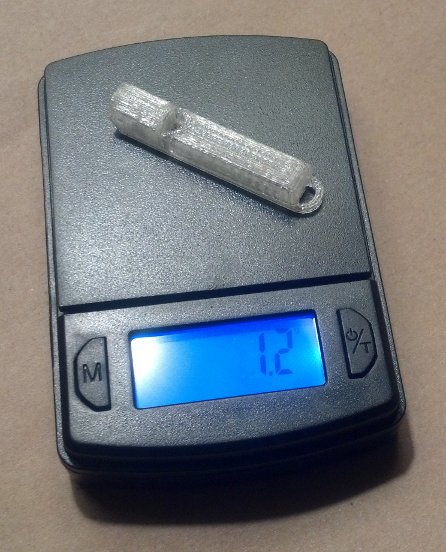
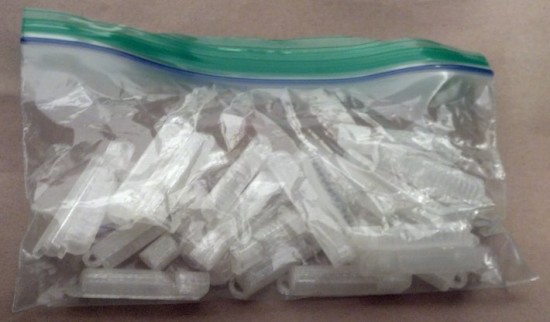
I ordered a decibel meter from Amazon the other day so I could drop some science on the claims from various 3D printed whistles on Thingiverse.  There are several that claim to be the loudest.  Well, today, I began my quest to put these claims to rest.

The closer the decibel meter is to a sound source, the higher it registers.  To eliminate some of these variables, I placed the decibel meter on a counter in front of me and a chair 24 inches in front of that.  For each of the whistles I was testing I stood just behind the chair and gave the whistle three hearty puffs.  The decibel meter, which was set to record and display the “max” reading, would then tell me the loudest reading for that set of three whistle toots.

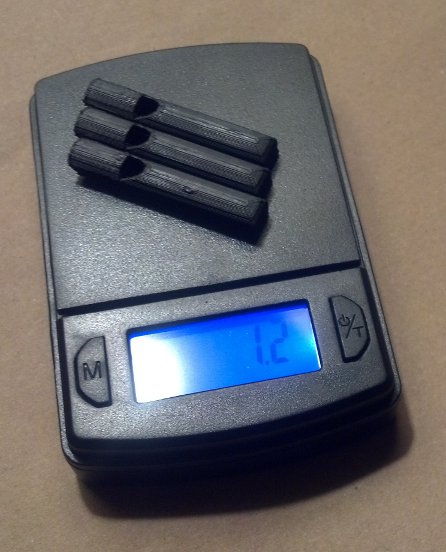
Without further ado, I declare the “Extremely loud and compact emergency whistle” by Whistleblower on Thingiverse the clear winner at 121.1 decibels.  Both whistles by this designer took the top two scientifically determined spots.

NameThingiverse IDMass (grams)PricePrint Time (minutes)DecibelsSubjective Rank
Extremely loud and compact emergency whistle [v1]29330213.9$0.1222121.11
Extremely loud and compact emergency whistle [v2]29330213.7$0.1118111.53
v29 (Over 118 db!)117916013.9$0.4290110.44
2 chamber whistle (LOUD) [w5]26165128.1$0.2449109.52
Emergency Whistle with Solidworks 2014 source4951721.2$0.047101.85
Whistle Ring Modified [v2]20271151.6$0.05990.86

Just how loud is 121.1 decibels? 1  Well, for starters, it’s just above the pain threshold of 120 decibels.  It’s louder than:

  • Your iPod headphones at maximum volume
  • A baby crying, next to your ear
  • A full symphony orchestra
  • The subway
  • A sporting event
  • A chainsaw
  • A jetski
  • A marching band

It’s on par with:

  • Thunder
  • A shotgun
  • An ambulance siren
  • A rock concert

And, if you didn’t have earplugs, you would exceed the daily safe exposure limit for 121 decibels in 7 seconds.

There may be louder whistle on Thingiverse2 and, if so, please let me know.  I’ll print the model and test against the others in my arsenal.

Loudest 3D Printed Whistle

  1. MOAR WHISTLES
  2. Loudest Whistle on Thingiverse… The Answer Might Surprise You!
  3. Loud 3D Printed Whistle Test, Take 2
  4. Loudest 3D Printed Whistle – now with 100% more science

  1. This page has several charts to help explain. []
  2. Or some other online 3D design repository []

Loud 3D Printed Whistle Test, Take 2

Impatient for my decibel meter to arrive from Amazon and eager to get more feedback on the loudest 3D printed whistle, I brought the four loudest whistles to work and enlisted the help of two friends.  We performed the test much the same as the last time – only this time they were on one end of a large parking lot and I had driven to the far side to blow each whistle once, then repeated them each once.  Here’s the result on their subjective test:

NameThingiverse IDMass (grams)PricePrint Time (minutes)RankDecibels
Extremely loud and compact emergency whistle [v2]29330213.7$0.11181TBD
Extremely loud and compact emergency whistle [v1]29330213.9$0.12222TBD
2 chamber whistle (LOUD) [w5]26165128.1$0.24493TBD
v29 (Over 118 db!)117916013.9$0.42904TBD

Whether the1 loudest whistle is the v1 or v2 of the “Extremely loud and compact emergency whistle,” Thingiverse user whistleblower clearly designed an amazing, quick printing, low cost whistle.  It has a very high pitched piercing tone that can be downright painful to be near, let alone create. 2

As before there’s a number of different things that could be happening here.  Perhaps the particular tone of this whistle travels better through open spaces (such as a parking lot) rather than through a door and down a hall (such as inside my house).  I know there are some whistles that require a lot of blowing power to hit maximum volume and others which almost “choke” on too much pressure.

In two days my decibel meter will arrive and I’ll try all of these tests again and post a new table.  If you think you’ve got a contender or have seen a really loud whistle on Thingiverse, let me know in the comments so I can print and test it.

Loudest 3D Printed Whistle

  1. MOAR WHISTLES
  2. Loudest Whistle on Thingiverse… The Answer Might Surprise You!
  3. Loud 3D Printed Whistle Test, Take 2
  4. Loudest 3D Printed Whistle – now with 100% more science

  1. Subjectively []
  2. Again, I had my earplugs in for the test []

Maker Faire 2018 – 3D Printing for Home Improvement

If you’re here checking out my site after my presentation, you can check out all the slides from my presentation above. If you’d like more information about the individual things in the slides, I posted an update for most of them over on Hackaday. If you’ve still got some questions, feel free to leave a comment below, hit me up on twitter, email me directly.

SOLVED! I can’t upload Arduino sketch to Wemos D1 Mini ESP8266

ESP8266 Wemos D1 Mini pinout

My Wemos D1 Mini WiFi boards had arrived from China1 on Friday and I’ve been fiending to build… something with them.

Unfortunately, I couldn’t get the very basic “blink” sketch to upload.  Here were my symptoms:

  • When uploading, I got the “error: failed to open” message
  • My Windows computer flashed a message when I connected the board, saying it was an unrecognized device
  • The Device Manager showed a little “alert triangle” suggesting the proper drivers were not installed
  • All of the ports in the Arduino IDE were disabled and greyed out

I tried several different upload speeds and several different USB micro cables to no success.  It was not until I found this post explaining that I needed to update the Wemos drivers along with a handy link to said drivers.

Now that I got this board blinking, I can’t wait to get it to do MOAR…

Default Series Title

Update:  My buddy Chris pointed out that I’ve been mixing up ESP32 and ESP8266.  I’ve corrected the title now.

  1. $13 for four boards plus headers?! []

Bamboo Illuminated Dome

Pieces for a Bamboo Illuminated Dome

I’ve always liked the idea of geodesic domes, but haven’t had the space, time, or ability to actually assemble one.  On top of all that, I was having trouble coming up with an idea for struts that would be both sturdy and cheap enough to build a dome at a reasonable cost.

Until I went to the grocery store recently.  The local supermarket had a clearance table with long bamboo skewers.  I realized these could probably work really well as struts and they were extremely cheap to boot.  I bought a few a the store to try out, but ultimately turned to Amazon for my bulk bamboo purchase.

I’ve already designed the connectors to work with these bamboo skewers.  You can try them out here on Thingiverse.

Once I’ve got the skewers cut to size and the remaining connectors printed, I’ll be wrapping the entire structure in that stretchy plastic wrap used for protecting furniture when you are moving. 1  Then I’ll be putting some LED’s and possibly a laser inside to make it more interesting.  :)

Lasers.

Default Series Title

  1. We have two rolls left over from the last two times we moved… []

Practical 3D Printing for Everyone

This slideshow requires JavaScript.

3D printing can sometimes get a bad rap.  At first people are excited by the possibilities, then after printing a few trinkets the novelty can really start to wear off.  However, our 3D printers have become an absolutely critical part of our home repairs.

We have printed literally dozens and dozens of things in and around our home.  As of the time I’m editing this post, we’re up to 82 things so far!  The vast majority of these are completely bespoke custom creations, with a few things that are printed from Thingiverse or mashups with things from Thingiverse.

My proposed Maker Faire Bay Area 2018 Presentation submission is for a presentation that discusses:

  1. Practical things everyone can 3D print for their own home
    1. Repairs
    2. Improvements
    3. Other useful things
  2. 3D Printing with Family and Friends
    1. Specifying a purpose (“Honey, can you make me something that…”)
    2. Specifying dimensions and purpose (“I need something that will…”)
    3. Simple techniques for creating replacement parts (using good reference photos, GIMP, Inkscape, and OpenSCAD)
  3. 3D Design with Family and Friends
    1. Photographs
    2. Sketches
    3. TinkerCAD and Sketchup

Default Series Title