It’s been a while since I’ve talked about my DrawBot. In large part that’s because it’s been a while since I’ve even used my DrawBot.
After a little dry spell of making, I’ve been rocking the DrawBot. Previously I had been drawing things about the size of a sheet of paper. While this meant the drawings were relatively quick, it also meant I could just print whatever I wanted directly onto a 8.5″x11″ sheet of paper using my traditional black and white laser printer. This weekend I’ve cranked out a few drawings – but on a much grander scale. Several months ago I picked up a large roll of white paper at the local office supply store – and I’ve since created about three 3-foot tall drawings. One is a House Stark direwolf from Game of Thrones, one is an R2D2 commissioned by my daughter, and a third is an R2D2 and C3PO also at the request for my daughter.1
The last one is particularly cool. I’ll take a picture for you later. There’s a lot of room for improvement with the gondola. The current setup is… let’s say… non-optimal. I’m working on an improved version.
Where was I? Oh yes! The watched pot!
I’m using Sandy Noble’s seriously awesome Polargraphsoftware to power my DrawBot. I’m rocking version 0.182 and noticed that when I’ve got the program on the “Input” tab it draws about 42 points a minute and when it’s on the “Queue” tab it draws about 96 points a minute when working on SVG / vector graphic. The cool part about drawing with the “Input” tab open is that you can see the drawing in progress. So, when I’m watching the drawing, it runs slower.
So, here’s the thing. I really really really like the Maker Faire. I’m just torn as to the most optimal way to experience it.
First of all, I love taking my wife and daughter to Maker Faire. Getting to see so many amazing things all in one place – and getting to see them all through my daughter’s eyes is absolutely incredible. I could spend the entire weekend just walking from exhibit to exhibit with them.
Second of all, I love talking to Makers and finding out what they do, what they love to make, and how they learned all the things they did to get there. I honestly feel smarter just for having gone each year.1
Third, helping man the MakerBot table last year was AWESOME! There was basically a constant crush of people coming by all super interested in what a MakerBot was and what it could be used to make. Everyone was friendly, polite, interested, and had such excellent and insightful questions. Imagine a place where you got to just hang out with people you like2 and people would stop by and ask you to tell them all about your favorite hobby. Chances are you could talk endlessly and cheerfully about it.
Fourth, I’ve build and made some things over the last year of which I’m kind of proud. While all the actual innovation credit must go to Sandy Noble and others, I like to think that my little drawing robot is uniquely mine. It would be a lot of fun to put it up and have it draw a huge picture all weekend. It would be even better with a time lapse video playing nearby.
So, what’s a maker to do? Experience Maker Faire with the family, spend my time talking to makers, man the MakerBot table, or put something on display myself? In all likelihood I’ll probably hit the Maker Faire before the family is up, help MakerBot, catch up with the family. 3
Oh, Natalie Imbruglia, only you know how I feel!
Admittedly, it wouldn’t take much for that to happen [↩]
Over the last two days or so I’ve drawn the largest picture yet with my DrawBot. I started it on Friday night and, with numerous pauses and other misadventures, finished it this morning. The drawing is roughly 12″ x 18″ or so. 1 With no apparent rhyme or reason the drawing would pause numerous times. I would estimate about 25 or so. Also, the pen had a difficult time towards the end. I believe this was in part due to the angle of the pen on the drawing surface and the quantity of the ink left. As of this morning I was still using version 1.1.2, but I’m installing version 1.1.4 right now. 2
Click on some other serial port other than the one I’ve been using
Disconnect and then immediately reconnect the USB cable from the computer
Click on the original serial port I had been using
As soon as the Drawbot reestablishes a connection with the Polargraph controller software, it starts drawing right where it left off
I used to export a copy of the existing queue before doing all of this, and while it is still a very good idea, it doesn’t seem necessary.
This exact process has worked several times in a row without a problem. Interestingly, step number 3 above3 is critical. If I exclude this step the program crashes.
For this drawing I used a Pilot Precise Rolling Ball V5, extra fine tip, black. I had used a red pen of the same make for a prior drawing and it worked reasonably well.
I’m in the process of designing a new pen gondola. I think something that can angle the pen downwards would help the pen apply ink to the page.
Interestingly, I noticed after about 80% of the drawing was done the pen had a little bit of paper fuzz on it. Once I removed this, the pen seemed to work a lot better.
The pen stopped drawing completely after about 85% of the drawing over all. This was a bit disappointing. However, since I was drawing from the top right to the bottom left and the version of the Polargraph controller I was using allows you to specify which area to start from, I just restarted the same drawing from the bottom right corner and ended up with a very satisfactory result.
In other words, it’s a nice day to start again.
Default Series Title
I rolled it up and gave it to a friend before I thought to take a photogram [↩]
A summer rose from our garden, drawn by a freakin’ narcoleptic robot
The drawings are getting better with a little tinkering. I’ve designed, printed, and installed new motor spools. These have a thicker central core, so they should be able to collect more monofilament line with slightly less distortion. I’ve made a few changes to the setup. Dialing in the starting area and calibrating the starting home point were pretty important.
I’m still having a little trouble with the robot occasionally stalling out. Although, now I think it is a symptom of the controller software rather than a problem with the Arduino. There’s no set time after printing, no set time after running the program, or other noticeable precipitating event which seems to cause this problem. At some point during a drawing, the controller software just reports the Arduino as being busy. 1 Here’s what I do to correct the problem:
Disconnect the USB cable from the laptop
Click “Queue->Export Queue” and save as a text document
Open the text document and perform the following operation
Select, copy, paste the first line above the first line – so now you see a duplicate. So, for instance in the image above I had to copy “C05,2700,2370,10,247,END” and paste this above the same line – so that it would look like the robot would be receiving the same command twice.
Edit the line “C05,2700,2370,10,247,END” so that I change the command to start with “C09” and delete the last two numbers and the “END” statement, so that it now looks like, “C09,2700,2370,END”
Save the text document with these changes
Shut down/close the controller software
Restart the controller software
Reconnect the USB cable to the laptop
Click “Setup->Serial Port…” and click on the serial port of choice
Click “Queue->Import Queue” and choose the text document I just edited
Start the queue again!
The reason I suspect this is a controller software and not an Arduino firmware issue is that I don’t have to reset the Arduino at any point – just disconnect the USB, restart the controller software, reconnect the USB, and start the queue again. I would think that if there were a problem with the Arduino firmware, I would need to reset the board itself.
The lowest you can specify as the “grid size”2 in the Polargraph controller software is “20,” but you can use a smaller value by editing the “polargraph.properties.txt” file. In the image above I used a grid size of “10” which appears to cover 1/4 the area of the size 20 pixel. That image probably took about five hours to draw. I think it looks really nice. The image above seems to have been distorted by my scanner. It came out almost perfectly square with a slight warp to the top right corner. 3 You can see some bare spots in the image above – that’s where the pen, for whatever reason, just wasn’t making a mark on the paper. I suspect it has something to do with that region of the paper being either slightly smoother and/or slightly more depressed than the surrounding regions. Otherwise, there would be no reason why the next row would have a similar defect nearby.
I’ve noticed the controller software also tends to forget the machine width, page size, and page position. I’ve updated this, saved it, and uploaded it to the Arduino several times, but it doesn’t seem to stick past a reboot of the software. Ultimately, these are very minor concerns and really just something to be aware of when I’m printing. I just about couldn’t be happier with the controlling software. That piece of software plus the Arduino sketch together have basically made this a nearly effortless project. Besides a hiccup soldering a circuit board wrong, this entire project went together very quickly and yielded almost immediately gratifying results.
I’ve done several drawings in the last few days. I’m still having trouble getting a perfectly rectangular and centered result. I may have to adjust the Y offsets and double-check my machine measurements. I still also notice a slight upwards warp to a drawing in the top right corner. But, I’m looking forward to additional experimentation – it’s all part of the adventure!
Last, but certainly not least, I want to make it clear that Sandy Noble’s software for the Polargraph/drawbot is really really great. That I am having some minor calibration troubles speaks more to my incompetence than Sandy’s excellent program. So, a great big thank-you to Sandy for his continued hard work on this software!
A few thoughts about operating a DrawBot, in semi-organized fashion:
Vertical Surface Drawing. There is an interesting tension in the design of a vertical line-driven drawing robot. As the drawing surface orientation approaches horizontal, the easier time the robot will have using a standard pen to draw, the more difficult it will be to control the drawing component via a line system, the greater the weight that would be required,1 a greater weight puts a greater stress on the line and the motor and has some effect on the responsiveness of the drawing component, and the more the weights on the drawing component would be in contact with the drawing surface – possibly causing smudges. The closer the surface is to vertical, the easier it will be to actually operate as a line-driven robot, the less weight required,2 but the more difficult it would be to have a pressure from the drawing component on the drawing surface.
Robot Portability. Right now my robot is quite portable – and, of course, there are costs and benefits associated with this. Right now I’m limited to the “size” of my robot at 2’x4′ since that’s the size of the piece of plywood I bought and on which the motors are mounted. However, it is very easy to just move the robot by putting the plywood in a different location in the house.
Robot Location. This is, in some senses, the flip side to robot portability. I’d love to put the ‘bot up on the wall and draw something really really huge. I don’t see that happening until I’m more comfortable running the robot, have found a better pen/paper combination, and – perhaps most importantly – figured out how to run the robot wirelessly or off an SD card.
This my theory, anyhow. My reasoning is that as the surface approaches horizontal, the more weight you’d need to pull at the drawing component because more of the force of the weight would be absorbed directly by the drawing surface itself – along with some friction as it passes over the surface as well. [↩]
Calibrating my DrawBot was apparently important to its operation. Who knew?! If you’re following along at home, you’ll definitely want to check out Sandy Noble’s instructible on Polargraph calibration. I’ll put my settings here, but they probably won’t be that helpful to you unless you’re using the same exact equipment and hardware as I am.
Setup->MM per Rev = 50
Based on the actual spool center diameter, this should be 47. But, with some line wound onto the spool, it should be more like 54. So, of course, I chose something that was neither.
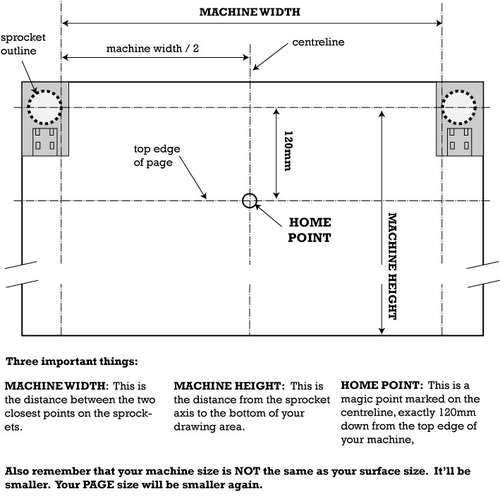
Although the “Machine Width” is defined by Sandy as “The distance between the two closest points on the sprockets,” I used a different figure.1 Since my machine uses spools, rather than sprockets, and the spools are unwound on the far side of the spool, I measured from the far edge of the spool’s core the the other far edge of the other spool’s core. I figure this is probably the best measurement of the width of the line available to the machine.
Setup->Machine Height = 848
This is a relatively arbitrary specification given that my spools have about four times as much filament than I could use in my current configuration. I intended this to be 844, but must have typed it in wrong. :)
Setup->Page Width = 216
Rounded up from 215.9, which is 8.5 inches converted to millimeters.
Setup->Page Height = 279
Rounded from 279.4, which is 11 inches converted to millimeters.
Setup->Pen Tip Size = 0.12
With my 2’x4’x0.5″ board covered in butcher paper, I’ve marked out on the paper the locations of the various important lines for my machine.
After actually calibrating my machine, the results are MUCH better. I still need to adjust the settings a little, but otherwise I’m very very happy with this result. As you can see, the drawing is flipped. Once flipped back, I think it is reasonably apparent this is Van Gogh’s Starry Night. Here are a few things I’m going to try:
The pen I was using seemed to stop working in certain regions of the drawing. I bought a few new pens on my lunch break today. Both are art marker pens – one blue and one red. Unfortunately, both are too wide to fit in my current gondola. For now I’ll use a thin sharpie.
There is a slight curvature on the top and bottom of the drawing. This is probably due to a miscalculation in the mm per rotation. The downside to using a spool, rather than a sprocket/ball chain or gear/toothed belt, is that as the spool contains more cord, the diameter of the spool actually grows larger. This means that when there’s a lot of line on the spool each rotation releases more line and when there’s very little line left on the spool, each rotate releases less line. However, given the diminished space requirements, I don’t think this is going to be such a big deal.
I mostly measured the machine width. Basically what that means is that I did measure it, but then got distracted, then used what I recalled the width to be inches to calculate the width in mm. Clearly, there is room for increased precision.
For weights I’m using a bunch of spent batteries in a ziplock baggie tied with a wire to the gondola. Too many batteries were causing the line to be too jagged.
Starry Night by Van Gogh, drawn by a freakin’ dyslexic robot
Starry Night by Van Gogh, drawn by a freakin’ dyslexic robot, and flipped back
The Thingiverse page actually has a lot of information about the motor mounts. They’re designed in OpenSCAD and are mostly parametric. Since I’m mounting these motors inside a box, the mounts are designed to go into the corners of the box.
Okay, I’m stuck. I don’ t know what I’m doing wrong or what I need to do next. So, I’m calling upon John Abella, Sandy Noble, and Kongorilla for your help. :)
Here’s where I am:
The burning!
At last attempt, I hooked up some small steppers to the Adafruit motor shield, put the shield on my Arduino Uno, hooked up the USB cable and the 9v power adapter.
I heard a small pop and smelled warm electronics.1
After the burning
I can upload and run the Arduino basic blink sketch. I can alter this to change the blinking pattern.
I can upload and run the Arduino sketches to operate a microservo. I can alter this to change the microservo’s behavior.
I can upload the Adafruit sketches for steppers – but I can’t make the steppers move.
I can upload the Polargraph sketch – but I can’t make the steppers do anything.
When I connect the 9v power to the Arduino, all it does is make the two chips on the Adafruit motor shield very warm.
Now, I’ve got tons of questions for you:
Did I ruin my Arduino? I can still run the blink and microservo sketches.
Did I ruin my motor shield? How can I tell if it is operational? When I connect the power to the Arduino and have the little jumper in place, the green LED is lit up.
What am I doing wrong?
What should I try next?
How should I diagnose a problem?
Default Series Title
Now I’ve got a cold and couldn’t smell anything if I wanted [↩]
This post isn’t really so much of an update as it is a way for me to jot down some thoughts about this DrawBot and to keep me occupied. 123
Stepper motors mounts
Right now I’m designing some rather mundane stepper motor mounts. They’re inspired by Ed’s designs, but I’ve written the code myself. I’ll post the code on Thingiverse once I’ve printed it. It will output a good looking motor mount, but the design isn’t entirely parametric yet.
There are several downsides to using beaded cord4 or toothed belts. First, they’re more expensive and slightly more work to obtain than simple mono filament line. Secondly, they are both bulky. If you’re using beaded cord or a toothed belt, they’re going to have to dangle off the side of your machine. This means more moving and swinging parts – which is a whole other problem.
One of the benefits to using a filament line is that you can easily route and redirect the line using pulleys. This means that you could mount the motors and electronics in close proximity to each other – and then run the filament line through something like an eye bolt or a specially designed5 part.
I don’t know how any of these options would affect the placement and usage of a servo for penlifts.
I have this long shallow pine box, at least three feet in length, that may be perfect for this project. I think I’ll be able to mount the motors, electronics, and just about everything I need entirely inside this box. If I do, then all I’ll need to do later is mount the box to the wall, plug the USB cable into a computer, plus the power adapter into the wall, and start printing away! Now, I realize that this implies a totally vertical drawing surface, but I think that is not as much of a problem as it could be.
Writing on a perfectly vertical surface with a pen can be challenging. My thought is to create a gondola that has the weight farther back on the gondola – so that it is pushing the pen against the paper. If the pen were angled down slightly, this might even work a little better. But, obviously, I’ve never tried any of these variations. I have to imagine that smarter men than me have considered and discarded these designs. I have a crappy sketch for this, but I’m really tired and should get some sleep.
To sleep, perchance to dream. Ay, there’s the rub.
Fear not gentle reader. If history tells us anything, tomorrow shall bring your RSS feed another deluge of nonsense!
Default Series Title
I don’t feel like working, even though the hour grows late and I will need to get a bunch of things done one way or another. [↩]
And, really making a drawing robot is SO much more productive than what I do on a daily basis. [↩]