Her project was so much fun that when she invited me to team up and take the show on the road, I jumped at the chance. This year we’re bringing a new and improved timer/buzzer hacked together from a cheap tap-light and a pop-up table/booth.
We’re taking photos of the build process and will post them along with tutorials, parts lists, and source code for everything. Here’s everything you need to know to build a cheap timer-buzzer out of a tap light.
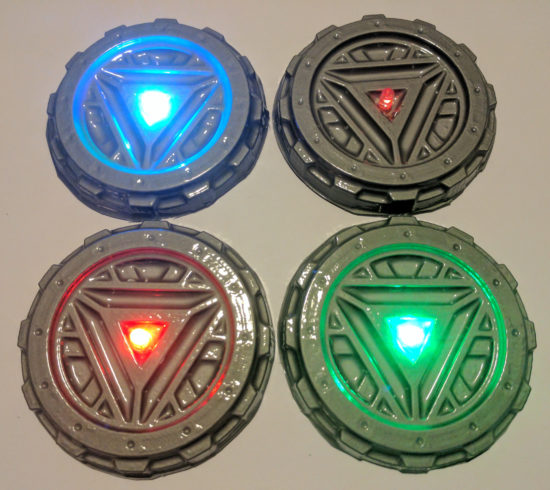
If you see me at Maker Faire this weekend, you will likely catch me wearing my vacuum formed goggles and arc reactor. I was inspired by my vacuum former and this awesome Instructable by dgrover.
Once you have everything set up, this neat little “arc reactor” only uses about 50¢ of materials and doesn’t require any special soldering skillz.1 Here’s how you make your own:
This slideshow requires JavaScript.
Make the form
I specifically bought a stack of silver plastic plates for this project. 50 plates for $10 was a pretty good deal. ((In case you care, I use affiliate links))
You could use dgrover’s lasercut files or design your own model. I designed my own, based on their designs and added 10 degrees of draft to the edges to help it release from the mold.
You’ll also notice lots of little holes in the nooks and crannies of the model. Those serve a dual purpose of allowing the vacuum to pull the plastic down into those parts and then letting air in when you’re ready to release the 3D printed part.
Poke two small holes in the center of the form for the LED leads.
Push the LED through the holes. I would recommend adding a drop of hot glue just under the LED moments before you pull it against the vacuum formed part. This will help keep it in place.
Bend the two leads as shown just using your fingers. Notice the bottom lead is bent roughly 90 degrees and the top lead is curved.
Add the battery. The LED is polarized, so it will only light up when the battery is properly connected. So, just put the battery in, then flip it over if it doesn’t light up. :)
DIY Vacuum Formed Arc Reactors
I really couldn’t be happier with the results. It looks way more impressive than the 57¢ worth of materials would suggest.
In case you missed me at Maker Faire Bay Area 2017 this year, here are my slides! Don’t forget to check out all the blog posts with even more detail and pictures. You can find all the links, including to the 3D printable files, below.
Between taking most of “Maker Faire” week off work and getting ready1 for MakerCon and Maker Faire, May was a hectic month. I remembered pretty much everything I needed for a successful2 – except “maker cards” and a metric ruler. With a few additional tweaks, I’m sure it can be even better next year.
In case you’ve never set up a booth at Maker Faire, you get an area with several folding chairs, a few long folding tables, and a chain link fence on at least one side of you.34 To have an interesting booth, you’ll want something to put over your table and on the chain link fence.
Since my entire booth was basically a wooden box that unpacked into a robot that made decorations for my booth, set up was rather easy.
I heard an amusing anecdote from someone at Make who said they put a lot of time and energy into figuring out a good spot for all the makers. Apparently they were a little concerned about having three drawing / art style robots next to one another! I had a great time hanging out near PicassoBot and PancakeBot! [↩]
My daughter later pointed out there were three robots, in a row, all with a “P” in the start of their name [↩]
As a Maker, I could eat at the Maker Lounge, but the credit card machine was intermittent [↩]
This could be a whole topic in itself. Two days is not enough to catch all the talks from just one stage. With multiple stages, multiple demonstrations, mini-concerts all happening at the same time [↩]
Or not. There were several booths giving away these stringy sack kind of backpacks [↩]
Maker Faire is big and there’s a lot to see. Although there are a lot of food options, you don’t necessarily want to drop what you’re doing just to go find food [↩]
Hey! It’s been a while since we’ve talked! ((Photo courtesy of Scott Beale))
Hopefully you’ll excuse the rambling nature of this post. :) A fair bit has changed recently. I started a new day job1 in June, but not after taking off all of May and arranging for this last week off.
May was fun, especially Maker Faire and taking the time to go on little field trips. I got my drawing robot in working order, put together a website dedicated to drawing robots, and drew some really cool things. I’ve even got some stories from Maker Faire to share with you.
A Little Story
I had a number of drawings on display in my Maker Faire booth. I had some Doctor Who related things, a Yoda, a Death Star, a Tesla, a House Stark dire wolf, and a number of other things. In particular, one was a big blue TARDIS I had taped to the chain link “wall” and I was working on drawing a dalek.
Then this guy walks up with some friends, asked me a few questions, and then asked me how much for the TARDIS and dalek. I told him that I wasn’t really selling them and that the dalek was only about 75% done – and it would need another hour or two to finish.
He turns to his friend and says, “Hey, how much do you have on you? $110?” Then, he says to me, “I’ll give you $110 for both right now.” I told him he had a deal – but that the dalek was still an hour or two from being done. He said he liked it just the way it was. What the hell, who am I to stand between a man and his Doctor Who-themed robot drawings? I stopped the robot, pulled down the drawings, rolled them up, and took the man’s money.
Another Little Story
At Maker Faire I drew two pictures for other Makers. One was for the guys from Wikipedia who asked me if I could draw a big poster of the Wikipedia logo. They e-mailed me an SVG of their logo and I was happy to draw it up. Although I was still figuring out how best to draw non-TSP SVG files, it turned out really well.
The next drawing was for a fellow maker and good friend, Chris Connors, who needed a banner/poster for his booth for How2Today. He sketched out a few tiny logos in Sharpie on a piece of paper, I took a picture with my cell phone, and I drew a big giant version of his logo. I’m working on putting together a tutorial to help you do this too. :)
Crane Project
I’m about 26% done folding 1,000 cranes. I kinda stalled out on this project over the last few weeks. However, now that I’m back from a vacation I’m hoping to revisit this project and get it back on track.
Okay, that’s it for a catch up post. More soon!
I say “day job” to differentiate what I do as my vocation versus what I do with the rest of my time [↩]
The winner of Maker Faire’s contest “The Road to Maker Faire Challenge” gets $2,500.00. Dear gentle reader, should I be fortunate enough to win – I hereby make you these two promises:
I promise to spend every last dime on building more and better robots.
I promise to continue blogging relentlessly about what I did, how I did it, what worked, what didn’t work, and how you do it all yourself too.
Early yesterday morning I got an e-mail from Make saying that my DrawBot project had been accepted to the “Road to Maker Faire Challenge!” If you check out Make’s latest post inviting applicants for the “Road to Maker Faire Challenge,” you’ll notice the tiny image in the bottom left is from this post. How cool is that?!
Before Maker Faire announced the official call for Makers, I had already downloaded and printed out the “call for Makers” information from the most recent Maker Faire and handwritten all of my responses in the form – just so I would be ready to submit my application to be a Maker this year. ((Photo courtesy of @Doug88888)) I ended up submitting my application within just a few hours of the call going out.
After I had submitted my application, my daughter wanted to submit her own application. Of course I was happy to help her, so I helped her prepare an application and submitted it on her behalf a little after 11pm on March 14, 2013, just under the wire.
Today Maker Faire sent her an acceptance! My daughter is going to be exhibiting at Maker Faire Bay Area 2013!
.
..
…
I just hope my acceptance letter comes soon. :/ Senior year all over again…
My RSS feed for Slashdot brought my attention to an article on Slate. The Slashdot summary stated:
This Slate article talks about a single line of code — 10 PRINT CHR$ (205.5 + RND (1)); : GOTO 10 — and how it manages to create a complicated maze without the use of a loop, variables and without very complicated syntax.
Even though that “one line” of code really is two lines and it really does use a loop, that short string of code is still very interesting. While the way the code generates a maze isn’t immediately intuitive, it becomes obvious once you watch a bit of the video above. All that code does is randomly kick out a forward slash or backward slash. Once they wrap around to the next line, they start to form what looks like a maze.
As a little exercise I created something similar using PHP. To make that work I had to use a fair bit of CSS to make it look decent. In any case, it occurred to me that this would be a wonderful project for a Polargraph! Draw a random forward slash or backslash, get to the end of the line and make a bunch more on the return line. How awesome would a huge paper roll of nothing but a giant maze look?
I think I may have found a project cool enough to show off at Maker Faire. :)