Beep Boop: Emotions for ED-E

So I’m trying to program emotions for ED-E.

Better ed-e dialogue at Fallout New Vegas - mods and community

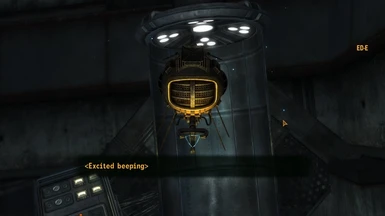
In Fallout New Vegas, ED-E doesn’t use regular dialogue, but communicates through beeps. Basically, he gets <(Emotion) + beeping> as his dialogue. Obviously the only way to research his beeping for this project is to replay Fallout New Vegas and talk to everyone’s favorite eyebot. I came up with a list of some of the emotional beeps he has in the game (and some that I just want) to start programming into him. I have ideas for what I want him to sound like, but I just need to find the right pitches and durations.

By this I mean I am sitting in my room and saying “beep beep” to myself at different pitches in sync with a program I wrote.

Yesterday my dad was checking in on me and how my programming was going and asked how I was doing. I replied, approximately, “bleurrrrghhhhh.”
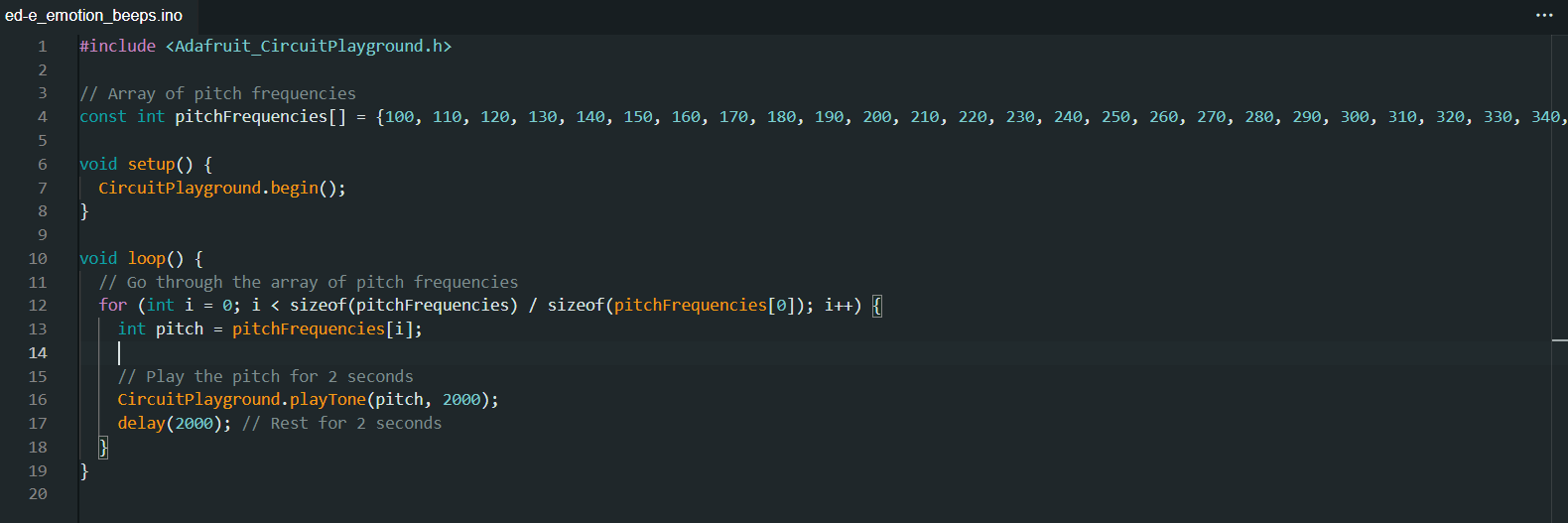
I was having trouble programming the emotional beeps because I have very specific ideas for what ED-E should sound like and no way to get that into a computer. I’m a huge music nerd, but I unfortunately don’t have perfect pitch or some superhuman ability like that to use to get ED-E to sound exactly like I want him to.1 Dad suggested using a loop with an array going up every time, which made everything so. Much. Easier.
This plays frequencies starting at 100hz and going up by 10hz every time. I started with 100hz but going up by 50hz every time, but I liked the specificity of 10hz. Once I get in the ballpark of where I want to be, I can then just run the program and correct the pitches if need be.
If you read my last post, specifically the spoiler section, you will know why I started with a shy beep. If you didn’t read my last post, go do that! If you didn’t read the spoiler section, that’s fine. What you really need to know is that I want ED-E to make noises.
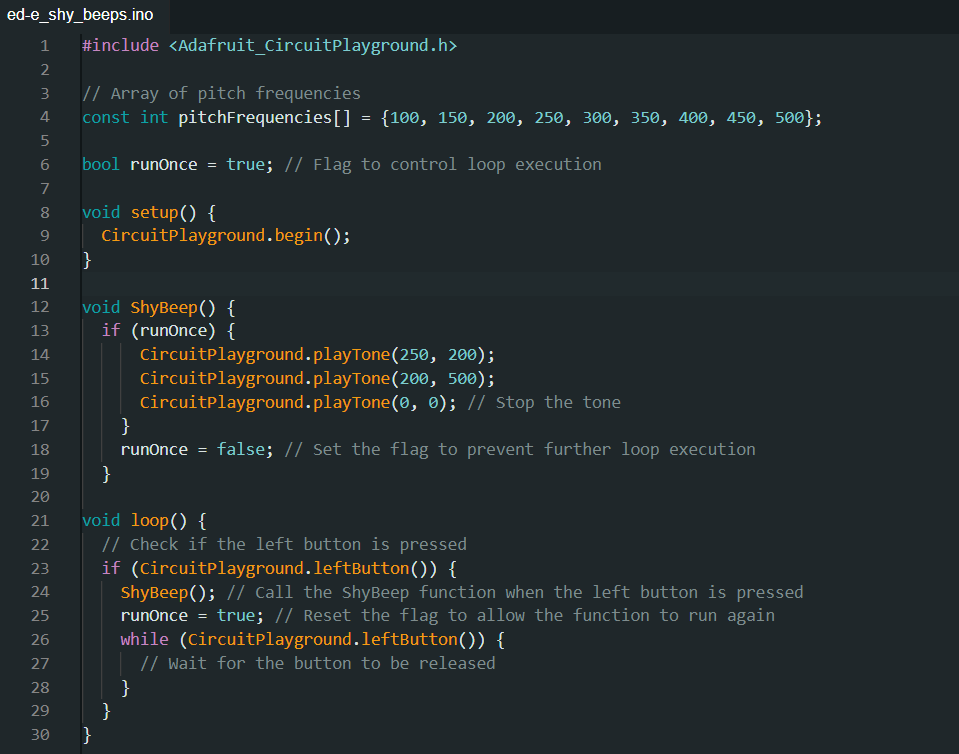
I’ll admit, this took a while to get right. Not playing the tones or even figuring out what pitches they were or how long they should play for. No, getting the tones to play was easy. Getting them to stop… was much harder.
ED-E was shyly screaming at me on repeat for at least 10 minutes while I was slowly losing my mind and trying to make him shut up.
I turned to ChatGPT to help me fix this, but it was utterly unhelpful and I ended up fixing the problem myself by deleting a bunch of the garbage it generated. Now the problem was that I had to continually upload the code to make the ShyBeep function run again. I was happy that it wasn’t looping anymore, but I wanted to fine tune the beeps and making it upload again and again was a pain. That’s why I decided to make it run when a button is pressed.2
It took a little while to make it run when a button was pressed, but then it would only run once and never again, even if the button was pressed. I finally realized that this was happening because runOnce was set to false, and fixed that.
Now that I have this framework, it has been much easier to program more beeps. Now I have a sad beep, and I’m going to start working on a happy beep because I have had just about enough of ED-E’s negativity.3
  1. I almost decided to use the definitions of pitch from my Rickroll code so I could just ask the computer to start at middle C and go down or say I want the pitch to be a half note in 3/4 time. I then realized I was making this WAY more complicated than it needed to be and just used seconds and hz like a normal-ish person []
  2. I seriously love Circuit Playgrounds. They have everything. []
  3. Just kidding ED-E, I love you []

ED-E Project: Origins

Hi, I’m DexterStarfighter, offspring of MakerBlock.1 I am a maker and artist with possibly too many interests that include drawing, writing, cats, theatre, video games, horror podcasts, folklore, coding, Jenga, history, triangles, succulents, and reading literally anything. I have been going to MakerFaire for basically my entire life and it has always been something I look forward to for the whole year. As soon as Dad told me MakerFaire was coming back, I knew I had to make something super cool for the occasion. This brings me to my latest project, a companion robot.

First, some background. My favorite game is part of the Fallout series (New Vegas, if you were wondering). I started the Fallout series because my dad played them when the first Fallout came out and I wanted to be able to share a cool game with him. I started Fallout 1 and loved it, then played Fallout 2 and 3. Over the summer, Epic Games released Fallout New Vegas with all DLCs for free and of course, I played the crap out of that.23

In Fallout New Vegas, there are various companions you can take with you on your journey through the Wasteland. There are human companions of course (and ghoul and nightkin), but you can also take with you one nonhuman companion. At first I was super disappointed that I couldn’t find Dogmeat. I don’t actually like being around dogs in real life, but I got Dogmeat in Fallout 1 and somehow I have become very attached. (I do not even want to think about how many times I have reloaded a save to keep that little jerk alive.) I quickly got over my disappointment though, because there is a statue of a dinosaur and now I’m disappointed that you can’t have a dinosaur robot companion. Anyway, in my travels through the Mojave, I found two interesting nonhuman companions. The first one I found was this little eye bot named ED-E. I play as a charismatic nerd (high INT and CHA with good repair, speech, barter and science) so I was able to fix him up. ED-E was still only able to beep in ways I couldn’t understand and when I brought him to where I was supposed to for his quest, there was some sort of glitch and I couldn’t interact with the lady for the quest. ED-E seemed kind of lame to me then, so I took him back to the place I found him and left. I later ran into a dog named Rex who I had to take care of for an Elvis impersonator (no, really) and found he was a pretty good companion.

Flash forward to the endgame. I had met a cowboy robot, climbed a dinosaur statue, resurrected a B-29, fought a soldier for a dog’s brain, charmed a scientist, accidentally sided with the mafia, cleaned out an entire casino, assassinated a 261-year-old man, had my vital organs removed, stolen 27 bars of gold, befriended a man wrapped in toilet paper, and was well on my way to conquering New Vegas for myself. I had only one more thing to check off my list: walking the Courier’s Mile. Don’t worry, I won’t spoil the Lonesome Road quest for you- I’ll just tell you that I met ED-E again. Somehow, within the first few minutes of interacting with him, I had become so completely charmed by this little robot that I would do literally anything to protect him. I’m not sure what about ED-E made him so endearing to me, but he became my best friend. 
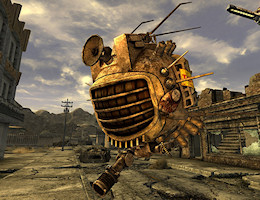
GameBanshee

In 2019, I met Odd_Jayy at MakerFaire. I remember seeing his spider bot and thinking how cool it was. I’ve always liked the idea of a companion bot, but I’ve never actually had a specific idea of what I want out of one. When dad told me that we would be going to MakerFaire again, I immediately thought of an ED-E companion bot.4 Dad loved the idea too and gave me lots of good tips on how to get started. I have a tendency to get lost in the details, so he helped me focus on the big picture and the first steps I could take to achieving my goals.
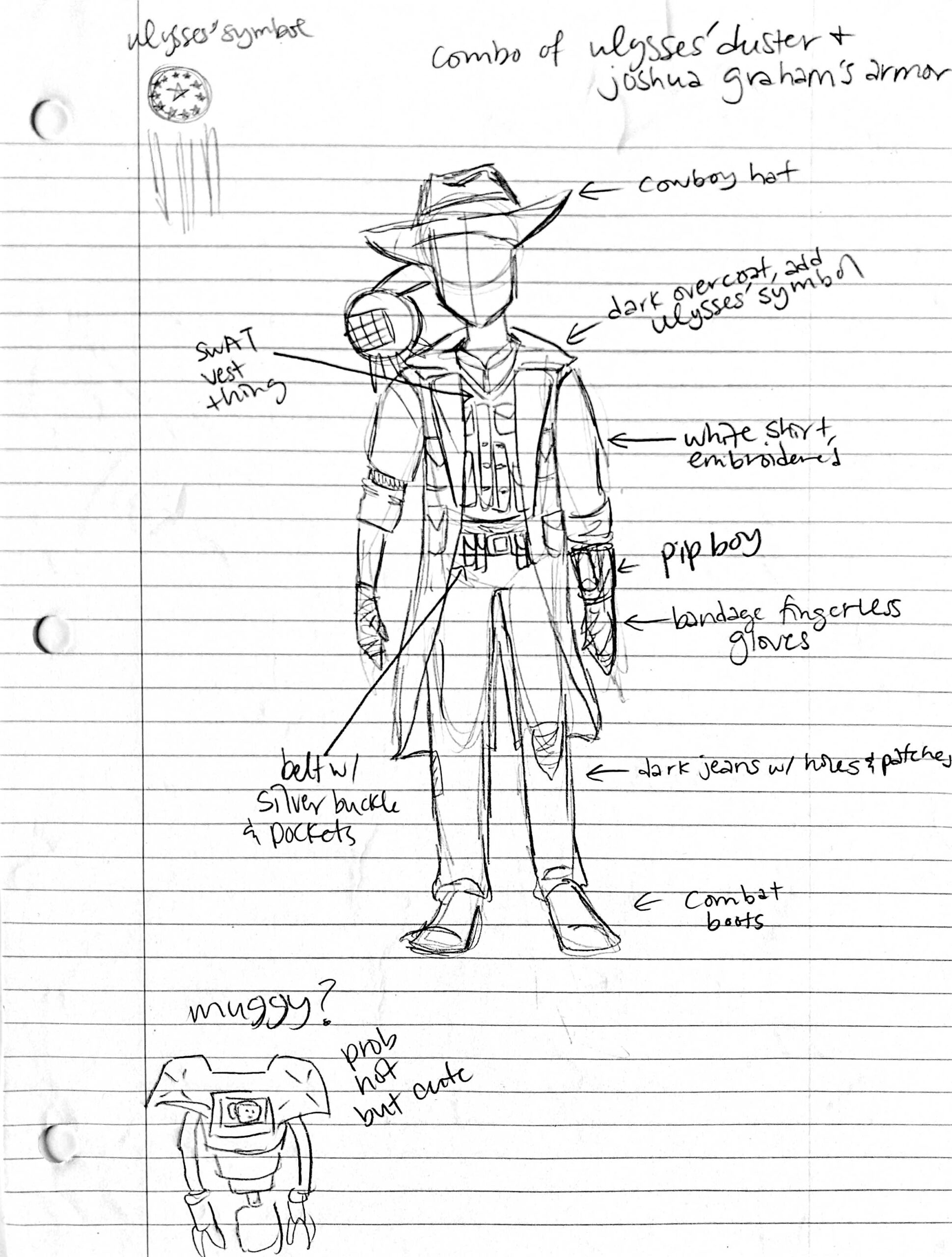
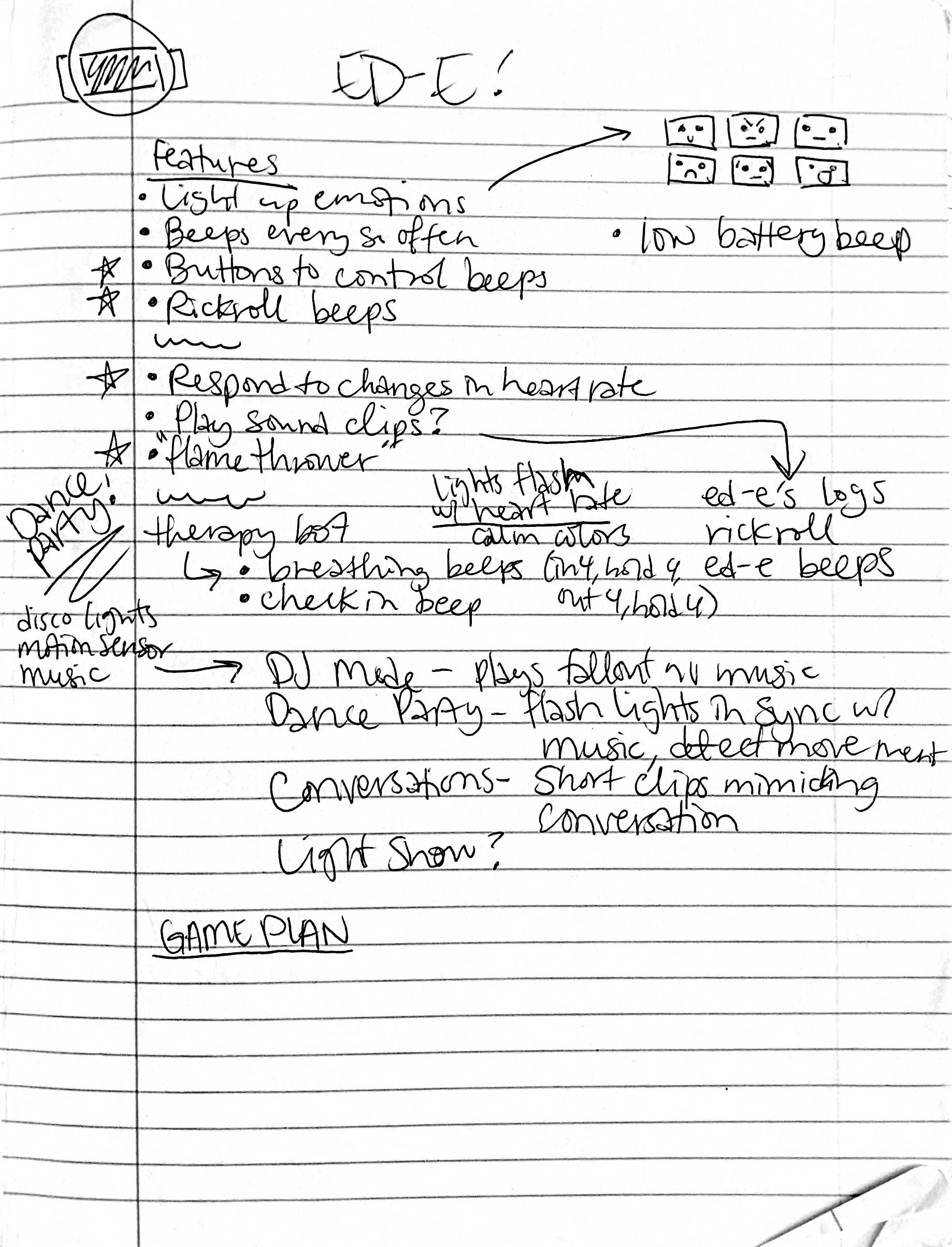
I have a lot of ideas about what I want ED-E to do eventually, but I’m a complete beginner at Arduino programming. Knowing this, Dad suggested starting small. First, turn on one light. Then multiple lights. Then make them flash. Then make them change colors. Then add beeps. Stuff like that. I was like “cool, cool” and immediately programmed ED-E to beep the entirety of Never Gonna Give You Up instead of doing literally anything sensible.

I regret nothing. It was frustrating at first because I was super out of my depth. I used Chlorondria’s arrangement of Never Gonna Give You Up and used ChatGPT to help me learn how the code works. ChatGPT was super helpful because I could get feedback on why my code wasn’t working. The sense of accomplishment when I finally recognized the tune made all the frustration so incredibly worth it.

After my self-indulgent first project for ED-E, I moved on to taking Dad’s suggestions. Sort of. I’m a teenager, and therefore I am legally obliged not to listen to any authority figures, real or perceived. I made ED-E flash some rainbow lights. I started with just red lights and it took a while to make the code work, but once I made it work, I just changed the color brightnesses. Fun fact: my ED-E bot now actually glows two shades of blue in his rainbow light show pattern. For some reason I decided RGB stood for Red Yellow Blue and messed up with the color values when I was trying to make green and accidentally made a light blue. The light blue actually looked pretty cool, so I decided to keep it.

Today, I worked more on5 ED-E’s… musical function. I’m going to warn you right now: there will be spoilers for MakerFaire below! I intend to take ED-E to MakerFaire with me, and if you meet him, there will be some fun surprises in store for you. Not if you read the spoilers, though. MakerFaire is a big place and I don’t expect everyone who visits this page to run into me at the Faire, so I’ll include some stuff about the surprises below. 

***SPOILERS START***


If you’re still here, I assume you want to read this. One of my favorite things about ED-E in Fallout are the little conversations you can have with him. I want to be able to have a few little “conversations” with my companion bot, kind of like in the game. I’m going to have a Pip-Boy with various buttons to run functions for ED-E, but one of the first conversations I thought of had to do with his musical function. This was my idea:


Me: Hey, ED-E. Do you wanna sing them your favorite song?

ED-E: [Shy beeping]

Me: Aw, are you shy?

ED-E: [Shy beeping]

Me: Come on, ED-E. We’d all really like to hear you sing!

ED-E: [Questioning beeping]

Me: Yes, of course! Listen, I’ll ask them. Do you want to hear ED-E sing his favorite song?

Other person: Yes!

Me: See, ED-E? 

ED-E: [Pleased beeps, wait, then Rickroll beeps]


Obviously, I’m not going to make ED-E understand my words and respond to them. ED-E will be a shoulder mounted bot, so I want to be able to have conversations that trigger based on movement. I’m using a Circuit Playground, so I intend to take full advantage of all the different sensors it has. I programmed ED-E to run his Rickroll function if he senses a significant change in acceleration. I’ll pop my shoulder like I’m giving him a nudge, triggering the function. He waits for 8 seconds to give me time to talk, then plays the Rickroll beeps.

I have to admit, this took a WHILE to get right. It was still incredibly satisfying to see it all come together and go right. I was so excited when it started working! I did a lot of testing to get the sensitivity right because I don’t want it to trigger if I’m just walking around. I’m still fine tuning that part because I bumped the cord earlier and he started Rickrolling me. Then again, maybe ED-E just has a funny sense of humor.


***SPOILERS END***
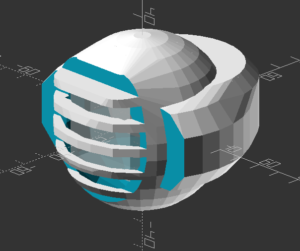
So, what’s next for ED-E? I think the next thing I want to work on is getting his beeps right. I can make him beep music, and that’s great, but I also want to have him beep every so often and have “conversations” with him. I’m going to program some little beep clips for different emotions or situations that I can then mix and match into various conversations. I might also actually listen to Dad for once and work on a light show.

Thanks for reading about my ED-E project! I’ve enjoyed working on him and I’m so excited to share him with other makers. I’ll try to post updates regularly (they shouldn’t be as long as this one since you won’t need all the background next time). Thank you to Odd_Jayy for the inspiration, Chlorondria for the musical arrangement, ChatGPT for the troubleshooting help, Adafruit for making awesome boards, whoever made Fallout New Vegas, MakerBlock for being a great dad and helpful sounding board, and to you for reading this post.

ED-E Companion Bot Project

  1. ED-E Project: Origins
  2. Beep Boop: Emotions for ED-E

  1. I considered saying progeny and descendant of the House of MakerBlock, but offspring sounded the best. Progeny sounded weird and the descendant thing reminded me of Game of Thrones, which I have not read or watched, but I might someday and I don’t want to invite spoilers. []
  2. I love Epic Games. Free games every week? Yes please! Disclaimer: I am not being sponsored by Epic Games, but if I was, that would be awesome. []
  3. New Vegas is best Fallout, you can fight me on this. []
  4. I also considered a Muggy companion bot. I love Muggy and if ED-E turns out well, Muggy might be my next project. []
  5. Lol, moron []

DIYFaire.com: Hello Maker World!

There were dark rumors going into Maker Faire Bay Area 2019 which imparted a cloud over the event.  On June 8, 2019 I was still reeling from the news Make and Maker Faire were closing, so I bought a domain and created a website (DIYFaire.com, now lapsed) with the idea that come January of 2020 perhaps I might find a way to get together again with far flung friends on the same weekend.

The website is gone, but Archive.org remembers and the WordPress installation may yet exist.  Although I write this preamble on 7/12/2023, the day I will remember I’d heard Maker Faire was coming back, I’d like to preserve that post on 6/8/2019 here on my main blog:

Make: and Maker Faire may be gone. I hope they’re not. I hope Dale and the Make crew figure out a way to rise up. People made things, just for the sake of making them long before Make they’ll continue to do so. Knowing people will continue to make doesn’t really salve my sense of loss. I feel like we’ve lost too much, mourned too much, and it still feels so raw.


At the same time I’m not going to miss Makers, because I don’t have to. Makers are not going anywhere. I am going to miss the opportunity to meet up with Makers and far flung friends at least once a year at Maker Faire.


Fortunately, the end of Make and Maker Faire are not the end of the friendships sparked and forged there.


Here’s my promise to you, right now. On the weekend of May 16-17, 2020 I’m going to travel out to San Mateo. I’m going to stay out there for the weekend. And, I’m going to bring some stuff I’ve made or been working on.


I don’t have any idea what “DIYFaire.com” is going to be. If nothing else, it’s a place holder.


It’s a “save the date.”


If I don’t see you sooner, dear friend, let’s start making something together right now. Let’s make a plan to hang out, share things, and continue our friendship. You’ll forgive me for ending with someone else’s words.


“And if you’ve come this far, maybe you’re willing to come a little further. You remember the name of the town, don’t you?”

Maker Faire Application: Vacuum Forming Workshop

DIY Vacuum Formed Arc Reactors

I’ve been making some notes as I work on my vacuum former and the proposed workshop for this year’s Bay Area Maker Faire.  Here’s some ideas and thoughts, in no particular order.12

  • Workshop Proposal
    • I’ve demonstrated my bucket vacuum former at my daughter’s school a few times – and it is always a huge hit.  The vacuum formed result looks like so much more than the product of very cheap and accessible materials.  Two years ago I put on a presentation at Maker Faire about how to build a vacuum former – and this year I want to try something even more ambitious.  Here’s the slideshow from 2017.

    • I want to do an entire workshop on how to build and operate a vacuum former – and then let people try to vacuum form their own objects.  One of my favorite things to vacuum form is an “Arc Reactor” and then augment it with an RGB flashing LED and a coin cell battery.  However, I think people would also enjoy making goggles and phone cases.  It takes about 30 seconds to heat up the plastic and just seconds to actually vacuum form a shape and let it cool down.

This slideshow requires JavaScript.

  • New Developments
    • Several months ago, just before Thanksgiving, our stovetop stopped working.  Yeah.  I know.  Talk about timing, right?  While we scrambled to get a new cooktop ordered, delivered, and installed, we also purchased an inexpensive hot plate from Amazon.  I had originally used an old hand-me-down large toaster oven to heat up the plastic, but wondered … is there a better way?  That toaster oven is huge and takes a long time to heat up.  This weekend I was delighted to learn the hot plate heats up very quickly, gets hot enough to soften the plastic, and works as a fantastic and compact replacement for the toaster oven.
      • There are a few caveats to using the hot plate.
        • The heat was more localized, causing the center of the plastic to become thinner and saggier.  When the plastic plates were heated in the toaster oven, they tended to heat more evenly.  Perhaps if I tried a lower heat setting or held the plastic plate higher, this might be mitigated.
        • It’s hard to get a sense of the plastic without actually watching it get soft and wobbly.  This is especially true when the plate is inside the toaster oven – there’s only room enough for one or two people to see what’s going on.  However, with the hot plate, there’s no enclosure3 to obscure an audience view.
        • I was somewhat paranoid about letting the plastic droop down onto the heating element.  I’m pretty sure it would smelled horrible, made a huge mess, been nearly impossible to clean, and made the hot plate unsuitable for any other purposes.  I may try to locate a cheap hot plate from a second hand / thrift store / goodwill to take to Maker Faire.  Though, now I’m also wondering if it might be possible to repurpose an old coffee maker, grill, griddle, or panini press, into the heater for this project.  Maybe if I covered the heating element in aluminum foil first, that would protect the surface?
      • The power switch of the vacuum head / bucket head is conveniently placed right on top for normal operation.  For unusual operations such as this, where the vacuum is upside down, it is decidedly inconvenient.  I used a power strip with a switch which made it much easier to operate the vacuum.  I think I may invest in a dedicated foot switch extension cord for this project.  It’s a very cheap upgrade that would make it a lot easier to do.
    • I also have a prior post discussing some additional ideas on how to improve this process.
  • Accessories / Things to Bring to Maker Faire.  There are SO many little parts to a project – forget any one little thing and you’re going to be making a last minute trip to the hardware store.4 Here’s a few lists of things I will need:
    • Parts
      • Bucket
      • Vacuum head
      • Hot plate
      • Power strip or foot switch extension cord
      • One or two wire coat hangers
      • 6x Small to medium binder clips
      • Wooden dowel (1x 6″ riser, 3x 8″ legs)
      • 3D printed parts (1x plug, 2x riser caps, 3x leg holders, 3x feet)
      • Hot glue
    • Building Tools
      • Drill (for drilling holes)
      • Ruler and / or paper grid
      • Chisels
      • Hacksaw (cutting the wooden dowels)
      • Hot glue gun
      • Sharpie
    • Presentation Tools
      • Heat gun
      • Scissors (cutting plastic plates)
      • Old socks (DIY oven mitts)
    • Materials
      • Examples of plastic plates in various stages of the process
      • Examples of items made, also in various stages of production
    • Consumables
      • Plastic plates
      • Tape (clear packing tape works well)
      • Fishing line
      • Elastic cord
      • Pens (metallic permanent markers)
      • LED’s
      • Batteries
      • Maybe stickers to give away?

Bucket Vacuum Former

  1. How to Make a Vacuum Former
  2. How to Use a Vacuum Former
  3. Vacuum Former – Things to Form
  4. Vacuum Former – Ideas to Improve Vacuum Former
  5. Maker Faire 2017 How to Make a Vacuum Former Presentation Slides
  6. Vacuum Forming an Arc Reactor
  7. Maker Faire Application: Vacuum Forming Workshop

Vacuum Formers

  1. How to Make a Vacuum Former
  2. How to Use a Vacuum Former
  3. Vacuum Former – Things to Form
  4. Vacuum Former – Ideas to Improve Vacuum Former
  5. Maker Faire 2017 How to Make a Vacuum Former Presentation Slides
  6. Vacuum Forming an Arc Reactor
  7. Maker Faire Application: Vacuum Forming Workshop
  8. How to Make a Vacuum Former (2023)
  9. DIY Vacuum Formers
  10. Very Smol Vacuum Former

  1. As always, as much to inform you, dear reader, as to order my own thinking and jot things down before I forget them []
  2. DOCUMENT!!! []
  3. And, now that I think of it, it may be the enclosure which causes more even heating… []
  4. Not that this is a bad thing.  But, I’d rather have to go because I want to do go []

Maker Faire 2018 – 3D Printing for Home Improvement

If you’re here checking out my site after my presentation, you can check out all the slides from my presentation above. If you’d like more information about the individual things in the slides, I posted an update for most of them over on Hackaday. If you’ve still got some questions, feel free to leave a comment below, hit me up on twitter, email me directly.

Practical 3D Printing for Everyone

This slideshow requires JavaScript.

3D printing can sometimes get a bad rap.  At first people are excited by the possibilities, then after printing a few trinkets the novelty can really start to wear off.  However, our 3D printers have become an absolutely critical part of our home repairs.

We have printed literally dozens and dozens of things in and around our home.  As of the time I’m editing this post, we’re up to 82 things so far!  The vast majority of these are completely bespoke custom creations, with a few things that are printed from Thingiverse or mashups with things from Thingiverse.

My proposed Maker Faire Bay Area 2018 Presentation submission is for a presentation that discusses:

  1. Practical things everyone can 3D print for their own home
    1. Repairs
    2. Improvements
    3. Other useful things
  2. 3D Printing with Family and Friends
    1. Specifying a purpose (“Honey, can you make me something that…”)
    2. Specifying dimensions and purpose (“I need something that will…”)
    3. Simple techniques for creating replacement parts (using good reference photos, GIMP, Inkscape, and OpenSCAD)
  3. 3D Design with Family and Friends
    1. Photographs
    2. Sketches
    3. TinkerCAD and Sketchup

Default Series Title

Hacked Tap Light Enclosure

Just seeing a post and pile of code about a project isn’t always that interesting.  The nifty thing about this project is also one of the problems.  They’re cosmetically identical – so you can only tell which one you’ve got by activating it.  :)

I couldn’t be more pleased with the way this project came out.  I basically took my daughter’s setup based off an Adafruit Circuit Playground, built a more specialized (and louder!) version into a breadboard using an Adafruit Trinket, and then ported the entire design into an ATTiny85.  The only thing I would change about it would be to add a socket for the ATTiny to make it easier to modify down the line.

Default Series Title

Cheapest Easiest Easy Button Hack EVER

But... could it be even EASIER?!
But… could it be even EASIER?!

I’ve always liked the idea of the Staples Easy Button.  Not so much a button that says “That was easy,” but the idea of having an enormous button on my desktop that would do… anything at all.  Official “Staples Easy Buttons” used to sell for about $20 and are now only about $7.  But, this is still a lot to pay for a big button that I’d want to gut anyhow.  Recently I figured out a way to build a big useful button, very inexpensively.

This slideshow requires JavaScript.

The secret sauce is … a tap light!  You can buy a pack of 4 big (10cm diameter) tap lights for under $4 and they’ll ship free as a “Prime add-on.”  For less than $1 each, you get a three AA battery holder, toggle on/off switch, a bright LED, all neatly organized into a big plastic button.  This button also has another “feature” which is missing from many other pricier options.  The dome over the light is white – which means you can put any color LED or, as I did, an Adafruit Neopixel inside and the dome will change color accordingly!

This slideshow requires JavaScript.

Here are some pictures of the disassembled tap light so you can see if it would work for you.  I had originally bought these so that I could put a light right next to my newest 3D printer.123

This slideshow requires JavaScript.

There’s actually quite a bit of room inside the tap light for a small project.  I was able to pack a Neopixel, a small buzzer, an ATTiny85, and a rat’s nest of wires.  I expect this project to take a lot of abuse at Maker Faire, so I applied a liberal amount of hot glue inside to hold the wires down and out of the path of the springs, switch, case, and the likely path of the button dome.

Once reassembled, there really isn’t any way to tell the button was hacked.  It looks identical to three other tap lights.  I just love that I was able to make use of the battery holder and existing switch inside the project.  The 4.5V supplied by the batteries is perfect for powering my ATTiny85 and lone Neopixel.  If you’ve got a junk drawer, you could probably build something very similar for about $2-3.4 As it is, I “splurged” by using $1 worth of Neopixel because I was being lazy and didn’t want to either wire up three sets of LED’s or track down three resistors to go with an RGB LED.  Even so, this is an incredibly cost-effective project enclosure.

15 Second Timer-Buzzer

In case it’s of interest to you, this project is the newest iteration of our 15 Second Timer-Buzzer from my daughter’s 15 Second Drawings project for Maker Faire Bay Area 2017.  The prior version used an Adafruit Circuit Playground, a 100mm Red Button, and a LiPo battery and probably cost around $40 or so. 5

All of the code is on Github. Basically, the buzzer flashes amber three times with a very short tone in between flashes, then turns green for 14 seconds, amber for one more second, and then turns red and buzzes angrily to let you know time is up.  I had written most of the code to work on an ATTiny45… until the code ballooned to a whopping 4560 bytes and I had to switch to an ATTiny85.6 If I had to build this over again, I’d solder in an 8-pin DIP socket for the ATTiny rather than mutilating the chip and hot gluing it directly to the inside.  ;)

Default Series Title

  1. I have a power strip next to it, but it’s fully utilized, I only need a little bit of light sometimes, and I was getting tired of holding a flashlight on it at night []
  2. In my tradition of naming my 3D printers after characters from Futurama, my Monoprice Mini Delta is named “Roberto.” []
  3. My prior 3D printers are Bender the MakerBot Cupcake CNC, Flexo the MakerBot Thing-O-Matic, and HedonismBot the Replicator 1 Dual []
  4. I figure about $1 for an ATTiny85 and $1 for the button.  Most people can find a way to scrounge an RGB LED or a few different LED’s, an old buzzer or piezoelectric disc, and some bits of wire []
  5. Not counting the gelato we ate, of course []
  6. What a waste!!! []

Maker Faire 2018: The Wandering Artists – 15 Second Drawings

This slideshow requires JavaScript.

My daughter and I are super excited about our Maker Faire project this year.  Last year she brought her “15 Second Drawing Challenge” project to Benicia Mini Maker Faire and Maker Faire Bay Area.

Her project was so much fun that when she invited me to team up and take the show on the road, I jumped at the chance.  This year we’re bringing a new and improved timer/buzzer hacked together from a cheap tap-light and a pop-up table/booth.

We’re taking photos of the build process and will post them along with tutorials, parts lists, and source code for everything.  Here’s everything you need to know to build a cheap timer-buzzer out of a tap light.

Default Series Title

Vacuum Forming an Arc Reactor

If you see me at Maker Faire this weekend, you will likely catch me wearing my vacuum formed goggles and arc reactor.  I was inspired by my vacuum former and this awesome Instructable by dgrover.

Once you have everything set up, this neat little “arc reactor” only uses about 50¢ of materials and doesn’t require any special soldering skillz.1 Here’s how you make your own:

This slideshow requires JavaScript.

  1. Make the form
    1. I specifically bought a stack of silver plastic plates for this project.  50 plates for $10 was a pretty good deal. ((In case you care, I use affiliate links))
    2. You could use dgrover’s lasercut files or design your own model.  I designed my own, based on their designs and added 10 degrees of draft to the edges to help it release from the mold.
    3. You’ll also notice lots of little holes in the nooks and crannies of the model.  Those serve a dual purpose of allowing the vacuum to pull the plastic down into those parts and then letting air in when you’re ready to release the 3D printed part.

    This slideshow requires JavaScript.

  2. Add the LED and Battery
    1. Gather the tools and materials
      1. 5mm fast flashing RGB LED ($7 for 100 LED’s!)
      2. 3V Coin Cell battery, CR2032 ($25 for 100 batteries!)
      3. Push pin
      4. Optional: Hot glue gun and glue
    2. Poke two small holes in the center of the form for the LED leads.
    3. Push the LED through the holes.  I would recommend adding a drop of hot glue just under the LED moments before you pull it against the vacuum formed part.  This will help keep it in place.
    4. Bend the two leads as shown just using your fingers.  Notice the bottom lead is bent roughly 90 degrees and the top lead is curved.
    5. Add the battery.  The LED is polarized, so it will only light up when the battery is properly connected.  So, just put the battery in, then flip it over if it doesn’t light up.  :)

DIY Vacuum Formed Arc Reactors

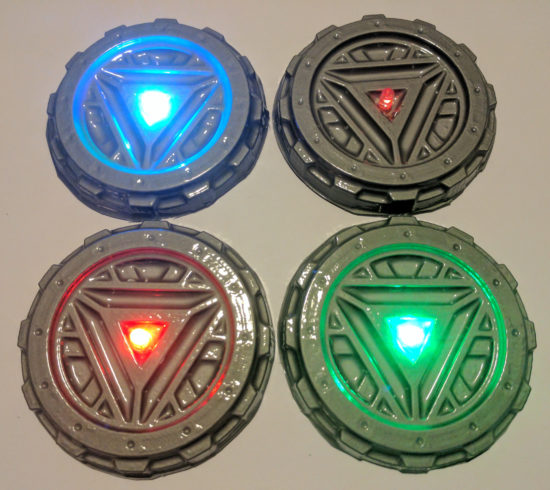
I really couldn’t be happier with the results.  It looks way more impressive than the 57¢ worth of materials would suggest.

Bucket Vacuum Former

  1. How to Make a Vacuum Former
  2. How to Use a Vacuum Former
  3. Vacuum Former – Things to Form
  4. Vacuum Former – Ideas to Improve Vacuum Former
  5. Maker Faire 2017 How to Make a Vacuum Former Presentation Slides
  6. Vacuum Forming an Arc Reactor
  7. Maker Faire Application: Vacuum Forming Workshop

Vacuum Formers

  1. How to Make a Vacuum Former
  2. How to Use a Vacuum Former
  3. Vacuum Former – Things to Form
  4. Vacuum Former – Ideas to Improve Vacuum Former
  5. Maker Faire 2017 How to Make a Vacuum Former Presentation Slides
  6. Vacuum Forming an Arc Reactor
  7. Maker Faire Application: Vacuum Forming Workshop
  8. How to Make a Vacuum Former (2023)
  9. DIY Vacuum Formers
  10. Very Smol Vacuum Former

  1. You could easily adapt these instructions to add some sweet LED color changing lighting to any other project []
Test