Things I learned while painting my MakerBot

Painted my MakerBot lasercut wood parts (and plastic pulleys!) today.  Here’s what I learned:

  • Spray paint cans work better when they’re not pointed downwards, so it helps to angle/elevate one part of the painting surface. 1
  • Too much ventilation or cross ventilation will let debris fly into the room.
  • Position the things to be painted close together, it will help you paint faster and will waste less paint.
  • Use primer and buy two cans.  Although, had I positioned the pieces more effectively I may not have needed the second can.  Then again, I think it probably would have worked better to put even more primer than I did.
  • I wiped the edges of some of the smaller parts, but not all of them.  The end result is that some paint wiped off as it had adhered to the ash from the lasercutter.  I think I like this effect as it made the parts look a little worn, but you may not.
  • If you’re painting your MakerBot, don’t forget to consider painting the pulleys!
  • Sand down any stray plastic parts off of the printed pulleys before you paint them.  I didn’t realize the clearance on the small pulley was so low, and I had to sand the painted finish to get it to fit properly.
  • Make sure no parts accidentally shift and overlap before you start painting.  It won’t be a big deal, but it’s a little extra unnecessary work to paint it.
  • If you’re spraypainting different colors, cover other parts while you paint a new color.  A fine mist will be deposited on those other parts.  I like the effect, but it may not work for you.
  • Keep in mind that if you are using a primer and then a coat of paint some of the parts won’t fit as well (or may fit better!) when you go to assemble the robot.  I found it necessary to sand away nearly all of the paint on a few body panel tabs.  I also needed to sand away the pain that got on the inside of the round X and Y axis mount holes.
  • If you’re painting the “MakerBot Industries” logo on the front a different color than the surrounding body, you probably want to do it at this stage.  I didn’t even think about it until I started assembling the body.  It won’t be a problem to paint it by hand later, but I could have done this all at once.
  1. I guess this is why you see graffiti on walls, not floors. []

Toasted WordPress

I’ve been tinkering with this website trying to move it to a different domain – MakerBlock.com rather than MakerBlocks.com.  (I like both names, but have a slight preference for MakerBlock).  In any case, since I’m rather used to working with WordPress I figured I’d just dive into the MySQL tables and start changing stuff.

This doesn’t work quite as well as you would think it would.  :)  For anyone who is looking to move a WordPress website from one domain (or subdomain) to another, I highly recommend using Domain Name Changer.

Lesson learned.  I’m just a little bit smarter today!  Woo hoo!

Mission critical decisions

Such as:  Should I paint?  What color(s)?

I’m thinking I should paint.  I figure it will help the robot body stand up to a little extra wear and tear while looking cool.

Not white or black.  That’s SOooo October 2009.  I’m liking gray/gunmetal/silver.  I’ve only seen pictures of one silver MakerBot and I rather liked it.  (Thank you to RDon Ebben/Robostang 548 for posting pics of his MakerBot 347.)  The picture is a little dark, so I don’t think I can see it to its full effect.

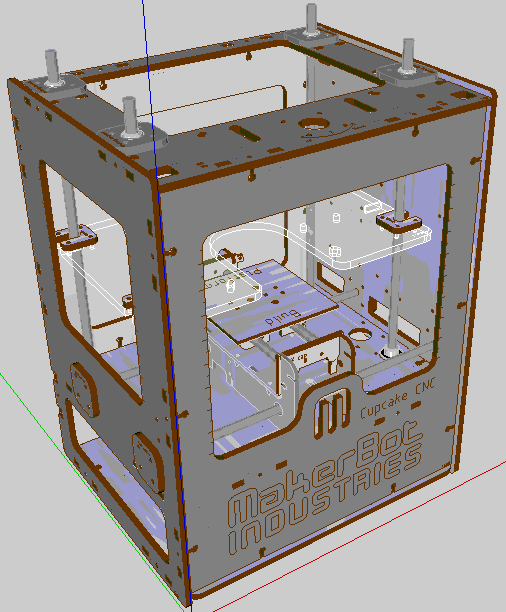
Just the other day a user named unrepentantgeek posted a Google Sketchup version of a MakerBot, to make it easy to test out paint/color schemes.  URG – you’re the best!  Thanks to you, I got to test out this color scheme:

Roughly a 50% gray on the outside, silver on the inside.  (I figure I can’t rightfully name the machine Bender unless it has a shiny metal assplate, right?)

Second Law, Schmecond Law

Unfortunately, in the haste to get the MakerBots out the door for the holidays the guys at MakerBot left out opto-endstop kits on some shipments.  These guys have been super responsive even before I bought a kit from them, so I’m not that concerned.  Frankly, it’s a little bit of a relief that I can skip the soldering stuff for now and move on to some of the pulley making steps.

In any case, as I understand it, these are not vital to the proper functioning of the MakerBot and that they’re really just a failsafe if the ‘bot forgets the second law of robotics.

Looking forward

This website for documenting my attempt to build a MakerBot Industries CupCake CNC 3D printer.  I’ve got just about no experience working with electronics and no experience building robots.  So, its going to be a wild ride.

It is named “Bender.”

Here’s what I’d like to see happen:

  • Documenting everything inside the CupCake Deluxe CNC kit
    • Right now I’ve only documented the unboxing
    • I’d like to document all the bits inside the various boxes/kits as well
  • Documenting each step (and misstep!) of taking a box of parts to a fully functional 3D printer
    • As I’m a total and complete novice, this should be educational for everyone involved
    • Since the guys at MakerBot suggest two people could assemble a CupCake CNC in leisurely weekend, I suspect it would probably take me about a week or two
  • Printing crazy plastic things for myself and others

Why did I name the website MakerBlock?  Well, if when I get this robot operational, I’d really like to design and print custom blocks that are compatible with various toy construction sets.

Frivolous?  Undoubtedly.  But, a man’s got to dream.