Keychron Keyboard Bluetooth Won’t Work

From dipping my toes in the mechanical keyboard subreddit, it seems some people look down on Keychron keyboards.  It was pricier than other mechanical bluetooth keyboards, but I like being able to reassign keys, I like having nifty RGB lights, and it seemed to have very good reviews.  Sure, perhaps an artisanal, grass fed, locally sourced, single origin, free range, ethically sourced mechanical keyboard would be better or cheaper… but this keyboard arrived quickly, looks good, worked immediately out of the box for a price I was willing to pay.

Anyhow, if you’re here, it’s because something went wrong.

  • Symptoms:
    • At first my Keychron K10 Pro keyboard stopped being able to use the shift keys to write capital letters or symbols using the number keys. Doing a factory reset on the keyboard worked, so I had to re-assign the special keys (screenshot, RGB changes, media keys) again. Unfortunately, now the keyboard wouldn’t work over bluetooth.
  • What I tried:
    • I tried pretty much every combination of starting/restarting the board, flipping between USB/cable and BT, re-flashing and updating the keyboard firmware, then the keyboard bluetooth firmware, turning the PC bluetooth on and off, restarting the computer several times, and reassigning the keys using the launcher.
  • What worked:
    • One of the various trouble shooting pages suggested that I try FN + J + Z to factory reset the keyboard.  Other suggested FN + 1 or FN + 2 or FN + 3.  After a little while I thought – wait a second…  why don’t I try FN + 2 or FN + 3?  In doing so, I saw the bluetooth name for the keyboard pop up on the computer!  I guess for some reason the keyboard is only recognized by FN + 2 or FN + 3.  I don’t know why this worked really, but I’m happy that the keyboard is back.

I hope this helps someone else (or perhaps… future me!)

Tap Light Focus Timer System

I’ve been procrastineering on a “sticky note timer” which would incorporate an e-ink display, be portable, updatable via WiFi, show me what I should be working on, and flash lights at me to give me a sense of movement / time passing / and urgency.  Sometimes I use the word “procrastineering” to refer to when I start to spiral on a project and end up in analysis paralysis.  But, I think it is more appropriately used when I’m doing a deep dive on a project when I really have something much more important / urgent I should be working on.

A long time ago I added a few components to an off the shelf dollar store tap light and turned it into a game buzzer.  While the sticky note timer project was marinating  / incubating1 in the back of my brain, I realized that maybe I don’t need or even want something that high-tech.  Maybe what I need is something dead simple?  As cool as the sticky note timer project is – and it really is neat – there’s a lot of pieces to the puzzle and a fair bit of maintenance that goes along with it once its finished.  You have to connect to it, upload a list, set up timers, etc.

I finally decided on something not so easily adjustable, but still flexible in it’s simplicity.  Rather than making the setup (adding / updating / uploading lists to a timer) something I have to do in order to start the timer, what if I made it part of the timing?

First, let’s look at what the setup.  A dollar store tap light which includes a lot of handy parts – a battery holder, a push button switch, several springs, and a simple and at attractive enclosure.

This slideshow requires JavaScript.

On the far left is a basic off the shelf dollar store tap light.  Next to it are two others I had previously modified to work as game / timer buzzers2  The last picture is the wiring diagram, except that I wired the ATTiny chip to the positive wire coming from the button switch.  Whenever I hit the button, it will toggle the circuit on and off.

Using some parts from my electronics bin3, I cobbled together a prototype on a breadboard that would do the following when the button was hit:

  • Turn orange for 1 minute and beep 3 times in the last 3 seconds
  • Beep once more and turn green for 12 minutes, then fade from yellow through orange over the last 3 minutes
  • Flash red and beep three times after 15 minutes had lapsed (12 minutes of green and 3 minutes of color fading)
  • Turn off, go to a low power mode, and then wake up long enough to flash blue every 8 seconds
  • After 5 minutes, it would flash green and beep twice
  • Then keep doing this 8 second blue flash and green light plus beep every 5 minutes
Animation of LED timer button

You’re probably wondering – what’s with all these timers and lights and beeps?  Here’s how I use them:

  • Place and slap the button to get going
    • I put my phone on my desk and the timer right on top of my phone.  It’s a big 4″ diameter timer and covers the phone pretty well.  I can’t pick up my phone without seeing this timer ticking down.  This is a huge difference between a phone app and a physical thing standing between me and my phone.  There are some web browser based apps – but these don’t really work for me.  Either I have to keep that window open and on top or … I’ll forget it exists.  This timer is right there, front and center, on my desk and lit up no matter where my desktop might take me.
    • Plus, it’s actually a little therapeutic to slap the tap light.  Pushbutton switches like this are built to take a bit of abuse and the physical action of hitting the light is a lot of fun.
  • Orange for 1 minute
    • This is the replacement for the “maintain / update a list.”  Instead of having to fuss with a list, I’ve dumped myself directly into work.  I’m suddenly racing the clock for 60 seconds to write all the things I want to try and accomplish in the next 15 minutes.  Maybe it’s a few emails, make some phone calls, or write / edit a document.  After 57 seconds, the buzzer will beep three times to let me know that the 15 minute timer is about to start.
    • Or, if you already have a particular task to work on, you could use this time to follow a process like Steven Kotler’s suggestions on tactical transitions to a a flow state4.  His three step process is:
      • Anchor your body
        • Practice box breathing.5  You could box breathe 3 times in one minute and have a few second left over to psych yourself up.
      • Focus your mind
        • Write down one clear goal.
      • Trigger your ritual
        • Recite a mantra, perform a gesture, start a “work” playlist
  • Green for 15 minutes
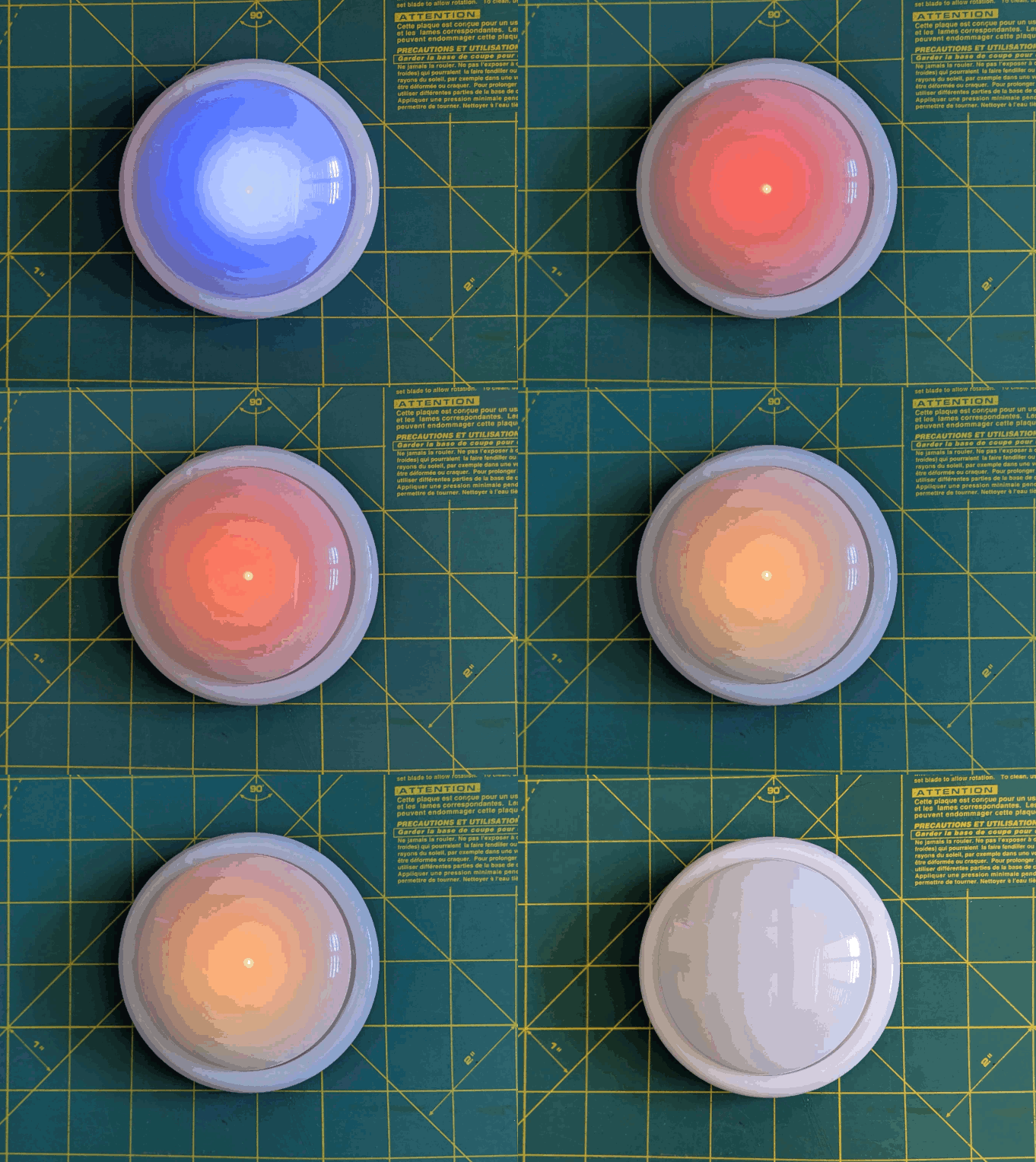
    • It’s go time!  Whatever I wrote down, now I’m in a race to work on those things – and those things only.  I can’t let new emails, calls, etc, distract me – that buzzer is going off in 15 minutes.  As the timer closes in on 15 minutes, with just 3 minutes to go, it turns yellow and fades to orange.  If I look up / down and see this, I know I’m in the home stretch and I’ve got to start moving fast to wrap things up.
  • Red alert!
    • Once the 15 minutes is up the light flashes red and beeps to let me know I’m off the hook.  Now, if I’ve already hit peak productivity, I could keep going.  If I got sidetracked, it’s an alert for me to restart the timer and get back to it.
  • Blue flashes, 5 minute green flash and beeps
    • These blue flashes happen once every 8 seconds6 just to keep the timer present in my vision so it doesn’t just appear into the mess on my desk.
    • If I finished out the 15 minute block of work time and I don’t stop the timer, the 5 minute timer is my reminder to return to my desk, reset the timer, and get going again.
    • If I ended up working past my 15 minute block of work time, the 5 minute beeps still give me a sense of how much time has passed.7
    • Importantly – if I get distracted by a sidequest, one of the beeps every 5 minutes is bound to catch my attention and remind me I’m supposed to restart the timer and get back to work.

So… does it work?  For me, yes!  Here’s why:

  • The hardest part of getting started is getting started.  My tendency is to want to collect all the stuff I’d need, get real comfy, make a list, look up some documents, etc.  This system short circuits all that.  I just need to be able to slap the big button sitting on top of my phone.  If I can manage that, I get 60 seconds to collect myself and then it’s time to rock and roll.  That’s enough time to take some deep breaths, start a playlist, or just sit quietly before I get started.
  • It covers up my biggest distraction.  Unlike an app on the phone or my desktop computer, I can literally cover up my phone with this big damn button.  I won’t see any notifications and if I want to pick up my phone, I have to actually look at and ouch the button – which is itself a reminder to get back to work.
  • It plays into a sense of play, urgency, and my own overdeveloped sense of competitiveness.  I enjoy hitting the timer to turn it on – and I want to beat that 15 minute timer.
  • The 5 minute timer acts like a built in break timer.  If I can get through 15 minutes of work, I can goof off, write a blog post, and without doing anything else that 5 minute timer can bring me back.
  • It includes a “failsafe” to bring me back to the timer if I get distracted by a sidequest.  If I miss the 15 minute timer, there’s another 5 minute timer around the corner.  Even between timers, there’s an intermittent flash of blue light to grab my attention.

The only meaningful “downside” to this timer button for me is there’s no pause button.  However, this isn’t exactly bad.  It helps me really hone in on what’s important and what’s interesting.  If a family member asks me for something or a call comes in, I just need to weigh the benefit of addressing the intrusion against having to restart the timer.  And realistically, if I pause the timer, I’m going to need some time to drop back into “flow” anyhow.

Sticky Note Timer
  1. Ah, just what I need! A new project!
  2. Sticky Note Timer, parts arrived!
  3. Seeed Studio XIAO ESP32C3 and a small sticky note display
  4. Brainstorming More E-Ink Stuff
  5. Smol Fonts for E-Ink Displays
  6. Tap Light Focus Timer System
  1. Fermenting?  Festering? []
  2. The older ones would flash orange a few times to alert you the game was going to start, turn green, fade from yellow to red, then flash red and buzz after 15 seconds. []
  3. I used an ATTiny45 because I had one, but it’s not much more expensive to use an Adafruit Trinket, a buzzer, a RGB/neopixel LED, and some wire.  In a subsequent version, I also used a small prototyping board like the Adafruit Perma Proto Boards []
  4. It’s the second slide []
  5. TLDR:  Breathe in slowly through the nose for 4 seconds, hold for 4 seconds, breathe out slowly through the mouth for 4 seconds, hold for 4 seconds, repeat []
  6. Because that’s the longest the little microchip can do between “deep sleep” to conserve battery life []
  7. I may adjust the program so the first five minutes is 1 beep, second five minutes is two beeps, etc []

Prusa Lack Stack, LED Lighting, CircuitPython Tweaks

Much like those recipes on the internet where the author tells you their life story or inspiration, I’ve got a lot to share before I get to the punchline of this blog post (a bunch of CircuitPython tweaks).  Edit:  On second thought:

  • Keep the lines of code <250
  • Try using mpy-cross.exe to compress the *.py to a *.mpy file

This is a bit of a winding road, so buckle up.

Admission time – I bought a Prusa1 about three years ago, but never powered it on until about a month ago.  It was just classic analysis paralysis / procrastineering.  I wanted to set up the Prusa Lack enclosure – but most of the parts couldn’t be printed on my MonoPrice Mini Delta, which meant I had to set up the Prusa first and find a place to set it up.  But, I also wanted to install the Pi Zero W upgrade so I could connect to it wirelessly – but there was a Pi shortage and it was hard to find the little headers too.  Plus, that also meant printing a new plate to go over where the Pi Zero was installed, a plate that I could only print on the Prusa, but I didn’t have a place to set it up…

ANYHOW, we’ve since moved, I set up the Prusa (without the Pi Zero installed yet), printed a Prusa Lack stack connector to house/organize my printers.  Unlike the official version, I didn’t have to drill any pilot holes or screw anything into the legs of the Lack tables.

Once the Lack tables were put together, I set about putting in some addressable LEDs off Amazon. I found a strip that had the voltage (5V for USB power), density (60 LED’s per meter), and the length (5 meters) I wanted at a pretty good price <$14, shipped.  I did find one LED with a badly soldered SMD component which caused a problem, but I cut the strip to either side of the it, then soldered it back together.  Faster and less wasteful than a return at the cost of a single pixel and bit of solder.

The Lack stack is three tables tall, keeps extra filament under the bottom of the first table, my trusty Brother laser printer on top of the first table, my trusty Monoprice Mini Delta (Roberto) on top of the second table, and the Prusa (as yet unnamed Futurama robot reference… Crushinator?) on top.  Since I don’t need to illuminate the laser printer, I didn’t run any LED’s above it.  I did run a bunch of LED’s around the bottom of the third printer…  this is difficult to explain, so I should just show a picture.

When Adafruit launched their QtPy board about four years ago, I picked up several of them.  I found CircuitPython was a million times easier for me to code than Adafruit, not least of which because it meant I didn’t have to compile, upload, then run – I could just hit “save” in Mu and see whether the code worked.  I also started buying their 2MB flash chips solder onto the backs of the QtPy’s to a ton of extra space.  Whenever I put a QtPy into a project, I would just buy another one (or two) to replace them.  There’s one in my Cloud-E robot and my wife’s octopus robot.  Now, there’s one powering the LED’s in my Lack Stack too.

I soldered headers and the 2MB chip into one of the QtPy’s, which now basically lives in a breadboard so I can experiment with it before I commit those changes to a final project.  After I got some decent code to animate the 300 or so pixels, I soldered an LED connector directly into a brand new QtPy and uploaded the code – and it worked!

Or, so I thought.  The code ran – which is good.  But, it ran slowly, really slowly – which was bad.  The extra flash memory shouldn’t have impacted the little MCU’s processor or the onboard RAM – just given it more space to store files.  The only other difference I could think of was that the QtPy + SOIC chip required a different bootloader from the stock QtPy bootloader to recognize the chip.  I tried flashing the alternate “Haxpress” bootloader to the new QtPy, but that didn’t help either.  Having exhausted my limited abilities, I turned to the Adafruit discord.

I’ll save you from my blind thrashing about and cut to the chase:

  • Two very kind people, Neradoc and anecdata, figured out the reason the unmodified QtPy was running slower was because the QtPy + 2MB chip running Haxpress “puts the CIRCUITPY drive onto the flash chip, freeing a lot of space in the internal flash to put more things.”
    • This bit of code shows how to test how quickly the QtPy was able to update the LED strip.
      • from supervisor import ticks_ms
      • t0 = ticks_ms()
      • pixels.fill(0xFF0000)
      • t1 = ticks_ms()
      • print(t1 – t0, “ms”)
    • It turns out the stock QtPy needed 192ms to update 300 LED’s.  This doesn’t seem like a lot, until you realize that’s 1/5th of a second, or 5 frames a second.  For animation to appear fluid, you need at least 24 frames per second.  If you watched a cartoon at 5 frames per second, it would look incredibly choppy.
    • The Haxpress QtPy with the 2MB chip could update 300 LED’s at just 2ms or 500 frames per second.  This was more than enough for an incredibly fluid looking animation.
    • Solution 1:  Just solder in my last 2MB chip.  Adafruit has been out of these chips for several months now.  My guess is they’re going to come out with a new version of the QtPy which has a lot more space on board.
      • Even so, I’ve got several QtPy’s and they could all use the speed/space boost.  I’m not great at reading/interpreting a component’s data sheet, but using the one on Adafruit, it looks like these on Digikey would be a good match.
  • The second item was a kept running into a “memory allocation” error while writing animations for these LED’s.  This seemed pretty strange since just adding a single very innocuous line of code could send the QtPy into “memory allocation” errors.
    • Then I remembered that there’s a limit of about 250 lines of code.  Just removing vestigial code and removing some comments helped tremendously.
    • The next thing that I could do would be to compress some of the animations from python (*.py) code into *.mpy files which use less memory.  I found a copy of the necessary compression/compiler program on my computer (mpy-cross.exe), but it appeared to be out of date.  I didn’t save the location where I found the file, so I had to search for it all over again.  Only after giving up and moving on to search for “how many lines of code for circuitpython on a microcontroller” did I find the location again by accident..  Adafruit, of course.  :)
    • I’m pretty confident I will need to find the link to the latest mpy-cross.exe again in the future.  On that day, when I google for a solution I’ve already solved, I hope this post is the first result.  :)

The animations for the Lack table are coming along.  I’ve got a nice “pulse” going, a rainbow pattern, color chases, color wipes, and a “matrix rain” / sparkle effect that mostly works.

Animated GIF

I started this blog post roughly 7 months ago2 by the time I finally hit publish.  After all that fuss, ended up switching from CircuitPython (which I find easy to read, write, maintain, update) to Arduino because it was able to hold more code and run more animations.  Besides the pulse animations, rainbow patterns, color chases, color wipes, and a matrix rain, it’s also got this halo animation, some Nyan cat inspired chases, and plays the animations at a lower brightness for 12 hours a day (which is intended to be less harsh at night).  I could probably add a light sensor, but I don’t really want to take everything apart to add one component.

  1. The i3 MK3S+! []
  2. January 7, 2025 []

Python Practice with an LLM

I’ve been tinkering with Python more recently.  When used on a MCU1 or a PC, it’s such a nice experience being able to write some code, run it without having to compile, see what happens, and adjust as necessary.  Now, since I’m a newb at this, I’m getting help from… *shudder* LLM’s.2 Now, in the past I’d turn to Googling, looking at reliable and friendly forums such as Adafruit and Arduino, but I’d invariably need to check out Stack Overflow as well.3

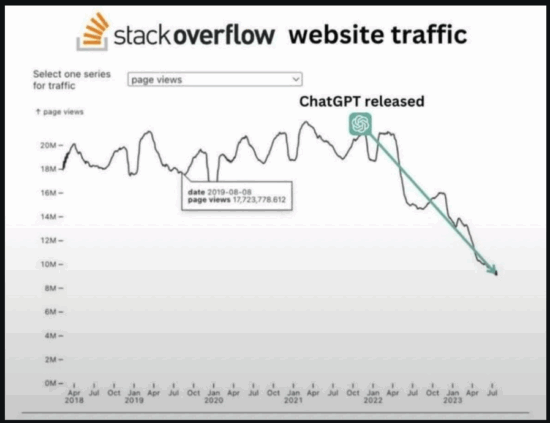
As you might imagine, Stack Overflow was something of a victim of it’s own success.  It’s content was good enough to train the LLM’s of the world – and those LLM’s can parrot / offer all the insights gleaned from Stack Overflow without the caustic haughty  condescending replies typical of the comment sections on Stack Overflow / SlashDot / HackADay.  Thus, it’s no small wonder the following graphic was circulating on Reddit:

Stack Overflow vs Time

Where was I?  Oh, yeah…  I was using some LLM’s to help with Python.  I don’t have any fancy GPU’s, BitCoin mining rigs, etc, so I’m just using my non-gaming PC’s modest 16 GB VRAM to run the smaller local LLM’s.  I can run things up to about 8B parameters, like the various Llama flavors, at 8 bit quantization with reasonable speed.  I’ve found for my system that Qwen3 4B to be fast, thoughtful, and helpful.

I’ve realized this blog post is woefully low on actual Python related content.  Here’s some things for future-me to remember:

  • pip list
    • Will give me all the names of all packages installed
  • pip install requests Pillow reportlab PyPDF2
    • Will install multiple packages, one after another
Python Programming Practice
  1. Python Practice with an LLM
Software Development with LLMs
  1. Series Plugin Test for Illustrative Purposes Only
  2. ChatGPT WordPress Plugins
  3. Coding with an LLM Sidekick
  4. Python Practice with an LLM
  5. Not Team AI
  6. Never Stop Breaking Up
  7. Weakness
  1. Microcontroller unit []
  2. Large language models such as []
  3. I bought their April Fool’s joke keyboard turned real product and once I’d remapped the keys, got significant use out of it for a long time.  Between the construction, packaging, and accessories, at $30 this is still a total no-brainer if you need a small extra keyboard dedicated to some specific tasks. []

OpenSCAD Render Times

Thanks to @raster, I’m going to do a side-by-side taste test of several different flavors of OpenSCAD.1 To give each one a similar test, I’m trying out my D-Pad design from … uh, earlier this morning.2

Version Release F5 Preview F6 Render Notes
2021.01 Stable 09:50.220 2.302 Best place to start
2024.01.13 Current 04:37.763 0.948 I’ve been running this one for a while
2025.04.04 Latest 04:36.593 0.483 Latest snapshot

Obviously, the good folks working on OpenSCAD have dramatically improved preview/render times over the last four years.  The speed boost in using a later snapshot is pretty significant if you’re doing any kind of complex designs.  They must be using some kind of cache system to make the render times so fast.

The speed differential between 2024.01.13 and the latest snapshot is so slight, I’m not going to switch things up unless I bump into a design that struggles with rendering some complex feature.

#OpenSCADClub
  1. OpenSCAD 3D Printed Spring
  2. OpenSCADClub Week 2: Directional Pad
  3. OpenSCAD Render Times
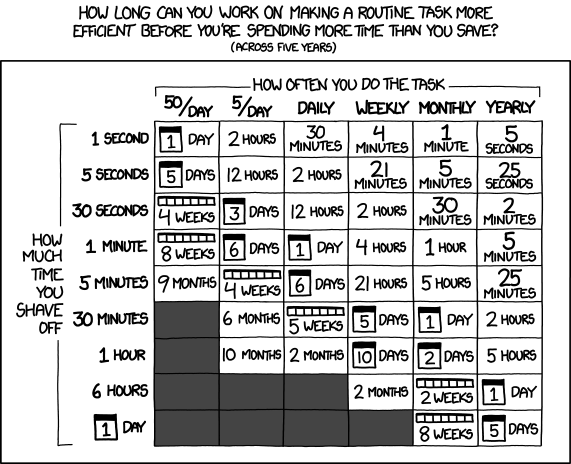
  4. One Simple Trick Can Save You 30 Minutes…
  5. OpenSCAD Club Cookies


  1. *I’m not avoiding work!* YOU’RE avoiding work! []
  2. Like, way earlier…  midnight or so… []

RepRap Parts for Sale [Draft 04/07/2010]

[Yep.  This was the whole blog post.  I don’t know what happened to that set of parts, if I sold them, gave them away, or what.  I hope I gave them away.]

I’ve made all of one Mendel part.

Drafts Zero - The Lost Blog Posts
  1. Misnamer [11/28/2010]
  2. The Lost Blog Posts
  3. Plastruder! [Draft 12/25/2009]
  4. UNTITLED [Draft 12/25/2009]
  5. Preparing to print [Draft 12/27/2009]
  6. More prints [Draft 01/04/2010]
  7. Prototype Pricing [Draft 01/19/2010]
  8. MakerBot tuning [Draft 01/20/2010]
  9. Plastic Screw Anchor [Draft 02/02/2010]
  10. Magic [Draft 02/03/2010]
  11. How are you printing with PLA? [Draft 02/16/2010]
  12. Rebuilding my extruder [Draft 02/16/2010]
  13. MY robot [Draft 02/18/2010]
  14. more things i learned [Draft 02/20/2010]
  15. First commissioned piece! [Draft 02/22/2010]
  16. MakerBot: Toy or Tool? [02/25/2010]
  17. Idea for Skeinforge settings… [Draft 03/27/2010]
  18. RepRap and MakerBot alternatives [Draft 04/05/2010]
  19. RepRap Parts for Sale [Draft 04/07/2010]
  20. Where is the Othercutter? [Draft 06/08/2015]
  21. Mendel Parts – Printed, Cast, CNC’d, Lasercut or Injection Molded? [Draft 04/12/2010]
  22. MakerBot Operator’s Manual [06/04/20210]
  23. MakerBot on CBS! [07/07/2010]
  24. New Print: Soft-Pawed Albino Stoat of South Wales Cookie Cutter [07/07/2010]
  25. House calls [07/11/2010]
  26. Digital assistant? [08/05/2010]
  27. MakerBot + Junk = Stuff! [08/06/2010]
  28. Design choices in RepRap, Goals of RepRap [08/14/2010]
  29. Upgrades and obsolescence [08/25/2010]
  30. Dear Anonymous [08/25/2010]
  31. The ultimate in customer service [08/26/2010]
  32. Open Source Makes You Smarter [08/27/2010]
  33. Getting my Plastruder MK5 running [09/06/2010]
  34. Weird new kind of spam [09/19/2010]
  35. An open letter to Ms. Word [10/18/2010]
  36. Printing with PLA again! [10/18/2010]
  37. Halloween costume too [10/27/2010]
  38. Dream jobs [10/29/2010]
  39. The nuances of time travel [10/31/2010]
  40. Printed Pink Panther Person [11/22/2010]
  41. Skein them all and let ‘Bot sort them all out [11/24/2010]
  42. The Patents for disc shooters [12/10/2010]
  43. Princess Bride with Lightsabers [12/13/2010]
  44. Dilbert comic [12/13/2010]
  45. Ultimachine PLA review [12/15/2010]
  46. Mendel to the power of 101 [12/21/2010]
  47. Potential improvements for Leonardo Voltron [12/27/20210]
  48. You can keep your filthy money [12/28/2010]
  49. I watched Primer the other night [12/30/2010]

RepRap and MakerBot alternatives [Draft 04/05/2010]

[Holy cow.  Can you imagine a time when a person could singlehandedly have made a comprehensive list of all open source 3D printers in an afternoon?]

Here’s a list of all of the RepRap, RepStrap, and MakerBot open source 3d plastic FDM 3d printers I can find.  When possible I’ve tried to link to the official site, helpful derivative sites, instructions, and parts.  I’ve also included some notes.

  1. RepRap – The ultimate in DIY personal fabrication technology.  Source everything yourself and put it together!
    1. Mendel –
      1. parts on ebay
      2. bearings – http://www.vxb.com/page/bearings/PROD/kit9060
  2. Darwin –
    1. Ponoko Darwin Acrylic lasercut parts – http://www.ponoko.com/showroom/reprap/free-acrylic-reprap-v1-1–2083
  3. Mini-Mendel
  4. Isaac Mendel http://isaac-mendel.blogspot.com/
  5. Fab@Home
  6. MakerBot –
  7. McWire – http://reprap.org/wiki/McWire_Cartesian_Bot_1_2#This_project_is_no_longer_actively_developed.___For_newer_mcwire_info.2C_please_see_http:.2F.2Fobjects.reprap.org.2Fwiki.2FDevelopment:McWire
  8. ShaperCube –
    1. http://wiki.shapercube.com/wagn/Shapercube_Assembly
  9. Profound Devices –
    1. http://www.profounddevices.com/
  10. RepMan –
    1. http://www.bitsfrombytes.com/index.php?page=shop.product_details&product_id=168&category_id=5&flypage=flypage-ask.tpl&option=com_virtuemart&Itemid=100005
  11. Tommilese –
Drafts Zero - The Lost Blog Posts
  1. Misnamer [11/28/2010]
  2. The Lost Blog Posts
  3. Plastruder! [Draft 12/25/2009]
  4. UNTITLED [Draft 12/25/2009]
  5. Preparing to print [Draft 12/27/2009]
  6. More prints [Draft 01/04/2010]
  7. Prototype Pricing [Draft 01/19/2010]
  8. MakerBot tuning [Draft 01/20/2010]
  9. Plastic Screw Anchor [Draft 02/02/2010]
  10. Magic [Draft 02/03/2010]
  11. How are you printing with PLA? [Draft 02/16/2010]
  12. Rebuilding my extruder [Draft 02/16/2010]
  13. MY robot [Draft 02/18/2010]
  14. more things i learned [Draft 02/20/2010]
  15. First commissioned piece! [Draft 02/22/2010]
  16. MakerBot: Toy or Tool? [02/25/2010]
  17. Idea for Skeinforge settings… [Draft 03/27/2010]
  18. RepRap and MakerBot alternatives [Draft 04/05/2010]
  19. RepRap Parts for Sale [Draft 04/07/2010]
  20. Where is the Othercutter? [Draft 06/08/2015]
  21. Mendel Parts – Printed, Cast, CNC’d, Lasercut or Injection Molded? [Draft 04/12/2010]
  22. MakerBot Operator’s Manual [06/04/20210]
  23. MakerBot on CBS! [07/07/2010]
  24. New Print: Soft-Pawed Albino Stoat of South Wales Cookie Cutter [07/07/2010]
  25. House calls [07/11/2010]
  26. Digital assistant? [08/05/2010]
  27. MakerBot + Junk = Stuff! [08/06/2010]
  28. Design choices in RepRap, Goals of RepRap [08/14/2010]
  29. Upgrades and obsolescence [08/25/2010]
  30. Dear Anonymous [08/25/2010]
  31. The ultimate in customer service [08/26/2010]
  32. Open Source Makes You Smarter [08/27/2010]
  33. Getting my Plastruder MK5 running [09/06/2010]
  34. Weird new kind of spam [09/19/2010]
  35. An open letter to Ms. Word [10/18/2010]
  36. Printing with PLA again! [10/18/2010]
  37. Halloween costume too [10/27/2010]
  38. Dream jobs [10/29/2010]
  39. The nuances of time travel [10/31/2010]
  40. Printed Pink Panther Person [11/22/2010]
  41. Skein them all and let ‘Bot sort them all out [11/24/2010]
  42. The Patents for disc shooters [12/10/2010]
  43. Princess Bride with Lightsabers [12/13/2010]
  44. Dilbert comic [12/13/2010]
  45. Ultimachine PLA review [12/15/2010]
  46. Mendel to the power of 101 [12/21/2010]
  47. Potential improvements for Leonardo Voltron [12/27/20210]
  48. You can keep your filthy money [12/28/2010]
  49. I watched Primer the other night [12/30/2010]

Idea for Skeinforge settings… [Draft 03/27/2010]

Dialing in Skeinforge settings and calibrating a MakerBot can be a frustrating and time consuming process.  I’m always tempted to just start tweaking settings and start printing.  Part of the reason I’m impatient is that making a change to Skeinforge, printing a test, noting observations, and LRR1 is SOOOOoooo incredibly boring next to the magic of watching things materialize inside a MakerBot.

Now, I don’t want to it sound like I’m down on Skeinforge.  It’s an incredible piece of software that does some amazing things.  However, the dozens of identically sounding settings put me in the mind set of deer and headlights.

Drafts Zero - The Lost Blog Posts
  1. Misnamer [11/28/2010]
  2. The Lost Blog Posts
  3. Plastruder! [Draft 12/25/2009]
  4. UNTITLED [Draft 12/25/2009]
  5. Preparing to print [Draft 12/27/2009]
  6. More prints [Draft 01/04/2010]
  7. Prototype Pricing [Draft 01/19/2010]
  8. MakerBot tuning [Draft 01/20/2010]
  9. Plastic Screw Anchor [Draft 02/02/2010]
  10. Magic [Draft 02/03/2010]
  11. How are you printing with PLA? [Draft 02/16/2010]
  12. Rebuilding my extruder [Draft 02/16/2010]
  13. MY robot [Draft 02/18/2010]
  14. more things i learned [Draft 02/20/2010]
  15. First commissioned piece! [Draft 02/22/2010]
  16. MakerBot: Toy or Tool? [02/25/2010]
  17. Idea for Skeinforge settings… [Draft 03/27/2010]
  18. RepRap and MakerBot alternatives [Draft 04/05/2010]
  19. RepRap Parts for Sale [Draft 04/07/2010]
  20. Where is the Othercutter? [Draft 06/08/2015]
  21. Mendel Parts – Printed, Cast, CNC’d, Lasercut or Injection Molded? [Draft 04/12/2010]
  22. MakerBot Operator’s Manual [06/04/20210]
  23. MakerBot on CBS! [07/07/2010]
  24. New Print: Soft-Pawed Albino Stoat of South Wales Cookie Cutter [07/07/2010]
  25. House calls [07/11/2010]
  26. Digital assistant? [08/05/2010]
  27. MakerBot + Junk = Stuff! [08/06/2010]
  28. Design choices in RepRap, Goals of RepRap [08/14/2010]
  29. Upgrades and obsolescence [08/25/2010]
  30. Dear Anonymous [08/25/2010]
  31. The ultimate in customer service [08/26/2010]
  32. Open Source Makes You Smarter [08/27/2010]
  33. Getting my Plastruder MK5 running [09/06/2010]
  34. Weird new kind of spam [09/19/2010]
  35. An open letter to Ms. Word [10/18/2010]
  36. Printing with PLA again! [10/18/2010]
  37. Halloween costume too [10/27/2010]
  38. Dream jobs [10/29/2010]
  39. The nuances of time travel [10/31/2010]
  40. Printed Pink Panther Person [11/22/2010]
  41. Skein them all and let ‘Bot sort them all out [11/24/2010]
  42. The Patents for disc shooters [12/10/2010]
  43. Princess Bride with Lightsabers [12/13/2010]
  44. Dilbert comic [12/13/2010]
  45. Ultimachine PLA review [12/15/2010]
  46. Mendel to the power of 101 [12/21/2010]
  47. Potential improvements for Leonardo Voltron [12/27/20210]
  48. You can keep your filthy money [12/28/2010]
  49. I watched Primer the other night [12/30/2010]
  1. Lather, rinse, repeat []

MakerBot: Toy or Tool? [02/25/2010]

or this post could be titled …  “Open source intern tells all!”1

A review of the MakerBot Industries Cupcake CNC today from a former MakerBot intern discusses the MakerBot’s use as a tool.  Some of the comments bring to suggest its usage as an expensive toy.  I’ve used my MakerBot as a tool to print tools and as a tool to print toys.  I suppose at the point I’m using it to print up toys I’m really using as a toy.

I’m fairly confident my MakerBot will pay for itself.  That’s not a claim most people can make about their toys.  I have printed replacement parts for toys, broken parts around the house, and broken tools – thereby saving me those replacement costs.  This probably doesn’t amount to more than $20 or so.  That’s not a great return on an investment, but it is returning

Drafts Zero - The Lost Blog Posts
  1. Misnamer [11/28/2010]
  2. The Lost Blog Posts
  3. Plastruder! [Draft 12/25/2009]
  4. UNTITLED [Draft 12/25/2009]
  5. Preparing to print [Draft 12/27/2009]
  6. More prints [Draft 01/04/2010]
  7. Prototype Pricing [Draft 01/19/2010]
  8. MakerBot tuning [Draft 01/20/2010]
  9. Plastic Screw Anchor [Draft 02/02/2010]
  10. Magic [Draft 02/03/2010]
  11. How are you printing with PLA? [Draft 02/16/2010]
  12. Rebuilding my extruder [Draft 02/16/2010]
  13. MY robot [Draft 02/18/2010]
  14. more things i learned [Draft 02/20/2010]
  15. First commissioned piece! [Draft 02/22/2010]
  16. MakerBot: Toy or Tool? [02/25/2010]
  17. Idea for Skeinforge settings… [Draft 03/27/2010]
  18. RepRap and MakerBot alternatives [Draft 04/05/2010]
  19. RepRap Parts for Sale [Draft 04/07/2010]
  20. Where is the Othercutter? [Draft 06/08/2015]
  21. Mendel Parts – Printed, Cast, CNC’d, Lasercut or Injection Molded? [Draft 04/12/2010]
  22. MakerBot Operator’s Manual [06/04/20210]
  23. MakerBot on CBS! [07/07/2010]
  24. New Print: Soft-Pawed Albino Stoat of South Wales Cookie Cutter [07/07/2010]
  25. House calls [07/11/2010]
  26. Digital assistant? [08/05/2010]
  27. MakerBot + Junk = Stuff! [08/06/2010]
  28. Design choices in RepRap, Goals of RepRap [08/14/2010]
  29. Upgrades and obsolescence [08/25/2010]
  30. Dear Anonymous [08/25/2010]
  31. The ultimate in customer service [08/26/2010]
  32. Open Source Makes You Smarter [08/27/2010]
  33. Getting my Plastruder MK5 running [09/06/2010]
  34. Weird new kind of spam [09/19/2010]
  35. An open letter to Ms. Word [10/18/2010]
  36. Printing with PLA again! [10/18/2010]
  37. Halloween costume too [10/27/2010]
  38. Dream jobs [10/29/2010]
  39. The nuances of time travel [10/31/2010]
  40. Printed Pink Panther Person [11/22/2010]
  41. Skein them all and let ‘Bot sort them all out [11/24/2010]
  42. The Patents for disc shooters [12/10/2010]
  43. Princess Bride with Lightsabers [12/13/2010]
  44. Dilbert comic [12/13/2010]
  45. Ultimachine PLA review [12/15/2010]
  46. Mendel to the power of 101 [12/21/2010]
  47. Potential improvements for Leonardo Voltron [12/27/20210]
  48. You can keep your filthy money [12/28/2010]
  49. I watched Primer the other night [12/30/2010]
  1. …  ’cause, you know, it was all… open source. []

more things i learned [Draft 02/20/2010]

  • put screws through the opto endstops first – to make sure they’ll go through
  • put the hex key through the body in order to line up the spacers
  • not all spacers are the same size
  • the heads that bite into the ribbon cable are difficult to clamp on
  • Adjust the y tension pulley as best as you can before installation of the caps
  • clipping the heads off of ethernet cables is very satisfying
Drafts Zero - The Lost Blog Posts
  1. Misnamer [11/28/2010]
  2. The Lost Blog Posts
  3. Plastruder! [Draft 12/25/2009]
  4. UNTITLED [Draft 12/25/2009]
  5. Preparing to print [Draft 12/27/2009]
  6. More prints [Draft 01/04/2010]
  7. Prototype Pricing [Draft 01/19/2010]
  8. MakerBot tuning [Draft 01/20/2010]
  9. Plastic Screw Anchor [Draft 02/02/2010]
  10. Magic [Draft 02/03/2010]
  11. How are you printing with PLA? [Draft 02/16/2010]
  12. Rebuilding my extruder [Draft 02/16/2010]
  13. MY robot [Draft 02/18/2010]
  14. more things i learned [Draft 02/20/2010]
  15. First commissioned piece! [Draft 02/22/2010]
  16. MakerBot: Toy or Tool? [02/25/2010]
  17. Idea for Skeinforge settings… [Draft 03/27/2010]
  18. RepRap and MakerBot alternatives [Draft 04/05/2010]
  19. RepRap Parts for Sale [Draft 04/07/2010]
  20. Where is the Othercutter? [Draft 06/08/2015]
  21. Mendel Parts – Printed, Cast, CNC’d, Lasercut or Injection Molded? [Draft 04/12/2010]
  22. MakerBot Operator’s Manual [06/04/20210]
  23. MakerBot on CBS! [07/07/2010]
  24. New Print: Soft-Pawed Albino Stoat of South Wales Cookie Cutter [07/07/2010]
  25. House calls [07/11/2010]
  26. Digital assistant? [08/05/2010]
  27. MakerBot + Junk = Stuff! [08/06/2010]
  28. Design choices in RepRap, Goals of RepRap [08/14/2010]
  29. Upgrades and obsolescence [08/25/2010]
  30. Dear Anonymous [08/25/2010]
  31. The ultimate in customer service [08/26/2010]
  32. Open Source Makes You Smarter [08/27/2010]
  33. Getting my Plastruder MK5 running [09/06/2010]
  34. Weird new kind of spam [09/19/2010]
  35. An open letter to Ms. Word [10/18/2010]
  36. Printing with PLA again! [10/18/2010]
  37. Halloween costume too [10/27/2010]
  38. Dream jobs [10/29/2010]
  39. The nuances of time travel [10/31/2010]
  40. Printed Pink Panther Person [11/22/2010]
  41. Skein them all and let ‘Bot sort them all out [11/24/2010]
  42. The Patents for disc shooters [12/10/2010]
  43. Princess Bride with Lightsabers [12/13/2010]
  44. Dilbert comic [12/13/2010]
  45. Ultimachine PLA review [12/15/2010]
  46. Mendel to the power of 101 [12/21/2010]
  47. Potential improvements for Leonardo Voltron [12/27/20210]
  48. You can keep your filthy money [12/28/2010]
  49. I watched Primer the other night [12/30/2010]
Test