I’ve been blogging on this site since 11/2009 – almost 4-1/2 years.1 In that time I’ve published just over 1,000 posts23 and I’ve got more than 200 just sitting around in draft form. Those are posts with partially finished ideas – possibly just a title or a link or a sentence. Others are almost entirely done, waiting for a small spark of creativity or maybe just an interesting photograph.
February 2014 was the first month in nearly 4-1/2 months that this site went without a new post. I am a little bummed about that. There were reasons – but reasons for not having done something are just excuses. Thus, instead of giving you an excuse, I will offer up this post as a bald-faced lie. It was “published” on 2/28/2014 at 11:59pm.
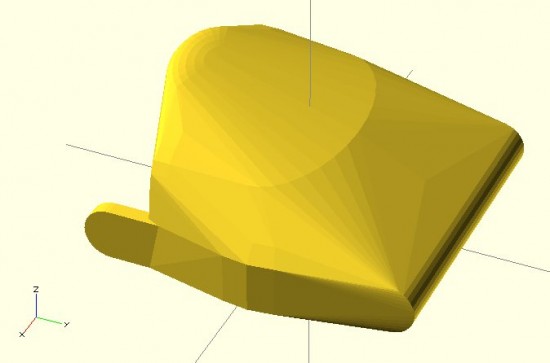
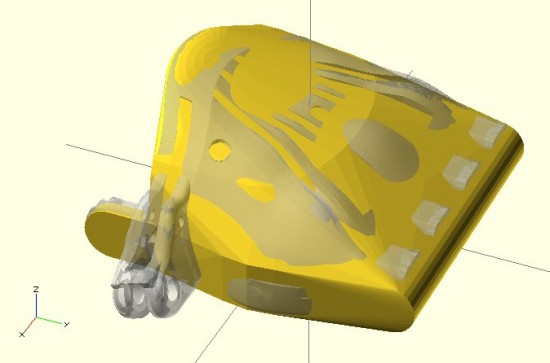
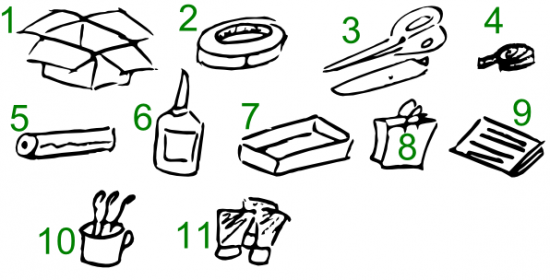
Now that my lie is out of the way… I wanted to add a little bit about the post I have/going to publish about working with paper mache. In January and February my daughter was working on a project for her science fair – which involved “The Brain and the Sense of Touch.” As part of the display, she created a paper mache model of the brain so she could point to the different regions and explain what each does. She says her favorite part was applying the strips of paper and then painting it. She enjoyed applying the gluey bits of paper and actually making something. She also enjoyed the painting because she loves painting and colors and being artistic.
I’d say I started noticing a change in the keyword stats reported on my websites about six months or so ago. Instead of seeing all of the keywords and search terms people used to arrive at my websites, most of the search terms were showing up as “Unknown search terms” in my WordPress Jetpack stats plugin and “(not provided)” in Google Analytics.
Apparently this is all due to a number of changes with Google. As Google pushes more people to be logged in or stay logged in to their Google, Gmail, or Google plus accounts, the more their searches will be done over SSL. This has the “side effect” of making their searches opaque to website owners. However, that same data is of course available to Google themselves. I say “side effect” because I’m not so sure this is unintended, rather than one of their actual goals.
Why then do I accuse Google of breaking their social contract? Here I am, an owner of multiple domains who has been running Google Analytics tracking bugs in all of my sites since their various inceptions. The entire point of doing so is that I might be able to better understand the search terms and patterns of people coming to my sites, with an eye towards improving traffic. In exchange literally allowing Google to insert code inside my websites, they were supposed to help with these insights. Insights they are no longer providing.
I’m not so naive as to think Google ever promised or contracted to provide this information to me. I’ve never read their Terms of Service and never plan to. When every piece of software includes click-shrink-wrapped terms of service, it’s impossible read, comprehend, or provide knowing consent to these things. All I can go on here is that I’ve continued to let Google inside my websites – and they’re not giving me the very thing I had been lead to believe would be provided in exchange.
That said, Google Webmaster Tools is still pretty useful.
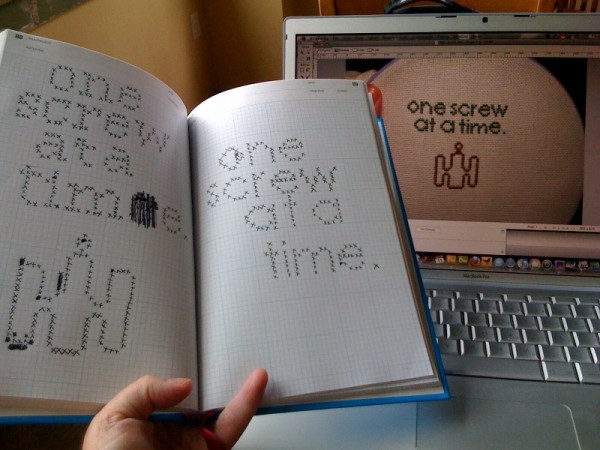
I love every damn thing about this beautiful post by Rachel aka AverageJaneCrafter.12 I love how she drew inspiration from John Grunsfeld (one of her favorite astronauts), a sweet bit of paperclip art, her first cross-stitch design, and how a quote from that astronaut brought it all together into a simple and elegant statement and artwork. Her cross-stitch just looks as if all the elements were specifically engineered to one day come together in this one place, for this one purpose.
If you didn’t click through to Rachel’s post, the quote “One screw at a time” refers to how Grunsfeld would go on space walks to repair the Hubble which involved managing more than 100 screws. To deal with the magnitude of the task, he just focused his mind, not on how many he had finished or had to go, but on “one screw at a time.”
If this man can handle tasks hundreds of miles from the earth while traveling thousands of miles an hour on a mission that probably cost billions, I’m sure as hell going to kick the crap out of today.
I’ve been investigating the possibility of trying to make a business out of making.1 This got me thinking about the best series and the best single post about making money out of making. I got a lot out of these posts and I hope you will too:
Ten Rules for Maker Businesses – Rule #1 Make a Profit. Chris Anderson, author, entrepreneur, and named as one of the 100 most influential people in the world by Time, has probably written the best “Ten Rules” list for a maker who is considering selling stuff. I’d rather have this list in my back pocket than an MBA any day.2 If you ever think about selling anything you’ve made, you should read every one of these posts:
The Slowest $380 I’ll Ever Make. This is the tale of a man with a dream – a dream of making and selling electronic LED QR Code clocks. Michael Ciuffo covers the money he made, lost, and made in painfully excruciating detail – with more than a little levity. This is a cautionary tale for anyone looking to sell something awesome in their spare time – and some of the dangers hidden in success.
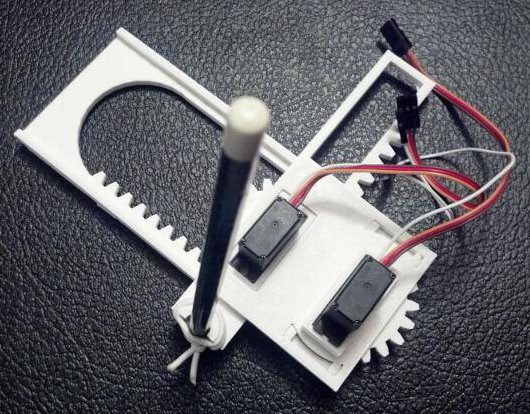
Lately I’ve been working on drawing robots more and more. My latest creation is an itty bitty Tiny CNC drawing robot. I’ve already published the files and Arduino sketch on Thingiverse, but you’ll find all of the instructions over on my PlotterBot blog. While this site is about 3D printing and random nonsense, I’ve tried to only post stuff directly related to drawing robots over on this new website.
If drawing robots are your cup of tea, then please take a minute and check out my other side. :)
This weekend we went to the The Tech Museum of Innovation, aka “The Tech,” in San Jose.1 We had a great time and saw a lot of amazing things. (Also, a lot of people greeted me as “Bender!” because I was wearing the Bender hat my wife knit for me.)
One of the coolest things we saw was an interactive floor projection display entitled simply “Social Circles.” A projector in the ceiling created a white rectangle on the floor – with a multicolored border. When you step onto the display, you have to cross through a colored bar along the border. Once inside the display, your feet are surrounded by a small circle of light – the same color as the bar you passed through. As you walk (or run!), the circle follows you around. When someone else is on the display (with their own circle) and is close to you, your circles will join for a moment into a larger circle of a combined color. As you separate, your circle will retain it’s inner color – but will have a border color that is your original color on one side and the color of the person whose circle you combined with on the other side. As you go along and interact with more people, you can gather more and more colors onto your outer ring.
It was awesome and awesome. Kids were running across, crashing into one another, chasing everyone else, collecting colors, and trying to avoid gaining colors.
This gave me SO many ideas on how to turn this kind of a display into an interactive game/project that I want to learn how to build one of my own. After doing some minor internet research I’ve found a few resources – some a lot more user friendly than others. There are some commercial, some semi-commercial, and some open source ways of creating a floor projection display.
The difficulty with OCV project is that it seems to be geared towards vision in robots, which isn’t really what I was interested in. Rather than giving a robot sight, I’d like to create a way to track and interact with multiple people using, ideally a webcam, and a projector. I’m not even that interested in fine grain detection, so much as tracking the location of people across a display area, and integrating their movements into the scene.
Starting from what I have now, which is a lot of interest and enthusiasm for the project but little knowledge of how to make it happen, it looks like the UbiDisplays system might best suit my needs. This system seems like it incorporates a Kinect to take inputs and then manages all of the interactions through the use of web based logic3 or possibly through some Flash animation. I just don’t know if it is capable of handling multiple sources of input (more than one person). The Po-Motion system is a commercial product that seems like it might also be an interesting way to go – as long as the product allowed the purchaser to create their own custom interactions/games.
All other things being equal, I would prefer to go with an open source solution – but as long as I can create what I want without restrictions, I’m happy to pay for the software.
SO, is this something you know anything about? Do you have any suggestions on where I could start?
Last year was our family’s second time at the East Bay Mini Maker Faire. October in Oakland tends to be a really rainy time – and the last few EBMMF’s are no exception. The rain didn’t seem to dampen the crowds or diminish attendance, but it did make the experience a little more trying. ((Don’t get me wrong – I love Maker Faire, even little ones. But, the EBMMF has been a tough one to love. There are small with tight quarters inside classrooms or open spaces outside – in the rain, there were long lines for the very few food options, and most of the vendors ran out of food really early on))
So, the point behind this post – I learned something really awesome I’ve been looking forward to putting to use. Some ladies, unfortunately I don’t recall who, were teaching people how to fuse plastic bags into a fabric. The basic process was shockingly easy – layered sheets cut from plastic shopping bags are ironed together between protective layers of paper. This one site has a good detailed description of the process with lots of tips and suggestions.
I’d love to make a bag, backpack, project enclosures, package linings, maybe a kite, and/or parachute using this stuff.
RepRap Morgan was recently awarded the Gada prize, which was the first time I had seen a “SCARA arm”1 robot.2Reading Hackaday lead me to read about RepRap Wally, another SCARA based robot.3 Anyhow, My favorite part about this robot is that it boasts it can print parts for larger versions of itself.
While building more 3D printers is, perhaps, a noble goal – democratizing production and all that – actually working to churn out parts is a dull business. On the other hand, the idea of a robot capable of building increasingly larger iterations of itself is incredibly amusing. As is the idea that a robot could build smaller and smaller versions of itself.4
Of course, this then makes me think of a chain of robots – one set making ever larger and another set making ever smaller robots… robots all the way down.
Outside a MintDuino, a book is a man’s best friend
It was hard for a beginner like me to imagine that an Arduino actually requires a whole lot less than all the stuff you would see on an Arduino Uno. Assembling a MintDuino – and slowly pulling parts out to see what was really necessary – helped me understand what was truly critical to its operation.
Inside a MintDuino, it’s too dark to read…
I found it useful to know what the (near) minimum necessary components of an Arduino were so that I could build a small project directly around just the chip and whatever critical parts were absolutely required to run the circuit.1 I wanted to build the circuit as small as possible – not to save on parts or cost, but to make sure everything could fit into an Altoids tin.23
As a side note, there is a very definite monetary benefit to figuring out how to build a minimal Arduino compatible device. A brand new Arduino will run you about $30 – whereas soldering a chip into perfboard with the least amount of parts required would probably only cost you about $9 or less if you source the pieces carefully. While an actual Arduino form factor makes a lot of sense when you’re using off-the-shelf shields, it’s not nearly as important when you’re building a very simple or completely custom project that you don’t intend to take apart. And, when you’re talking about leaving a chunk of electronics in a project, it’s a lot easier to leave $9 in parts inside rather than a $30 Arduino board.
Here’s what I found to be the (near) least number of parts and (basically) the smallest configuration for the programming MintDuino:
The (almost) minimum you need to upload an Arduino sketch
This is the “almost” minimum since the configuration above includes (1) a red power indicator LED and a 220 Ohm resistor and (2) a red wire, another red LED, and another 220 Ohm resistor for running the “Blink” sketch. Once you remove those parts, you could still upload a sketch to the Arduino – but it wouldn’t be able to do anything. You’ll notice that this configuration doesn’t even include the usual reset button for the Arduino.4 It’s not pictured, but you’d also need a way to communicate with the Arduino, such as a USB cable plus FTDI Friend or FTDI cable.
Here’s what I found to be the (near) least number of parts and (basically) the smallest configuration for running a sketch on the MintDuino:
The (almost) minimum you need to run an Arduino sketch
Again, I’m qualifying the statement with an “almost.” This nearly minimum configuration above again includes a red wire, another red LED, and another 220 Ohm resistor for running the “Blink” sketch. You could remove all of these parts and connect whatever else you wish the Arduino to do for you. While the power LED indicator is useful to know that your project has power, I could see some situations where you wouldn’t want it – such as for a project that needs to work in the dark without drawing undue attention to itself.
Besides fiddling around yanking parts out of my MintDuino to see what would happen, I also found some interesting tidbits about building a minimum possible Arduino. If your project is tight on space or you are tight on parts or budget, you might find some of the following useful:
This tutorial points out that you don’t really need the crystal/clock and two capacitors for your Arduino if you use its internal clock. To use the Arduino’s internal clock, you would have to accept two important compromises. First, you would have to accept that the internal clock is not as accurate as the external clock from these additional components. If timing is important for your project – perhaps something that deals with communicating with another device in some fashion or is otherwise time-critical – you don’t want to do this. Secondly, you would have to use a different bootloader other than the Arduino bootloader for your project. The author of the Instructable suggests the Lilypad environment would be reasonably compatible with an Arduino project, but would make use of the chip’s internal clock. (He also suggests you may or may not have to disable your board’s auto-reset feature).
I’m still very new to this whole Arduino thing, so if you notice something wrong here, please let me know so I can fix it.
My very next Arduino project is going to be something that fiddles with my television’s IR (infrared) control codes. You can expect some definite wackiness soon…
Default Series Title
Since I wanted to include a picture of the MintDuino inside and out, I couldn’t help putting a spin on this classic Groucho Marx quote. [↩]
I ended up using the Mintduino tin – and actually recycling some of its packaging into the project as well [↩]
I discuss this more below, but I don’t think you need the crystal and two capacitors for the “external clock” functions of the Arduino if all you’re doing is uploading a sketch. [↩]
My first real foray into tinkering with an Arduino began a few weeks ago with a MintDuino. About two years ago I contemplated trying one out, but I never pulled the trigger. This was due to a combination of decision paralysis, a very short attention span1 , and a plethora of other projects that were always vying for my2 attention.
Overall, I think this was a good place for me to start learning about Arduinos.3 The nifty thing about the assembly tutorial for the MintDuino is that it takes you slowly through the creation of an Arduino. I learned a surprising amount from assembling this little breadboard Arduino – more so than I ever did by just making an LED blink on a regular Arduino Uno.
The first thing the tutorial does is show you how it converts the power from a 9 volt battery into the 5 volts that an Arduino would use. I found this incredibly useful. Even if I had stopped reading the tutorial at Step 7, I would have learned that with some capacitors and a “voltage regulator,” I could create a system for converting power from a 9 volt battery into something I could use in a different project. Sure, I didn’t learn how these parts made that happen, but this was something I could put to use immediately, if I so chose.
The second thing the tutorial takes you through, at step 9, is adding a “crystal.”45 This wasn’t particularly useful to me – except that now I know how the Arduino is able to keep time. While doing some ‘net research on what constitutes a bare-bones minimal Arduino, I discovered that it is possible to omit the crystal and two capacitors in favor of the chip’s internal clock.
The third thing I learned from this tutorial, at Step 12, is what appeared to be the bare minimum MintDuino setup required to run a program that was loaded onto the Arduino’s chip.6 Now, it’s possible to remove several more pieces and still have a working Arduino. If you just had to have an Arduino with an absolute minimum of parts (I’ll get to why later) you could pull the red LED, the 220 Ohm resistor, the black wire going to the red LED. The result would be a pretty minimal Arduino that didn’t have a status/power LED, but could blink a single green LED. Remove the green LED, the red wire going to it, and the 220 Ohm resistor going to the green LED, and you have a really stripped down Arduino – that can’t do anything. But, if you were to design your own Arduino project, you could build this minimalistic Arduino, add connections to whatever additional parts you needed, and solder it all together.
By the time I got to Step 17, I learned the connections to the ATmega328 necessary to program the chip with an Arduino program.7 This was interesting to me because it meant that any circuit that I wanted to design, but still have the capability of reprogramming at a later date, would have to have these connections. However, it would probably easier to add a 28-pin socket or 28-pin ZIF socket to your project so you can remove the chip, reprogram it, and replace it without much fuss. ((I mean, why add a bunch of wires you only need for reprogramming to a project when you can add a little socket?))
Overall, tinkering with a MintDuino taught me quite a lot about Arduinos. Staring at an Arduino for the first time out of a box, it’s a little daunting. There are a ton of little surface mount parts and pins and I had no idea where to start. I had made an LED blink – but that didn’t seem to do much for me.
Having assembled a MintDuino, I already knew what a bunch of the parts already did – so I could focus on building on my knowledge from there. Having the breadboard handy meant it was easy to connect more wires and try out other sketches and configurations. Lastly, I went back over my work from the first time I built the MintDuino and rewired it so that the little red, black and green wires didn’t have any slack. This let me see better which wires when where – which meant I could concentrate on working with the other pins.
I mentioned earlier why I was interested in finding out the absolute minimum amount of parts necessary to operate an Arduino. Well, more on this in the very next post…
I say “start” because my prior experience with Arduinos consisted of just putting shields on Arduinos and uploading sketches. [↩]
I don’t know why they call it a crystal – it just looks like a little bit of metal with two wires sticking out [↩]
I’m just kidding. I’m guessing they’re using a quartz crystal – similar to quartz watches – as a timer/clock. For those of you who aren’t familiar with quartz watches – they keep time by applying a little bit of electricity to a piece of quartz and counting the vibrations of the crystal. [↩]