
DrawBot – The Assembly, Part IV

Here’s what I was able to do last night:

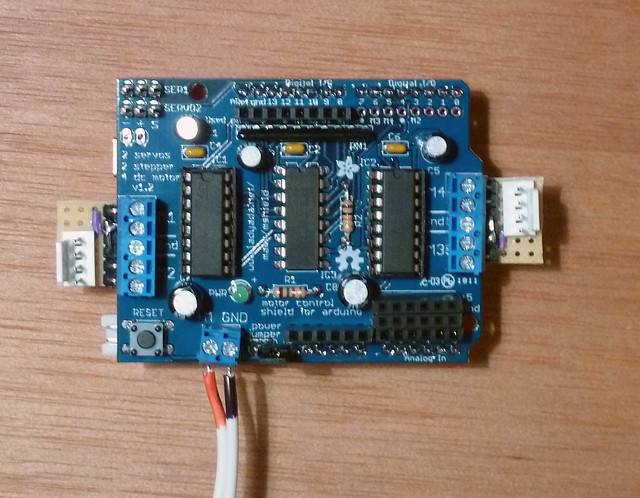
  • As I’ve mentioned, I know very very little about Arduinos or how to hook them up.  Although the Adafruit stepper motor page gives some guidance as to how to hook up the Stepper motor – 200 steps/rev, 12V 350mA, “Red, Yellow, skip ground, Green, Brown,” I have no idea which side or starting from which end of the terminal block this is supposed to go.  Admittedly, I have a 50/50 chance of wiring it up properly.
  • I tried hooking up two old steppers I had scrapped from some old electronics – but all I got for my troubles was a small popping noise and the smell of electronics.  There was no blue smoke, no apparently burned parts, and I was able to program the Arduino Uno to blink and then run a servo through the Motor Shield.
  • I designed and printed a spool for holding the monofilament line and which will fit snugly on the stepper motor shaft.  I got a little sidetracked playing with Skeinforge settings, but the spools turned out really well.
  • I printed a gondola for holding the pen, designed for the Polargraph by John Abella
  • I designed and printed a holder for the Arduino with the Motor Shield on it – but it was slightly too narrow for some reason.  I’ll have to redesign, reprint.
  • I’ll have to design and print a new motor block as well as a filament line guide.  I have some cool ideas for the latter.
  • I tried to use the Polargraph controller, but I wasn’t able to get it to do much.  I”ll give it another whirl tonight.
  • I know I’ll also have to change some of the Polargraph Arduino code to accommodate the motor and spool combination I’m using.
Default Series Title

DrawBot – The Assembly, Part II

Now that all the parts have arrived, I’ve finished soldering the Adafruit Motor Shield, it’s time to figure out what the hell I’m doing.

  1. The Parts
    1. 9 VDC 1000mA regulated switching power adapter – UL listed 
    2. Stepper motor – 200 steps/rev, 12V 350mA
    3. Micro servo
    4. Arduino Uno R3 (Atmega328 – assembled)
    5. Adafruit Motor/Stepper/Servo Shield for Arduino Kit v1.0
  2. Assembly
    1. Adafruit soldering and assembly instructions for the Adafruit Motor Shield
      1. Hint:  Don’t try to put the L293D into the 16-pin sockets before you solder the socket into place.
      2. Hint:  While preparing to solder the header pins into the motor shield, I found that the motor shield would not sit flat on the Arduino Uno because the leads from the motor shield’s reset button were in the way.  I crimped the leads slightly and then motor shield sat flat.
    2. Download and read the Polargraph Instructions
      1. Polargraph build instructions on Instructables
      2. Latest Polargraph Build Instructions circa 11/28/2011
      3. Polargraph Instructions circa 10/20/2010
      4. Polargraph Instructions circa 10/9/2010
    3. Install the Processing environment
      1. Processing environment download page
      2. It’s necessary to run the Polargraph controller software
    4. Update the Arduino Uno’s firmware
      1. Go to Arduino.cc and download the latest software (Version 1.0 is 85.9MB for Windows)
        1. The latest version of Sandy Noble’s Polargraph software requires the Arduino 1.0 firmware
      2. Install the Arduino drivers123
        1. Plug in your board and wait for Windows to begin it’s driver installation process.  After a few moments, the process will fail, despite its best efforts
        2. Click on the Start Menu, and open up the Control Panel.
        3. While in the Control Panel, navigate to System and Security. Next, click on System. Once the System window is up, open the Device Manager.
        4. Look under Ports (COM & LPT). Â You should see an open port named “Arduino UNO (COMxx)”
        5. Right click on the “Arduino UNO (COmxx)” port and choose the “Update Driver Software” option.
        6. Next, choose the “Browse my computer for Driver software” option.
        7. Finally, navigate to and select the Uno’s driver file, named “ArduinoUNO.inf”, located in the “Drivers” folder of the Arduino Software download (not the “FTDI USB Drivers” sub-directory).
        8. Windows will finish up the driver installation from there.
      3. OMG!  I just made an LED blink!
        1. I followed up this incredible success by adjusting the amount of time the LED spent off and on.  It was pretty cool. 4
    5. Download Sandy Noble’s Polargraph Controller v2.0
      1. Download the Windows binaries or
      2. Download the source code and compile them for yourself
    6. Download the AccelStepper Arduino Library
      1. Direct download
    7. Download the Adafruit Motor Shield Arduino Library
      1. Direct download
      2. When I tried to drop this library into the “arduino-1.0/libraries/” subfolder, the Arduino IDE freaked out.  I had to rename the library sub-folder from “adafruit-Adafruit-Motor-Shield-library-dd30da7” to “AdafruitMotorShieldLibrary” since the IDE would not recognize a library with spaces, dashes, etc.
    8. Um… now what?
      1. As I’ve mentioned, I really have no clue what I’m doing here.  I’m mostly just banged away at the motor shield with a hot soldering iron, jammed it onto an Arduino…  and don’t know what to do next!  Halp?
Default Series Title
  1. This was written for Windows XP, Vista, and 7, there’s also guides for Mac OS X and Linux []
  2. I’ve just copied and pasted this info here for completeness. []
  3. MacOSX []
  4. Arduinos can be used for MORE than this, you say?!  Tell me more! []

DrawBot – The Software, Part I (and an existential conversation)

This morning the USPS website told me that the remaining parts from Adafruit left Oakland yesterday.  As of this moment, they should be sitting at my local Post Office… but not go out for delivery until tomorrow as today is a postal holiday.1  In any case, I just realized that a DrawBot based on Sandy Noble’s Polargraph will require some basic knowledge of Processing.  I guess I better get learning!

Default Series Title
    • My current self [CS] would like to point out to my past self [PS] that if you had only placed the order one day earlier, you’d probably have had all the parts this weekend to work on.  Heck you could even have been done by now.
    • PS would counter, first, that I couldn’t have ordered all of the parts necessary without having first sought some input from people who have done this before me.  And, second…
    • CS would interrupt saying, “Hey PS, what happened to you, man?  You used to be so cool!  What you were afraid of?  Burning a chip or some damn thing?  That’s how you learn!  Buy a helmet!  In any case, people have built these things out of complete junk before!  Where is your sense of adventure?!”
    • PS would remind CS it is not polite to interrupt, “And, secondly, as I was saying, there’s no point in not making use of the various resources available to one.  It would be brash and foolhardy to simply jump in not knowing what the heck you/we were doing.  And, thirdly, in the fullness of time, I think you’ll come to understand that a few day’s delay in assembling a robot is but a blink of the eye in comparison to the time you’ll spend assembling, tuning, and operating said robot.”
    • CS, “Really?  ‘Fullness of time’?  Seriously, man, who talks like that?  I suppose the delay is not such a big deal, but the momentum one has when tackling a project is not an inconsequential concern.  I don’t know about you, but I have the attention span of a gnat.  <Oh!  Shiny!>  It is entirely possible that by the time the final parts arrive, in less than 24 hours, I may have moved on to some new project.”
    • PS, “Momentum, schmomentum.  You might move on to a new project?  Do you realize that you’ve got 16 posts on your site yammering on about this project – when all you have so far is one half-assembled circuit board?  No, you’re going to have to do better than that.  Besides, if you had simply moved to Brooklyn already like I told you, none of this would have been an issue.  You could have just walked over to Adafruit and picked up all the parts you required.”
    • CS, “Move to Brooklyn?  That’s your answer?  I live in the Bay Area, as in ‘California.’  Chances are work is going to have me driving down to Silicon Valley at some point this week anyhow.  And you want me to move to Brooklyn over $100 in parts?”
    • PS, “Well, it looks like you just admitted that this project wasn’t important enough for you to conjure up an excuse to drive to San Jose or Palo Alto.  You didn’t even try to visit a Radio Shack or a Fry’s.  Hell, the time you’ve spent griping about the delays you’ve caused yourself would have been enough for you to drive down to an electronics store and pick up the parts.”
    • CS, “Yeah, at a 50% markup?  Right.  Good plan!”
    • PS, “Okay, which is it?  Did you want the cheapest result or the fastest?  Having chosen an economical middle ground, it seems somewhat silly to blame me that the parts didn’t arrive as fast as fast can be.”
    • CS, “Shut up.”
    • PS, “No, you shut up.”

    []

DrawBot – The Assembly, Part I

I assembled most of the Adafruit Motor/Stepper/Servo Shield for Arduino kit – v1.0 last night.  Since I don’t have an Arduino yet,1 I didn’t want to solder in the connector pins.  Other than those four connectors, it is all soldered up.

FYI, don’t try to put the L293D into the 16-pin sockets before you solder the socket into place.  I tried to do that and it was a mistake.  I bent some of the leads to the socket and stabbed myself in the finger with the L293D chip.

Default Series Title
  1. It’s on its way!!! []

DrawBot – The Delivery?

I don’t think all of my parts are going to arrive in time for me to take a crack at assembling a DrawBot this weekend.  Per the USPS:

  • MakerBot shipment:  Your item departed our OAKLAND, CA 94615 sort facility on January 13, 2012.
  • Adafruit  shipment:  Your item departed our NEW YORK, NY 10199 sort facility on January 13, 2012.

I think the best I can hope for is getting my motor shield tomorrow.  That’s okay, there’s plenty to do in the meantime.  I must learn patience.

Default Series Title

DrawBot – Giant Unicorn?

As you may know, I’ve got a MakerBot Cupcake named “Bender” and a MakerBot Thing-O-Matic named “Flexo“.  There’s really no doubt in my mind I’ll be springing for a Replicator with dual extrusion1  Thankfully, I think there’s a way for me to make use of each of my robots, in its own special way.  I figure I can keep the Cupcake rocking a Unicorn Pen Plotter, use my Automated Build Platform in my Thing-O-Matic for mass production of smaller parts, and put a Replicator to work printing new, wacky, and/or large designs.

But, why am I talking about giant unicorns?!  Sandy Noble, the creator of the Polargraph,2 just posted about how he has created a vector graphics importer for the Polargraph software.  This is some pretty amazing stuff.  The MakerBot Unicorn has several software toolpaths that take vector graphics to GCode for printing through ReplicatorG.  The end result is that a Polargraph rocking a vector graphic importer should be able to draw arbitrary shapes, without the need to draw scribbly bits.

I think it would be particularly awesome to have a DrawBot draw a frame/border and then fill it with a scribbly/pixelated drawing.  Or, perhaps, draw the outline of an object and then fill it in with scribbly/pixelated shadings.

Default Series Title
  1. Will my extravagance know no bounds?! []
  2. Which is probably the best documented DrawBot on the internet []

DrawBot – The Hacks

Sandy Noble's modifications to Adafruit's Motor Shield

Chatting with Sandy Noble over at the Polargraph website has been extremely helpful1  It looks like he’s added three changes to the Adafruit Motor Shield:

  • Heatsink added23
  • Breakout boards to connect the terminals to the clips for the motor leads.  However, it looks like there’s a small little component of a circular purple variety also on that board.
  • Extra pins for hooking up a cooling fan.  Sandy says he doesn’t use them any more, but it really wouldn’t be a bad idea given that it would take hours for even a simple print.
Default Series Title
  1. The photo is from Sandy Noble’s photo stream.  It says All Rights Reserved and I will happily take it down if he asks and says this is not a fair use.  Given that all of his stuff has been very open source, I’m guessing this was just a default setting. []
  2. To the H-Bridges? []
  3. Also…  Where does one get a heatsink?  How do you attach it? []

DrawBot – The Plan!

What’s next?

Default Series Title


  1. Printing, for sure! []
  2. I don’t fish, but I have a bunch left over from a prior project []

DrawBot – What would you draw?

If you’re just tuning in, I’m going to be building a DrawBot.  Or, in the alternative, I intend to fail as spectacularly as I can.

However, it occurs to me that I need not be constrained by just my ideas of what a drawing robot should draw.  Admittedly, several of my anticipated print jobs are going to take a while since my daughter already has a stack of drawings she wants a drawing robot to replicate.  Here are the things I’m thinking about drawing:

So, if you had a drawing robot that could create sketches of arbitrary size, what would you draw?

Default Series Title
  1. I’m kidding []
  2. The reason I’m kidding is that a Polargraph tends to create a sketchy sort of design – so trying to replicate a Pollock painting would be an exercise in abstracting abstractness. []

DrawBots for the slow learner

Today I bugged several people far more knowledgeable than I about Arduinos, drawbots, steppers, servos, and power supplies.  Here’s what I’ve learned:

Having just salvaged a bunch of parts from some old electronics this weekend, I think I’m ready to pull the trigger and start building this bad boy.  :)

Yay for learning!

Default Series Title