DrawBot Pen Holder Post Mortem

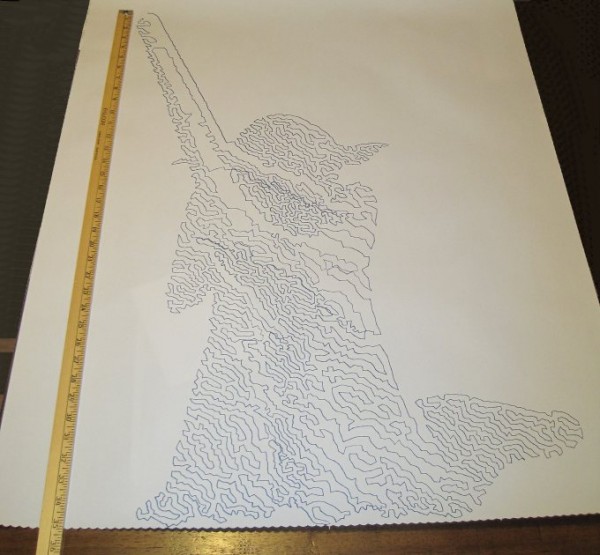
Yoda, standing tall
Yoda, standing tall

Two days ago I designed a new type of pen holder for my drawing robot based upon what I had learned from examining the pen holders other people have designed and used.

Here’s what worked and what didn’t:

  1. WORKED:  The fit.  I’m really happy with how the pen holder went together.  It’s always very satisfying to print a part you just designed and have it “just fit.”  With the zip tie holding the micro servo in place, neither the micro servo tab nor the zip tie protrude beyond the flat surface of the pen holder.  The groves for the rubber band to hold the pen in place work very well.  The pen doesn’t move side-to-side, get pushed back into the holder, and it is very easy to reposition the pen or change pens entirely.  While it’s not as elegant as, say, a metal spring, it works very well and doesn’t require a bunch of moving parts.
  2. WORKED:  The amount and placement weight.  I hot glued a AA battery to either side of the pen holder, as close to the center as I could manage around the hole for the pen.  This weight seemed to work perfectly.  There was enough weight that the cords hung in straight lines, but not so much that it seemed to cause a strain on the motors.  The placement of the weights seemed to work well as there was no noticeable pendulum swinging of the pen holder, despite me running the robot at about three times it’s usual top motor speed and about twice it’s normal acceleration.1
  3. WORKED:  The multiple points of cord attachment.  Having a row of holes for connecting the cords at different points along the top central edge of the pen holder worked out great.  To test the balance all I did was stick a small paperclip through a hole.  If the holder balanced with the flat edge upright and vertical, that’s the point I needed.  It was easy to find the balance point and easy to connect the cords.
  4. WORKED:  The single point of cord attachment.  When I was using a crappy cardboard pen holder with cord attachment points very far apart, the entire pen holder would tip to one side or another when it got close to that side.  This caused a bubble-like distortion effect towards the edges of the drawing.  While this could be a cool effect to intentionally inflict on a drawing, it’s not what I was going for with that crappy cardboard design.  Having the two cords meet at exactly the same point worked out incredibly well.  Even when the robot was drawing the top left corner of Yoda’s lightsaber, the pen holder was always perfectly vertical.
  5. WORKED:  Shape of pen holder flat side.  The pen holder I’ve designed is roughly teardrop shaped, with a flat top.  My thought with giving it a “flat top” was that it wouldn’t potentially develop a central raised point (between the circular top edge of the pen holder and the device I was using for the pen lift) when I was doing a pen lift.  I figured that if I was using a “flat top” it was possible for the pen holder to be balanced on the edge of the flat top and the point of the servo arm – essentially turning my full contact pen holder into a three point contact pen holder with the servo arm as one of the points.
  6. DIDN’T WORK:  Motor skipping?  There is a large section in the middle of the drawing of Yoda, pictured above, that looks like it was shifted downwards slightly.  This could have been because I was fussing a little with the robot while it was working.  It could also have been because I was running the robot pretty fast (motor speed of 1600 when the normal is 600), because I had increased the acceleration (400 instead of the default 800), because I had the pots turned down too low (maybe, but the current settings have worked reasonably well for other drawings), because the pen holder was too heavy and causing too much strain on the motor (very unlikely since this holder is lighter than the cardboard abomination I was using) or some combination thereof.  My guess is that I probably need to increase the pots when I increase the speed.  It’s really unlikely that the pen holder itself was to blame for these missteps.2
  7. DIDN’T WORK:  The pen lift.  I haven’t drawn anything with a pen lift yet – but I did test the pen lift last night after Yoda was done.  I noticed a few minor problems with the pen lift – but nothing to indicate I was on a completely wrong track.
    1. The first problem is that I glued the two batteries slightly too close to the clearance area for the micro servo arm.  This is why the next version will include a holder for the AA batteries – to ensure they don’t get in the way.
    2. Second, even when fully extended the servo arm didn’t push out far enough to cause the pen tip to lift off the surface of the paper.  This could be solved by either making sure the pen tip is positioned slightly farther back, extending the servo arm, or creating a servo arm powered cam, similar to Dan Royer’s Makeangelo (check out the video at about 4:35 for a view of the cam in action).
    3. Third, my concern is that since the micro servo is mounted in such a way that the servo arm sweeps from right to left, it could cause a similar sweeping motion to be applied to the pen tip – assuming I work out the pen tip depth issues.  It’s possible that sweeping the arm upwards or downwards might minimize this effect.  I just have no idea whether this is a valid concern or not – the servo arm might move so quickly that it’s not a real concern.
    4. Also, while not an actual issue, the servo motor cable applies a bit of weight to the pen holder.  This will require me to reposition the cord attachment points – and may require me to add extra weights to the pen holder itself.

Once I change the pen position and maybe use a larger servo arm, I’ll try a vector drawing which requires pen lifts and re-evaluate this design.  Overall, this design has basically worked beautifully.  I’m looking forward to experimenting with some new variations on the design to see if I can eliminate the few remaining issues.

Default Series Title
  1. I’ll pretend I was doing this for a system stress-test, but really I was impatient to get a big giant Yoda drawing []
  2. Does that count as a pun? []

Drawing Robot Pen Holders, Calligraphy Pens, and Thought Experiments

Just hanging out
Just hanging out

In discussing Sandy Noble’s Polargraph pen holder I mentioned how his design is optimized so that the point where the two cords meet is always the same as where the pen tip meets the paper.1 In the comments, he explained his rational, “So the pen tip is always at the tip of the hanging triangle, and there’s no distortion that way.”  My response was that “…if the pen holder has a single ‘hanging triangle’ point in it with the pen tip a constant distance from that ‘hanging triangle point,’ the drawings should appear identical to those created at the ‘hanging triangle point’ – just offset by the constant distance.”

This morning Sandy updated his site with a post explaining, using several diagrams, the basis for his prior theory and how he came to agree with my point. (Not that he’s changing his pen holders…  ;)  )

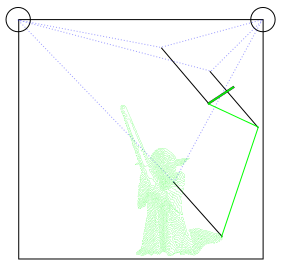
Without as much fancy-schmancy maths and geometry, I figured I would explain the thought experiment I used to conclude that a pen tip that is always a constant distance and position from the “hanging triangle point” will always produce an accurate distortion-free drawing.  To help illustrate these thought experiments, I’ve enlisted the help of Yoda.  “Hi Yoda!”

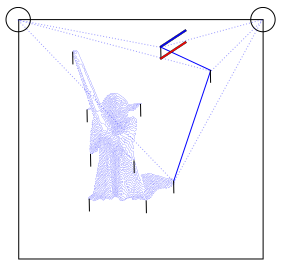
Fig 1:  Yoda, being drawn by a drawing robot
Fig 1: Yoda, being drawn by a drawing robot

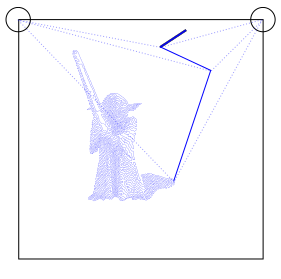
In the picture above, Yoda is being drawn by a drawing robot.

Fig 2: Yoda drawing, annotated

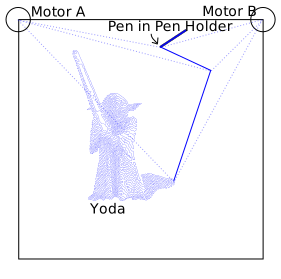
Above, I’ve labeled the important parts of the drawing.  On the top left “Motor A,” on the top right “Motor B,” which are attached by cords to the pen holder indicated by the dark blue line.  Here, I’ve shown Yoda as he would be drawn by a drawing robot, where the robot then draws two more points.

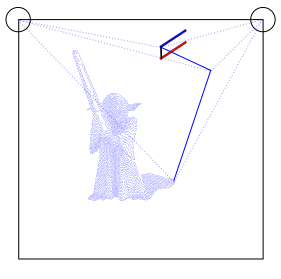
Let’s say, because we’re feeling whimsical today, we want to add a second pen to our pen holder.  We’ll use a red pen and affix it below the blue pen in such a way that the red pen will always be directly below the blue pen by the same distance.

Fig 3:  Another pen
Fig 3: Another pen

For the moment let’s pretend the red pen is capped so it won’t leave a mark.  Now we’ll try to predict the position of the red pen at different points along the original drawing.

Fig 4: Where's the red pen?
Fig 4: Where’s the red pen?

It turns out this task is pretty easy.  The red pen, at any given point during the Yoda drawing, will always be directly below the blue pen by the same exact distance between the two pens.  Okay, now let’s draw Yoda again – this time with the red cap off.

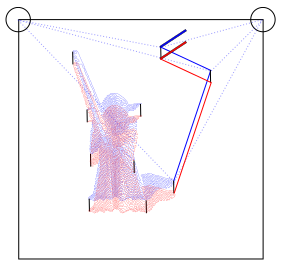
Fig 5: Double vision

We get two Yodas!  How awesome is that!  The reason I mentioned calligraphy pens in the title of this post is because it shows another way to think about this process.  When we write with a calligraphy pen we don’t have one end of the pen wildly distorted – in theory the two points on the calligraphy pen are always a constant distance from one another and moving together (as long as we don’t rotate the pen when we write).  You could imagine instead of a blue and red pen above, we’ve put a single calligraphy pen that’s as wide as the black line representing the distance between the two pens above.  The resulting drawing would look like a Yoda – that had been smudged downwards by the same distance.

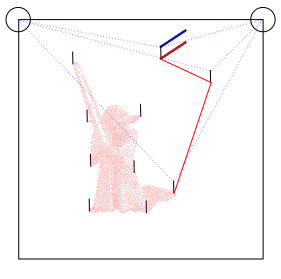
Let’s now draw Yoda again, but capping the blue pen and still tracking where the blue pen would be.

Fig 6: Not using the blue pen

We should end up with a result very similar to Fig 4.  It’s the same Yoda, only red and shifted down from the original blue Yoda by the distance between the two pens.

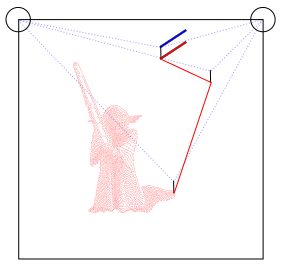
Let’s draw Yoda again – this time we’ve still got a pen holder which has the cord from Motor A meet Motor B at exactly one point.  As Sandy points out, this is really easy to do when you aren’t worrying about making that exact point be the same precise point as the pen tip.  Directly below point where the two cords meet on the pen holder, we’ll put the red pen.  From a functional standpoint, this setup is identical scenario to Fig 6.

Fig 7: Drawing just one red Yoda

Now we have a red Yoda, shifted down on the paper by the distance between the point where the two cords meet and where the red pen touches the paper.  It’s important to note that there’s no special magic to having the red pen directly below the point where the cords converge.  This pen tip just needs to be a constant distance and position from the cord convergence point at any given time.  While it might be more difficult to build a pen holder that holds the pen far off to one side, there’s no reason this wouldn’t work.

Fig 8: Yoda, now in green

The lessons I take from this thought experiment are:

  1. As long as the pen is a constant distance and constant position from the point where the two cords meet, your drawing will not appear distorted – just shifted by the same constant distance and position.
  2. When calibrating the robot, the operator would need to calibrate the pen holder position by the cords convergence point – not the pen point.  This means that the preview in your software won’t match exactly the position of your drawing on the paper.  
  3. While not part of the thought experiment per se, I think we can all agree that the more weight that is not centered on the cord convergence point, the more likely the pen holder is to sway.
  4. I’m willing to defer to Sandy’s experience that pen holders that do not have the cord convergence point the same as the pen tip are, “Easier to design, easier to build, and cheaper, far, far cheaper.”

Thanks Yoda!

P.S.  Just in case you’re wondering – the reason that SVG of Yoda above is so large is because it includes the full TSP version of Yoda I’m getting ready to draw.  :)

Default Series Title
  1. Photo courtesy of Kristina Alexanderson []