
If you’re here checking out my site after my presentation, you can check out all the slides from my presentation above. If you’d like more information about the individual things in the slides, I posted an update for most of them over on Hackaday. If you’ve still got some questions, feel free to leave a comment below, hit me up on twitter, email me directly.
Category: Projects
Various different projects in various states of construction and destruction
Wemos D1 Mini Arduino Pin Mapping
I was expecting to be able to set up digital pin 0 on the Wemos D1 Mini and have it “Just Work.”
It turns out the Arduino pins don’t match up neatly to the Wemos D1 Mini pins. The path of true love, eh?
Luckily, Richard Lee mapped the Wemos pins to the Arduino pins well all know so well.
SOLVED! I can’t upload Arduino sketch to Wemos D1 Mini ESP8266
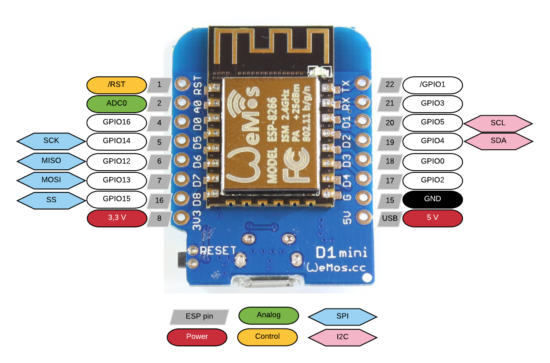
My Wemos D1 Mini WiFi boards had arrived from China1 on Friday and I’ve been fiending to build… something with them.
Unfortunately, I couldn’t get the very basic “blink” sketch to upload. Here were my symptoms:
- When uploading, I got the “error: failed to open” message
- My Windows computer flashed a message when I connected the board, saying it was an unrecognized device
- The Device Manager showed a little “alert triangle” suggesting the proper drivers were not installed
- All of the ports in the Arduino IDE were disabled and greyed out
I tried several different upload speeds and several different USB micro cables to no success. It was not until I found this post explaining that I needed to update the Wemos drivers along with a handy link to said drivers.
Now that I got this board blinking, I can’t wait to get it to do MOAR…
Default Series TitleUpdate: My buddy Chris pointed out that I’ve been mixing up ESP32 and ESP8266. I’ve corrected the title now.
- $13 for four boards plus headers?! [↩]
Bamboo Illuminated Dome
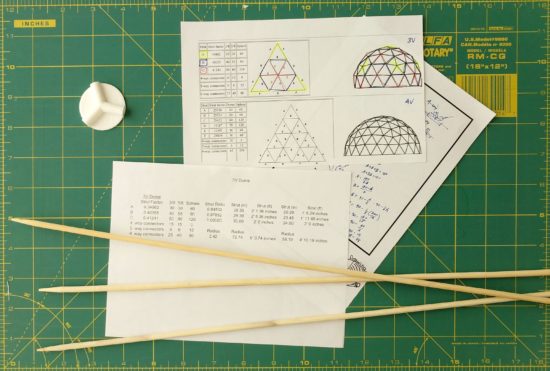
I’ve always liked the idea of geodesic domes, but haven’t had the space, time, or ability to actually assemble one. On top of all that, I was having trouble coming up with an idea for struts that would be both sturdy and cheap enough to build a dome at a reasonable cost.
Until I went to the grocery store recently. The local supermarket had a clearance table with long bamboo skewers. I realized these could probably work really well as struts and they were extremely cheap to boot. I bought a few a the store to try out, but ultimately turned to Amazon for my bulk bamboo purchase.
I’ve already designed the connectors to work with these bamboo skewers. You can try them out here on Thingiverse.
Once I’ve got the skewers cut to size and the remaining connectors printed, I’ll be wrapping the entire structure in that stretchy plastic wrap used for protecting furniture when you are moving. 1 Then I’ll be putting some LED’s and possibly a laser inside to make it more interesting. :)
Lasers.
Default Series Title- We have two rolls left over from the last two times we moved… [↩]
Practical 3D Printing for Everyone
3D printing can sometimes get a bad rap. At first people are excited by the possibilities, then after printing a few trinkets the novelty can really start to wear off. However, our 3D printers have become an absolutely critical part of our home repairs.
We have printed literally dozens and dozens of things in and around our home. As of the time I’m editing this post, we’re up to 82 things so far! The vast majority of these are completely bespoke custom creations, with a few things that are printed from Thingiverse or mashups with things from Thingiverse.
My proposed Maker Faire Bay Area 2018 Presentation submission is for a presentation that discusses:
- Practical things everyone can 3D print for their own home
- Repairs
- Improvements
- Other useful things
- 3D Printing with Family and Friends
- Specifying a purpose (“Honey, can you make me something that…”)
- Specifying dimensions and purpose (“I need something that will…”)
- Simple techniques for creating replacement parts (using good reference photos, GIMP, Inkscape, and OpenSCAD)
- 3D Design with Family and Friends
- Photographs
- Sketches
- TinkerCAD and Sketchup
ESP WiFi Board Experiments
A friend of mine pointed me in the direction of some ESP32 board tutorials over at MsRaynsford.co.uk.1 You know it’s a fast moving area when a post that’s less than a month old already has a dead link. :) Rather than re-creating all the tutorials that are already out there, I’m going to just jot down my notes and links as a short of “quick start guide to quick start guides.”
- ESP Boards
- There’s several different “flavors” of ESP WiFi tech, however it seems as if they all break down into one of three different categories.
- Bare ESP WiFi module. These require a bit of effort to make work since the bare module requires the pins to be broken out to be made useful.
- ESP WiFi breakout boards. This type of board, which has 8 pins broken out, requires a programmer. Since these 8 pins are arranged in a 2×4 pattern, they can’t be used directly in a breadboard.
- ESP WiFi development boards. These board seem to have lots of pins broken out and typically a USB connector. Since these boards have more features (voltage regulators, compatibility with other boards’ form factors, USB communication built-in), they’re going to be more expensive. There’s the Adafruit Huzzah, the Sparkfun ESP Thing, and then something called the ESP Wemos D1.
- There are several different ESP modules and boards which have varying amounts of space from 512kb to 4MB and varying amounts of pins from 2 to 24 pins. These modules all tend to have different names (ESP-01, ESP-07, etc, etc) but are all known as ESP8266.
- The ESP modules require 3.3v, so a 5.0v USB or other source will fry them. Plan accordingly. Some development boards have voltage regulators on them to adjust the power going to the module.
- There’s several different “flavors” of ESP WiFi tech, however it seems as if they all break down into one of three different categories.
- Correct Board Manager URL for ESP boards
- An overwhelming amount of information for ESP boards
- Ordering Boards
- I’m ordering several boards off of Aliexpress. I’m getting a few Wemos D1 boards, since they’ll be easy to prototype with2 , and a few ESP-01 breakout boards and a single programmer to toss into a project. Then again, at <$3 a piece for the Wemos boards and <$2 a piece for the ESP breakouts, it doesn’t make a ton of sense to stretch to put the ESP-01’s into a project. My thinking is that most any project I build will only use a pin or two and not be too terribly complicated anyhow, so that once it’s been prototyped I can just burn it into the ESP-01’s and permanently install it into a project.
- I’m not exactly sure which what WiFi enabled things I’d like to build yet. 3 Here are some ideas:
- A pair of tap lights that are connected over the internet. I’d tap one before I left work, it would flash a color to let me know it sent a message, and the other one at home would light up to let my fam know I was on the way. I guess it’s similar in theory to this.
- A button to call an Uber or Lyft.
- A button that will email or call my cell in 2-5 minutes from the time I press the button. Useful when I know someone who stepped into my office isn’t good at taking a hint. Or when I need to get off a conference call.
- A button that can be used to log simple events. Might be useful at work in a variety of ways.
- A button that will automatically start a print job on my WiFi enabled 3D printer.
Hacked Tap Light Enclosure
Just seeing a post and pile of code about a project isn’t always that interesting. The nifty thing about this project is also one of the problems. They’re cosmetically identical – so you can only tell which one you’ve got by activating it. :)
I couldn’t be more pleased with the way this project came out. I basically took my daughter’s setup based off an Adafruit Circuit Playground, built a more specialized (and louder!) version into a breadboard using an Adafruit Trinket, and then ported the entire design into an ATTiny85. The only thing I would change about it would be to add a socket for the ATTiny to make it easier to modify down the line.
Default Series TitleCheapest Easiest Easy Button Hack EVER

I’ve always liked the idea of the Staples Easy Button. Not so much a button that says “That was easy,” but the idea of having an enormous button on my desktop that would do… anything at all. Official “Staples Easy Buttons” used to sell for about $20 and are now only about $7. But, this is still a lot to pay for a big button that I’d want to gut anyhow. Recently I figured out a way to build a big useful button, very inexpensively.
The secret sauce is … a tap light! You can buy a pack of 4 big (10cm diameter) tap lights for under $4 and they’ll ship free as a “Prime add-on.” For less than $1 each, you get a three AA battery holder, toggle on/off switch, a bright LED, all neatly organized into a big plastic button. This button also has another “feature” which is missing from many other pricier options. The dome over the light is white – which means you can put any color LED or, as I did, an Adafruit Neopixel inside and the dome will change color accordingly!
Here are some pictures of the disassembled tap light so you can see if it would work for you. I had originally bought these so that I could put a light right next to my newest 3D printer.123
There’s actually quite a bit of room inside the tap light for a small project. I was able to pack a Neopixel, a small buzzer, an ATTiny85, and a rat’s nest of wires. I expect this project to take a lot of abuse at Maker Faire, so I applied a liberal amount of hot glue inside to hold the wires down and out of the path of the springs, switch, case, and the likely path of the button dome.
Once reassembled, there really isn’t any way to tell the button was hacked. It looks identical to three other tap lights. I just love that I was able to make use of the battery holder and existing switch inside the project. The 4.5V supplied by the batteries is perfect for powering my ATTiny85 and lone Neopixel. If you’ve got a junk drawer, you could probably build something very similar for about $2-3.4 As it is, I “splurged” by using $1 worth of Neopixel because I was being lazy and didn’t want to either wire up three sets of LED’s or track down three resistors to go with an RGB LED. Even so, this is an incredibly cost-effective project enclosure.
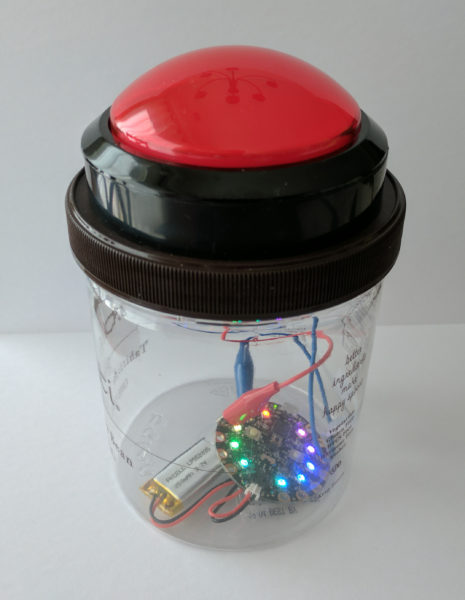
In case it’s of interest to you, this project is the newest iteration of our 15 Second Timer-Buzzer from my daughter’s 15 Second Drawings project for Maker Faire Bay Area 2017. The prior version used an Adafruit Circuit Playground, a 100mm Red Button, and a LiPo battery and probably cost around $40 or so. 5
All of the code is on Github. Basically, the buzzer flashes amber three times with a very short tone in between flashes, then turns green for 14 seconds, amber for one more second, and then turns red and buzzes angrily to let you know time is up. I had written most of the code to work on an ATTiny45… until the code ballooned to a whopping 4560 bytes and I had to switch to an ATTiny85.6 If I had to build this over again, I’d solder in an 8-pin DIP socket for the ATTiny rather than mutilating the chip and hot gluing it directly to the inside. ;)
Default Series Title- I have a power strip next to it, but it’s fully utilized, I only need a little bit of light sometimes, and I was getting tired of holding a flashlight on it at night [↩]
- In my tradition of naming my 3D printers after characters from Futurama, my Monoprice Mini Delta is named “Roberto.” [↩]
- My prior 3D printers are Bender the MakerBot Cupcake CNC, Flexo the MakerBot Thing-O-Matic, and HedonismBot the Replicator 1 Dual [↩]
- I figure about $1 for an ATTiny85 and $1 for the button. Most people can find a way to scrounge an RGB LED or a few different LED’s, an old buzzer or piezoelectric disc, and some bits of wire [↩]
- Not counting the gelato we ate, of course [↩]
- What a waste!!! [↩]
Maker Faire 2018: The Wandering Artists – 15 Second Drawings
My daughter and I are super excited about our Maker Faire project this year. Last year she brought her “15 Second Drawing Challenge” project to Benicia Mini Maker Faire and Maker Faire Bay Area.
Her project was so much fun that when she invited me to team up and take the show on the road, I jumped at the chance. This year we’re bringing a new and improved timer/buzzer hacked together from a cheap tap-light and a pop-up table/booth.
We’re taking photos of the build process and will post them along with tutorials, parts lists, and source code for everything. Here’s everything you need to know to build a cheap timer-buzzer out of a tap light.
Default Series TitleVacuum Forming an Arc Reactor
If you see me at Maker Faire this weekend, you will likely catch me wearing my vacuum formed goggles and arc reactor. I was inspired by my vacuum former and this awesome Instructable by dgrover.
Once you have everything set up, this neat little “arc reactor” only uses about 50¢ of materials and doesn’t require any special soldering skillz.1 Here’s how you make your own:
- Make the form
- I specifically bought a stack of silver plastic plates for this project. 50 plates for $10 was a pretty good deal. ((In case you care, I use affiliate links))
- You could use dgrover’s lasercut files or design your own model. I designed my own, based on their designs and added 10 degrees of draft to the edges to help it release from the mold.
- You’ll also notice lots of little holes in the nooks and crannies of the model. Those serve a dual purpose of allowing the vacuum to pull the plastic down into those parts and then letting air in when you’re ready to release the 3D printed part.
- Add the LED and Battery
- Gather the tools and materials
- 5mm fast flashing RGB LED ($7 for 100 LED’s!)
- 3V Coin Cell battery, CR2032 ($25 for 100 batteries!)
- Push pin
- Optional: Hot glue gun and glue
- Poke two small holes in the center of the form for the LED leads.
- Push the LED through the holes. I would recommend adding a drop of hot glue just under the LED moments before you pull it against the vacuum formed part. This will help keep it in place.
- Bend the two leads as shown just using your fingers. Notice the bottom lead is bent roughly 90 degrees and the top lead is curved.
- Add the battery. The LED is polarized, so it will only light up when the battery is properly connected. So, just put the battery in, then flip it over if it doesn’t light up. :)
- Gather the tools and materials
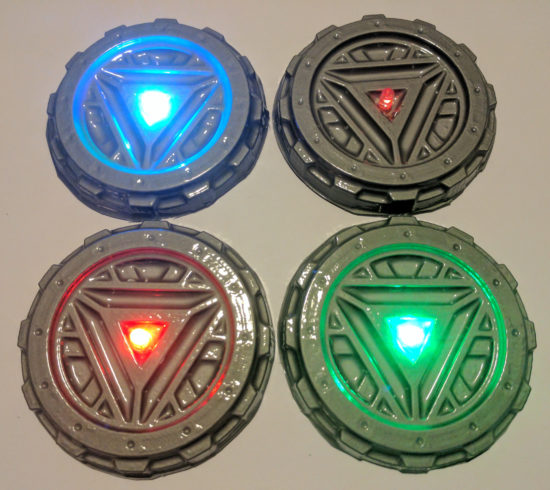
I really couldn’t be happier with the results. It looks way more impressive than the 57¢ worth of materials would suggest.
Bucket Vacuum Former- How to Make a Vacuum Former
- How to Use a Vacuum Former
- Vacuum Former – Things to Form
- Vacuum Former – Ideas to Improve Vacuum Former
- Maker Faire 2017 How to Make a Vacuum Former Presentation Slides
- Vacuum Forming an Arc Reactor
- Maker Faire Application: Vacuum Forming Workshop
- How to Make a Vacuum Former
- How to Use a Vacuum Former
- Vacuum Former – Things to Form
- Vacuum Former – Ideas to Improve Vacuum Former
- Maker Faire 2017 How to Make a Vacuum Former Presentation Slides
- Vacuum Forming an Arc Reactor
- Maker Faire Application: Vacuum Forming Workshop
- How to Make a Vacuum Former (2023)
- DIY Vacuum Formers
- Very Smol Vacuum Former
- You could easily adapt these instructions to add some sweet LED color changing lighting to any other project [↩]