While looking at the source code on my Simple Series plugin page, I began to wonder how WordPress.org was serving up all those nifty little stats into the downloads graph. ((Photo courtesy of Windell Oskay)) What I discovered is that there’s a little bit of jQuery magic going on that pulls download data from a WordPress.org API, formats it for niftiness, and inserts it into the dynamically draw SVG graphic of the downloads.
In case you’re interested, the API call looks like this:
This weekend, almost an entire year from the last update, I made some revisions to my Simple Series plugin for WordPress.1 This is one of the plugins that I use the most often for WordPress. It’s right up there, in terms of frequency, with the WP-Footnotes plugin that lets me insert footnotes.2
As much as I loved this plugin, it was always a little bit of pain to use. In order for two posts to be associated together in the same series, the title must be listed exactly the same in each post. So, to make sure that I was getting it right, I would open an old post in the relevant series, copy the exact plugin shortcode with the exact title, and paste it into the new post.
With this update you can click the “Add Series” button in the TinyMCE text editor for a post and insert any series title you’ve previously used. It’s not yet as elegant as I would like, but it makes a few button clicks out of a what used to be an annoying process.3 I’ve also added the ability to have a series between pages, posts, or any combination of the two kinds of content types.
This morning I quickly checked my small-side-business SaaS site before heading off to work, only to find the thing that people actually pay to use was not working. Dropping everything, I quickly started hunting through code. I haven’t changed a single word of core logic on the site in about six months, so there’s no reason this problem should be occurring.
Except that whenever WordPress asks me if I want to update, I immediately do so. Sometimes really minor changes to WordPress functionality create huge tangles of CSS and HTML, as it did in this case. Once I tracked down the problem I quickly hacked together a solution and uploaded it back to the site. 2 Thankfully it’s now working as well as it did before I found this problem.
Because my site has been working so well for so long3 I’ve been loathe to build a better design for the logic. In the very long run, it will save me time, but in near future/short run of a few months all it will do is suck up time without demonstrating a tangible benefit. I suppose being less prone to breakage is a tangible benefit, but I spend less than 2 hours a year dealing with minor problems like this. The prospect of spending two months rewriting and then rechecking code to save 2 hours a year doesn’t seem like a worthwhile investment.
Frankly, what I need to do is come up with some other tangible benefits that when added with the existing fixes I need to perform will have a more tangible4 benefit, and then jump into building them all. Default Series Title
I don’t know where the original picture comes from, but I got it from this website. [↩]
And, really, it’s a nearly unforgivable hack. Rather than figuring out how to fix the problem in the plugin, I commented out the newly-bad code and hacked that same code directly into the website’s theme. I know, I know… nearly unforgivable. At least I didn’t try to hack the core. [↩]
The core logic of the site has been essentially unchanged since about 2008. [↩]
I just read this super useful comparison test of four top-notch WordPress caching solutions. Since none of my websites have the kind of traffic that really warrants the optimal caching solution, it’s nice to know what that solution actually is. :)
I cannot express to you how much I just love this new CompFight plugin. 1 Snagging images off of CompFight/Flickr and dropping them into a post is so freaking easy now. This is definitely going to become one of my stock-plugins for a fresh WordPress installation. I’m happy to say that I contributed a small bit of code to this very very awesome plugin. Since that comment, my modification of their code was merged into the main plugin. I’ve also added a few small tweaks to my version of this plugin. By modifying the javascript file very slightly, my copy of this plugin also:
Adds a caption, that includes the same text as the original photo on Flickr
Centers the image, using WordPress’s tags
Makes the photo credit part of the text. I like to include the photo credit using slightly different language. At some point I’ll get around to modifying the plugin so that I can save my format as a setting.
Admittedly, these implementations are just a little bit buggy – I just hacked those bits in without really doing any serious testing on them. Once I have kicked the tires on this code a little, I’ll post it to the plugin’s page. If you want to take a look at it before then, just drop me a line.
Sometimes the right post just needs the right picture – I’ve actually had a lack of a good photo hold up a post before. I’m happy
ShrimpTest is a WordPress plugin with a LOT of promise. Basically, it is an A/B testing tool for WordPress. The plugin author, Mitcho, does a great job of explaining A/B testing and why it is important. If you are already familiar with A/B testing, you can skip ahead to 16:03 in the video to see a demo of Mitcho presenting the plugin
Unfortunately, and this is truly a shame, the plugin also suffers from an almost complete lack of development and updating. There must have been some change in WordPress v3.2 that stopped the plugin from working. The effect was that the “A/B” icon in the rich text editor was missing. Fortunately, someone figured out a work around. The super quickest way to apply this change to the plugin is to do the following:
Make sure you’re logged into your WordPress website of choice
Navigate to `http://[DOMAIN].com/wp-admin/plugin-editor.php?file=shrimptest/plugins/variant-shortcode/tinymce.js&plugin=shrimptest%2Fshrimptest.php`
If you want to see something that is simultaneously disturbing and ego-inflating, check out the Collusion plugin for FireFox. 1 A friend of mine e-mailed me the link to the LifeHacker post discussing it. If you want to cut to the chase, the link to the Collusion plugin is right here. After web surfing and blogging for about an hour, the little web it’s drawn so far is a little scary.
In a perverse way, it is slightly ego-inflating because I’m clearly so very important to ALL these companies! [↩]
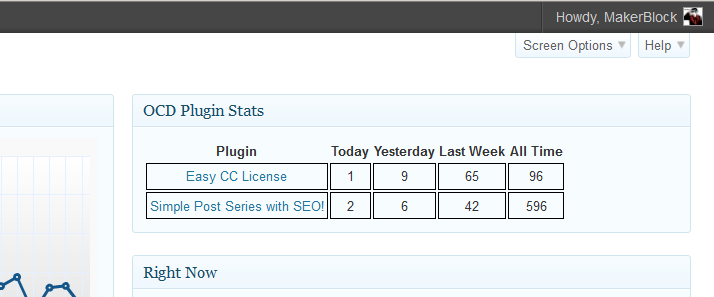
I’ve just published another WordPress plugin called OCD Plugin Stats. This isn’t a plugin that would really interest most people. If you’re a WordPress plugin developer and like seeing the stats for your plugins, OCD Plugin Stats will let you monitor all the stats for all of your plugins in one convenient location in your WordPress dashboard.
Unless you publish your own plugins, I can’t imagine anyone would be terribly interested in such a thing. My reason for making this plugin was that (a) I found it useful, so perhaps others would too and (b) I wanted to learn how to create a WordPress dashboard widget. Default Series Title
I’ve written a new WordPress plugin! It uses the Creative Commons API to grab the appropriate license based on your license choices. While there’s still room to improve the plugin, I’m pretty happy with the way it’s turned out. I’ve made a conscious effort to use best plugin programming practices – and learned a lot in the process. 1