My daughter, TinkerGirl, and I are going to be demonstrating our 15 second drawings at the Rocklin Mini Maker Faire this Saturday. We’re pretty stoked about this since it will be our first time as Makers at this Mini Maker Faire. We’ll be the ones wandering around with a DIY dry erase board.
If you’re wondering what the heck “15 second drawings” even means… it’s just what it sounds like. Both of us will each draw whatever you want in 15 seconds. Whatever you want, no matter how complicated or absurd, drawing before your eyes in just 15 seconds.
Or, we can teach you how to draw anything in 15 seconds. Or compete against us or perhaps challenge a friend (or enemy?!) to a 15 second drawing.
I ordered a decibel meter from Amazon the other day so I could drop some science on the claims from various 3D printed whistles on Thingiverse. There are several that claim to be the loudest. Well, today, I began my quest to put these claims to rest.
The closer the decibel meter is to a sound source, the higher it registers. To eliminate some of these variables, I placed the decibel meter on a counter in front of me and a chair 24 inches in front of that. For each of the whistles I was testing I stood just behind the chair and gave the whistle three hearty puffs. The decibel meter, which was set to record and display the “max” reading, would then tell me the loudest reading for that set of three whistle toots.
Without further ado, I declare the “Extremely loud and compact emergency whistle” by Whistleblower on Thingiverse the clear winner at 121.1 decibels. Both whistles by this designer took the top two scientifically determined spots.
Name
Thingiverse ID
Mass (grams)
Price
Print Time (minutes)
Decibels
Subjective Rank
Extremely loud and compact emergency whistle [v1]
2933021
3.9
$0.12
22
121.1
1
Extremely loud and compact emergency whistle [v2]
2933021
3.7
$0.11
18
111.5
3
v29 (Over 118 db!)
1179160
13.9
$0.42
90
110.4
4
2 chamber whistle (LOUD) [w5]
2616512
8.1
$0.24
49
109.5
2
Emergency Whistle with Solidworks 2014 source
495172
1.2
$0.04
7
101.8
5
Whistle Ring Modified [v2]
2027115
1.6
$0.05
9
90.8
6
Just how loud is 121.1 decibels? 1 Well, for starters, it’s just above the pain threshold of 120 decibels. It’s louder than:
Your iPod headphones at maximum volume
A baby crying, next to your ear
A full symphony orchestra
The subway
A sporting event
A chainsaw
A jetski
A marching band
It’s on par with:
Thunder
A shotgun
An ambulance siren
A rock concert
And, if you didn’t have earplugs, you would exceed the daily safe exposure limit for 121 decibels in 7 seconds.
There may be louder whistle on Thingiverse2 and, if so, please let me know. I’ll print the model and test against the others in my arsenal.
Impatient for my decibel meter to arrive from Amazon and eager to get more feedback on the loudest 3D printed whistle, I brought the four loudest whistles to work and enlisted the help of two friends. We performed the test much the same as the last time – only this time they were on one end of a large parking lot and I had driven to the far side to blow each whistle once, then repeated them each once. Here’s the result on their subjective test:
Name
Thingiverse ID
Mass (grams)
Price
Print Time (minutes)
Rank
Decibels
Extremely loud and compact emergency whistle [v2]
2933021
3.7
$0.11
18
1
TBD
Extremely loud and compact emergency whistle [v1]
2933021
3.9
$0.12
22
2
TBD
2 chamber whistle (LOUD) [w5]
2616512
8.1
$0.24
49
3
TBD
v29 (Over 118 db!)
1179160
13.9
$0.42
90
4
TBD
Whether the1 loudest whistle is the v1 or v2 of the “Extremely loud and compact emergency whistle,” Thingiverse user whistleblower clearly designed an amazing, quick printing, low cost whistle. It has a very high pitched piercing tone that can be downright painful to be near, let alone create. 2
As before there’s a number of different things that could be happening here. Perhaps the particular tone of this whistle travels better through open spaces (such as a parking lot) rather than through a door and down a hall (such as inside my house). I know there are some whistles that require a lot of blowing power to hit maximum volume and others which almost “choke” on too much pressure.
In two days my decibel meter will arrive and I’ll try all of these tests again and post a new table. If you think you’ve got a contender or have seen a really loud whistle on Thingiverse, let me know in the comments so I can print and test it.
If you’re here checking out my site after my presentation, you can check out all the slides from my presentation above. If you’d like more information about the individual things in the slides, I posted an update for most of them over on Hackaday. If you’ve still got some questions, feel free to leave a comment below, hit me up on twitter, email me directly.
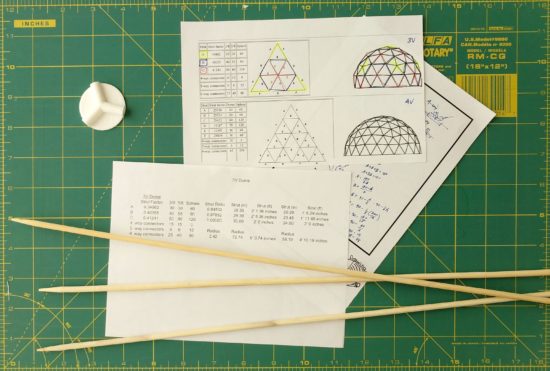
I’ve always liked the idea of geodesic domes, but haven’t had the space, time, or ability to actually assemble one. On top of all that, I was having trouble coming up with an idea for struts that would be both sturdy and cheap enough to build a dome at a reasonable cost.
Until I went to the grocery store recently. The local supermarket had a clearance table with long bamboo skewers. I realized these could probably work really well as struts and they were extremely cheap to boot. I bought a few a the store to try out, but ultimately turned to Amazon for my bulk bamboo purchase.
Once I’ve got the skewers cut to size and the remaining connectors printed, I’ll be wrapping the entire structure in that stretchy plastic wrap used for protecting furniture when you are moving. 1 Then I’ll be putting some LED’s and possibly a laser inside to make it more interesting. :)
Lasers.
Default Series Title
We have two rolls left over from the last two times we moved… [↩]
3D printing can sometimes get a bad rap. At first people are excited by the possibilities, then after printing a few trinkets the novelty can really start to wear off. However, our 3D printers have become an absolutely critical part of our home repairs.
We have printed literally dozens and dozens of things in and around our home. As of the time I’m editing this post, we’re up to 82 things so far! The vast majority of these are completely bespoke custom creations, with a few things that are printed from Thingiverse or mashups with things from Thingiverse.
My proposed Maker Faire Bay Area 2018 Presentation submission is for a presentation that discusses:
Practical things everyone can 3D print for their own home
Repairs
Improvements
Other useful things
3D Printing with Family and Friends
Specifying a purpose (“Honey, can you make me something that…”)
Specifying dimensions and purpose (“I need something that will…”)
A friend of mine pointed me in the direction of some ESP32 board tutorials over at MsRaynsford.co.uk.1 You know it’s a fast moving area when a post that’s less than a month old already has a dead link. :) Rather than re-creating all the tutorials that are already out there, I’m going to just jot down my notes and links as a short of “quick start guide to quick start guides.”
This slideshow requires JavaScript.
ESP Boards
There’s several different “flavors” of ESP WiFi tech, however it seems as if they all break down into one of three different categories.
Bare ESP WiFi module. These require a bit of effort to make work since the bare module requires the pins to be broken out to be made useful.
ESP WiFi breakout boards. This type of board, which has 8 pins broken out, requires a programmer. Since these 8 pins are arranged in a 2×4 pattern, they can’t be used directly in a breadboard.
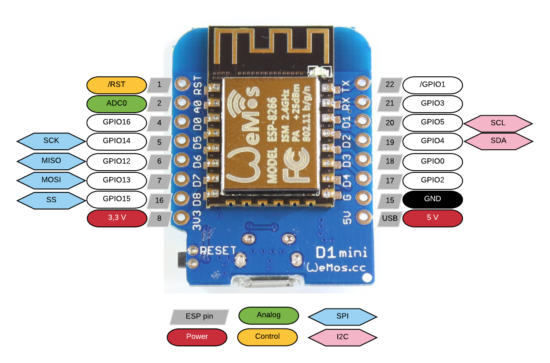
ESP WiFi development boards. These board seem to have lots of pins broken out and typically a USB connector. Since these boards have more features (voltage regulators, compatibility with other boards’ form factors, USB communication built-in), they’re going to be more expensive. There’s the Adafruit Huzzah, the Sparkfun ESP Thing, and then something called the ESP Wemos D1.
There are several different ESP modules and boards which have varying amounts of space from 512kb to 4MB and varying amounts of pins from 2 to 24 pins. These modules all tend to have different names (ESP-01, ESP-07, etc, etc) but are all known as ESP8266.
The ESP modules require 3.3v, so a 5.0v USB or other source will fry them. Plan accordingly. Some development boards have voltage regulators on them to adjust the power going to the module.
I’m ordering several boards off of Aliexpress. I’m getting a few Wemos D1 boards, since they’ll be easy to prototype with2 , and a few ESP-01 breakout boards and a single programmer to toss into a project. Then again, at <$3 a piece for the Wemos boards and <$2 a piece for the ESP breakouts, it doesn’t make a ton of sense to stretch to put the ESP-01’s into a project. My thinking is that most any project I build will only use a pin or two and not be too terribly complicated anyhow, so that once it’s been prototyped I can just burn it into the ESP-01’s and permanently install it into a project.
I’m not exactly sure which what WiFi enabled things I’d like to build yet. 3 Here are some ideas:
A pair of tap lights that are connected over the internet. I’d tap one before I left work, it would flash a color to let me know it sent a message, and the other one at home would light up to let my fam know I was on the way. I guess it’s similar in theory to this.
A button that will email or call my cell in 2-5 minutes from the time I press the button. Useful when I know someone who stepped into my office isn’t good at taking a hint. Or when I need to get off a conference call.
A button that can be used to log simple events. Might be useful at work in a variety of ways.
A button that will automatically start a print job on my WiFi enabled 3D printer.
Solder in headers, connect via USB, drop in breadboard, prototype away [↩]
Sometimes I will buy a few parts I know will be useful, spend some time tinkering with them, and then later build something when inspiration strikes. [↩]
Just seeing a post and pile of code about a project isn’t always that interesting. The nifty thing about this project is also one of the problems. They’re cosmetically identical – so you can only tell which one you’ve got by activating it. :)
I couldn’t be more pleased with the way this project came out. I basically took my daughter’s setup based off an Adafruit Circuit Playground, built a more specialized (and louder!) version into a breadboard using an Adafruit Trinket, and then ported the entire design into an ATTiny85. The only thing I would change about it would be to add a socket for the ATTiny to make it easier to modify down the line.