Real life sonic screwdriver

This morning I received an e-mail from Bre out of the blue introducing me to Travis Goodspeed.  Apparently Travis has been working on building sonic screwdriver guts out of the GoodFET, a universal JTAG programmer, a “sonic screwdriver of hacking.”  Travis suggested a GoodFET could be programmed to act as a TV-B-Gone, light show, or any number of other things.  Given that his circuit board is about 3″ x 0.85″ x 0.2″1 , there shouldn’t be a problem finding space for it in the sonic screwdriver I’m in the middle of designing2

Freaking sweet.

So, here’s my real life sonic screwdriver wishlist:

  • Lights.  Red LED3 , white LED4 , green LED5 , and a UV LED6
  • An actual screwdriver bit or spot where you can attach a screwdriver bit.  It would just be cool to have a sonic screwdriver that could be used as a screwdriver.
  • A shakey Tic-Tac container style recharger.  Having a sonic screwdriver that doesn’t need batteries would be awesome.
  • A tiny speaker that played the sonic screwdriver sound.
  • A tiny magnet.  I remember watching Doctor Who back in the day, black and white old school episodes, where he used his sonic screwdriver to take screws out of things, bolts out of doors, etc in the worst stop motion animation the BBC could get away with.  Still, if this sonic screwdriver had a magnet, it could actually affect a physical change via magnetic force.
  • TV-B-Gone.  On the episode “Midnight” Doctor Who shuts off a bunch of TV’s using his sonic screwdriver.  This would be an INCREDIBLE feature!
  • Flash drive and/or mini-memory card reader.  Perhaps with the entire library from PortableApps.com installed.
  1. For those of you non-imperialists out there: 76.2mm x 21.59mm x 5.08mm []
  2. TBuser, if you want to help, lemme know! []
  3. For night vision.  Also, there are suggestions that a sonic screwdriver can have a “red setting.” []
  4. As a flashlight. []
  5. The 11th Doctor’s screwdriver has a green light. []
  6. For making things fluoresce such as secret messages, blood stains, and monsters. []

MakerBot Origami

Or, “Design Constraints and Creativity”

Origami is another of my hobbies and it is all about design constraints. 1 The rules are simple2 – one square sheet of paper only manipulated by folding. 3  Yet, within these rules it is theorized that a sufficiently skilled artisan can design and fold any arbitrary figure.  I find folding origami to be at once cathartic and contemplative. 4

Pondering the design constraints within origami reminded me of one of my own recent designs – the 3x2x1 Rubik’s style puzzle cube.  Quite apart from the medium or subject matter, I really liked the idea of a single print job resulting in parts that could be immediately hand-assembled without tools to form a useful object.  Then I thought – if the design constraints are one of the things I like about this design, what else is possible within these same constraints?

Thus, I propose a new style of “MakerBot Origami”:  One MakerBot print5 , multiple components6 , no tools or hardware7 .

What’s the coolest most awesome thing you can design within these constraints?

Update:  Cyrozap – sory fore mispellnig yoru mane.

((I waffled on that title.))
  1. I waffled on that title. []
  2. Modern origami rules, anyhow. []
  3. Designing an origami model is not about figuring a way to cheat those rules – rather a way to work within them to achieve a desired goal. []
  4. I recall one origami master referring to the folding of a particularly difficult and rewarding model as invigorating. []
  5. Or, as Cryozap Cyrozap calls them, “production file.” []
  6. Otherwise, people would be making whistles. []
  7. Thus, no bottle openers []

If I only knew then what I knew now

I’m going to warn you right now, this post has nothing to do with RepRap or MakerBot.

Three years ago I was  unemployed with a big fat mortgage payment.  The year that followed my newfound unemployment was a roller coaster.  I took contract work for others, I had a few small clients of my own, taught myself how to program in PHP/MySQL, built my first website, tried to turn that website into a business, did some freelance programming, and generally did whatever I could do in order to make ends meet.  It was an exciting and scary time.  About a year after becoming unemployed I accepted an unsolicited job offer and have been there ever since.

I wish that I had read Tim Ferriss’ Four Hour Work Week and Guy Kawasaki’s Art of the Start back then.1  I just finished reading the FHWW for the first time and I’m glad I bought it.  Like Reality Check and The Art of the Start before it, these are books I’m positive I will be using as reference manuals.  It would have been sooo helpful to have Guy’s book around when I started my first website business.  I needn’t have learn so many lessons the hard way.

The same goes for the FHWW.  Tim’s book includes a lot of advice that would have been invaluable to me as an unemployed entrepreneur-by-circumstance2 .  Basically, when I had a surplus of time and deficit of money.  With a steady job I no longer have a deficit of money3 , but I do have a deficit of time.  Some days I will daydream about what I could accomplish if only I had a little more time in the day.  I won’t know until I try, but the Four Hour Work Week may just be my chance to find out.

Suffice it to say, I’ve read both books and will probably re-read both again soon.  If you’re unemployed or want to start a business4 , you should definitely pick up both of these books.

Okay, back to your regularly scheduled nonsense.  :)

  1. Guy’s new book Reality Check is an updated and expanded version of “The Art of the Start.” []
  2. As opposed to an entrepreneur-by-choice []
  3. And, by no means a surplus!  Haha! []
  4. Perhaps a MakerBot or RepRap based business? []

Printable Sonic Screwdriver progress

STL sheet for printable sonic screwdriver
Sketch of Screwdriver

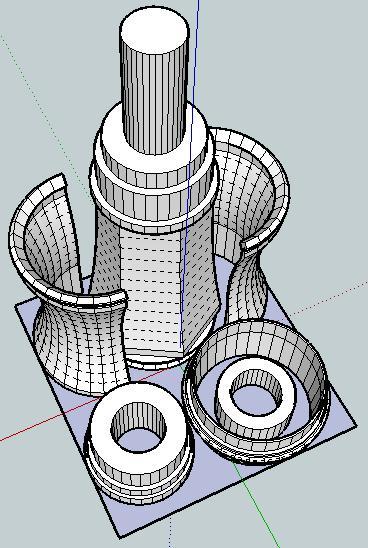
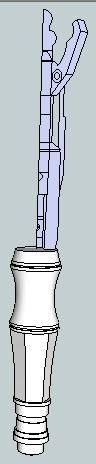
Off to the left is a picture of what the finished sonic screwdriver should look like.  Here’s a picture of the parts I’ve designed so far.  Assembled properly, these parts should be able to be assembled into the lower half of the sonic screwdriver.

I’ve arranged the parts so that they have a less than 60mm x 60mm footprint on the build platform.  I would really like it if the final product could be printed all on one build plate and assembled without tools or additional non-printed pieces.

After my recent design-print fail, I’m going back to the drawing board (slightly)1 wiser.  If nothing else, I like to think what I have so far is pretty neat. 2

  1. Make that very slightly. []
  2. Even if it doesn’t work at all. []

MakerBot Calibration

After my design-print failure I thought it was about time I recalibrated my ‘bot:

  1. Starting from scratch, I’m using the 0.5mm test pieces from Spacexula’s calibration set.  Before starting I set Skeinforge->Carve->Layer Thickness (mm) to 0.4.  Thus, I came to test piece 815.1.  The piece came out well, but I noticed that where the Z axis raises there is some slight blobbing and just before the blobbing, some sparse areas I can see through.  Otherwise, great interlayer adhesion.  The height of the piece is 10.25, 10.31, 10.30, 10.55.  Throwing out the high and low, there’s an average of 10.305mm.  It is 22.29mm x 22.29mm.
  2. Skeinforge->Carve->Layer Thickness (mm) to 0.38.  Test piece 815.2.  Again, slight blobbing, very small sparse areas and great interlayer adhesion.  Piece height is 10.39, 10.40, 10.18, 10.19, we’ll call this 10.29mm.  It is 22.41mm x 22.13mm.
  3. Skeinforge->Carve->Layer Thickness (mm) to 0.36.  Test piece 815.3.  Slight blobbing, very small sparse areas and great interlayer adhesion.  Piece height is 10.25, 10.31, 10.14, 10.30, we’ll call this 10.275mm.  This one was 22.33mm x 22.29mm.

Design-print fail

I’ve been slowly working on the design of a printable (and fully MakerBottable) sonic screwdriver.  This model of the sonic screwdriver is built up of a number of concentric cylinders, has several significant overhangs well in excess of 45 degrees, and is larger than the MakerBot’s built capacity.  In order to deal with these design problems, I modeled it in sections.

In order to make the overall result something I could just pop/snap/slide together I designed it making some sections which were split vertically and other sections which slide around those sections to keep them together.  In order to make the parts quickly printable I designed all the parts at around 0.5mm thickness.

About 40% of the way through the print one of the vertical sections wasn’t coming out properly – probably because it was too thin.  The parts were too thin and flexible and ended up tearing between layers and just being too flimsy.

I also noticed something odd – the extrusion was too thin on that side of the model.   I can’t be sure why this is happening – but I suspect it’s due to the extruder not getting a good enough grip.  Perhaps I need to floss the extruder pulley or install a new extruder idler wheel.  However, it doesn’t explain why the extrusion was too thin on just that one side and no other spots.

Suggestions?

Make(rBlock)Shift #1: MakerBot, Mineshaft, Tiger Solution

The recent Make(rBlock)Shift #1 posed this conundrum:

You’ve got a MakerBot, a laptop, unlimited plastic and electricity.  You are trapped in a mineshaft with a tiger.  How do you get out?

Dave’s suggestion was close, but no cigar.  The correct answer is:

  1. Design and print a second mineshaft.
  2. Throw tiger down second mineshaft.
  3. Design and print a tunnel to the surface.
  4. Walk out of mineshaft.

((This reminds me of an old “quiz” attributed to Andersen Consulting.))

Electrical design help?

I recently bought the Perhaps with a joule thief?)1  Since I know very VERY little about electronics, I’d appreciate some diagrams, descriptions of parts, etc.

My end goal is to install this device into a MakerBot made replica of the 11th Doctor’s Sonic Screwdriver.

If you’re interested in this project or just want to help, I’ll gladly accept any assistance.  Let me know if I can help with any printing projects in return.

Thanks!

  1. Why do I get the feeling I’ve seen the guy on the right before??? []