Speedier DrawBot Drawings

When using my DrawBot to draw pixelated drawings (versus TSP or vectors)1 I don’t really notice a pause from the machine between each pixel.  It takes a few seconds to shade each pixel, then it moves to the next spot and starts over again.  However, when trying to draw TSP art I discovered that the time spent shading a picture obscured the amount of lag time that occurred between each drawing point!  As I tried to draw a TSP portrait of my family I found it was taking about 3 seconds between each little point – which translated to a VERY VERY long time for a VERY small drawing.

When I asked Sandy about this, he suggested that this lag would be eliminated by drawing from an SD card.

Sandy’s current setup, which allows for computer free printing, consists of an Arduino Mega 2560 R32 , a MicroSD card breakout board3 , and an Adafruit Motor Shield4 .  Thus, the electronics setup would cost about $100 if you were starting from scratch, or another $80 if you have been following along at home and have a similar setup to mine.  Apparently the problem is you can’t just shove a MicroSD card into an Arduino.  If you try to add one to an Arduino, then the card shield will end up taking up the pins necessary to use the Motor Shield.  Since the Arduino Mega has a lot of extra pins, some of those can be used towards accessing the MicroSD card.

However, I thought I had seen an Arduino that had a MicroSD slot on board. 5  When I searched around Adafruit, I found this Ethernet Shield R3 with MicroSD connector6 .  Not only does this little shield fit my existing Arduino Uno, have a MicroSD slot, and have an Ethernet port, but it also has input pins so that it can be stacked!  This makes me then wonder…  Could I just pop this $45 board between my Arduino Uno and Motor Shield, add some software and get cooking?  I have to admit, the idea of spending $45 more, rather than $80 more for a Mega and MicroSD breakout board appeals to me.  I suppose there’s the added benefit that I might be able to run a REALLY long ethernet cable to the ‘bot if I so desired since it would have a built-in ethernet port on the Ethernet Shield.

Now, I’m the first to admit that I know next to nothing at all about programming Arduinos or fiddling with such things.  I’m just a fair hand at slavishly following some other person’s excellent directions.  Please do me a favor and let me know whether you think adding this Ethernet shield between my Uno and the Motor Shield will or will not work.

Default Series Title
  1. Actually, the TSP drawings ARE vector graphics… []
  2. $65 at Adafruit []
  3. $15 at Adafruit []
  4. $20 at Adafruit []
  5. Spoiler alert: I was wrong []
  6. $45 at Adafruit []

Restarting a Stalled DrawBot Drawing

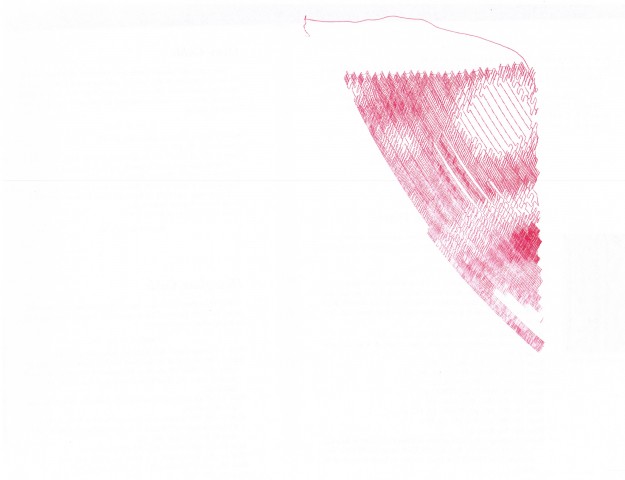
Over the last two days or so I’ve drawn the largest picture yet with my DrawBot.  I started it on Friday night and, with numerous pauses and other misadventures, finished it this morning.  The drawing is roughly 12″ x 18″ or so. 1  With no apparent rhyme or reason the drawing would pause numerous times.  I would estimate about 25 or so.  Also, the pen had a difficult time towards the end.  I believe this was in part due to the angle of the pen on the drawing surface and the quantity of the ink left.  As of this morning I was still using version 1.1.2, but I’m installing version 1.1.4 right now. 2

Here are some additional thoughts:

  • In an earlier post I had mentioned I was having stalling problems while drawing.  Sandy asked whether I was able to change serial ports to a different one and back again.  The answer is “sort of.”
  • When there’s a stall, here’s what I do:
    1. Click “SETUP->SERIAL PORT…
    2. Click on some other serial port other than the one I’ve been using
    3. Disconnect and then immediately reconnect the USB cable from the computer
    4. Click on the original serial port I had been using
    5. As soon as the Drawbot reestablishes a connection with the Polargraph controller software, it starts drawing right where it left off
  • I used to export a copy of the existing queue before doing all of this, and while it is still a very good idea, it doesn’t seem necessary.
  • This exact process has worked several times in a row without a problem.  Interestingly, step number 3 above3 is critical.  If I exclude this step the program crashes.
  • For this drawing I used a Pilot Precise Rolling Ball V5, extra fine tip, black.  I had used a red pen of the same make for a prior drawing and it worked reasonably well.
  • I’m in the process of designing a new pen gondola.  I think something that can angle the pen downwards would help the pen apply ink to the page.
  • Interestingly, I noticed after about 80% of the drawing was done the pen had a little bit of paper fuzz on it.  Once I removed this, the pen seemed to work a lot better.
  • The pen stopped drawing completely after about 85% of the drawing over all.  This was a bit disappointing.  However, since I was drawing from the top right to the bottom left and the version of the Polargraph controller I was using allows you to specify which area to start from, I just restarted the same drawing from the bottom right corner and ended up with a very satisfactory result.

In other words, it’s a nice day to start again.

Default Series Title
  1. I rolled it up and gave it to a friend before I thought to take a photogram []
  2. One of Sandy’s latest posts suggests there’s a 1.1.5 available, but I couldn’t find it. []
  3. The disconnect and reconnection of the USB cable from the computer []

DrawBot – Pen Selection, Part II

I believe my next challenge, aside from better DrawBot calibration, is to find a good pen and paper combination.

This afternoon after I got back from a meeting, but before I went back to the office, I stopped off at an office supply store.  The local craft/hobby store near work didn’t have any really big rolls of butcher/craft paper – which was very disappointing.  Luckily, the office supply store had a slightly larger roll of white paper. 1

I really went there to check out the pens.  And, there were a LOT of these pens.  An entire side of one large aisle was devoted to pens.  However, since this was an office supply store, you could only buy these pens in office supply quantities for office supply amounts.  I was not about to drop $20.00 for a five pack of multi-colored pens only to find out that that style of pen just doesn’t work in a near-horizontal drawing robot kung fu grip.  I even checked out the pen refills, which were more reasonable – but the selection wasn’t there.

One thing I did while I was there was write down the name of every brand name pen manufacturer I saw.  Here’s the list I came up with:

  • BIC
  • Cross
  • Montblanc
  • Paper Mate
  • Parker Quink
  • Penatia
  • Pentel
  • Pigma
  • Pilot
  • Sharpie
  • Uni ball
  • Waterman

While I understand Montblanc and Waterman pens to be on the expensive side, I would gladly pay for a pen that “just worked.”  I would point out that the Pigma was no where to be seen at the office supply store.  This is a really nice quality art pen and I’m actually surprised I didn’t see any of them when I was at the craft/hobby story yesterday.

One other side note… while at that craft/hobby store I noticed fountain pens.  I’ve never tried to write with one, but I did wonder how effective they would be in a nearly horizontal orientation.  It could result in some very cool drawing effects.

But, for now I think I’ll focus on robot calibration for the moment while I ponder this move.  In the meantime, if you’ve got a pen suggestion, please let me know!

Default Series Title
  1. For slightly cheaper than the craft store too! []

DrawBot – Drawing Success(ish)!!!

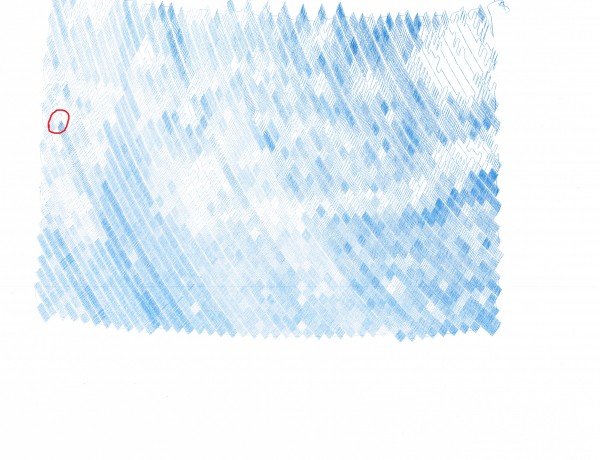
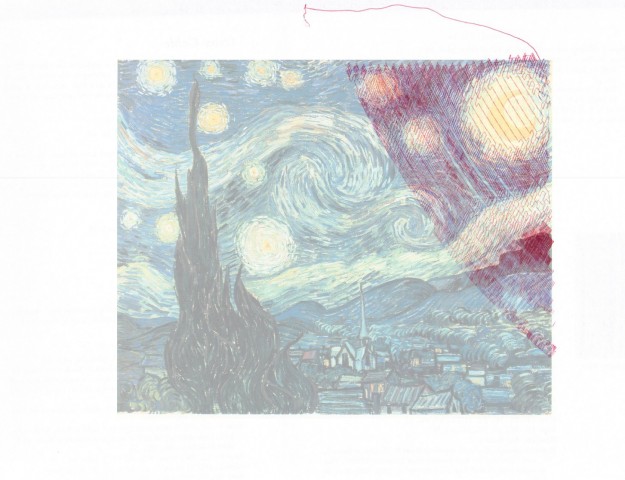
Starry Night by Van Gogh, drawn by a freakin’ narcoleptic robot

I think that turned out rather well!!!  If you look closely at the area circled in red in the next picture, you’ll see where there is a discontinuity in the line.  You may have to look at the large version to really see where this happens.

Starry Night by Van Gogh, drawn by a freakin’ narcoleptic robot, with the error circled

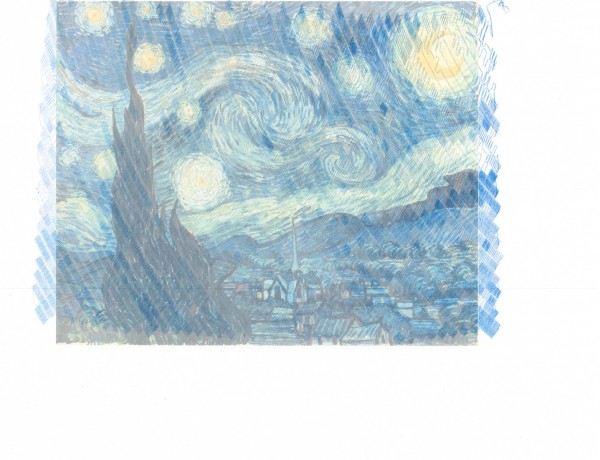
I suspect that my attempt to fix the stalled drawing probably did not have a role to play in the robot drawing off the top edge of the paper.  I think that is my fault for badly centering the paper on the robot.  Let’s see it again, without the red circle, with the original image overlaid.

Starry Night by Van Gogh, drawn by a freakin’ robot with narcolepsy, overlaid the subject image

There is clearly some calibration and whatnot to be done, but I’m still amazingly pleased with the results.  As much as I’ve blogged about drawing robots, the entire process from assembling parts ordered online to having a machine that actually draws stuff has been amazingly painless.  Based on the image above, it looks like I need to:

  • Adjust the aspect ratio, so that the image isn’t made too wide by the drawing process.  I suspect this has something to do with the “Setup->Machine Width” setting.  That was the setting that caused the drawing to be unnaturally narrow.
  • Adjust the amount of line that is unspooled in the center of the drawing.  I suspect this has something to do with the “Setup->MM per Rev” setting.  I have nothing upon which to base this suspicion except that my feeling is the robot is spooling out too little line.  I suspect that if I tell it that the spool is slightly smaller (closer to 47 than the 50 I’m using now) I would end up with a better result.
Default Series Title

DrawBot – How to Recover from a Stalled Print!

I should really have entitled this post “How to mostly recover from a stalled print.”  Several times now I’ve had a problem with the DrawBot stalling out and stopping a print.  When this has happened, hours can pass and the little ‘bot will do nothing at all.

Such as last night.  It was probably 80% done drawing Starry Night when it … just… stopped.

Here’s what I saw and here’s how I (mostly) fixed it:

  • The Symptoms
    • No DrawBot movement1
    • No scrolling of the command queue
    • The ‘bot status read “BUSY [insert normal seeming string command I didn’t write down]”2
    • The motors were quite warm
    • And the poor little Motor Shield was warm as well3
  • The Fix45
    •  I figured that, for whatever reason, the little ‘bot just seized up – but that perhaps if I could get it to respond to commands I might set it back on track.
    • The control software was responsive enough that I could “Queue->Export Queue“, which I did.
    • The problem with trying to reset the board or the control software and just feeding it the remaining part of the queue is that it wouldn’t remember where it was.  So, I figured if I could convince it that it was already where it was supposed to be, it might just continue on as if everything were okay.
    • I had seen from prior command queues that the code, “C09,NUMBER1,NUMBER2,END” appeared to be the way the machine would apply “Input->Set Pen Position.”
    • I then looked at the code that I had exported from the queue.  The first item was:
      • C05,3103,4350,29,133,END
    • So, I edited the text file so that it read as follows:
      • c09,3103,4350,END
      • C05,3103,4350,29,133,END
      • …the rest of the command queue
    • Which I believed essentially tell the ‘bot that it was where it was supposed to be and to continue on as if everything was normal.
    • I then disconnected the USB cable
    • Closed the control software
    • Restarted the control software
    • Reconnected the USB cable
    • Reestablished contact with the ‘bot, “Setup->Serial Port” and selected the port of choice for my laptop
    • Clicked the queue to start it up again…
    • It seems to have worked – but may possibly have shifted up one pixel.  This is why I say this was mostly a recovery.  I suspect that if I should have moved the pen down a little and see if I could get it to draw the next pixel in line.

I’ll scan and post this drawing as well and will point out the spot where I tried this little fix.

Default Series Title
  1. Doctor, she’s been acting listless… []
  2. … and unresponsive… []
  3. …and has a fever!  What should I do?! []
  4. VERY nearly almost called this the Cure and linked to a YouTube video.  It’s really just too damn early in the morning for me to write such a thing or you to read such a thing.  As much as I like the Cure, they’re not morning music, you know? []
  5. Like the Smiths []

DrawBot – Calibration

Polargraph Calibration by Sandy Noble

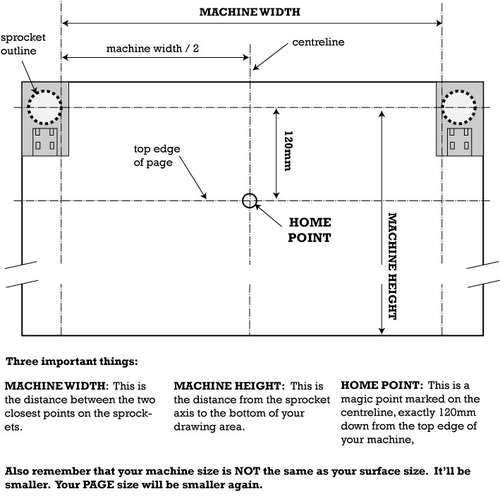
Calibrating my DrawBot was apparently important to its operation.  Who knew?!  If you’re following along at home, you’ll definitely want to check out Sandy Noble’s instructible on Polargraph calibration.  I’ll put my settings here, but they probably won’t be that helpful to you unless you’re using the same exact equipment and hardware as I am.

  • Setup->MM per Rev = 50
    • Based on the actual spool center diameter, this should be 47.  But, with some line wound onto the spool, it should be more like 54.  So, of course, I chose something that was neither.
  • Setup->Steps Per Rev = 400
  • Setup->Machine Width = 844
    • Although the “Machine Width” is defined by Sandy as “The distance between the two closest points on the sprockets,” I used a different figure.1  Since my machine uses spools, rather than sprockets, and the spools are unwound on the far side of the spool, I measured from the far edge of the spool’s core the the other far edge of the other spool’s core.  I figure this is probably the best measurement of the width of the line available to the machine.
  • Setup->Machine Height = 848
    • This is a relatively arbitrary specification given that my spools have about four times as much filament than I could use in my current configuration.  I intended this to be 844, but must have typed it in wrong.  :)
  • Setup->Page Width = 216
    • Rounded up from 215.9, which is 8.5 inches converted to millimeters.
  • Setup->Page Height = 279
    • Rounded from 279.4, which is 11 inches converted to millimeters.
  • Setup->Pen Tip Size = 0.12
    • With my 2’x4’x0.5″ board covered in butcher paper, I’ve marked out on the paper the locations of the various important lines for my machine.
Default Series Title
  1. Heaven forbid I do something normal, right? []

DrawBot – Why are you crying?

Starry Night by Van Gogh, drawn by a freakin’ robot with ADD

After about half an hour I noticed my drawing robot was not making the low scritchy scratchy humming drawing noise.  I’ve started the drawing again…  It looked like it should have been working, the controller software indicated it was still connected, the command queue was still loaded, the Arduino + Motor Shield were still lit up, but it just wasn’t moving.

In retrospect, I should just have hit the reset button on the Arduino.  I think that would have made it pick up with the last command.  But, then I wouldn’t have the lovely picture above to show you!

Actually, I’m really really happy with the drawing quality.  Check out what it looks like when overlaid the subject image:

Starry Night by Van Gogh, drawn by a freakin’ robot with ADD, overlaid the subject image
Default Series Title

DrawBot – Printing!

I’ve actually printed something using my DrawBot!!!  Would you like to see it?!

DrawBot test print #4

As you can see, this is a print of Van Gogh’s Starry Night.  It has a few problems.  First, the pen was non-ideal.  This will take some experimentation.  Second, the image, as anyone can tell you, is mirrored.  Third, the image was supposed to be much larger – almost as wide as the entire A4 page I’ve scanned in above.  I fiddled with some settings last night, but didn’t accomplish much.  I’ll try again tonight.

However!  I’m really very encouraged!  It actually drew something that roughly corresponds to the thing I’ve asked it to draw!  I’m looking forward to playing with the settings.  The robot is fairly quiet – it’s propped against a wall about seven feet from where I’m sitting and the sound of operation is barely noticeable above the television.

Default Series Title

DrawBot – The Breakdown, Part II

Since my prior cost breakdown post, I’ve invested a little more in this project.  Thankfully, this hasn’t been a project where I’ve been throwing money at the end goal.  Overall, it’s been incredibly cheap with the cost of failure at the most delicate points being quite low.this help in choosing the steppers and power adapter.  Here’s what I bought and from where:

Right now the robot is probably close to its final form and I don’t anticipate any further expenditures.  Someone who has a box of electronic stuff could almost certainly build this robot for next to nothing.  Many other people have spare Arduinos, steppers, stepper controllers, and power supplies.  If I just purchased the bare minimum for this project and used scrap stuff from around the house, I probably could have built this robot even cheaper.

Default Series Title
  1. I couldn’t think of anything else I couldn’t live without!! []

DrawBot – The Assembly, Part VIII

Well, my newly designed motor mounts, while cool, just aren’t working.  If I were committed to using that long pine box, I could probably make a go of them.  I’ve tried several variations on this robot, and nothing has really worked so far.  Here’s what I’ve tried:

  1. In a box, mounted to the wall
    1. This just didn’t work.  The spot I found on the wall was in our robot room, behind my monstrous card catalog.  It was difficult to get to, the laptop I had it hooked up to wasn’t really talking to the robot, and I didn’t even get it fully hooked up in that location before I decided it just wasn’t going to work.
  2. In a box, under an easel
    1. In a fit of inspiration I realized that I had a painting easel, a rather nice one at that.  I took an old new canvas1 , put it on the easel, put the easel’s feet inside the long pine box, ran the monofilament line from the motor, through holes in the pine box, up behind the canvas, through an eyescrew on top of the canvas, and down over the front.  This was terrible.  It creaked, shuddered, and the pen sputtered around the front.
  3. In a box, on an easel
    1. Not ready to give up on Project Easel, I tried to put the pine box on top of the canvas and hold them together in the easel.  This really didn’t work.  Because of the location of the motors in the pine box, the canvas was either going to block the holes for the monofilament line or I’d have to run the line through the top of the box, which would have resulted in the same creaky, shuddering, sputtering problem of using the line through a hole in the box as if it were a pulley.  Either way, the entire assembly just wasn’t stable on the easel which did not want to hold it together.
  4. Bolted to a chunk of wood
    1. I actually have some spare plywood, but it’s been in the garage for a while and has a weathered look to it.  It also has a large 1.5 foot radius quarter circle cut out of it.  I figure if I’m going to keep this inside, I might as well spring for a new piece of wood.  A bit over $14 at the hardware store and I was in business.  Now that I’ve given up on my nifty motor mounts, I designed and printed a dead simple motor mount.  I could have accomplished much the same result by just drilling some holes in a piece of scrap wood. 2  I’ve also abandoned a gondola of my own design. 3
    2. The final result is essentially as follows – a 2’x4’x0.5″ piece of plywood, wrapped in butcher paper, two steppers bolted to mounts and screwed to the left and right sides at the end of the plywood.  The steppers are wired to the stepper motor in the center, and the Arduino and stepper motor controller are in an ill-fitting plastic holder which is duct taped to the front top of the plywood.  The plywood is then propped up against our built-in on which my most useless laptop is sitting, ready to run the robot.
Default Series Title
  1. Old because I’ve had it for about 10 years; new because it’s still in the shrink wrap.  Now, to my credit, I have actually painted on my other canvases – this is just the last one and I completely forgot about it. []
  2. These will probably have been the very very last thing I’ll have ever printed with my black ABS. []
  3. While cool, it just did not work well at all – I made the pen holder so large it would only hold the largest sharpie made by man, it didn’t do a good job of holding the pen against the paper, and it held the weights rather awkwardly. []