Rebuilding my extruder [Draft 02/16/2010]

[I put down the title and then did nothing.  :)  I suspect the other adjacent draft about printing with PLA was related to the need to re-re-re-build my extruder.  The way extruders were built back then didn’t involve careful machining of custom nozzles and shaped channels for the plastic to flow.  Instead, the PTFE tube went into the extruder and you kinda hoped for the best.  If you had heat creep, didn’t cool down properly, etc, you had to disassemble everything and rebuild it all.  But, such was the course of the hobbyist 3D printer enthusiast in the winter of 2010!]

Drafts Zero - The Lost Blog Posts
  1. Misnamer [11/28/2010]
  2. The Lost Blog Posts
  3. Plastruder! [Draft 12/25/2009]
  4. UNTITLED [Draft 12/25/2009]
  5. Preparing to print [Draft 12/27/2009]
  6. More prints [Draft 01/04/2010]
  7. Prototype Pricing [Draft 01/19/2010]
  8. MakerBot tuning [Draft 01/20/2010]
  9. Plastic Screw Anchor [Draft 02/02/2010]
  10. Magic [Draft 02/03/2010]
  11. How are you printing with PLA? [Draft 02/16/2010]
  12. Rebuilding my extruder [Draft 02/16/2010]
  13. MY robot [Draft 02/18/2010]
  14. more things i learned [Draft 02/20/2010]
  15. First commissioned piece! [Draft 02/22/2010]
  16. MakerBot: Toy or Tool? [02/25/2010]
  17. Idea for Skeinforge settings… [Draft 03/27/2010]
  18. RepRap and MakerBot alternatives [Draft 04/05/2010]
  19. RepRap Parts for Sale [Draft 04/07/2010]
  20. Where is the Othercutter? [Draft 06/08/2015]
  21. Mendel Parts – Printed, Cast, CNC’d, Lasercut or Injection Molded? [Draft 04/12/2010]
  22. MakerBot Operator’s Manual [06/04/20210]
  23. MakerBot on CBS! [07/07/2010]
  24. New Print: Soft-Pawed Albino Stoat of South Wales Cookie Cutter [07/07/2010]
  25. House calls [07/11/2010]
  26. Digital assistant? [08/05/2010]
  27. MakerBot + Junk = Stuff! [08/06/2010]
  28. Design choices in RepRap, Goals of RepRap [08/14/2010]
  29. Upgrades and obsolescence [08/25/2010]
  30. Dear Anonymous [08/25/2010]
  31. The ultimate in customer service [08/26/2010]
  32. Open Source Makes You Smarter [08/27/2010]
  33. Getting my Plastruder MK5 running [09/06/2010]
  34. Weird new kind of spam [09/19/2010]
  35. An open letter to Ms. Word [10/18/2010]
  36. Printing with PLA again! [10/18/2010]
  37. Halloween costume too [10/27/2010]
  38. Dream jobs [10/29/2010]
  39. The nuances of time travel [10/31/2010]
  40. Printed Pink Panther Person [11/22/2010]
  41. Skein them all and let ‘Bot sort them all out [11/24/2010]
  42. The Patents for disc shooters [12/10/2010]
  43. Princess Bride with Lightsabers [12/13/2010]
  44. Dilbert comic [12/13/2010]
  45. Ultimachine PLA review [12/15/2010]
  46. Mendel to the power of 101 [12/21/2010]
  47. Potential improvements for Leonardo Voltron [12/27/20210]
  48. You can keep your filthy money [12/28/2010]
  49. I watched Primer the other night [12/30/2010]

How are you printing with PLA? [Draft 02/16/2010]

[There were two drafts with this title, one empty, and one with the single sentence below unfinished.  Up until about January of 2010 I was printing in ABS which smelled bad and warped like crazy.  But, it did print.  When I started printing with PLA I found it difficult to work with, temperamental, wouldn’t melt or it would and then clog the extruder.  I think at some point I suggested that PLA was only suitable for printing tears.  Obviously, printers, PLA, and my maturity have come a long way since.]

I’d like to know, I really would.

Drafts Zero - The Lost Blog Posts
  1. Misnamer [11/28/2010]
  2. The Lost Blog Posts
  3. Plastruder! [Draft 12/25/2009]
  4. UNTITLED [Draft 12/25/2009]
  5. Preparing to print [Draft 12/27/2009]
  6. More prints [Draft 01/04/2010]
  7. Prototype Pricing [Draft 01/19/2010]
  8. MakerBot tuning [Draft 01/20/2010]
  9. Plastic Screw Anchor [Draft 02/02/2010]
  10. Magic [Draft 02/03/2010]
  11. How are you printing with PLA? [Draft 02/16/2010]
  12. Rebuilding my extruder [Draft 02/16/2010]
  13. MY robot [Draft 02/18/2010]
  14. more things i learned [Draft 02/20/2010]
  15. First commissioned piece! [Draft 02/22/2010]
  16. MakerBot: Toy or Tool? [02/25/2010]
  17. Idea for Skeinforge settings… [Draft 03/27/2010]
  18. RepRap and MakerBot alternatives [Draft 04/05/2010]
  19. RepRap Parts for Sale [Draft 04/07/2010]
  20. Where is the Othercutter? [Draft 06/08/2015]
  21. Mendel Parts – Printed, Cast, CNC’d, Lasercut or Injection Molded? [Draft 04/12/2010]
  22. MakerBot Operator’s Manual [06/04/20210]
  23. MakerBot on CBS! [07/07/2010]
  24. New Print: Soft-Pawed Albino Stoat of South Wales Cookie Cutter [07/07/2010]
  25. House calls [07/11/2010]
  26. Digital assistant? [08/05/2010]
  27. MakerBot + Junk = Stuff! [08/06/2010]
  28. Design choices in RepRap, Goals of RepRap [08/14/2010]
  29. Upgrades and obsolescence [08/25/2010]
  30. Dear Anonymous [08/25/2010]
  31. The ultimate in customer service [08/26/2010]
  32. Open Source Makes You Smarter [08/27/2010]
  33. Getting my Plastruder MK5 running [09/06/2010]
  34. Weird new kind of spam [09/19/2010]
  35. An open letter to Ms. Word [10/18/2010]
  36. Printing with PLA again! [10/18/2010]
  37. Halloween costume too [10/27/2010]
  38. Dream jobs [10/29/2010]
  39. The nuances of time travel [10/31/2010]
  40. Printed Pink Panther Person [11/22/2010]
  41. Skein them all and let ‘Bot sort them all out [11/24/2010]
  42. The Patents for disc shooters [12/10/2010]
  43. Princess Bride with Lightsabers [12/13/2010]
  44. Dilbert comic [12/13/2010]
  45. Ultimachine PLA review [12/15/2010]
  46. Mendel to the power of 101 [12/21/2010]
  47. Potential improvements for Leonardo Voltron [12/27/20210]
  48. You can keep your filthy money [12/28/2010]
  49. I watched Primer the other night [12/30/2010]

The Lost Blog Posts

A sign in front of a desolate wasteland says "YOU ARE LOST"
But at least you’re here

I’ve got a lot of unpublished draft blog posts here.  Like a lot.  At the time I’m writing this post, I’ve got 1,134 published posts and 329 drafts.  This isn’t versions of drafts.  It’s posts that I’ve started and then didn’t publish for some reason or another.  On probably 300 different topics.  Some are, admittedly, little more than a collection of links and indecipherable shorthand texts from a madman.  However, others are filled with research, links, images, code, and were so close to publishing that I can only imagine that something distracted me before I could… squirrel!

The oldest of these dates back to December 2009 and relates to the cutting edge, new to market, MakerBot Cupcake CNC’s plastic extruder, the “plastruder.”  I don’t know that anyone would be interested in this kind of content any more, but I kinda like the idea of “Drafts Zero” and spending about 5-15 minutes dusting off an old draft and just publishing it.1

Let’s see how this goes.

Update:

  1. In just the first few posts, I discovered that I wanted to add some additional comments.  Look for these at the top, in italics and in brackets to provide context.
Drafts Zero - The Lost Blog Posts
  1. Misnamer [11/28/2010]
  2. The Lost Blog Posts
  3. Plastruder! [Draft 12/25/2009]
  4. UNTITLED [Draft 12/25/2009]
  5. Preparing to print [Draft 12/27/2009]
  6. More prints [Draft 01/04/2010]
  7. Prototype Pricing [Draft 01/19/2010]
  8. MakerBot tuning [Draft 01/20/2010]
  9. Plastic Screw Anchor [Draft 02/02/2010]
  10. Magic [Draft 02/03/2010]
  11. How are you printing with PLA? [Draft 02/16/2010]
  12. Rebuilding my extruder [Draft 02/16/2010]
  13. MY robot [Draft 02/18/2010]
  14. more things i learned [Draft 02/20/2010]
  15. First commissioned piece! [Draft 02/22/2010]
  16. MakerBot: Toy or Tool? [02/25/2010]
  17. Idea for Skeinforge settings… [Draft 03/27/2010]
  18. RepRap and MakerBot alternatives [Draft 04/05/2010]
  19. RepRap Parts for Sale [Draft 04/07/2010]
  20. Where is the Othercutter? [Draft 06/08/2015]
  21. Mendel Parts – Printed, Cast, CNC’d, Lasercut or Injection Molded? [Draft 04/12/2010]
  22. MakerBot Operator’s Manual [06/04/20210]
  23. MakerBot on CBS! [07/07/2010]
  24. New Print: Soft-Pawed Albino Stoat of South Wales Cookie Cutter [07/07/2010]
  25. House calls [07/11/2010]
  26. Digital assistant? [08/05/2010]
  27. MakerBot + Junk = Stuff! [08/06/2010]
  28. Design choices in RepRap, Goals of RepRap [08/14/2010]
  29. Upgrades and obsolescence [08/25/2010]
  30. Dear Anonymous [08/25/2010]
  31. The ultimate in customer service [08/26/2010]
  32. Open Source Makes You Smarter [08/27/2010]
  33. Getting my Plastruder MK5 running [09/06/2010]
  34. Weird new kind of spam [09/19/2010]
  35. An open letter to Ms. Word [10/18/2010]
  36. Printing with PLA again! [10/18/2010]
  37. Halloween costume too [10/27/2010]
  38. Dream jobs [10/29/2010]
  39. The nuances of time travel [10/31/2010]
  40. Printed Pink Panther Person [11/22/2010]
  41. Skein them all and let ‘Bot sort them all out [11/24/2010]
  42. The Patents for disc shooters [12/10/2010]
  43. Princess Bride with Lightsabers [12/13/2010]
  44. Dilbert comic [12/13/2010]
  45. Ultimachine PLA review [12/15/2010]
  46. Mendel to the power of 101 [12/21/2010]
  47. Potential improvements for Leonardo Voltron [12/27/20210]
  48. You can keep your filthy money [12/28/2010]
  49. I watched Primer the other night [12/30/2010]

  1. A take on the “Inbox Zero” productivity / organization strategy []

Goblin Hours, Enabled

Live Webcam Feed
Live Webcam Feed

I’ve often told my family that if it were not for them, I’d basically work all night, every night, on whatever latest project popped into my brain, and then fall asleep at the workbench/eating plank/soldering station every night/early morning.

The thing is, these tendencies just aren’t very conducive when it comes to trying to live with other people, especially those you’re semi-responsible for.1 It’s especially challenging to work in a professional environment at DayJob™️when I’m working crazy hours.  I don’t want my clients or the other people I work with realizing they’re communicating with the functional equivalent of three meth-addled racoons in a trench coat.23

I have a few ways of passing for a socially normative respectable professional.  Here are some of my coping mechanisms:

  • I’ve put several buttons into Outlook’s quick access toolbar.  The most important are:
    • “Delay Delivery” so that I can draft and hit “send” on an email, but not have it go out until a socially acceptable time
    • “Signature” so that I can easily send an email with my “mobile” email signature or my full fledged obnoxiously enormous “professional” email signature.  Why would I do this, you ask?  Well, if I want to get away with a quick reply and not really do a deep dive, I’ll fire off an email as if I were typing from my phone.  I’ll even introduce “strategic typos” to really sell the impression.  Then again, if I’m typing a really long email into my phone and want to have it appear more impressive, I’ll use the “professional” signature.
    • “Work Offline” so that I can work uninterrupted for even a little while.  Being able to shut off the firehose that is my daily work email inbox is incredibly helpful.
  • I addressed strategic typos earlier, but it’s really genuinely a real coping mechanism aside from just an email signature.  Adding typos makes it more likely someone will focus on appreciating your responsiveness and less likely they’ll get nitpicky about the content.
  • My old cell phone using Google Voice as my “personal cell phone” number.  I don’t want to talk to people, but it’s basically unavoidable.  Then again, a quick text from the phone can handle many situations.  Even better, clients feel like they really have access to me.  It’s also nice that I can keep Google Voice open on my desktop and be able to “text” from my computer and using my keyboard.  In reality, I just leave this secondary phone and just … walk away from it.  No one outside my family needs that much access to my life.
  • I’ve spent a lot of time tracking my productivity and know what days I’m the least productive.  Unsurprisingly, it’s Mondays and very especially Fridays.  This means I try to avoid meetings on these days as much as possible so that I can lean into unproductivity if I need to.  Why flog myself into working ever harder when I already know that however hard I push myself, it’s just not gonna be a productive day?
  • I really try to avoid all meetings.  Mercifully in person meetings are all but extinct.  Video meetings are nearly as bad, but at least I don’t have to wear pants.  Whenever I have a video meeting (or phone conference), I will make a special effort to ask for an “agenda.”  If you don’t have an agenda, or at least some kind of idea about what you want to accomplish at a meeting you’ll never know if you’ve succeeded at the meeting … or when it should end.  And, once I have the agenda, I will send an email with as much detail and cover as many points as possible.  Sure, no one will read it… but its’ my way of preparing for the meeting and I can keep referring back to it as necessary. I’d say in roughly 40% of situations that email is enough to torpedo the entire meeting.
  • Recently I created, with the help of ChatGPT4 I wrote an Outlook macro which will help me automate when I send emails.  Whenever the “Work Offline” button is toggled and I hit “send” on an email, it picks a random time between 7:15 AM and 7:59 AM and schedules the email to go out on the next business day.  Sure, this means people will get a flood of emails from me first thing on Monday morning.  But, it’s that a lot better than getting a stream of emails from me all weekend?
  • I hate phone calls, so I will dodge as many as I can get away with.  And, when I’m on a long phone call, I will play a recording of someone knocking on my door and asking for my attention in increasingly urgent tones, until I can get off the line.

I don’t know – maybe this all adds up to some kind of antisocial behavior or DSM IV diagnosis?  What I do know is that with these various tools I’m able to better work with others in a professional setting.

It’s a little after 4AM right now.  I’m not sure how to end this post so I’m just going to publish it.  :)

  1. In so far as I can be responsible for other humans []
  2. God, wouldn’t that be an amazing Halloween costume?!  Me dressed as three racoons dressed as me?!!? []
  3. Where was I? []
  4. Don’t @ me.  I don’t care. []

Combining Multiple Video Files

Rather than send me a single set of video files, my client’s vendor sent me… 149 separate MP4 files, ranging from a few seconds to about 11 minutes long.  I have no interest in sorting through dozens of video files, cataloging them individually, and then trying to review them in order.

While I would have thought VLC would have been a good drag-n’-drop way to stitch them all together, the version I had and the newest version available both weren’t letting me save multiple files into a single file.

A bit of googling and I stumbled across an old friend – ffmpeg!  I hadn’t used this program to transcode video since the early days of DIVX, backing up DVD’s back in the late 1990’s / early aughts.

Here’s the process I settled on for my Windows machine:

  • Created a batch file to create a list of the video files (which included spaces, commas, and all kinds of nonsense command line tools hate).  The entire contents of the batch file was:
    • dir *.mp4 /b > list.txt
  • Since I’m using Notepad++, I used the find/replace function to search / replace on “list.txt”:
    • /r/n
    • ‘/r/nfile ‘
  • Even using some find/replace magic, I still needed to adjust the first and last lines, but that wasn’t so bad.
  • Then, the videos which had been named in semi-logical pattern, were not in strictly alphanumeric order.  I re-ordered them in the text list to the order I’d wanted to view them in.
  • I dropped the FFMPEG executable, downloaded from this mirror, into the folder with the video files and list.txt, then made a new batchfile which contained the following:
    • ffmpeg -f concat -safe 0 -i list.txt -c copy combinedfilename.mp4
  • Now, I could have typed this into the command line, but since I wanted to batch certain files together, it was just easier for my purposes to have the batch file.  Plus, now I have the executable and the batch file for future use.

Anyhow, I hope this helps save someone, perhaps even myself, a few minutes of hair pulling and searching.  :)

Night Before Going to Maker Faire

Annnnnnnnnnnd…  my robot which has been working for a solid year is now completely unresponsive.

My wife’s robot is working, Dexter Starfighter’s robot is working, Kim’Dael LightingSlayer’s pendant is working.

And my robot not only doesn’t work, I have spent so much time trying to get it functional that I still don’t have a good way to mount it on my shoulder.

I could cry.

How to Uninstall McAfee AntiVirus

I got to my computer this morning and discovered a pop-up from McAfee AntiVirus altering me to some nonsense or other.  Without going into all the reasons, I don’t like or want McAfee on any of my computers.  Given when it was installed, I believe it was quietly bundled with the Adobe Reader I installed yesterday (and now uninstalled as well).

I went through the normal process of trying to uninstall a program:

  • Settings
  • Add / Remove Programs
  • Find “McAfee” and click “Uninstall”
  • When you do, you’ll see a small window pop up offering you some promotion.  However, this is where the uninstallation process stopped for me!  The window appeared too small and the text too large and the only options available to me were to close the window (in which case McAfee stays) or click on their offer (which didn’t tantalize me either).  There was no way to scroll the contents of the window to see what else was below their text and offer.
  • I realized there might be more below their offer, so I hit the “Tab” button a few times.  This caused the window to focus on the next button “Uninstall” (in white) on the bottom left and to see the “Go to Offer” (or somesuch, I wasn’t paying attention to it) button on the bottom right.
  • I clicked Uninstall and it hasn’t been back since…

Hope that helps!

Review of DriveThruCards.com

TLDR:  The cards from DriveThruCards.com (DTC) arrived yesterday and I couldn’t be happier with the result.  Great customer service, product, and value.

This slideshow requires JavaScript.

  1. Shipping:  Great
    1. 3/19/2024:  I ordered 120 cards around 2 AM PST in California.
    2. 3/19/2024:  The DTC website was updated with the following statuses:  Pending Payment Approval, Paid For, Sent to printer, Confirmed.
    3. 3/24/2024:  I received a shipping confirmation email from DTC in Overland Park, Kansas with a USPS tracking number at about 4:32 PM PST.
    4. 03/25/2024:  The date on the “External Packing Slip” included with the box.
    5. 3/28/2024:  USPS sent me a notification the package arrived around 8:29 AM PST.
    6. This was basically exactly as long as my Reddit lurking had suggested (about 10 days) it would take.

      Order confirmation and status screen
      Order confirmation and status screen
  2. Packaging:  Great
    1. The cards arrived wrapped in a cellophane band, within packing paper, inside a small box (about 5″x5″x3.5″ cube).  This was perfectly fine for these cards.  They have options for tuck boxes and other containers, but I didn’t need or want these for this project.
  3. Card Quality:  Great
    1. Text and images were sharp, legible, and colors rich but slightly darker than what I saw on my computer screen.  By tinkering with Inkscape, I would guesstimate the final card was about 5-10% less bright than what I saw on my screen.  Without comparing the cards directly against a large bright monitor, I don’t think I would have noticed this difference.
    2. When I set the deck down on a flat surface and run my finger over the side of the stack of cards, there’s a very slight variation over a few cards.  It’s barely perceptible and probably totally fine for any kind of card usage or card game except a super precise cut for casino playing cards.
    3. When the cards are viewed edge-on in a stack, you can tell see a faint bit of the card’s edge color.  I grabbed some “Magic: the Gathering” cards and looked at a mix of black and white bordered cards and noticed that even the black border cards seem to look white-ish when viewed edge on.  The slight bit of color here doesn’t bother me at all and for most purposes would be totally irrelevant.
    4. The cards were 2.503″ or 63.57 mm wide and 3.506″ or 89.05 mm tall, or about 0.2% large.  Some variation is to be expected in any order and this miniscule variation would be completely unnoticeable except I used digital calipers to measure them.
    5. The cards, printed on DTC’s “premium stock,” advertised as 11.4 pt (0.0114″) were 0.0115″ or 0.29 mm thick.  Flicking the cards against a table, right next to an actual casino poker card, they felt identical.  (The casino card has a slightly raised texture, but the flex, bounce, and flick of the card stock felt identical).
    6. Card Cut.  This is the one aspect that didn’t come out exactly as I had planned.  Ten of the cards I printed had borders, but they were visibly different widths at each end.  These cards were Premium U.S. Poker sized (2.5″ x 3.5″), the PDF itself was 2.75″ x 3.75″ (to account for the 1/8″ bleed area at each edge).  Unfortunately, I didn’t notice this until after I had used the cards a bit, so I don’t know whether top or the bottom was slightly thinner.  Since these cards are basically dividers, this isn’t a huge deal for me.  However, I’d prefer being able to get them back with an even border all the way around.

      This slideshow requires JavaScript.

  4. Customer Service:  I discussed the responsiveness of the DTC customer service team in the prior post.  They went out of their way to help me with my project – and it really smoothed things for me.

I simply could not be happier with these cards.  I will absolutely be trying them again.

Print On Demand Custom Cards
  1. Custom Cards with DriveThruCards.com
  2. Review of DriveThruCards.com
  3. Designing Custom TCG Cards and Proxies

Gluing Polypropylene Corrugated Plastic (Coroplast)

Late at night, when I should be doing work or, better yet, sleeping, ideas spring to mind.  I’ve created a few small projects from big sheets of coroplast or polypropylene corrugated plastic.  This is the kind of material you see in use for yard signs.  They are big, cheap, sturdy (as long as you’re not bending it with the grain), and lightweight.  They can be bent or cut easily.  However, since it is polypropylene, it is fairly resistant to most glues, adhesives, and paints.

Duct tape and hot glue work well, but have their downsides.  The duct tape can be unsightly and not very good for “laminating” several layers together.  Hot glue works well for laminating layers, but it cools so fast that it’s hard to glue big sheets together.

Anyhow, all of this is to say I found a great website by Christine DeMerchant which provides a lot of information and insight on how to glue these materials together.

How to “Unthread” Emails in Thunderbird v115

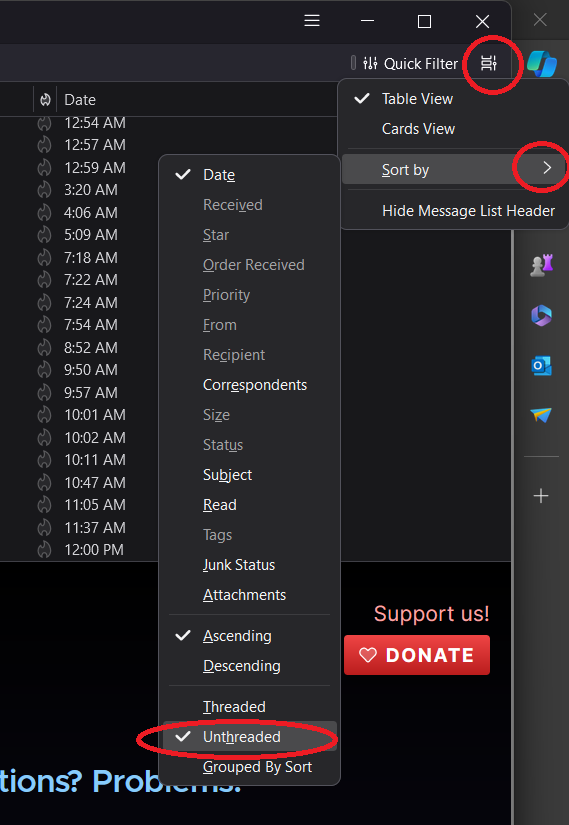
If you’re just here for the solution (or, you’re actually me, returning some time in the future to fix the problem after perhaps a Thunderbird update), here’s all you need to know:

  1. Click on the icon in the top right that looks like a film strip which displays the “Message list display options” when the mouse hovers over it.
  2. Sort by -> Unthreaded
Just follow these steps, starting with the menu at the top right

I suppose there are times when threaded email view is useful.  However, when reviewing emails at a glance, it’s incredibly frustrating because your inbox will show you have a new unread email, but you won’t know which thread it’s nested under.

I found numerous “solutions” online for how to unthread Thunderbird emails, but none of them worked for me since the answer wasn’t buried in any of the settings, the hamburger menu didn’t help, and nothing relevant showed up in the help sections or even in searching the settings section.

Of course, right clicking on the columns allowed me to hide the “thread” column, but that didn’t stop emails from actually being threaded.

I spent some time searching for the answer, watching snippets of videos, and finally stumbled across the solution here after seeing multiple people voice the very same frustrations I did, discussing.  Hopefully the above screenshot helps you (or me!) solve this problem in the future.

Test