I’m guessing I’m not the only one who would be interested in such an add-on for my MakerBot. It’s not a terrible burden to have a computer constantly connected, but it would be nice to have the MakerBot slightly more independent of a computer. Just bring plenty of plastic, electricity, and an SD card with your favorite things.
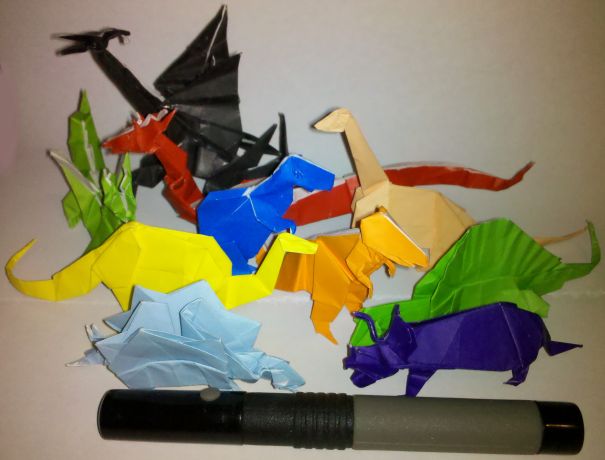
There’s a new poll to the right. Basically, “Should Makerbot hire MakerBlock to blog for them?” So, take 5 seconds and cast your vote. Then, on to pictures of dinosaurs with lasers!!!
The guys at MakerBot just posted a job opening for a MakerBot blogger. As if their list of qualifications wasn’t daunting enough, the tweet that follows… Well, I’ll just let it speak for itself.
I never meant for this to happen. It just sort of happened. It all started so innocently – reading about the RepRap project, going to the MakerFaire, buying a MakerBot, starting this blog, extra plastic here and there… and then MakerBot advertised for a blogger.
Tell the kids I love them, don’t forget to feed the dog, and there’s a post-it on the dresser for my boss.1
Origami is another of my hobbies and it is all about design constraints. 1 The rules are simple2 – one square sheet of paper only manipulated by folding. 3 Yet, within these rules it is theorized that a sufficiently skilled artisan can design and fold any arbitrary figure. I find folding origami to be at once cathartic and contemplative. 4
Pondering the design constraints within origami reminded me of one of my own recent designs – the 3x2x1 Rubik’s style puzzle cube. Quite apart from the medium or subject matter, I really liked the idea of a single print job resulting in parts that could be immediately hand-assembled without tools to form a useful object. Then I thought – if the design constraints are one of the things I like about this design, what else is possible within these same constraints?
Thus, I propose a new style of “MakerBot Origami”: One MakerBot print5 , multiple components6 , no tools or hardware7 .
What’s the coolest most awesome thing you can design within these constraints?
Objectives: What do you expect the students to learn?
Structured Lead In: How will you engage the students and connect the new learning to their life?
Instructions: What are you going to teach? How are you going to do it?
Independant Practice: What will you have the students do to demonstrate their new learning?
Evaluation: How will students know if they have learned what you’ve taught them?
Pssh. No problem. I can bang out a lesson plan that covers those points. How’s this:
Objectives. I expect the students of my lesson plan to learn self reliance, designing for novel problems, designing under less-than-ideal conditions, improvisation, and respect for endangered species.
Structured Lead In: Nothing is more immediately engaging that being thrown into a mineshaft. Wait, correction, being thrown into a mineshaft with a tiger. There will be a direct correlation between design efficacy and the application of their learning to their life in a very real and immediate sense.
Instructions: I’m going to teach my students using a series of mineshafts and large predators. They will learn how to apply technology for problem solving, iterative design, and preservation of endangered species.
Independent Practice: Survive a mineshaft and a tiger.
Evaluation: One of the great things about this lesson plan is that there are many ways to successfully complete the assignment. All are essentially the same in their inception, beginning with “Using a MakerBot the student…” and then quickly diverge to multiple “win conditions.” The most common solutions found my my students are:
Using a MakerBot the student escapes the mineshaft, but leaves the tiger, shark, or tiger shark inside. Extra credit: Student expresses remorse for leaving said animal in the mineshaft.
Using a MakerBot the student builds a PLA tiger, shark, or tiger shark and has it fight (or woo!) the other tiger, shark, or tiger shark, student escapes in the confusion. Extra credit: While the PLA and flesh tigers, sharks, or tiger sharks fight (or flirt), you build a second PLA carnivore and ride it out of the mineshaft.
Using a MakerBot the student escapes the tiger, shark, or tiger shark by digging even deeper into the mine and builds a new civilization underground inside the mineshaft. Extra credit: The student gains the trust and respect of the underground dwelling mole people and teaches them how to use the MakerBot as well.
Using a MakerBot the student builds a new civilization of tiger, shark, tiger-shark, and robot hybrids. Extra credit: This new human/animal/robot civilization’s national currency is … love.
Using a MakerBot the student helps the tiger, shark, or tiger shark to escape, and stays on inside the mineshaft. Extra credit: Student increases the MakerBot’s print resolution and builds a tiny extension of MakerBlock University, populates it with a tiny PLA version of me, themselves, a mineshaft, and a tiger, shark, or tiger shark and repeats the lesson plan on a small scale.
Using a MakerBot the student teaches the tiger, shark, or tiger shark to operate the MakerBot, thereby demonstrating their own mastery of all things MakerBot-ish. Extra credit: The student, tiger, shark, or tiger shark form their own open source hardware company building human-tiger/shark/tiger shark translation devices.
If you use any of these lesson plans in your own classroom, please link to this blog post.
I tend to see the world through WordPress eyes.1 When I find (or write) a clever bit of script that would be useful to a WordPress website, I tend to convert it into a WordPress plugin. I did this with my PieChart Plugin and a few other knick-knacky plugins.
It occurs to me that it would be relatively easy to build a WordPress plugin that searches through a post/page, finds Amazon links, and then turns them into affiliate links… I think this could be useful in several of my sites, actually.
The interesting thing about this model is that it combines some of the best parts of Darwin and MakerBot and what appears to be a Bowden extruder.
The very nature of FDM1 means that the robot will only move the Z axis a little bit every once in a while. One of the design drawbacks to the Darwin was that the heavy extruder head (motors, gears, heating elements) were so heavy that the entire robot would rock or vibrate with the lateral XY movements. MakerBot got around the heavy extruder head problem by moving the platform in the XY and moving the extruder head only up and down. This design decision isn’t without it’s tradeoffs, however. One downside is that their build area is much smaller than a Darwin. Another downside of the MakeBot design is that once the object being built reaches a sufficiently large volume or height, moving the object around quickly on the XY platform causes it to vibrate, shake, and become somewhat unstable.
One of the main improvements inherent in the Bowden extruder is that it allows you to take the heaviest parts of the extruder head, separate them from the rest of the extruder head, and move those heavy pieces to a different location. Using a Bowden extruder makes a Darwin style robot much more feasible – the small moveable print head won’t have the mass to cause the robot to become unstable.
It seems that combining either of the X or Y movements with the Z probably won’t matter all that much, since the Z axis will only move about 0.33mm or so per layer and the Z axis typically doesn’t operate at the same time as either the X or Y axis. Combining the as the new RepRap version II, Mendel, design shows us that combining the Z axis along with either the X or Y axis, but not both, can lead to a very stable configuration.
What I like about the Ultimaker design is that it would appear to incorporate some of the best parts of the MakerBot and Darwin designs. It appears to have a bolt/nut/T-slot MakerBot style assembly structure using thin lasercut wood pieces for the body. I found these parts to bolt together very quickly. Contrast this to the Darwin/Mendel structure using lots of nuts and threaded rod and printed plastic parts to hold it together. At the same time, by making use of a Bowden extruder and the Darwin body shape, it appears to be able to use most of the interior volume for printing.
I suspect it probably uses fewer parts than a typical Darwin, but I can’t be sure. I also have to wonder about the cost of lasercut wood versus the cost of nuts and threaded rod.