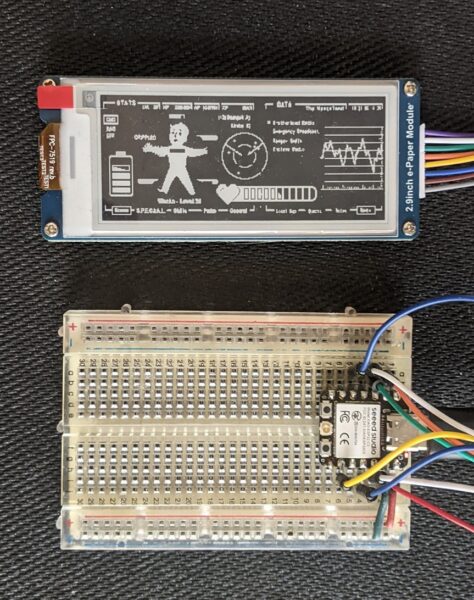
I’ve been playing with different screen designs for my e-ink display. After initially going with some “to do” style items, I quickly pivoted to playing with some more interesting screens while I was working out the best way to update the display with new content from lists. This wasn’t a totally worthless chase, however. Fiddling with various ideas and tests about updating the display and coming up with different images lead me to chase down good looking fonts (Futura variants and Roboto being attractive and friendly fonts) and fonts that look good at very small scale (UNSCII, Tom Thumb, TinyFont for TinyGo displays, and Terminus). Adafruit has a great toolchain for converting a font from an PC recognizable font to a BDF format font which is much smaller and can fit into a microcontroller.1 It involves2 using FontForge to remove unused glyphs, restrict the font to a specific bitmap size, exporting the font, then using an online tool to convert it to a BDF format.
For extra visual interest, here’s the first Fallout themed screen I uploaded and the latest:
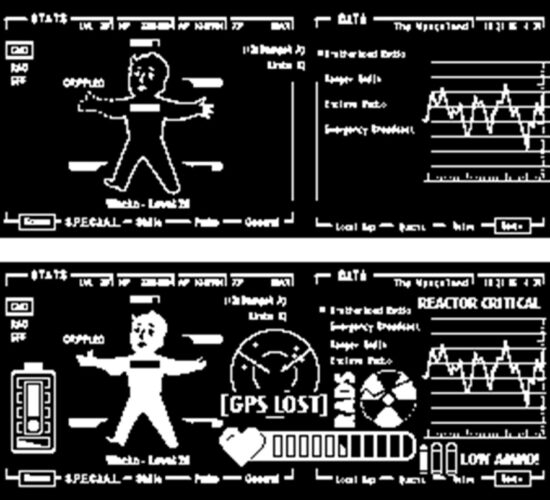
The main screen was inspired by the work of CrowTeeRobot on the RPF. I took a few screens, jammed them together, added and deleted a bunch of stuff. After all that, there was still a fair bit of negative space, so I kept adding in more things. A low battery indicator, life point indicator, a GPS lost / map indicator, an increasingly worrying radiation counter, and a “low ammo” indicator. If these end up getting installed into a PIP-Boy, I’ll probably try to add a green transparency over it to give a more retro feel.
For working with an e-ink display to go into a PIP-Boy, it really only needs to cycle through a set number of screens. This could just be done by having the MCU just play new screens every few minutes (keeping in mind the Adafruit guides recommend updates be no more frequently than every 3 minutes) or having it be slightly interactive and update the screen way less often (say every 10 minutes) but can be set to a new screen manually by pressing an associated button. However, this just requires building a few static screens, saving them as BMP files, tossing them in, and letting the MCU detect button presses, capacitive touches, or some other kind of input. There wouldn’t be any kind of need for a text overlay. That said, while I was playing with the screen, I discovered that some of the graphic text I had included was surprisingly readable at very small scale. This lead me back to my main project…
For my note / reminder / task purposes, I’m still toying with how the workflow would go. Since I want a device that is untethered from a USB cable and has
Here are some ideas I’ve gotten to work and played with:
- ESP32C3 as a WiFi access point and provides an HTML form which the phone or my computer can connect to. The problem with this is then I have to disconnect my phone/computer from the network, connect to the ESP, send an update through the HTML form, disconnect and reconnect to the router.
- Cell phone as a WiFi access point, the ESP32C3 connects and fetches data from the phone. The problem with this is then I would have to disconnect the phone from the router, let the device connect, pull data, then I would reconnect the phone to my router for regular usage again. This is pretty clunky.
- ESP32C3 connects to same WiFi network, then tries to push/pull data from a local IP address. Also possible is for the ESP32C3 to connect to a webservice via an API, but then this makes the device dependent upon proximity/access to both my home router and internet access.
- The best way forward is probably a Bluetooth connection to my phone and an associated app. I’ve written some small apps using the MIT App Inventor, so this looks like the best way forward. I’m thinking, something along the lines of:
- Use the app to create an ordered list of items
- Press a button on the device, to “wake” it – which also makes it try to connect over Bluetooth to the device it’s been paired with, and pull the latest list
- The device disconnects from Bluetooth, displays the topmost list item, and goes to sleep
- I can can press a button to start a timer until X seconds has elapsed
- When the time elapses, the device buzzes, vibrates, and/or lights up an LED
- I can then press a button to sleep or another button to advance the task to the next item
- Possibly an interval timer as well to remind me to get up and walk around / move :)
- Ah, just what I need! A new project!
- Sticky Note Timer, parts arrived!
- Seeed Studio XIAO ESP32C3 and a small sticky note display
- Brainstorming More E-Ink Stuff
- Smol Fonts for E-Ink Displays
- Tap Light Focus Timer System
- This one, League Spartan Bold 16, looked particularly good [↩]
- as best as I understand it… [↩]