More progress on a fully parametric prosthetic design
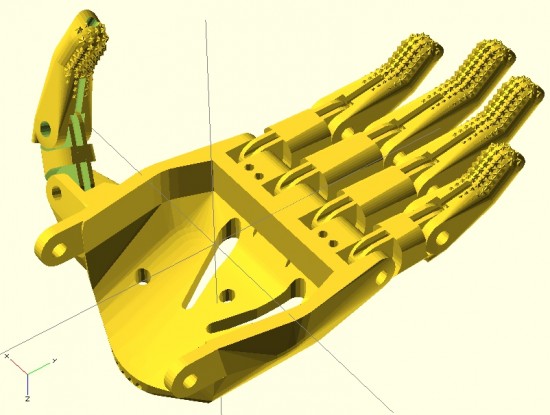
Here you can see the fingers placed appropriately with the palm. I’ve used the same “finger” designs to add a thumb.
For right now, this is just to demonstrate the progress so far. Theoretically, the only thing left to do is crank out an appropriate gauntlet to bring the entire design together. In reality, there’s still a fair amount of work to do. The design for the prosthetic palms was… not elegant. Also, I want to create a separate (but very similar) design for the thumb.1 It is possible that if I improved the finger designs, I might be able to get away without designing a separate thumb.
In the meantime, I think it looks good and would probably be functional as-is.
Onwards and upwards!
Default Series Title
I feel like the thumb should be stubbier, so I’ll go back and adjust the designs accordingly. [↩]
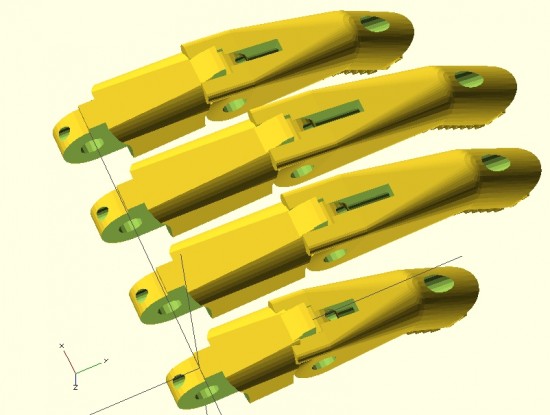
Parametric fingers – different lengths, same scale, with no distortion to hardware
I’m not ashamed to admit it – I’m proud of these parametric designs like few of my other designs. I’ve worked to make this design as customizable and organic as possible. The two modules that define each finger can be customized in two important ways – they can be lengthened1 as well as scaled up or down – without any distortion or change in the size of the holes for the hardware, elastic cords, or tension cords.
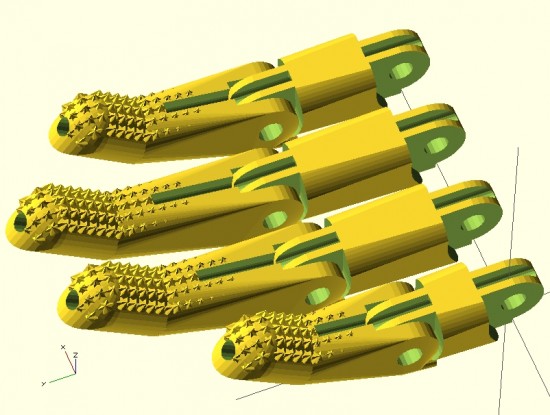
Parametric fingers – with grippy bits
Being able to lengthen2 the finger segments is important because it allows the user to create fingers of different lengths, as normal fingers are of different lengths, all without having to actually scale the fingers to different sizes and without causing a change in each finger’s diameter.
As I’ve discussed in earlier posts, being able to scale the parts up and down without distortion to the hardware holes is important because it allows users to use standard hardware throughout different designs.
For now, it’s back to work on the parametric palm to ensure a proper fit with these parts.
This post is intended as a set of “guidelines” to creating a parametric design in OpenSCAD.
Last Sunday afternoon was spent working out a parametric design for printable prosthetic fingers. Using the OpenSCAD function “hull” it’s relatively easy to crank out a nifty organic appearing design. Admittedly, you have to have a working knowledge the basic union/difference/intersection function first. However, once you do it’s really quite easy.
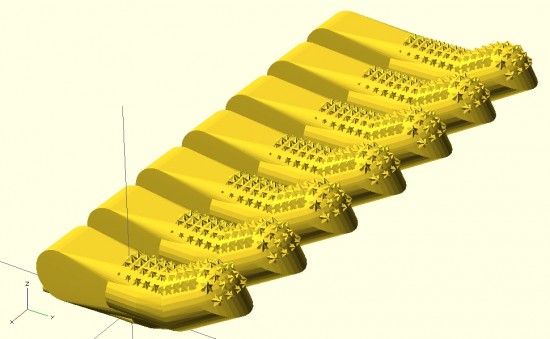
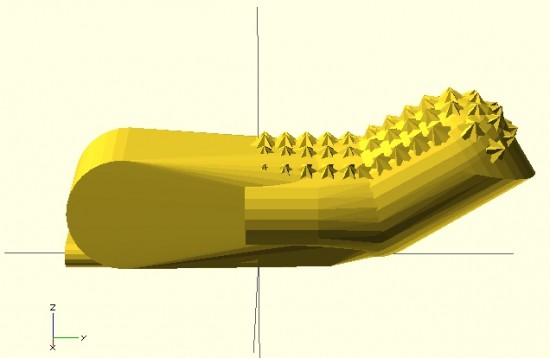
The feature of the design I’m most proud of is the “nail” part of the finger tip. I designed the “nail” by using the OpenSCAD function “intersection()” on two cylinders. The little “nubs”1 consist of a small cube, rotated so a corner is pointed straight up combined, with an identically situated cube rotated slightly.
When I’m designing something to be parametric, I usually don’t really start out designing it that way. I first strive to create a form in OpenSCAD that resembles closely the thing I wish to design. Then, I poke through the design code looking for those elements that are related to the design aspects I’m interested in changing based on parameters. Once located, I replace those parts of the design code with variables that can be specified when the module is called. I realize this is kind of a “high level” description of my design process for parametric things, but it’s still the best description.
Since last Sunday I’ve really done a lot with the design. Some simplifying and a lot of improvements. In the next post I’ll go over these features. I’m really excited to show these off. :)
Above is my first attempt at designing a “solid” finger for the Cyborg Beast DIY printable prosthetic in OpenSCAD.1 The reason this is a “solid” finger is that I haven’t subtracted out any material to allow this partial finger to connect with anything else.
The problem with scaling (up or down) any design that requires fasteners and hardware is that when you do, the holes for the hardware are similarly scaled. This leads to more post-printing work drilling holes to widen them or to find larger fasteners that won’t rattle around in too-large holes.
Thus, if the hardware consists of 3mm screws, the holes for the hardware should be 3mm no matter how much the parts are scaled up or down. To make matters more interesting, not all holes in the model should be excepted from scaling. The above finger tip has a plastic end that is supposed to fit into a mid-finger piece – and those parts should be scaled up or down according to the size of the overall hand. Thus, some voids should be scaled2 and others not at all.3
I’m rather happy with how this finger has turned out so far. It has most of what I understand to be the essential features of the Cyborg Beast fingertips, including little nubs along the finger pad to allow for gripping. I intend to make this an option, in case a user would rather use something like Plasti-Dip to make grippy finger pads, rather than relying on printed plastic bumps.
However, converting a decent design into a parametric design requires a little more work. The way I go about designing a parametric model is to first design one instance of the thing, in this case the finger tip. My next step is to poke through the OpenSCAD code to locate those aspects parts that contribute to the models’ essential features – length of the finger tip, for instance. Once I’ve found these bits, I then try to modify them so that I can insert different variables and arrive at sane variations on the model.
Tuesday afternoon I had the good fortune to talk to Professor Jorge Zuniga of Creighton University regarding his insights on printable prosthetics, measurements of uneffected/effected hands, and various important design considerations. Getting to talk to him really helped crystallize my understanding of the various measurements and the way in which the parts of the printable prosthetic1
Design Ideals
One of the design ideals of the Cyborg Beast prosthetic is to fashion a device that strives for symmetry with the unaffected hand. Thus, all of the necessary measurements are taken from the unaffected extremity. This serves two purposes. First, it allows for the prosthetic to be similar in scale to the unaffected hand. Secondly, the unaffected extremity tends to be, in most cases2 , slightly larger than the affected extremity. The size difference may be due to the unaffected extremity being used more, and thus having more muscle mass, or due to the loss of muscle tone and muscle atrophy in the affected extremity. Either way, a prosthetic designed using the measurements from the unaffected extremity should generally fit the affected extremity. Since this particular prosthetic design uses velcro straps to fasten to the affected forearm, a prosthetic that is slightly too large can easily be adjusted to fit well by tightening the straps.
Another design ideal is to create a core prosthetic design which works for the vast majority of persons.
Critical Printable Components
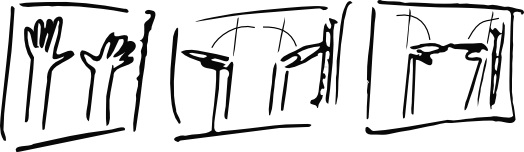
A rough sketch of the various parts of the Cyborg Beast prosthetic appear above as “Figure 2.”
Palm. This is the part that fits over the hand.
Gauntlet. This is the part that fits over the forearm, between the wrist and elbow.
Four fingers, each comprised of two pieces. The above simplified sketch only shows the fingers as a single piece. Do not let my sophisticated drawings fool you.
One thumb, comprised of two pieces. Like the fingers, the thumb is comprised of two plastic pieces.
Critical Measurements
These measurements refer to the lines labeled in “Figure 1.” All measurements relate to the unaffected extremity.
F5. This is the length of the forearm, from the interior of the elbow to the wrist. While this could be measured along the side of the forearm, it very likely doesn’t matter.
F2 (measured at 1/2 F5). At a location along the forearm, half way long F5, the width of the forearm.
H1. This is the distance across the knuckles, from the pinky to the forefinger.
When I lay my own hand flat on a table top, I perceive that an imaginary line drawn through my pinky and forefinger knuckles would end up being not exactly perpendicular to an imaginary line drawn from my elbow to my wrist. More on this below.
All of that is another way to say that I suspect H1 is not perpendicular to F5.
W. This is the width of the wrist. Rather than being strictly measured from either side of the wrist, this measurement appears to best made using the endpoints of the H2 and H3 lines closest to the wrist.
H2 and H3. H2 is the length from the wrist to the pinky knuckle and H3 is the length from the wrist to the forefinger knuckle.
All other measurements indicated might possibly be useful for refining the design, but they are primarily important for the Creighton University research study purposes.
How Each Critical Measurement Informs Design
F5. Gauntlet length is not longer than 1/2 F5 and not shorter than 1/4 F5.
F2. Gauntlet forearm width is F2.
W. Gauntlet wrist width is W. Theoretically, if the prosthetic’s palm is scaled up to accommodate the wrist width (W), the affected hand should fit under and inside the prosthetic palm.
H3can be used to inform the relative lengths of the fingers to match the overall length of the unaffected hand. This isn’t strictly required for a functional prosthetic. As designed, the Cyborg Beast appears to use fingers of equal length. However, the fingers could be scaled up or down along with the rest of the prosthetic hand. Alternatively, and as will be discussed below, its possible that the fingers could be designed to be of different lengths. Prosthetics for young children should contemplate fingers based upon slightly larger, 1-2cm, measurements. The reason being that they quickly outgrow existing parts.
Functional Design Considerations
Thickness of parts is 3mm – 5mm, 20% fill.
The wrist hinges should line up as exactly as possible with where the user’s wrist bends. Additionally, the wrist hinge should be perpendicular to the line of the forearm/gauntlet.
There should be about 1 – 2 mm of space between the hinge part on the palm and the hinge part on the gauntlet. This allows a washer to be inserted for more fluid movement.
Eliminate square corners when possible, as sharp edges can contribute to possbile injury.
Cosmetic Design Considerations
Using the unaffected hand for measurements also allows us to seek symmetry between the hands.
Advanced Considerations
Degree tilt to H1. As mentioned above, it seems like the “H1” line is not perfectly perpendicular to an imaginary line drawn from my elbow to my wrist. An educated guesstimate would be that there is a 9 degree tilt to this line. While existing Cyborg Beast designs do not include this knuckle “tilt,” including this feature in future designs may allow the prosthetic to appear and function more naturally. However, I don’t know if there’s any real ergonomic benefit to using incorporating this knuckle tilt.
Different knuckle positions for fingers. The Cyborg Beast has a knuckle “block” that positions the attachment points for all fingers in a straight line. The reason for this is simple – it’s a lot easier to put one long screw through the entire knuckle block to secure and strengthen all four fingers at once. At a recent e-NABLE meeting I had the chance to inspect a 3D printed prosthetic which used different knuckle positions for each finger. Rather than all of the knuckles in a straight line, this model featured each knuckle at a different, and more natural seeming, position. While this can appear more natural, I’m not sure there’s an ergonomic or aesthetic benefit.
Different finger lengths. Fingers are different lengths. The Cyborg Beast, with all fingers having the same relative knuckle positions and same finger sizes, has a more mechanical look than might otherwise be possible. I don’t know if there’s an ergonomic benefit to using different finger lengths, but this is certainly something to explore.
Based on the above, I think I’m ready to dive back into the OpenSCAD code and work out a parametric gauntlet, fingers, and thumb. Stay tuned!
Marc Petrykowski of Creighton University was kind enough to provide some additional practical experience and information about the university’s research study into printable prosthetics. For anyone looking to dive into this project, I’m cross-posting the information from the e-NABLE Google Plus group here.1 I’ve adjusted the formatting slightly, but otherwise everything below are Marc’s words.
What exact measurements do you need (e.g., hand-length from where to where?)
Below are photos of all of the measurements I use for designing a hand.2 Yes it does seem like a lot, but all of them are needed to ensure the best custom fit for the hand we make for the user. When making a custom hand, it is important to make the 3D printed hand as similar to the non effect hand (fingers, width, length, etc). Each hand also has to be custom because of the size (length, width, height) or the stump. Some are very tiny and some are much bigger, so that also plays a big role when you have to design a hand. There are two photos that are measuring angle of flexion and extension. Those are important to see how tight or how loose the hand has to be for the power and strength of the individual and to make the hand as functional as possible.
How do you get them from scans etc.
Scans from our 3D scanner are in the format .STL which can be imported into programs such as blender (Shown below). Then I can lay it into the preexisting hand design and see an image of how it will fit, including the gauntlet size. If there are further changes to be made, I can do it all in blender before the print.
How do you apply those measurements to your model
As stated above, the measurements matter for the size of the hand. You can’t have a hand that is much smaller then the opposite hand, but you also can’t have a hand that is too small or large for the stump. Everything has to be customize depending on each case. This is where the designing takes the longest. My goal as the designer and printer is to make the hand as near perfect as the other hand so it feels the same to the body and brain, thus they will respond with the effected hand like it was their real non effected hand. Also as stated above, the degrees of flexion and extension and the size/length of the fingers are all incorporated into the final design before the printing the hand.
And if, as +Jorge Zuniga suggests, ALL parts can be pre-printed, I’m hoping you guys will take the lead in helping us make it easy. (As easy as buying shoes at a shoe store)
This is possible because all of the redesigning and redoing of the measurements are all done in blender. Remember, if you resize a finger to a certain percentage, then you have to do the same for the rest of the fingers, thumb, phalanges, palm, and the gauntlet. That is how you can print everything off as one complete print.
What are the pre-printed unit descriptors and dimensions small medium large XL? Narrow/wide?
Pre Print units are based off of the measurements and how you converted them in blender. Instead of having small, medium, large, XL, etc. I have converted that into being resizing percentages. I use makerware since we use makerbots (2x and 2) so for a hand such as below picture measurements, I would classify that as a small or (110-130%), an extra small would be closer to 100-110% (which is super small like a 4 year old or so), a medium hand will be around 130-150%, a large will be around 150-170%, and an extra large is around 170%-190%+. Again, the percentage matters from the sizes that correspond the non effected hand as you want to make it as close to the other hand as possible.
Does a Medium finger always go with a Medium hand? If not, what’s the deal?
Yes, whenever you print a certain size of one finger, you do that same size for the rest of the print. For example, if I printed a palm at 110%, I would have to make the fingers, phalanges, thumb, thumb phalanger, and the gauntlet all at 110%.
Where are the models for printing S M L XL hands or fingers, etc..
The problem is that there are no models. Each hand is supposed to be custom depending on each case scenario.
I have several follow up questions, but I’ll leave those for the next post.
Default Series Title
The Google Plus group is private and you have to request an invitation, freely given, to be included. While discussing discrete issues is easy enough, without the ability to quote original text, a detailed multi-issue open design discussion is very difficult. [↩]
Note: I’ve removed the photographs. I am not sure I have permission to post these pictures publicly. [↩]
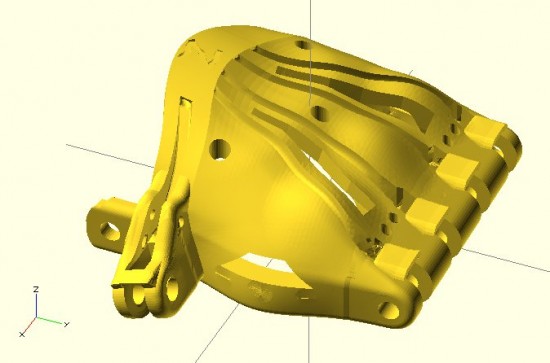
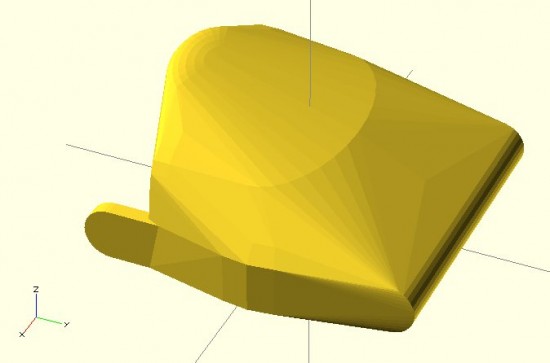
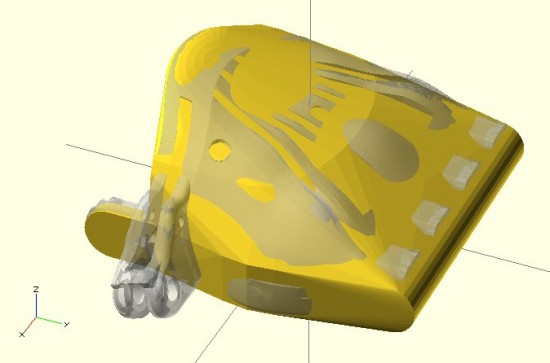
So, I’ve been hacking away at an OpenSCAD sketch of the Cyborg Beast 3D printable DIY prosthetic. At the moment I’m working on designing the left palm.1 I’m reasonably happy with the version so far. I’ve also managed to separate out the cutouts for the hardware from the design of the hand itself. The benefit to doing so is that it should later be possible to scale the hand up or down, but keep the hareware cutouts the same size.
It’s easy to print a hand, fingers, and thumb scaled to 110%, but finding Chicago screws that is 110% may be more difficult. There’s still a LOT of work to do here, but I think this is a good start. Below are the same three views of the two versions (OpenSCAD parametric and original Cyborg Beast).
This slideshow requires JavaScript.
As I’m going through and replicating the design aspects of the Cyborg Beast, more design issues crop up:
The grooves where the fingers fit into the palm are either tapered or flared in a non-uniform manner. To get a better idea of this by reviewing the two pictures below.
The holes for the elastic cord to cause the fingers to return to the open position do not appear to be of uniform diameter, uniform distance apart, or equally centered in the knuckle blocks.
This slideshow requires JavaScript.
I can’t tell if these are critical design features2 or just design elements that don’t provide additional function or utility. If you happen to know, your input would be greatly appreciated.
Default Series Title
And, really, once the left palm is done it’s an easy to mirror this part to make a “right palm.” [↩]
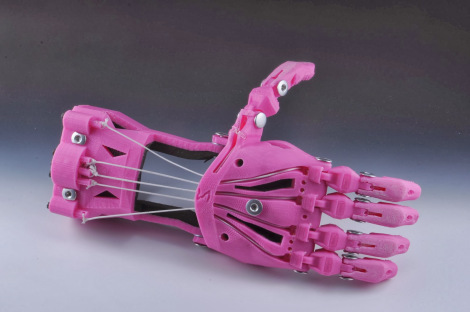
I’ve recently embarked upon a quest to create a parametric version of the e-NABLE prosthetic designs. I’ve chosen the “Cyborg Beast” as it came highly recommended and I had the good fortune to meet one the main designers.
I have a habit of diving headfirst12 into a project I know absolutely nothing about and learning just enough to be dangerous as I go.3 Even if the results aren’t what would be called “successful” under normal circumstances, they do tend to be entertaining.
I generally get started by asking a ridiculous amount of questions.4 I have some guesses, but no concrete answers to the below. If you know, I’d greatly appreciate any comments or replies. Here’s a bunch to get us started:
What are the minimum required measurements to create a suitable prosthetic, such as the Cyborg Beast?
Knowing the minimum required measurements would allow a designer to better create a parametric design.
The Cyborg Beast instructions refer the builder back to the measurement instructions for the Snap Together Robohand by Michael Curry aka Skimbal. These instructions indicate that all you need is the measurement of the width of the hand, where the hand is held flat with the fingers together, at the widest point on the knuckles. Based upon the ratio between the subject’s knuckles and the stock Robohand knuckle block, all of the parts for the model are then scaled up or down.
The ease of reference, the entire set of instructions for the Snap Together Robohand are as follows:
Measure the length of the individual’s knuckles across the back of the hand
from the index to pinky finger. (Example: 85mm)
Add 5mm to your measurement to account for the thickness of the gauntlet.
(Example: if the individual’s hand measures 85mm knuckle-to-knuckle, add
5mm for a total length of 90 mm).
The knuckle block in the files you downloaded is 65mm. Divide your result by
65. (Example: 90/65 = 1.38).
Multiply the answer times 100 to get a percentage.
(Example: 1.38 x100 = 138%).
Scale all the parts of Robohand by this percentage before printing. This can b
e done using the ‘Scale’ tool in Makerware.
Are there any other measurements, besides the width of the hand at the knuckles, required to create a suitable custom prosthetic?
How do these measurements inform a customized prosthetic design?
Scaling all parts equally makes sense for a “snap together” design where all the parts, including the fasteners, are sized together. When one is using stock parts (such as screws, elastic cord, and nylon cord)), this approach can end up requiring the builder to do a lot of post-printing work widening holes or trying to find wider screws.
Other than scaling all parts equally, based upon knuckle measurements, is there any other modifications to the printable design required in order to create a useful prosthetic?
How accurate do these measurements need to be in order to create a suitable prosthetic?
Do the measurements need to be down to the micron? Is within about 1mm or so good enough?
For each required measurement, is it better to round it up or down?
If the only required measurement is the width of the knuckles at the widest point, I suspect that it is probably better to round this figure up, rather than down. I believe it would be much easier to add a little extra padding or tighten the velcro strapping a bit more.
What are the important structural features of the Cyborg Beast? As in, what parts, dimensions, and part relationships are absolutely critical to its proper function and fit?
I’m very very weak in this area. I just don’t know which parts are “load bearing” and are so critical to the function of the device that I should make special efforts to replicate them in my design. Any suggestions here are greatly appreciated.
I suspect that the critical functional features include part thickness (especially where separate parts meet – for strength and durability), the height and length of the “outcropping” on the back of the wrist which appears to provide the mechanical advantage which causes the fingers to constrict, and the tightening block on the gauntlet.
What are the important design features of the Cyborg Beast? As in, what parts, dimensions, and part relationships are critical to the suitability of this model over others?
Again, I’m incredibly weak in this area. I suspect that the overall organic shape to the model is one of its most stand-out features. However, I would invite more informed comments and observations.
What parts of the Cyborg Beast are the most improved?
What parts of the Cyborg Beast are most in need of improvement?
I imagine this is what it is like to learn to fly. [↩]
If you don’t believe me, feel free to peruse this site where you fill find literally thousands of words on the smallest design variations on the smallest parts for a drawing robot [↩]
This last Friday I journeyed to the Autodesk offices at Pier 9 in San Francisco to attend a meeting for e-NABLE, a group devoted to developing, making, and distributing DIY prosthetics. I have to admit that my own personal interests weren’t necessarily aligned with that of the entire group. I’m sure those there would forgive my trespasses, but I am far more interested in making the prosthetics and in making it easier for others to make similar prosthetics than I am in the actual mechanics of building an organization that does these same things.
I came away from the meeting having met some amazing people doing amazing things, and with considerably more knowledge than that with which I arrived.1 Just as with the RepRap project, the daunting part of getting started in this field is wondering where the heck to get started. There are so many different models being developed and so much information, that I just was not sure how to go about actually making such a prosthetic.
As frequent readers of this blog2 know, I like to treat this site as something of an online open notebook where I share my notes, thoughts, and ideas. Thus, here are the most helpful things I learned as a result of this meeting:
Where to Get Started
Jonathan Schull, an associate professor at the Rochester Institute of Technology, was patient and kind enough to provide me with some pointers on where to get started with producing 3D printed prosthetics. Jon suggested the Talon Hand for strength, the Cyborg Beast for general use, and the ODY Hand for young children. The Cyborg Beast instructions refer one to the measurement instructions for the Snap Together Robohand by Michael Curry aka Skimbal. The process, as far as I understand it, involves measuring the subject’s hand and scaling all of the parts up or down accordingly.
Taking Measurements.
Professor Jorge Zuniga, of Creighton University in Nebraska, is currently using a system for taking measurements that involves taking three photographs of a person’s upper extremities in different positions. The photographs are taken with a ruler in the image, so that the measurements may be extrapolated. In talking with Professor Zuniga, I learned that while this is a good way to get a lot of information very quickly (take three quick photographs), it can be labor intensive and time consuming to actually extrapolate the various measurements.
It occurred to me that this sort of problem has actually been solved reasonably well. Marty McGuire3 and Amy Hurst created a system for using pictures of hands with standardized objects to extrapolate hand measurements for the creation of custom 3D printed objects. In the case of their NickelForScale project, they used a photography setup and OpenCV to create custom rings. While OpenCV isn’t exactly the easiest thing to dive into, one it was figured out could reap huge time savings in gathering the measurements necessary to create custom prosthetics.
Customizing Printable Prosthetics
The multi-step process of taking pictures of a subject’s hands, extrapolating the necessary measurements, calculating the scaling factor, scaling the files up or down, then printing seems fairly involved to me. While none of these individual steps are actually that complex, it is entirely possible to automate much of this and lower the barrier to getting people involved.
One interesting problem that is created by scaling parts is that certain parts of a design probably shouldn’t be scaled – such as the channels for routing cables or holes for the Chicago screws.4 This inadvertent scaling problem can be completely solved by use of a parametric modelling program, such as (my personal favorite) OpenSCAD. The “trick” is to scale the model and distribute the various channels for routing cables and screw holes to the appropriate positions to match the new scale – without scaling the diameter of these voids.
One of the really great things about the Cyborg Beast prosthetic model is its extremely realistic and organic appearance. While OpenSCAD is definitely well suited to creating functional models, it is not as obvious how to create organic seeming solids. Fortunately, MakerBot’s handsomest and most modest blogger5 posted a very comprehensive tutorial on creating organic solids with OpenSCAD.
Last night I got started on creating a parametric Cyborg Beast model. While I’m not going for a completely faithful translation of the Cyborg Beast into a parametric model, I’m shooting for a reasonable facsimile of the most important structural and cosmetic features of the Cyborg Beast. Below is a screenshot of this work in progress. There’s no thumb joint in this model yet, but it’s coming along.
Cyborg Beast OpenSCAD prototype
Obviously, there’s more work to do embellishing this model, including adding the thumb joint, hollowing out the underside, adding the knuckle stops for the fingers, and the voids for routing the cables and screws. However, it’s not that bad for a little bit of quick OpenSCAD hackery. After that’s done, the various other parts would need to be replicated in OpenSCAD as well.
Cyborg Beast OpenSCAD prototype with original Cyborg Beast overlaidDefault Series Title