I’m really just learning OpenSCAD right now. I can make some basic shapes, put things together, and whatnot. I was thinking about putting together some super super basic tutorials that would take a user from knowing nothing about OpenSCAD to knowing as little about OpenSCAD as I do.1 Is this something you’d be interested in?
Please leave a comment and let me know. What would you like to know about it? What would you like to learn?
“This should never happen, deltaX in addValueSegmentToPixelTable in euclidean is 0.”
And, really, this is just one of MANY such errors.
Also, Marty was kind enough to slice it up in Zaggo’s Pleasant 3D software. He took a look at the OpenSCAD code and didn’t see anything nasty in there.
I need to bolt some shelving to the wall. Yes, I know the shelves came with some hardware for doing that – but I own a 3D printer and I can design BETTER hardware. I whipped something up in Sketchup and printed off some brackets. Next, I needed a slight variation in order to bolt two shelving units to each other. (Something for which their hardware wasn’t designed).
Unfortunately, ReplicatorG just puked all over itself as soon as I tried to slice the bracket. I had been tinkering with OpenSCAD for the last week or so, so I figured I’d give that a shot. Here’s what I tried:
First, I tried building the bracket up out of just rectangular boxes. This was okay, but cumbersome.
Next, I tried to design a really really complex polyhedron in the shape of my bracket. This was a nightmare. To do it properly, you need to design your object such that you’re defining each of the triangles that make up the object. If you get set up the triangles by putting the numbers for each corner in the wrong order, in a less-right order, or did some other benign thing, it would make a mess.
After chatting with Clothbot, I tried to define a cross section of my bracket as a flat image in Sketchup (again), then tried to expert it to a DXF through a plugin. I just couldn’t manage to extrude that flat DXF into a 3D image.
So, I went back to Sketchup and tried to tinker with the file again, fixed it in CADSpan, exported to STL again, fixed it up with NetFabb again, and ReplicatorG still barfed it up.
Back to OpenSCAD (again). This time I tried to assemble a 2D cross section of other shapes. This didn’t work as I tried to tinker with the “linear_extrude” function.
THEN, finally, I tried to define a polygon (not a polyhedron) based upon the coordinates I had used originally to describe the bracket when I was attempting to build it out of triangles. This worked to describe a flat 2D section of the bracket. I tried the “linear_extrude” function again and it worked well. I then punched a few holes into the bracket with some small cylinders and exported to an STL again. It’s my understanding that OpenSCAD makes quality STL files – without holes or other cleanup required. While that may be the case, you guessed it, ReplicatorG tossed its cookies when it saw this bracket.
So, what is it? Is it the bracket? Sketchup and ReplicatorG? Is it OpenSCAD? Suggestions?
Unfortunately, since variables aren’t really variable in openscad, it’s often easier to write code in another language that writes out openscad code.
Okay, what the hell. “Variables aren’t really variables”? What does that mean? Yes, yes, OpenSCAD is written using a keyboard, but not really a keyboard. T, are you just messing with me or what? How the heck am I supposed to learn this language with this kind of nonsense?!
Amusingly, Tony is the second person to mention that sometimes it’s easier to use another language to write OpenSCAD. Kidding aside, I kinda get that. I use PHP to write custom javascript and MySQL all the time, since I sometimes have need for more dynamic-ness than those languages can accommodate. 1
A quick google search tells me that OpenSCAD doesn’t have a random number generator. That’s a bit of a bummer. I was just thinking how cool it would be to have an OpenSCAD file that would give you little variations on itself every time you generated an STL. I’m thinking snowflakes, giant fingerprints, and other things that have a little bit of chance and chaos built in.
Or, perhaps some kind of Mad Libs-esque system where you tell it to create an alien or monster figure and you get a random number of eyes, heads, noses, arms, legs, and tails.
Now, I figure with CloudSCAD it wouldn’t be terribly difficult to add a little bit of javascript that can include a random number with given parameters… So, it’s at least possible.
I have always enjoyed the ease and immediacy of Sketchup. Complex objects and forms are easy. Amusingly, sometimes the smaller simpler bits can be more difficult to tame. 2 But, CloudSCAD does appeal to my programmer/hacker nature.
In any case, I’ve managed to conjure simple forms – spheres, cubes, boxes, cylinders, and cones. I can assemble and subtract forms from one another. But, it appears that more complex or irregular polygons are more difficult.
The latest entry is one that will convert a Sketchup file into a 2D G-code cutting pattern. It’s not useful (yet) for printing 3D images, but I hope one day it will be!
Well, I finally got around to designing it! All you have to do is print up the parts from Jrombousky’s Leonardo Robot and then this single plate of parts. Swap out the bits, paint to suit (or print in the color of your choice).
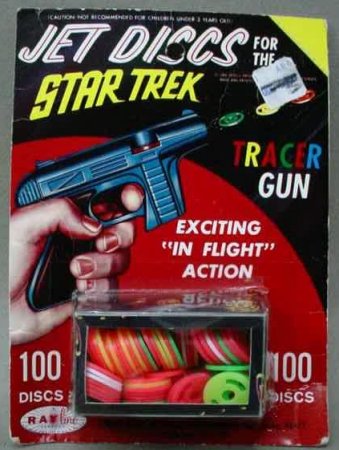
Despite my best efforts I could not locate an image on the interwebs for the kind of disc shooter I remember playing with as a kid. Finally after much googling, I found a picture and the actual name of the type of toy. Apparently they were known as “Tracer Guns” and were produced circa the 1960’s through 1990’s. (Image of a Tracer Gun at right from collect-antiques.net). Whenever I searched for these online I only found references to larger disc guns that shot larger foam discs from cylinder mounted on top.
A variation I had not seen as a kid, but desperately wanted, was disc shooter that had a removable and re-loadable clip. In the pictures to the right you’ll see a grove about halfway down the barrel, just above a protuberance. That protuberance would house about 20-25 discs depending upon the gun you had. In order to load/reload the gun you would have to slip each disc under the firing pin one at a time.
Once I discovered the name of this type of toy, Wikipedia filled in the rest. They had some pictures of a tracer gun which had been taken apart to expose the insides. The best part is the gun depicted has a clip loading mechanism!
Having taken apart the non-clip version as a kid, I recall it having a similar metal spring as a source of power. 1 I believe the rubber band on the trigger is merely to keep it in place. The protuberance on the non-clip version and the clip on the clip version of the toys both contain springs for advancing the next disc into place.
To be clear, I am not looking to duplicate, copy, or replicate this toy. I don’t want that toy. Rather, I would love to print a toy of my own, or a collaborative, design that will shoot harmless plastic discs.
Tracer Gun, clip removed – from WikipediaTracer Gun, exposed – from Wikipedia