Note to self, too

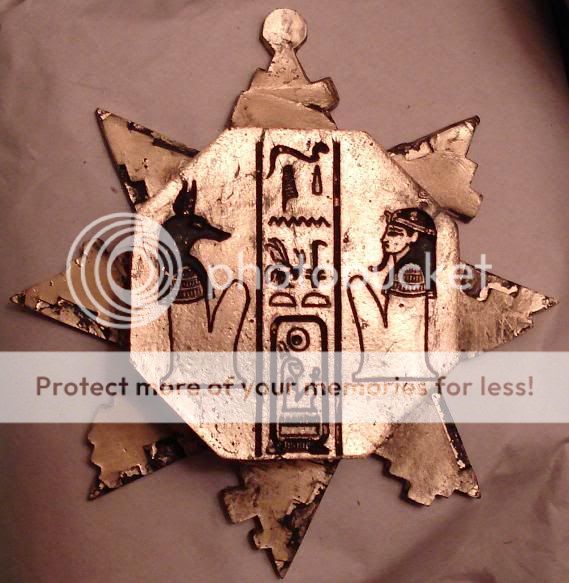
The Mummy Box Set - and detail of box
1. The Mummy Box Set - and detail of box

One of my favorite movies is The Mummy, and the coolest prop in the movie is a hexagonal puzzle box. When I get a chance, I’d like to design this object too. Here are some photos and informative links I’ve found:

  1. The cover of the Mummy Box DVD Set.
  2. What appears to be a homebrew prop replica.
  3. What appears to be an actual movie prop.

Sure, it’s frivolous.  However, I like the design challenge inherent in replicating this prop, getting the pieces to fit, perhaps even getting it to spring/pop open.
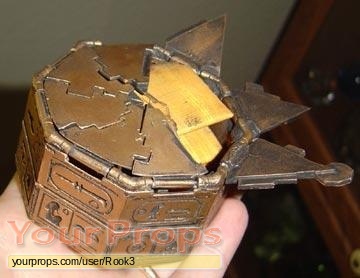
Home brew prep replica
2. Home brew prep replica
Mummy Puzzle Box Stats
Measurement of height 6-7/18″
Measurement from front to back 3-3/4″
Measurement of width, all sides 2-3/4″
Measurement of width, corner to corner 2-3/4″
Measurement of height 1-1/2″
Measurement of width, from base 5″
Measurement of all links 1-1/4″
Color Antique Gold
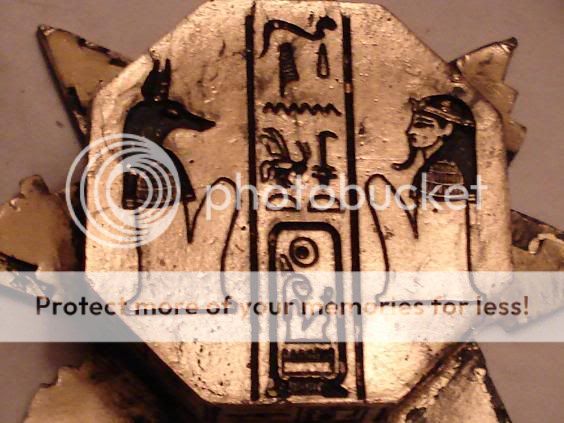
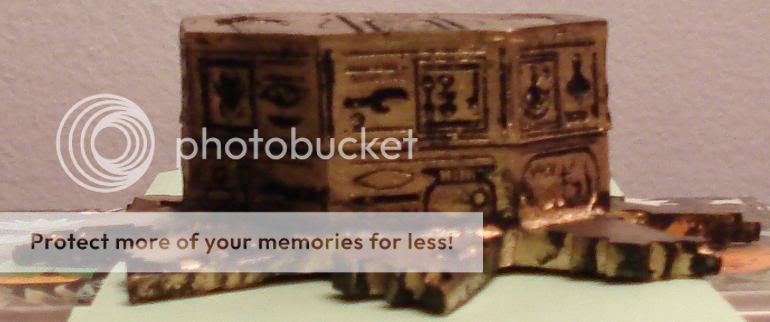
Other design details Top shows Seti I’s Horus name (men-maat-re), flanked by Anubis on the left and a male figure on the right, separated by vertical lines. Sides are inscribed with haphazard hieroglyphs including “Son of Re” and “Amen-Re.”
Puzzle Box - full picture
3. Puzzle Box - full picture
Puzzle Box close up
3. Puzzle Box - close up
3. Puzzle Box - side view

MakerBot woes

Building my MakerBot and getting it printing reliably was challenging, but totally doable by a technical novice such as myself.  I have lots of people on the MakerBot Operators group to thank for their patience and help in getting my MakerBot online. 1  Looking back, I spent about a month building and then calibrating my ‘bot. 2

It’s easy for me to forget that first month of occasional frustrations and triumphant victories, now that I’ve been printing successfully for more than eight months.  It actually makes me a little sad when I read people writing about their own frustrations and how they’re ready to throw in the towel.  The most recent example was noobcake getting frustrated with her ‘bot and getting ready to sell it off in parts.  Thankfully, Spacexula swooped in to help her out.

This brings me to We Alone On Earth‘s recent post.  WAOE are a group of introspective, philosophically and technologically minded twenty-somethings.  To give you you an idea of their frustration with their ‘bot, the post was entitled, “MakerBot: not very much fun at the moment (caveat emptor)”  Yikes. 3  I realize that WAOE has revised their original post several times since the original publishing date – but they have a lot of legitimate concerns.

WAOE list off seven problems with the MakerBot.  I’m not going to refute these points – but rather offer another perspective on them.  After several updates, WAOE offer additional comments, I’ll include them here in “[]”.

  1. The PTFE is prone to melting.  [WAOE expects the new MK5 Plastruder will resolve this issue]. I have never heard of a PTFE barrier melting.  I’ve heard of them deforming from a blockage and had one develop a clog which I had to remove.  Several people have purchased MakerGear PEEK replacements – but these are far from necessary.  I clogged my first barrier once, cleared it, clogged it again, and am now using a slice of it as an insulating washer.
  2. Inexplicable printing behavior due to noise.  [WAOE fixed this issue by twisting wires and installing a resistor]. I’ve never had this problem, but I know others have.  Like WAOE, I’ve heard of people fixing these issues by twisting wires, using resistors, or ferrite beads.  Perhaps my workstation has less electronic noise, but I haven’t had to do any of these things.  Then again, perhaps my prints suffer from a certain degree of noise?
  3. Printing large objects is hard without a heated build plate.  [WAOE notes this isn’t an issue if you’re good at soldering]. Totally true for ABS, but not PLA.4  However, this is really a problem with the print media – not with the printer, right?  ABS will warp as it cools, unfortunate but true.  I’ve had less warping problems in warm weather or during with a second print – basically when the build platform is already warmed up.  Zaggo’s printruder is one of the largest things I’ve printed.  Interestingly, his design takes into account that certain parts are expected to warp. 5  Or check out Clothbot’s train track – it was designed with a lattice/correlated bottom to prevent warp problems.  Plastic warps – but with careful and thoughtful designing, this shouldn’t be a limitation.
  4. The heated build platform is difficult to build and requires a relay kit. [WAOE notes this isn’t an issue if you’re good at soldering]. I can’t dispute either point.  I just got both and haven’t had a chance to assemble them yet.  I’m assuming the heated build platform, which requires SMT soldering, will be challenging.  Frankly, fear of SMT soldering was the big reason why I didn’t jump into buying a MakerBot sooner. 6  The MakerBot HBP is just one option for a heated platform – there’s several others out there.  Don’t like SMT soldering?  Try out Rick’s platform over at MakerGear.  More into DIY?  Well, use the plans posted for any of several other variations.  As for the relay kit – it’s not a requirement – but it will prevent MOFSETs from burning out on your extruder motherboard7
  5. Calibrating Skeinforge is hard.  [WAOE notes this is still an issue]. I like to use the word, “challenging.”  A better way to look at MakerBot calibration is that you get out of it what you put into it.  I have my MakerBot tuned to the point that I get reasonably good looking durable parts.  Sure, I could spend more time and get even better looking parts.  However, once I got it printing reliably I was much more interested in printing new things than refining the printing process.  I’ll get around to improving the print quality even more – but I’m having too much fun right now.
  6. The Plastruder MK4 feed system is unreliable. [WAOE expects the new MK5 Plastruder will resolve this issue]. Getting the tension on the MK4 idler wheel is just one of those aspects of my MakerBot I had to experiment with and get just right.  I’ve been printing reliably for eight months using the same idler wheel and gear.  With proper maintenance, flossing the extruder, and clearing chips out of the extruder the current setup is serving me well.
  7. The threaded rods are of poor quality. [WAOE are getting new threaded rods, which should fix their problem.]. Of my four threaded rods, one is definitely warped and two have very minor warps.  By experimenting, rotating them just so, and printing a few wobble arrestors I’ve eliminated most of these issues.  You can definitely get more expensive and straighter threaded rods and improve your build quality.

A MakerBot Cupcake CNC kit is not for everyone – but the kit can be build and operated by anyone who is willing to invest the time to do so.  It is a cheap, hackable machine that is literally going to be just as useful as you make it.  Want less warpage, higher resolution, more reliable extrusion?  You can buy an upgrade, build one from their plans, or design your own solution. 8  Want a CNC mill, CNC pencil, or CNC music box?  Design the very first one!  Then again, you don’t have to do any of these things.

A MakerBot kit is just a platform for your creativity.  It’s just that big. 9

As for you, WAOE, if you want some help – drop me a line!
  1. If I had an acceptance speech, I’d go on and on while the music played. []
  2. My first successful print was on 12/31/2009. []
  3. Don’t get me wrong – I love my MakerBot, but I readily acknowledge its limitations. []
  4. From what I heard.  :)  []
  5. It was designed before availability or widespread use of heated build platforms. []
  6. Well, that and a little thing called “money.” []
  7. Did I get that part right? []
  8. I haven’t installed a single non-printed upgrade. []
  9. Or that small.  :)  []

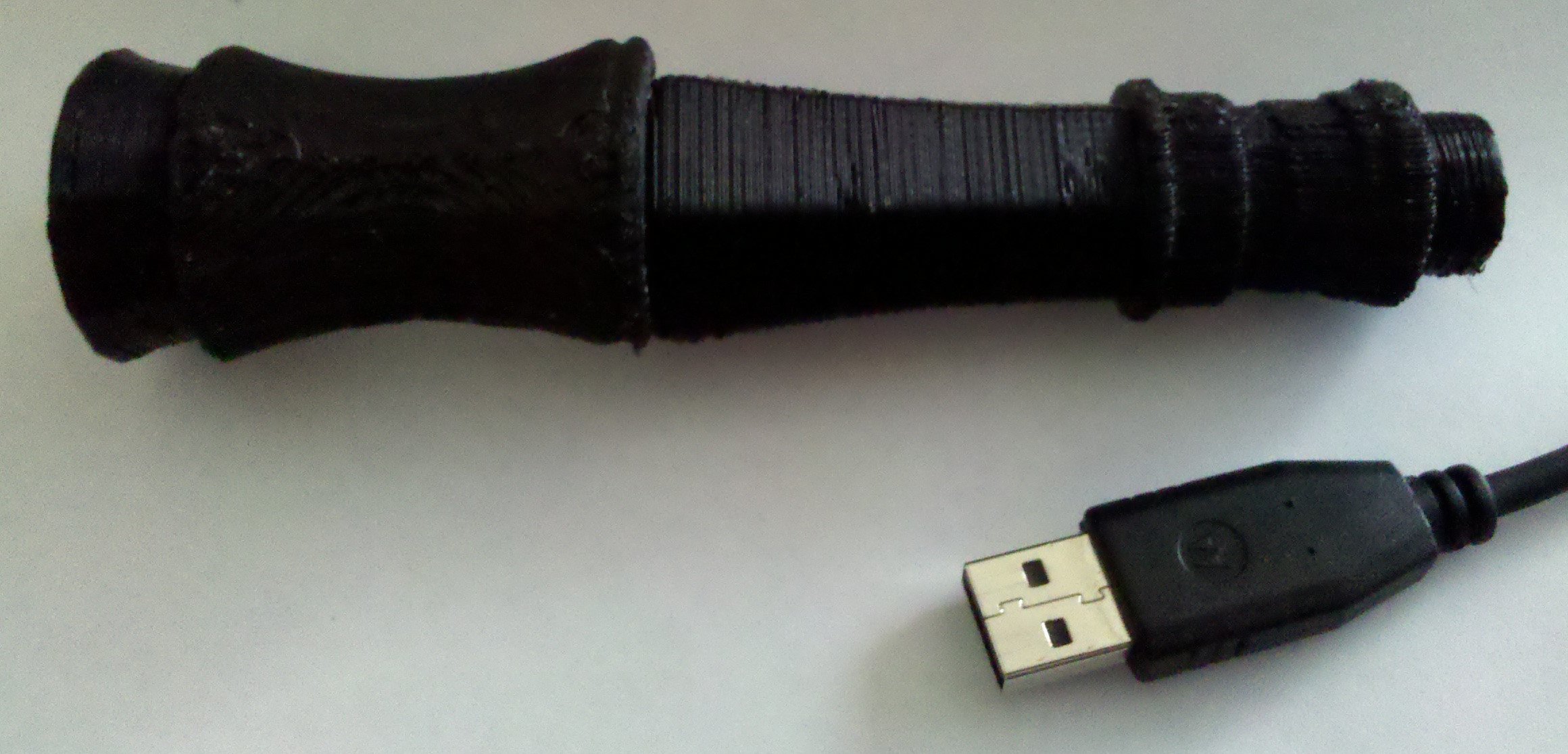
Sonic Screwdriver – first draft

Sonic screwdriver, first draft

To the right is a first draft print of my latest designs for the sonic screwdriver.  It’s next to a USB cable for scale and perspective.  There are several things I need to fix:

  • It’s too small.  I was guesstimating the scale based upon the size of hand holding the sonic screwdriver in one of the photos I saw.
  • Too much warpage.  I need to build my heated build platform.  :)  I’ve got my SMT1 soldering Toolkit, now I just need a hotplate.
  • Better connectors.  The connectors I designed are adequate, but not that great.  They need to be much larger to ensure a proper grip between parts.
  • Fix a connector.  I have a hex connector on one piece and a 16-sided connector on another.  That’s not going to work.
  • Consider changing the fit.  Some parts have a 0.25mm clearance on all sides between the male and female connections.  Other parts have a 0.5mm clearance instead.  I tried both on different sections so I could test the fit.  The 0.25mm clearance on all sides is fine for some parts, but other parts could use a little more wiggle room.
  • Change the thickness.  My earlier draft was a whopping 0.5mm thick all around.  I printed these parts at varying thickness to test their durability, flexibility, conserve plastic, and maximize internal space for future electronics.  A 1mm thickness seems to be the most optimal mix.

I’ve posted my sonic screwdriver designs to Thingiverse for people to tinker with and, hopefully, improve.  I would sincerely appreciate any help anyone can provide when it comes to designing the upper half of the sonic screwdriver – especially the moving parts.

  1. surface mount technology []

Fourth wall

Yesterday, just as an experiment, I tried to blog all of my the MakerBot related ideas and reactions.  Here’s the result:

  1. Thank you MakerBot!!! [144 words]
    1. Thanking MakerBot for sending fluorescent red ABS and a spare parts kit along with my birthday order.
  2. Anticipation [140 words]
    1. Likening waiting on my application for the MakerBot blogger position to waiting for my grad school entrance results.
  3. MakerBlock’s MakerBot setup [376 words]
    1. Description of how my MakerBot is situated on a repurposed library card catalog.
  4. Why I want to work for MakerBot? [57 words]
    1. A few words about why I want to work for MakerBot.  I’m kicking myself for not including this bit in my application.  :/  Argh!
  5. Poll results so far [54 words]
    1. Of the poll respondents so far, one person wants MakerBot to hire me so that I will stop blogging so much.
  6. Plastruder MK5 plans released! [529 words]
    1. Thoughts on the new Plastruder MK5 plans – this was posted after someone noticed the MK5’s appearance in the photostream and wiki instructions, but a few hours before it was on their official blog or in the store.  Thus, some thing wondered about may not be accurate.  Fair warning.  Oh, and I included a picture of a Cyberman because Cybermen are cool.
  7. Plastruder MK5, now with 85% less heartache! [276 words]
    1. Don’t get me wrong – I love my Batch 9 ‘Bot.  However, the Plastruder MK4 has been challenging on occasion.  This is basically a list, with Beak90’s help, of all the problems the revamped Plastruder designs should resolve.
  8. Why should you buy a MakerBot sooner, rather than later? [280 words]
    1. I can see not jumping into a first generation hybrid car, digital camera, or MP3 player.1  When a product comes with such a clear2 upgrade path, nothing you invest in will ever be truly obsolete.
  9. Why Tweet? [64 words]
    1. When their slogan has to do with following others and having people follow you, “Bleeter” just makes more sense.  This post was inspired by my thinking about recent Twitter activity.  And, the only reason for my Twitter account and the people that I follow is because of my interest in MakerBot.
  10. MakerBot Business Idea #5 [237]
    1. I’ll cut to the chase here: The idea is to start a small scale small replacement/repair business and advertise at your local hardware store
  11. What’s the minimum cost to upgrade to a MK5 Plastruder? [95 words]
    1. Sourcing a minimum number of parts from MakerBot for the new MK5 Plastruder.  (Spoiler:  It looks like $106 in new parts.)  Guys, any chance we can see a Plastruder MK4 to MK5 upgrade kit?  I wouldn’t mind a MK4 to MK5 upgrade that excluded prior upgrades like the MK5 gear and relay board kit to reduce duplication for early adopters.  :)

2252 words blogged in one day – NaNoWriMo, here I come!

  1. I had to own the Rio PMP300 when it first came out in 1998!  And yet, I still have never owned an iPod or iPhone.  Go fig. []
  2. And nigh inevitable []

What’s the minimum cost to upgrade to a MK5 Plastruder?

I figure to upgrade my Batch 9 MakerBot to use a Plastruder MK5, I’ll need the following:

$106.00 isn’t too shabby to upgrade to the most badass Plastruder2 money can buy. 34

  1. I’d ask Zaggo, Webca, or jrombousky to design it… []
  2. Edit: Plastruder kit []
  3. Especially when you essentially get to keep your Plastruder MK4 as a backup. []
  4. You’d still need a few spare parts – but I’m sure that’s nothing we can’t scrounge from leftovers… []

MakerBot Business Idea #5

I’ve had a few ideas about how one can build a business around a MakerBot.

  1. Advice for a Makerbot based business
  2. Thingiverse based business idea
  3. Custom plastic cookie cutter business idea
  4. RepRap crowdsourced parts business

Well, here’s my latest idea.  Small custom replacement parts.  Not a new idea, right?  Well, it’s all about the marketing and how you reach and pitch to your target market.  Who is always out looking for small replacement parts?  When they do, where do they go?  What are their alternatives when they can’t find a replacement part?

I found the answers to all of those questions when I needed a replacement window latch.  Here’s the business model:

  1. Print up some universally useful parts, prime examples of your ‘bot’s ability to print
  2. Take said parts to your local neighborhood hardware store and ask to talk to the manager1
  3. Explain that you can quickly and cheaply fabricate nearly any small replacement part out of sturdy plastic2
  4. Ask them if you can put up flyers for your business and maybe even leave a few samples3
  5. Put up a website with a few examples of what you can print, how you solve problems with your Makerbot, things you’ve fixed, things you’ve replaced
  6. ???
  7. Profit!

What do you think?

  1. You’ll probably have much better luck with a mom-and-pop store than a big chain []
  2. Throw or jump on said ABS specimen []
  3. I’d even offer them a percentage of net []