Counter proposal for MakerBot Industries

Sometimes you just need to turn a problem on it’s head.  I see that’s it been over a week since I submitted my job application1

So, here’s my counter proposal – I will continue to blog incessantly UNTIL you hire me!  Ha – and you thought it was going to be irritating to have me camp out outside, not showering, and stinking up the joint.2 Just wait until I clog up the RSS feed with every bit of nonsense I can dream up. 3
  1. That’s right, I stayed up until 1:27am on Wednesday morning writing it, overslept, and was late to a meeting the following morning…  Worth every moment. []
  2. You see, I’m not above harrassment. []
  3. For those astute readers, you’ll notice I actually added a new category to this blog.  Some posts are now categorized as “Random nonsense.” []

DIY laser cutting

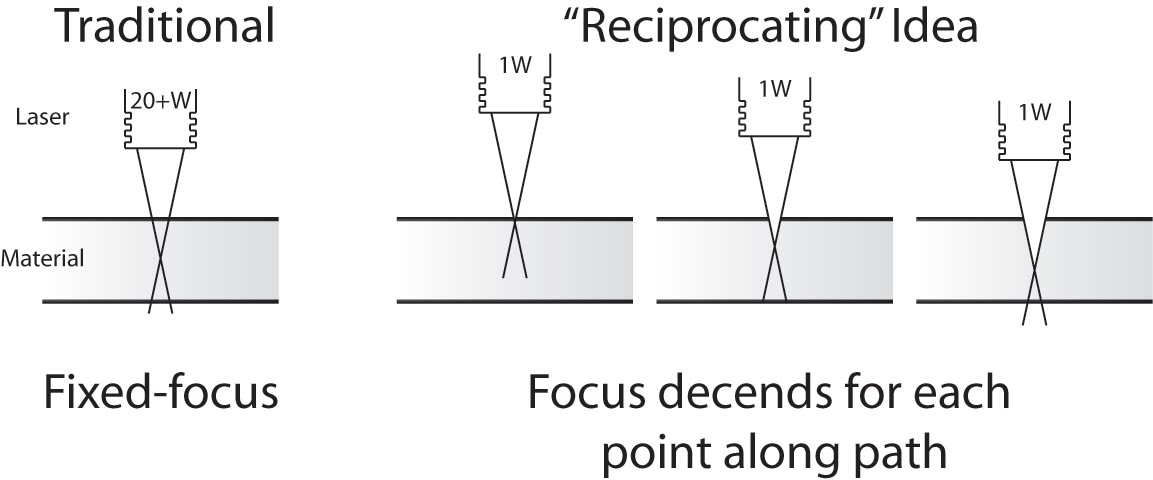
Peter Jansen's reciprocating laser concept

Peter Jansen’s latest post about selective laser sintering (SLS) is nothing short of amazing.  Most of his posts on the RepRap Builders blog posts deal with his adventures and research into SLS fabrication – basically directing a laser over a bed of powder to fuse powder in successive layers into a 3D object.  Since the object is being created in a bed of powder and any new layer is supported by the powder above it, the powder print media becomes it’s own support material.

His latest post diverges from his adventures with SLS 3D printing and details his efforts at building a DIY laser cutter.  His idea is for a “reciprocating laser” which would change the focal length or the height of the laser above the material being cut.  Peter points out that commercial high power laser cutters essentially brute force burn through the entire depth of the material to be cut.  They’re so powerful that it doesn’t matter that the laser is out of focus and “cooler” at different depths.

He has demonstrated a proof of concept using much lower power laser to cut material by lowering a much lower power laser as it cuts material.  The downside is that the lower power laser requires a much longer time to burn through the material – having to hit the same area several times at different depths to cut all the way through.  His proof of concept setup was about the size of a CD/DVD drive – since CD/DVD drives, motors, and housing provided most of his building materials.  So far he’s been able to burn through most of two CD case backs – about 2mm together.  He’s hoping to push it to cut thicknesses up to 3.0mm to 4.5mm.

The incredibly small size of his setup means that it can only very small pieces of material.  However, this gave me two ideas:

  1. If the low power lasers are so cheap, why not install multiple lasers at different focal lengths?
  2. If the entire setup is that small, what about making the entire setup mobile? 1  Think hexapod CNC mill.  If a laser cutter wheeled or hexapod robot was as small as a CD drive, you could conceivably just take out a large sheet of acrylic or thin plywood, set the robot in the dead center, and let it go. 2
  1. This reminds me of one of my favorite sayings.  “If Mohammed won’t go to the mountain, the mountain must come to Mohammed.” []
  2. The robot could stay oriented in any number of ways.  You could draw a grid on the material, the material could have a thin paper coating with LeapFrog style micro-dots that told the robot it’s location, you could project a grid onto the material with light or guide it with another laser like a laser guided missile. []

Note to self, too

The Mummy Box Set - and detail of box
1. The Mummy Box Set - and detail of box

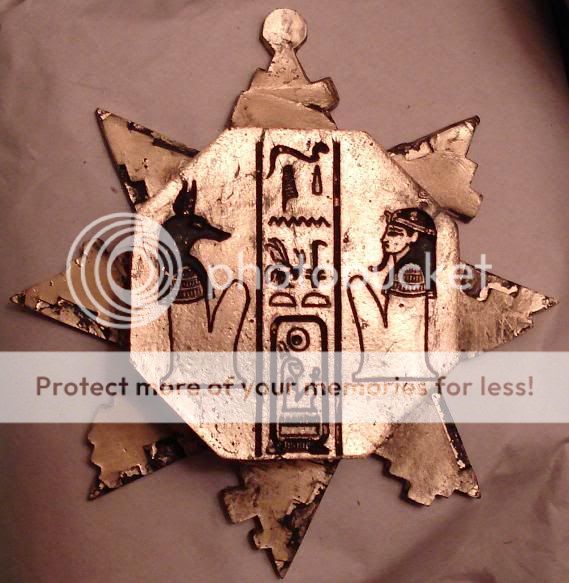
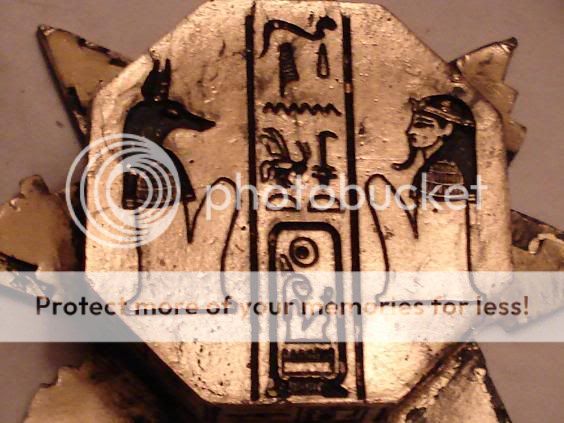
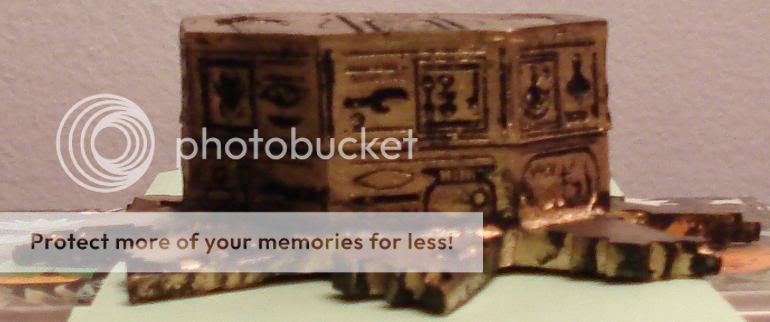
One of my favorite movies is The Mummy, and the coolest prop in the movie is a hexagonal puzzle box. When I get a chance, I’d like to design this object too. Here are some photos and informative links I’ve found:

  1. The cover of the Mummy Box DVD Set.
  2. What appears to be a homebrew prop replica.
  3. What appears to be an actual movie prop.

Sure, it’s frivolous.  However, I like the design challenge inherent in replicating this prop, getting the pieces to fit, perhaps even getting it to spring/pop open.
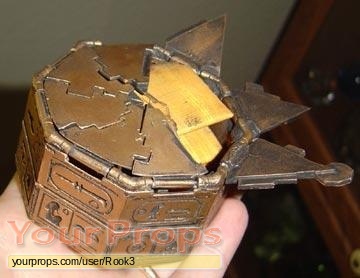
Home brew prep replica
2. Home brew prep replica
Mummy Puzzle Box Stats
Measurement of height 6-7/18″
Measurement from front to back 3-3/4″
Measurement of width, all sides 2-3/4″
Measurement of width, corner to corner 2-3/4″
Measurement of height 1-1/2″
Measurement of width, from base 5″
Measurement of all links 1-1/4″
Color Antique Gold
Other design details Top shows Seti I’s Horus name (men-maat-re), flanked by Anubis on the left and a male figure on the right, separated by vertical lines. Sides are inscribed with haphazard hieroglyphs including “Son of Re” and “Amen-Re.”
Puzzle Box - full picture
3. Puzzle Box - full picture
Puzzle Box close up
3. Puzzle Box - close up
3. Puzzle Box - side view

An honorary Duggar

Nophead’s Mendel1 has produced 15 sets of Mendel parts, and is hard at work on it’s 16th!!!  My understanding is that it would take about 60 hours to print a full set of Mendel parts.  I have to admire anyone who prints up Mendel/Mini-Mendel parts because of the amount of dedication it would take to do so.  After spending 90 hours2 printing something, I don’t know that I could part with it.

My point is that we really have guys like Nophead, Spacexula, and Cyrozap3 to thank for cranking out parts and pushing replication forward.

I hereby bestow upon you gentlemen the Duggar medal of continuous replication.

  1. I don’t know if he’s named it yet – so I’ll call it Anna until he corrects me. []
  2. I’m just assuming it would take me 50% longer since I don’t know what I’m doing… []
  3. Dude, I realized yesterday I’ve been misspelling your name.  I’ll go back through and fix that – sorry! []

MakerBot woes

Building my MakerBot and getting it printing reliably was challenging, but totally doable by a technical novice such as myself.  I have lots of people on the MakerBot Operators group to thank for their patience and help in getting my MakerBot online. 1  Looking back, I spent about a month building and then calibrating my ‘bot. 2

It’s easy for me to forget that first month of occasional frustrations and triumphant victories, now that I’ve been printing successfully for more than eight months.  It actually makes me a little sad when I read people writing about their own frustrations and how they’re ready to throw in the towel.  The most recent example was noobcake getting frustrated with her ‘bot and getting ready to sell it off in parts.  Thankfully, Spacexula swooped in to help her out.

This brings me to We Alone On Earth‘s recent post.  WAOE are a group of introspective, philosophically and technologically minded twenty-somethings.  To give you you an idea of their frustration with their ‘bot, the post was entitled, “MakerBot: not very much fun at the moment (caveat emptor)”  Yikes. 3  I realize that WAOE has revised their original post several times since the original publishing date – but they have a lot of legitimate concerns.

WAOE list off seven problems with the MakerBot.  I’m not going to refute these points – but rather offer another perspective on them.  After several updates, WAOE offer additional comments, I’ll include them here in “[]”.

  1. The PTFE is prone to melting.  [WAOE expects the new MK5 Plastruder will resolve this issue]. I have never heard of a PTFE barrier melting.  I’ve heard of them deforming from a blockage and had one develop a clog which I had to remove.  Several people have purchased MakerGear PEEK replacements – but these are far from necessary.  I clogged my first barrier once, cleared it, clogged it again, and am now using a slice of it as an insulating washer.
  2. Inexplicable printing behavior due to noise.  [WAOE fixed this issue by twisting wires and installing a resistor]. I’ve never had this problem, but I know others have.  Like WAOE, I’ve heard of people fixing these issues by twisting wires, using resistors, or ferrite beads.  Perhaps my workstation has less electronic noise, but I haven’t had to do any of these things.  Then again, perhaps my prints suffer from a certain degree of noise?
  3. Printing large objects is hard without a heated build plate.  [WAOE notes this isn’t an issue if you’re good at soldering]. Totally true for ABS, but not PLA.4  However, this is really a problem with the print media – not with the printer, right?  ABS will warp as it cools, unfortunate but true.  I’ve had less warping problems in warm weather or during with a second print – basically when the build platform is already warmed up.  Zaggo’s printruder is one of the largest things I’ve printed.  Interestingly, his design takes into account that certain parts are expected to warp. 5  Or check out Clothbot’s train track – it was designed with a lattice/correlated bottom to prevent warp problems.  Plastic warps – but with careful and thoughtful designing, this shouldn’t be a limitation.
  4. The heated build platform is difficult to build and requires a relay kit. [WAOE notes this isn’t an issue if you’re good at soldering]. I can’t dispute either point.  I just got both and haven’t had a chance to assemble them yet.  I’m assuming the heated build platform, which requires SMT soldering, will be challenging.  Frankly, fear of SMT soldering was the big reason why I didn’t jump into buying a MakerBot sooner. 6  The MakerBot HBP is just one option for a heated platform – there’s several others out there.  Don’t like SMT soldering?  Try out Rick’s platform over at MakerGear.  More into DIY?  Well, use the plans posted for any of several other variations.  As for the relay kit – it’s not a requirement – but it will prevent MOFSETs from burning out on your extruder motherboard7
  5. Calibrating Skeinforge is hard.  [WAOE notes this is still an issue]. I like to use the word, “challenging.”  A better way to look at MakerBot calibration is that you get out of it what you put into it.  I have my MakerBot tuned to the point that I get reasonably good looking durable parts.  Sure, I could spend more time and get even better looking parts.  However, once I got it printing reliably I was much more interested in printing new things than refining the printing process.  I’ll get around to improving the print quality even more – but I’m having too much fun right now.
  6. The Plastruder MK4 feed system is unreliable. [WAOE expects the new MK5 Plastruder will resolve this issue]. Getting the tension on the MK4 idler wheel is just one of those aspects of my MakerBot I had to experiment with and get just right.  I’ve been printing reliably for eight months using the same idler wheel and gear.  With proper maintenance, flossing the extruder, and clearing chips out of the extruder the current setup is serving me well.
  7. The threaded rods are of poor quality. [WAOE are getting new threaded rods, which should fix their problem.]. Of my four threaded rods, one is definitely warped and two have very minor warps.  By experimenting, rotating them just so, and printing a few wobble arrestors I’ve eliminated most of these issues.  You can definitely get more expensive and straighter threaded rods and improve your build quality.

A MakerBot Cupcake CNC kit is not for everyone – but the kit can be build and operated by anyone who is willing to invest the time to do so.  It is a cheap, hackable machine that is literally going to be just as useful as you make it.  Want less warpage, higher resolution, more reliable extrusion?  You can buy an upgrade, build one from their plans, or design your own solution. 8  Want a CNC mill, CNC pencil, or CNC music box?  Design the very first one!  Then again, you don’t have to do any of these things.

A MakerBot kit is just a platform for your creativity.  It’s just that big. 9

As for you, WAOE, if you want some help – drop me a line!

  1. If I had an acceptance speech, I’d go on and on while the music played. []
  2. My first successful print was on 12/31/2009. []
  3. Don’t get me wrong – I love my MakerBot, but I readily acknowledge its limitations. []
  4. From what I heard.  :)  []
  5. It was designed before availability or widespread use of heated build platforms. []
  6. Well, that and a little thing called “money.” []
  7. Did I get that part right? []
  8. I haven’t installed a single non-printed upgrade. []
  9. Or that small.  :)  []