Love the smell of burning wood in the morning…

I just added a Relay Board Mounting Kit to my Cupcake.  It’s been a few months since I’ve assembled something from a laser cut kit, so having that now-familiar smell of burnt wood, ash, and singed adhesive…  Ah!  That takes me back to when I first assembled my Cupcake!

Anyhow, up until this morning1 my Relay Board was hanging off the side of my Cupcake by the very wires it was connected to.  In order to prevent it from shorting anything I had wrapped it in the anti-static plastic my circuit boards came in and then used electrical tape to seal it all up.  Not the best way to do things and certainly enough to prove the world at large that I’m NOT an electrical engineer…2

  1. It’s very very early or very very late, depending upon your perspective []
  2. Like I had trouble convincing people before… []

Creating an Online Profileinator

I’m always juggling multiple projects – that seems to be the mark of a Maker and/or a Maker with ADD. 1  I’m looking to tinker with a clockwork spider, an open source disc shooter, possibly an open source shooter compatible with Nerf darts, and now…  I’d like to create a web app that aids in the calculation of good profile settings.

I’ve downloaded a bunch of different Thing-O-Matic, Cupcake, PWM and RMP calculators off of Thingiverse and am tinkering with them to get a better understanding of how they run these calculations. 2  Once I understand these, I’d like to make a very simple front end for these calculations.

If you have a good idea of how these things work, please leave a comment or shoot me an e-mail through the contact form.  Thanks!

  1. Which, in my experience, might just be a redundant statement []
  2. I’ve put out the call to Dave Durant to help me get a better grasp on these calculations… []

Don’t think I’ve given up…

Just because I didn’t label the Clockwork Spider on Thingiverse as a “work in progress,” don’t think I’ve given up on it.  It exists now as an actual physically printed object and I’m very happy about that.  However, the legs are just a stand-in1 for nice spidery looking legs I’ve already designed.  There’s no point in printing the real legs up until I’ve gotten a mechanism that will make them work.

  1. As it were []

Robotics Work Area

My work area

My robotics work area

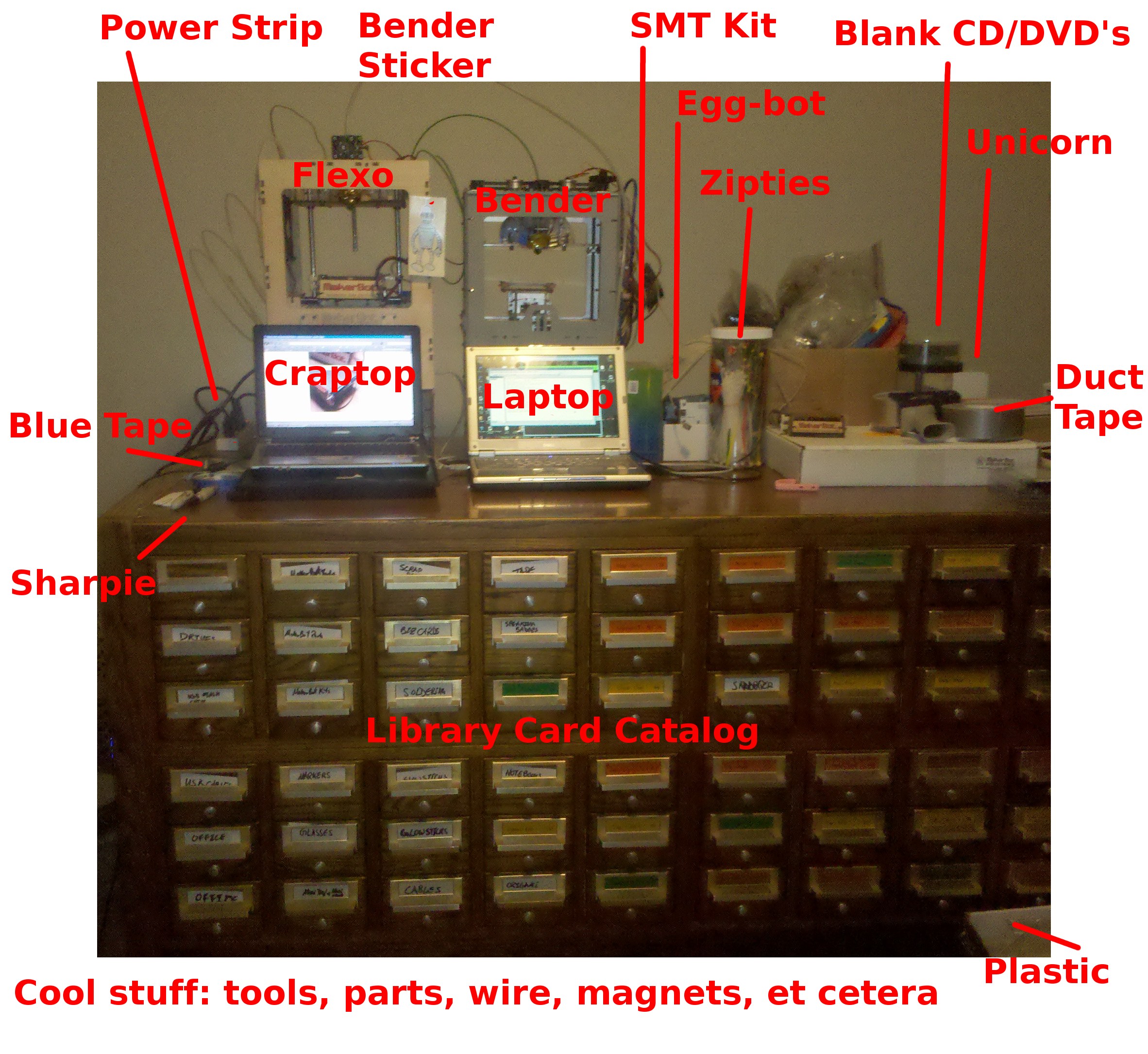
I thought people might be interested in seeing what my robot work area looks like. 1  Part of this last weekend was devoted to organizing the contents of the above library card catalog, putting things in appropriate drawers and labeling them. 2

You can’t really tell from the photo, but each of the Three-Dee printing ‘bots is sitting on a separate filament spindle kit.  I’ve got clear MakerBot PLA loaded underneath the Thing-O-Matic (“Flexo”) and black MakerBot ABS loaded under the Cupcake CNC (“Bender”).3 On the surface of the card catalog you can see a pink bracket I printed for my daughter so we can hang a bathroom towel4 at her level.  I’ve got a power strip duct taped down to the back left of the card catalog.  This has made the entire thing the perfect stand-up computing and soldering station.5

The drawer labels are difficult to read from that image – in large part because of my tragically terrible handwriting. 6  In case you’re interested, the highlights are:

  • Two different drawers labeled, “GLOWSTICKS”
  • One drawer labeled, “GLASSES”
  • One drawer labeled and filled with “NOTEBOOKS”7
  • One for “SPEAKER BADGES” of various kinds.  Admittedly, most are just from attending different conferences.  About a third are from when I was speaking at such conferences.
  • One drawer labeled and filled with various kinds of “TAPE”
  • One for “ORIGAMI” with paper and half-completed projects
  • One for “SANDPAPER” of differing grades
  • One drawer for “CABLES” and one for “USB CABLES”

I’m probably using almost 30 drawers, which is only half the front side of this library card catalog.  It’s got 60 such drawers on the front and back. 8 910  This monster occupies what was originally called a “living room.”  Now we just call it our “robot room.”  I was lobbing to change the name to either “The Robotics Lab,” “The Lah-BOHR-Ah-tory,” or the “Laboratory” but the idea did not receive the required 67% of household votes.

The way that I look at it – I could quadruple my robotics hobby and still have enough drawers for it all…

  1. It’s a bit messy, but worlds better than before I tidied it up. []
  2. I had posted a description a while back, but this probably explains it all much better. []
  3. FYI, Flexo has a small magnet installed behind the front panel.  That way I can affix a detachable magnetic soul patch. []
  4. What color do you want, honey?  “Pink, PINK!”  *sigh* Now, if ONLY we had a robot that could make a pink towel hook for you…  “Daddy, stop being silly.  Of course we do!” []
  5. I use a long wooden tray when I solder or assemble something with small fiddly bits.  That way if I drop something it falls into the tray. []
  6. If anything, the JPG compression probably helps the readability. []
  7. Including my DIY homebrew recycled paper and shopping bag analog notebook []
  8. The sad part is this thing is SO huge and SO heavy that if we move, we’ll never be able to take it with us. []
  9. It took an unreal amount of fuel, beer, and pizza to move it to where it is today. []
  10. If you live in the Bay Area and are interested in it – drop me a line. []

MakerBot Cupcake Ultimate Sale!

If you’ve been waffling on whether to buy a 3D printer, NOW is the time to pull the trigger.

I purchased my Cupcake CNC Deluxe kit for about $1000, shipped.  Over the following year I spent about another $500 or so on other color of plastic, replacement parts, and upgrades.  You, my friend, are in a much more enviable position.  For the next five days MakerBot is selling their Cupcake Ultimate kits for $697.  This is all the tools you’ll need (Well, you’d still need some basic things – soldering iron, etc) , all the parts you’ll need, all the upgrades (the automated build platform, the MK5 kickass plastruder, and the relay kit) you’ll need, plus five pounds of plastic to start making ANYTHING you can imagine.  Since getting my MK5 plastruder, my Cupcake hasn’t had a single problem that required any replacement parts at all.  This kit has been battle tested by literally thousands of people and is totally rock solid.

I’m telling you, my past self is SO jealous of your opportunity!!!  Don’t get me wrong, I’m loving my brand new Thing-O-Matic, but this is an insane deal.

Okay, I know someone is going to point out that I blog for MakerBot.  That’s totally true, I do.  No one asked or suggested I say any of this, I’m not getting any kickbacks, kudos, knickknacks or kangaroos.  I’m just a big believer in their products and service.

If you’re in the market for a 3D printer kit and can’t get a Thing-O-Matic, these next few days are exactly what you’ve been waiting for.

Nuance

Some would call it OCD, others attention to detail.

When I originally uploaded the STL file for my Leonardo Voltron I discovered that the figure was facing away from the “camera” in the rendering.  Since I had to run the model through Netfabb to fix up some minor details anyhow, I rotated the entire model 180 degrees in Sketchup, re-exported to the STL, and then put it through Netfabb.

That way, when you view the rendered image of the Voltron parts, they’re facing the viewer.

It’s alive!

I’ve got my Thing-O-Matic operational.  There were some initial hiccups, but it seems to be working.  However, I definitely need to calibrate Skeinforge and the “end.txt” cool down settings for this machine.  More on those details over at the MakerBot blog.  My initial print, a mini mug1 , turned out reasonably well – but is a little too sparse for actual toasting.

  1. Natch []

I cheated

Just a little.  I completed the body assembly of my Thing-O-Matic, but not the MK5 Plastruder.
I just finished up the plastruder, so I’m going to bolt that in and move on to flashing the firmware.