
Tap Light Focus Timer System

I’ve been procrastineering on a “sticky note timer” which would incorporate an e-ink display, be portable, updatable via WiFi, show me what I should be working on, and flash lights at me to give me a sense of movement / time passing / and urgency.  Sometimes I use the word “procrastineering” to refer to when I start to spiral on a project and end up in analysis paralysis.  But, I think it is more appropriately used when I’m doing a deep dive on a project when I really have something much more important / urgent I should be working on.

A long time ago I added a few components to an off the shelf dollar store tap light and turned it into a game buzzer.  While the sticky note timer project was marinating  / incubating1 in the back of my brain, I realized that maybe I don’t need or even want something that high-tech.  Maybe what I need is something dead simple?  As cool as the sticky note timer project is – and it really is neat – there’s a lot of pieces to the puzzle and a fair bit of maintenance that goes along with it once its finished.  You have to connect to it, upload a list, set up timers, etc.

I finally decided on something not so easily adjustable, but still flexible in it’s simplicity.  Rather than making the setup (adding / updating / uploading lists to a timer) something I have to do in order to start the timer, what if I made it part of the timing?

First, let’s look at what the setup.  A dollar store tap light which includes a lot of handy parts – a battery holder, a push button switch, several springs, and a simple and at attractive enclosure.

This slideshow requires JavaScript.

On the far left is a basic off the shelf dollar store tap light.  Next to it are two others I had previously modified to work as game / timer buzzers2  The last picture is the wiring diagram, except that I wired the ATTiny chip to the positive wire coming from the button switch.  Whenever I hit the button, it will toggle the circuit on and off.

Using some parts from my electronics bin3, I cobbled together a prototype on a breadboard that would do the following when the button was hit:

  • Turn orange for 1 minute and beep 3 times in the last 3 seconds
  • Beep once more and turn green for 12 minutes, then fade from yellow through orange over the last 3 minutes
  • Flash red and beep three times after 15 minutes had lapsed (12 minutes of green and 3 minutes of color fading)
  • Turn off, go to a low power mode, and then wake up long enough to flash blue every 8 seconds
  • After 5 minutes, it would flash green and beep twice
  • Then keep doing this 8 second blue flash and green light plus beep every 5 minutes
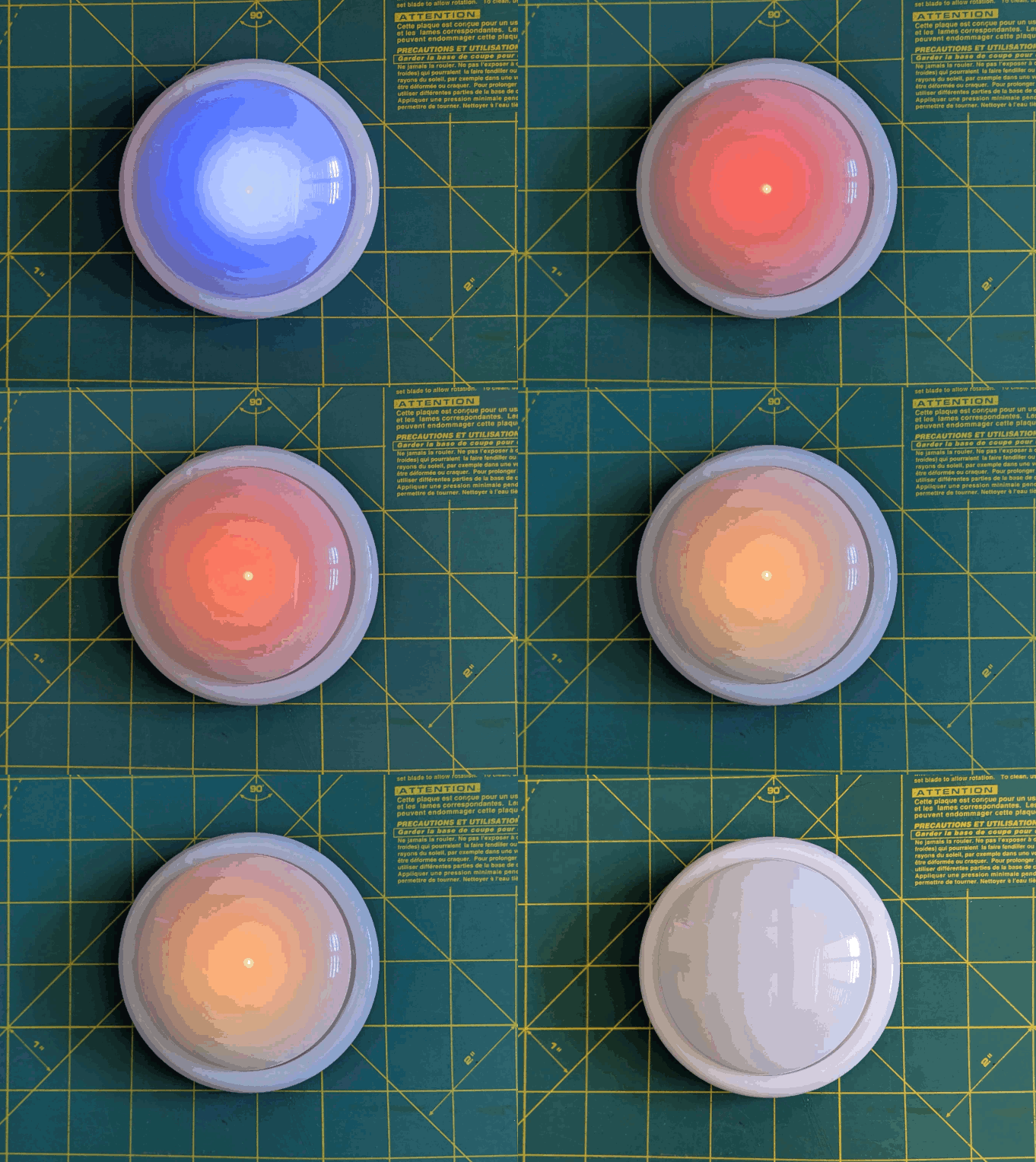
Animation of LED timer button

You’re probably wondering – what’s with all these timers and lights and beeps?  Here’s how I use them:

  • Place and slap the button to get going
    • I put my phone on my desk and the timer right on top of my phone.  It’s a big 4″ diameter timer and covers the phone pretty well.  I can’t pick up my phone without seeing this timer ticking down.  This is a huge difference between a phone app and a physical thing standing between me and my phone.  There are some web browser based apps – but these don’t really work for me.  Either I have to keep that window open and on top or … I’ll forget it exists.  This timer is right there, front and center, on my desk and lit up no matter where my desktop might take me.
    • Plus, it’s actually a little therapeutic to slap the tap light.  Pushbutton switches like this are built to take a bit of abuse and the physical action of hitting the light is a lot of fun.
  • Orange for 1 minute
    • This is the replacement for the “maintain / update a list.”  Instead of having to fuss with a list, I’ve dumped myself directly into work.  I’m suddenly racing the clock for 60 seconds to write all the things I want to try and accomplish in the next 15 minutes.  Maybe it’s a few emails, make some phone calls, or write / edit a document.  After 57 seconds, the buzzer will beep three times to let me know that the 15 minute timer is about to start.
    • Or, if you already have a particular task to work on, you could use this time to follow a process like Steven Kotler’s suggestions on tactical transitions to a a flow state4.  His three step process is:
      • Anchor your body
        • Practice box breathing.5  You could box breathe 3 times in one minute and have a few second left over to psych yourself up.
      • Focus your mind
        • Write down one clear goal.
      • Trigger your ritual
        • Recite a mantra, perform a gesture, start a “work” playlist
  • Green for 15 minutes
    • It’s go time!  Whatever I wrote down, now I’m in a race to work on those things – and those things only.  I can’t let new emails, calls, etc, distract me – that buzzer is going off in 15 minutes.  As the timer closes in on 15 minutes, with just 3 minutes to go, it turns yellow and fades to orange.  If I look up / down and see this, I know I’m in the home stretch and I’ve got to start moving fast to wrap things up.
  • Red alert!
    • Once the 15 minutes is up the light flashes red and beeps to let me know I’m off the hook.  Now, if I’ve already hit peak productivity, I could keep going.  If I got sidetracked, it’s an alert for me to restart the timer and get back to it.
  • Blue flashes, 5 minute green flash and beeps
    • These blue flashes happen once every 8 seconds6 just to keep the timer present in my vision so it doesn’t just appear into the mess on my desk.
    • If I finished out the 15 minute block of work time and I don’t stop the timer, the 5 minute timer is my reminder to return to my desk, reset the timer, and get going again.
    • If I ended up working past my 15 minute block of work time, the 5 minute beeps still give me a sense of how much time has passed.7
    • Importantly – if I get distracted by a sidequest, one of the beeps every 5 minutes is bound to catch my attention and remind me I’m supposed to restart the timer and get back to work.

So… does it work?  For me, yes!  Here’s why:

  • The hardest part of getting started is getting started.  My tendency is to want to collect all the stuff I’d need, get real comfy, make a list, look up some documents, etc.  This system short circuits all that.  I just need to be able to slap the big button sitting on top of my phone.  If I can manage that, I get 60 seconds to collect myself and then it’s time to rock and roll.  That’s enough time to take some deep breaths, start a playlist, or just sit quietly before I get started.
  • It covers up my biggest distraction.  Unlike an app on the phone or my desktop computer, I can literally cover up my phone with this big damn button.  I won’t see any notifications and if I want to pick up my phone, I have to actually look at and ouch the button – which is itself a reminder to get back to work.
  • It plays into a sense of play, urgency, and my own overdeveloped sense of competitiveness.  I enjoy hitting the timer to turn it on – and I want to beat that 15 minute timer.
  • The 5 minute timer acts like a built in break timer.  If I can get through 15 minutes of work, I can goof off, write a blog post, and without doing anything else that 5 minute timer can bring me back.
  • It includes a “failsafe” to bring me back to the timer if I get distracted by a sidequest.  If I miss the 15 minute timer, there’s another 5 minute timer around the corner.  Even between timers, there’s an intermittent flash of blue light to grab my attention.

The only meaningful “downside” to this timer button for me is there’s no pause button.  However, this isn’t exactly bad.  It helps me really hone in on what’s important and what’s interesting.  If a family member asks me for something or a call comes in, I just need to weigh the benefit of addressing the intrusion against having to restart the timer.  And realistically, if I pause the timer, I’m going to need some time to drop back into “flow” anyhow.

Sticky Note Timer
  1. Ah, just what I need! A new project!
  2. Sticky Note Timer, parts arrived!
  3. Seeed Studio XIAO ESP32C3 and a small sticky note display
  4. Brainstorming More E-Ink Stuff
  5. Smol Fonts for E-Ink Displays
  6. Tap Light Focus Timer System
  1. Fermenting?  Festering? []
  2. The older ones would flash orange a few times to alert you the game was going to start, turn green, fade from yellow to red, then flash red and buzz after 15 seconds. []
  3. I used an ATTiny45 because I had one, but it’s not much more expensive to use an Adafruit Trinket, a buzzer, a RGB/neopixel LED, and some wire.  In a subsequent version, I also used a small prototyping board like the Adafruit Perma Proto Boards []
  4. It’s the second slide []
  5. TLDR:  Breathe in slowly through the nose for 4 seconds, hold for 4 seconds, breathe out slowly through the mouth for 4 seconds, hold for 4 seconds, repeat []
  6. Because that’s the longest the little microchip can do between “deep sleep” to conserve battery life []
  7. I may adjust the program so the first five minutes is 1 beep, second five minutes is two beeps, etc []

Paper Circuits: The Adventure Begins

While I’m a big fan of paper and circuits, I’ve never really given paper circuits/circuitry a shot.  Unfortunately, I have no good excuse for this.  (Fair warning:  I’ve been collecting links and ideas on this topic for several weeks now, and even though I intend to break up the post into more manageable chunks, I have a feeling this is going to be a doozy)

TapeTricity

Years ago Chris Connors, a STEAM educator/maker and friend, had posted some photos and videos about something called, “TapeTricity” and helped hundreds of kids as young as 3 and 4 years old build their very first circuit at Maker Faire 2013.  TapeTricity is all about making electronics accessible to people by showing them how to make real circuits using cheap and common components while removing the need for specialized tools and materials.  This system of designing circuits made use of several very interesting innovations: aluminum HVAC tape and paperclips along the edges to form electrical contacts.

Aluminum HVAC Tape – Benefits and Limitations

Back in 2013 copper tape was reasonably common in artistic settings for use with soldering stain glass.  However, the copper tape wasn’t readily available with conductive adhesive and tended to be more expensive than the aluminum HVAC tape used in Chris’ projects.  While the prices of copper tape with conductive adhesive have fallen over the last few years and conductive inks/paints have become more common, pretty much nothing is going to beat aluminum HVAC tape for price per project.  However, HVAC tape is not without its limitations.  The adhesive is a decent insulator rather than a conductor, the tape only comes in strips about 2 inches wide and must be torn or cut to much thinner strips, and has a tendency to curl at torn edges, and aluminum tape does not take solder well.1 I expect that the non-insulation properties of the underside of the aluminum tape could actually be very useful in conjunction with copper tape – to essentially make for circuit board traces that can cross over one another.

Taped Edges – Contact Points

TapeTricity components

As you can see from some of the photos above, the edges of the cards had foil tape wrapped over some edges which were then connected to some of the components.  The result is that the edges of the paper essentially become functional I/O pins.  The nifty thing about this is that it could allow TapeTricity cards to be wired/rewired/networked together.

Paperclips – Alternatives to Alligator Clips

Another interesting feature of TapeTricity comes from the use of paperclips.  Paperclips are ubiquitous and cheap23 and, with a little bit of wire, become cheap DIY alligator clips replacements.  While individual alligator clips aren’t that expensive (let’s say around $0.25 each?), the cost of providing a number of them to a room full of students would quickly add up.

These TapeTricity cards allowed kids to color and draw on one side of an index card – then bring their designs to life with electronics on the back and through the card.

Lessons from TapeTricity

  • HVAC tape is a great choice for paper electronics with a few limitations.  The adhesive is an insulator which allows HVAC tape to be leveraged in bridges and there aren’t easy ways to solder to it.
  • Edge conductive pads from HVAC tape allow for cards to be powered or networked
  • Paperclips and wire are a great cheap DIY alternative to alligator clips

Evil Mad Scientist Labs and Paper Electronics

Evil Mad Scientist Labs is one of my all time favorite open source arts/electronics designers/manufacturers ever.  Not only do they enable other people to realize their plans for world domination, they’re pretty cool people.  I had the good fortune to be able to visit Evil Mad Scientist Labs (now celebrating their 10th birthday!) a few years ago.

One Sided Circuit Board – paper, conductive ink, and soldering

Mobius Circuit - 21

While there Windell Oskay and Lenore Edman gave me a tour and showed off their awesome single sided mobiüs circuit board.4

Electronic Origami – several methods for electrifying paper

toner - 15

More recently, while researching for this blog post I discovered their simpler, but perhaps more spectacular, origami balloon circuit.  EMSL posted several possible methods for electrifying paper.  Since the post explains each of these methods in detail, I’ll only list them:

  • Using dry mount adhesive to glue aluminum foil to paper
  • Using an iron to fuse aluminum foil to freezer paper
  • Using an iron to fuse aluminum foil to the toner on laser printed paper
  • Lessons on resistors and simple LED/battery combinations inspired by LED throwies

This circuit is beautiful and eerily reminiscent of a certain other cube.  If someone hasn’t made an origami LED paper circuitry companion cube, well, this is just a thing that needs to exist in the universe.

Edge-Lit Cards

EdgeLitCard - 31

Another particularly cool post from EMSL is their piece on edge lit holiday cards.  The electronics are essentially the same as a simple throwie or TapeTricity circuit, but the use of scored sheets of plastic allow incredibly interesting display possibilities.

Lessons from EMSL

In no particular order, here are some of the lessons I’ve learned from EMSL:

  • The conductive ink in the mobiüs circuit has enough resistance that the LED’s don’t really require actual resistors
  • Electronic paper projects need not be merely two-dimensional and adding a third dimension can be truly transformative
  • Scored or scratched plastic plus paper and carefully designed LED circuits can create amazing display possibilities

Paper Circuits / Paper Circuitry / Electronic Notebook

Just before Maker Faire 2016 I saw a tweet from Jeannine Huffman showing off her development of a paper circuitry robot panda which would cost about $5 per student.

I was astounded by what Jeannine was doing.  Where TapeTricity was a great way to introduce kids to electronics, making those same electronics smart by adding a microcontroller could make those same pages smart and interactive.  Moreover, a TapeTricity project could be “leveled” up by just wiring the aluminum contact pads to a microcontroller.

Jeannine Huffman’s Notebook

I was fortunate enough to be able to catch up with Jeannine at Maker Faire Bay Area 2016 this year and we compared notebooks.  Here’s some pictures of her work:

This slideshow requires JavaScript.

I regret that I didn’t take more pictures of Jeannine’s notebook, she’s been kind enough to post much of her designs on her website, her Twitter account, her Google Plus page, and in the 21st Century Notebooking Google Plus community.

Lessons from Jeannine Huffman

To just jot down some of the problem solving and ideas I noticed in the few moments when we compared notebooks:

  • Mixing off the shelf electronic components and circuit stickers with conductive ink, copper tape, and soldering
  • Incorporating electronic components, sensors, and microcontrollers with DIY sensors, switches, and other solutions
  • Melding a notebook and electronics – by sketching in, around, and through circuits to provide annotations and instructions
  • Finding a way to create a copper tape hinge that could survive repeated opening and closing of the notebook

21st Century Notebooking

The ideas shared in the 21st Century Notebooking Google Plus community are just too numerous for me to do justice.  Since my blog posts are as much about me documenting my own discoveries as it is about sharing with you, gentle reader, perhaps you’ll forgive my jotting down just a few of the ideas found within a 30 second scan of this community:

  1. Paper electronics with mixed media arts crafts
  2. Paper electronics mixed with origami
  3. From +Jie Qi and @Chibitronics:
    1. Conductive fabric to create conductive hinges for use in circuits spanning more than one page in a notebook
    2. Light up paper helicopters
    3. Copper tape paper speakers
    4. UPDATE 10/26/2016: Jie Qi’s “paper-based electronics for creative expression” tutorials have some really great ideas for getting started with paper circuitry.  Frankly, this is to be expected from the lady who created Chibitronics and circuit stickers.  :)  These tutorials are great – and you can see exactly how she refined these ideas to become circuit stickers and the kind of skill building projects seen in Chibitronics books.  These tutorials include:
      1. basic circuits,
      2. paper battery holder,
      3. parallel circuits, soldering,
      4. making switches,
      5. blinking LED’s,
      6. pressure sensors,
      7. basic programming,
      8. fading program,
      9. blinking program,
      10. random program,
      11. sequence program,
      12. and a microphone program!

Project Daffodil (Update 10/26/2016)

Project Daffodil is the work of Sian Geraghty, Robert Foster, and Christine Ho as their graduate thesis project for the Masters in Multimedia Program at CSUEB.  Their project combines pop-up books, paper circuitry techniques, and 3D printing to provide an interesting introduction to electronics for kids.  When I saw them at Mini Maker Faire Rocklin on 10/5/2016 they had combined their work with an iPad app which could interact with some of their 3D printed models infused with conductive material.  They’ve been interviewed on the Make Magazine website and published a tutorial on building pop up paper crafts with electronics.

Lessons from 21st Century Notebooking, Circuit Stickers, and Project Daffodil

I think what I learned most out of these projects is that there’s a lot of ways to combine paper circuitry with other interesting and creative ideas like origami, paper crafts, greeting cards, pop up books, and 3D printing.

What’s Next???

Smart sketchbooks, electronic origami, and the ability to program anything.  With all these incredible designs, pieces of code, and ideas – where can we go next?

Well, I have a few ideas…

Default Series Title
  1. When I googled “how to solder copper wire to aluminum foil” the top result was a YouTube video which suggested applying a thin layer of oil to the foil, using a soldering iron with solder to heat up the foil, with the oil supposedly preventing the aluminum from oxidizing, then the wire could be soldered to the foil. []
  2. Or free when you are at a Kinko’s []
  3. Perhaps the better phrase is “complimentary”? []
  4. I hope you will, once again, forgive me as I present these items in the order of my discovery, rather than chronological order? []