
There must be something wrong with me. The idea of a “unibody” Mendel cast as several large chunks of polyurethane with nylon fasteners, is a pretty cool concept.
Then I thought of a Mendel wearing a unitard – which is just weird.
There must be something wrong with me. The idea of a “unibody” Mendel cast as several large chunks of polyurethane with nylon fasteners, is a pretty cool concept.
Then I thought of a Mendel wearing a unitard – which is just weird.
Which never ever happens.
Right after posting about this fantastic large MySQL file upload script… it stalled out around insert #2,650,000. Thus, much fiddling with file offsets and start positions ensued. So, fair warning – the script has zero upload recovery modes.
That said, it’s still significantly easier than using any of the methods I had tried earlier.
Anyhow, if your BigDump <shudder – what a name!> script fails on you, there is a way to force it to resume the upload. I was performing the upload on a GZipped file – which makes the recovery process more difficult. Nevertheless, here’s how you do it:
I’ve used this process exactly once to resume a transfer of a GZipped file. There’s no guarantee it will work for you, so use the above at your own risk.
I’ve probably mentioned before how much of a PHP/MySQL/WordPress nerd I am. If I haven’t so far, I’ve said so now.
One of the sites I operate requires numerous tables with about five million rows all together. Automated backups are easy with any number of WordPress plugins. But, what to do when you’ve got a HUGE SQL file and really small upload limits in phpMyAdmin and short server timeouts preventing a single script from reviving said huge file?
The brilliant scheme I came up with (I’m being sarcastic here) was to take those large files and split them up into smaller files of about 3MB each. This approach was problematic for a number of reasons. It required me to download a huge file and slice it up into small files between MySQL inserts. Copying and pasting 25,000 rows at a time was giving my poor laptop fits. It also meant I had to manipulate the full plaintext MySQL file, rather than a GZipped version. On top of all of that, I was paranoid that I would accidentally omit a single row and have to start all over again. In order to overcome the problem of server timeouts, I wrote a script that would load one small file, finish, then call itself again incrementing to the next file to be loaded, LRR.
There’s nothing good about this extremely time and labor intensive approach that was greatly error prone.
I wrote the above original serial-file-upload schema about a year and a half ago. My PHP/MySQL kung fu is now much stronger. Back then I never used scripts written by others – foolishly thinking that it would take me longer to understand how to integrate their scripts than it would be to build a serviceable script from scratch. I went so far as to write my own AJAX library. It was functional, but no where near the quality and reliability of jQuery.
Much humility and less hubris later, I’m more confident in my ability to read, understand, and interface with scripts written by others. This now allows me to focus on only writing those things that are truly unique and critical to my projects, without having to re-invent the wheel.
What’s the name of this magnificent script I’m using for bulk uploads of really large MySQL databases? Well, this is where the “tragically terrible name” bit from the subject line of this post. The script is called <wince cringe>, “BigDump.”</wince cringe> This script just automated a HUGE chunk of work for me. Instead of struggling with more than 4 million lines of MySQL, I uploaded a SQL file, changed some variables in the BigDump script, and ran the script.
The total upload time is probably about the same as the script I was using. The benefit is in not having to handle a ton of code before getting around to running the script
With great power comes great responsibility
The guys at i.materialize turned down a request to print what appeared to be an ATM skimming device cover plate. 1 Like the power of a high quality full color photocopier and a stack of twenties, owning a MakerBot is a serious responsibility.
I rather enjoy building the easy-to-use user interfaces for another website of mine. I’m always tweaking it and trying to make it better. Small change, test, ask for input, LRR.1
My last post gave me a great idea. A large physical console with actual knobs, switches, and dials that all operate Skeinforge. If I had one of these, I would want it to look like the center console of a TARDIS. Some of the best Doctor Who moments are when he’s zipping around the console, tapping, flipping, twisting, turning and generally being wacky.
Imagine being able to do that sort of thing and then have a plastic object (of a seemingly correspondingly random quality) pop out of the center?
As MakerBots and RepRaps proliferate, so do the websites and content concerning them. Gian Pablo Villamil had a really great post about his adventures with Skeinforge. As with BotHacker’s excellent post about the Skeinforge Cool setting and analysis about the benefits of cooling fans, Gian’s post takes us through each of his Skeinforge changes as well as documenting it’s effect on the print quality.
I wish I had more patience for that. I tried for a while documenting each change… but quickly became enamored with the idea of spinning dials and flipping switches in Skeinforge in the (sadly badly) mistaken belief I could make it better.
If you’re thinking of the normal run-of-the-mill business cards and you’re thinking too flatland.
This is a 3D printed business card printed using two extruder heads, clear PLA, black ABS, and some special GCode to essentially laminate black text within layers of clear PLA.
I’m not even sure what I would build with this kind of tech. Although, I think it would be super awesome to build models using clear PLA to create a variation on those “bubbles in crystal created by laser” thingies you see in gift shops everywhere. Or, a white or black plastic dinosaur skeleton printed in a block of PLA “ice.”
How about a woolly mammoth? Or caveman or alien or an entire 3D scene of spaceships attacking the deathstar suspended in clear PLA?
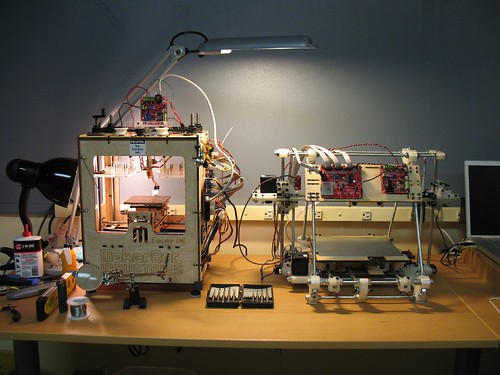
Okay, I’m liking the MakerBot and it’s RepRap child. But, check out that work area!
(I have the same 3-in-1 oil for my MakerBot. :) )
An actual honest-to-goodness Time And Relative Dimensions In Space machine? (Thx Tony!)
It just wasn’t the same without my old theme.
Of the several WordPress websites I have, this was the first one I moved to WordPress 3.0 when it came out. Unfortunately, 3.0 totally broke the hell out of my theme. I suspect it happened when the database was upgraded and it nuked the theme options. But, an upgrade to the theme1 and a little CSS spit and polish… and I’m back!
Edit: One unfortunate side effect of upgrading the theme was that it nuked my logo image. I found the original on Flickr, resized it, and dropped it back in. However, as you can tell from the nasty pixelation – I used “Paint” to resize. Blech. I’m going to have to redo that.