Thank you MakerBot!!!

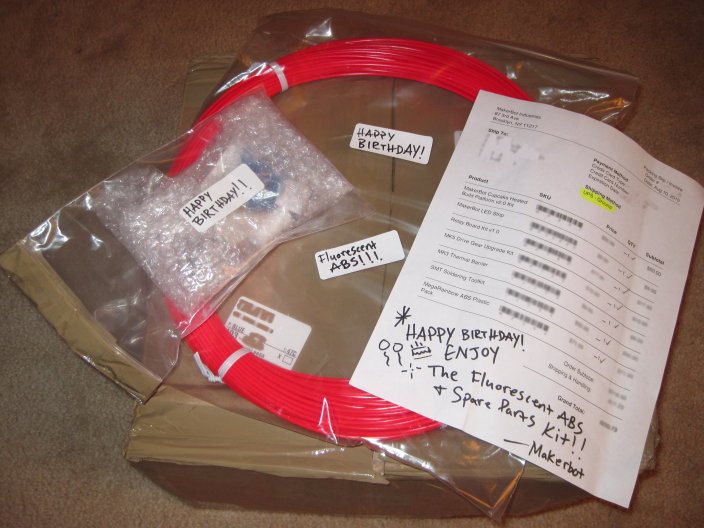
Fluorescent red ABS and spare parts kit!

Thanks to the generosity of my family I placed an order for a bunch of the MakerBot1 parts for which I’ve been pining away.  Ordered on August 10th, the box arrived on August 16th.  One of the things ordered was the MegaRainbow ABS plastic pack.

However, the box contained something else – fluorescent red ABS and a spare parts kit!

Thank you MakerBot Industries!!!  I have, indeed, had a happy birthday.  :) 2 I promise to only use these parts for good. 34

  1. And MakerGear! []
  2. I would have posted this a lot sooner, but it’s been a crazy busy week. []
  3. As for the black ABS that came with my Deluxe Kit I’m sorry to say that I cannot make similar promises…  that stuff just has a life of it’s own. []
  4. Is it an EVIL Rubik’s cube? []

Sometimes a good deal isn’t

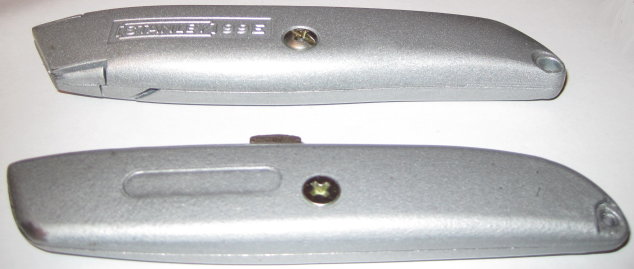
$3 utility knife and $1 utility knife

Several months ago I made an impulse buy at the local hardware store.  I picked up a utility knife that came with 6 blades for $1.  It was a good deal, if even for just the razors, and I couldn’t find my usual $3 knife.

Here they are, side by side.  My trusty Stanley utility knife on top.  This knife has a good heft, stores a few extra blades in its handle, and is slightly wider, making for a more comfortable grip.  The two sides also interlock as well as screw into one another.  Clicking the blade out another notch requires a small amount of force – just enough so you’ll never do it by accident – and so that it will stay in each notch as long as you don’t intentionally depress the button.

On the bottom is my no-name brand knife.  It’s lighter, slightly thinner, rattles with the extra blades inside, and the button to extend/retract the blade has a little bit of wobble and play to it.  Also, there’s no interlocking between the two halves.

What an extra $2 buys you

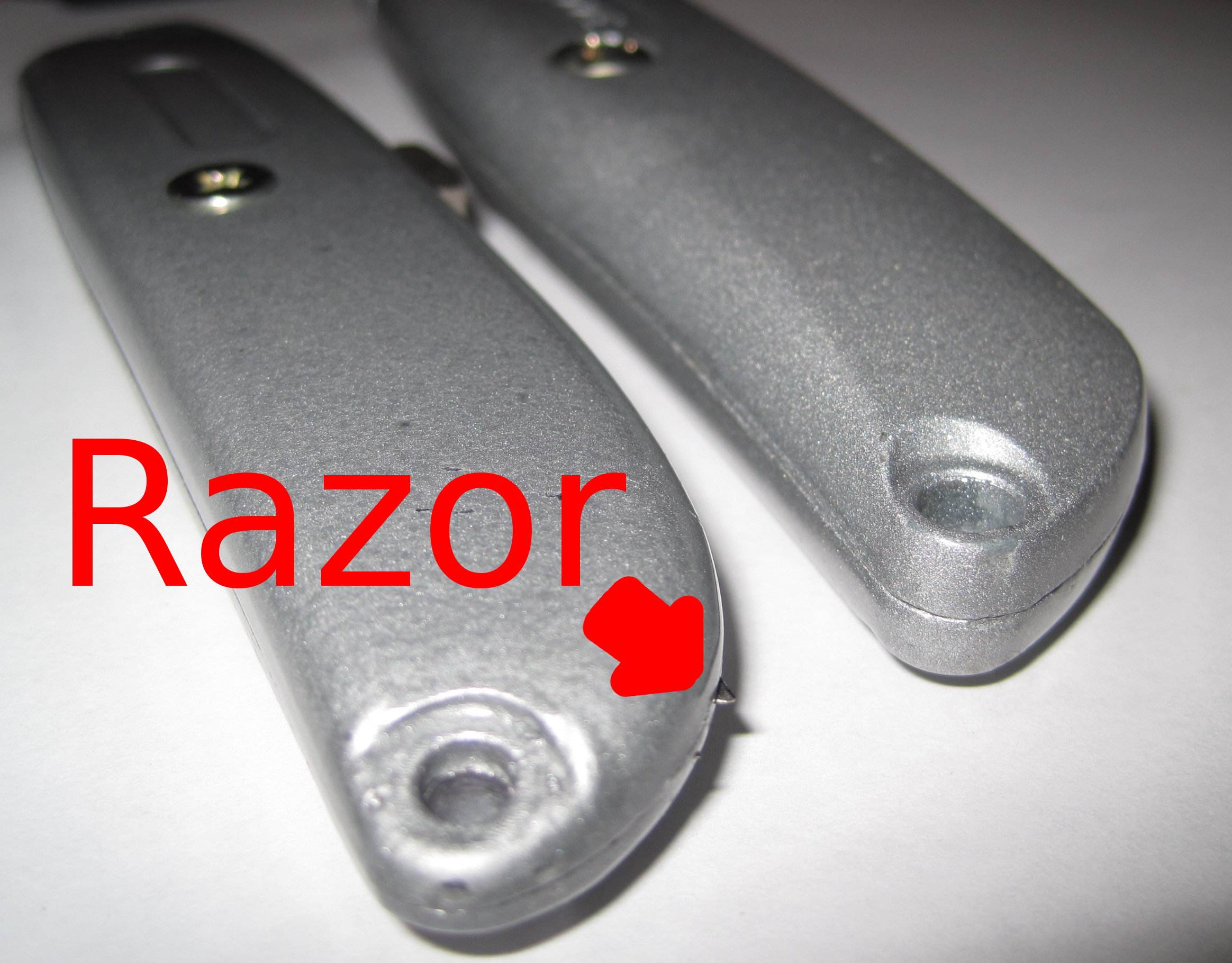
I discovered that the seams between the two halves of the cheapie utility knife left a lot to be desired.  While using the knife I felt a sharp poke in my palm.  Turns out that some of the spare razor blades were poking through the incomplete seam.

So, if you’re headed to the hardware store, invest the extra $2 in the better knife.  :)

MakerBot LCD screens

Perusing Capolight’s recent post about his LCD screen made me pine for an LCD display/simple SD print selection for my MakerBot.  I think Zaggo was working on something similar a while back.  Of course, there’s the RapMan with an integrated OLED screen.

I’m guessing I’m not the only one who would be interested in such an add-on for my MakerBot.  It’s not a terrible burden to have a computer constantly connected, but it would be nice to have the MakerBot slightly more independent of a computer.  Just bring plenty of plastic, electricity, and an SD card with your favorite things.

Lazzersaurus Rex, I choose you!

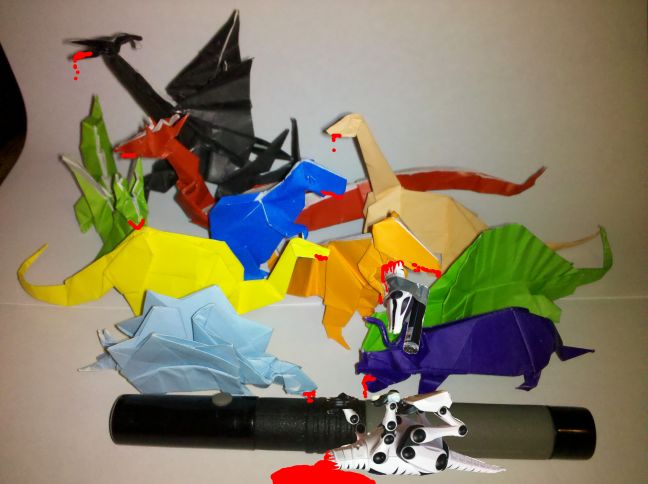
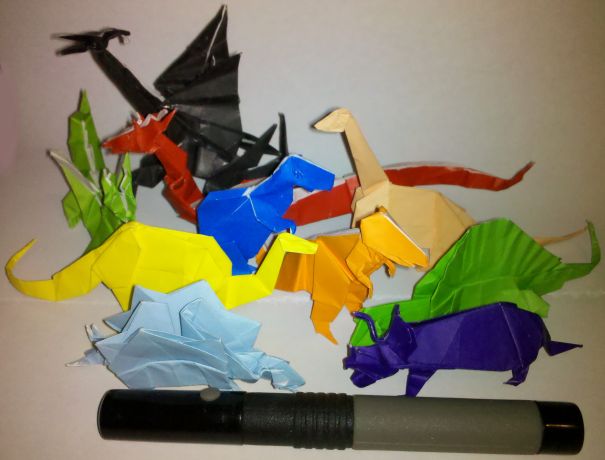
Tony Buser, my origami laser dinosaurs accept your challenge.

SyFy Movie:  MakerBlock origami laser dinosaurs Vs Buser's Laser Dinsosaur
SyFy Movie: MakerBlock origami laser dinosaurs Vs Buser's Laser Dinsosaur

Oh.  Dang.  That did not appear to go well for Team Buser. 1  You probably didn’t realize the scale of those origami dinosaurs before issuing your challenge.  See, that’s a laser canon, not a laser pointer.

Also, sorry about your robot dinosaur.  I’ll print you a new one.  :) 2

  1. You see, I use EVIL origami paper. []
  2. Friends again? []

Unrealistic expectations

The guys at MakerBot just posted a job opening for a MakerBot blogger.  As if their list of qualifications wasn’t daunting enough, the tweet that follows…  Well, I’ll just let it speak for itself.

MakerBot Blogger Wanted: http://bit.ly/dur4vK (also: dinosaurs with lasers wanted)

You want a robot obsessed dinosaur with lasers? 1  What kind of a job posting is that?

  1. I don’t recall that as an option on career day. []

I’m sorry you had to find out like this

Dear lovely wife,

I never meant for this to happen.  It just sort of happened.  It all started so innocently – reading about the RepRap project, going to the MakerFaire, buying a MakerBot, starting this blog, extra plastic here and there…  and then MakerBot advertised for a blogger.

Tell the kids I love them, don’t forget to feed the dog, and there’s a post-it on the dresser for my boss.1

If you need to reach me, I’ll be camped out 87 3rd Ave, Brooklyn, NY 11217 until they let me in and hire me.

Love,

MakerBlock

  1. See?  I can be succinct. []

Sonic Screwdriver progress

Printable screwdriver

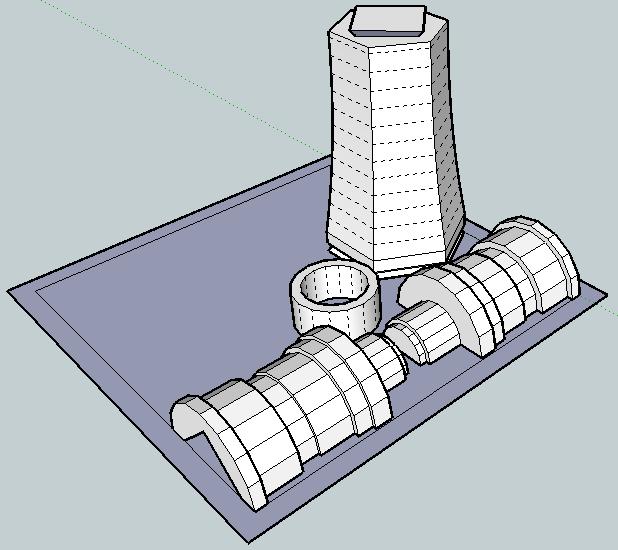
I just redesigned the printable screwdriver in order to make the parts fit together better and be more printable.

It should be easier to see how these parts go together.

Basically, you take the “mid-handle” at the far end of the build sheet, turn it upside right, clamp the two “lower handle” pieces on either side of it, and slide that bottom ring onto the lower handle.

I still need to redesign the upper handle, hollow out the mid-handle, and make sure there’s enough room inside for the GoodFET / electronic sonic screwdriver guts.

Now I’m wondering if it is also possible to make this a piece of MakerBot origami – and make it printable on one build sheet…

Real life sonic screwdriver

This morning I received an e-mail from Bre out of the blue introducing me to Travis Goodspeed.  Apparently Travis has been working on building sonic screwdriver guts out of the GoodFET, a universal JTAG programmer, a “sonic screwdriver of hacking.”  Travis suggested a GoodFET could be programmed to act as a TV-B-Gone, light show, or any number of other things.  Given that his circuit board is about 3″ x 0.85″ x 0.2″1 , there shouldn’t be a problem finding space for it in the sonic screwdriver I’m in the middle of designing2

Freaking sweet.

So, here’s my real life sonic screwdriver wishlist:

  • Lights.  Red LED3 , white LED4 , green LED5 , and a UV LED6
  • An actual screwdriver bit or spot where you can attach a screwdriver bit.  It would just be cool to have a sonic screwdriver that could be used as a screwdriver.
  • A shakey Tic-Tac container style recharger.  Having a sonic screwdriver that doesn’t need batteries would be awesome.
  • A tiny speaker that played the sonic screwdriver sound.
  • A tiny magnet.  I remember watching Doctor Who back in the day, black and white old school episodes, where he used his sonic screwdriver to take screws out of things, bolts out of doors, etc in the worst stop motion animation the BBC could get away with.  Still, if this sonic screwdriver had a magnet, it could actually affect a physical change via magnetic force.
  • TV-B-Gone.  On the episode “Midnight” Doctor Who shuts off a bunch of TV’s using his sonic screwdriver.  This would be an INCREDIBLE feature!
  • Flash drive and/or mini-memory card reader.  Perhaps with the entire library from PortableApps.com installed.
  1. For those of you non-imperialists out there: 76.2mm x 21.59mm x 5.08mm []
  2. TBuser, if you want to help, lemme know! []
  3. For night vision.  Also, there are suggestions that a sonic screwdriver can have a “red setting.” []
  4. As a flashlight. []
  5. The 11th Doctor’s screwdriver has a green light. []
  6. For making things fluoresce such as secret messages, blood stains, and monsters. []

MakerBot Origami

Or, “Design Constraints and Creativity”

Origami is another of my hobbies and it is all about design constraints. 1 The rules are simple2 – one square sheet of paper only manipulated by folding. 3  Yet, within these rules it is theorized that a sufficiently skilled artisan can design and fold any arbitrary figure.  I find folding origami to be at once cathartic and contemplative. 4

Pondering the design constraints within origami reminded me of one of my own recent designs – the 3x2x1 Rubik’s style puzzle cube.  Quite apart from the medium or subject matter, I really liked the idea of a single print job resulting in parts that could be immediately hand-assembled without tools to form a useful object.  Then I thought – if the design constraints are one of the things I like about this design, what else is possible within these same constraints?

Thus, I propose a new style of “MakerBot Origami”:  One MakerBot print5 , multiple components6 , no tools or hardware7 .

What’s the coolest most awesome thing you can design within these constraints?

Update:  Cyrozap – sory fore mispellnig yoru mane.

((I waffled on that title.))
  1. I waffled on that title. []
  2. Modern origami rules, anyhow. []
  3. Designing an origami model is not about figuring a way to cheat those rules – rather a way to work within them to achieve a desired goal. []
  4. I recall one origami master referring to the folding of a particularly difficult and rewarding model as invigorating. []
  5. Or, as Cryozap Cyrozap calls them, “production file.” []
  6. Otherwise, people would be making whistles. []
  7. Thus, no bottle openers []