MakerBot woes

Building my MakerBot and getting it printing reliably was challenging, but totally doable by a technical novice such as myself.  I have lots of people on the MakerBot Operators group to thank for their patience and help in getting my MakerBot online. 1  Looking back, I spent about a month building and then calibrating my ‘bot. 2

It’s easy for me to forget that first month of occasional frustrations and triumphant victories, now that I’ve been printing successfully for more than eight months.  It actually makes me a little sad when I read people writing about their own frustrations and how they’re ready to throw in the towel.  The most recent example was noobcake getting frustrated with her ‘bot and getting ready to sell it off in parts.  Thankfully, Spacexula swooped in to help her out.

This brings me to We Alone On Earth‘s recent post.  WAOE are a group of introspective, philosophically and technologically minded twenty-somethings.  To give you you an idea of their frustration with their ‘bot, the post was entitled, “MakerBot: not very much fun at the moment (caveat emptor)”  Yikes. 3  I realize that WAOE has revised their original post several times since the original publishing date – but they have a lot of legitimate concerns.

WAOE list off seven problems with the MakerBot.  I’m not going to refute these points – but rather offer another perspective on them.  After several updates, WAOE offer additional comments, I’ll include them here in “[]”.

  1. The PTFE is prone to melting.  [WAOE expects the new MK5 Plastruder will resolve this issue]. I have never heard of a PTFE barrier melting.  I’ve heard of them deforming from a blockage and had one develop a clog which I had to remove.  Several people have purchased MakerGear PEEK replacements – but these are far from necessary.  I clogged my first barrier once, cleared it, clogged it again, and am now using a slice of it as an insulating washer.
  2. Inexplicable printing behavior due to noise.  [WAOE fixed this issue by twisting wires and installing a resistor]. I’ve never had this problem, but I know others have.  Like WAOE, I’ve heard of people fixing these issues by twisting wires, using resistors, or ferrite beads.  Perhaps my workstation has less electronic noise, but I haven’t had to do any of these things.  Then again, perhaps my prints suffer from a certain degree of noise?
  3. Printing large objects is hard without a heated build plate.  [WAOE notes this isn’t an issue if you’re good at soldering]. Totally true for ABS, but not PLA.4  However, this is really a problem with the print media – not with the printer, right?  ABS will warp as it cools, unfortunate but true.  I’ve had less warping problems in warm weather or during with a second print – basically when the build platform is already warmed up.  Zaggo’s printruder is one of the largest things I’ve printed.  Interestingly, his design takes into account that certain parts are expected to warp. 5  Or check out Clothbot’s train track – it was designed with a lattice/correlated bottom to prevent warp problems.  Plastic warps – but with careful and thoughtful designing, this shouldn’t be a limitation.
  4. The heated build platform is difficult to build and requires a relay kit. [WAOE notes this isn’t an issue if you’re good at soldering]. I can’t dispute either point.  I just got both and haven’t had a chance to assemble them yet.  I’m assuming the heated build platform, which requires SMT soldering, will be challenging.  Frankly, fear of SMT soldering was the big reason why I didn’t jump into buying a MakerBot sooner. 6  The MakerBot HBP is just one option for a heated platform – there’s several others out there.  Don’t like SMT soldering?  Try out Rick’s platform over at MakerGear.  More into DIY?  Well, use the plans posted for any of several other variations.  As for the relay kit – it’s not a requirement – but it will prevent MOFSETs from burning out on your extruder motherboard7
  5. Calibrating Skeinforge is hard.  [WAOE notes this is still an issue]. I like to use the word, “challenging.”  A better way to look at MakerBot calibration is that you get out of it what you put into it.  I have my MakerBot tuned to the point that I get reasonably good looking durable parts.  Sure, I could spend more time and get even better looking parts.  However, once I got it printing reliably I was much more interested in printing new things than refining the printing process.  I’ll get around to improving the print quality even more – but I’m having too much fun right now.
  6. The Plastruder MK4 feed system is unreliable. [WAOE expects the new MK5 Plastruder will resolve this issue]. Getting the tension on the MK4 idler wheel is just one of those aspects of my MakerBot I had to experiment with and get just right.  I’ve been printing reliably for eight months using the same idler wheel and gear.  With proper maintenance, flossing the extruder, and clearing chips out of the extruder the current setup is serving me well.
  7. The threaded rods are of poor quality. [WAOE are getting new threaded rods, which should fix their problem.]. Of my four threaded rods, one is definitely warped and two have very minor warps.  By experimenting, rotating them just so, and printing a few wobble arrestors I’ve eliminated most of these issues.  You can definitely get more expensive and straighter threaded rods and improve your build quality.

A MakerBot Cupcake CNC kit is not for everyone – but the kit can be build and operated by anyone who is willing to invest the time to do so.  It is a cheap, hackable machine that is literally going to be just as useful as you make it.  Want less warpage, higher resolution, more reliable extrusion?  You can buy an upgrade, build one from their plans, or design your own solution. 8  Want a CNC mill, CNC pencil, or CNC music box?  Design the very first one!  Then again, you don’t have to do any of these things.

A MakerBot kit is just a platform for your creativity.  It’s just that big. 9

As for you, WAOE, if you want some help – drop me a line!
  1. If I had an acceptance speech, I’d go on and on while the music played. []
  2. My first successful print was on 12/31/2009. []
  3. Don’t get me wrong – I love my MakerBot, but I readily acknowledge its limitations. []
  4. From what I heard.  :)  []
  5. It was designed before availability or widespread use of heated build platforms. []
  6. Well, that and a little thing called “money.” []
  7. Did I get that part right? []
  8. I haven’t installed a single non-printed upgrade. []
  9. Or that small.  :)  []

Sonic Screwdriver – first draft

Sonic screwdriver, first draft

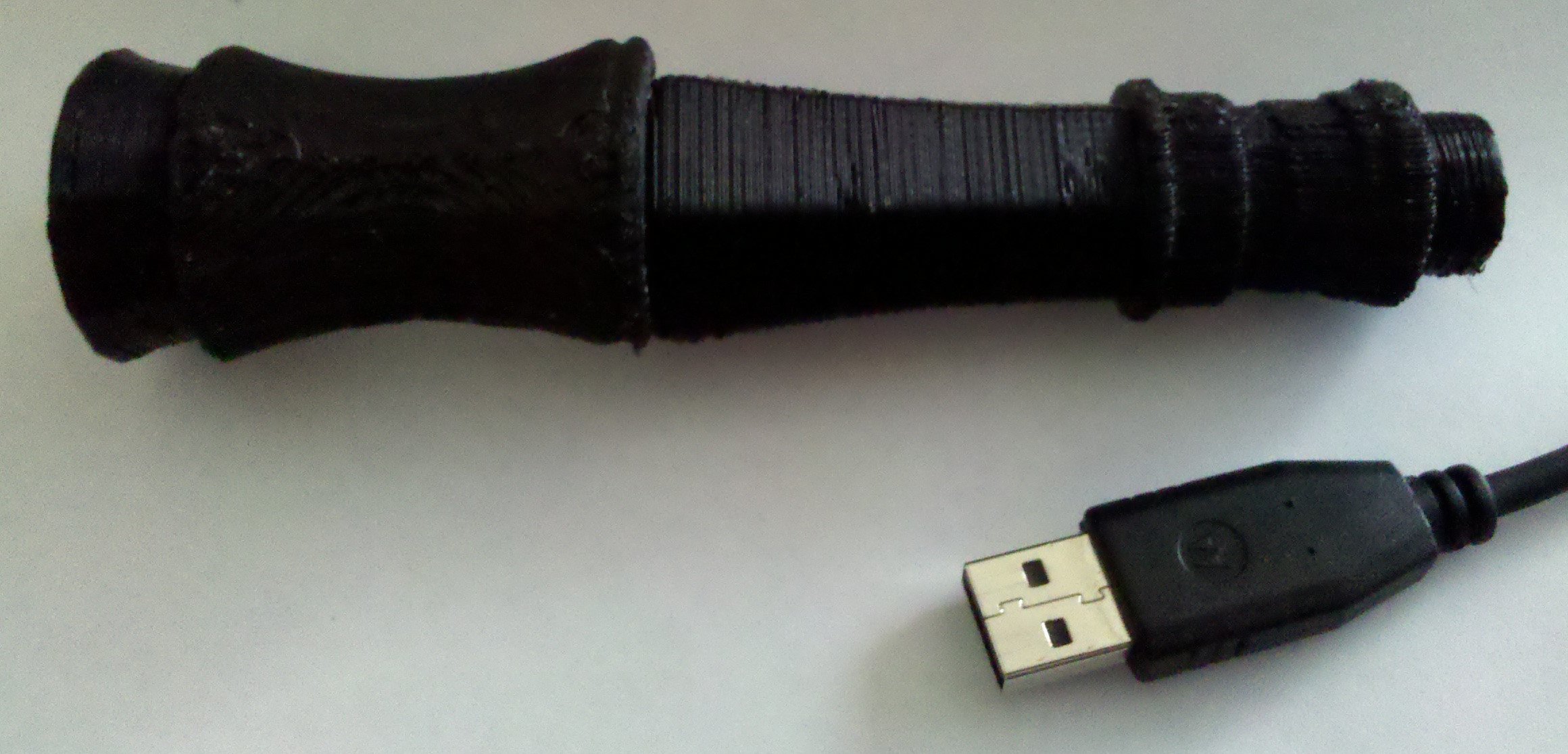
To the right is a first draft print of my latest designs for the sonic screwdriver.  It’s next to a USB cable for scale and perspective.  There are several things I need to fix:

  • It’s too small.  I was guesstimating the scale based upon the size of hand holding the sonic screwdriver in one of the photos I saw.
  • Too much warpage.  I need to build my heated build platform.  :)  I’ve got my SMT1 soldering Toolkit, now I just need a hotplate.
  • Better connectors.  The connectors I designed are adequate, but not that great.  They need to be much larger to ensure a proper grip between parts.
  • Fix a connector.  I have a hex connector on one piece and a 16-sided connector on another.  That’s not going to work.
  • Consider changing the fit.  Some parts have a 0.25mm clearance on all sides between the male and female connections.  Other parts have a 0.5mm clearance instead.  I tried both on different sections so I could test the fit.  The 0.25mm clearance on all sides is fine for some parts, but other parts could use a little more wiggle room.
  • Change the thickness.  My earlier draft was a whopping 0.5mm thick all around.  I printed these parts at varying thickness to test their durability, flexibility, conserve plastic, and maximize internal space for future electronics.  A 1mm thickness seems to be the most optimal mix.

I’ve posted my sonic screwdriver designs to Thingiverse for people to tinker with and, hopefully, improve.  I would sincerely appreciate any help anyone can provide when it comes to designing the upper half of the sonic screwdriver – especially the moving parts.

  1. surface mount technology []

Plastruder MK5, now with 85% less heartache!

Of all the bits to get working on my MakerBot, the Plastruder MK4 was the most challenging.  There were so many ways for some critical component of the Plastruder to go wrong.  You could:

  • Cut the wrong length or resistance of nichrome wire
  • A small patch of nichrome fiberglass insulation is scratched off, creating a short
  • The nichrome is not wound close enough to the barrel, requiring extra power to heat
  • There’s too much space between the barrel and nozzle, creating a gap where plastic and build up and cause a blockage
  • Heat can travel up the barrel and plastic can ooze up the threads
  • Heat can travel up the barrel, plastic can pool and then cool causing a blockage, bulge the PTFE
  • The thermistor can burn out or short out
  • Heat can cause the thermistor or nichrome to become unsoldered or lose connectivity

From the description of the new Plastruder MK5, it sounds like the improved designs solve all of the above potential problems!

Update: Beak90 offered several other possibilities!

  • one could not heat it up enough and strip the PTFE threads.
  • one could heat it too much and cause the PTFE threads to fail.
  • one could put the thermistor in the wrong place and have it read the wrong temp.
  • one could wind the nichrome in 2 layers and have it not heat enough.
  • one could tighten the nut on the barrel too much and cause extra stress on the PTFE causing it too fail.
  • one could forget to say the required magical incantations before firing up the plastruder causing everything to fail.

And, one more I just thought of:

  • Fail to play Daft Punk

Plastruder MK5 plans released!

The plans for the Plastruder MK6 look downright wicked

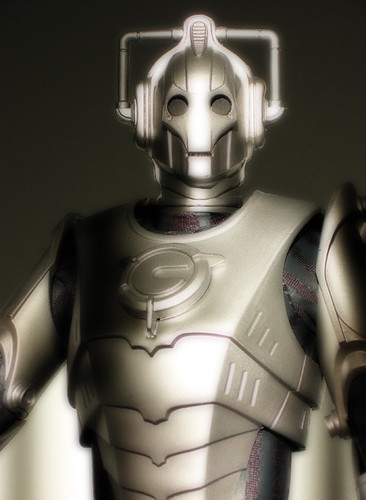
MakerBot just released the photostream and wiki instructions for the Plastruder MK5. 1 This looks like a total overhaul of their original designs. 2

It is based on Charles Pax’s Paxtruder which has such a small form factor that it is possible to squeeze two extruder heads into one Makerbot.  The Paxtruder also uses a delrin plunger which is used to push the filament against the extruder pulley, rather than the previous idler wheel design.  I like the delrin plunger idea since it would be a lot easier to adjust tension and remove/insert filament.  The idler wheel held in by a large bolt and nut works… but is finicky and sometimes prone to fussiness.

Out are the big/small/weird and whimsical dinos in favor of lasercut acrylic “arches.”  There may be a benefit to the arches over the dinos, but I’m not sure what it would be.

The entire heater element and extruder head has been redesigned as well.  I don’t recall seeing any published designs which reference this new system.  We’ve all seen power resistors in use in RepRap/MakerBot projects – but they’ve usually been relegated to heated build platform designs.  Now a pair are being used as the full heating element in place of tempermental3 nichrome wire.  The problem with the old nichrome wire wrapped around the barrel system is that if you need to rebuild the heater, you’ve got to toss out the old nichrome since the insulation is going to get peeled off as soon as you pull it off the barrel.

The new MK5 system uses a PTFE sleeve to feed the filament down into the heater.  Interestingly, the PTFE sleeve is encased in a snug metal tube which should prevent any bulging problems.

My understanding of the instructions is that the MK5 is far less prone to failure than the previous MK4 model Plastruder.  I’ll grant the Plastruder is easily the most4  challenging component of the Makerbot to get working.

The instructions also hint at Generation 4 electronics.  Right now I’m rockin’ the Gen 3 which have served me quite well.  I wonder what the Gen 4 has in store?  One thing I have to really like about the electronics is that I know they’ll never really be obsolete. 5  If I wanted to upgrade to Gen 4, I can always print off a Mini-Mendel or Mendel, and swap in the new electronics.

However, if this new system is as resilient as the instructions describe, I’m on board.  I’m probably not going to have a good excuse to test out this new Plastruder design for a while since my Plastruder has been behaving itself since the last time I rebuilt my Plastruder and I just scored some spare MK4 parts6

  1. Photo courtesy of Johnson Cameraface []
  2. A close tie for the photo was “Number 5 is alive!” a la Johnny 5 from Short Circuit.  I’m just too much of a Doctor Who fanboy to NOT use an “You will be upgraded” joke. []
  3. Pun intended!!! []
  4. Dang.  I’ve already used temperamental, finicky, and fussy…  Where’s my thesaurus?  Oh, that’s right – he’s out EATING Tony Buser’s Laser Dinosaur! []
  5. Bite me Cybermen! []
  6. Thanks again guys! []

MakerBlock’s MakerBot setup

I’ve posted about other people’s MakerBot work space set ups,1 but not much about my own yet.

Right now there’s a bunch of junk2 in the way so no pictures of the setup for now.  My MakerBot – “Bender,” a laptop3 , and a large long cardboard box with a wooden dowel running the length with badly cut cardboard spools holding what was once a 5 pound coil of black ABS4 , a very nearly 5 pound coil of clear PLA5 , and a full pound of white ABS I’ve never used. 678

All of this resides in our living room on an enormous former-library card catalog.  For those of you youngsters out there, a library card catalog is the kind of thing you see in the background scenes of Warehouse 13.  Imagine a huge chest about four feet tall that has lots of small, deep, drawers.  It is what libraries used to use to store information about their collections – an analog database.  Frankly, I didn’t realize the one I bought was quite so large. 9  It’s literally big enough for about six identical MakerBot/laptop/plastic coil setups to the one I have. 10  The drawers beneath the area where my Makerbot resides are devoted to tools and spare parts.  Right now the surface is covered in a number of unfinished projects and some totally finished projects.

Library card catalogs are super handy and useful ways to incorporate storage and a raised level surface for working.  The only problem is that these things are absolutely enormous and way way heavier than they look.
  1. Mattpr’s MakerBot cart , Tony Buser’s “Tea” #481 []
  2. FYI, junk = stuff waiting to be made into other, more useful or more amusing stuff. []
  3. Named Bleys, if you must know. []
  4. I would guess I’ve used about a pound over the last 8 months.  5 pounds is a LOT of plastic.  Dear faithful ABS, oh how I love thee… []
  5. Polly!!!!!!!!! []
  6. Though, I have very specific and immediate plans for it. []
  7. More on this later if you remind me.  I have a tendency to get lost in nested footnotes and parenthetical references. []
  8. Seriously, just imagine what my PHP code looks like.  Yikes! []
  9. Or far away.  Or would become so expensive.  That’s a story unto itself. []
  10. I best get printing more MakerBots, no?  Hmm…  I might have to print more laptops too… []

Sometimes a good deal isn’t

$3 utility knife and $1 utility knife

Several months ago I made an impulse buy at the local hardware store.  I picked up a utility knife that came with 6 blades for $1.  It was a good deal, if even for just the razors, and I couldn’t find my usual $3 knife.

Here they are, side by side.  My trusty Stanley utility knife on top.  This knife has a good heft, stores a few extra blades in its handle, and is slightly wider, making for a more comfortable grip.  The two sides also interlock as well as screw into one another.  Clicking the blade out another notch requires a small amount of force – just enough so you’ll never do it by accident – and so that it will stay in each notch as long as you don’t intentionally depress the button.

On the bottom is my no-name brand knife.  It’s lighter, slightly thinner, rattles with the extra blades inside, and the button to extend/retract the blade has a little bit of wobble and play to it.  Also, there’s no interlocking between the two halves.
What an extra $2 buys you

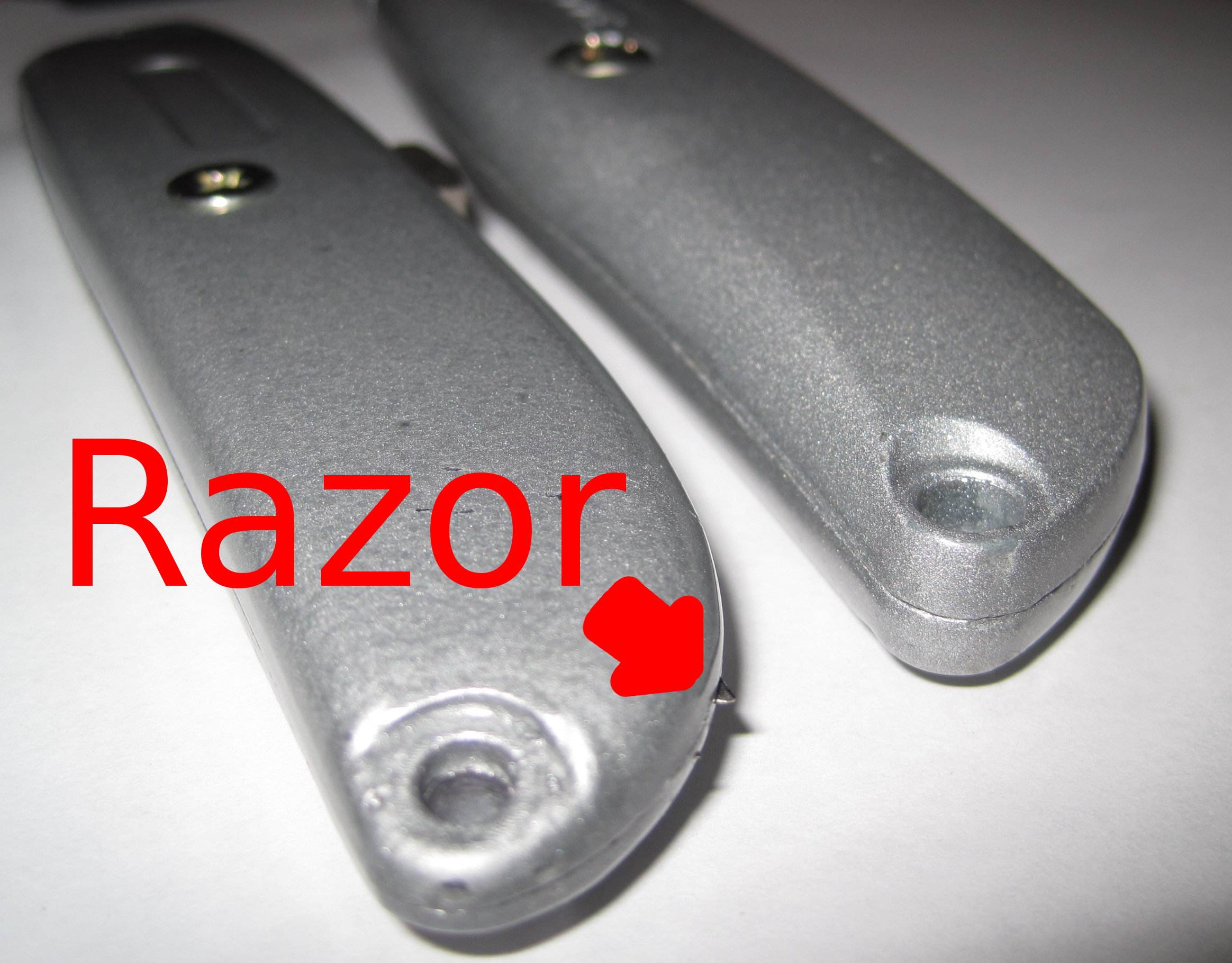
I discovered that the seams between the two halves of the cheapie utility knife left a lot to be desired.  While using the knife I felt a sharp poke in my palm.  Turns out that some of the spare razor blades were poking through the incomplete seam.

So, if you’re headed to the hardware store, invest the extra $2 in the better knife.  :)

Lazzersaurus Rex, I choose you!

Tony Buser, my origami laser dinosaurs accept your challenge.
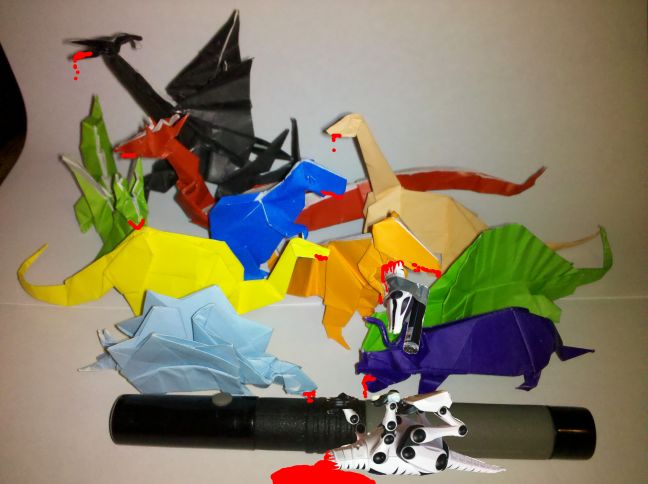
SyFy Movie:  MakerBlock origami laser dinosaurs Vs Buser's Laser Dinsosaur
SyFy Movie: MakerBlock origami laser dinosaurs Vs Buser's Laser Dinsosaur

Oh.  Dang.  That did not appear to go well for Team Buser. 1  You probably didn’t realize the scale of those origami dinosaurs before issuing your challenge.  See, that’s a laser canon, not a laser pointer.

Also, sorry about your robot dinosaur.  I’ll print you a new one.  :) 2
  1. You see, I use EVIL origami paper. []
  2. Friends again? []

Sonic Screwdriver progress

Printable screwdriver

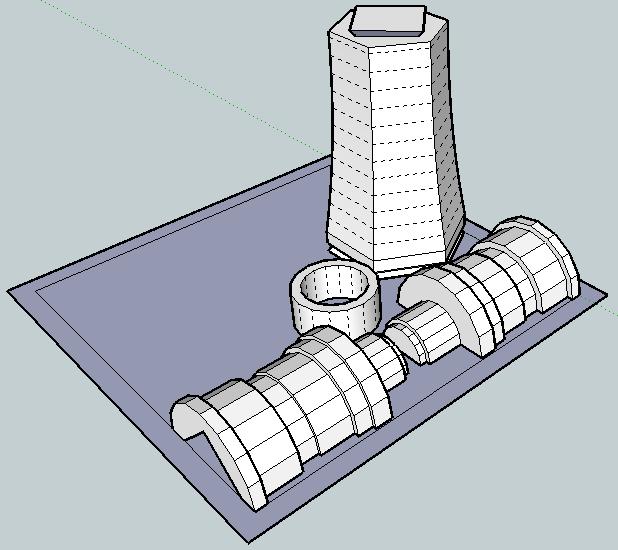
I just redesigned the printable screwdriver in order to make the parts fit together better and be more printable.

It should be easier to see how these parts go together.

Basically, you take the “mid-handle” at the far end of the build sheet, turn it upside right, clamp the two “lower handle” pieces on either side of it, and slide that bottom ring onto the lower handle.

I still need to redesign the upper handle, hollow out the mid-handle, and make sure there’s enough room inside for the GoodFET / electronic sonic screwdriver guts.

Now I’m wondering if it is also possible to make this a piece of MakerBot origami – and make it printable on one build sheet…

Real life sonic screwdriver

This morning I received an e-mail from Bre out of the blue introducing me to Travis Goodspeed.  Apparently Travis has been working on building sonic screwdriver guts out of the GoodFET, a universal JTAG programmer, a “sonic screwdriver of hacking.”  Travis suggested a GoodFET could be programmed to act as a TV-B-Gone, light show, or any number of other things.  Given that his circuit board is about 3″ x 0.85″ x 0.2″1 , there shouldn’t be a problem finding space for it in the sonic screwdriver I’m in the middle of designing2

Freaking sweet.

So, here’s my real life sonic screwdriver wishlist:

  • Lights.  Red LED3 , white LED4 , green LED5 , and a UV LED6
  • An actual screwdriver bit or spot where you can attach a screwdriver bit.  It would just be cool to have a sonic screwdriver that could be used as a screwdriver.
  • A shakey Tic-Tac container style recharger.  Having a sonic screwdriver that doesn’t need batteries would be awesome.
  • A tiny speaker that played the sonic screwdriver sound.
  • A tiny magnet.  I remember watching Doctor Who back in the day, black and white old school episodes, where he used his sonic screwdriver to take screws out of things, bolts out of doors, etc in the worst stop motion animation the BBC could get away with.  Still, if this sonic screwdriver had a magnet, it could actually affect a physical change via magnetic force.
  • TV-B-Gone.  On the episode “Midnight” Doctor Who shuts off a bunch of TV’s using his sonic screwdriver.  This would be an INCREDIBLE feature!
  • Flash drive and/or mini-memory card reader.  Perhaps with the entire library from PortableApps.com installed.
  1. For those of you non-imperialists out there: 76.2mm x 21.59mm x 5.08mm []
  2. TBuser, if you want to help, lemme know! []
  3. For night vision.  Also, there are suggestions that a sonic screwdriver can have a “red setting.” []
  4. As a flashlight. []
  5. The 11th Doctor’s screwdriver has a green light. []
  6. For making things fluoresce such as secret messages, blood stains, and monsters. []

MakerBot Origami

Or, “Design Constraints and Creativity”

Origami is another of my hobbies and it is all about design constraints. 1 The rules are simple2 – one square sheet of paper only manipulated by folding. 3  Yet, within these rules it is theorized that a sufficiently skilled artisan can design and fold any arbitrary figure.  I find folding origami to be at once cathartic and contemplative. 4

Pondering the design constraints within origami reminded me of one of my own recent designs – the 3x2x1 Rubik’s style puzzle cube.  Quite apart from the medium or subject matter, I really liked the idea of a single print job resulting in parts that could be immediately hand-assembled without tools to form a useful object.  Then I thought – if the design constraints are one of the things I like about this design, what else is possible within these same constraints?

Thus, I propose a new style of “MakerBot Origami”:  One MakerBot print5 , multiple components6 , no tools or hardware7 .

What’s the coolest most awesome thing you can design within these constraints?

Update:  Cyrozap – sory fore mispellnig yoru mane.

((I waffled on that title.))
  1. I waffled on that title. []
  2. Modern origami rules, anyhow. []
  3. Designing an origami model is not about figuring a way to cheat those rules – rather a way to work within them to achieve a desired goal. []
  4. I recall one origami master referring to the folding of a particularly difficult and rewarding model as invigorating. []
  5. Or, as Cryozap Cyrozap calls them, “production file.” []
  6. Otherwise, people would be making whistles. []
  7. Thus, no bottle openers []