If I had never known about Twitter and were asked to start a company exactly like it, I would have called it “Bleeter” instead. Anything you said in 140 characters would be a “Bleet.” And, best of all, the phrase “Follow me” would just make SO much more sense when you’re talking about sheep.
I’m pretty late to the whole “Twitter” phenom. [↩]
A fair number of people I polled are waiting to buy MakerBots not because of money, but because they are waiting for the technology to mature.1 Is this you too?
If so, let me ask you this – would you be willing to spend $235 right now to play with a current “immature” technology MakerBot for an entire year before buying a full price MakerBot that’s more “mature” next year?
If you said yes, you need to buy a MakerBot today.
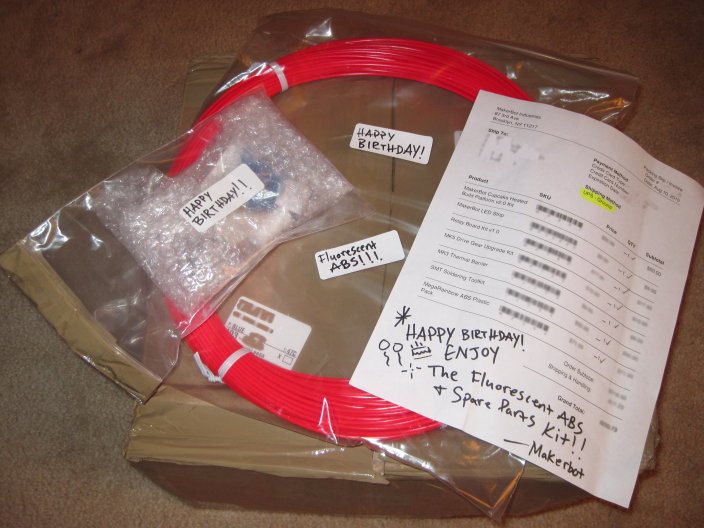
I bought my Batch 9 MakerBot in late November 2009. In the nearly 10 months since then MakerBot has come out with a $50 heated build platform and the brand spanking new 2 more reliable $185 Plastruder MK5. 3 The only “difference” between my MakerBot and one you buy today with all the upgrades is that I got to play and experiment with a MakerBot for 8 full months more than you for an extra $235. On top of that, I have all the parts for a complete Plastruder MK4! 4
$235 is a small price to play with a MakerBot for nearly a year.567
Not to mention a small percentage of people whose parents were killed by awesome robots… [↩]
I’m not counting the MK5 Drive Gear Upgrade Kit because that MK5 Gear is included in the Plastruder MK5 kit. [↩]
This way, if any part of the MK5 fails, just drop the MK4 back in! [↩]
Not to mention having a Plastruder MK4 on standby. [↩]
That’s a $125 value FREE!!! That’s right – FREE!!! Order now and we’ll throw in these high tech atmospheric pocket buffer equipment safety enclosures FREE! That’s right – FREE!!! Just pay shipping and handling! [↩]
High tech atmospheric pocket buffer equipment safety enclosures is bubble wrap. [↩]
Of all the bits to get working on my MakerBot, the Plastruder MK4 was the most challenging. There were so many ways for some critical component of the Plastruder to go wrong. You could:
Cut the wrong length or resistance of nichrome wire
A small patch of nichrome fiberglass insulation is scratched off, creating a short
The nichrome is not wound close enough to the barrel, requiring extra power to heat
There’s too much space between the barrel and nozzle, creating a gap where plastic and build up and cause a blockage
Heat can travel up the barrel and plastic can ooze up the threads
Heat can travel up the barrel, plastic can pool and then cool causing a blockage, bulge the PTFE
The thermistor can burn out or short out
Heat can cause the thermistor or nichrome to become unsoldered or lose connectivity
The plans for the Plastruder MK6 look downright wicked
MakerBot just released the photostream and wiki instructions for the Plastruder MK5. 1 This looks like a total overhaul of their original designs. 2
It is based on Charles Pax’sPaxtruder which has such a small form factor that it is possible to squeeze two extruder heads into one Makerbot. The Paxtruder also uses a delrin plunger which is used to push the filament against the extruder pulley, rather than the previous idler wheel design. I like the delrin plunger idea since it would be a lot easier to adjust tension and remove/insert filament. The idler wheel held in by a large bolt and nut works… but is finicky and sometimes prone to fussiness.
Out are the big/small/weird and whimsical dinos in favor of lasercut acrylic “arches.” There may be a benefit to the arches over the dinos, but I’m not sure what it would be.
The entire heater element and extruder head has been redesigned as well. I don’t recall seeing any published designs which reference this new system. We’ve all seen power resistors in use in RepRap/MakerBot projects – but they’ve usually been relegated to heated build platform designs. Now a pair are being used as the full heating element in place of tempermental3 nichrome wire. The problem with the old nichrome wire wrapped around the barrel system is that if you need to rebuild the heater, you’ve got to toss out the old nichrome since the insulation is going to get peeled off as soon as you pull it off the barrel.
The new MK5 system uses a PTFE sleeve to feed the filament down into the heater. Interestingly, the PTFE sleeve is encased in a snug metal tube which should prevent any bulging problems.
My understanding of the instructions is that the MK5 is far less prone to failure than the previous MK4 model Plastruder. I’ll grant the Plastruder is easily the most4 challenging component of the Makerbot to get working.
The instructions also hint at Generation 4 electronics. Right now I’m rockin’ the Gen 3 which have served me quite well. I wonder what the Gen 4 has in store? One thing I have to really like about the electronics is that I know they’ll never really be obsolete. 5 If I wanted to upgrade to Gen 4, I can always print off a Mini-Mendel or Mendel, and swap in the new electronics.
However, if this new system is as resilient as the instructions describe, I’m on board. I’m probably not going to have a good excuse to test out this new Plastruder design for a while since my Plastruder has been behaving itself since the last time I rebuilt my Plastruder and I just scored some spare MK4 parts. 6
A close tie for the photo was “Number 5 is alive!” a la Johnny 5 from Short Circuit. I’m just too much of a Doctor Who fanboy to NOT use an “You will be upgraded” joke. [↩]
I’ve posted about other people’s MakerBot work space set ups,1 but not much about my own yet.
Right now there’s a bunch of junk2 in the way so no pictures of the setup for now. My MakerBot – “Bender,” a laptop3 , and a large long cardboard box with a wooden dowel running the length with badly cut cardboard spools holding what was once a 5 pound coil of black ABS4 , a very nearly 5 pound coil of clear PLA5 , and a full pound of white ABS I’ve never used. 678
All of this resides in our living room on an enormous former-library card catalog. For those of you youngsters out there, a library card catalog is the kind of thing you see in the background scenes of Warehouse 13. Imagine a huge chest about four feet tall that has lots of small, deep, drawers. It is what libraries used to use to store information about their collections – an analog database. Frankly, I didn’t realize the one I bought was quite so large. 9 It’s literally big enough for about six identical MakerBot/laptop/plastic coil setups to the one I have. 10 The drawers beneath the area where my Makerbot resides are devoted to tools and spare parts. Right now the surface is covered in a number of unfinished projects and some totally finished projects.
Library card catalogs are super handy and useful ways to incorporate storage and a raised level surface for working. The only problem is that these things are absolutely enormous and way way heavier than they look.
I remember waiting for the letter which would tell me whether I got into grad school. Once you send off your application, it’s out of your hands and just need to be patient. I was waiting to find out if I would get the small envelope1 or the large envelope.2
I hadn’t thought about the small/large envelope anticipation for a while now. I was only really reminded when I recently applied for a job. I saw the posting about 8pm or so and stayed up way later than I’d like to admit writing up my application.
Of course, I had to follow up my application with a post about dinosaurs and lasers… Both of which I happen to just have lying around here at MakerBlock headquarters. 3
Several months ago I made an impulse buy at the local hardware store. I picked up a utility knife that came with 6 blades for $1. It was a good deal, if even for just the razors, and I couldn’t find my usual $3 knife.
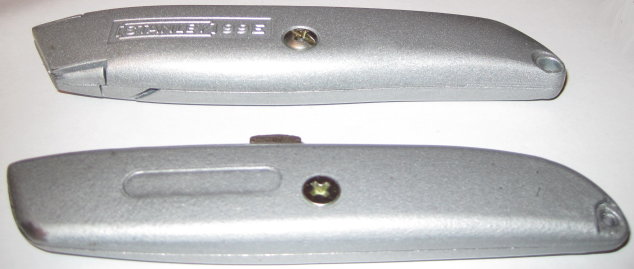
Here they are, side by side. My trusty Stanley utility knife on top. This knife has a good heft, stores a few extra blades in its handle, and is slightly wider, making for a more comfortable grip. The two sides also interlock as well as screw into one another. Clicking the blade out another notch requires a small amount of force – just enough so you’ll never do it by accident – and so that it will stay in each notch as long as you don’t intentionally depress the button.
On the bottom is my no-name brand knife. It’s lighter, slightly thinner, rattles with the extra blades inside, and the button to extend/retract the blade has a little bit of wobble and play to it. Also, there’s no interlocking between the two halves.
What an extra $2 buys you
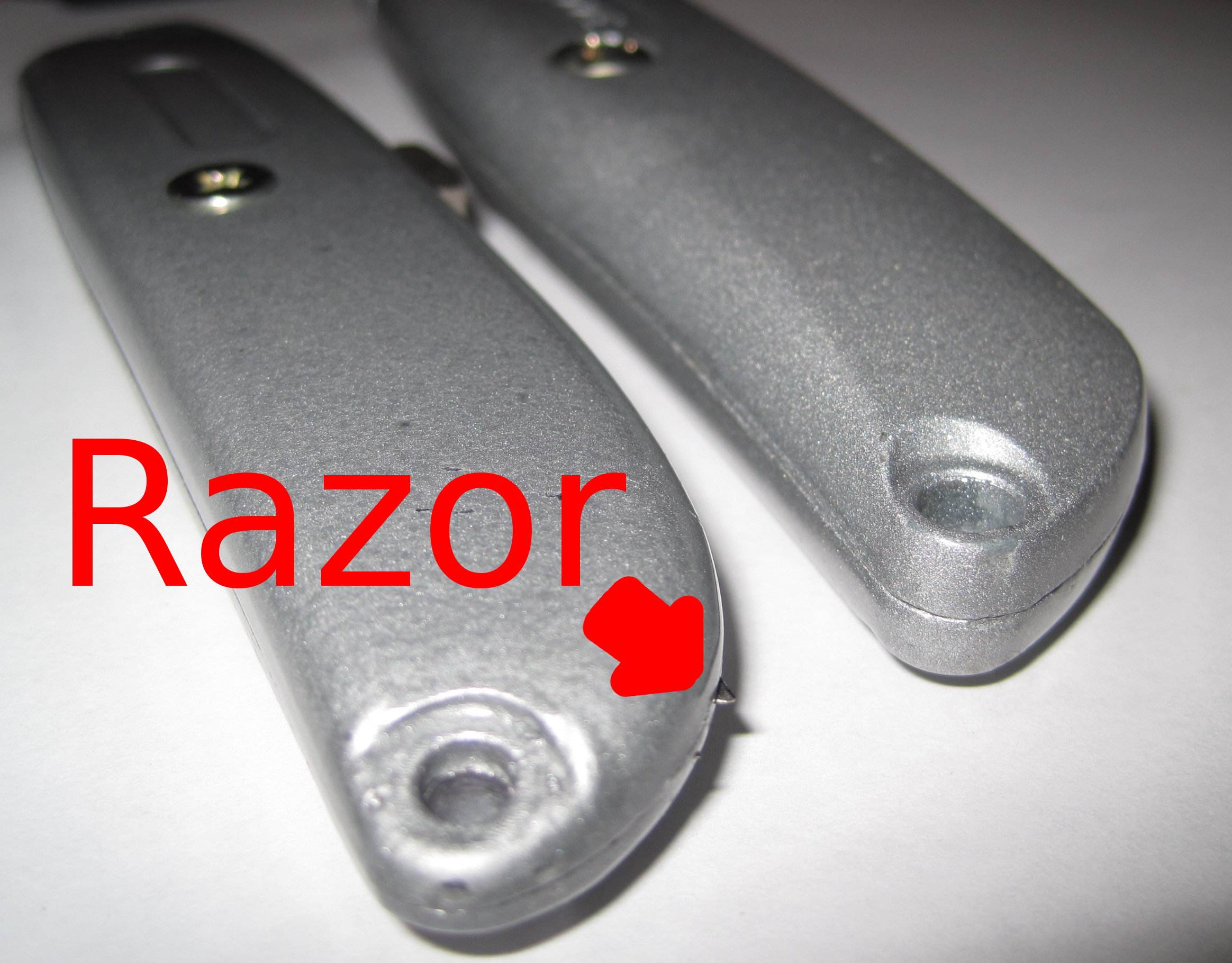
I discovered that the seams between the two halves of the cheapie utility knife left a lot to be desired. While using the knife I felt a sharp poke in my palm. Turns out that some of the spare razor blades were poking through the incomplete seam.
So, if you’re headed to the hardware store, invest the extra $2 in the better knife. :)