Arduino Adventure Series – The Adventure Begins!

Arduinos, Arduinos, Arduinos... where to start?!
Arduinos, Arduinos, Arduinos… where to start?!

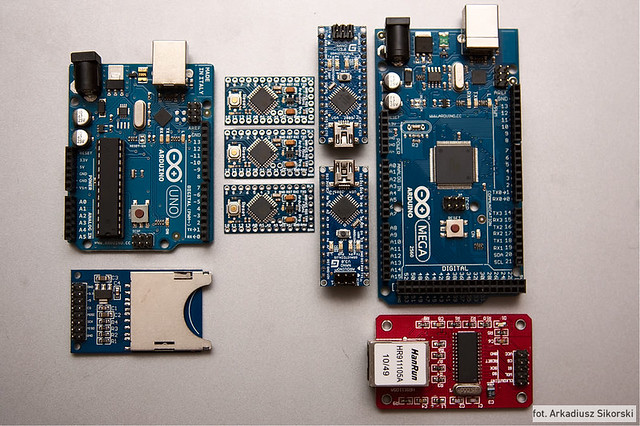
A few weeks ago I started fiddling with an Arduino in earnest.1 I’ve built things using Arduinos before, but each time all I did was slavishly follow a tutorial as it took me step by step through a process.

Just as a child memorizes the Pledge of Allegiance, committing to memory the right sounds in the right order, I had a grasp of the assembly – but not the underlying meaning.  Sure, I built a MakerBot Cupcake CNC (“Bender”), a MakerBot Thing-O-Matic (“Flexo”), an Egg-Bot, a Polargraph/PlotterBot, and an IoT Printer.  ((FYI, my MakerBot Replicator 1 is named “HedonismBot“))  However, I have only the dimmest understanding of how the things I did actually created the things I ended up building.

However, I want more – there are several ideas I would like to create using electronics.  One is a sonic screwdriver flashlight.  Another is device for … shall we say…2  interfering with television infrared codes.3

My goal for this series of posts4 is to document my triumphs and failures playing with an Arduino.  I think it’s time to get started on that next post now…

Default Series Title
  1. Photo courtesy of Arkadiusz Sikorski []
  2. Mu-ah-ha-ha!!! []
  3. Nope, not a TV-B-Gone []
  4. I know it’s ambitious to call a post the “first” post – but dammit, a man’s got to dream []

Lessons In Printed Plastic Paper Mache Molds

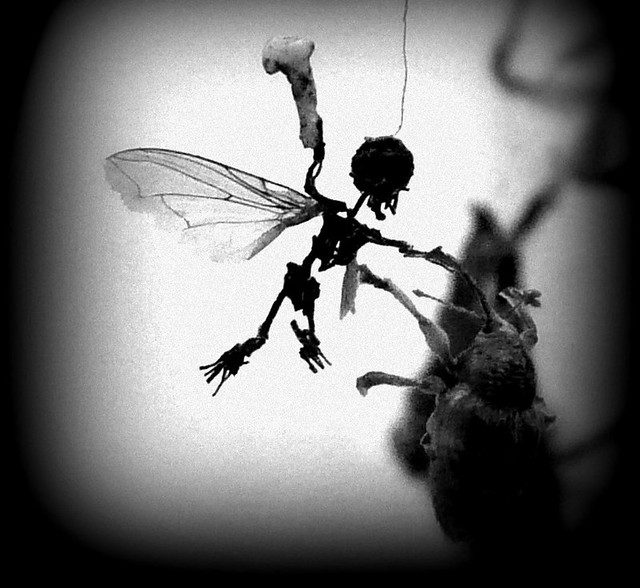
My daughter and I have been working on a project to create paper mache fairies and fairy furniture.1

Photographic Background Stand, ready for shooting!

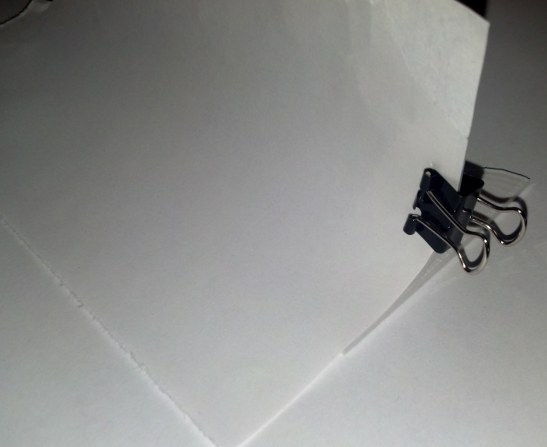
But first, I can’t help showing off this nifty 3D printable photographic background stand I designed.  Inspired by some other designs on Thingiverse, my first draft worked exactly as I was hoping it would.  Okay, back to the paper mache.

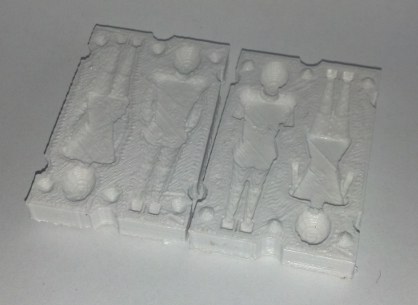
Printed fairy mold (about 2" long)
Printed fairy mold (about 2″ long)

I designed two tiny human-ish figures in OpenSCAD, subtracted them from a block, and sliced the block in half to create a two-piece mold for what we were hoping would be tiny paper mache fairies.  I was pretty sure the tiny figures wouldn’t come out well in the printed plastic mold and that the mold wouldn’t work well with the paper mache.  However, my daughter really wanted to try to make fairies of this size (about 2″ tall) – so we gave it a shot.

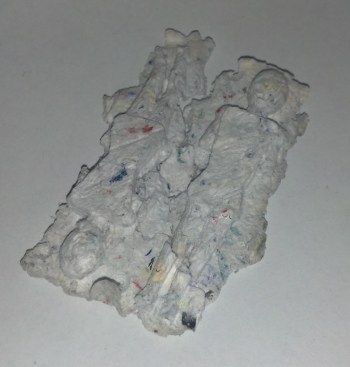
Cast paper mache fairies

I squeezed the paper pulp so it wasn’t sopping wet, added a liberal amount of white glue, packed the printed mold with the mixture, and put a rubber band around it to keep it together.  I gave it a few days, then pulled the mold apart.  I wasn’t able to add much of the mixture into the upper half, so the reverse side didn’t seem to leave much of an impression.  Once it was dry, the dried paper mache stuck to the bottom half of the mold so well it tore in several places as I got it out.

In any case, here are the lessons I’ve learned:

  1. The fairy bodies are somewhat angular – which I think made them difficult to remove from the mold.  I would have made them more rounded in the first place, but there were already a lot of spheres and cylinders in the design which were causing some pretty long OpenSCAD render times.
  2. Larger molded objects would probably work better.
  3. The mold would probably release the cast object if I made the interior smoother – either with sanding or acetone.
  4. A release agent would probably help.  Maybe petroleum jelly on the inside, perhaps plastic wrap?
  5. I should have sanded the tops of the mold halves – so they would mesh better.  This might have allowed the paper mache to be pressed better into the top part of the mold.
  6. It may help to add something to the paper mache mixture to make it stronger.  My thought is pieces of frayed yarn or pieces of a cotton ball.  This may give it more strength and flexibility.
  7. It’s hard to tell if it would matter, but more glue might have helped.
  8. I think it would have helped to create the mold in multiple pieces – similar to this Chris K. Palmer early Thingiverse chocolate mold.
Default Series Title
  1. I’ll leave it to your imagination to decide who chose the subject matter []

DIY Chess Board Bag – 13 years in the making

Very nearly four years ago I had a vision of a totally DIY chess set.  In the year 2000 I designed a bag for holding chess pieces – that could be turned inside out and used as a chess board itself.  I filled the bag with some cheap1 plastic chess pieces… and then lost it after we moved in 2006.

Fast forward nine years after I made this bag to the year 2009 when I bought my very first 3D printer – my trusty MakerBot Cupcake CNC #465, “Bender.”  In preparation for Botacon 0 in the winter of 2010, I was furiously dialing in my printer to create a set of non-black chess pieces so that I could bring a full set of printed chess pieces to New York.  I was able to print the pieces – but I still could not find the chess bag.

Today, I found my chess bag – and I’d love to share it with you.  I’m not a tailor and I’ve had no formal training with a sewing machine.  When I was in college I wanted a very specific kind of carrying bag – so I made it.2 What I know about sewing I learned from my dad when he showed me the basics of the machine operation and turned me loose on my mom’s sewing machine.  In any case, I no longer have the designs for this chess bag, but I’m quite sure a clever person, such as yourself gentle reader, would be able to figure out how to put one together from the pictures you shall find within.

This slideshow requires JavaScript.

If this is the sort of thing you feel like embarking on building yourself, I have some suggestions:3

  • Find the fabric first.  I’d recommend canvas for the outside, obviously a simple black and white checkered square for the board itself, and a nice pleasant deep color for the border around the checkered board.
  • Get a cool cord.  The bag as designed incorporates a pretty nifty looking shiny cord.
  • Consider how you’ll put it together carefully.  As best as I can recall and piece together from its appearance, this is the rough process I used:
    • Prepare the checkered fabric.  I remember that I had to find a good piece of the checkered pattern that was more square than other parts.  I then ironed it so it would hold it’s shape.  Then, cut to size, leaving about 1/2″ all the way around the checkered board.
    • Prepare the cool border.  The next step I recall is ironing the cool border, then sewing the checkered square to it.  I think my border is about an inch thick – maybe an inch and a half.
    • Create the bag.  I am pretty sure the next thing I did was sewed the border fabric to some of the canvas (but I’m not certain).  Once that was done, it looks like I folded the pieces of canvas so that it was trapping the cool red cord, and then I sewed that together.  Once I had the two sides individually assembled, I then sewed them with the board-side-out.  This had the effect of putting all the seams on the outside edges of the bag, making them visible when the bag was laid out for play.  The reason I sewed the bag in this fashion, rather than leaving it so the seams were on the inside of the bag when it was laid out for play, is that it would have caused too much fabric to be inside the bag making it uneven during play.

I simply cannot tell you how happy I am to have united these pieces I printed in 2010 with the bag I made them to be contained within in 2000.

If you and I happen to see one another, and I hope this is soon, please remind me to bring this bag with me and maybe we’ll share a cup of coffee or a beer over a friendly game and a bit of conversation.

  1. Injection molded []
  2. I’ve been increasingly tempted to make a new bag – but that’s an entirely different post for an entirely different day []
  3. Alas, all the drawings and plans I made for this bag have been lost in the mists of time, otherwise I would share these with you too []

Productivity Hack: Fight The Tab

Must resist tab!
Must resist tab!

One of the best things about modern browsers, the tab, is also the most destructive to my productivity.1 While I wouldn’t want to give up my tabs, I’ve found an awesome productivity hack to help me manage them.

The Problem

In short: cognitive clutter.  Visiting Twitter, a favorite blog, or some RSS feeds I’ll end up accumulating tabs in my web browser.  These tend to be things I know I may want to come back to later, but wasn’t ready to commit to bookmarking.

The problem with bookmarking a website is that either you have to spend a lot of time curating your bookmarks (into folders or hierarchies  or you just bookmark things willy-nilly.  What I needed was a way to save things I knew I wasn’t going to visit all the time – but which I might want to see again some day.  Since I was pretty sure I didn’t need a bookmark of these tabs, I would just leave them open (I’ll get to them some day and then close the tab).

Those open tabs created what I’m going to term cognitive clutter.  Whenever I looked at the top of the browser, all I saw were a line of icons – things I felt like I needed to read or do.2

I’m pretty sure this is exactly why Evernote has a business model – people want to save the things they see or think in a searchable fashion.

The Solution

The answer was e-mail.  While I don’t need MORE e-mail, my e-mail is already a repository for information that I want to keep because I may some day need or want to look back on it, but not a place where I went to refer to something all the time.

Now I send myself an e-mail with the subject “bookmarks” and then dump any links I’m not going to get to immediately and don’t warrant a bookmark.  To find something that I once saw, all I need to do is search for an e-mail with “bookmarks” in the subject line, from me, and then perhaps a word about the thing I’m trying to remember.

Really, I use this same system for a lot of other things as well.  I e-mail myself “todo” lists, “song” lists, and other lists.  Things I don’t need to remember, but don’t want to forget forever.

Anyhow, I hope this has been of some use to you.  :)

  1. Photo courtesy of Bill Selak []
  2. And, really, cognitive clutter sounds SO much better than “digital hoarder” []

Tentative Shredded Paper Mache Results

This is, by far, the most interesting photograph that came up when I searched for "fairy furniture" on Flickr
This is, by far, the most interesting photograph that came up when I searched for “fairy furniture” on Flickr

This last weekend my daughter and I tried making some small objects using paper mache from shredded paper.1  Here’s what we did:

  1. Soaked 3 gallons of shredded paper in 1 gallon of water in a 5 gallon bucket for a week in a warm garage
  2. Each day I stirred the mixture a little – to see if the paper was absorbing the water and disintegrating
  3. We scooped the paper pulp out of the bucket, squeezed the water out, put the pulp into another bucket and added a liberal amount of glue – and then kneaded the glue into the pulp
  4. We then formed the gluey pulp into simple shapes – and left them to dry

After four days, the sculptures (a fairy sized bed, bathtub, table, two chairs, and a footstool)  are mostly dried.  They all have a grayish brown look with a rough texture – as if they were carved badly from hard rock.  It was difficult to mold the gluey paper pulp into shapes – and it didn’t want to keep complex forms.  Nonetheless, for their intended purpose – fairy sized furniture and fixtures – I think they look really nice.  Once they’re fully dry, we’ll sand and paint them with some acrylic paints (which will also help seal them up).

If they come out well or if there is enough interest, I’ll put together a tutorial on how to do this all yourself.  But, in case you’re interested already, the process is pretty simple and there’s not much more than what I’ve described above and in the prior post.

Default Series Title
  1. Photo courtesy of Esther Simpson []

Shredded Paper Mache

Shredder Means Business

A few days ago I realized that I might have an actual use for all of the shredded paper I’ve accumulated at home and at work.1 Basically, my thought is that I may be able to create a paper mache “clay” by soaking shredded paper in a bucket of water, draining it somewhat, mixing in some white glue (or flour), molding into some interesting form, and letting it dry into a hardened cardboard like form.

Today my daughter and I went out to the hardware store to pick up a bucket2 , masking tape, and a lot of glue.  We dumped about three gallons of shredded paper into the bucket, added about a gallon of water, and mixed it up.  I plan to let it sit out to let the paper disintegrate a little before we drain it and add some glue.

Just to see if it would work, we packed one of my daughter’s sand toys (a large fish mold) with some of the wet shredded paper and set it out to dry.  I have no idea if it will hold together since we didn’t wait for the paper to disintegrate and didn’t add any glue.  If it works, great.  If not, I figure we can just toss it in the bucket again and let it disintegrate for good.

In the meantime, if you’re interested in learning some really great paper mache techniques, I can’t recommend enough Dan Reeder‘s books on paper and cloth mache.  Here are the three Dan Reeder books I own:

Of the three, I think the second (Make Something Ugly) is probably the most comprehensive and interesting.  However, the techniques in the others are also really great.

Default Series Title
  1. Photo courtesy of Sha Sha Chu []
  2. Pink!!!  Pink!!! []

Mechanical Movements and Design Inspirations

Mechanical Movement #36

I’ve been working on a few different mechanical projects for a while now.  On the one hand, I’m severely limited by my complete and utter lack of mechanical engineering knowledge.  On the other hand, I’ve got a 3D printer so I can always arrive at a decent approximation through enough trial and error.

Of course, it’s not like it would kill me to actually learn something about the basics of mechanical engineering.  With a bit of googling, I found a page named, “Kinematic Models for Design” which links to a large number of historical texts relating to mechanical engineering – including works from Charles Babbage and Leonardo da Vinci.  I found two to be particularly useful – Mechanisms for Intermittent Motion, by John Bickford, 1972, and Five Hundred and Seven Mechanical Movements, by Henry Brown, 1871.

Last, but not least, I want to mention that a friend of mine, Rob Gisebert, told me about the website 507movements.com which is an online repository of the various movements from Brown’s book.  Even more interesting, many of these complex movements are are accompanied by animated versions of the drawings in the book.

Catching up

Sit down!  Stay a while!  It's time we talked
Sit down! Stay a while! It’s time we talked

Hey!  It’s been a while since we’ve talked! ((Photo courtesy of Scott Beale))

Hopefully you’ll excuse the rambling nature of this post.  :)  A fair bit has changed recently.  I started a new day job1 in June, but not after taking off all of May and arranging for this last week off.

May was fun, especially Maker Faire and taking the time to go on little field trips.  I got my drawing robot in working order, put together a website dedicated to drawing robots, and drew some really cool things.  I’ve even got some stories from Maker Faire to share with you.

A Little Story

I had a number of drawings on display in my Maker Faire booth.  I had some Doctor Who related things, a Yoda, a Death Star, a Tesla, a House Stark dire wolf, and a number of other things.  In particular, one was a big blue TARDIS I had taped to the chain link “wall” and I was working on drawing a dalek.

Then this guy walks up with some friends, asked me a few questions, and then asked me how much for the TARDIS and dalek.  I told him that I wasn’t really selling them and that the dalek was only about 75% done – and it would need another hour or two to finish.

He turns to his friend and says, “Hey, how much do you have on you?  $110?”  Then, he says to me, “I’ll give you $110 for both right now.”  I told him he had a deal – but that the dalek was still an hour or two from being done.  He said he liked it just the way it was.  What the hell, who am I to stand between a man and his Doctor Who-themed robot drawings?  I stopped the robot, pulled down the drawings, rolled them up, and took the man’s money.

Another Little Story

At Maker Faire I drew two pictures for other Makers.  One was for the guys from Wikipedia who asked me if I could draw a big poster of the Wikipedia logo.  They e-mailed me an SVG of their logo and I was happy to draw it up.  Although I was still figuring out how best to draw non-TSP SVG files, it turned out really well.

The next drawing was for a fellow maker and good friend, Chris Connors, who needed a banner/poster for his booth for How2Today.  He sketched out a few tiny logos in Sharpie on a piece of paper, I took a picture with my cell phone, and I drew a big giant version of his logo.  I’m working on putting together a tutorial to help you do this too.  :)

Crane Project

I’m about 26% done folding 1,000 cranes.  I kinda stalled out on this project over the last few weeks.  However, now that I’m back from a vacation I’m hoping to revisit this project and get it back on track.

Okay, that’s it for a catch up post.  More soon!

  1. I say “day job” to differentiate what I do as my vocation versus what I do with the rest of my time []

New Google Groups to Discusss 3D Design Marketplaces

Looking towards the 3D future...
Looking towards the 3D future…

If you read this blog, I think you would be interested in joining a new Google Group for discussing emerging 3D design marketplaces.1 It was started a few days ago by the illustrious 3D designer and artist Emmett Lalish to start a dialog about designing in the brave new world of digital things.

I generally share my 3D designs freely on Thingiverse.  Some designs I don’t care much about, I share them in case someone else might fight them interesting or useful.  Some I don’t have much of a right to – a very slight variation / derivative of someone else’s work or a derivative of a work that walks the fine line that is “fair use” such as my OpenSCAD Voltron.  Some of my designs are things which I think I might be able to turn into something I could sell or be the start of a little business.

And some of my designs I want to share and am particularly proud of – such as my sushi set, pirate ship, and the printed parts for my PlotterBot.  For these very few designs, I choose a “non-commercial” license.  I’m so proud of these designs that I want to share them, and yet I feel that my creativity and hard work merits reward – especially if someone makes a profit off of them.

  1. Photo courtesy of David []

PlotterBot.com – a new site dedicated to drawing robots

Moving time!
Moving time!

I’ve been working on and blogging about my PlotterBot, through several incarnations, for a little over a year now.1 The posts on this site have always tended to be a mixture of near-incoherent ramblings, frivolity, and the occasional nuggets of information.  However, since showing off my PlotterBot at the Maker Faire Bay Area 2013 it really feels like that project deserves a website of its own.

While I’ll still discuss my PlotterBot and related experiments here, my goal is to make PlotterBot.com a resource for people who are interested in building an awesome drawing robot of their very own.  If you’ve enjoyed reading about my DrawBot adventures here, I hope you’ll sign up for my Plotterbot.com newsletter and stay tuned for some tutorials on how to build and get the most from your own drawing robot.

Default Series Title
  1. Photo courtesy of cmorran123 []